
How They Did IT: Epic Hyperdrive Logon Times for Clinicians Reduced by 50%
Epic Hyperdrive Logon Times for Clinicians Reduced by 50%
By Thomas Charlton, Goliath Technologies
“Within the first two weeks we were able to take corrective action to dramatically improve our clinician’s logon experience. I don’t want to say actual numbers because it was so bad, but we reduced the logon times by 50% quickly, and in the next 45 days we dropped to just under 30-second initial logon times and sub-10-second reconnects.”
– Director, System Engineering Team & Clinician Experience Lead
Want to learn more? Request to speak with a healthcare IT consultant.
The Backdrop
An acute care health system with more than 9,500 employees recently engaged in Goliath’s EHR Speed & Reliability Improvement Program to address a growing clinician frustration problem. Physicians and nurses were experiencing consistently slow logon times when accessing Epic and other critical clinical applications. The delay in launching Epic Hyperdrive was especially disruptive because it frequently occurred at the point of care, forcing clinicians to wait while patients sat in front of them. What initially appeared to be “another Epic performance issue” quickly became a broader operational concern impacting workflow efficiency, clinician satisfaction, and patient experience. Our objective was clear: isolate the true root cause as quickly as possible so remediation efforts could be targeted, measurable, and effective, allowing clinicians to stay focused on delivering care instead of fighting technology.
Challenge
The IT Incident Response Team was actively investigating multiple reports of slow logon performance when clinicians attempted to access Epic Hyperdrive. The first challenge, however, wasn’t fixing the problem, it was understanding the true scope of the issue. As anyone who has worked in healthcare IT knows, relying on self-reported feedback through support tickets or surveys only tells part of the story. Most clinicians simply work around performance issues rather than reporting them, and even when response volume is high, the data often lacks the precision needed to drive targeted remediation.
This is where quantifying digital experience fundamentally changes the troubleshooting process. Because clinician experience is digital, it can be measured objectively and continuously. By leveraging technology-enabled, empirical experience data, the team was able to move beyond anecdotal complaints and gain granular visibility within hours, not weeks. Specifically, they could immediately identify:
• Which clinicians were experiencing speed and reliability issues
• How often those issues occurred and how long they lasted
• Where the most probable root cause was occurring within the delivery stack
With this level of clarity, the investigation shifted from reactive troubleshooting to proactive diagnosis. Instead of guessing whether the problem originated in the EHR, virtualization layer, network, or endpoint environment, the team now had objective evidence to guide next steps. This allowed remediation efforts to be prioritized based on impact to patient facing workflows, ensuring that technical resources were focused where they would deliver the greatest clinical and operational return.
Example readout:
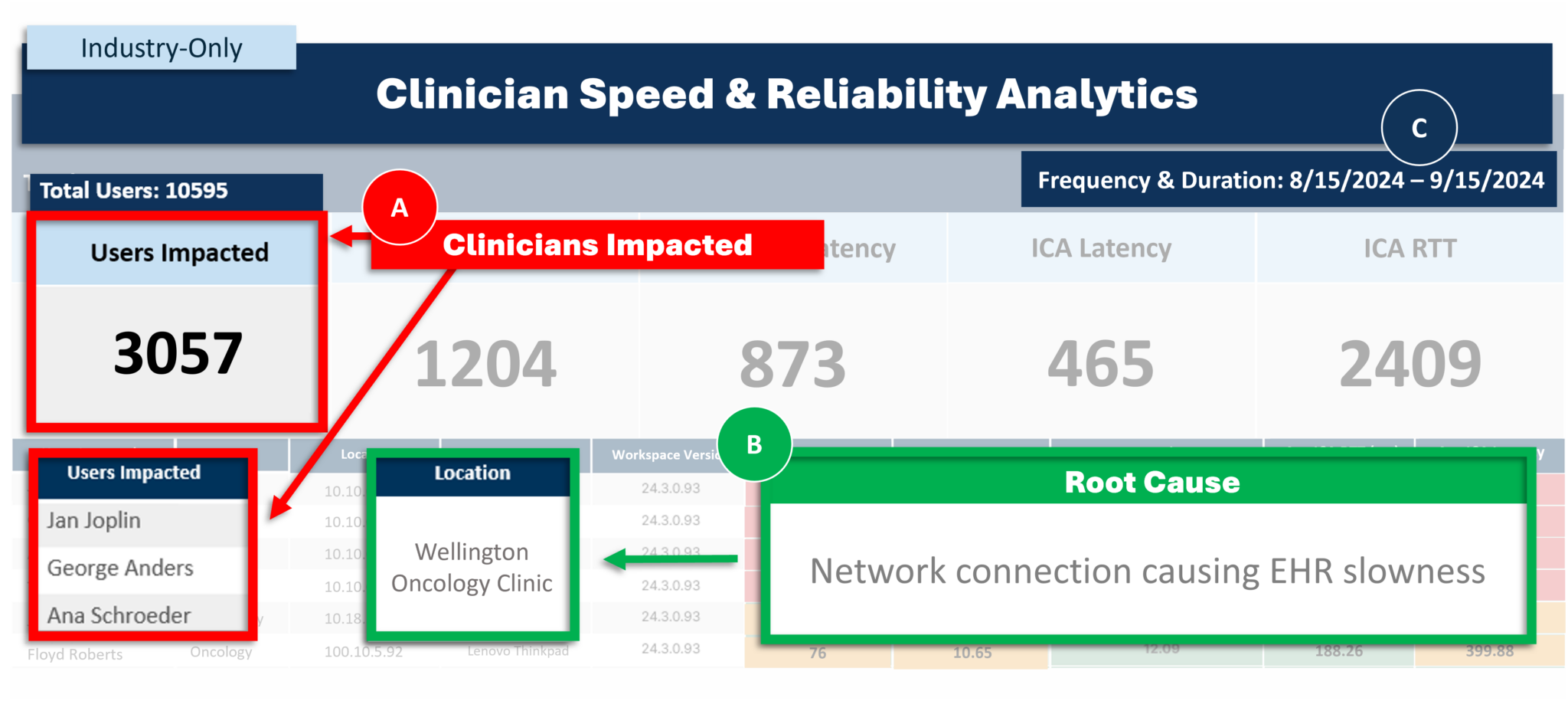
A. Which clinicians are impacted
B. When and for how long
C. Likely root cause
Goliath identified a recurring pattern of failed Citrix and Epic Hyperdrive login attempts followed by successful, but consistently slow, authentication. Importantly, this behavior was not isolated to a single workstation or user group. The pattern was observed across multiple devices and locations, indicating a systemic issue rather than an endpoint specific configuration problem.
By drilling into the failed and degraded sessions, the underlying bottleneck became immediately apparent: the Citrix profile load stage was introducing excessive delay during the authentication process. This insight provided the breakthrough moment for the IT team, allowing them to pivot remediation efforts toward the true source of clinician frustration instead of continuing to troubleshoot the EHR application itself.
Even with successful Citrix logons, the profile load time was extremely high. This health system uses local profiles on Epic Citrix servers, and this step in the logon process should be completed within 1-2 seconds. Looking at the Active Directory object for that account, they found a defined home folder path that should not be there. The identified path does not exist on the network and as a result, users were forced to wait for Windows to time-out the home drive connect action before eventually being logged into their workstation, or having their Citrix delivered applications connect.
As this path was a legacy carryover from a Google Drive migration, they opened a Priority 2 ticket and then implemented an emergency change to remove the path from the Active Directory object resolving the forced timeouts and long logon times.
Additionally, this problem had been previously reported by users; however, lacking the necessary data, the team was unable to identify the root cause and put permanent fixes in place.
Clinician Experience Analytics
The results of the initial performance baseline immediately reframed the problem and sharpened the troubleshooting focus. Contrary to initial assumptions, the data made it clear that the bottleneck was not occurring inside the Epic Hyperdrive application itself. Instead, latency was introduced before clinicians ever reached their active Epic session, specifically during the connection path from the endpoint to the application delivery layer.
What made this especially challenging to detect through traditional methods was the nature of the issue. While support tickets and clinician feedback suggested isolated incidents, the empirical data revealed a much broader and more persistent pattern. The performance degradation was both intermittent and chronic, spanning two major health systems, 24 clinical locations, and impacting more than 3,000 Epic Hyperdrive users. Without objective experience analytics, this systemic issue would have continued to appear as disconnected, one-off complaints rather than a widespread operational problem.
Solution
With clear visibility into where performance degradation was occurring, the IT team leveraged Goliath’s AI-enhanced contextual analytics to isolate the true root cause of the slow logon experience. This capability correlated session behavior, infrastructure events, and user experience metrics in real time, allowing the team to move beyond symptom-level troubleshooting and focus on permanent remediation.
Example readout:
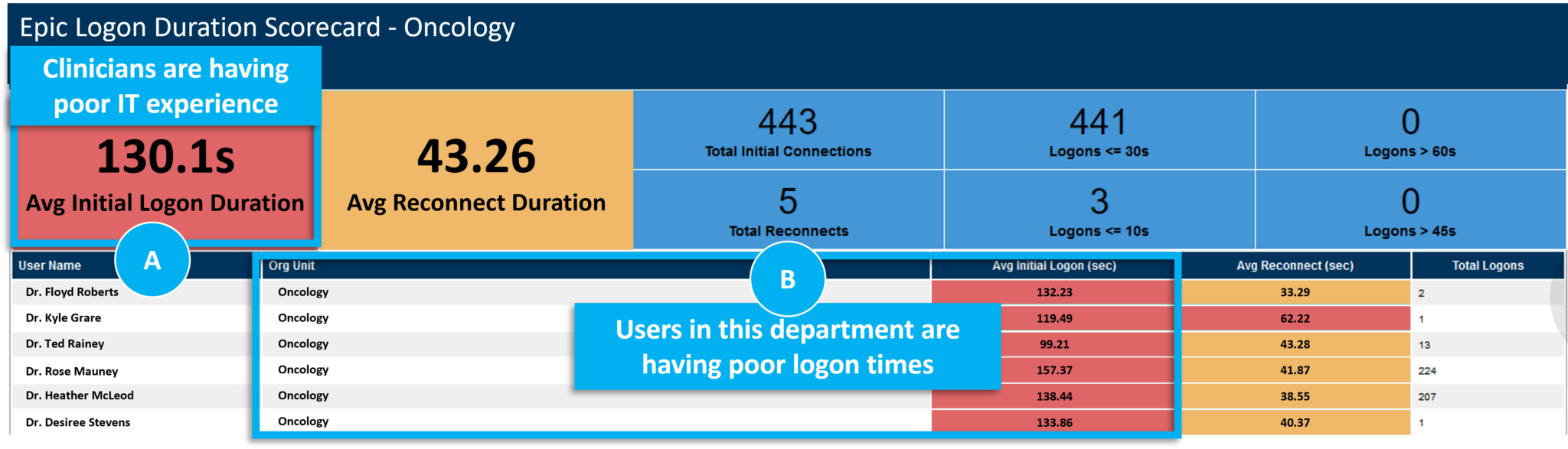
A. Clinicians impacted by excessive logon times
B. Location of impacted clinicians
Goliath identified a recurring pattern of failed Citrix and Epic Hyperdrive login attempts followed by successful, but consistently slow, authentication. Importantly, this behavior was not isolated to a single workstation or user group. The pattern was observed across multiple devices and locations, indicating a systemic issue rather than an endpoint specific configuration problem.
By drilling into the failed and degraded sessions, the underlying bottleneck became immediately apparent: the Citrix profile load stage was introducing excessive delay during the authentication process. This insight provided the breakthrough moment for the IT team, allowing them to pivot remediation efforts toward the true source of clinician frustration instead of continuing to troubleshoot the EHR application itself.
Even with successful Citrix logons, the profile load time was extremely high. This health system uses local profiles on Epic Citrix servers, and this step in the logon process should be completed within 1-2 seconds. Looking at the Active Directory object for that account, they found a defined home folder path that should not be there. The identified path does not exist on the network and as a result, users were forced to wait for Windows to time-out the home drive connect action before eventually being logged into their workstation, or having their Citrix delivered applications connect.
As this path was a legacy carryover from a Google Drive migration, they opened a Priority 2 ticket and then implemented an emergency change to remove the path from the Active Directory object resolving the forced timeouts and long logon times.
Additionally, this problem had been previously reported by users; however, lacking the
necessary data, the team was unable to identify the root cause and put permanent fixes in
place.
Resolution and Ongoing Proactive Management
As the project manager mentioned in the quote at the beginning of the post, the client was able to get their logon times down to industry’s best practices standards.
Now with the reported issues permanently resolved, the IT team wanted to ensure that they would not have these issues again and if they did occur, they wanted to be alerted by technology and not end users.
They rely on several features for proactive alerting but one such feature is the application availability feature which will proactively log on to Epic 24/7/365 automatically and alert to any logon difficulty with corresponding data necessary to troubleshoot as is seen in the image below. Here a logon failure occurred, and the alert contained an image sent to the IT administrator with key data to enable remediation actions.
Automated Troubleshooting Without Engaging the Users

If you are having end user experience issues with your clinical or business applications, reach out and let’s discuss. We find and fix very specific issues and in a discovery conversation we will let you know if we can assist. If the issues you are experiencing are outside our purview, we will share that as well. If you would like to discuss, reach out to techinfo@goliathtechnologies.com or request to speak with a healthcare IT consultant.