
Goliath Technologies
  • Healthcare
    • EHR Speed & Reliability
      • Improve:
        • Oracle Health EHR
        • Epic
        • MEDITECH
        • Get Started
    • .
      • Case Studies:
        • Enhance Speed & Reliability
        • Improve Clinician Experience
        • Clinician Experience Analytics
    • Technology
      • Citrix
      • Omnissa Horizon
      • Microsoft AVD & Azure
      • Amazon WorkSpaces & AWS EC2
      • VMware
      • ChromeOS Devices
    • Resources
      • Partnerships
      • HIT Webinars
        • Live
        • On Demand
      • Blogs
      • Customers
  • Enterprise
    • Troubleshooting Use Cases
      • Application Availability
      • Long Logons
      • Slow Session Performance
      • User Experience Reporting/Analytics
    • Technology
      • Citrix
      • Omnissa Horizon
      • Microsoft AVD & Azure
      • Amazon WorkSpaces & AWS EC2
      • VMware
      • ChromeOS Devices
    • Resources
      • Partnerships
      • Webinars
        • Live
        • On Demand
      • Blogs
      • Video Library
      • Customers
  • Company
    • Company
      • About
      • Leadership
      • Media
      • Contact Us
    • Work with Us
      • Careers
      • Reseller/MSP
      • Equity Partnership
  • Pricing
  • Support
  • Free Trial
  • Demo
Select Page

Troubleshooting: Citrix Session Slowness – Storage Latency

Problem

A majority of end users complaining that every Friday from 10:00 am to 1:00 pm their sessions were slow.

Identifying Root Cause

When trying to identify the root cause of a Citrix end user experience issue, one of the key pieces of information is if the issue is widespread or if the issue is somewhat isolated. In the case above, since the issue seemed to be pretty widespread the best place to start your troubleshooting process is by using the Topology View within Goliath Performance Monitor.

The Topology View provides access to a high-level overview of the Citrix environment. This view is automatically built and scales to any size environment and even multiple environments.

To access the Topology View, click Dashboard then Topology. This will display a window similar to the following:
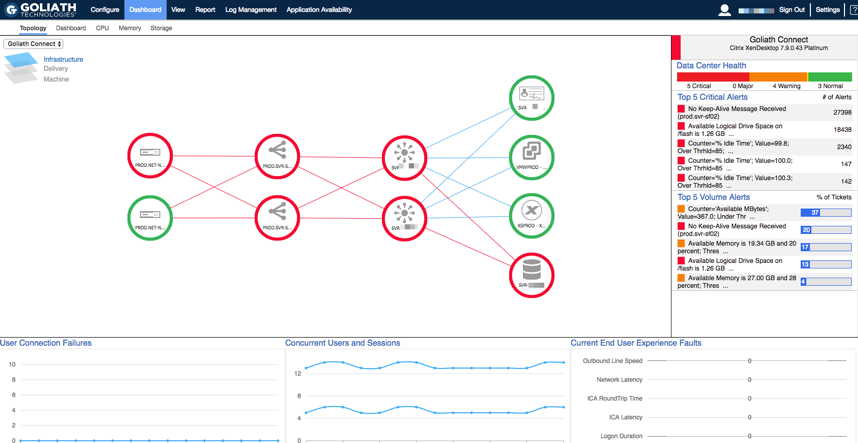
The Topology view is divided into 3 layers: Infrastructure, Delivery and Machine. On the Infrastructure layer, your Citrix architecture is mapped to display how your Netscalers, Storefronts, Delivery Controllers and other Role Server are connected. These nodes function has a heat map, so as problem occur in the environment they will change colors to identify you of an issue. You can also click down to view key services, validation of uptime and availability, resource utilization, and the top alerts that are triggering.

By drilling down into the delivery layer, you can see a logical view of the environment which maps the Delivery groups, Machine Catalogs, and Gold Images as pictured below.
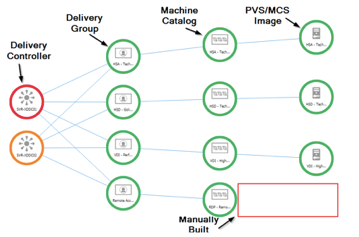
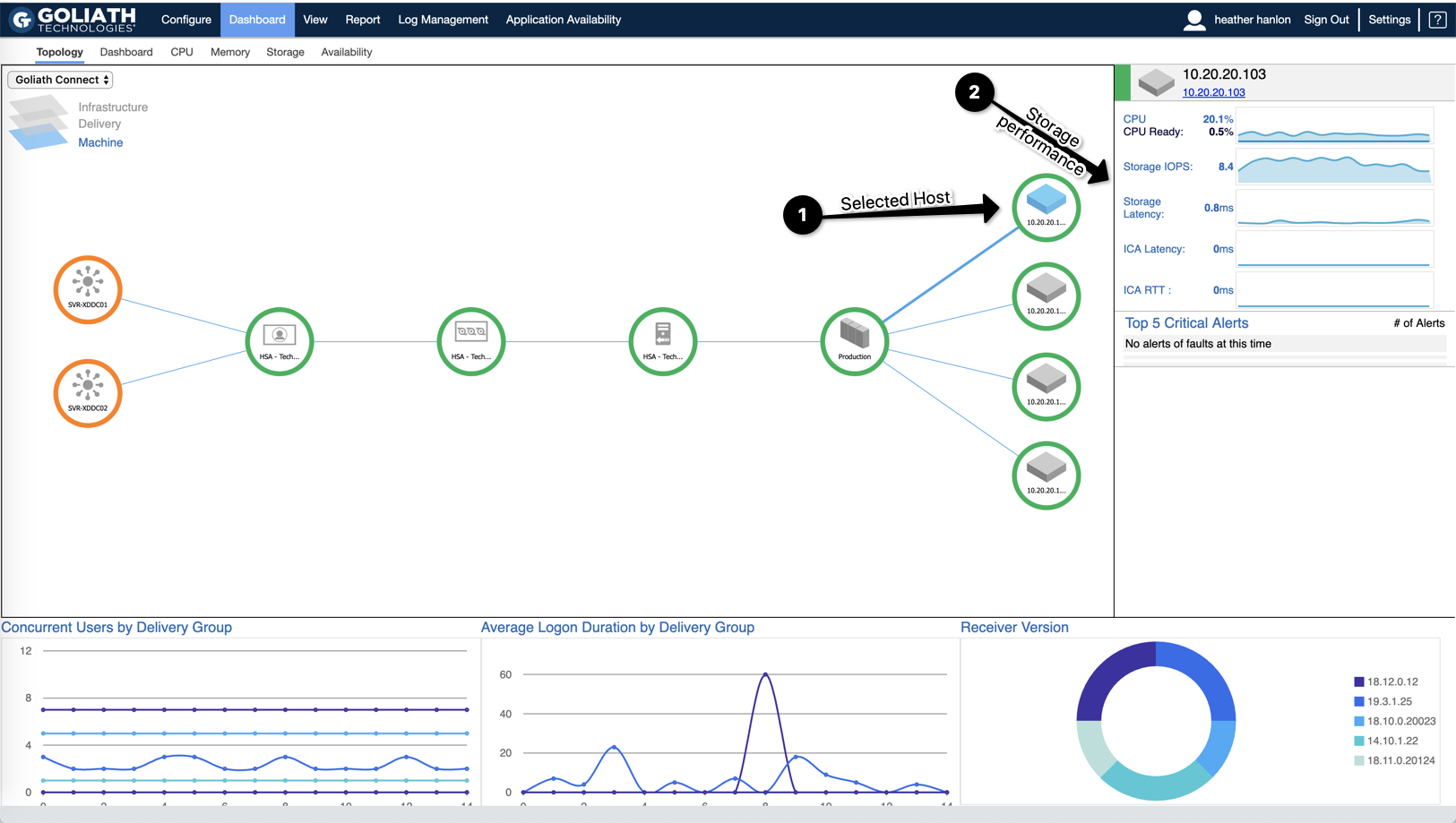
By drilling into any of the nodes on the delivery layer, it takes you to the machine layer where we can see how it builds out to the Image, Cluster, and hosts supporting these users, and on the right the end user experience and performance metrics identify. If there are any overarching bottlenecks affecting not just one user but hundreds or thousands of users.

The delivery and machines layers allow users to identify resource and user experience problems that are affecting large numbers of users.
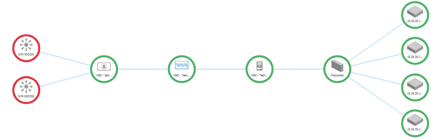
In terms of a widespread group of users complaining of slowness, you’ll want to start at the delivery layer and drill into the different delivery groups one by one. When troubleshooting slowness, the primary question you need to answer is whether the slowness is due to a network/connectivity or resource utilization. The quickest way to make that determination is by reviewing the Network Latency, ICA RTT, and Connection Speed. These performance metrics are shown as an average per delivery group on right hand side of the page.
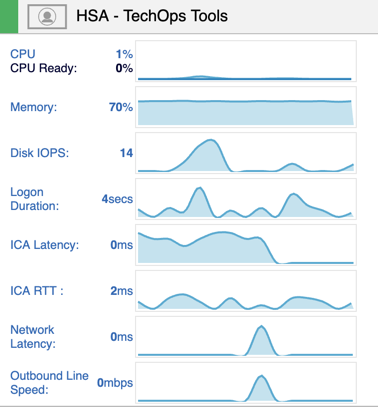
In some cases, you’ll find that the delivery groups had nominal resources, good connection speed, no ICA Latency, Network Latency or ICA RTT. When this behavior is presented, it can be usually be confirmed that the poor performance issues are not related to a user or Citrix Delivery issue. With that said, you’ll want to next click into the clusters to further validate that the hosts supporting these users have resources. Often times, our customers will find that there was enough CPU and Memory, but storage latency was high. Next, by clicking into the hosts, you can see which hosts had session hosts impacted by Storage latency.
Root Cause

By following the above workflow on the Topology View, our customers have been able to eliminate the entire architecture but storage as causing the issue and show proof of where problem is taking place.

In scenarios like this one, one customer was able to alert their Storage team, who then looked into the issue further and saw there was snapshot based backups taking place during business hours and turned it off at that time. The following week it was confirmed that the performance issues that occured every Friday were no longer taking place.

Also, where this scenarios focused on storage latency, CPU and Memory could also be cause in some cases

Company

About Goliath
Careers
Contact
Customers
Support

Information

Media Library
Dashboards
Privacy Policy

Community

Goliath Blog

Learning

Live Webinars
On-Demand Webinars
Independent Reviews

Find us on

  • Follow
  • Follow
  • Follow

Company

About Goliath
Careers
Contact
Customers
Support

Community

Goliath Blog
Contact Us
Customers

Information

Media Library
Dashboards
Privacy Policy


Learning

Live Webinars
On-Demand Webinars
Independent Reviews

Disclaimer: All brands, logos or product information mentioned here are the registered trademarks of their respective owners.

Designed and Hosted by Telemitra Inc |©2021 Goliath Technologies. All Rights
  • Follow
  • Follow
  • Follow
Designed and Hosted by Telemitra Inc |©2021 Goliath Technologies. All Rights
  • Follow
  • Follow
  • Follow

©2025 Goliath Technologies. All Rights Reserved.

We use cookies!

This website uses essential cookies to ensure its proper operation and tracking cookies to understand how you interact with it. The latter will be set only after consent.

Functional Always active
These cookies are necessary for the proper functioning of our website. Without these cookies, the website might not be working properly.
Preferences
The technical storage or access is necessary for the legitimate purpose of storing preferences that are not requested by the subscriber or user.
Security cookies
Security cookies allows storage of security-related information, such as authentication, fraud protection, and other means to protect the user. The technical storage or access that is used exclusively for anonymous statistical purposes. Without a subpoena, voluntary compliance on the part of your Internet Service Provider, or additional records from a third party, information stored or retrieved for this purpose alone cannot usually be used to identify you.
Personalization cookies
Personalisation cookies may use third party cookies to help them personalise content and track users across different websites and devices.
  • Manage options
  • Manage services
  • Manage {vendor_count} vendors
  • Read more about these purposes
View preferences
  • {title}
  • {title}
  • {title}
We use cookies!

This website uses essential cookies to ensure its proper operation and tracking cookies to understand how you interact with it. You may opt out at anytime.

Functional Always active
These cookies are necessary for the proper functioning of our website. Without these cookies, the website might not be working properly.
Preferences
The technical storage or access is necessary for the legitimate purpose of storing preferences that are not requested by the subscriber or user.
Security cookies
Security cookies allows storage of security-related information, such as authentication, fraud protection, and other means to protect the user. The technical storage or access that is used exclusively for anonymous statistical purposes. Without a subpoena, voluntary compliance on the part of your Internet Service Provider, or additional records from a third party, information stored or retrieved for this purpose alone cannot usually be used to identify you.
Personalization cookies
Personalisation cookies may use third party cookies to help them personalise content and track users across different websites and devices.
  • Manage options
  • Manage services
  • Manage {vendor_count} vendors
  • Read more about these purposes
View preferences
  • {title}
  • {title}
  • {title}