Central Maine Healthcare Improves Clinician Experience with Cerner by Drastically Reducing Time to Remediation

How We Did IT

Central Maine Healthcare Improves Clinician Experience with Cerner by Drastically Reducing Time to Remediation


User Story Banner

“Every morning, I use Goliath to set the stage for my day. The software proactively monitors events, conditions, and failure points 24/7/365 to help solve end user experience issues. It even alerts me before users are impacted.”
–  Aaron Hilton, System Administrator at Central Maine Healthcare

Infrastructure

Cerner Millennium, Citrix Virtual Apps (XenApp)


Challenge

Troubleshooting Citrix Performance Issues Exhausts IT Support

“I’ve received so many tickets where I would spend hours troubleshooting four or more applications to try and find what was causing the latency when it was connection speed all along,” shares Aaron Hilton, a system administrator at Central Maine Healthcare system.  Aaron is one of the main points of contact for resolving Citrix tickets, and the lack of visibility into the Citrix delivery infrastructure caused him to be reactive instead of proactive. “It took so much time to react to complaints that I didn’t have time or data to isolate the root cause and resolve the underlying issues that were actually causing the Citrix and Cerner performance issues.” Central Maine’s IT team needed a solution that would allow them to become proactive and reduce performance issues that were causing clinician frustration.

Solution

End-to-End Visibility into Cerner & Citrix End-User Experience Improves Clinician Satisfaction

Goliath Technologies was selected by Central Maine Healthcare to give their IT team an end-to-end view from the initiation of a Cerner session, through the logon process and experience while using the application. All the data is presented based on what the user is experiencing. The traditional IT approach is to monitor the health of individual IT elements like networks, servers, storage, and the applications. This, however, offers no insights into how the IT delivery infrastructure is performing and one is left to infer that the end user is having a good experience. Unfortunately, that is often not the case and administrators are regularly surprised by complaints without the details necessary to solve the problem. Goliath approaches it from the end-user’s perspective and proactively identifies if there is slowness, for example, and then identifies which IT element is causing the issue to help pinpoint root cause. Aaron remarked, “Goliath has improved the credibility and reputation of the IT department due to the success with resolving clinician issues. In addition, other Cerner application support analysts are coming to me to get user experience data that Goliath collects.”   

Resolving “Citrix is Slow”

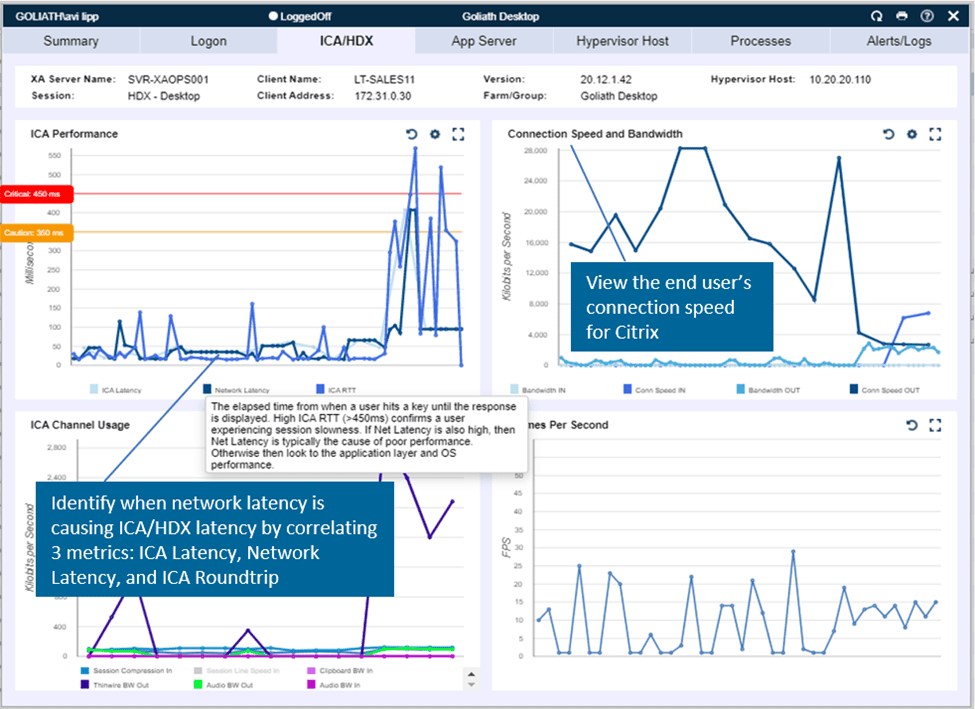
The very ambiguous “Citrix is slow” complaints have increased since the pandemic when their users went remote. With Goliath operational, Aaron and his team have been able to quickly determine if issues actually came from the Citrix or data center side, or if they were the result of the end-user’s behavior. The ability to drill all the way down into an end user’s session and analyze an array of visual proof, in real time, makes it much less challenging to convince end users that something on their end is the cause of their performance issues. 

ICAHDX

In the past, the team handled persistent issues by holding a weekly committee meeting to work together and try to remediate them. Now, with the use of Goliath’s technology, Aaron has become invaluable to his team as he has insights that not everyone else is able to see, and is even able to cut down the amount of time required for the meeting. Anyone could be in such a meeting and have a million assumptions of what the root cause is, Aaron tells us, and then everyone points their fingers to each other – “not my problem!” – puts their hands up, and passes the buck off to another team. But when you have proof of something, or good information including visual representations in the form of graphs, it gives you really fast resolution. 

Automated system notifications resolve issues before users are impacted:

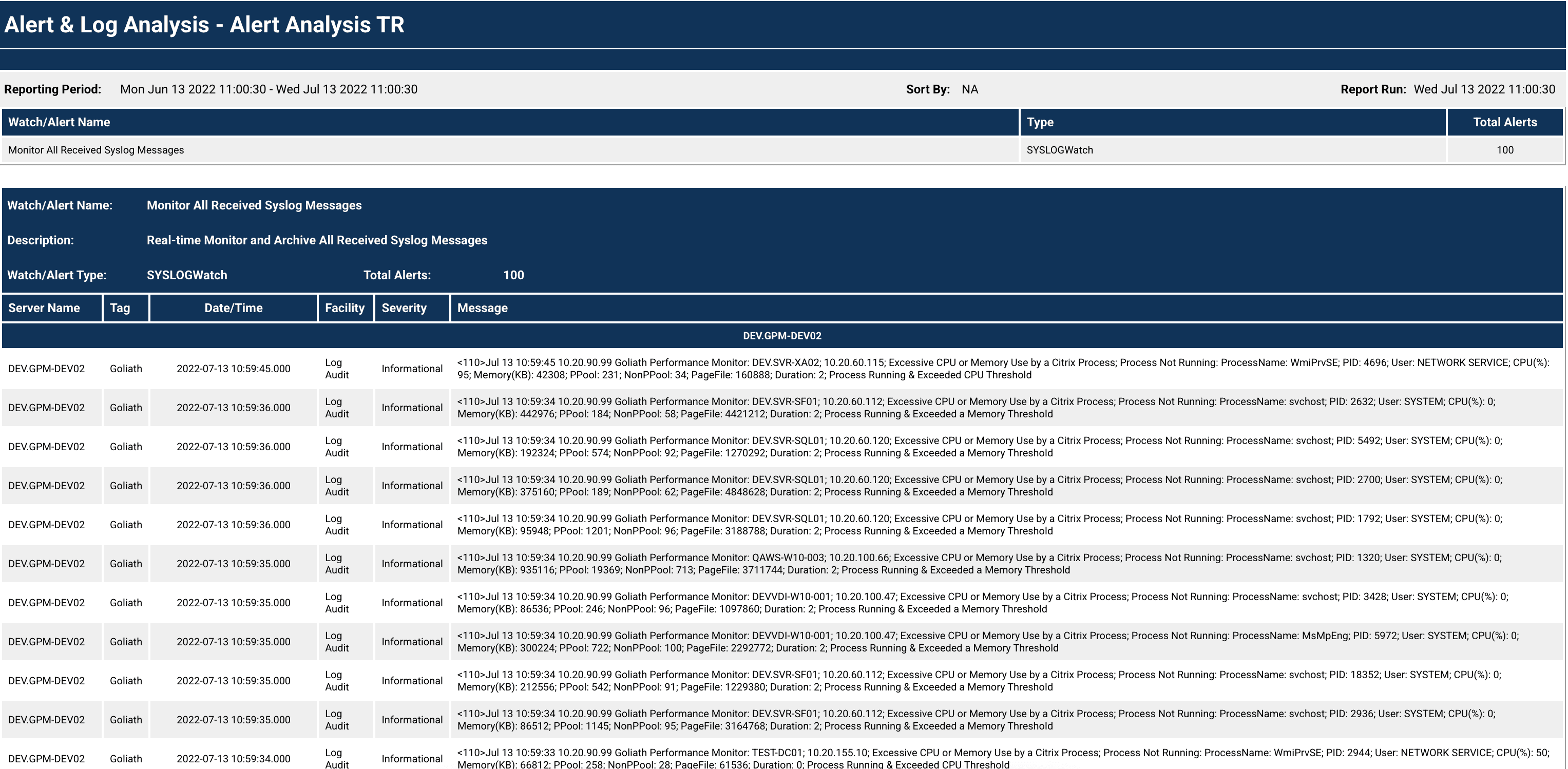
In addition to responding to regular “Citrix is Slow” tickets, Goliath can also be used to set up reporting to track the status of different components of the Citrix environment. For Central Maine, this involves monitoring their use of drive space within their cache. “When the drives all fill up, the server becomes unstable and begins kicking users off. I’ve made some custom reports to alert me when they reach a certain threshold. I can then put the server into maintenance mode to get all the users off and do a quick reboot before anyone gets kicked off.” This kind of proactive management using Goliath’s documentation helps to keep server instability from unexpectedly interrupting the workday for end users. As the team grows more comfortable with the platform, they hope to start making use of Goliath’s remediation functionalities to allow the system to automatically update when the alert conditions are met.

Alert Analysis

Conclusions

Before adding the Goliath solution, they only had time to do the bare minimum in support and react to issues as they came up. Now that they have deeper insights into the root cause, they can solve issues quickly and have the documentation to put permanent fix actions into place. Goliath has enabled them to be proactive instead of reactive.

Aaron summed up his experience with Goliath this way, “I recommend Goliath to any other Citrix admin that has never used this before. Once you use Goliath, it is going to be your go-to tool for sure.  The software is so user friendly and has such detailed metrics that I can resolve sporadic end-user experience issues incredibly quickly and move on to fixing longer term issues.”

ABOUT ORGANIZATION

Central Maine Healthcare (CMH) is an integrated healthcare delivery system serving 400,000 people living in central, western, and mid-coast Maine. CMH’s hospital facilities include Central Maine Medical Center in Lewiston, Bridgton Hospital, and Rumford Hospital. CMH also supports Central Maine Medical Group, a primary and specialty care practice organization.

Headquarters location: Lewiston, Maine
Founded: 1888
Employees: 3000
Industry: Healthcare

Troubleshooting the Top 3 Citrix Issues found in Health IT

Troubleshooting the Top 3 Citrix Issues found in Health IT

Article originally posted by Citrix CTP, George Spiers.

For several years I have worked with healthcare customers deploying, managing, and supporting Citrix environments that serve applications and desktops to thousands of users. 

Citrix Virtual Apps and Desktops tends to be a popular choice for healthcare customers wanting to virtualize their applications and desktops, often due to the complexity of health IT, supporting many different applications from SaaS to modern thick apps and legacy apps, providing access out to other healthcare organizations, and keeping patient data secure at all times. Citrix performs well in this field and can solve many of the challenges and requirements mentioned. 

With healthcare though, due to how healthcare staff work, their needs, and the typical applications that are used, there are particular issues that I have witnessed in this field that I haven’t so much witnessed in others, or at least not to the same scale. As such, I would like to highlight the three I have come across most recently and how you can help avoid or troubleshoot those issues more efficiently. 


Audio and Dictation Issues 

Dictation in particular is prominent in healthcare. With the many consultant visits by patients every day, the consultant dictates notes for that patient into their EHR app, for a secretary then to transcribe the audio to text, into a letter that can be sent to the patient or simply to be stored on the system. This method of work uses a consultant’s time efficiently. 

I have seen in the past secretaries complain of poor audio quality in relation to these dictation audio files. Sometimes audio skips, slows down and then speeds up, and so on, or does not work at all. 

Audio Bandwidth Citrix Bandwidth

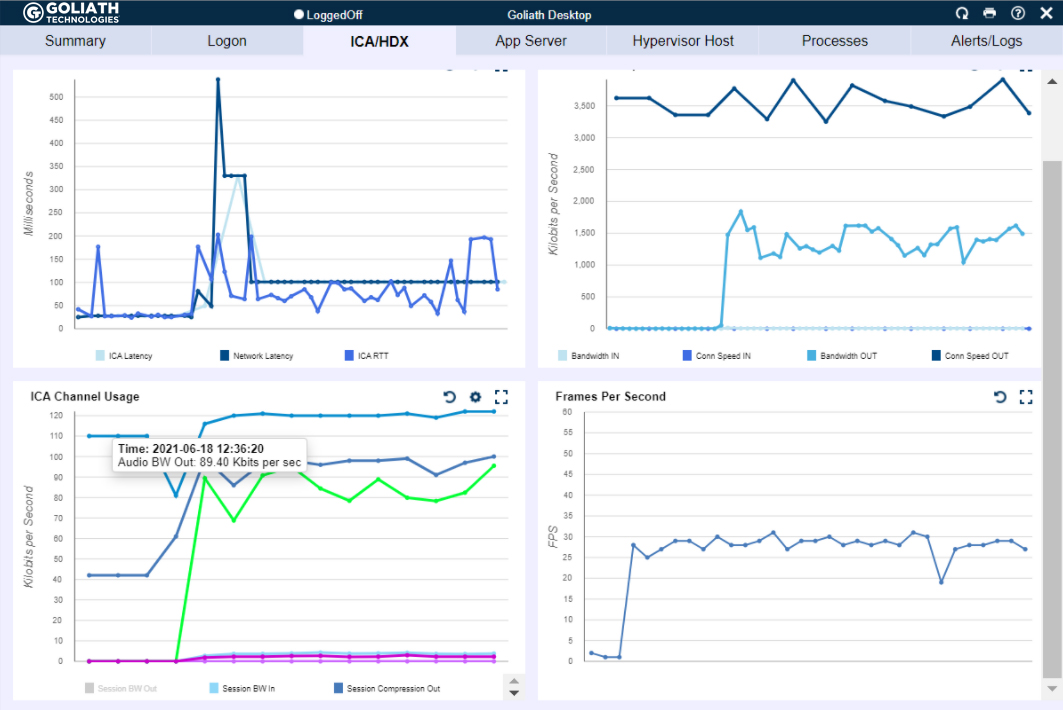
Figure 1  – Audio bandwidth (bright green line graph in bottom left chart) is being heavily utilized when there isn’t much bandwidth available for Citrix (top right graph with connection speed) which can lead to poor experience. 

Audio in a Citrix Virtual Apps and Desktops environment can be subject to poor latency, having a negative effect on how audio is delivered to the client. Otherwise, it could simply be impacted by missing best practice configuration. 

To troubleshoot, if the issue is poor audio quality, firstly check the user’s latency when they are connected to Citrix. This is the most simple and quickest thing to check first. You can use a tool like Citrix Director, or your third-party solution if you have one. You should also check if the ICA connection is facing packet loss. This is a little more difficult when using a tool like Director, but can be achieved using third-party tools, or some packet captures between the endpoint and Citrix server. If the user is working remotely, you will want to make sure your third-party tool, if you have one, can still report on latency. 

Secondly, you should analyse the consumption of the audio virtual channel. I have written an article previously explaining how incorporating this task into your troubleshooting steps could help you determine if audio bandwidth throughput is low due to a misconfigured Citrix policy, or due to other virtual channel contending for the user’s bandwidth, such as high video bandwidth consumption, which can then negatively impact the audio virtual channel, especially if no QoS is in place.

Finally, to avoid many of the audio performance problems your users may face in the first place, you should take a task to review your audio configuration for your Virtual Apps and Desktops deployment. As a starter, the Audio quality policy in Citrix Studio should be set to Medium. Secondly, you should adopt the use of Audio over RTP (Real-time Transport Protocol). This is the recommended protocol to use when delivering audio from a Citrix environment to the end user. It does require some configuration and firewall policies to be open but has most definitely in my experience solved many audio quality issues in the past.  

Long Logon Times 

Long logon times and associated user complaints are not unique to healthcare environments in any case, but healthcare has some of the highest user logon counts across any industry. Firstly, healthcare organizations typically run 24/7, and staff come and go as part of shifts. This means that throughout a day or week, the number of times that EHR app delivered via Citrix is launched enters the thousands. On the other hand, an individual user may launch a Citrix session multiple times per day. The hospital has many different kiosk or shared workstations that are used by many clinicians each day, and individual clinicians may launch Citrix apps from several PCs as they move between wards and so on. 

That is why logon times are crucial for healthcare, because if those logon times are slow, they will most likely be realised in a healthcare environment, and the helpdesk are most likely to receive calls about it. 

To troubleshoot, you really need the aid of a monitoring solution that can help track each step of the logon, and report on the time it takes to complete each step. The Citrix logon process contains many different steps such as Group Policy printing, logon script execution, printer and drive mappings, desktop load, brokering, user profile load, and so on. Without knowing which step is causing the overall process to be slow, you can’t begin to troubleshoot effectively. 

 

Logon Drill Down Spiers Blog

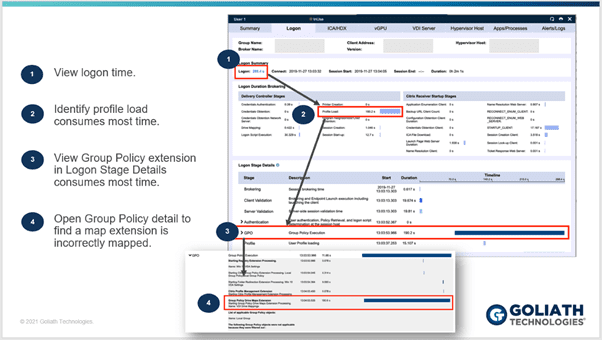
 Figure 2 – The benefits of the logon drill drown 

However, that said, what I do recommend is that you take a process of elimination approach. Check for patters and consistencies to the issue, such as if it’s a particular location that is impacted by long logon times, a particular set of users, users on a particular set of VDAs and so on. You will want to review the health of your entire infrastructure, from the network, to storage, hypervisor hardware, and the virtual infrastructure. Again, based on if you have the right monitoring solution in place or not will determine how manual and time intensive these steps are, and how many other different teams you need to involve. 

Printing Issues 

The final piece I wanted to talk about is printing. Clinicians or medical staff cannot print at all, or print jobs are not rendering as expected. 

Again, like the number of logons, the healthcare industry prints more than any other industry I have worked with, which makes printing very important, and as it affects patient care, something that cannot go wrong! 

However, it often does go wrong. Printing is complex. Print devices are deployed en-masse all over the environments in their hundreds, some wireless, others hardwired. Then you have the print servers that contain many different print drivers for each of your device types, and often those drivers are old or simply unstable and that can lead to things like spooler crashes. 

To troubleshoot printing issues effectively, first understand the scope and impact of the problem. Are the issues affecting multiple people, what type of print jobs are the users trying to print, what devices are they trying to print from. For example, if it’s a single device, you are going to troubleshoot the issue from a different angle compared to if the issue was affecting multiple devices. 

Output Printer Bandwidth
Output Printer Bandwidth High Latency

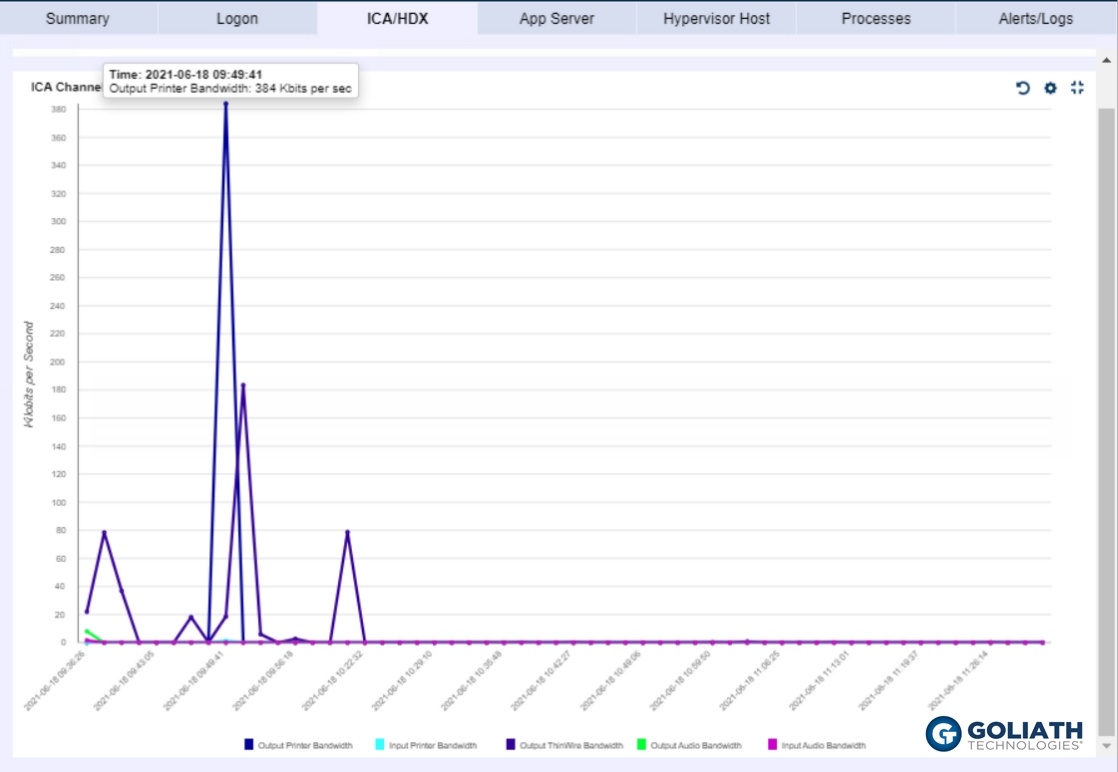
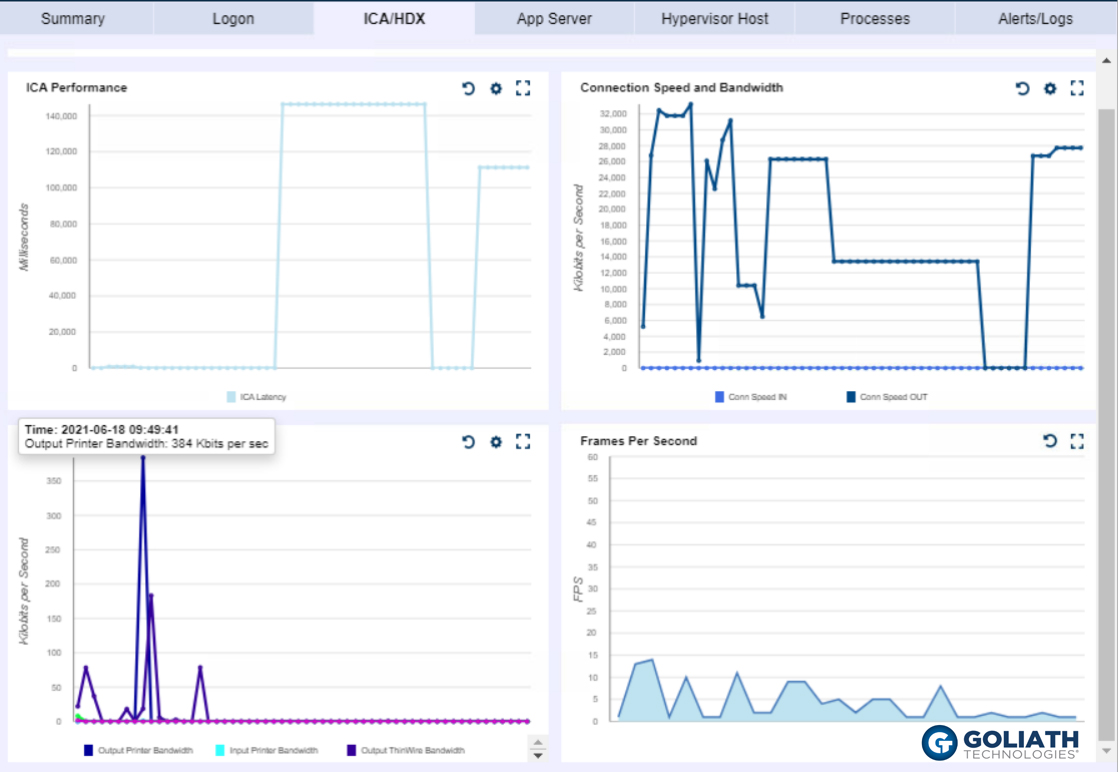
Figure 3 & 4 – The Output Printer Bandwidth (dark blue line in Figure 3, and dark blue in line in bottom left graph of Figure 4) is being heavily utilized, showing that there was a large print job at the same time that there was high latency within the session, which allowed the IT professional to quickly identify it was a printer issue that led to the poor experience.

Also, keep in mind that no print job is the same. Some prints flow through Citrix, whilst others may flow through a healthcare organizations EHR infrastructure. So, knowing the type of print again will shape how you begin to tackle the issue, and where you begin to look. 

If you have the ability through third-party monitoring solutions, track the print job as it flows through your infrastructure. Maybe the job is reaching the print server and spooling, but not arriving at the physical print device, or maybe it’s not spooling, or reaching the print server at all. 

Asides understanding the scope and impact, and understanding the type of print job etc, you will want to check the health of your print servers and components a print job may travel through. Check to make sure there has not been any spooler crashes, typically due to bad drivers, and that print queues are responding to requests. You may even send engineers on-site to investigate the physical elements from the print device itself to the network connection piece. In many cases, a monitoring solution can automate many of these checks, so you can find route cause quicker. 

Summary 

If you support a Virtual Apps and Desktops environment in a healthcare organization, audio quality issues, slow logins, and printing woes are likely something you have come across during your time. 

To be one step ahead in finding root cause, or catch issues before end-users are impacted, you ideally will have a monitoring solution that can monitor your entire infrastructure and has functionality specific for Citrix deployments. 

Without the help of a monitoring solution, you are left with a more manual approach to troubleshooting, which can burn up many more hours than anticipated which isn’t ideal in any industry, not to mention healthcare were patient care could be impacted as a result. 


About Goliath Technologies

Goliath Technologies offers software that is purpose-built for monitoring and troubleshooting end user experience issues, and can more easily correlate and present ICA/HDX virtual channel metrics alongside all other potential metrics that could impact performance.

To learn more on Goliath, email techinfo@goliathtechnologies.com to set up a demo.

Complementary to Cerner Lights On Network

Complementary to Cerner Lights On Network

How Goliath Technologies is Complementary to Cerner Lights On Network®

“We selected Goliath Technologies because their end-user experience monitoring, troubleshooting and management solution supports Cerner and identifies systems degrading before clinicians are impacted. We do more than 15,000 Cerner application launches per day. This early warning system coupled with enhanced performance data and analysis helps us collaborate with Cerner to resolve issues.”

– Mike Nelson, Sr. Vice President, Strategic Services, Universal Health Services

The Goliath Focus: End-to-End Visibility Requires 3rd Party Tools

While Healthcare IT leaders take great care in choosing the right Electronic Health Records system, some may overlook the critical role that a virtualized desktop delivery infrastructure like Citrix and VMwareHorizon plays in providing access to Cerner and other mission-critical applications. The reality is that an organization’s on-premises desktop delivery infrastructure, and performance requirements for delivery of different applications, may negatively impact end-user experience with Cerner.

Understanding how the performance of the on-premises delivery infrastructure impacts the end-user experience requires powerful, purpose-built tools that allow Health IT to proactively anticipate, troubleshoot, and prevent access and performance issues. Without these tools, the true root cause of performance issues cannot be established and corrected. Furthermore, the hospital IT department will not have the performance metrics to have a data-driven conversation with CernerWorks that is collaborative.

For those hospitals that deliver Cerner through a ‘double-hop’ configuration, where users connect to IT through Citrix or VMware and then connect to Cerner’s remote hosted environment, the performance of the underlying Citrix or VMware infrastructure can adversely impact the user experience, which may be incorrectly attributed to a Cerner issue that does not actually exist.

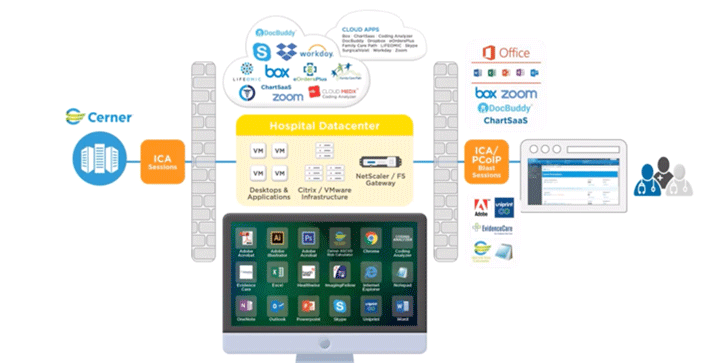
As indicated in the image below, without purpose-built tools, the technically unsophisticated perception is that if there is an issue with Cerner Hosted Applications, then the root cause is Cerner, but the technical reality is much different, and there are many conditions, events, and failure points that could be responsible. Only a tool that can deliver deep and broad metrics across end-user behaviors, the IT delivery infrastructure, and Cerner itself will enable effective troubleshooting and future prevention of clinician performance issues.

Resolving Clinician Experience Issues is Complicated

PERCEPTION:

Cerner Owns All Clinician Complaints

REALITY:

20 Different Vendors Can Impact Clinician Experience

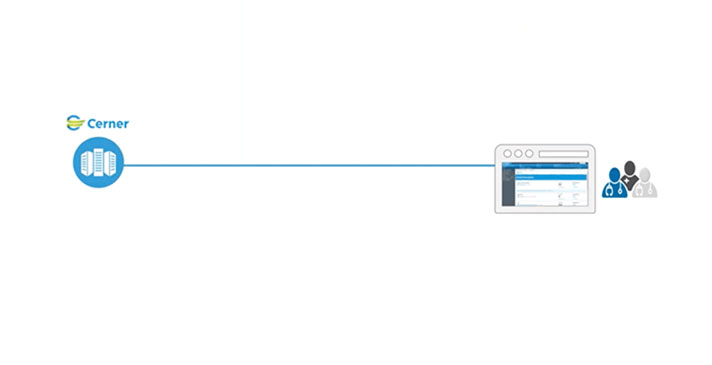
    The assumption people have regarding Cerner is that there is a direct connection between themselves, and the Cerner hosted environment. Therefore, user issues should be owned and resolved by Cerner

      The reality is that there are over 20 vendors who own IT elements that must work in concert to deliver a good clinician experience. This is a complex issue that requires purpose-built software to resolve it.

        CernerWorks & Goliath Technologies: Working Together to Improve End-User Experiences across Cerner Lights On Network®

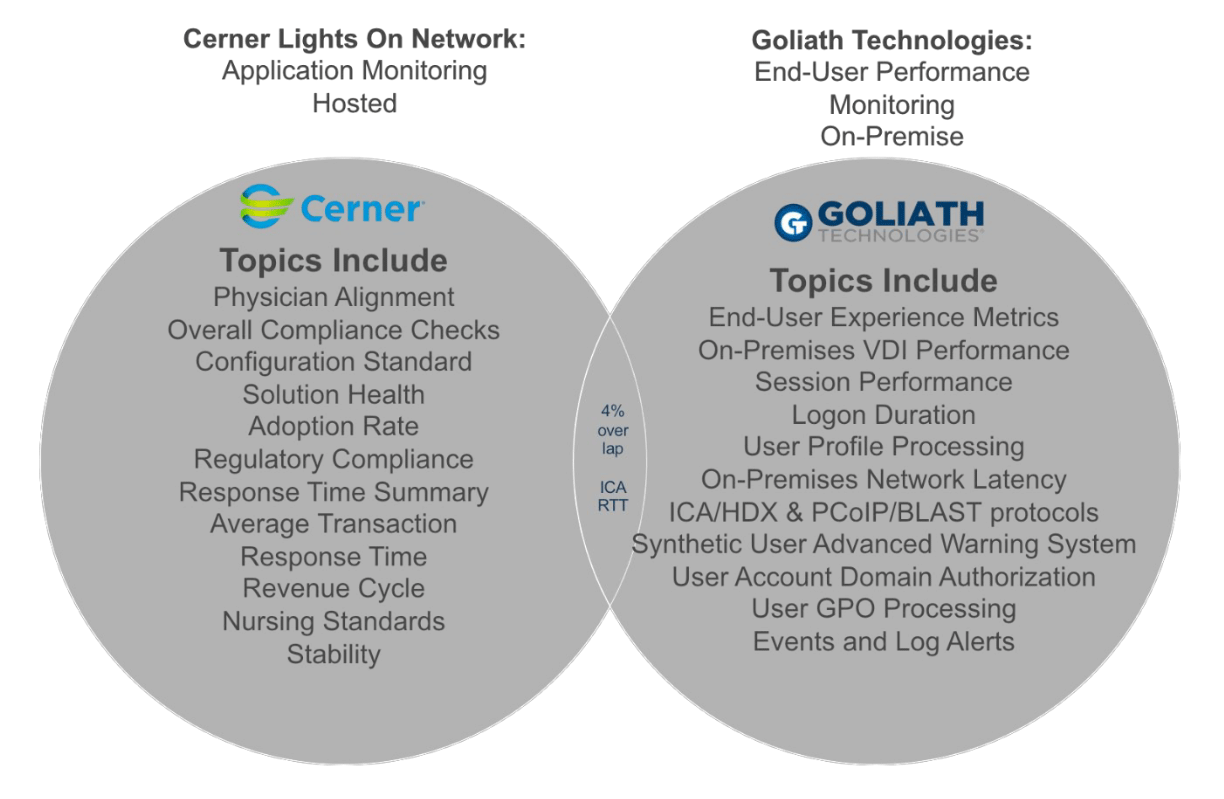
        Cerner Lights On Network® and Goliath Technologies offer a powerful and complimentary feature set that together deliver significant value to our mutual customers. Cerner Lights On Network® is the best technology available to support Cerner and Cerner hospitals with the complex needs and requirements of multiple stakeholders throughout the hospital. It provides a robust, comprehensive set of features that covers many critical areas, including Compliance, Security, Adoption, Configuration Standards, Application Performance, Application Use, Patient Outcomes and much more.

        Goliath Technologies compliments Cerner Lights On Network® by focusing on the Citrix/VMware environment on-premises and end-user experience at the hospital locations and its impact on the overall clinician’s experience. The systems engineers specifically use Goliath’s software in hospital IT organizations that support both users accessing Cerner over Citrix and VMware, and other corporate staff at the hospital. Goliath focuses on reducing clinician experience issues on-premises when users are interacting with any Citrix or VMware Horizon delivered applications. Most Cerner hospitals are using Citrix and/or VMware Horizon to deliver access to multiple corporate applications, not just access to Cerner RHO. It is because of this dynamic that Cerner often gets blamed as root cause of the clinician’s performance challenges, even though it’s not Cerner’s fault at all but another element within the delivery infrastructure.

        The different roles and users (as shown in the image below) for our products actually present additional value for both Cerner and Cerner hospitals.

        • The combined metrics available from both Cerner Lights On Network® and Goliath Technologies allow hospitals to analyze a holistic view of their environments and the metrics to collaborate when resolving end-user experience issues. 
        • Beyond just the IT delivery infrastructure, Goliath collects metrics around the real-time end-user experience and the many events, conditions and user behavior that can impact performance. 
        • This holistic view allows hospitals to pinpoint the specific root cause of performance issues – which are likely to actually exist in the on-premises delivery infrastructure, not Cerner itself. 
        • Goliath’s proactive approach to Citrix performance issues leads to less criticism for Cerner and reduces support calls to CernerWorks.

        Goliath Critical Capabilities for Proactive Troubleshooting and Monitoring

        Goliath provides the following data and features that are different from the Lights On Network®:

        Automated Intelligence Isolates Clinician Performance Issues

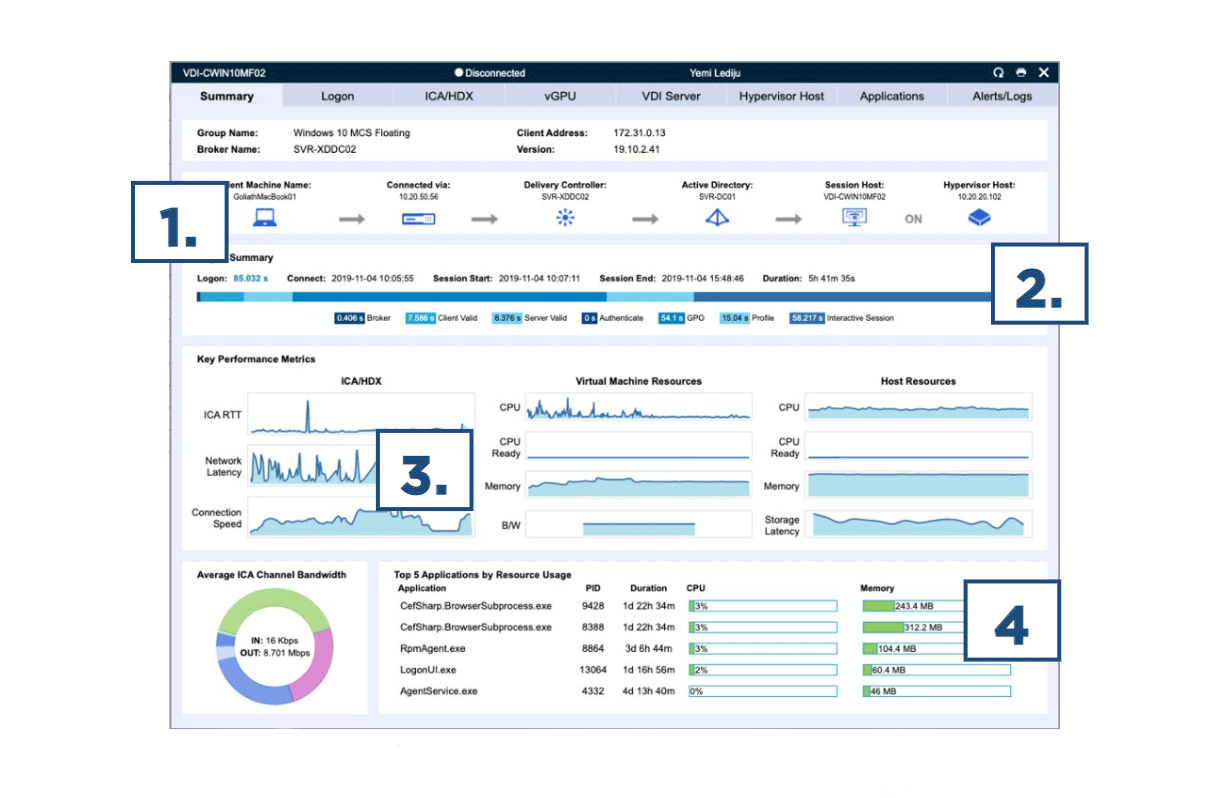
        Goliath provides the ability to drill down into a single end user’s session and, at a glance, review key analytics around that session performance: logon duration summary, key performance metrics from ICA/HDX or PCoIP/BLAST, VM resources, host resources along with application resource usage data. All of these elements can impact the performance of Cerner and, with this insight, an administrator can quickly drill into a root cause of a Cerner is slow complaint and determine if it is Cerner or something within the Citrix/VMware delivery infrastructure. This quick summary enables an administrator to quickly view correlated performance metrics and rule out what isn’t causing the performance bottleneck and focus on the metrics that appear to indicate root cause.

        Citrix Xenapp end user productivity report
        The image above shows Goliath’s summary for a single session. At-a-glance, administrators can quickly get an overview of a single session’s performance.
        1. Dependency map offers a quick overview of all components involved in establishing and hosting the selected Citrix/VMware session.
        2. Quick visual breakdown of all stages of the logon process.
        3. Key performance metrics enable an administrator to quickly view answers about the performance of a Citrix/VMware session and if slowness is caused by the network or other resources.
        4. A detailed breakdown of the applicate usage reveals root cause of a performance issue within an end-user’s virtual machine.

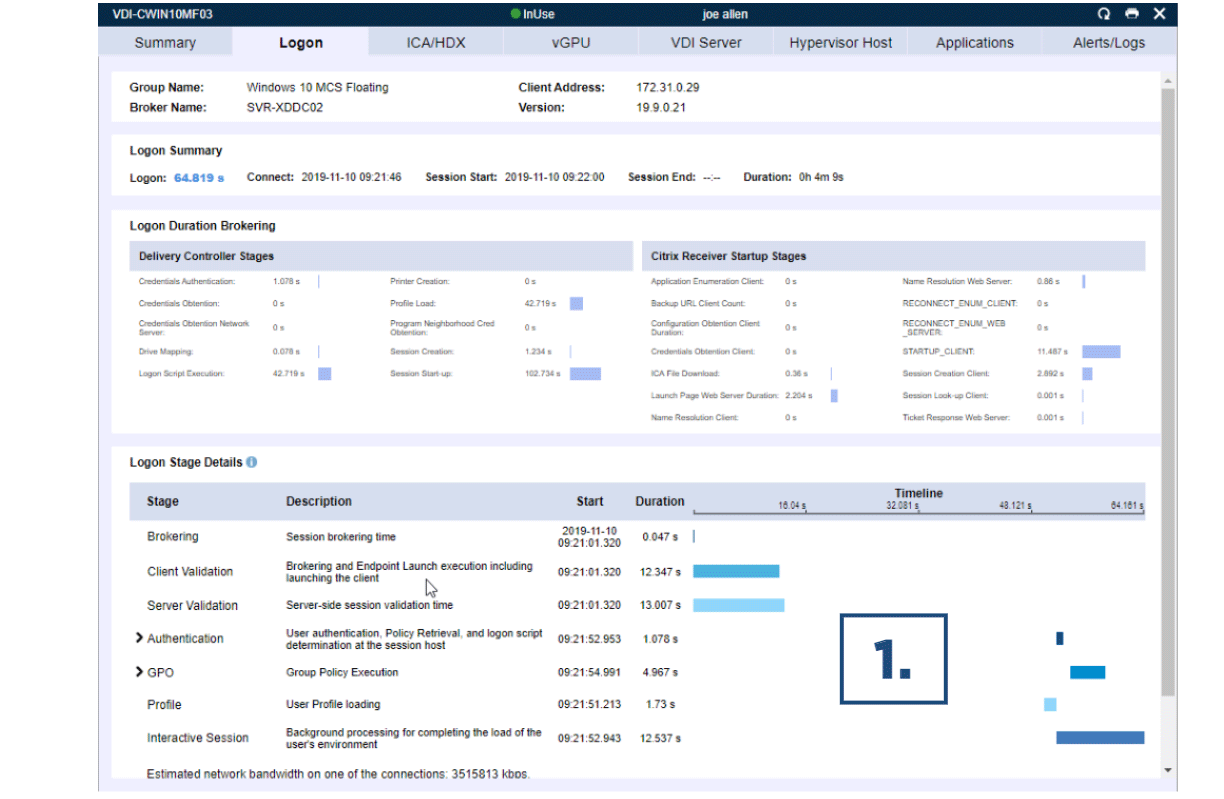
        Real-Time Logon Duration Drilldown

        Goliath can monitor and report on the logon duration from Citrix or VMware Horizon. The real-time Citrix Logon Duration Drilldown breaks down a user’s logon process into each of the stages to help understand what needs to be optimized to improve logon times. This report can also be used to identify and troubleshoot session load problems by identifying what may be getting stuck or taking too long to process. Threshold-based alerting on user logon times is also possible.

        Citrix Xenapp end user productivity report
        The image above shows the combination of in-depth Citrix data along with Windows OS logging data to break down the user’s login from start to finish giving the administrator usable metrics to reduce troubleshooting times.
        1. The logon duration view above not only details out the performance of each logon stage, but also highlights the unique value delivered by Goliath which combines the logon duration metrics with information included in the Goliath logs. This approach saves time and testing because it calls out specific details during login that an administrator would normally have to dig through logs to obtain.

        Automated Logons Confirm Cerner Availability

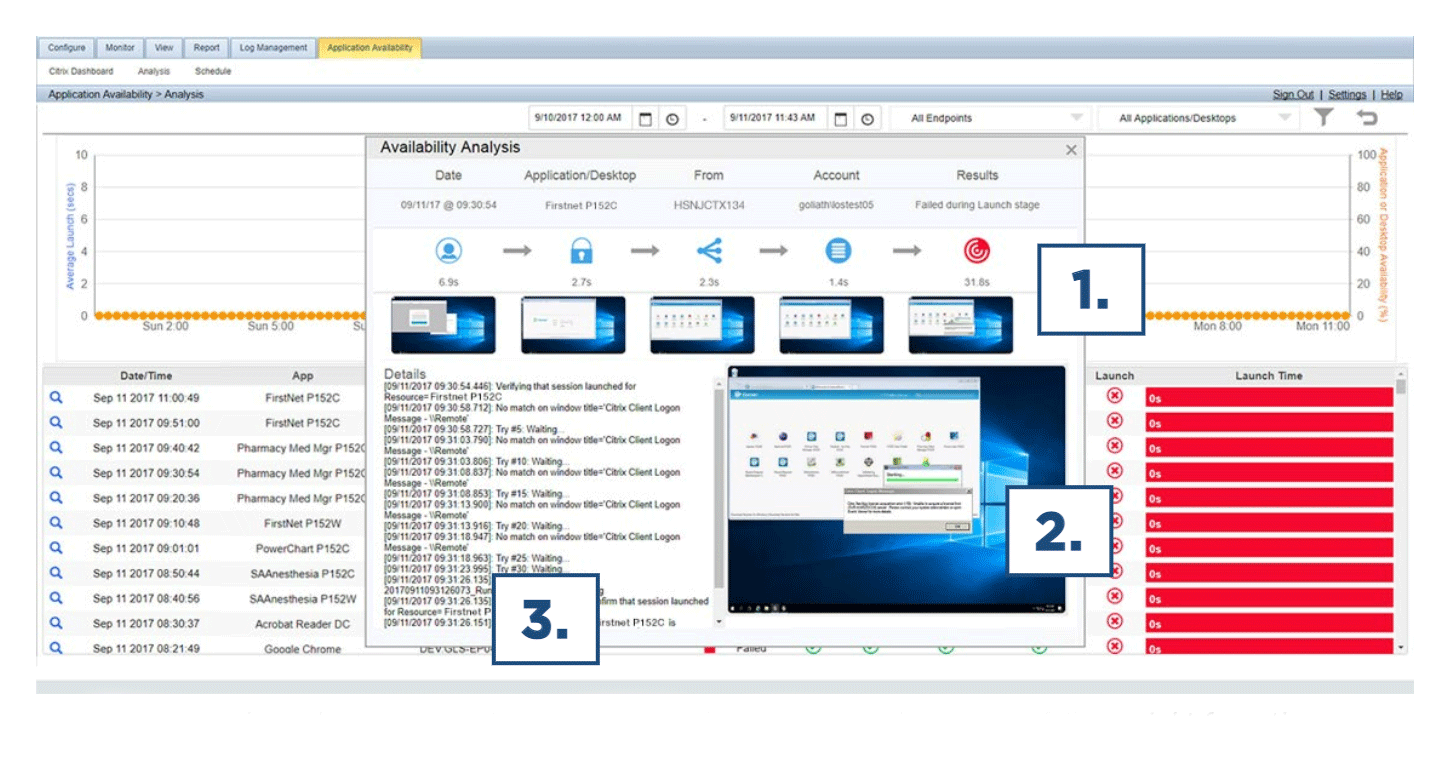
        Goliath is the industry’s only proactive, production-ready end-user experience software that validates the availability of the entire Citrix or VMware delivery infrastructure. It intelligently ensures availability by executing real sessions that exercise the exact same steps a user takes during the Citrix/VMware logon process. Regardless of whether a user is remote or local, Goliath gives administrators an “early warning system” that allows them to know exactly what the Citrix end-user experience will be like for their users – in advance.

        When there is a logon failure, an administrator will be alerted immediately. Using the simulation details, an administrator can quickly pinpoint where the failure occurred and the root cause. 

        Citrix Xenapp end user productivity report
        The image shows how an administrator can quickly drill down to investigate failures right from the application availability dashboard by clicking on the magnifying glass. In just three steps, you can then see where the logon issues occurred during the logon process and what the issue was:
        1. Highlight of where the issue occurred during logon.
        2. Visual proof that an issue did occur.
        3. Isolation of the failure point in the specific details captured.

        Automatic Citrix Discovery and Dependency Map

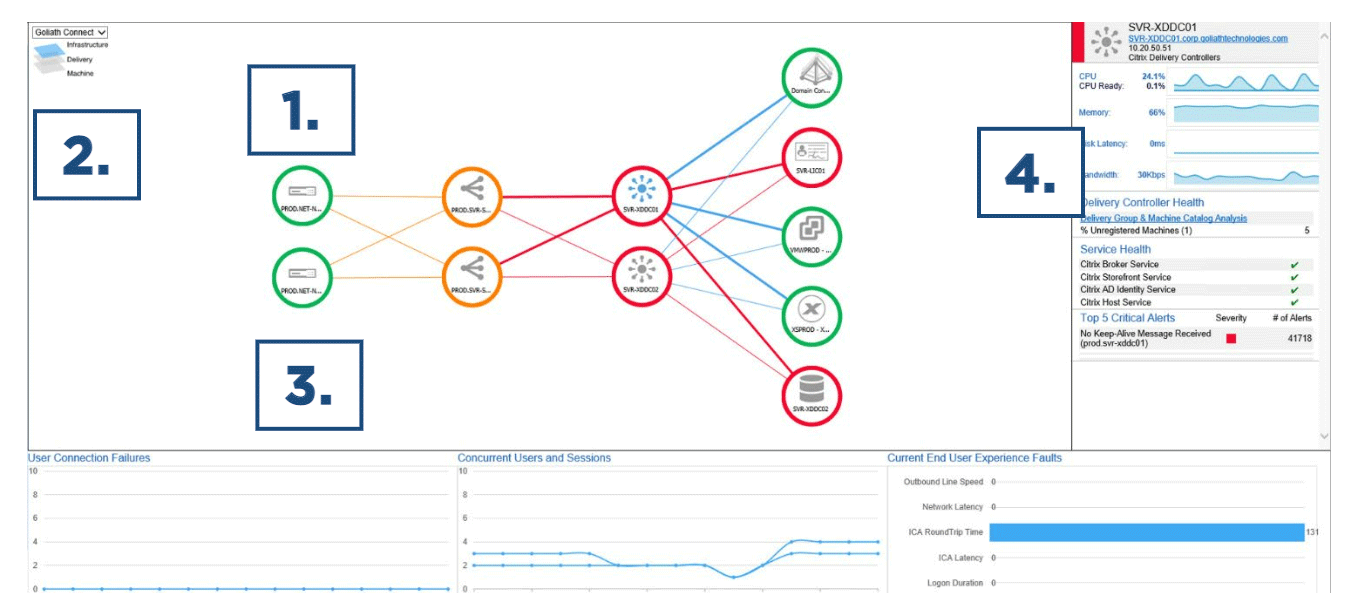
        The Automatic Citrix Discovery and Dependency Map intelligently creates a dependency map of your entire Citrix infrastructure with true end-to-end visibility of the health of your Citrix infrastructure. The underlying out-of-the-box imbedded intelligence which drives the color-coded NOC view are hundreds of monitoring rules which proactively look for events, conditions and failure points within the entire delivery infrastructure from the user end point to Cerner RHO.

        Citrix Xenapp end user productivity report
        The image above shows the Citrix Automatic Discovery Map and Highlights critical components:
        1. Automatic mapping of your entire Citrix infrastructure to visualize connections, relationships, and health of components.
        2. Ability to easily switch views to different data centers or locations.
        3. Correlation of end-user experience issues to delivery infrastructure components and health.
        4. Context-sensitive metrics and alerts for selected components.

        Goliath for health systems using Cerner is purpose-built to proactively anticipate, troubleshoot, and prevent issues with the entire on-premises virtual desktop infrastructure used to deliver mission-critical applications including Cerner. Goliath Technologies’ troubleshooting capabilities, combined with Cerner’s remote hosting technologies and services, provides healthcare organizations with advanced warning of potential end-user experience issues and objective technical evidence of root cause to prevent future issues. This results in faster detection, identification, and resolution of these issues before users or patients are impacted. 

        For more information on how Goliath can resolve end-user experience issues for any Citrix or VMware-delivered application, or to request a demonstration or free trial, please contact Goliath Technologies at techinfo@goliathtechnologies.com.


        About Goliath Technologies: Goliath Technologies offers IT professionals monitoring and troubleshooting software with embedded intelligence and automation that is purpose-built to help IT proactively anticipate, troubleshoot and prevent end-user experience issues – regardless of where IT workloads or users are located. By doing so, Goliath helps IT break out of reactive mode, into proactive mode. Joint Cerner and Goliath customers include Universal Health Services, CommonSpirit, Ascension, AtlantiCare, Intermountain Healthcare, Olmsted Medical Center, NorthBay Healthcare, Inspira Health, Children’s National and more. Learn more about how we empower proactive IT at goliathtechnologies.com. 

        Citrix Xenapp end user productivity report