Collect, Correlate, & Visualize Citrix End-User Experience Data

Collect, Correlate, & Visualize Citrix End-User Experience Data

Citrix CTP Blog

Collect, Correlate, & Visualize Citrix End-User Experience Data

Written By: Benjamin Crill

Previously we heard about the ability for the Goliath solution to test and self-heal the environment.  This provides an ability to let the environment take care of itself, relying on the collective years of experience from EUC experts.  However, we all know that just because an environment checks all the boxes, does not necessarily mean that users are productive and pleased with the environment.  However, we can now focus on the things that are important to the end user, but we need to know what those are and how they are working together in concert.  This will be the focus of what we look at next. 

Automatic Correlation

No one enjoys receiving support calls from users complaining of performance issues, but it happens all the time.  Doing your due diligence, you look for alarms, tickets, etc; ANYTHING that could point you to the root cause.  The problem is that it isn’t always obvious or systemically noticeable when a single person has an issue.  Now we must dig deeper and start to look at all the different connecting points to see where the true root cause could be.  Let’s list out some possible experience issues and where we would typically look: 

Slow authentication  

  • Which domain controller did the logon go against? 
  • Is the domain controller under resource contention? 

Slow logon 

  • How long did the profile take to load?   
  • How long did Group Policy take to load? 
  • Which policies are being applied? 
  • Which host is the workload on? 
  • Is the host under resource contention? 

Poor session performance 

  • What resources are being consumed on the workload VM? 
  • Are there errors on the workload VM? 

 That’s just the start of things – there could be more depending on what other solutions are in the environment that impact user experience.  Nevertheless, you can see that it can be a difficult process to track down issues.  Just looking at the list above, here are some of the tools you’ll be bouncing between: 

  • Command prompt 
  • Group Policy Management Console 
  • Citrix Director 
  • Citrix Studio 
  • vCenter/Prism/System Center/XenCenter – whatever your hypervisor of choice is 

Going back and forth between tools is not ideal.  At best you must find the time an issue occurred and line it up against the data from each tool.  It would be so much easier if there was a way to see all that data lined up for you. This is where Goliath Performance Monitor helps you be more efficient. 

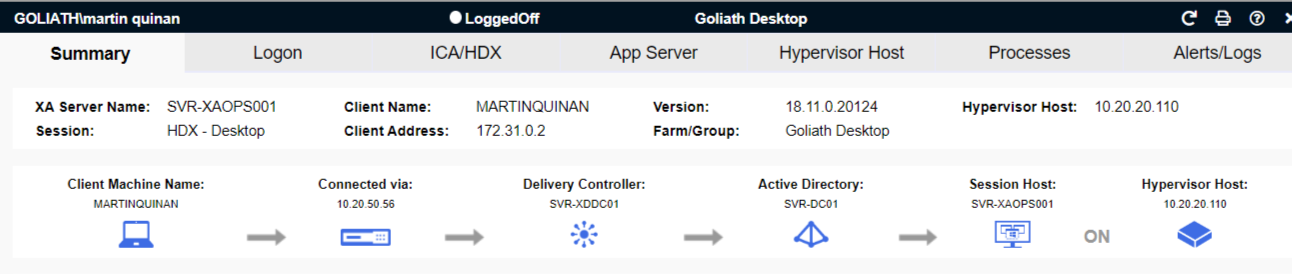
When you start looking at a user’s session, the first thing you’ll see is the authentication and brokering path.  At first glance you can immediately narrow down the actors involved in the user’s session.  No more finding the session in Director/Studio to find the broker.  No adjusting views to bring in the hypervisor the workload is running on.  No special scripts to extract the logon server.  It’s all right in front of the admin from the first click. 
 

Application Availability Monitor

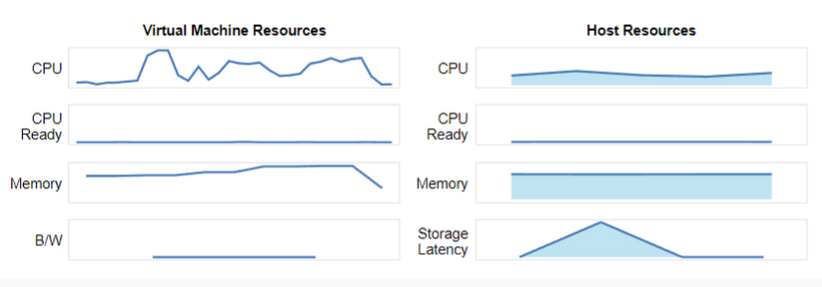
Further down on the Summary tab is this helpful bit of information.  Now you can see how the virtual machine is performing as it relates to the host that it is on. 
 

Application Availability Monitor

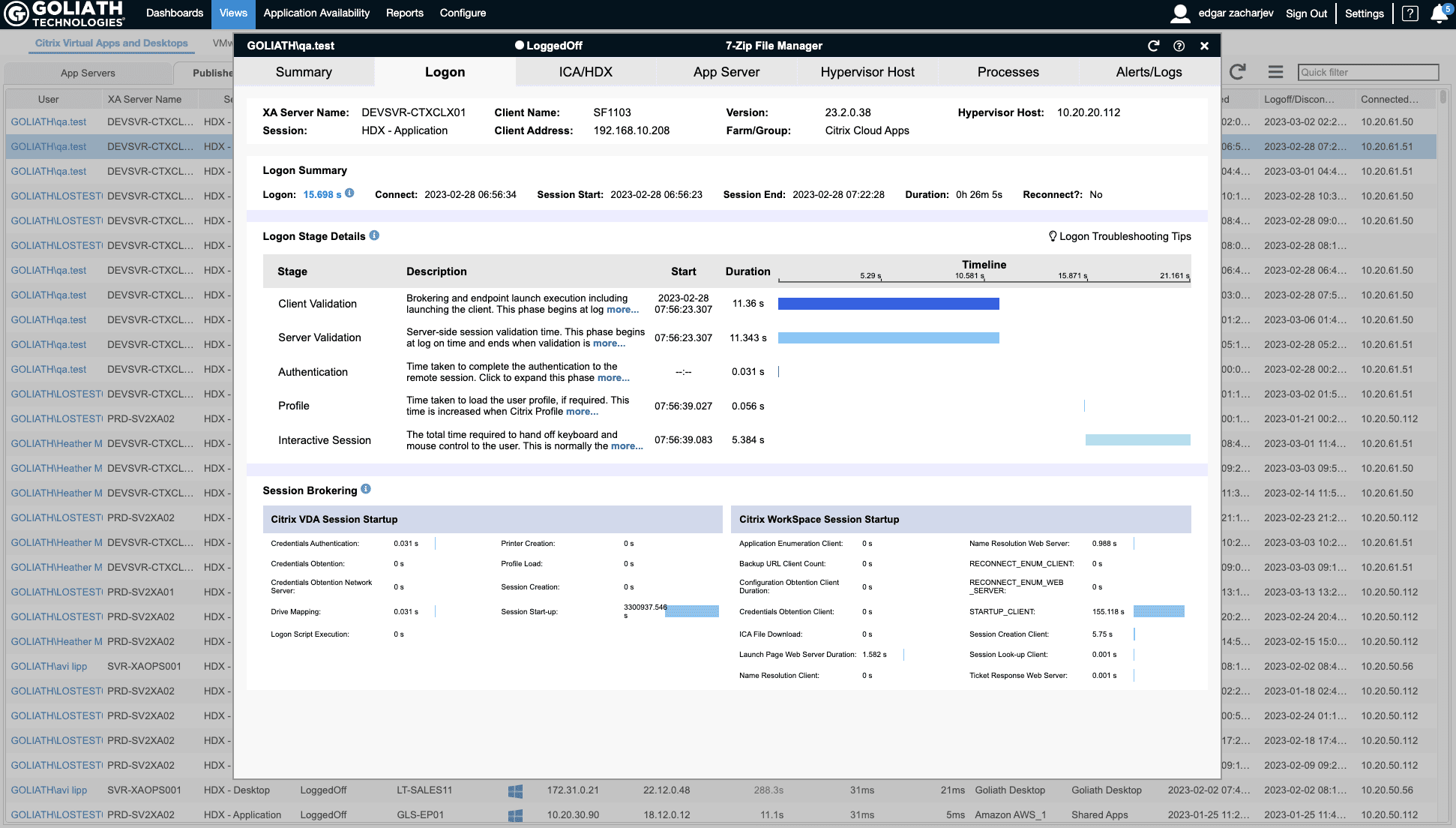
Troubleshooting logon duration must be one of the most tedious tasks out there.  There are so many things happening at user logon, and they are right in the face of the user.  It’s almost like being an orchestra conductor when you’re attempting to align all the disparate elements together, but it is ever critical to the user experience.  The Goliath logon stage information gives you the data you need, showing the different stages of the logon, how and when they were executed, and for how long. You want to see if there was a GPO that didn’t apply?   It will show you that in the GPO section.  It just eliminated another step for the admin. Again, it will show you the logon server too, so you don’t even have to click back into the interface to keep that in the forefront of your troubleshooting workflow.
 

Application Availability Monitor

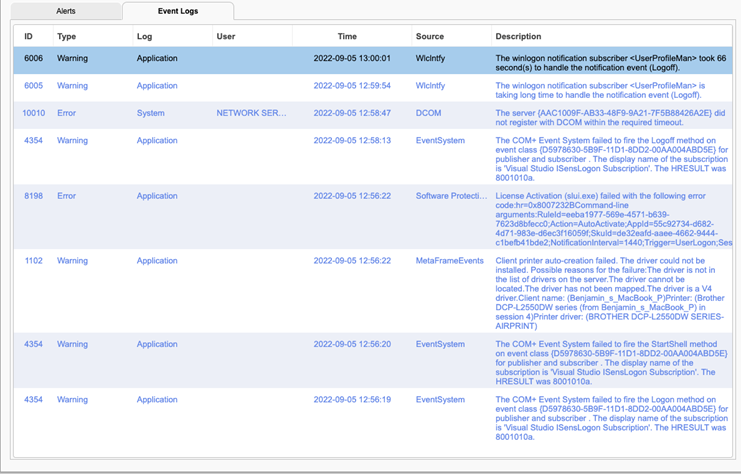
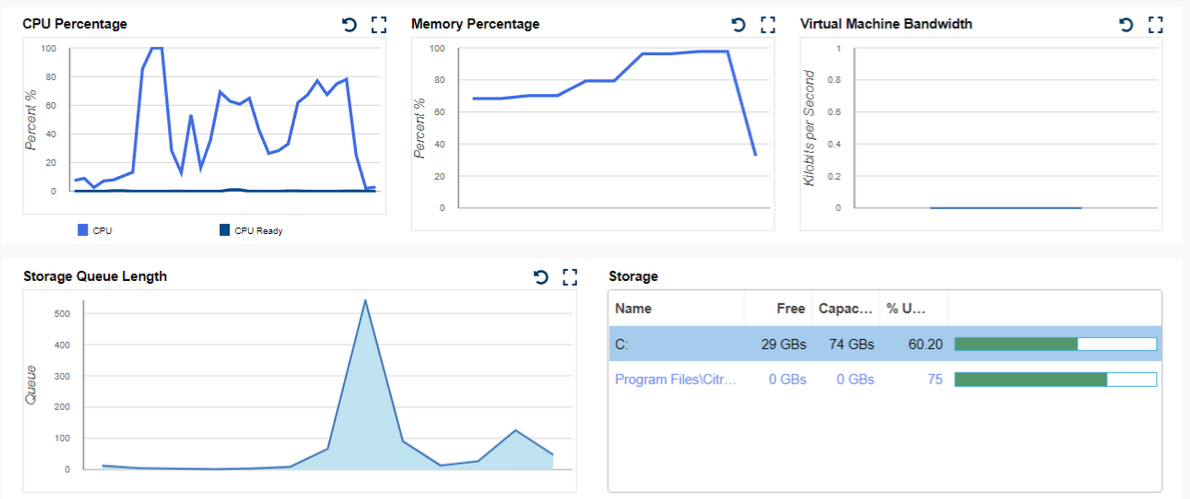
Finally, we have the infamous user complaint of “it just feels slow.”  Well, now you can look at the workload the user is connected to and view its performance.  You can look for pure performance counters, processes that may be consuming those resources, or errors and events that are being logged.

 

Application Availability Monitor

All this information is now at your fingertips.  By centralizing it, the result is faster and more accurate troubleshooting.  Faster time to resolution will help you show the value of your function in IT, plus demonstrate how you contribute to your company’s overall business goals. 


ICA Drilldown

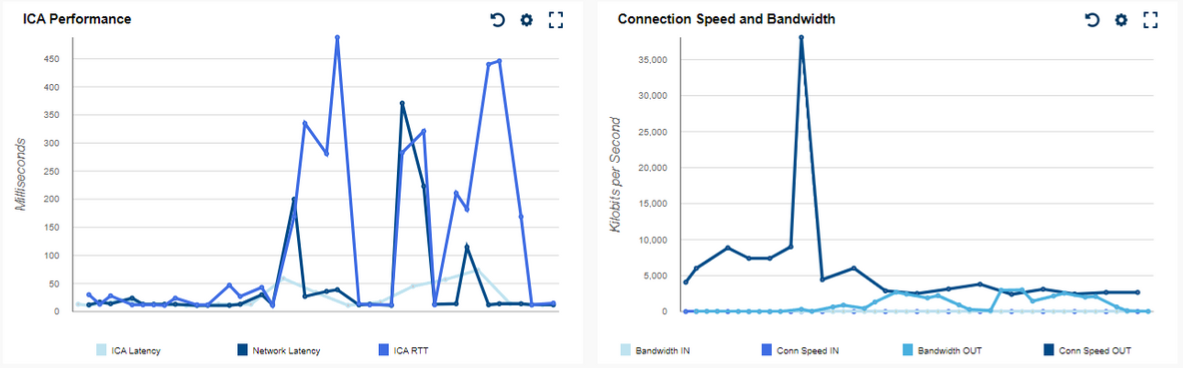
With any remoting technology, the weakest link is often the link itself.  The connectivity between the end user and the resource is either congested, not stable, or the amount of data going across it is more than it can handle.  Digging into that data, determining the cause, and remedying it is laborious.  But it is integral when explaining to end users and management what is impacting user productivity.   With the Goliath solution you can easily dig into the HDX protocol and its components to determine where issues are occurring.  You might see that you have enough bandwidth, but that the latency is high.  Unlike simply receiving a point in time statistic like in Director, you can see your data mapped and correlated. 
 

Application Availability Monitor

Sometimes what happens is a particular component can drive bandwidth consumption, or it might impact a particular portion of the user experience.  Goliath’s tool lets you see the breakdown of the Citrix virtual channel usage.  Now the admin no longer needs to isolate, test, and repeat to determine which is the culprit.  The information is available to them from the start.
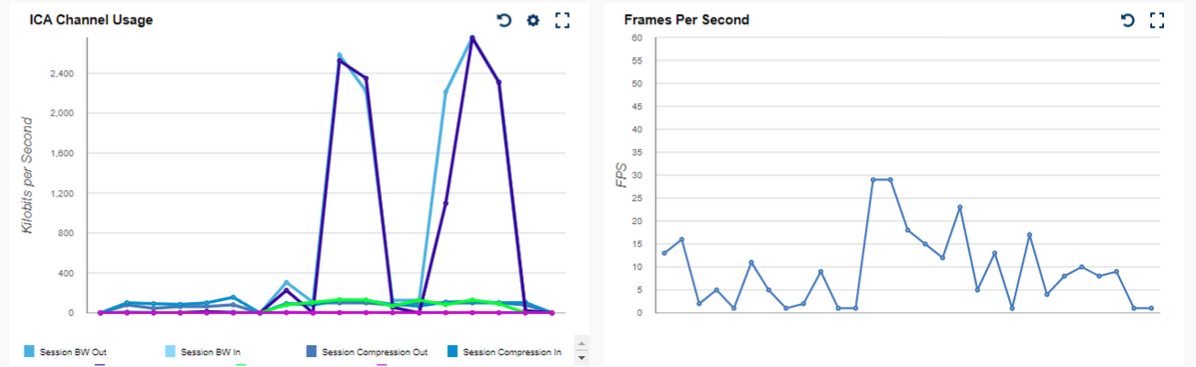
 

Application Availability Monitor

Not only is it available, but it can easily be filtered.  The admin can see the overall view, or zero–in on particular channels to see greater detail.  This can eliminate hours of policy changes, registry changes, client testing, etc. All this results in time saved for the company’s highly trained and well-paid staff, letting them focus on the next strategic goal. 
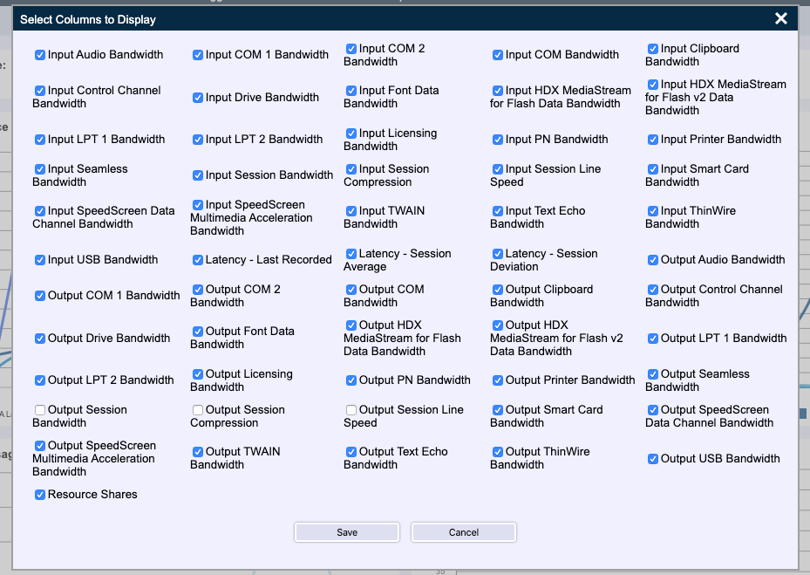
 

available ICA channels bandwidth can be detected Citrix session

Conclusion

Goliath Performance Monitor brings together a wealth of information.  Some tools on the market will have a large depth of information but no good way to sort or locate the data you need.  Even if you do find what you’re looking for, a large amount of work is needed to interpret the raw data.  By correlating the data for you and allowing you as the admin to break it down into its component parts, you have a powerful tool to make sure your user productivity issues are addressed and resolved as quickly as possible.   

 

Chris Hughes

Benjamin Crill

Citrix CTP,  consulting on end user computing technologies for over 15 years (Citrix XenApp/XenDesktop, Horizon View, IGEL, etc), Benjamin focuses on viewing how systems fit together and impact each other.  From storage to servers to network to thin clients and all in between, Ben examines the interaction and figuring out how to make the system hum!

Try Goliath For Free

Experience true end user experience monitoring and troubleshooting free for 30 days.
Application Testing and Remediation with Self-Healing Technology

Application Testing and Remediation with Self-Healing Technology

Citrix CTP Blog

Application Testing and Remediation with Self-Healing Technology

Written By: Benjamin Crill

In my previous blog, I highlighted how Goliath is configured out-of-the-box with the hundreds of data points for your EUC environment.  This is a great and valuable tool to help get you started.  But just knowing what is good versus bad only helps so much.  That’s where the automation component of Goliath comes in and takes the next step.  It can save you from getting pinged in the middle of the night, and more importantly, can keep your business running. Citrix XenApp & XenDesktop, Citrix XenServer, Nutanix, RDS, vCenter

Self-Healing

After being in IT for long enough, we all have our own collection of scripts and go-to resolutions for issues.  When that P1 ticket comes in at 2AM because services aren’t online, we have a solid idea of what to do.  This is a good thing, as we’re able to leverage our knowledge and experience.  However, that knowledge and experience could be put to better use within your organization during the day. 

Whenever I’ve been responsible for the admin side of things, monthly patching always made me cringe.  It wasn’t because I didn’t think that software patches were necessary, quite the contrary.  My frustration was always that the validation was incomplete.  Across many enterprises the typical validation I would see was if the expected patches pushed installed successfully.  Rarely does the validation include if the services on the server patched come back online as expected.  Was the application it serves out running post patching?  Next thing you know, the P1 alert goes out. 

All of these are known issues and resolutions.  Either by monitoring rules or scripts developed, these problems can be remediated without waking up the admins, saving them for more important work.  I know I would have appreciated a tool doing that for me and being able to sleep and have a clear mind in the morning.  Goliath’s built-in automations can look for the desired state of a service.  Or, based on an alert, a script can be run to rectify the situation. These can allow everyone to sleep at night, the business can continue unencumbered, and less coffee is needed come morning. 


Logon Testing

Just checking for services is one thing, but even then, it doesn’t always ensure that things are working as expected.  To really make sure the environment is working as expected, the proof is in the launching of the application.  That’s where the real beauty of the Goliath solution comes in. 

Goliath allows the ability to set up automated logon testing to ensure resources are available. The automated logon testing allows you to test applications launching from one or multiple locations, even remote testing!  So besides just testing, you can test all the different use cases you have, not just one office or just the local network.   

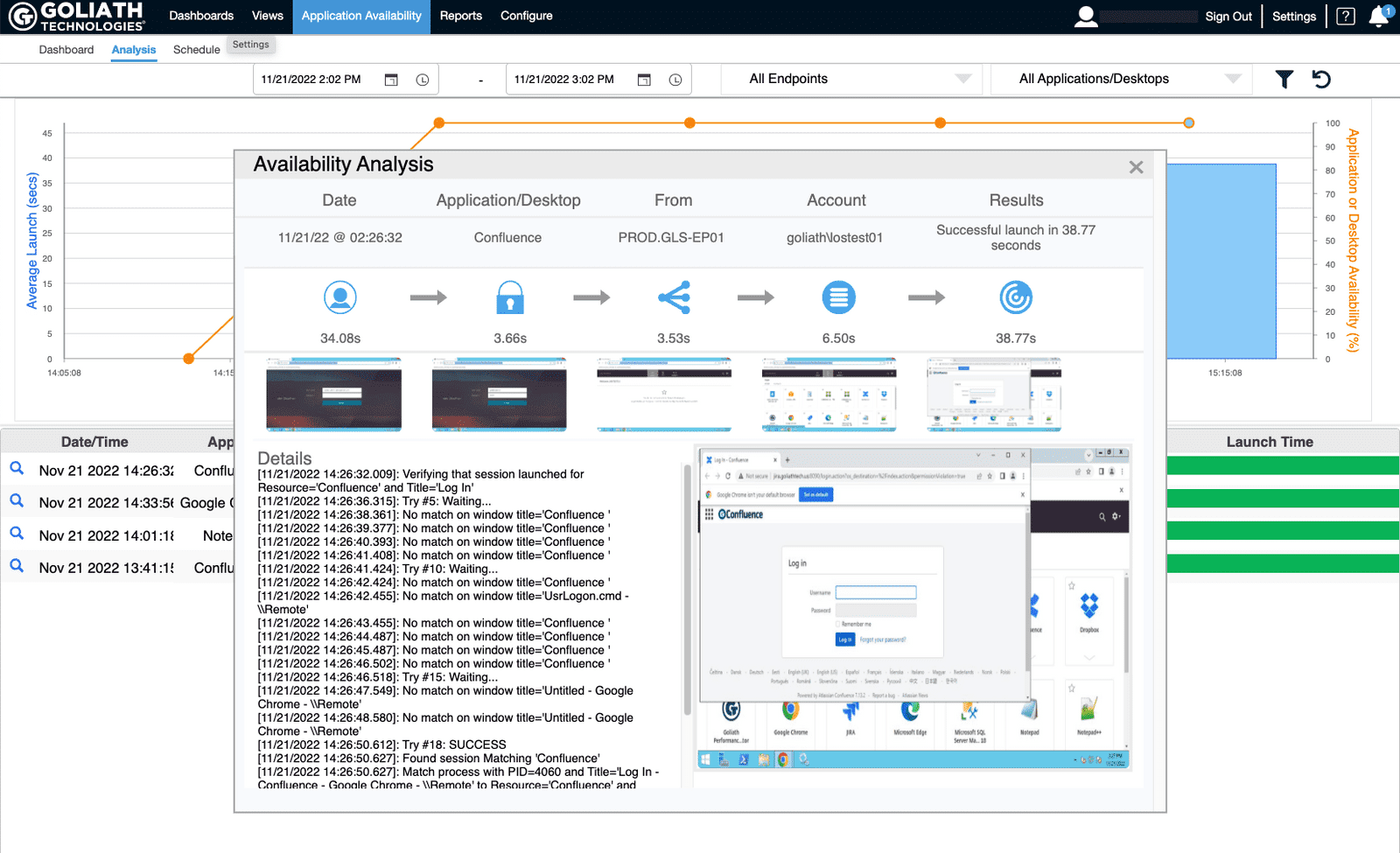
This logon testing is even useful in a lab scenario where it doesn’t impact end users.  I made a DNS change in my internal lab a few months back.  Because of this DNS change my Storefront got the wonderful ‘Cannot complete request’ loop.  Thankfully, I was able to quickly see what was going on because unlike most synthetic logon tools, Goliath’s application availability monitor takes screenshots of the logon process.  So not only was I able to see that the logon failed, but I could step through the end-user experience.   

Most of the time a report comes in that a user is experiencing a problem and you have reached out to them and hope that the problem happens again to be able to resolve it.  Or even better, try to get an accurate description of what happened.  Having a tool that can screenshot the failure points and allow you to step through them makes troubleshooting and resolving much faster and easier.  Now as an administrator you are no longer dependent on end users to alert you when issues arise, since consistent tests will alert you to issues before users are impacted. 


Application Availability Monitor
Goliath’s Application Availability Monitor

In addition to having the ability to walk through the replay of the logon, the Goliath solution has another advantage.  It can test multiple solutions from the same interface.  Sure, we all like to think that we will end up with one homogenous solution, but it doesn’t always end up that way.  I have come across so many situations where there is an old RDP environment supporting one business units’ applications while the rest of the org is on Citrix.  Or a customer that was on Horizon View and migrated to Citrix, but that one use case didn’t work properly when migrated and the application is no longer supported so it was just easier to leave the Horizon environment in place.  There can be a variety of reasons, but the major point is that it happens.  With many of the vendor solutions, you’d be setting up all sorts of different separate testing environments.  With Goliath you can test RDP, Horizon, Citrix, all, some, etc. 

But wait – it gets better!  The two can be combined.  In addition to testing the logon process, if an issue does arise a remediation action can be applied.  Now, if a particular application or server hosting an application set doesn’t respond as expected, actions can be taken to fix the problem before the user reports start rolling in.  You as the administrator can look like a real hero in that you have a solution that determines, and FIXES, problems before a user can even report them. 

Conclusion

Goliath gives you the tools to be the big hero without having to put in a ton of work; and isn’t that the solution we all want?  Maximum output with minimum input.  By leveraging the wisdom of EUC experts through the years, Goliath has a base of knowledge to start from to ensure your environment is functioning at its best.  Add the flexibility plus the environment-specific knowledge that you bring, and it makes for a well-rounded solution.  The environment can continuously test itself and remediate itself, allowing you to tackle the more strategic needs of your organization.


Chris Hughes

Benjamin Crill

Citrix CTP,  consulting on end user computing technologies for over 15 years (Citrix XenApp/XenDesktop, Horizon View, IGEL, etc), Benjamin focuses on viewing how systems fit together and impact each other.  From storage to servers to network to thin clients and all in between, Ben examines the interaction and figuring out how to make the system hum!

Try Goliath For Free

Experience true end user experience monitoring and troubleshooting free for 30 days.