Amazon AWS Monitoring & Troubleshooting for a Top 10 Retailer

Amazon AWS Monitoring & Troubleshooting for a Top 10 Retailer

User Story: Proactive Amazon AWS Monitoring & Troubleshooting for a Top 10 Retailer

The Organization: Top 10 Online Retailer

The Organization’s Infrastructure: VMware vSphere, Citrix XenDesktop, AWS EC2

The Organization’s Performance Monitoring Products: Goliath for Monitoring AWS

The Business Challenge: AWS

The retail organization discussed in this post faced challenges with the influx of web traffic to their online store during the holiday season. Their plan was to move to a hybrid cloud infrastructure during the busy season. This required them to expand their private cloud or on-premises to Amazon AWS to leverage Amazon AWS resources during the busy season. Leveraging Amazon AWS allowed them to expand capacity only when needed. The strategy to burst to the AWS cloud made it so they did not have to make a substantial capital investment that would only be leveraged two months per year. However, for the solution to make economic sense, they needed an AWS monitoring and AWS troubleshooting solution that would allow them to monitor their existing resource utilization and their cloud resource consumption simultaneously. It was critical to monitor AWS and the on-premise infrastructure, which included Citrix XenDesktop on VMware vSphere, with the same technology to ensure they were delivering the most efficient and cost effective experience to their customers.

As seen in the image below, with Goliath for AWS Monitoring, the administrators can separate their on-premise infrastructure in the data center, Amazon AWS and Citrix XenDesktop environment into groups within the same console for a central view of all infrastructure. This heat map allows the administrator to monitor AWS and on-premise infrastructure and have icons register as red if there is an issue.


The Solution

The retail organization chose Goliath for AWS Monitoring and AWS Troubleshooting as their Hybrid Cloud monitoring solution. Ease of use, flexibility, real-time alerting and historical reporting made Goliath an obvious choice for monitoring AWS and their internal cloud infrastructure. As depicted above, in addition to monitoring AWS from Goliath provided them with visibility into their cloud infrastructure allowing them to understand the health and resource consumption status of all compute resources.

AWS Monitoring Includes Real-Time Alerting on Resource Consumption

Flexible, real-time alerts were configured as depicted below based on resource location. This provided the flexibility to monitor cloud resources differently than on premise. On premise, resources are monitored to understand the best time to “burst” into the cloud, while Amazon AWS resources are monitored to ensure that consumption costs are understood and controlled. In the image below Goliath for AWS Monitoring enables an administrator to set alerts based on consumption thresholds and consumption duration for example which are triggered when the threshold is breached. This allows the administrator to know exactly what resources are being used and the corresponding cost. This is designed to help IT control costs and increase awareness resource utilization in real-time.


Managing Dynamic Workloads Out-Of-The-Box 

In a hybrid cloud, infrastructure workloads are dynamic and may move from one infrastructure location to another for various reasons including general migration, resource expansion (bursting) or component integration. As previously discussed, monitoring requirements change depending on their location. To support this, monitoring rules must be as dynamic as the workloads themselves. If they are not, resources will not be monitored properly, and the solution will be ineffective. Furthermore, if the solution is not as dynamic as the workloads themselves, there will be a significant amount of administrative overhead manually reassigning rules as workloads move. Goliath for AWS Monitoring provides dynamic flexibility through group-based policy assignments, as depicted below. When workloads move from one location to another, simply changing the workload’s group membership ensures that the appropriate monitoring policies are assigned to the workload instantly. This functionality was a significant requirement for the retailer as their hybrid infrastructure was dynamic by design.


In the below image an administrator can receive real-time alerts from AWS monitoring right to their phone. Importantly, Goliath has out-of-the-box monitoring rules preconfigured to look for resource consumption and other performance metrics. Also, to facilitate AWS troubleshooting the pre-configured monitors look for failure points and can alert in real time if they are detected. This can improve time to resolution


AWS Monitoring Includes Real-Time Dashboards

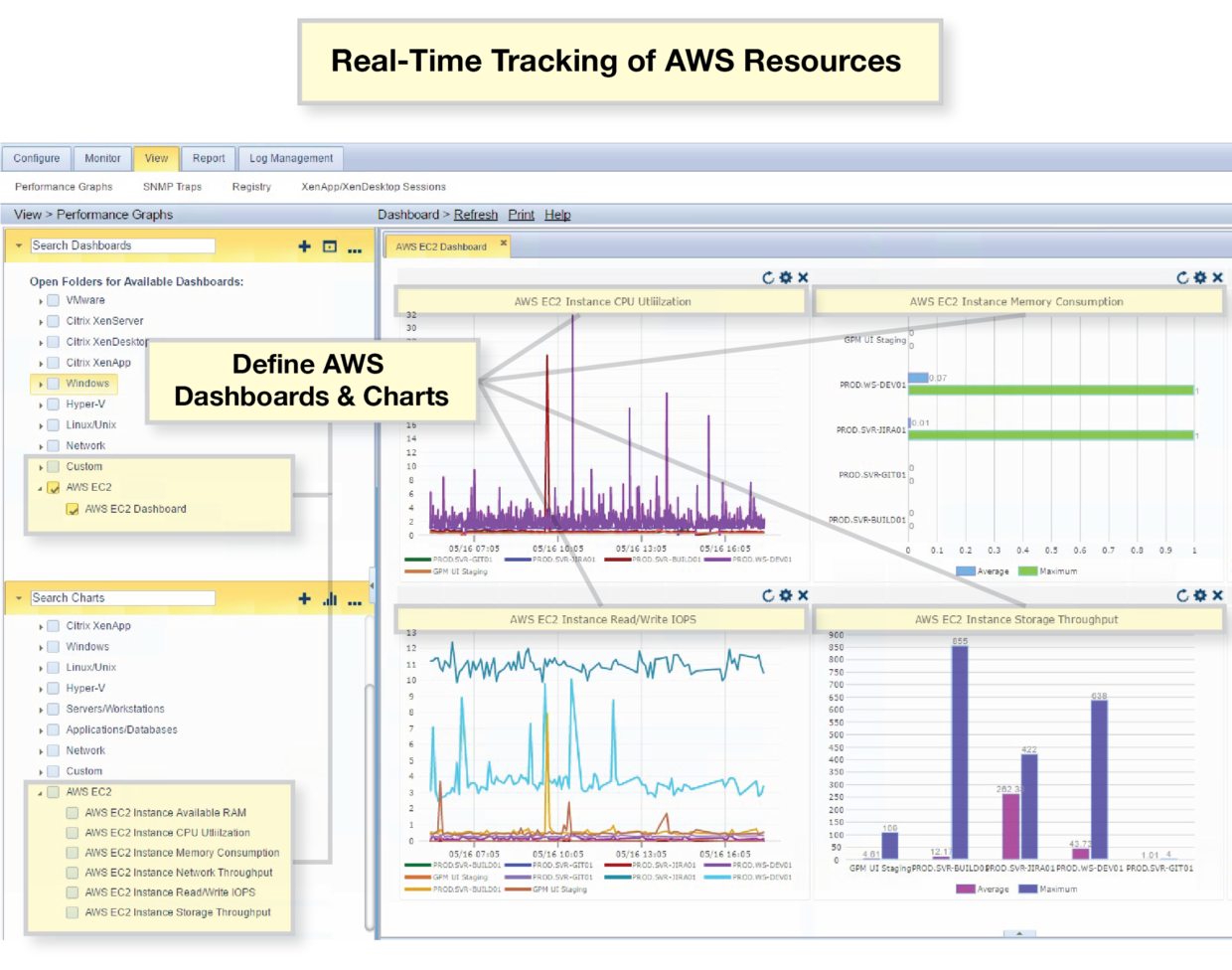
Pre-configured and therefore out-of-the-box dashboards provide both a real-time health check and historical trending perspective to the environment. In just a few clicks, the performance of the Amazon AWS infrastructure, the private cloud or both is instantly visible. In the screenshot below, on the left-hand pane, you can just select any set of IT elements from either Amazon AWS or the internal cloud you want to monitor and it will draw the chart on the right. This allows an administrator to proactively, and in real time, identify any concerning trends or assist in AWS troubleshooting.


The Summary of AWS Monitoring and AWS Troubleshooting for Hybrid IT

Many organizations are faced with new challenges when managing hybrid cloud infrastructures, and the retailer discussed today is no different. The metrics gathered, monitored and alerted on provide different value based on whether the workloads are hosted on-premise, or in the Amazon AWS cloud. But, one thing is clear—AWS monitoring and AWS troubleshooting—is important as part of this hybrid infrastructure. If an IT group doesn’t have a single complete view of the entire hybrid infrastructure there is an inherent risk.

Goliath provides the flexibility, visibility and analysis tools needed for modern, dynamic hybrid architectures and it is also flexible enough to deliver the metrics in a way that applies to every scenario—on-premises or in the AWS cloud.

Get a 30-day Free Trial of Goliath’s Proactive IT Operations Software

All of the proactive IT performance monitoring and management products featured in this article are available for you to try in your own environment. You can download a fully supported 30-day free trial today. Simply click below to access.


Get a 30-day Free Trial of Goliath’s Proactive IT Operations Software

All of the proactive IT performance monitoring and management products featured in this article are available for you to try in your own environment. You can download a fully supported 30-day free trial today. Simply click below to access.

Access Cloud GPM Free Trial

About the Author: 

The team members collaborated to bring together this blog post by calling on their past Customer Experiences and Expert Knowledge of Citrix Troubleshooting. Beyond writing technical documents this team supports Goliath Customers and provides product feature and function guidance to development.

User Story: Citrix Troubleshooting Assessment Reduces Support Tickets by 25% in 30 days

User Story: Citrix Troubleshooting Assessment Reduces Support Tickets by 25% in 30 days

Citrix Printing Issues Troubleshooting Assessment Reduces Support Tickets by 25%

The Business Challenge: A customer was experiencing persistent Citrix XenApp and XenDesktop performance issues related to printing and the logon process. After trying to troubleshoot the issues on their own, the root cause could not be determined without the assistance of Goliath Technologies.

The Solution: To start, the client requested a Citrix troubleshooting engagement to investigate the root cause of persistent performance issues. Before seeing the observations and reports that Goliath was able to provide, it’s important to understand the customer’s infrastructure elements at the initial stage of the Citrix Troubleshooting Assessment. Goliath’s Citrix Monitoring solution was deployed to the following infrastructure elements:

After the implementation, out-of-the-box rules and dashboards were automatically applied to the inventory. A follow-on configuration effort was then initiated to deploy agents and build custom rules and reports to identify printing and profile issues; it was essential to deploy agents to the delivery infrastructure in order to achieve end-to-end visibility and determine the root cause. After collecting data for two weeks, the Goliath Support team came back with observations related to:

  • Printing Issues
  • Profile Problems
  • Other Citrix Troubleshooting findings

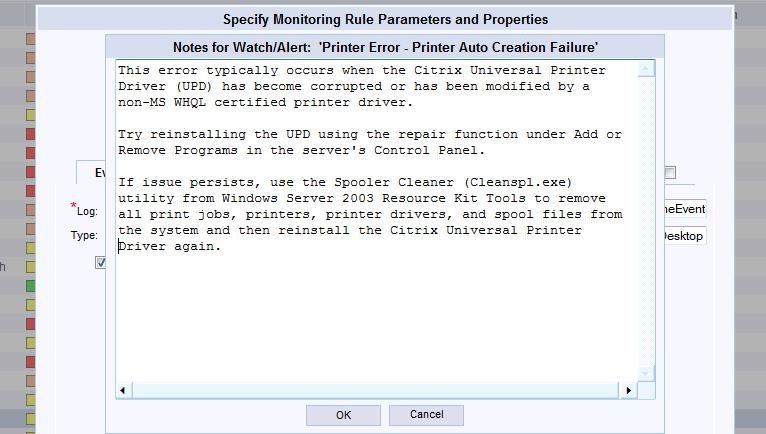
Using Out-of-the-Box Monitoring Rules, like the one pictured below, were useful to identifying and preventing these Printing Issues from occurring in the future. Having the ability to enter Notes into the specific rule allowed the Help Desk and other IT Administrators to collaborate on issues and troubleshoot issues more effectively and efficiently.

After identifying the specific Printing issues, Profile problems appeared to stem from underlying registry and security issues, outlined below:

Finally, as the Goliath Support team worked through the issues and problems related to Printing and Profiles, other Citrix Troubleshooting findings were documented.

The Summary: By completing the Citrix troubleshooting assessment and implementing the recommended fix actions provided by Goliath Performance Monitor and Goliath Application Availability Monitor, Citrix support tickets decreased by 25% within 30 days.

Goliath vs. Citrix Comparison

About the Author: 

The team members collaborated to bring together this blog post by calling on their past Customer Experiences and Expert Knowledge of Citrix Troubleshooting. Beyond writing technical documents this team supports Goliath Customers and provides product feature and function guidance to development.

Questions When Evaluating Monitoring & Troubleshooting Software

Questions When Evaluating Monitoring & Troubleshooting Software

Questions When Evaluating Production-Ready Monitoring & Troubleshooting Software Solutions

There are many IT Operations products in the market that focus on monitoring and management. The key difference between Goliath Technologies and other products is our focus on end user experience with Citrix and healthcare. Though there are good products that have some functionality for Citrix, there isn’t another solution that offers the end-to-end capability to anticipate, troubleshoot, resolve, and prevent end user experience issues with Citrix. Pertaining to healthcare, there isn’t another company that has purpose-built modules to support major EMR/EHR applications and correlate the application and system performance data.

The single most important criteria that determines the “best product” is the customers’ specific requirements. We cannot say that the major differentiators above are important for all customers. For those who have a desire to test the “production-readiness” of a product, the Goliath Technical Support Team have put together a summary of questions, asked by our customers, to troubleshoot issues and proactively manage their Citrix and EMR/EHR environments.

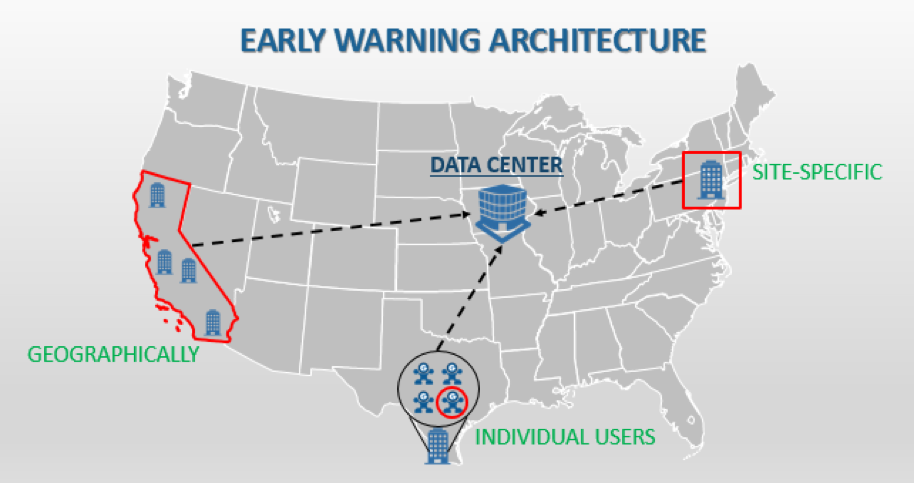
What is important to note is that through our customers’ unique experiences, our support team has acknowledged that the questions posed typically stem from three key areas (Pictured below). All attribute to one common goal: a positive End User Experience.

Here are some of the questions that can empower Citrix administrators to determine if a vendor’s ability to anticipate, troubleshoot, resolve, and prevent Citrix and EMR/EHR issues satisfy their unique demands.

Logon Initiation

Anticipate

  1. Can logon and applications be tested with simulations using real ICA sessions?
  2. Can logon, session and application or desktop availability issues be identified and resolved before end users are aware?

Troubleshoot

  1. Can you identify if logon issues are geographically-based, site-specific, or user-based, in advance?
  2. Can you drill down into failed logons and identify exactly what part of the logon process failed and when it failed?

Resolve

  1. Are detailed reports available on the success and failure rate of simulated logons?
  2. Is it possible to take remediation when issues are identified with simulated and actual real user logons?

Logon Process

Anticipate

  1. Can preemptive rules and alerts be configured based on logon duration thresholds?
  2. Can logon simulations be used to identify slow logons before users are impacted?

Troubleshoot

  1. Can you identify if a slow logon was a result of a delay related to the starting up of a virtual desktop?
  2. Can the technology identify if the ICA file download is slow?
  3. Will you know when the session launch page is loading slowly?
  4. Are you able to identify when logon is slow because of an overloaded XML broker?
  5. Can you identify that client side validation and session brokering is slow?
  6. Is it possible to drill into session logon to know how long Active Directory takes to obtain GPOs and determine if they are applicable?
  7. Can the technology identify how long it takes to process Citrix policies vs Windows Policies?
  8. Is there the capability to identify if a corrupt print driver is causing a delay in the logon process?
  9. Can the technology natively break down the following GPO types and the length of time it takes to process each?
    1. Registry extensions
    2. Folder redirection extensions
    3. Scripting extensions
    4. Folder extensions
    5. Folder Options extensions
    6. Group Policy environment extensions
    7. Local user group extensions
    8. Drive map extensions
    9. Scheduled task extensions
    10. Files extensions
    11. Ini files extensions
    12. Search extensions
    13. Shortcut extensions
    14. IE zone mapping extensions
    15. IE settings extensions
    16. Citrix Profile Management Extensions
  1. Is there a fully detailed breakdown of the Logon Duration States, Citrix Receiver Startup Stages, Brokering Stages, and Session Launch Stages in a single screen?
  2. Can the technology provide data to correlate each state properly and understand the true duration of logon?
  3. Are there detailed historical reports on every session, its logon duration, and how long each of the specific components took to complete?
  4. Can logon stages be correlated with event logs to identify root cause?

Resolve

  1. Is it possible to configure remediation actions to automate the resolution of logon duration issues?
  2. Can ICA session simulations be conducted to test and validate configuration improvements made to the logon process?
  3. Are reports available to baseline and trend detailed logon duration metrics over time?

Session Performance

Anticipate

  1. Are preemptive threshold based alerts available on the following session performance issues
    1. ICA Latency
    2. ICA RTT
    3. Network Latency
    4. Active Sessions
    5. Available VDI
    6. XenApp Session Host Server Load
    7. Active XenApp Session Count
    8. Active XenApp User Count

Troubleshoot

  1. Is correlation possible with ICA Round Trip Time to ICA latency and Network Latency?
  2. Can you identify that network jitter is causing a client side issue with remote users?
  3. The technology correlate ICA latency to network jitter?
  4. Can the technology provide visibility into all the ICA channel, and application usage to identify issues such as a user session is slow because they are watching video in session consuming all available bandwidth?
  5. Is it possible identify that a print job outside of the ICA session is cause poor session performance within the session?
  6. Does the technology provide reporting to see that ICA Latency increases every day at the same time over a period of one year?
  7. Is there a detailed analysis of each of the 50 ICA channels and how they impact session performance?
  8. Can you provide detailed historical reports on ICA Round Trip Time and how it correlates to problems with the underlying infrastructure?
  9. Can you drill down to correlate ICA round trip time with high storage latency to pinpoint user session performance issues?
  10. Is there robust event log management available that allows you to archive all event logs from all monitored virtual/physical Windows machines including PVS or MCS provisioned session hosts?
  11. Can all event logs be viewed and analyzed including Application and Services Logs?

Resolve

  1. Can remediation actions be taken to automate resolution of issues such as print service failures?
  2. Are reports available to trend session performance overtime to validate performance and issue resolution actions?
  3. Does the technology provide an inbuilt knowledge base for IT staff to share specific resolution details directly in the alerts?

There is no disputing the importance of Logon Initiation, the Logon Process, and Session Performance, but monitoring and troubleshooting software solutions must also take into account other factors. As our Support Team has learned, there is more to a positive end user experience then the three pillars mentioned above. Which is why questions related to the Citrix NetScaler and Healthcare in general must be taken into consideration when evaluating different products in the marketplace.

NetScaler

Anticipate

  1. Can alerts be generated preemptively for poor ICA session performance metrics such as RTT and network jitter?
  2. Are alerts available to notify you of an HA failover?

Troubleshoot

  1. Can you to correlate ICA roundtrip time with Network Jitter?
  2. Is it possible to identify if proxied ICA session performance issues are client side or server side?
  3. Can the technology provide you with a single console for managing the entire NetScaler deployment?
  4. Is there visibility into the following NetScaler metrics?
    1. Activity by application/VIP
    2. Transaction response time
    3. User IP
    4. Transactions per NetScaler
    5. Transaction Load Time
    6. Page Latency
    7. Pages Viewed
    8. Faults by Error Codes
  5. Is there unrestricted historical reporting on NetScaler usage and trends?

Resolve

  1. Is the capability to share analytical data live via URL with collaborators to resolve issues?
  2. Is there integration with other monitoring technologies via Syslog or CSV?

Healthcare

Anticipate

  1. Are there purpose built modules for EMR/EHR applications available in the technology?
  2. Does the technology have specific performance graphs, rules and alerts available for MEDITECH

3.Is a module available for monitoring and preemptive based alerting for Allscripts?

4. Can simulations be conducted to ensure that EMR/EHR applications are available before health care workers           access the environment?

Troubleshoot

  1. Is the technology able to be deployed to monitor XenApp servers in the Cerner Datacenter?
  2. Can you have complete visibility from the user’s endpoint into a hosted EMR/EHR application to identify if root cause is resulting from the provider or from your infrastructure?
  3. Can all event logs be archived, analyzed and alerting on from the EMR/EHR platform for root cause analysis?
  4. Is there visibility to troubleshoot EMR/EHR platform specific faults and performance issues?

Resolve

  1. Does the technology have detailed reporting for collaboration with EMR/EHR vendors?
  2. Can remediation actions be taken to automate the resolution of issues?

Summary

What has become clear is IT Operations products in the market focus on monitoring and management. When evaluating solutions that offer end-to-end capabilities, it’s important to ask the right questions. As our Goliath Support Team has noticed, each customer has distinct IT requirements and unique challenges that must be addressed. A positive End User Experience is the heart of all IT Operations products. The first question that should be asked is which product can anticipate, troubleshoot, resolve and prevent end user experience issues with Citrix and healthcare? Goliath Technologies has solutions that are purpose-built and product-ready to not only answer questions, but satisfy those requirements and challenges and ensure a positive end user experience for all.