User Story: Augusta Health Proactively Manages MEDITECH

User Story: Augusta Health Proactively Manages MEDITECH

Hospitals do not close and EHR applications do not go to sleep at night – which presents a continuous problem and challenge that Healthcare IT teams must solve. And what keeps everyone from the CIO to the System Administrators up at night?

It’s managing the applications, infrastructure, and end user experience that allow physicians and healthcare workers to deliver patient care around the clock.

For those reasons, Augusta Health, a Community Hospital with 4,000 MEDITECH users and 255 physicians agreed to give a view into their data center to show how they proactively manage MEDITECH, Citrix, VMware, and the underlying infrastructure.

MEDITECH, Citrix & VMware Performance Data in a Single View

In this upcoming free live webinar, Mike Tremel, Augusta Health’s Sr. Systems Engineer, will show how he uses Healthcare ITs only technology that correlates, in a single view, MEDITECH, Citrix and VMware to proactively monitor and manage the entire end user experience.

You will get a comprehensive view of the application and delivery infrastructure and you will see how this technology’s built remediation functionality enables Augusta to proactively anticipate, troubleshoot, and resolve end user performance issues, ultimately delivering better patient care.

To register now for this free live webinar, please go here. And if you have a question about the webinar or the proactive EHR performance monitoring technology that will be shown, please leave a comment or tweet at us now.

 
Browse EHR Monitoring & Troubleshooting Webinars

User Story: How MaaS Provider Ensures IBM WebSphere Availability for Retailer

User Story: How MaaS Provider Ensures IBM WebSphere Availability for Retailer

Editor’s note: This post tells the story about a MaaS provider who deployed advanced technology to ensure IBM WebSphere application availability and proactively troubleshoot and resolve end user performance issues for a large online athletic retailer. This is a guest post from Bill Karounos, CEO of TransformaTech and a trusted Goliath Service Provider. Transforma Tech utilizes Goliath Performance Monitor to deliver MaaS or Monitoring as a Service for IBM WebSphere to their customers.

The gift-giving rush of the holiday season can make or break a retailer and downtime, performance degradation, and delays in order processing in their online shopping experience during this time can be incredibly damaging to the business. Thus, proactively monitoring and maintaining these environments using the most state-of-art IBM WebSphere application monitoring solutions available is understandably a high priority for members of the retail industry.

As a MaaS, IT service provider, my team at TransformaTech Inc. is often asked by clients to solve these types of problems. Consequently, when we were selected by a billion-dollar athletic retailer to ensure the application availability of IBM WebSphere Message Broker and MQ Environments during peak times, we knew that we could make a big improvement in performance in IBM WebSphere performance based on our past history of doing this for other MaaS customers.

The Challenge and the Pain in Delivering MaaS

Our client was operating an unsupported IBM WebSphere Message Broker (WMB) version 6 in the production environments responsible for supporting their critical retail stores and web based operations. They also had major components of their HR and backend warehouse systems running on these WMB and MQ environments.

Our job was to not only upgrade these IBM WebSphere applications but also to provide a 24/7 MaaS performance monitoring, troubleshooting, and support services with the expectation of 100% availability of the IBM WebSphere and MQ environments that support their critical business applications during the client’s crucial holiday season.

The Problem and Pain Solution

After designing an upgrade path for both WMB and MQ; our performance monitoring, troubleshooting and support plan included deploying the TransformaTech Monitor product for WMB and MQ monitoring and the Goliath Performance Monitor solution for complete system monitoring of servers and resources.

This MaaS solution kept tabs on several key performance metrics including:

  • Application availability
  • Application Errors and events for the applications
  • Server performance
  • Application incident management and resolution of production issues
  • Weekly, management-level reporting on incidents, environment health and related metrics
  • Application Maintenance, troubleshooting, and development resolutions for the WMB Production environments

The Goliath Performance Monitor solution provided advanced application monitoring capabilities such as the ability to set up custom alerts as well as alert resolution options that kept us two steps ahead of any problems, and equally important, provided consistency across our team when troubleshooting support issues.

And when 100% availability is the client’s requirement, you cannot possibly be proactive enough.

The Results

Our client achieved continuous, efficient operations throughout the peak holiday season including 24/7 availability and high performance of WebSphere Message Broker and MQ. Based on this success, we were retained to continue to provide monitoring and support, subject matter expertise, development support, and knowledge transfer as our client continues to optimize their overall architecture and support additional business requirements.

At TransformaTech, we pride ourselves on “doing whatever it takes” to meet our clients expectations through expert knowledge, dedication, commitment, and hard work, and our partnership with Goliath Technologies has been pivotal in meeting this and other client’s needs as they share this work ethic and philosophy.

We first partnered with Goliath Technologies a few years ago when we were engaged in monitoring the server performance of the Pennsylvania Department of Revenues, and it has been a strong and fruitful business relationship ever since. As MaaS provider, we value Goliath’s willingness to provide flexible business terms and develop solutions that meet our exact requirements.

Goliath offers a fully supported 30-day free trial of their Proactive IT Performance Monitoring Software.

More User Stories:

Independent Review of the Goliath Logon Simulator for Citrix

Independent Review of the Goliath Logon Simulator for Citrix

Editor’s note: This post about proactively troubleshooting and fixing Citrix XenApp/XenDesktop end user logon issues is written by Ed Duncan, a former Citrite and one of the IT industry’s foremost experts on Citrix end user logon optimization. Ed’s post is written to be a resource, so please share this content with your peers and colleagues.

A few years ago I co-authored a white paper for Citrix called Logon Optimization for XenDesktop and XenApp. In it I discussed various ways to improve the logon experience when launching XenApp or XenDesktop sessions. I am proud that it has been one of the more popular whitepapers from Citrix and that it is still relevant with the current versions of XenApp and XenDesktop.

The whitepaper did not really delve into what administrators can do after following the best practices mentioned in the document, but are still experiencing logon issues. This is an important topic because slow logons give users the perception that the problem is with XenApp or XenDesktop, when the root cause could be due to something else. There are several components involved in the logon process, and trying to identify where the problem is occurring is not always an easy task.

Think about it, you have Citrix Receiver initiating the connection from the end client device, NetScaler Gateway or a similar appliance providing secure access into the datacenter, StoreFront or Web Interface servers handling authentication, and the Broker Service on the Controller determining which desktop and/or applications the user will be given access to all happening relatively quickly when the environment is configured optimally.

In addition to those components there is the supporting infrastructure to consider with Active Directory, DNS, group policies, SQL Services, Citrix Licensing, and optionally Provisioning Services. There is also the hardware to consider from the hypervisor hosts, to the underlying network, to the storage sub-system where the virtual machines reside. With so many components involved in delivering a XenApp or XenDesktop session how does one go about accurately finding the root cause when issues arise?

Most administrators will have a well-defined methodology for analyzing each step in the logon process using an assortment of tools, logs, and reports however this process can be painstakingly difficult for a few reasons:

  • IT components may be siloed. This is particularly true in larger organizations where services like Active Directory and SQL, or infrastructure components like networking and storage are managed by different IT teams. As a Citrix consultant, many companies I’ve worked with had great interaction between the Citrix admins and the other IT teams working together to resolve issues. However I have seen organizations, where enlisting assistance from other teams is a formal procedure involving submitting support tickets and waiting for a resource from that team to respond. While efficient it can slow the troubleshooting process.
  • Multiple monitoring tools are required. It is not uncommon to find administrators using multiple monitoring solutions within the datacenter for different services. There are times when it is even necessary to run multiple monitoring solutions for different versions of the same product. For example, I would often see organizations running multiple versions of XenApp usually because of the need to support a critical legacy business application that won’t run on Windows Server 2012 R2. Therefore EdgeSight is used to monitor the older XenApp farms and Citrix Director is used for the newer XenApp 7.x sites. This creates additional complexity when troubleshooting because both tools may be required.
  • Data may not accurately reflect the issue. The data gathered by some tools may not be indicative of the real issue. For example, a report may show that logon performance is slower during the morning hours, which is expected due to the increased number of users starting sessions around the same time. However just assuming that the increased load is the problem and not digging further into the details may cause you to miss the real issue like a faulty domain controller or non-responsive DNS server. During periods of light user logons a bad domain controller or DNS server may be masked by a healthy domain controller or DNS server that is handling all of the logon requests.

These are just a few examples of what I’ve seen Citrix administrators having to grapple with when troubleshooting session logon issues. An ideal tool would be able to capture the entire logon process from initiation to launch, and provide in-depth details that can be analyzed quickly and easily.

I have recently been evaluating Goliath Technologies’ Logon Simulator. It is a product that is capable of simulating the full user logon experience, and through the use of agents it can report on what is occurring at every step of the logon process. The product can also send alerts based on failed or slow logons.I have been looking at this product for several reasons:

  • There are not many tools available that can detect and report issues across the different components that make up the Citrix environment as well as the supporting infrastructure. If I am experiencing slow logons and can show that the problem is with a domain controller, or that network latency is high, or read/writes to storage is taking longer than usual, then the teams managing those services will know where to focus their investigation, which speeds up the troubleshooting process.

ICA-Channel-Metrics-Goliath-Logon-Simulator

  • Logon Simulator collects data from every component in the Citrix environment and provides an overview from one console, which is more efficient than having to pull logs or run reports from multiple sources and monitoring tools.
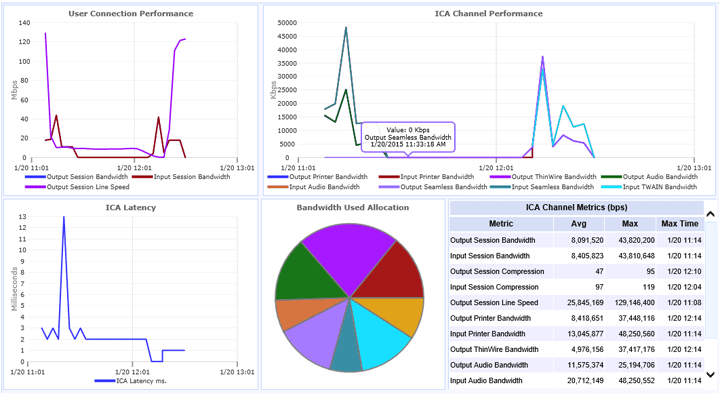
  • A unique feature of Logon Simulator is being able to drill down into the details of the individual ICA channels, which makes it easier to identify the activities of the end user when performance issues occurred. This is useful for troubleshooting slow sessions in general and not just the logon performance.

The product provides many built-in reports. I won’t cover each one here but some important ones to note are the End-to-End Connection Report which gives details about the specific components that were touched during the logon process, from the type of device the end user is working from to the server the session was brokered to and how long it took to get there. The ICA Latency Report (previously mentioned and shown pictured above), and the End User Activity report which gives details on the number of sessions and the length the sessions ran.

At the time of writing the Logon Optimization whitepaper there wasn’t a technology that could preemptively logon with synthetic users to identify potential performance issues before real users attempt to logon. I can see great value in this technology to fundamentally change how Citrix Administrators manage and troubleshoot logon issues.

To see a live demo of the Logon Simulator, please watch our pre-recorded webinar, Introducing the Goliath Logon Simulator for Citrix. You can also get a fully supported free 30-day trial or personal demo.

If you have any questions about the Goliath Logon Simulator or you need help troubleshooting a Citrix end user logon issue please leave a comment. Thank you.

Product Review: MEDITECH Application Performance Monitoring

Product Review: MEDITECH Application Performance Monitoring

Product Review: MEDITECH Application Performance Monitoring

The new MEDITECH Performance Monitoring Module from Goliath Technologies is the Healthcare IT industry’s first software purpose built to troubleshoot and resolve MEDITECH performance issues.

One of our long standing customers was using the Goliath Performance Monitor in their virtual infrastructure and began experiencing performance issues with their MEDITECH EHR/EMR. Our customer worked with MEDITECH support to troubleshoot and resolve their performance issues, but to no avail. What they discovered is a blind spot where the MEDITECH role servers were concerned, making resolution impossible.

In response, our software architecture and technical teams worked with our customer to build a proactive MEDITECH performance module that has purpose-built monitors, alerts, dashboards, and reports that easily install, right out of the box. They designed the module to provide the same visibility regardless of whether the MEDITECH servers are on-premises or hosted with organizations like Park Place or Dell’s MSite.

Proactive MEDITECH Performance Monitoring

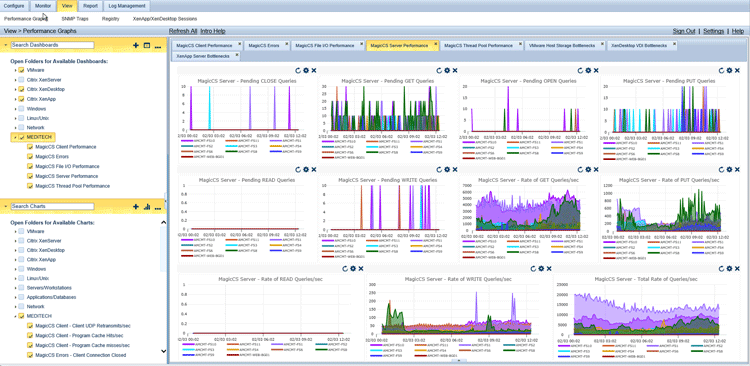
By correlating MEDITECH data, Citrix XenApp & XenDesktop infrastructure, and end user experience metrics, our customer was able to proactively monitor the MEDITECH application and supporting infrastructure in a single console. Then, because the data is in a central location, if there is a performance issue the administrator can easily determine root cause of the issue whether it is infrastructure, Citrix, or MEDITECH related.

Goliath-MEDITECH-Performance-Module-Report

The customer, upon deploying Goliath’s MEDITECH Module, was able to send to MEDITECH their support log files, written in MEDITECH code, when they opened up a support task. This data was able to help them fix the issue. In fact, this was so valuable that MEDITECH support began to login to our product to assist in troubleshooting.

Becoming a Proactive Healthcare IT Operations Admin

To truly get proactive, you have to correlate performance data from MEDITECH as well as the underlying Citrix delivery infrastructure, including virtual servers and desktops, in a single console. This broad and deep visibility will allow you to anticipate, troubleshoot, resolve, and ultimately prevent MEDITECH end user performance issues.

You can get a fully supported free 30-day trial or personal demo of Goliath’s Proactive MEDITECH Performance Monitoring Module.