Leading not-for-profit health system isolates and resolves speed & reliability of Citrix related Epic and ChromeOS device issues
Leading not-for-profit health system isolates and resolves speed & reliability of Citrix related Epic and ChromeOS device issues

How We Did IT

Leading not-for-profit health system isolates and resolves speed & reliability of Citrix related Epic and ChromeOS device issues 

Leading not-for-profit health system isolates and resolves speed & reliability of Citrix related Epic and ChromeOS device issues

“We are having major issues with slowness and response times on our new Windows 10 Desktops, these Desktops replaced the Windows 7 Epic Desktops that are no longer compliant.” – Citrix Administrator

Infrastructure

Epic, Citrix, Windows 10, ChromeOS


Challenge

The Citrix team was in the process of upgrading older, out of compliance Windows 7 Epic Desktops to new compliant Windows 10 Desktops. During the rollout, several clinicians began experiencing poor speed & reliability accessing Epic via Citrix. The problem persisted for about two weeks as they tried targeting images, running Citrix Optimizer and following its recommendations (disabling services and applications), as well as reaching out to Epic and following their recommendation to turn off certain telemetry. Unable to resolve their issues, they reached out to Goliath. The Citrix team lacked the necessary visibility to isolate root cause of the issues and needed a purpose-built HIT observability solution to overcome blind spots. 

Solution

The IT & Goliath teams met to discuss requirements and outcomes and once agreed upon, began the deployment and configuration of Goliath in the upgraded Citrix environment. Within 20-minutes of deployment, Goliath was able to isolate three areas that were causing performance issues. 


While observing a clinician who had recently complained about poor Epic speed & reliability, they filtered by his sessions and immediately notice the client devices are ChromeOS devices coming from multiple Client IP addresses (this clinician is badging in and out of patient rooms with stationary ChromeOS devices in each room). 
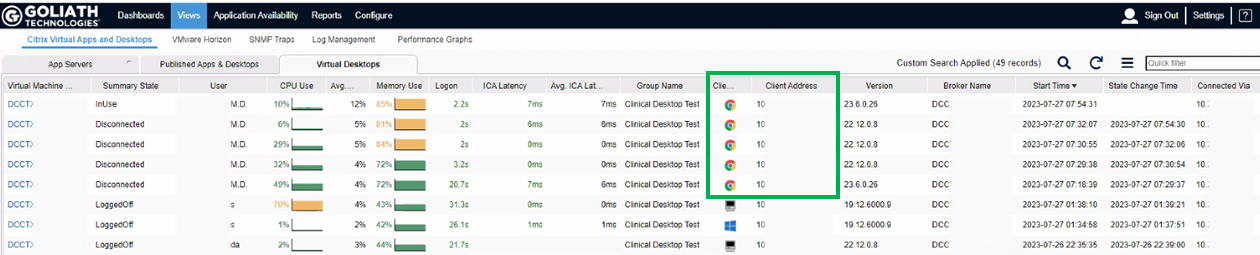
 

Device Inventory

Since Goliath has the industry’s only capability of monitoring ChromeOS devices, upon analyzing the clinician’s sessions, they were able to rule out ChromeOS devices as the root cause and discovered the following items that were likely causes of poor speed & reliability. 

  1. High memory utilization on the XenServer Host that was supporting the clinician’s session. We can see below that memory for the host was above 93%. This seemed to be consistent across multiple XenServer Hosts. 
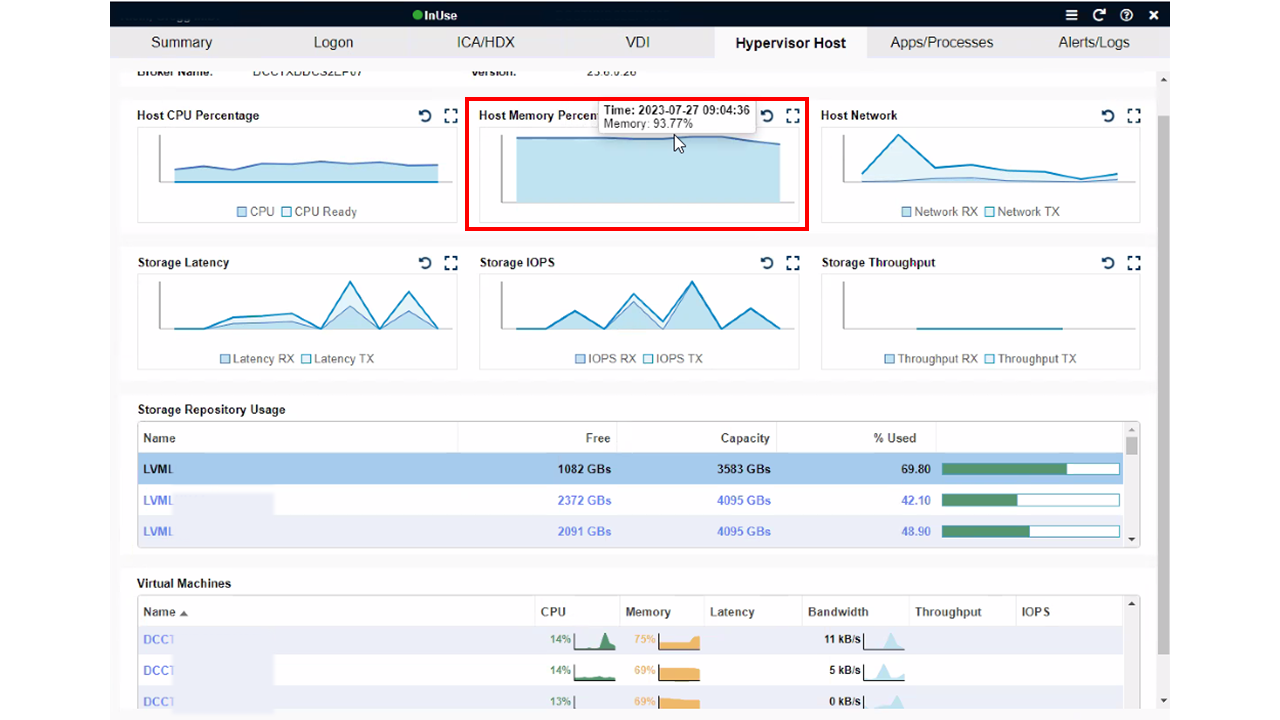
High Host Memory

2. There was also high memory usage on the VDI the clinician was using, typically above 80%. They were then able to identify the processes that were the source of the high memory usage, and Epic and Chrome were at the top of the list. 
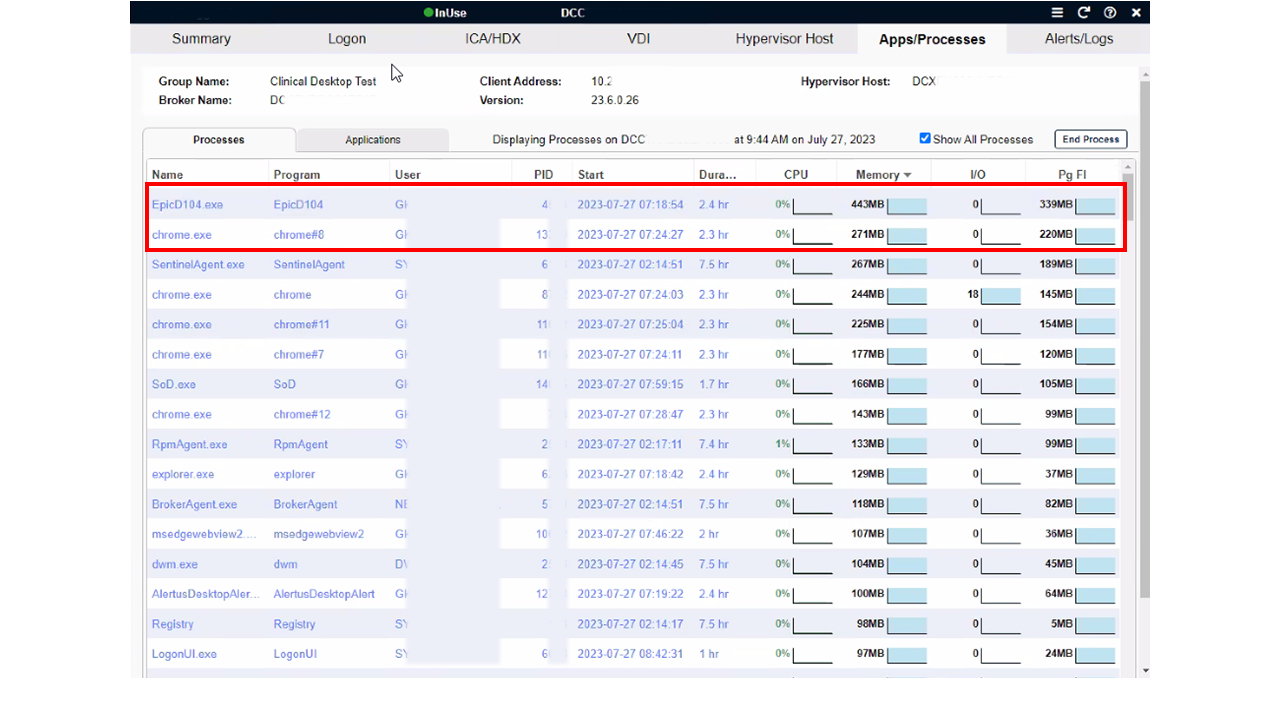
 

High VDI Memory

3. Seeing the clinician’s session data correlated into a single view made it easy to identify user behavior as a third contributor to poor Citrix session performance. There was a significant amount of bandwidth being used in portions of the session and on average, between 20-30 Mbps of connectivity for the Citrix session. That is typically enough bandwidth for basic usage, but if the user is performing actions that are consuming excessive amounts of bandwidth, the result is a less-than-optimal experience. 

a) High levels of audio bandwidth being leveraged, both inbound and outbound (Dragon Dictation likely being used). Any slowness here can negatively impact user experience. 
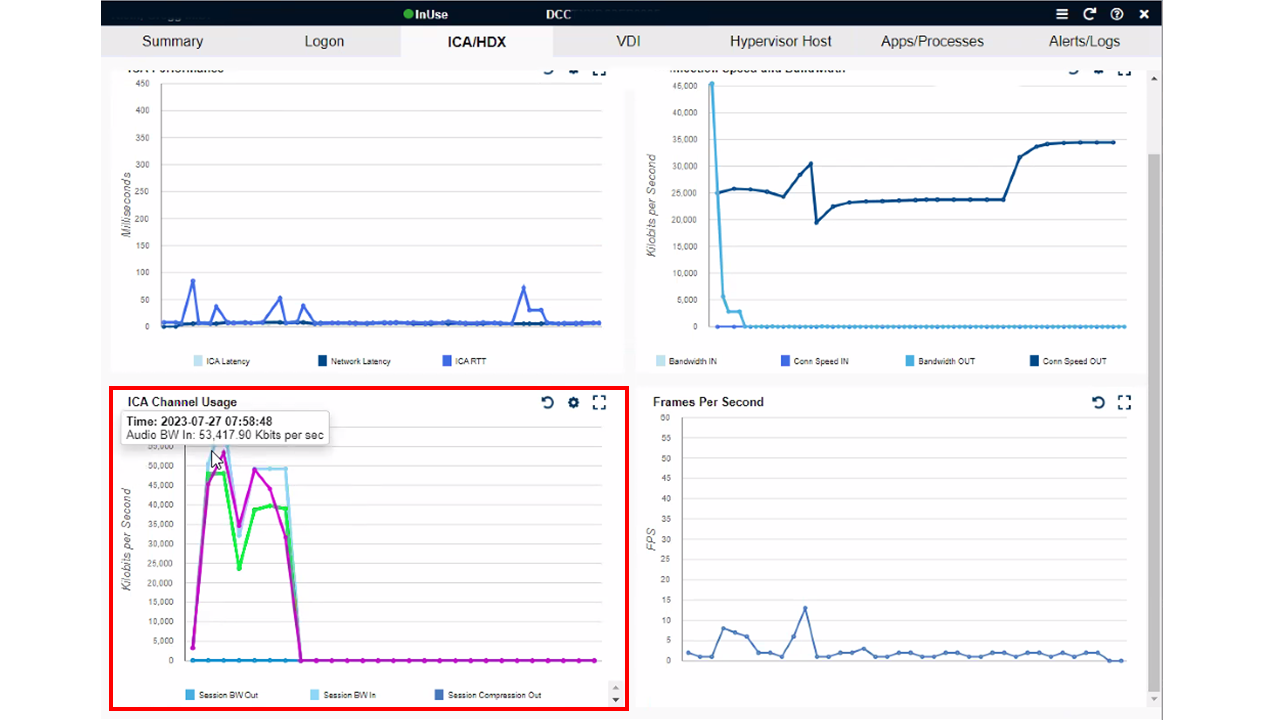
 

High Audio BW

b) There was also an excessive amount of printer bandwidth being consumed. Based on the levels observed, these were very large print jobs. The IT team immediately thought of different ways they could alter their print spooler configuration as a result of seeing this data. 
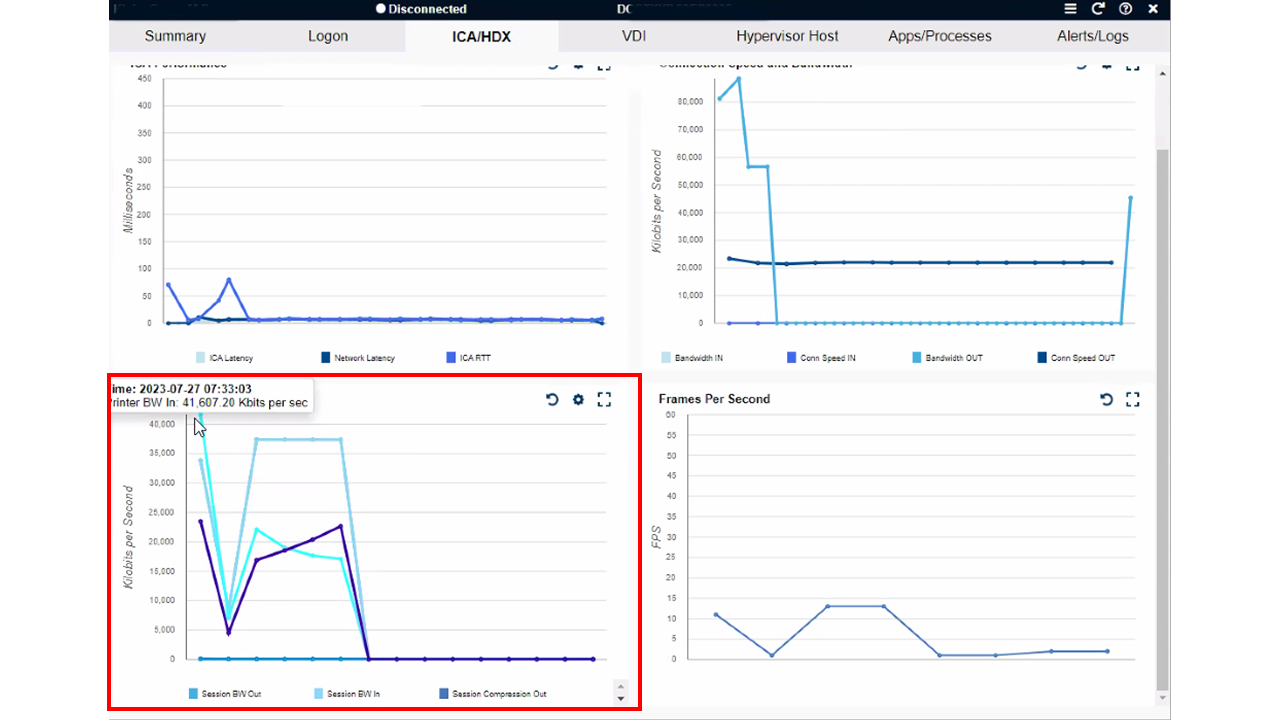
 

High Printer BW

Results

The health system was able to leverage Goliath to pull in a subset of the new Windows 10 environment (including hypervisor layer), and within 20 minutes of deploying Goliath were able to isolate root cause of the poor Epic speed & reliability experienced by their clinicians; memory usage on XenServer Host, memory usage on the VDI, and user behavior. Goliath has provided their IT support team with detailed telemetry that was not previously possible. By correlating data from the Citrix session, underlying IT delivery infrastructure, user behavior, and ChromeOS device, the IT team now has levels of visibility they didn’t have prior to Goliath and can now further optimize their end user clinician experience. This is only possible from a purpose-built HIT observability solution. 

If you are having end user experience issues with your clinical or business applications reach out and let’s discuss. We find and fix very specific issues and in a discovery conversation we will let you know if we can assist. If the issues you are experiencing are outside our purview, we will share that as well.

Learn more about our EHR Speed & Reliability Improvement Program.

Cadaceus Medical Symbol

ABOUT ORGANIZATION

One of the largest healthcare networks, renowned for its commitment to providing comprehensive, patient-centered care. With a wide range of medical services and a focus on innovation, it plays a vital role in enhancing the well-being of the communities it serves.

Headquarters location: USA
Hospitals & Facilities Locations: >520
Employees: >35 000
Industry: Healthcare
Risks for Health IT Running Outdated Citrix Receiver/Workspace

Risks for Health IT Running Outdated Citrix Receiver/Workspace

Citrix CTP Blog

Risks for Health IT Running Outdated Citrix Receiver / Workspace App

Written By George Spiers
blog banner

Over the past couple of years, I’ve carried out several audits on healthcare customers’ Citrix Virtual Apps and Desktops or DaaS deployments, and one of the checks that consistently stands out is the use of older Citrix Receiver and Workspace app versions connecting to the environment.

Usually, the organization won’t have just one consistent version being used to connect to their Site. Instead, there is a mixture from the latest current release right down to old versions such as Citrix Receiver 4.2, 4.9, Citrix Workspace app 1809 and 1812. The reason for the mixture is often because healthcare organizations allow uncontrolled devices to connect to their environment remotely. This has become especially common since the Covid-19 pandemic set upon the world, where many staff members would suddenly find themselves working from home on their own devices. Those devices are owned by the end-user, not the organization, thus software deployment mechanisms to enforce versioning control is non-existent. Another example is where health organizations have 3rd party contractors, vendors, or other health institution personnel connecting to their Citrix environment, and these endpoint devices are managed by another IT department. I experienced this first hand supporting isolated Citrix infrastructure that allowed staff from other hospitals in the country to connect in, and 3rd party vendors who supported clinical systems to be used within the hospital.

These aren’t the only scenarios, however; some environments have little in the way of different versions connecting, but the endpoints that do connect are managed by the organization and simply run outdated versions.

Should we let this continue to happen, but place more focus on keeping the core Citrix Virtual Apps and Desktops components e.g., StoreFront, Delivery Controller, Licensing, up to date? Why do we need to update our clients to the latest versions of Workspace app? For several reasons it is important to keep on top of Workspace app updates. An organization should have a tried and tested automated approach to deploying new versions of Workspace app to their managed endpoints at least 1-2 times per year. For unmanaged devices, it is advised to either discuss with other Health IT teams or hand out guidance to the end-users themselves on how they should and can keep their own siloed Workspace app deployments up to date.

I’ll discuss a couple of the reasons as to why it is important to not be that health environment that continues to run any Citrix Receiver versions, let alone old versions of Workspace app. For clarity, Citrix Receiver was rebranded to Workspace app some time ago, so if you still have ‘Citrix Receiver’ installed on your endpoint, you really are running old versions!

Potential Impact on End User Clinician Experience and Organizational Security

Lack of Feature Support

Want to make use of Teams optimization or Browser Content Redirection? One health client I supported rolled out Microsoft Teams to replace Zoom not long after Teams was starting to gain popularity, and Teams on Citrix requires a minimum Workspace app version to run effectively. As Citrix releases new functionality and enhancements to Virtual Apps and Desktops, there may be a requirement to introduce supporting code in Citrix Workspace app. Citrix won’t cover all versions of Citrix Receiver and Workspace app that have ever been released, especially when most of these versions are no longer officially supported. Therefore, there will be a minimum version of Workspace app that you need to have installed on your machine before you can make use of said functionality. When your users continue to run older versions of Citrix Receiver or Workspace app, they may miss out on these functionality and performance improvements.

The following list includes some functionality that has been released over the past couple of years that requires a minimum version of Workspace app.

Feature Minimum Supported Workspace app (Windows Only)
Browser Content Redirection 1809
Optimization for Microsoft Teams 1907
Adaptive transport 2105
Service Continuity 2109
App Protection 2002
Drag and Drop 2002
HDX Direct 2303

Security Vulnerabilities

Yes, security vulnerabilities affect Citrix Receiver and Workspace app too. If you are running those older and unsupported versions, then it’s likely that you have a piece of software on hundreds or thousands of corporate endpoints that has a known vulnerability exploitable by attackers. Healthcare organizations are not exempt from attacks, in fact some of the most sophisticated attacks have been carried out on healthcare organizations resulting in devastating impact to patient care.

Upgrading to the latest versions of Workspace app will include patches for such security vulnerabilities. Here are some of the recent vulnerabilities affecting certain Citrix Receiver and Workspace app versions so that you have an idea where you are impacted.

CVE ID Version of Workspace app impacted (Windows only)
CVE-2020-14884 Before Long Term Service Release 1912
CVE-2020-13885 Before Long Term Service Release 1912
CVE-2021-22907

Before Current Release 2105

Before Long Term Service Release 1912 CU4

CVE-2023-24484

Before Current Release 2212

Before Long Term Service Release 2203 CU2

Before Long Term Service Release 1912 CU7 Hotfix 2

CVE-2023-24485

Before Current Release 2212

Before Long Term Service Release 2203 CU2

Before Long Term Service Release 1912 CU7 Hotfix 2

Supportability

Citrix Receiver is long out of support, and many Citrix Workspace app versions are no longer supported as well. When a product is not supported, you will no longer be able to avail of bug fixes, enhancements, or security patches unless you perform an upgrade. If you have any issues within your environment that is deemed to be related to Citrix Receiver or Workspace app, then you may not be able to get technical support from Citrix and likely will be asked to upgrade the product to a supported version.

Check out the Lifecycle Milestones for Citrix Workspace app and Citrix Receiver: https://www.citrix.com/support/product-lifecycle/workspace-app.html

There are two product lifecycles known as Current Release (CR) and Long Term Service Release (LTSR). CR versions are often released every three months and will typically reach End of Maintenance (EOM) once the next version of Workspace app is released, and End of Life (EOL) 18 months after the release date.

LTSR versions each have a three-year lifecycle, and new LTSR versions are typically released every 18-24 months.

As of the time of writing, here are some lifecycle dates for Citrix Workspace app.

Citrix Workspace app version (Windows only) EOM EOL
2307.1 Current Release Upon next release February 12th, 2025
2204.1 Current Release May 16th, 2022 November 7th, 2023
2203.1 Long Term Service Release Upon next release March 23rd, 2025

Compatibility Issues

Citrix frequently release new functionality via DaaS and new versions of Virtual Apps and Desktops. Only supported versions of Workspace app are officially compatible with DaaS and supported versions of Virtual Apps and Desktops, thus there is an increased risk that you could run into compatibility issues if you do not upgrade to the latest versions of Workspace app. Such compatibility issues could range from connection failures to application crashes or other issues.

Often in healthcare environments the Citrix session hosts will have a number of components and drivers installed to interact with peripherals on the users’ endpoint such as dictation devices, foot pedals, and microphones, thus it is important to align with vendor best practice recommendations and be on a supported Citrix Workspace app version in case any issues arise.

Also, do you remember when Citrix stopped accepting TLS 1.0 and 1.1 connections to Citrix Cloud? Customers had to ensure that they upgraded their endpoints to run minimum versions of Citrix Receiver / Workspace app that supported TLS 1.2, or else deploy StoreFront in their resource locations. If you keep on top of your Workspace app upgrades, then you are being proactive rather than reactive to such situations that are likely to again present themselves in the future.

Denial of Environment Access

Health organizations are exploring all types of ways to better secure their environment. This includes securing the front door access, in other words, posture checking devices before they are allowed to connect to the environment. Citrix Device Posture service is one of the newer cloud-based solutions that allows an organization to easily enforce governance on endpoints, ensuring that they must meet certain requirements before being allowed access to resources such as Virtual Apps or SaaS apps.

Organizations may impose restrictions on endpoints that run older versions of Citrix Receiver or Workspace app. If a version of Workspace app has vulnerabilities, and is not supported by Citrix, or does not support certain enhancements and features such as Microsoft Teams Optimization, then to protect the environment, access could be entirely or partially restricted to resources unless the entity or individual that manages that endpoint upgrades Workspace app to a later version. This can certainly be useful in healthcare where a multitude of devices connect into the Citrix environment, but one must be careful not to unintentionally prevent productivity and patient care being provided.

It’s a balancing act and good ongoing communication to all users of the system is important so that users know what versions they should be running now and in the future.

Integration Challenges

Often third-party software vendors will mandate that you have a particular minimum version of Workspace app installed on your endpoints to be compatible with their software. In the past with my experience working in the Healthcare industry, I’ve come across many different agents and drivers that need to exist on the Citrix Virtual Delivery Agent (Session Host) and talk back to the endpoint, via a custom virtual channel for example. These integrations are often critical in providing clinicians with the functionality that they need to provide great patient care, so it is imperative that you align with such requirements to avoid potential compatibility issues such as features or functionality not working correctly, or sporadic issues arising that are difficult to audit and find root cause for.

Performance Problems

As I mentioned previously, some enhancements to the Citrix suite of products require that you run a minimum version of Workspace app to avail of them. By simply having a recent version of Workspace app deployed to your managed endpoints, your users can take advantage of some recent performance improvements to the HDX stack, such as:

  • HDX Adaptive Transport. Requires a minimum of Workspace app for Windows 1907. Designed to combat challenging WAN conditions and improve overall session performance for all types of connections, this feature uses Enlightened Data Transport, a Citrix-proprietary transport protocol that is built on top of UDP to transport ICA data for all virtual channels between the Citrix Virtual Delivery Agent and endpoint.
  • HDX Adaptive Throughput. Requires a minimum of Workspace app for Windows 1811 or later. This feature intelligently fine-tunes the peak throughput of the ICA session by adjusting output buffers. The number of output buffers is initially set at a high value, which allows ICA data to be transmitted to the client endpoint more quickly and efficiently, which in turn allows for improvements in file transfer performance, video playback, and general interactivity with an ICA session. This can be useful for consultants who work from home and analyze high-resolution X-Ray images, for example.
  • EDT Congestion Control. Whilst currently still in Tech Preview, this enhancement aims to provide end-users with better in-session responsiveness, visual quality, and frame rate. Overall, the end-user would receive a better end-user experience particularly if they are connecting to their Virtual App or Desktop over a connection that is suffering from high latency and/or packet loss. Required a minimum of Workspace app for Windows 2303, but that may be subject to change once the enhancement is made generally available.

Steps to Consider

Addressing modern HIT challenges may require a third-party solution purpose-built for HIT. Goliath Technologies is a powerful tool that will empower HIT teams to anticipate clinician experience issues before they happen by leveraging intelligence and automation, isolate root cause and troubleshoot quickly when issues do arise with correlated data across the entire delivery infrastructure, and provide documented objective proof so permanent fixes can be put in place and IT can objectively report on the quality of the clinician experience they are delivering.

Some ways Goliath can help HIT address client issues:

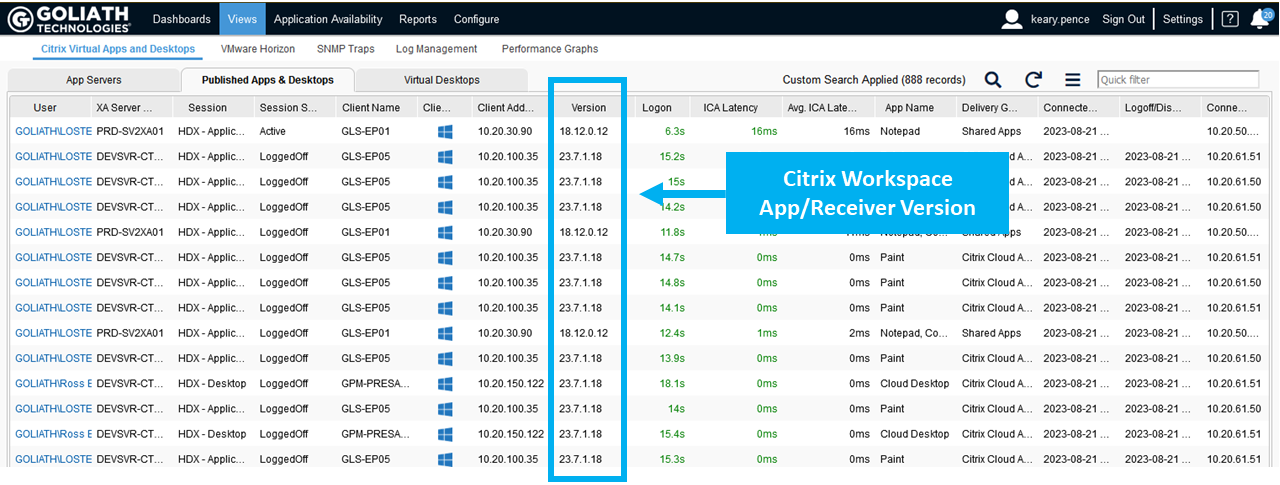
  • View client version across your inventory: with Goliath Performance Monitor you can quickly check the Citrix Receiver and Workspace App versions used by your end users and plan remediation actions for outdated client software.

Citrix Receiver Version Views


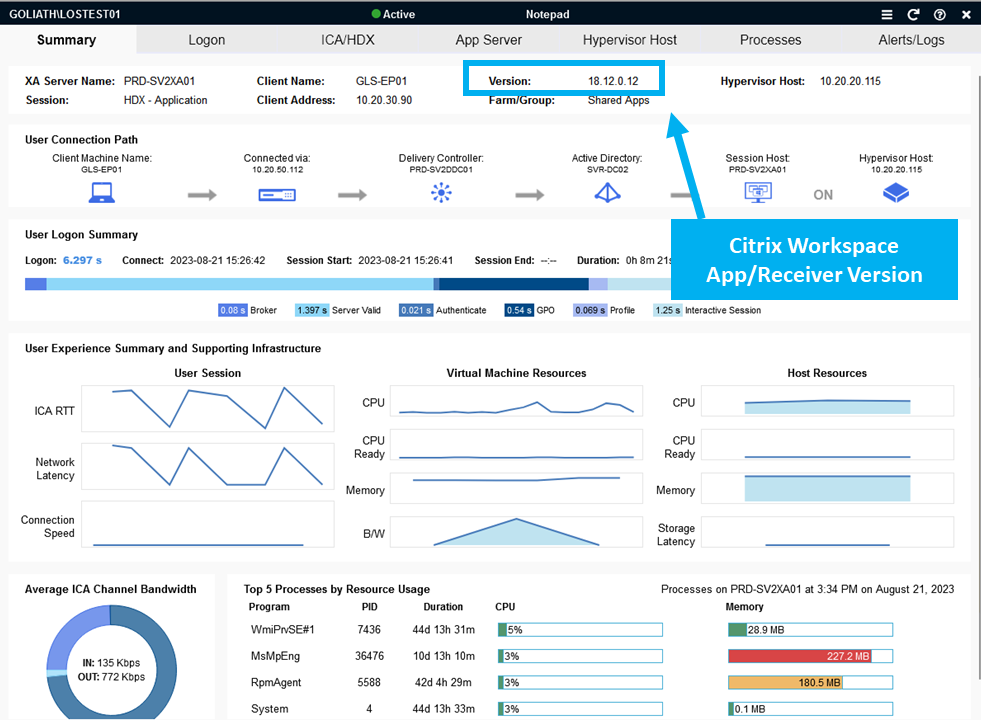
  • Deep end user experience telemetry correlated across the entire delivery infrastructure: Goliath Performance Monitor enables the correlation of client software versions and reduced performance by presenting this information in a single (summary) pane.

Citrix Receiver Version Summary


Summary

This article has explained various important reasons as to why you should strive to keep Workspace app updated across all of your health organization’s managed endpoints. Of course, one of the benefits of a Citrix environment is the work from anywhere and from any device possibility, meaning that for those unmanaged endpoints, which the majority of health organizations do have connecting to their Citrix Virtual Apps and Desktops / DaaS environments, then some solid guidance either via ‘Remote User Guides’ or ‘Acceptable Use Policies’ can help reduce or eliminate the use of outdated Workspace app versions. The same applies when an organization has third-party vendors or contractors connecting to the environment, which is again very common in healthcare to support the wide array of application systems in use.

With the running of the latest Workspace app, end-users can avail of the latest security enhancements, product features, bug fixes, performance and stability improvements, all whilst being within vendor support boundaries.

For more information about Goliath Technologies, you can visit their website www.goliathtechnologies.com or reach out to techinfo@goliathtechnologies.com.

Chris Hughes

George Spiers

Citrix CTP, Citrix Certified Expert in Virtualization (CCE-V), Citrix Certified Expert in Networking (CCE-N), and  Microsoft Certified Solutions Expert. 

Try Goliath For Free

Experience true end user experience monitoring and troubleshooting free for 30 days.

Health System Reduces Logon Times for Epic Hyperspace by >50%

Health System Reduces Logon Times for Epic Hyperspace by >50%

How We Did IT

Top 5 Largest Non-Profit Health System Improves Epic Hyperdrive Speed and Reliability by reducing Citrix Logon Times by >50%

Top-5-Largest-Non-Profit-Health-System

Infrastructure

Epic Hyperdrive*, Citrix


“With Goliath, we were able to take corrective action to dramatically improve our clinicians experience around speed and reliability and Epic Hyperdrive.”

– Director of Citrix System Engineering Team, Non-profit Health System

Challenge

The IT Incident Response Team was investigating multiple instances where end users were reporting slow logon performance when accessing Epic Hyperdrive via Citrix. In all cases, the account in use was a generic unassigned account presenting a challenge for the IT team in pinpointing the root cause of the Epic Hyperdrive speed & reliability issues.

While not initially apparent based on submitted support tickets, these issues were intermittent spanning 10 health systems, over 60 locations, and more than 37k users. There was significant impact to speed & reliability of Epic Hyperdrive and other clinical applications using Citrix to provide access.


Solution

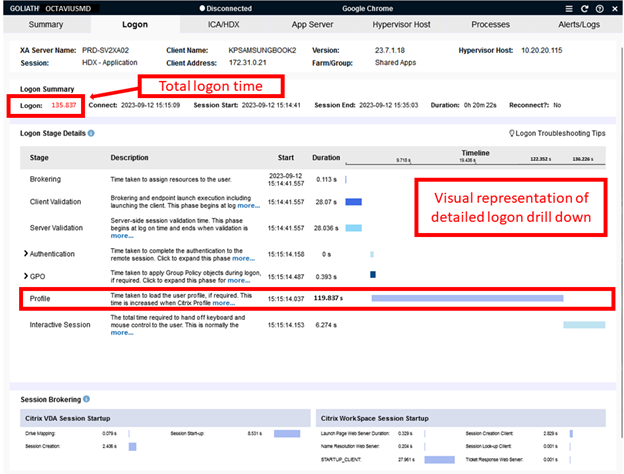
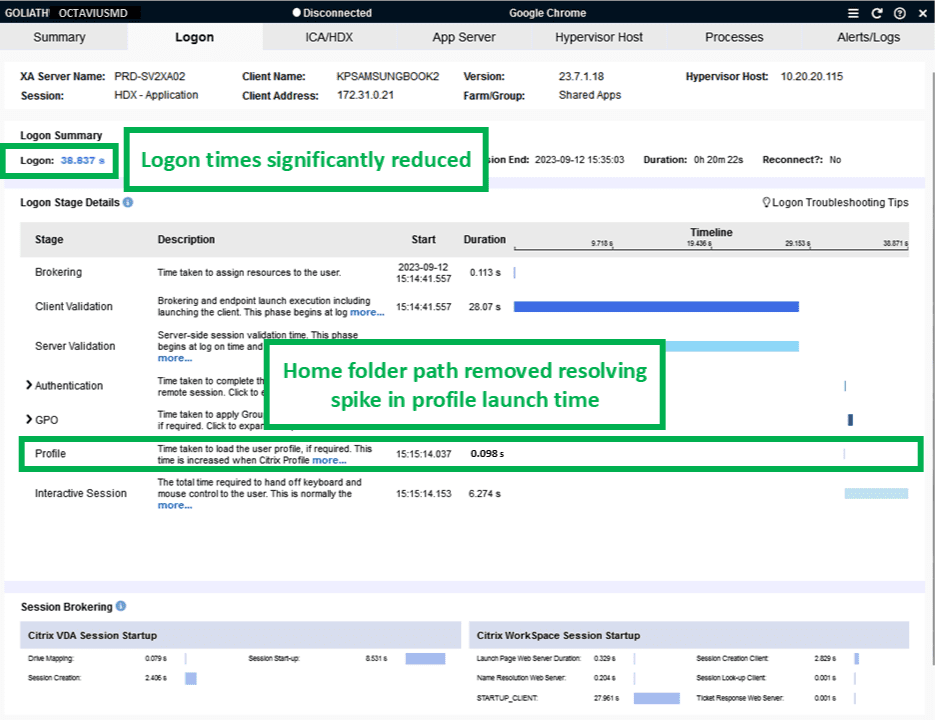
The IT team leveraged Goliath’s AI-enhanced contextual data to help isolate the root cause of the logon issues, giving them the necessary information to permanently resolve the problem. Goliath was able to identify repeated Citrix and Epic Hyperdrive login failures followed by a successful, but relatively slow logon, for these accounts. Goliath also identified this was happening from multiple devices. Drilling into the failed sessions, it was immediately clear that the “profile load” stage of the Citrix logon was taking too long. Even with successful Citrix logons, the profile load time was extremely high.


Citrix logon

This health system uses local profiles on Epic Citrix servers, and this step in the logon process should be completed within 1-2 seconds. Looking at the Active Directory object for that account, they found a defined home folder path that should not be there. The identified path does not exist on the network and as a result, users were forced to wait for Windows to time-out the home drive connect action before eventually being logged into their workstation, or having their Citrix delivered applications connect.

As this path was a legacy carryover from a Google Drive migration, they opened a Priority 2 ticket and then implemented an emergency change to remove the path from the Active Directory object resolving the forced timeouts and long logon times.

Additionally, this problem had been previously reported by users; however, lacking the necessary data, the team was unable to identify the root cause and put permanent fixes in place.

Results

Since the time they implemented the change, they’ve seen the logon times for that account reduced by 50% or more.

Profile Load 2.1.2


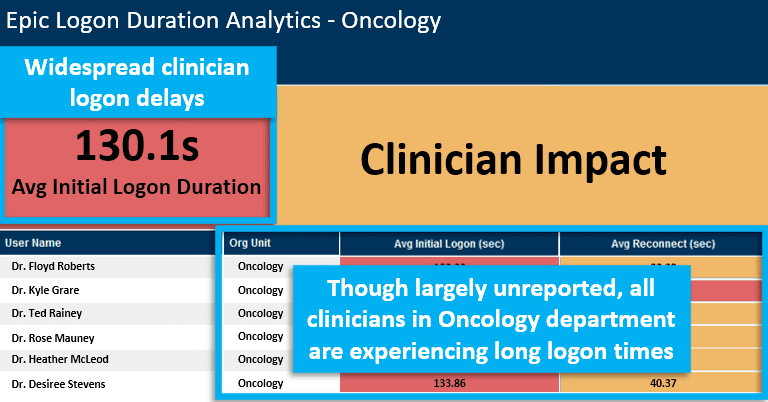
While the reported issue was now permanently resolved, the IT team got proactive and leveraged Goliath’s AI-enhanced contextual data and Citrix Fault Isolation reporting to identify all users who were experiencing Epic Hyperdrive speed & reliability issues. It was immediately apparent that the original issue, while not widely reported, was in fact a widespread problem.


LOD Epic

They immediately kicked off an initiative to identify and resolve user path issues. In addition, they configured Goliath to alert on Citrix and Epic Hyperdrive logons that extend beyond an acceptable threshold allowing them to resolve speed & reliability issues before end users are impacted.

In the end, they improved Epic Hyperdrive speed & reliability for 37k users.

If you are having end user experience issues with your clinical or business applications reach out and let’s discuss. We find and fix very specific issues and in a discovery conversation we will let you know if we can assist. If the issues you are experiencing are outside our purview, we will share that as well.

Learn more about our EHR Speed & Reliability Improvement Program.


*Epic, Hyperspace, Hyperdrive, and System Pulse are trademarks of Epic Systems Corporation

Cadaceus Medical Symbol

ABOUT ORGANIZATION

This non-profit healthcare organization is one of the largest in the country. It operates an extensive network of medical facilities across the United States, providing a wide range of healthcare services to diverse communities. With a strong commitment to compassionate care and community well-being, this organization plays a vital role in the nation’s healthcare landscape.

Headquarters location: USA (Midwest)
Hospital Locations: >150
Employees: >150,000
Industry: Healthcare

Try Goliath For Free

Experience true end user experience monitoring and troubleshooting free for 30 days.