Performing Comprehensive Root Cause Analysis for EHR Speed & Reliability

Performing Comprehensive Root Cause Analysis for EHR Speed & Reliability

Performing Comprehensive Root Cause Analysis for EHR Speed & Reliability

Performing Comprehensive Root Cause Analysis for EHR Speed & Reliability

Operationalizing KLAS EHR Speed and Reliability Recommendations


By Ryan Oliver, former Research Director at KLAS

This is the second installment in our three-part series on Operationalizing KLAS EHR Speed & Reliability Recommendations. In the article, we explored Phase 1: Proactive Monitoring – detailing how health systems are using Goliath Technologies to move beyond anecdotal reports and gain objective, real-time data about clinician EHR experience. We highlighted how Goliath helps IT teams detect hidden issues such as logon delays and system slowness, even before clinicians submit support tickets.

Now, in Phase 2, we focus on the next critical step recommended by KLAS: performing a comprehensive root cause analysis (RCA). While proactive monitoring tells you that something is wrong, RCA helps you understand why, so you can fix the issue at its source and prevent it from recurring.

Traditional RCA efforts can be manual, slow, and incomplete. Goliath changes that by automating the process with embedded intelligence, delivering precise insights into performance disruptions across the entire IT stack. In this article, we’ll walk through three best practices to fully operationalize RCA using Goliath.
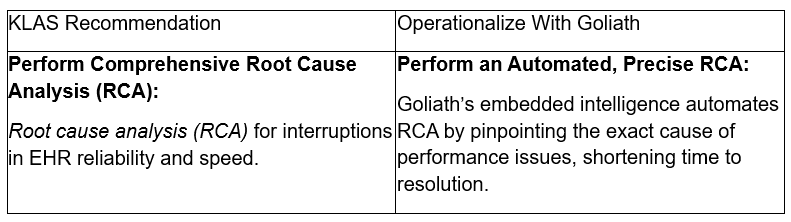
 

KLAS Recommendation

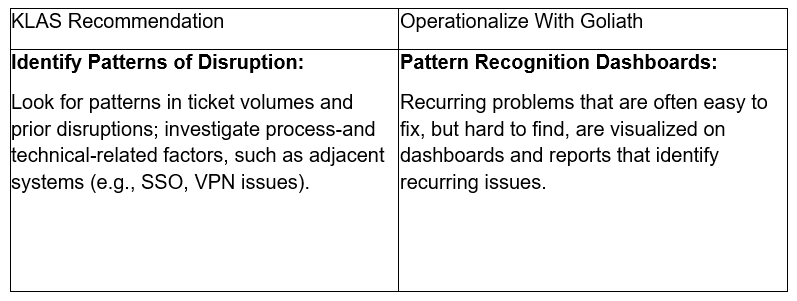
Some of the most frustrating EHR problems are intermittent, easy to fix – but hard to detect. Goliath’s pattern recognition dashboards surface trends in ticket volumes, time of day, user groups, and system interactions. These insights enable IT to stop chasing symptoms and instead eliminate systemic disruptions at their source. 
 

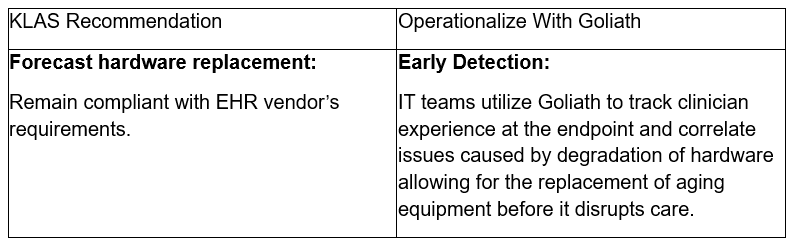
Aging or underperforming hardware can silently degrade clinician experience over time. Goliath correlates device-level performance with user experience to identify hardware issues before they disrupt care. This empowers IT teams to remain compliant with EHR vendor requirements and proactively replace equipment – preventing costly downtime and clinician frustration. 
 

Automating RCA to Drive Faster, Lasting Improvements

Comprehensive root cause analysis is a necessity for healthcare organizations striving to deliver fast, reliable EHR performance.  Goliath automates this process by providing a common set of facts that shows the number of clinicians being impacted, the duration of issues, and the root cause.

An example of this was published in a recent article, by Thomas Charlton, where a top 5 largest non-profit health system was facing widespread Epic Hyperdrive speed and reliability issues, with clinicians experiencing slow Citrix logon times that impacted over 37,000 users across 60 locations. The IT team struggled to pinpoint the root cause due to the use of generic unassigned accounts and intermittent issues spanning multiple health systems. Traditional support tickets did not reveal the full extent or source of the problem, delaying effective remediation.

By leveraging Goliath’s AI-enhanced contextual data and automated root cause analysis, the team identified that long Citrix “profile load” times caused the slow logons. The root cause was traced to a legacy, incorrect home folder path in Active Directory, forcing timeouts during login. After removing this obsolete path, logon times dropped by more than 50%. Furthermore, Goliath’s continuous monitoring enabled proactive alerts for future performance issues, helping the health system maintain fast, reliable Epic Hyperdrive access for all users.

By operationalizing RCA with Goliath, health systems can move from reactive firefighting to proactive performance assurance – ultimately improving clinician satisfaction, reducing support burden, and protecting patient care.

If you are having end user experience issues with your clinical or business applications reach out and let’s discuss. We find and fix very specific issues and in a discovery conversation we will let you know if we can assist. If the issues you are experiencing are outside our purview, we will share that as well.

If you want to learn more, check out our EHR Speed & Reliability Improvement Program.

 

How They Did IT: Identifying & Fixing The “True Root Cause” of Epic Hyperdrive Slowness

How They Did IT: Identifying & Fixing The “True Root Cause” of Epic Hyperdrive Slowness

Identifying & Fixing The “True Root Cause” of Epic Hyperdrive Slowness

Identifying & Fixing The “True Root Cause” of Epic Hyperdrive Slowness

By Thomas Charlton, Goliath Technologies


Part 2 of 2

This two-part blog post tells the story of how we engaged with the second largest nonprofit health system in the US to improve clinician experience with Epic Hyperdrive.

In the first post of this two-part series, we started the Epic Speed & Reliability Improvement Program by establishing a baseline of the clinicians’ actual experience when using Epic Hyperdrive. We use technology to collect and correlate this data across 100% of the users, so it is not a survey or in any way subjective. We are looking at the digital footprint of every clinician to frame up the size of the problems, whether loud and/or broad, isolate root cause, and determine remediation plan based on the findings.

The Analysis

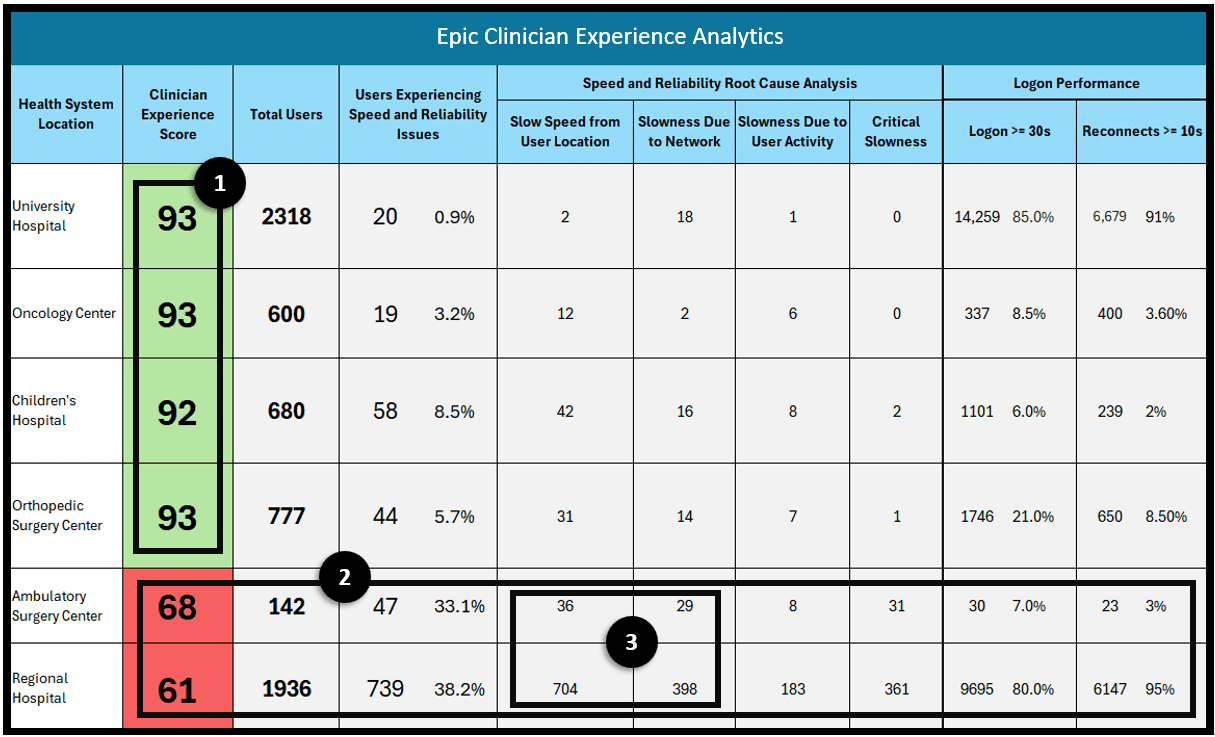
Within the first 48 hours we had our first reports across various locations that we could use for analysis. From the report in the previous post, we focused on the ambulatory surgery center and the regional hospital. We could isolate a few things very quickly:

1. In most locations the clinician experience was acceptable. The issues were isolated to an  ambulatory surgery center and regional hospital. Though this was a small number of clinicians, on a percentage basis the impact was amplified.
2. At the two locations they were experiencing a number of issues including slow logon times and latency when using the application.
3. The issues appeared to be either at the location or the connection path to the Epic Hyperdrive application. We did not think it was Epic or the immediate supporting infrastructure.


Image A: Epic Hyperdrive & Citrix Overall End User Experience Scores 

Epic EUE Summary

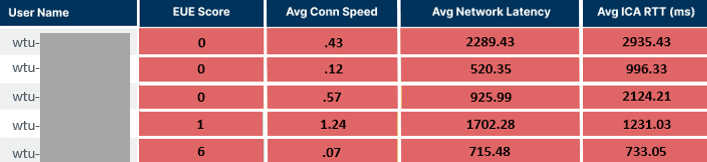
Still within the first 48 hours we consulted another, more detailed report on the users’ experience from that location. When we analyzed the data, we noticed a high correlation of user accounts that started with “wtu” which had some of the worst EUE scores (Image B below). Those accounts are auto logon accounts from Wyse Thin Clients.

Image B: Lowest End User Experience Scores for Wyse Thin Client Users

Epic EUE Summary

This is a sample of the 40k+ users included in the report. This report image shows that almost all the users experiencing slow logons and session latency were Wyse Thin Client users.

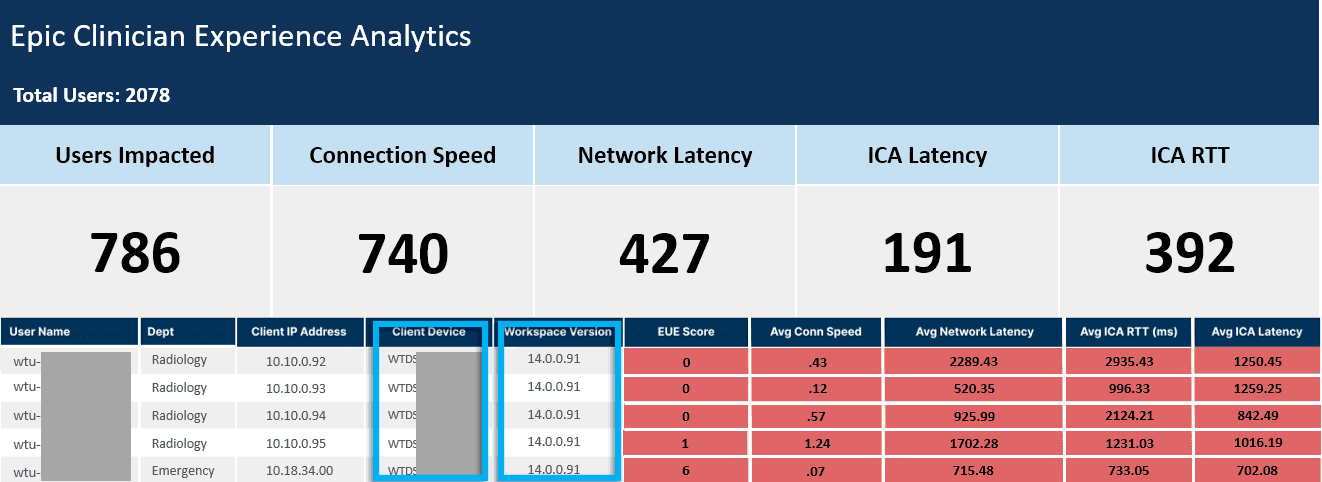
Next, we searched for some of those user accounts that had the worst scores over an extended period to put together trends and we noticed that they were running a Citrix Receiver version that was 10 versions behind and that the Wyse thin clients themselves were also old. Image C

Image C: Poor Performance Correlated Out of Date Client Versions

Epic EUE Summary

When analyzing user sessions, we confirmed consistently high latency, which was a downstream effect of having outdated versioning on Citrix and the thin client technology. These older versions cannot take advantage of the optimization technology enhancements that Citrix has delivered over the last 10 updates.

Remediation Actions

The IT department submitted change requests to update both Citrix and the old Wyse Thin Clients. There was a concerted outreach effort to upgrade the sites and users so within 60 days after the updates were made the issues were resolved. It was significant that test upgrades were made by IT to validate versioning as the root cause and the performance improvement was significant.

There are a few takeaways from this engagement that are significant to note:

  1. Overall, this Epic speed & reliability improvement engagement was initiated because of what were thought to be widespread issues. In fact, the complaints were amplified and only came from two facilities.
  2. Tremendous cost was saved as they were initially suggesting network upgrades to all sites as a potential solution. Once the size of the problems was understood, there was no need for a widespread upgrade.
  3. Within 48 hours suggested remediation actions were proposed and in 60 days chronic performance issues that had been challenging for IT and problematic for clinicians were solved at low cost.
  4. Ongoing, the IT and Clinical teams have access to data weekly that they can use to understand, isolate, and resolve clinician issues.

The Health IT Team and Goliath Performance Consultants did a great job working together to positively impact clinician experience with Epic and corresponding patient care.


If you would like to discuss further, reach out directly at techinfo@goliathtechnologies.com or the author charlton@goliathtechnologies.com


Ryan Oliver

Thomas Charlton

Thomas is Founder and CEO of Goliath Technologies.