How to Troubleshoot “Citrix is Slow” for Remote Workers

How to Troubleshoot “Citrix is Slow” for Remote Workers

Citrix CTP Blog

How to Troubleshoot “Citrix is Slow” for Remote Workers

Troubleshoot Citrix remote workers

By George Spiers, Citrix CTP

The COVID-19 pandemic has disrupted how every business on the planet works. Remote working has become the new normal, and IT needs to adapt quickly to support this somewhat new way of working.

I say new way of working, but it isn’t actually new at all in the grand scheme of things.

People have been working outside of the office, such as from home or other public places, for many years now. Organizations such as Citrix have provided technologies that have helped with achieving this, and many times in the IT industry we hear how the office is now just another place people can stop by to work from.

However, working remotely may now be for many of us the new normal. While there are organizations that previously had staff working from home one or two days a week, these organizations may now have staff working from home full time or the majority of their working week.

On the other hand, some organizations did not have staff working remotely at all. These organizations have had to adapt quickly because of the pandemic, and that may have been a rushed, painful process especially if the organization did not initially have the correct infrastructure in place to allow effective remote working.

Organizations now have staff working from home all over the country, and staff depending on remote technology could be using either their personal devices, or corporate laptops. To support this shift, Citrix Gateway could be configured within the organization’s private or public cloud to allow for secure remote access to virtual applications and desktops. With Citrix Gateway acting as an ICA proxy, staff may be allowed by the organization to use their personal computers, laptops, or tablets such as an iPad.

Other organizations may use the Citrix Gateway for VPN access, and have staff again use their corporate devices, or personal devices subject to posture checking.

IT loses visibility and control

These technologies such as VPN and ICA proxy are great at allowing efficient remote working, however, there are more external factors introduced with remote working that can impact the end-user experience. We now have staff connecting into our datacenters from a range of different internet connections, from 3G, 4G, Wi-Fi hotspots and broadband. This is something corporate IT can’t control.

Further to this, if staff are likely using their personal devices to connect in, those devices in some instances could be the latest and greatest Windows 10 or Apple devices that are fully patched running the latest versions of web browsers and Citrix Workspace app. This is often only a very small percentage of the userbase though, as most devices will run a mixture of operating systems from Windows 10 to Windows 7, and older macOS versions that have not been updated in 3-4 years. I often find these devices also running unsupported versions of Citrix Receiver that simply haven’t been updated since they were initially installed.

Staff still expect that if they can connect to their virtual apps and desktops, that the performance they receive is similar to what they were used to when working from the office. That is, minimal lag, a responsive application that also launches quickly, and is available whenever they need it.

The rise of multimedia

Audio and video technologies such as Zoom and Teams have become much more popular due to the pandemic and staff working remotely. People need to stay in touch daily, from having meetings regarding ongoing projects or simply keeping in touch to prevent feeling isolated.

Usage of Teams has more than doubled in recent months, with now over 70 million active users using it around the world. Bandwidth consumption can range from 30kbps to over 1Mbps depending on if you are audio calling or in a group video call.

It is important to keep in mind that these multimedia platforms do have the ability to consume more of your available bandwidth, and for those staff members who have lower quality broadband in the home, there could be bandwidth contention with your virtual apps and desktop sessions. I should also mention the fact that if you have other members in your household streaming or playing online games from a range of devices, those activities will further add to the bandwidth contention of your home broadband.

The remote worker, returning to the office

Since the initial months of the pandemic, some restrictions are being lifted across different countries and people are allowed to return back to the office, though often in limited numbers.

Some staff are also returning to the office on a part-time basis, but the change of toolsets has created a potential new problem. All these multimedia applications such as Zoom and Microsoft Teams that were adopted for keeping connected will continue to be used even as staff return to the office. Because of this, what starts to happen is that gradually a much higher demand is placed on the office network. The more people that return, the higher the bandwidth utilization is likely to be, higher than ever before.

Users will still also obviously continue to launch their virtual apps and desktops whilst in the office, but with the much higher bandwidth contention with peers, the ICA channels could be impacted, causing slow application launches, slow in-session performance and so on.
Ultimately, the risk of tickets reaching the desk for “Citrix is slow” problems may be more common.

Pinpointing the slowness

From an IT perspective, Citrix admins need to be able to pinpoint where the slowness is coming from when an end-user reports that “Citrix is slow” from the office or remote. Is it the home network the user is connected from, the user’s personal device, the entire corporate office, or something in the datacenter with the Citrix VDAs?

For example, it could be the end-users home network due to household members using Wi-Fi for streaming and playing video games, leading to bandwidth contention which is impacting the end-users ICA session to their virtual apps and desktops.

On the other hand, it could be that the end-user’s personal device is running poorly. Maybe it is running on quite old hardware, or there has been a lot of third-party software installed on the device which is causing high RAM or CPU utilisation. Such problems can impact the launching and in-session ICA performance, however the end-user may report to the helpdesk that Citrix is slow, not knowing that it is caused by their own device. This leads IT down the wrong path from the beginning.

Also, staff may now be reporting slowness after a return to the office, with the usage of Zoom and Teams still high, because the network infrastructure was not designed for the larger amount of traffic end-users are now pushing through it.

IT needs purpose-built monitoring tools to help pinpoint where the issue lies and to quickly rule out if the issue is not with Citrix at all.

How ICA channel, network, and latency monitoring help

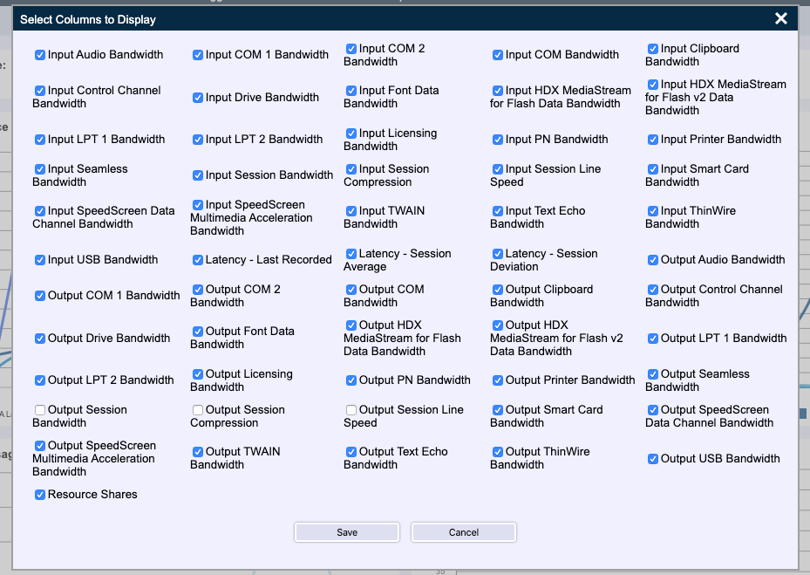
A purpose-built monitoring tool that can monitor each of the individual ICA channels, the end-user’s network, and latency is a powerful solution to have at your disposal. Goliath Performance Monitor, for example, has such ability to monitor each channel and you can be selective about what channel to investigate when troubleshooting.  
 

Troubleshoot Citrix remote workers

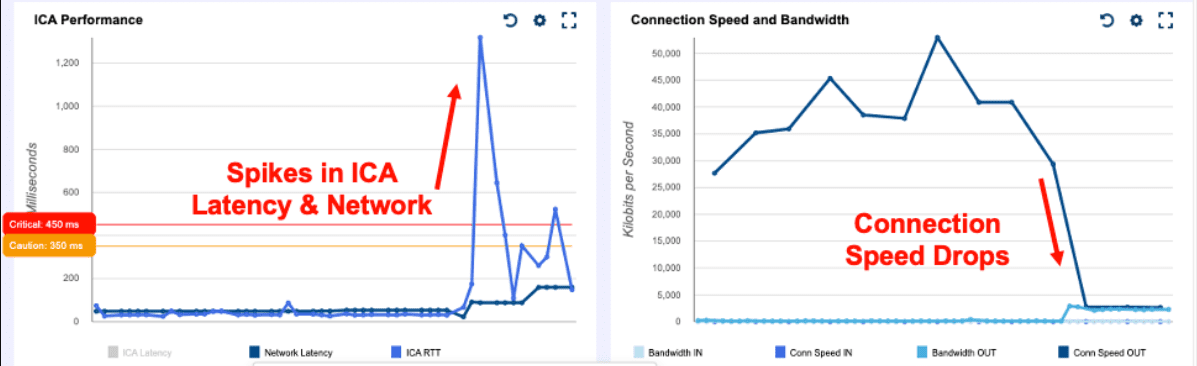
In the below example, an end user reported that their session became slow suddenly and wanted to know what happened. Upon review, we can see that the end user experienced a sudden spike in network latency, which caused the ICA latency to jump up.

At the same time, we were able to see that the user’s connection speed dropped simultaneously, which we can correlate to the sudden spike in network latency. Obviously, something happened on the end-users network at that time to cause a drop, which could have been a burst in demand for available bandwidth or just temporary slowness from any of the hops coming into the organization’s datacenter.
 

Troubleshoot Citrix remote workers

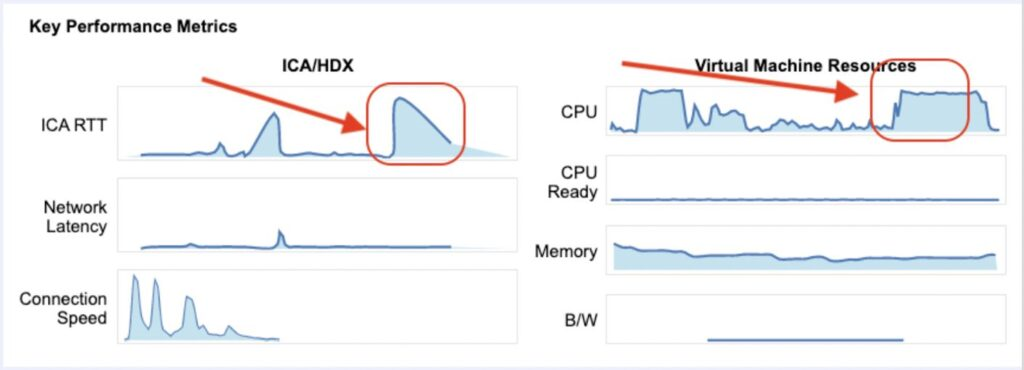
Finally, in this example, an end user similar to the scenario before encountered a sudden spike in ICA RTT latency, but this time it was not actually anything user-side which caused the problem.

Upon comparing the VDA CPU utilization the end user was connected to at the time, we can see the CPU usage increase for a period of time that matches when the ICA RTT latency jumped. This eliminates any doubt over the end-user connection, which can also be tracked under Network Latency and appears to be very stable throughout.
 

Troubleshoot Citrix remote workers

Summary

Remote working, and higher usage of multimedia solutions are here to stay. What that also means is troubleshooting slow session and end-user experience issues is not going away any time soon.

Luckily, there are solutions out there that can help assist and guide Citrix admins to typical “Citrix is slow” resolutions so that you don’t spend any extra time troubleshooting, especially when you cannot see the full picture for those users remotely connecting from various internet links and from personal devices.

As you can see from these examples, with actual data-driven proof you can quickly isolate root cause, have your users back up and running quicker and spend less time troubleshooting end-user problems.

To learn more about how to troubleshoot “Citrix is Slow” by understanding data from ICA/HDX protocol, check out this Technical Guide to Citrix ICA/HDX sponsored by Goliath Technologies.

This post was originally published on JGSpiers.com.

Chris Hughes

George Spiers

Citrix CTP, Citrix Certified Expert in Virtualization (CCE-V), Citrix Certified Expert in Networking (CCE-N), and  Microsoft Certified Solutions Expert. 
Goliath Partners with Automai for App Performance Monitoring

Goliath Partners with Automai for App Performance Monitoring

Goliath Partners with Automai for App Performance Monitoring


IT Pros can work with Goliath to monitor and troubleshoot end user experience within applications.

Philadelphia, PA and Los Angeles, CA – August 25, 2020 –  Goliath Technologies, a leader in end user experience monitoring and troubleshooting software, and Automai, specialized in application monitoring, today announced their partnership to extend Goliath’s solution to provide visibility into users’ experiences working within applications. Organizations leverage Goliath’s software to anticipate, troubleshoot, and document end user performance issues across their virtualized desktops powered by Citrix or VMware. In partnership with Automai, Goliath extends its reach to provide visibility into performance and response times when users are interacting with applications.

“Goliath and Automai have a synergistic approach to eliminating the pains IT Pros have when monitoring and troubleshooting end user experience issues. Goliath confirms that Citrix or VMware Horizon and all supporting infrastructure elements are available and high performing. Automai then extends this visibility into the application layer, identifying if individual pages or end user activities are available and performing well – especially at peak usage time,” shares Thomas Charlton, CEO and Chairman of Goliath Technologies. “With our partnership, we can alert IT if there is any outage or slowness from the virtualized desktop delivery infrastructure down to actions performed within an application so they can be resolved before end users are impacted.”

Sam Benihya, CTO of Automai, says, “I believe the combined solution of Goliath and Automai is a must for organizations seeking to drive productivity and performance with the surge of remote workers due to COVID-19. Employees working from home need to have consistent and high-performing access to their virtualized desktops and applications to be productive.”

Goliath Technologies, the standard in Health IT, is already experiencing success extending its offerings for Health IT to include application performance testing. Health IT teams need a way to proactively monitor and test the clinician experience when working within their EHR systems – Cerner, Epic, MEDITECH, and Allscripts. Now with Goliath, Health IT professionals have end-to-end visibility into the performance of their virtualized desktop from Citrix or VMware Horizon, all supporting infrastructure elements, EHR and clinical applications, and into end user behavior itself. They can proactively address issues before clinicians are impacted, all in an effort to improve patient care.

To learn more about Goliath Technologies’ solutions visit: https://goliathtechnologies.com/.


About Goliath Technologies

Goliath Technologies offers end user experience monitoring and troubleshooting software, with embedded intelligence and automation, that enables IT pros to anticipate, troubleshoot, and document performance issues regardless of where workloads, applications, or users are located. By doing so, Goliath helps IT break out of reactive mode, and into proactive mode. Customers include Universal Health Services, Ascension, CommonSpirit, Penn National Insurance, American Airlines, Office Depot, Tech Mahindra, Pacific Life, Xerox, HCL, and others. Learn more about how we empower proactive IT at goliathtechnologies.com.


About Automai

Automai specializes in automation solutions for load testing, performance monitoring, regression testing, and business automation that are so intelligent and flexible that you can use them out “out of the box” to optimize performance for all your business applications. Founded in 2000, Automai is headquartered in Los Angeles, California and is privately held. For more information about Automai, our software testing products and services, please email info@automai.com.


Media Contacts

Nicole Connell
Goliath Technologies
+1 (855) 465-4284
Nicole.connell@goliathtechnologies.com

Terralogic, IT Service Provider,  Avoids Ticket Escalations with Proactive Citrix Troubleshooting

Terralogic, IT Service Provider, Avoids Ticket Escalations with Proactive Citrix Troubleshooting

How We Did IT

Terralogic, IT Service Provider, Avoids Ticket Escalations with Proactive Citrix Troubleshooting


citrix troubleshooting

Level 1 Service Desk Uses Goliath to Resolve Tickets Quickly

“Our Level 1 Service Desk supports all of our Citrix managed services clients. With Goliath, the team resolves 9 out of 10 performance issues, avoiding escalations to our Level 3 Citrix architects.”

Infrastructure

Citrix XenApp & XenDesktop, Citrix XenServer, Nutanix, RDS, vCenter


Challenge

Citrix Architects Spend Too Much Time Troubleshooting Citrix

Terralogic is a USA based software and IT services company with expertise in IoT, Cloud, DevOps, Citrix, App development, Cybersecurity and more. They turned to Goliath because their Citrix Architects were spending too much time troubleshooting basic Citrix end user experience issues around slow logons, applications failing to launch, and overall slow performance. They needed a solution that would enable their Level 1 Service Desk to resolve more issues on their own, avoiding escalations.

Mark Gigliotti, CIO of Terralogic, shares, “The free tools provided by Citrix do not provide enough insights to troubleshoot Citrix end user issues quickly. They are also too complex for a non-Citrix expert to use.” He added, “Most of our Level 1 Support Desk is managed in India or sourced with recent college graduates. We needed a technology that provided data to isolate root cause, guide the team on how to remediate, and was intuitive enough to be used by non-Citrix experts.”

Solution

Level 1 Service Desk to Solve Citrix Performance Issues With Software

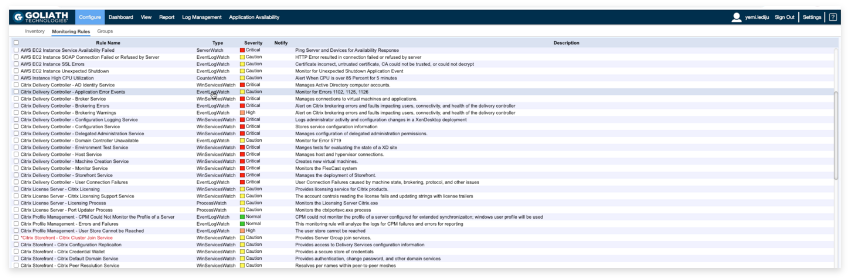
Terralogic selected Goliath Technologies due to its embedded intelligence and automation for monitoring and troubleshooting Citrix and the end user experience for their managed services customers. Goliath automatically discovers the entire Citrix delivery infrastructure, identifies what to monitor, the thresholds to set, and then alerts when thresholds are exceeded for all potential events, conditions, and failure points.

Results

As a result of using Goliath, Terralogic has been able to reduce time to remediation as well as escalations to their Level 3 Citrix Architects. Not only does this positively impact client satisfaction, but it also lowers cost.

“Prior to Goliath, almost every Citrix ticket went to our Level 3 Architects. We have turned this around to where our Level 1 Service Desk is troubleshooting Citrix and resolving issues for 90% of all performance-related tickets,” states Gigliotti. “Our Level 1 Service Desk is alerted on issues, views data in Goliath to isolate root cause, and resolves them before end users are impacted – increasing our client satisfaction while reducing support costs.”

Level 1 Service Desk Resolves 9 out of 10 Performance Issues

Terralogic uses Goliath’s threshold-based alerts to be notified anytime a VM or host is running low on memory, a primary server fails, memory leaks with 3rd party software, or other infrastructure issues occur that can result in slow logons or performance.

The alert is sent to their Level 1 Service Desk based either in India or locally manned by recent college graduates and interns. The team then resolves the issue quickly by restarting a server or adding memory to ensure end users are never impacted.

Image 1 shows Goliath’s alert dashboard, highlighting all alerts that have been triggered due to performance issues. Alerts can be viewed here or received via email or text message. Terralogic’s Service Desk can monitor this screen to proactively address any potential issues that could negatively impact end user performance.


Image 1: Goliath’s embedded intelligence and automation will automatically identify what to monitor, thresholds to set, and alert when thresholds are exceeded. All executed alerts can be viewed in the alert dashboard.


Gigliotti summarizes the overall value of Goliath by stating, “Goliath has transformed the way we support our Citrix managed service customers. Our Level 1 Service Desk team in India is being alerted of any potential issues that could negatively impact the end user experience and fixing them before end users start their day. We have reduced support costs and number of escalations to our architects – all while increasing our client satisfaction.”

Chris Hughes

ABOUT TERRALOGIC

Terralogic is a global IT service provider delivering end-to-end technology solutions, including software development, DevOps, cloud infrastructure, and cybersecurity. With expertise in emerging technologies like AI/ML, IoT, and automation, the company helps businesses accelerate their digital transformation. Terralogic’s engineering-driven approach and scalable delivery model support clients across industries such as healthcare, automotive, fintech, and smart cities.

Headquarters location: San Jose, California
Founded: 2008
Employees: >1200
Industry: Information technology

Goliath Named Top Virtualization Solutions Provider

Goliath Named Top Virtualization Solutions Provider

Goliath Named Top Virtualization Solutions Provider

IT Pros Troubleshoot and Resolve Citrix and VMware End User Experience Issues Quickly with Goliath

Philadelphia, PA – Aug 5, 2020 – Goliath Technologies, a leader in end user experience monitoring and troubleshooting software, has been named a Top Virtualization Solutions Provider by Cloud Computing Outlook. Through its support of Citrix and VMware Horizon virtualized environments, Goliath is one of ten vendors that “are at the forefront of providing virtualization solutions and impacting the industry.”

“Recognition like this underscores what we already hear from our clients like American Airlines, Ascension, Xerox, and others,” shares Thomas Charlton, CEO and Chairman of Goliath Technologies. “They tell us our software has the operational impact of hiring at least two full-time Citrix or VMware experts who are proactively discovering end user experience issues and solving them before users are impacted.”

Goliath offers end user experience monitoring and troubleshooting software for organizations using desktop virtualization from Citrix or VMware. The software automatically discovers an organization’s Citrix or VMware environment and identifies what to monitor, the thresholds to set, and then alerts when thresholds are exceeded for all potential events, conditions, and failure points regarding end user performance.

In the first half of 2020, Goliath Technologies continued to grow and deliver powerful solutions to help IT ensure a seamless end user experience anywhere, on any device, and at any time.

“We are passionate about helping IT Pros solve challenges with software. Recently with the surge of remote working, due to COVID-19, we had clients asking for data to determine if employees were as productive working from home as in the office. We listened to their needs, and our technical team rapidly delivered a new End User Productivity Report for Citrix XenApp and XenDesktop that provides critical insights into remote worker performance – and has now become a must-have for our clients,” says Charlton.

To learn more on how Goliath Technologies can help better anticipate, troubleshoot, and document end user performance issues, visit: goliathtechnologies.com.


About Goliath Technologies

Goliath Technologies offers end user experience monitoring and troubleshooting software, with embedded intelligence and automation, that enables IT pros to anticipate, troubleshoot, and document performance issues regardless of where workloads, applications, or users are located. By doing so, Goliath helps IT break out of reactive mode, and into proactive mode. Customers include Universal Health Services, NorthBay Healthcare, Penn National Insurance, American Airlines, Office Depot, Tech Mahindra, Pacific Life, Xerox, HCL, and others. Learn more about how we empower proactive IT at goliathtechnologies.com.