GPM ChromeOS Blog Chris Bradshaw

GPM ChromeOS Blog Chris Bradshaw

Expert Blog

Goliath Technologies ChromeOS Monitoring

Written By: Chris Bradshaw
Nearly 20 million new ChromeOS devices were shipped globally in 2022 according to IDC figures, with the large US education sector being by far the prime market for the platform. That’s a lot of endpoints to monitor and troubleshoot and Goliath Technologies has stepped up to this challenge, leveraging their exclusive access to some of Google’s API’s to build a platform to discover, check, and diagnose devices running the OS.

Goliath is supporting both green and brown-field operations with this product. This means starting new ChromeOS/ ChromeOS Flex deployments with the right monitoring and troubleshooting tools in place, and helping existing ChromeOS estates who might be struggling to understand their environment and diagnose issues when they occur.

One of the big issues when delivering any new platform is that the end users will blame any performance issues they see on that new device. Especially if that device isn’t the $1000+ laptop they were perhaps hoping for. Goliath’s customers are using the embedded intelligence and automation features of the software to analyse what individual users are seeing, and also diagnose the root cause of any problems. Their customers report that this is often the surrounding application delivery infrastructure or peripheral devices rather than the Chromebook itself.

End user experience is determined by the entire technology stack, and issues can be caused by any of these components– from the network connection to the underlying hypervisor, or the end user device – or even the behaviour of the end user. Goliath pulls in all the telemetry related to the end user experience to provide a complete picture that allows IT to perform a quick isolation of the root cause and work on a permanent remediation.

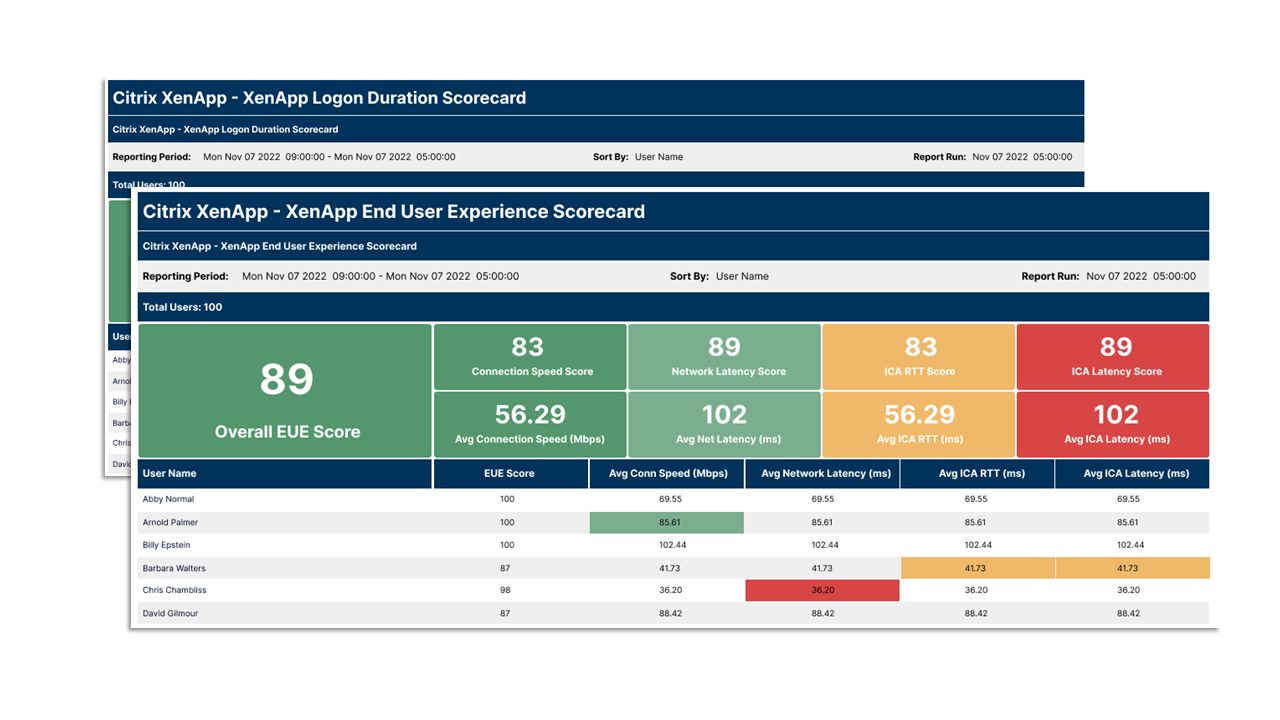
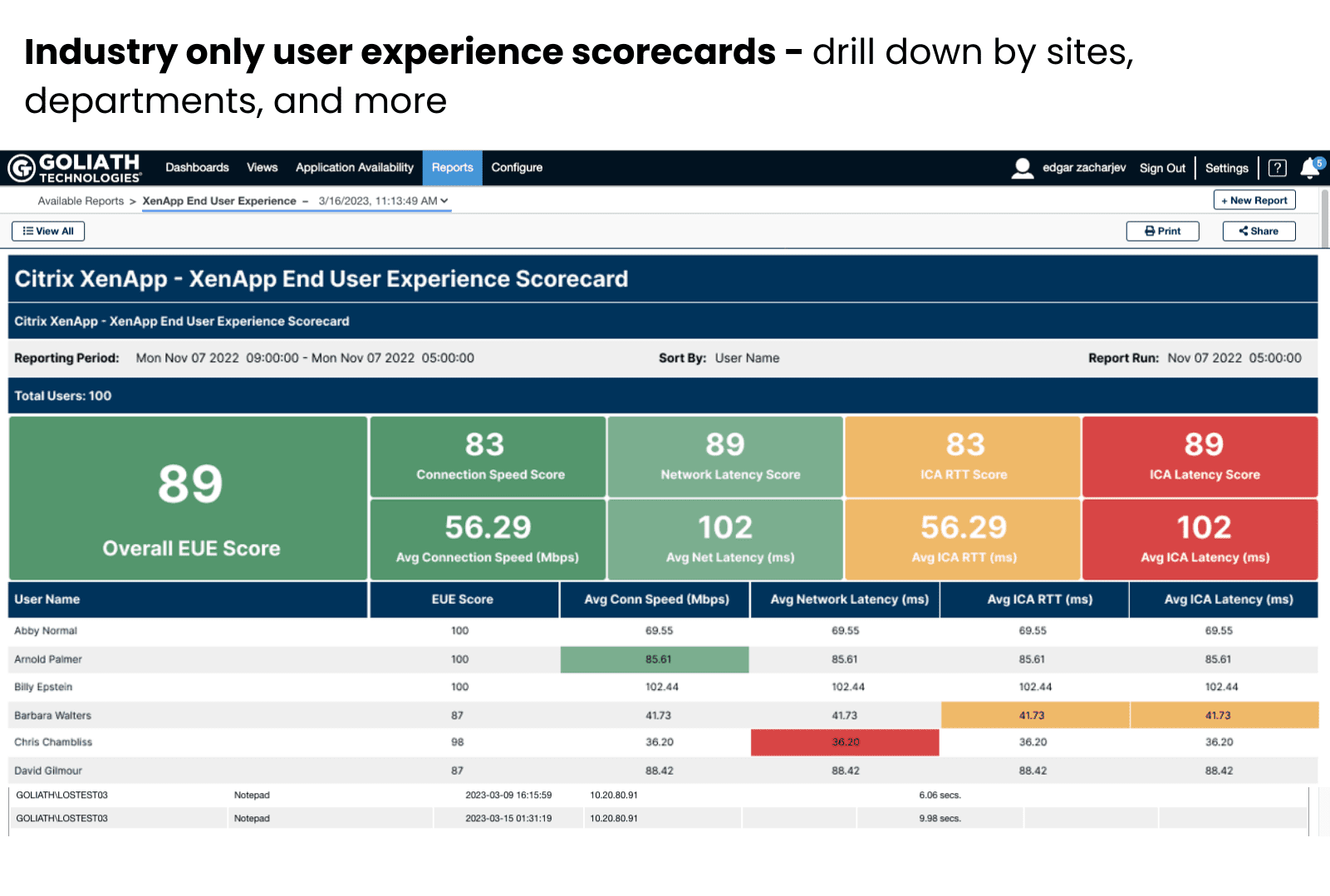
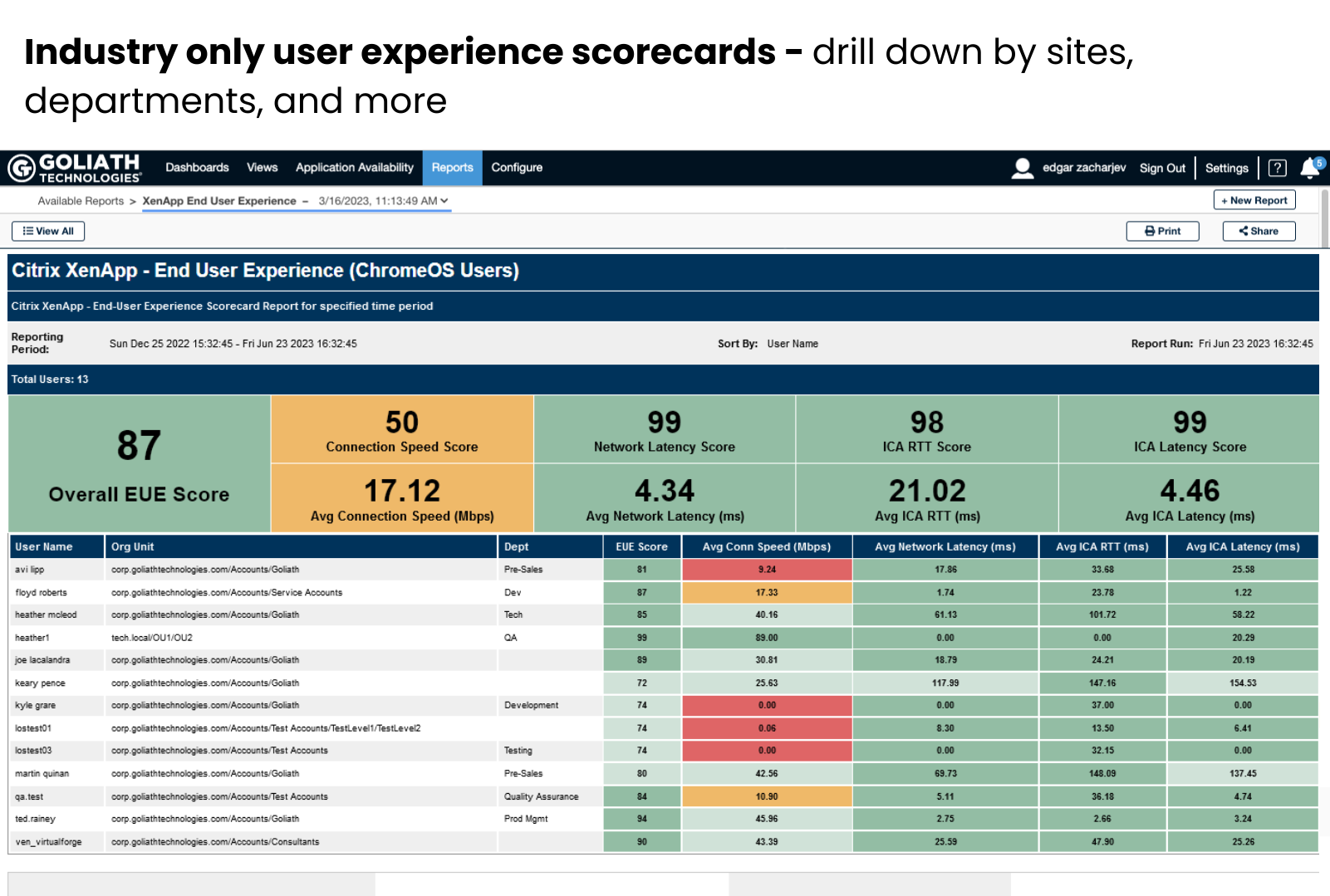
Goliath offers unique scorecards for objectively reporting on end user experience. As the example screenshot below shows, these provide a very clear headline on the overall environment but also the experience for each individual user. This can be particularly powerful when organizations are introducing new technology – like ChromeOS / ChromeOS Flex devices. By running the report before and after a new deployment, IT can quickly see the real impact on end users. It’s always good not only to be able to spot problems quickly, but also to be able to report back quantitatively when an upgrade has improved the user experience.

The scorecards automatically capture and then score end user experience metrics. There’s no end-user interaction in this measurement, so there’s no opportunity for any bias to sneak in, and so the dashboard paints a truthful picture. Scores are also benchmarked against industry best practices.
available ICA channels bandwidth can be detected Citrix session

Existing environments may have never been optimised, or might be suffering from recent degradation in performance. Introducing Goliath Technologies’ ChromeOS Monitoring product here can also help pinpoint the cause and improve the service. The endpoint device is a common target for disgruntled users, we’ve all heard “My Laptop is Slow”, “Stupid Computer”, and perhaps more colourful comments to describe a laptop or desktop. Poor performance somewhere in the EUC stack manifests itself as poor service to the user, and Goliath is confident that by introducing their purpose-built monitoring tools into your environment you can get happy end users who trust their IT department and within that IT department there is less finger pointing between the device, VDI, server, and networking teams.

When the cause is the device, this will be surfaced through the Device Health and telemetry available through the Goliath platform. Being able to diagnose faults from a central console enables IT to work with their potentially remote users to get them back up and running with the service levels they expect.
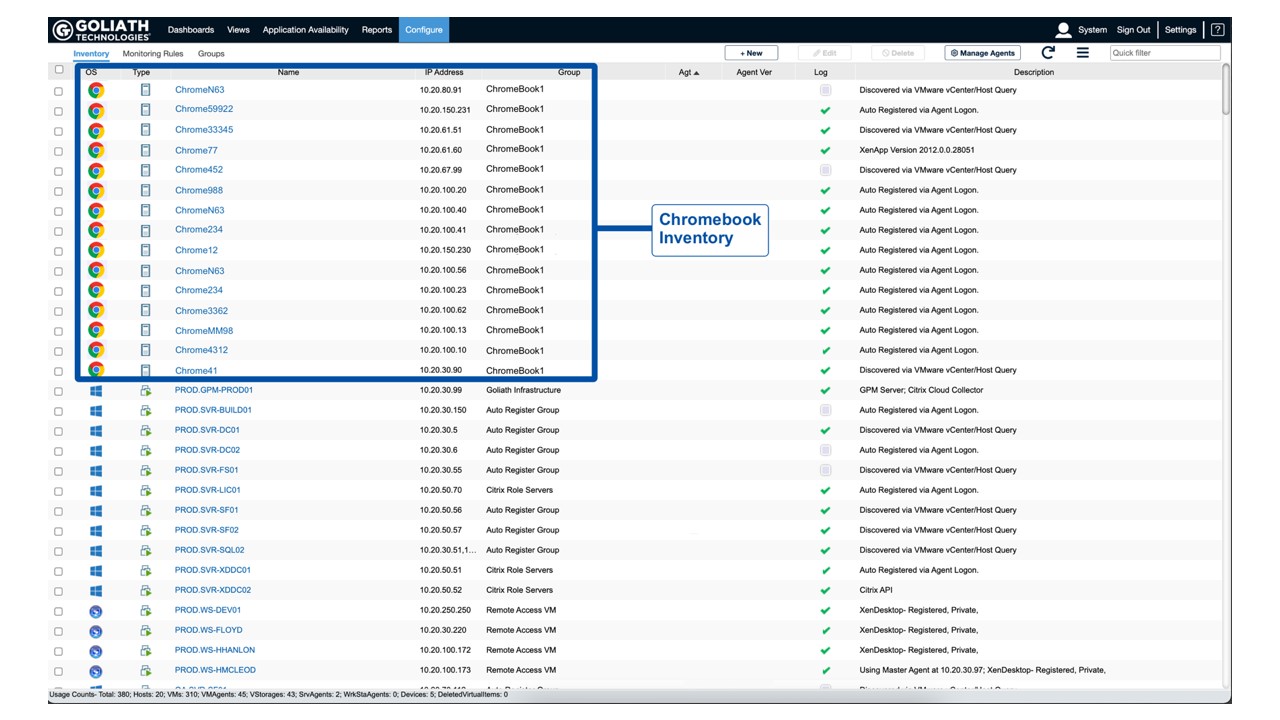
Chromebook Inventory

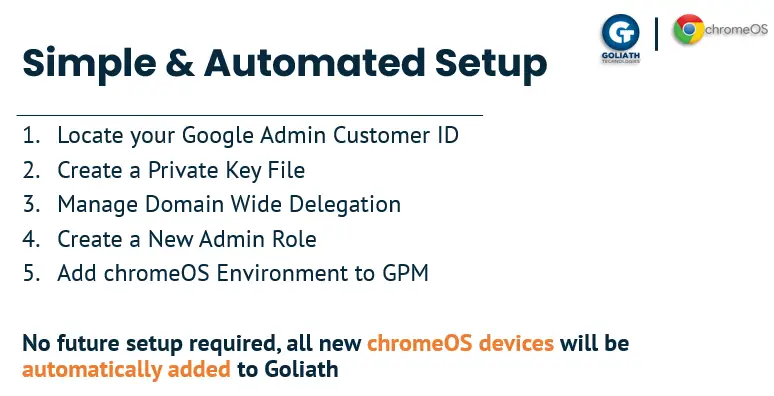
In both old and new environments, once Goliath is set up and configured, all future devices joining your Google environment will be automatically added. There’s no need to manually register each device separately. Goliath’s wider platform will monitor your entire portfolio, but ChromeOS devices can be easily identified and filtered in the interface.

Chris Bradshaw

Chris is an IT Professional with over twenty years employment in the industry and experience covering a wide range of technologies: Microsoft Azure, VMware (ESXi, vSphere, vSAN), Windows, and Linux environments.  You can visit Chris’ blog, IT Should Just Work, at https://www.isjw.uk/.

Try Goliath For Free

Experience true end user experience monitoring and troubleshooting free for 30 days.
New Features in Goliath Performance Monitor 12.1 Release

New Features in Goliath Performance Monitor 12.1 Release

Citrix CTP Blog

New Features in Goliath Performance Monitor 12.1 Release 

Written By: Chris Twiest

Goliath monitoring & troubleshooting software for EUC workspace environments lets you perfectly monitor your Citrix/VMware end-user computer environment. With their GPM 12.1 release, Goliath has added many new features to help you better monitor end user experience. In this blog, I will explain the new features and give real-world use cases for these features. 

Intelligent Sorting 

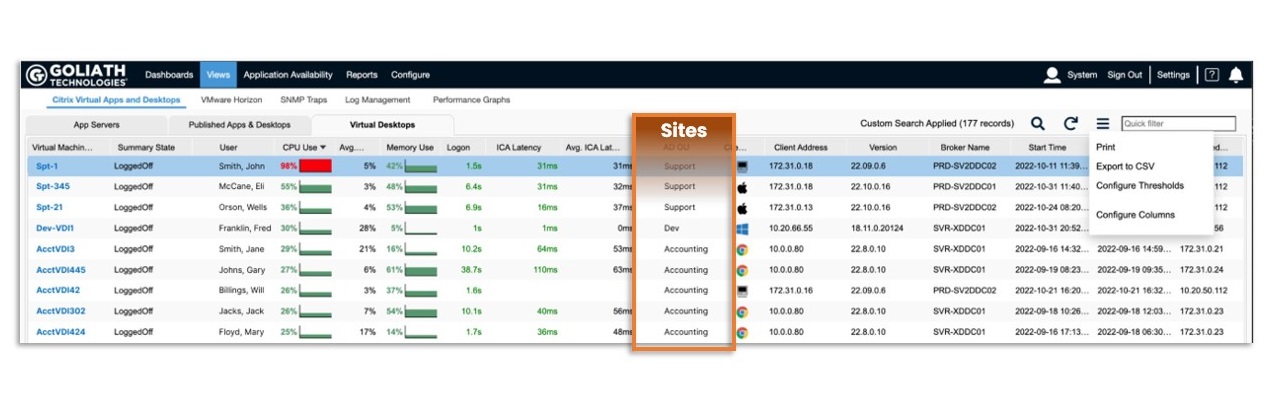
The first new feature is Intelligent Sorting (via AD OU) – a simple but very effective new capability. Attributes from Active Directory are pulled into the Goliath console making it easy to create views based on location, department, teams, etc. Goliath can now also show reports sorted on the user’s OU. This feature is handy when troubleshooting specific application or site performance issues.  

For example, imagine you have a Citrix environment with multiple people from all different departments working on the same host. If there is a performance issue with the accounting software, it might be challenging to see the impact on a host because the host has workloads from multiple departments. With this new feature, you can quickly sort all the users from the accounting department and see how their performance compares to the complete environment. This is a small but very impactful new feature.  

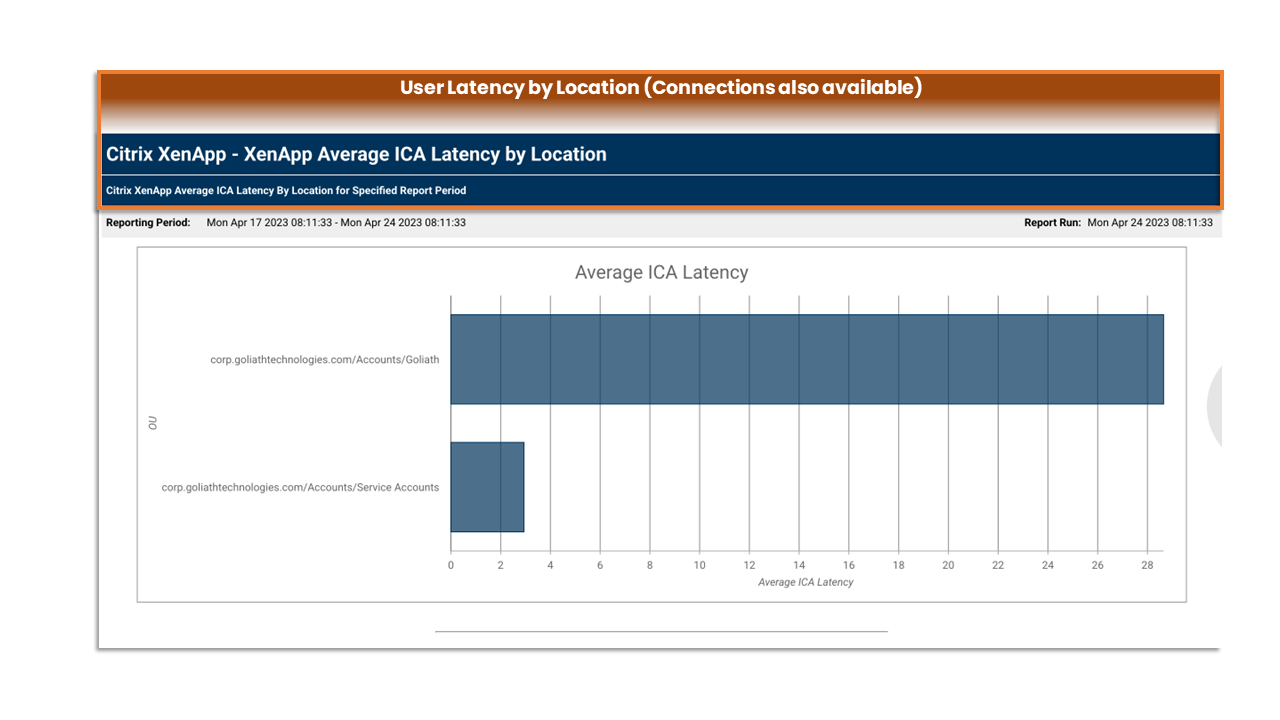
Location Sorting
AD OU Latency by Location Sorting

Real-time Remediation 

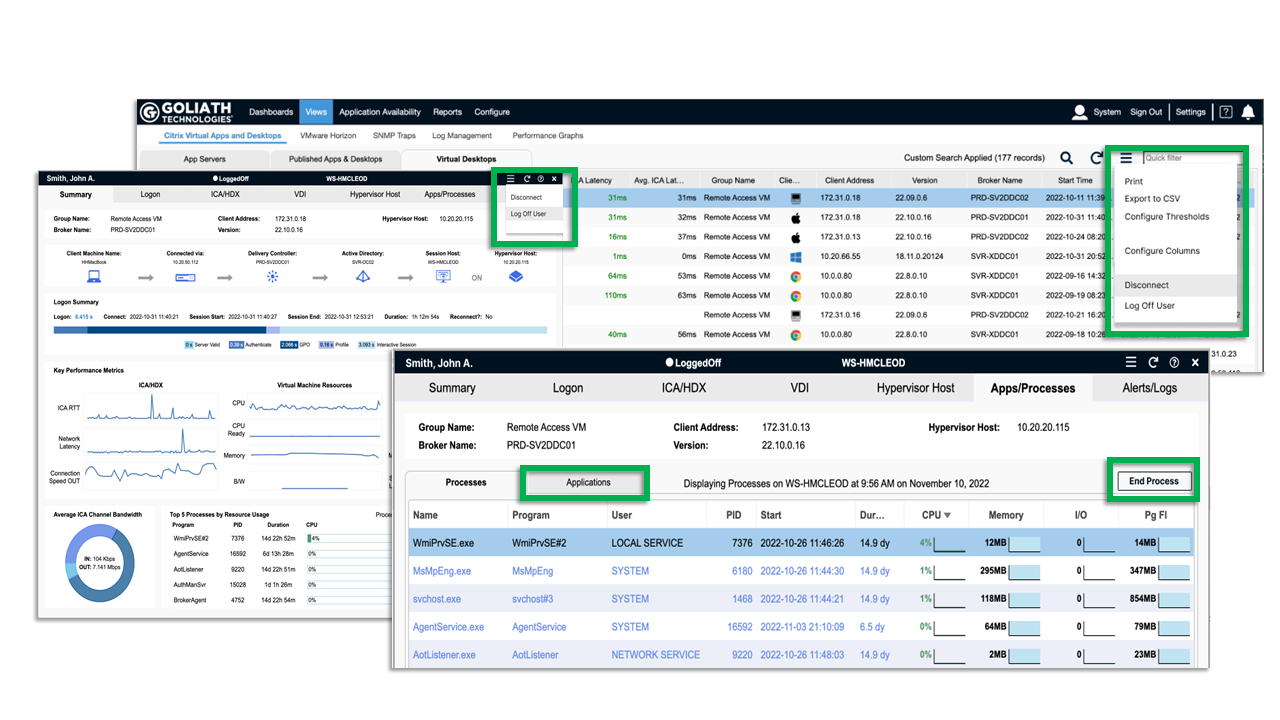
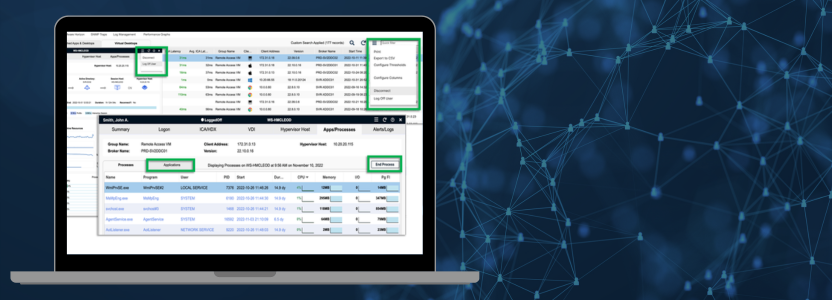
Goliath has excellent new ways to remediate issues and let the first-line helpdesk help end users more effectively. Automated remediation for things like launching scripts/ executables or restarting serves, applications, and processes with specific conditions are already baked into the product. Real-time remediation is the next step towards helping support quickly resolve end user issues and is the perfect action for first-line helpdesk workers. It allows them to perform actions directly from the Goliath console for actions like:  

  • Log Off User from a Session  
  • Disconnect a Session  
  • End Running Process  
  • End Application 

This means that first-line helpdesk workers don’t need rights within Citrix Director to perform these actions and don’t need to switch between the Director and the Goliath console, making the Goliath console the one-stop place for monitoring and helping end users.  

For many organizations, first-line helpdesk does not have access to Citrix Director. If a ticket is submitted that is tied to Citrix, it is automatically routed to L2 or L3. With real-time remediation in the Goliath console, a ticket comes in from a user who says their application is hung and not responding. Helpdesk can look in the user’s live session, see the applications and processes running, and take quick action to end a process or the application. All this in a few clicks and a couple of minutes. No escalation, and the user gets back to productivity quickly. 

Real Time Remediation Actions

Scorecards 

The last new feature we will go over is the scorecards feature. It was already possible to create scorecards showing the performance of your environment with the combination of Goliath and PowerBI. But now, it’s possible to create scorecards directly within the Goliath console.  

Scorecards are a great way to get unbiased information about your workspace environment. Of course, it’s possible to ask your end users what they think about the environment’s performance, which can often give a skewed view of the environment. The scorecards are a fantastic way to remove all emotion from the performance equation. With the scorecards, you can easily see where your environment might need improving to give a better user experience.  

You may choose to leverage scorecards to give leadership a clear view of the health of the end user experience. You can also use them to let site leaders or department heads know how their respective teams are doing. They can be automatically scheduled to run and send so you can set them up the first time and let your reporting run automatically thereafter. 

You can also use them to proactively focus IT resources toward users or departments that are or may be experiencing issues. Run the report every Monday morning and see where the hotspots are so you can address issues before they arise. 


End User Experience Scorecards
Chris Hughes

Chris Twiest

Citrix CTP & VMware vExpert, Chris has more than 10 years of experience in managing, creating, and automating workspace environments with a strong focus on virtualization products. Chris works as Technology Officer at RawWorks and runs his own blog at Workspace Guru.

Try Goliath For Free

Experience true end user experience monitoring and troubleshooting free for 30 days.
GPM ChromeOS Blog Shawn Cannon

GPM ChromeOS Blog Shawn Cannon

Expert Blog

Introducing Goliath Technologies ChromeOS Device Monitoring and Troubleshooting Solution

Written By: Shawn Cannon

Goliath Technologies recently introduced their ChromeOS Device Monitoring and Troubleshooting Solution. They have partnered with Google to be able to provide rich data about the performance and health of ChromeOS and ChromeOS Flex devices. Goliath Technologies is the only monitoring and troubleshooting platform that has access to the Google APIs to get this ChromeOS data.

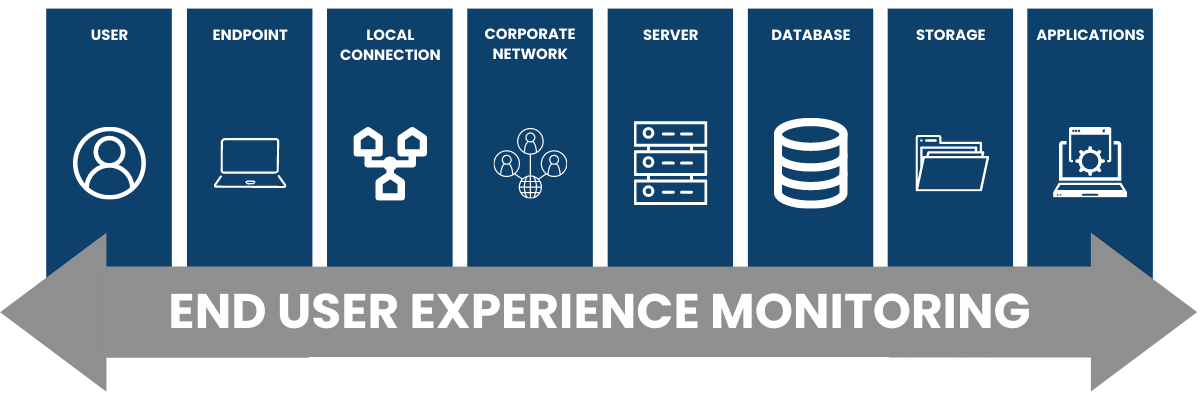
The Goliath Technologies solution tackles issues using a user experience monitoring model. This model monitors the entire user experience, from the user itself all the way to the application level, including everything in between.


Application Availability Monitor

Essentially, this solution is designed to help improve the overall end-user experience. How is this done?

Application Availability Monitor

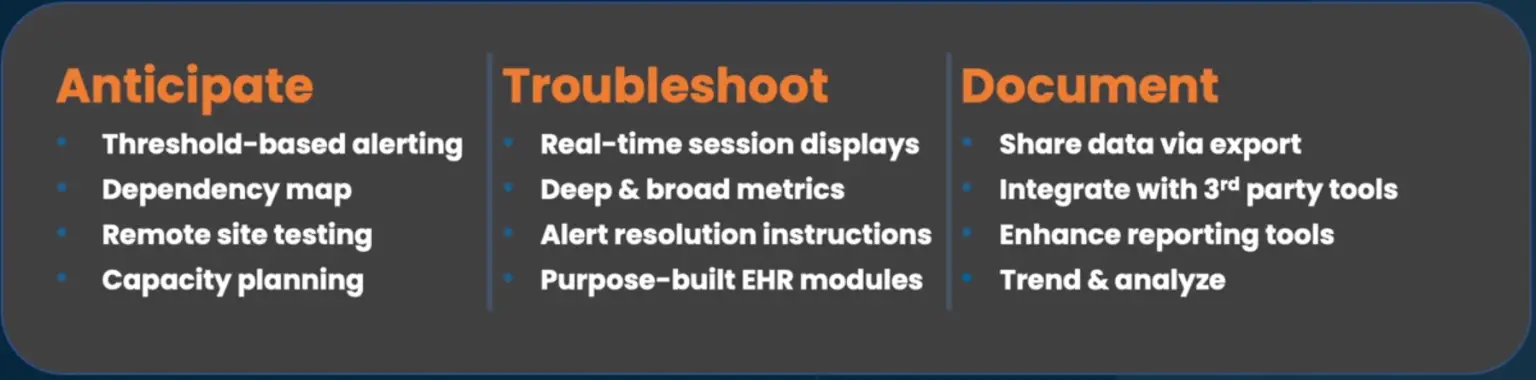
As you can see, the solution leverages embedded intelligence and automation to anticipate issues via alerting, mapping dependencies, remote site testing and capacity planning; being able to troubleshoot and remediate issues using real-time session displays and deep/broad metrics; documenting the entire process by sharing data via export, integrating with 3rd part tools and the ability to trend and analyze.

So how do you add your ChromeOS fleet to your Goliath environment? Simple!

Application Availability Monitor

Let’s take a look at some screenshots from the solution.


Application Availability Monitor

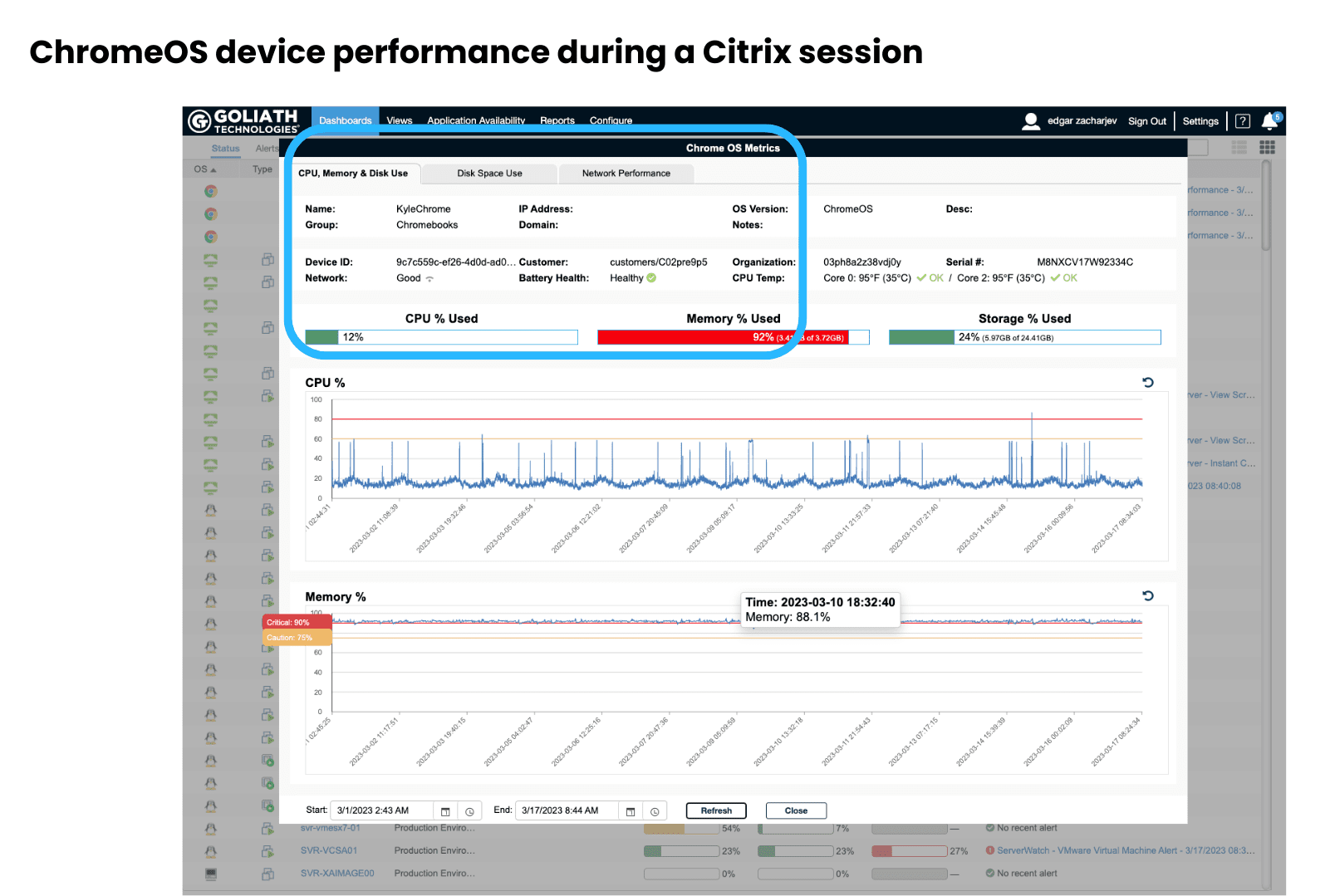
The screenshot above shows you what you will see when looking at a dashboard that shows ChromeOS device performance during a Citrix session. You can select CPU. Memory and Disk Use, disk space use and Network performance metrics using the tabs along the top. In the blue highlighted section, you can see the following information on the ChromeOS device: Name, Group, IP Address, Domain and much more.

Shawn’s take: This is great information when troubleshooting an issue as you can get a quick glance at the state of the device. Often times users will blame the device. This makes it easy to rule out device performance and get to the task of isolating root cause… which Goliath makes quick work of.


Application Availability Monitor

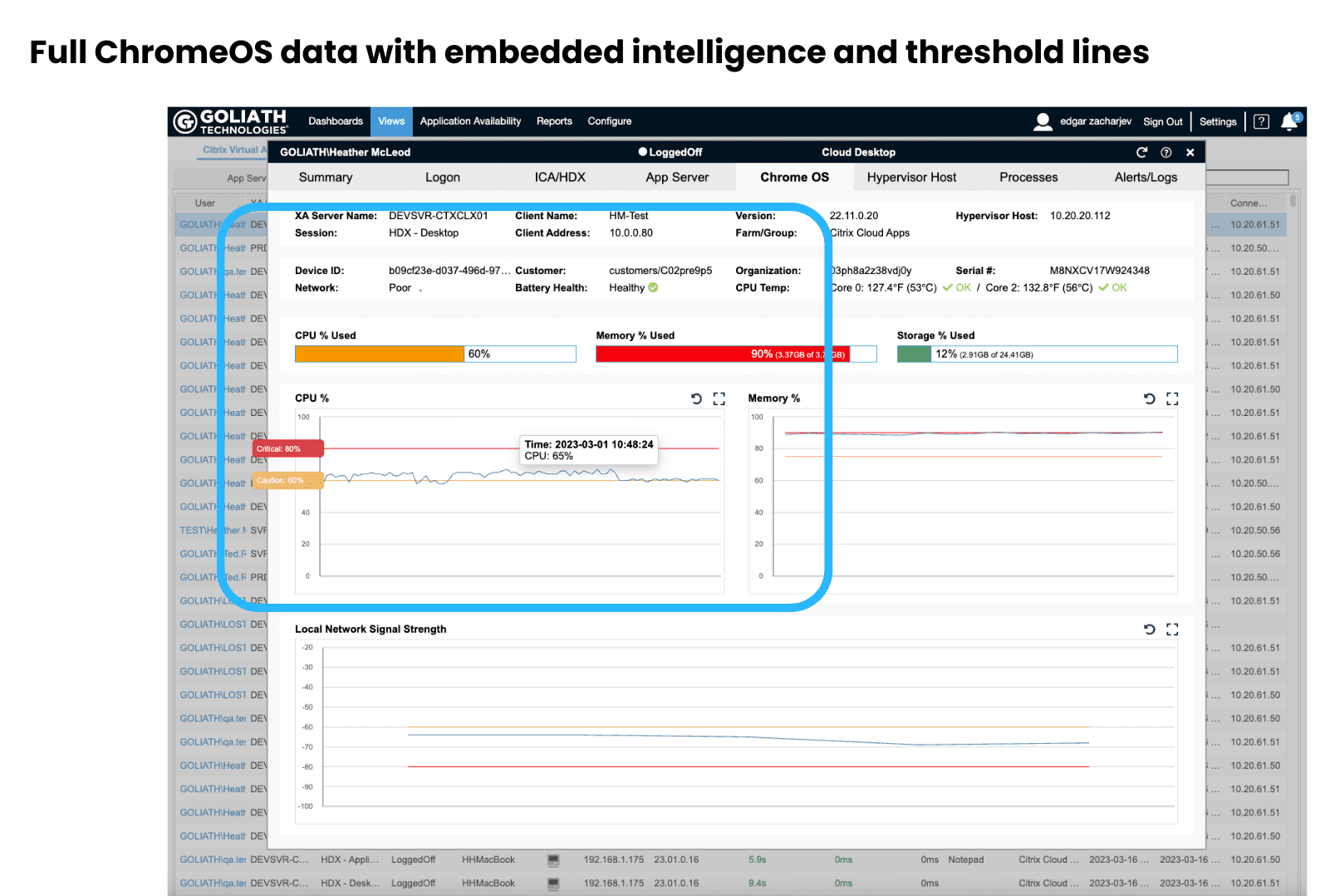
The screenshot shown above is the session view. This particular view is of the ChromeOS tab within the session view. which shows full ChromeOS data with embedded intelligence and threshold lines. This is a view of an entire Citrix session for a user. It is a correlated drilldown of telemetry from all the IT elements that could be impacting end user experience. Only the ChromeOS tab is selected here, but you can view a Summary page, Logon information. ICA/HDX, App Server, Hypervisor Host, Processes and Alerts/Logs. If you highlight any of the chart lines, it will show you the value at different times along the line.

Shawn’s take: If you need to troubleshoot an issue, the more data you can see the better. Views definitely give you a lot of information that an IT administrator can use when working an issue. Goliath takes data to a new level by correlating relevant metrics. This takes the guesswork out of isolating root cause and makes the solution extremely useful for novice support specialists and veteran system administrators alike.

Application Availability Monitor

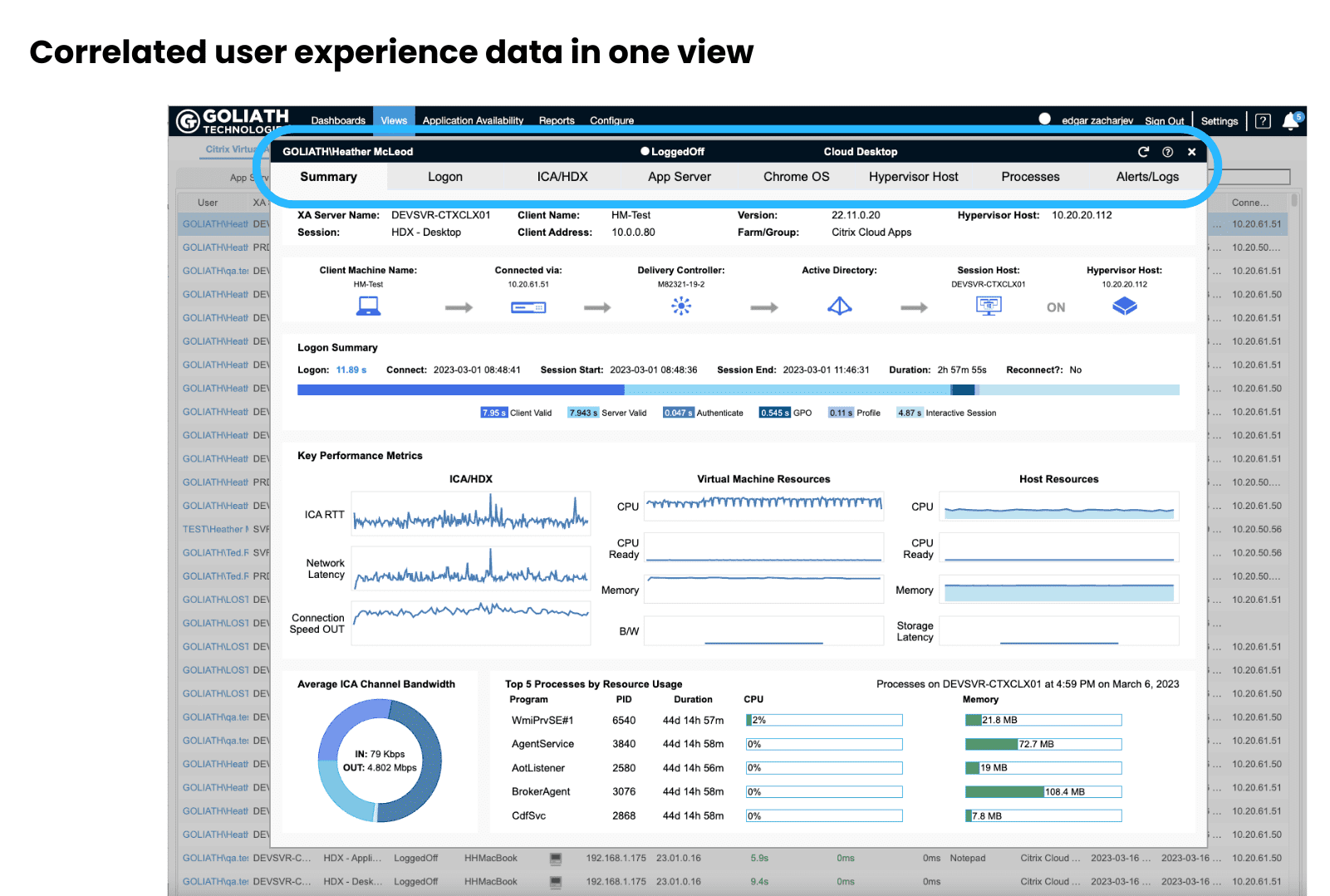
Here is a look at the Summary tab under views. This is a correlated view of all the delivery elements that could potentially impact end user experience. From this view you can get a pretty good idea of where to and where not to look when troubleshooting. With another click, you can get a detailed drilldown into the IT elements that look like they could be causing performance issues.

Shawn’s take: Wow! This is a lot of excellent information. Who knew you could even collect this information and then correlate it with ChromeOS device telemetry? I especially like the flow graphic towards the top, showing each part of the connection. All of this information aggregated into one place is ideal when working to find the cause of an issue.

available ICA channels bandwidth can be detected Citrix session

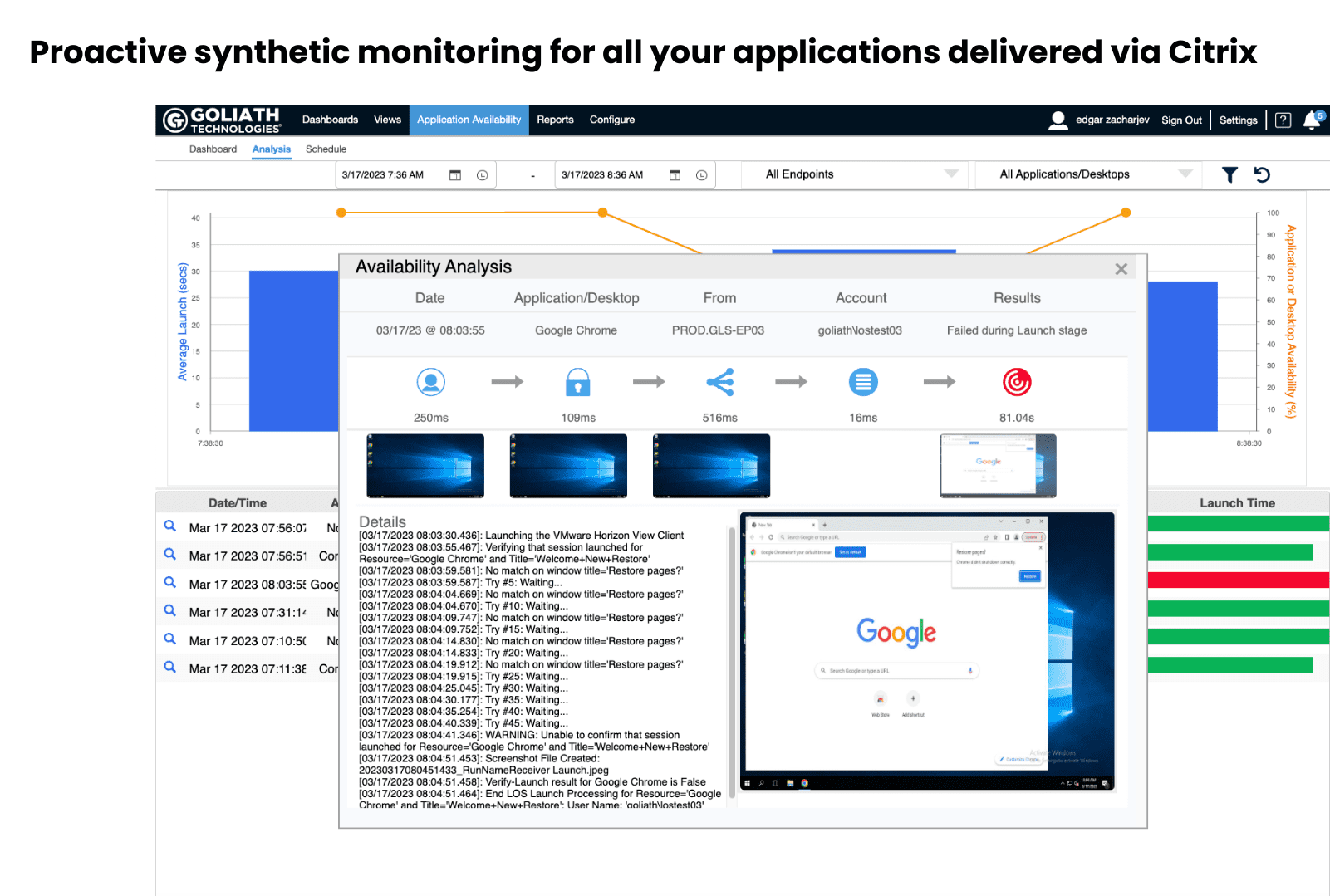
This screenshot shows the Application Availability tab. This section shows you applications that have been launched. This is a set it once and let it run feature. It is a synthetic user logon that continuously 24×7 goes through the entire logon process for monitored applications and then automatically alerts if an application fails to launch. It will then provide a detailed breakdown of exactly what happened in each stage of the logon process and include actual screenshot evidence of the failed launch. IT receives all this and can quickly isolate the root cause and permanently remediate the issue. This means if there is an application failure, most of the time IT can resolve the issue before end users begin to submit tickets.

Shawn’s take: This is an amazing view of information to help figure out why an application may not be available. I never expected screenshots to be available so you can see what the user would have seen. This becomes a powerful way to objectively document both the failure and the remediation.


available ICA channels bandwidth can be detected Citrix session

The final screenshot is the End User Experience scorecard, which is found under the Reports tab. This solves three primary challenges for IT; No objective way to prove how well IT is delivering end user experience, lack of necessary data to improve end user experience when there are issues, and the ability to easily determine if issues are widespread or just localized and loud. Add to this the ability to intelligently sort by location or department, and it becomes a powerful tool for IT to leverage for proactive troubleshooting.

Shawn’s take: A scorecard is an excellent way to present the end user’s experience. These scorecards can be used to show what is working well and what needs to be improved on. The colors help you zone in on the potential issues and work to improve on them. This is perfect for executive leadership since they don’t have time to sift through complicated reports or spreadsheets.

Summary

As ChromeOS devices make their way into the enterprise, IT professionals need a way to monitor and troubleshoot these devices and the end-user experience issues. This is exactly what Goliath Technologies ChromeOS Monitoring and Troubleshooting Solution was built to do. It is purpose-built for end user experience, and the addition of ChromeOS / ChromeOS Flex device telemetry makes Goliath an even more powerful tool.


Chris Hughes

Shawn Cannon

Shawn has been working in IT related fields since 1996. A vExpert, he has experience with VMware, Microsoft, EMC storage, Veeam and Dell servers. For the past 3.5 years he has been working with Splunk and leads the Splunk user group in Atlanta. He is an Executive Senior Blogger at vbrainstorm.com.

Try Goliath For Free

Experience true end user experience monitoring and troubleshooting free for 30 days.