Monitor End User Experience on Citrix Workspace

Monitor End User Experience on Citrix Workspace

Monitor End User Experience on Citrix Workspace

Citrix Ready shares how Goliath Technologies gives organizations the visibility they need to effectively monitor and troubleshoot end-user experience across Citrix Workspaces.

“Since Goliath is all automatic, you can just sit back and watch”  – Alexander Ervik Johnsen, Citrix CTP and VMware vExpert

Goliath Performance Monitor for Citrix


Anticipate, Troubleshoot, and Document Citrix Issues

Goliath Performance Monitor is the only comprehensive Citrix monitoring and troubleshooting solution that brings together Citrix monitoring data, end user experience performance metrics and the supporting IT elements that can impact end users experience when using Citrix. Comprehensive Citrix monitoring requires full visibility into everything the user does from the initial logon to working within their Citrix session and the IT infrastructure that supports this activity.

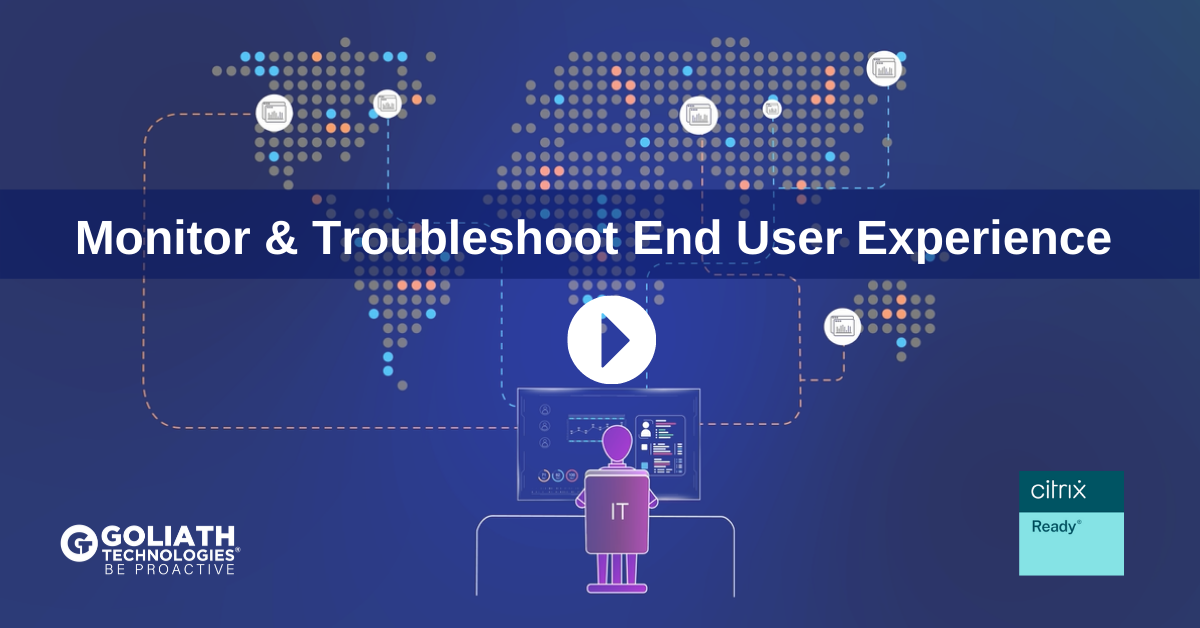
How to Monitor & Troubleshoot End User Experience on Citrix Workspace

Goliath will automatically integrate with your environment and build a dependency map of your Citrix infrastructure components – and ancillary database and Active Directory systems. Goliath’s intelligence engine assigns correlating monitoring for relevant failure points to each component, so you can monitor with a purpose.

Since this is all automatic, you can just sit back and watch – tweakin and tuning is your only responsibility. Then, pre-configured Citrix Monitoring rules are automatically applied and look for over 250 common failure points in the Citrix, Infrastructure, and Role Servers. Because of this embedded intelligence, you don’t have to be a Citrix expert to proactively anticipate, troubleshoot, resolve, and prevent performance issues in the most complex Citrix environments. Goliath’s purpose-built Citrix monitoring and troubleshooting software has the Citrix expert included!

Automatic Citrix Discovery and Dependency Map

The Automatic Citrix Discovery and Dependency Map intelligently creates a dependency map of your entire Citrix infrastructure with true end-to-end visibility of the health of your Citrix infrastructure. This single, macro view used as a real-time NOC display of your Citrix environment gives administrators the ability to monitor, manage and troubleshoot issues with Citrix whether the root cause is the Citrix infrastructure or the supporting IT elements. It shows the overall health of your environment at a glance and provides context-sensitive supporting metrics and details as you select each element. You can drill down and dynamically examine your environment, and troubleshoot issues more easily since everything is logically broken down. Read More.

Citrix XenApp

Don’t just monitor Citrix XenApp passively! Get a proactive XenApp monitoring and troubleshooting solution with embedded intelligence and automation that allows you to anticipate, troubleshoot and prevent Citrix XenApp end user experience issues before your users are impacted. Then, if there is an issue you get the unique detailed Citrix XenApp metrics you need to isolate root cause for quick troubleshooting and resolution. Read More.

Citrix XenDesktop

Goliath Performance Monitor is the only Citrix XenDesktop performance monitoring and troubleshooting solution that brings together Citrix XenDesktop monitoring data as well as metrics from the underlying delivery infrastructure in a single console. This visibility is absolutely required to proactively monitor and troubleshoot Citrix XenDesktop. Read More. 

Citrix XenServer

Goliath allows Citrix Virtual Server Administrators to proactively monitor, manage and troubleshoot their Citrix Servers and the supporting infrastructure with one single product. Goliath Performance Monitor includes deep API integration with Citrix XenServer so it is easy to use with almost no configuration required to monitor and troubleshoot Citrix XenServer issues. Read More. 

End-User Experience

Goliath’s proactive and purpose-built IT performance monitoring and management software gives you, in real-time, an understanding of what end users are experiencing from the time they initiate a logon, through the logon process, and while working in their Citrix session. The result is true Citrix End User Experience monitoring and troubleshooting that enables IT admins to Be Proactive. Read More. 

HDX Monitoring

Goliath Performance Monitor includes unique metrics that provide real-time performance insights at a granular level. This allows you to troubleshoot Citrix session slowness issues by immediately identifying if an issue is caused by network issues, server issues, or user behavior. Further, Goliath provides alerts to latency issues on any HDX channels. Read More. 
Learn more about Goliath Performance Monitor here

EHR Telehealth Apps Too Slow? There is a Solution.

EHR Telehealth Apps Too Slow? There is a Solution.

By Theresa Miller, Citrix CTP, VMware vExpert, Microsoft MVP

Telehealth use has become a prominent and preferred method of patient care since the COVID-19 outbreak.  What happens though when technology becomes a barrier to adequate care? For example, your Electronic Health Record (EHR) Telehealth application is working too slowly or is randomly disconnecting.  This not only looks bad to the patient trying to meet with the physician, but it makes it impossible to deliver a quality patient experience. How can IT get a true understanding of where the problem is when a ticket is opened indicating that the EHR system (Cerner, Epic, MEDITECH, Allscripts) is slow?  Let’s take a closer look at how monitoring all the backend infrastructure, the user experience, and the Electronic Health Record (EHR) solution from one toolset can create monumental success.


Electronic Health Record (EHR) Ticket in Queue for Slowness:

Finding Root Cause

When a clinician opens a support ticket indicating that their Electronic Health Record (EHR) application is slow and they cannot initiate their telehealth visit with a patient, it doesn’t mean the EHR application is the problem.  The reality is that the problem can be anywhere in the architectural infrastructure of the deployment, an issue on the device, a problem with the network connection, or even a result of clinician behavior.  Whether the EHR system is on-premises or in the cloud, it is almost always presented through a virtualized desktop and application infrastructure (Citrix or VMware Horizon). There is great complexity in getting all technologies to work together to deliver a seamless clinician experience and fast access to their EHR system. Just because the problem manifests itself to the clinician as “my EHR system is slow” doesn’t mean it is the fault of the EHR system.

In my experience, I have seen success in quickly finding the root cause when there was a proactive monitoring solution that was able to monitor everything from the endpoint, to clinician behavior, to the virtualized environment through to the backend data center. The health IT team would be alerted of the issue, saw it was actually related to the network, and able to resolve before it impacted a patient appointment.


Breaking Down the Clinician Experience Challenges

Having been in a situation where only native monitoring toolsets were used; I personally have seen how challenging it can be to manually work through troubleshooting a clinician performance issue. Thinking back on this, there was a time where there was a persistent performance issue for one doctor. I saw nothing as the Citrix admin, the application team said the EHR application was working fine for everyone else, the network team said wasn’t their issue. Finally, after hours of digging, I found the issue was related to the clinician’s profile. But without a single tool to see all aspects, I had to extend my search and talk to all teams beyond doing my own digging. It can take a long time to figure out where an issue in the technology can be.

Any standard telehealth and EHR architecture is complex and has many layers.  The full infrastructure required to support telehealth likely includes virtualization architecture infrastructure, EHR servers and infrastructure, unified communications tools, networking, Active Directory, policies, DNS, and more.  Now imagine you have to manually troubleshoot all of this without a solution that provides critical data in a single pane of glass; you would need to look at all of the following, and it could take hours to figure out the answer to a problem.

Manual troubleshooting checklist:

  • Check all servers event logs
  • Research any errors found
  • Bring in members of other teams for systems managed by them
  • Contact vendor support if needed

When making decisions around toolsets that help with problem resolution, initial price will be a factor, but know it will be more costly overall if your IT team cannot resolve an issue quickly to get the telehealth system functioning properly in an expedited way.

The Solution: Purpose-Built Tools for Monitoring and Troubleshooting Clinician Experience

Thankfully, there is a better way than what I had available to me. There are now purpose-built tools that monitor and troubleshoot end-user experience regardless of where applications or users are located. The best tools for Health IT are the ones that not only correlate data from the delivery infrastructure and clinician behavior, but also pull in specific performance data from the EHR system itself. When I see health systems deploy monitoring solutions that can monitor everything from the EHR application to the virtualization environment, I find they are more proactive and avoid many end-user performance issues altogether. With proactive monitoring, IT knows about an issue early and can have the problem fully resolved before patient care is impacted.

Purpose-built tools that have embedded intelligence and automation also bring data together from all IT elements that could potentially impact an end-user session. Now IT admins don’t have to hunt and peck for root cause like I did; instead, they have immediate access to data that can identify if the issue is with the application, network, server, hypervisor host, end-user behavior, or within the Citrix infrastructure. By having full visibility in a single screen, all the finger-pointing across teams is stopped and issues are resolved more quickly in a collaborative fashion.

Concluding Thoughts

With intelligent monitoring and troubleshooting software for Health IT, admins get expedited insights into root cause of where the technology problem is located when a ticket is opened around EHR or session performance issues.  In evaluating software, the solution should be able to quickly identify the issue anywhere in your technology stack.  It also must know healthcare systems and have the ability to extract performance data from the EHR system (Cerner, Epic, MEDITECH, Allscripts, etc). With increased visibility, IT professionals can more easily anticipate, troubleshoot, and document end-user experience issues. This ensures that your IT administrators can keep systems online, ultimately keeping your business online and delivering a seamless experience for clinicians and patients.

To learn more about Goliath’s purpose-built modules for all the major EHR vendors (Epic, Cerner, MEDITECH, Allscripts) read more here. 

You Need More Than a Scripting Engine to Monitor Citrix

You Need More Than a Scripting Engine to Monitor Citrix

You Need More Than a Scripting Engine to Monitor Citrix or VMware Horizon

Proactive IT Requires Embedded Intelligence & Automation, Not Scripts

As IT continues to leverage artificial intelligence (AI) and automation to transform how IT operates and becomes more proactive, leveraging a solution that relies on manual scripts to monitor and troubleshoot Citrix is a giant step backward. And, anyone evaluating commercial solutions should pause and review whether something being marketed simultaneously as “out-of-the-box” and with a scripting library instead of ready functionality is really going to improve Citrix or VMware Horizon monitoring and troubleshooting. Relying on 3rd party scripters to support your software can be a risk as it lacks structure, security standards, and documentation.

Risks of Depending on Scripts to Monitor Citrix Workspace or VMware Horizon

There are three main challenges to leveraging scripts either created by an individual or shared through a community setting when it comes to monitoring Citrix Workspace or VMware Horizon:

  • Variability within the infrastructure makes it very hard to verify if scripts work in all conditions.
  • Security vulnerabilities and variations in quality are common as there is no QA process and all script authors are equally skilled.
  • Official support or documentation isn’t available so there is no recourse when issues occur, or updates are required.

Due to the risk and complexity that scripting adds, it can often go against the digital transformation initiatives that IT management is driving.

Questions to Ask When Evaluating Software That Claims Automation

It can be challenging for anyone at a management level to decipher the marketing behind a commercial product and understand if the product itself is performing actions, or if it requires manual scripts to work. If you are at a management level and evaluating commercial offerings to monitor Citrix or VMware Horizon, the following questions may help uncover the extent to which the product relies on manual actions instead of automated functionality. Without scripting can the software:

  • Automatically discover my entire Citrix or VMware Horizon infrastructure and dynamically adjust as components change and alert if any component experiences slowness or failure?
  • Proactively identify all IT elements, conditions, and failure points that could impact the end user experience, know industry standard thresholds, and alert when those thresholds are exceeded?
  • Dynamically correlate data from end user behavior, to the endpoint, and through all elements of the data center to quickly isolate root cause and resolve when issues do arise?
  • Automatically login as a real user would and identify if Citrix Workspace or VMware Horizon is slow or unavailable? Will it alert and report back when issues do arise so IT can address before end users are impacted?
  • Run historical reports readily available automatically, analyzing data to provide insights around end user activity, end user performance, and overall system performance that can be shared with management, vendors, other IT teams and end users?

Proactive IT is Possible with Embedded Intelligence & Automation

Goliath Technologies offers software to monitor and troubleshoot end user experience across Citrix and VMware Horizon – regardless of where users or workloads are located. Instead of leveraging manual scripts, Goliath has embedded intelligence and automation that automatically discovers your Citrix or VMware Horizon environment. Then without any manual intervention, the software will proactively identify all potential IT elements, conditions and failure points that impact end user experience. With the intelligence built in, the solution knows what thresholds to set and alerts anytime any of those thresholds are exceeded. Now IT Pros can discover and resolve end user performance issues, before end users are ever impacted. All without creating, running, or testing a script.

With Goliath’s embedded intelligence and automation, clients of Goliath share that it has the operational impact of hiring 2-3 full time troubleshooting experts. John Bennett, Principal Consultant and Head of EPM Practice at Critigen, shares that “Goliath’s embedded intelligence and automation not only helps us troubleshoot but also proactively prevents end user performance issues from happening.”

To learn more, visit Goliath’s product pages around how IT leverages its embedded intelligence and automation to anticipate, troubleshoot, and document end user experience issues across Citrix Workspace and VMware Horizon.

How I Use Goliath to Monitor & Troubleshoot Citrix Daily

How I Use Goliath to Monitor & Troubleshoot Citrix Daily

How I Use Goliath to Monitor & Troubleshoot Citrix Daily

Don’t Troubleshoot Citrix Blind


As an engineer, we’ve all been there.  In the middle of an escalation, users are frustrated, management is hovering over you looking for updates every 5 minutes, while at the same time you are trying to troubleshoot the issue and figure out what’s going on.  It’s a stressful situation to be in, and unfortunately one that we find ourselves in all too often in IT.  Everyone just wants it fixed and they want it NOW!

This is the moment where you either shine or falter.  The tools that you have at your disposal can literally save you hours of time, headache and grief.  If the system you support is multifaceted and dependent on an entire cast of other technologies such as Citrix, it can be a true “needle in a haystack” type of scenario trying to determine the root cause.

This is where Goliath Technologies’ ability to monitor and troubleshoot Citrix end-user experiences has stepped up to help me automatically obtain a great overview of the overall health of my end user’s Citrix session.

From within the Goliath console, navigating to View → Citrix Virtual Apps and Desktops, I can see data for all my Citrix App Servers, Published Apps & Desktops, and Virtual Desktops.

Monitoring Application Servers

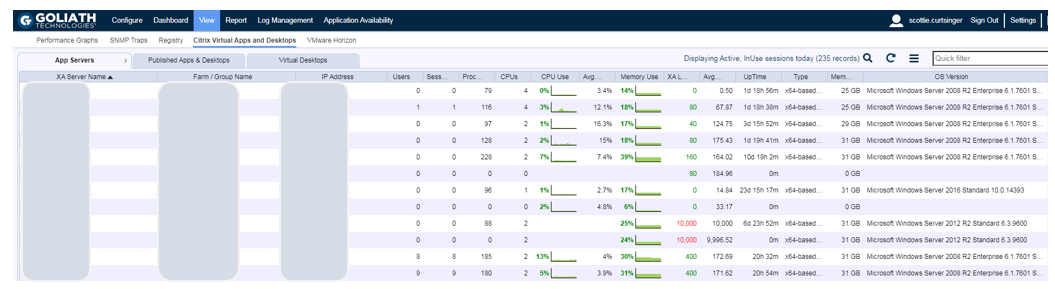
The App Servers section provides insight into the Application servers running in my Citrix farm.  Here I can view metrics around the number of user sessions along with resource utilization.  By selecting a specific server, I can drill into the XenApp Summary Dialog, which provides even further information.

On this screen (see Figure 1), I tend to look for overloaded servers either from a session perspective or even a runaway process that may be consuming a lot of CPU or Memory.  Depending on your density, if a single server is overloaded it could impact anywhere from 15-30 sessions.

End Citrix is Slow Complaints with Goliath
Goliath's single view of Citrix Virtual Apps & Desktops metrics

Figure 1: On the Apps Servers tab you can view metrics around the number of user sessions along with resource utilization.

Monitoring Citrix XenApp Server Summary and Additional End-User Experience Metrics

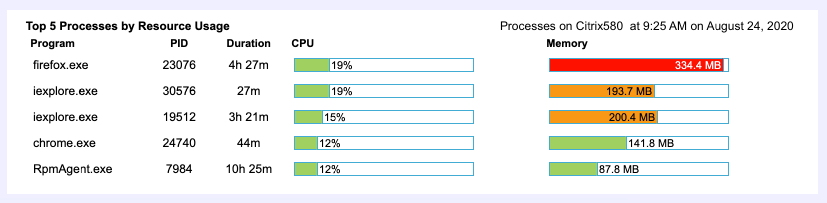
From the XA Server Summary, I am presented with information about the Citrix server itself.  Nearly all graphs are clickable and enable me to investigate further if necessary as you are troubleshooting. If, for example, I notice a resource issue on the App Servers dialog I’ll be able to drill in even further by looking at things like the “Top 5 Processes” (see Figure 2).

Compared to some vendors, Citrix does a decent job of writing to the Event Log, and if at first glance I don’t see any issues I’ll start to dig into the Application Event Logs.  Here it’s very simple to jump around between servers and compare events between Delivery Controllers and Session Hosts.

Below are several good resources that provide descriptions for the various Citrix Event ID’s.

If you are looking for more detail on how Goliath can help with Event Log Monitoring, they have a good write up here.

https://goliathtechnologies.com/software/goliath-performance-monitor/microsoft/event-log/

Goliath gives you deep metrics including Top 5 Process by Resource Utilization

Figure 2: Goliath provides the ability to drill further into metrics such as “Top 5 Processes by Resource Usage.”

Troubleshooting Citrix End-User Performance Issues

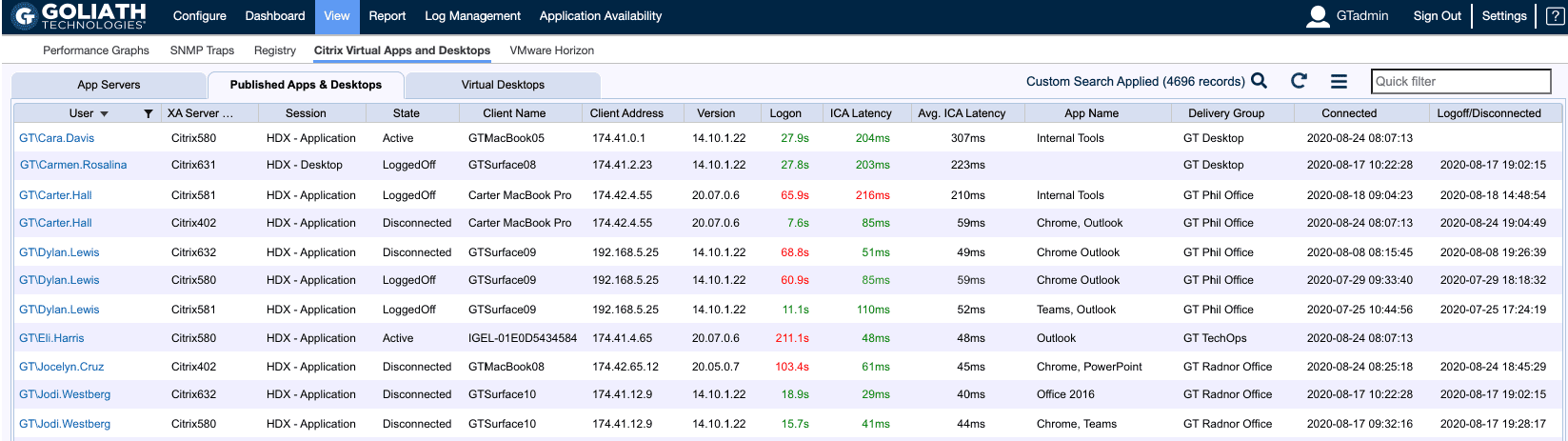
Under the Published Apps & Desktops tab (see Figure 3), I can see a list of all users.  If I know the problem user, I can use the filter to quickly find their Citrix session and view more data around their overall experience.

Published Apps & Desktops tab

Figure 3: Goliath’s Published Apps & Desktops tab allows you to quickly find and troubleshoot the Citrix session in question.

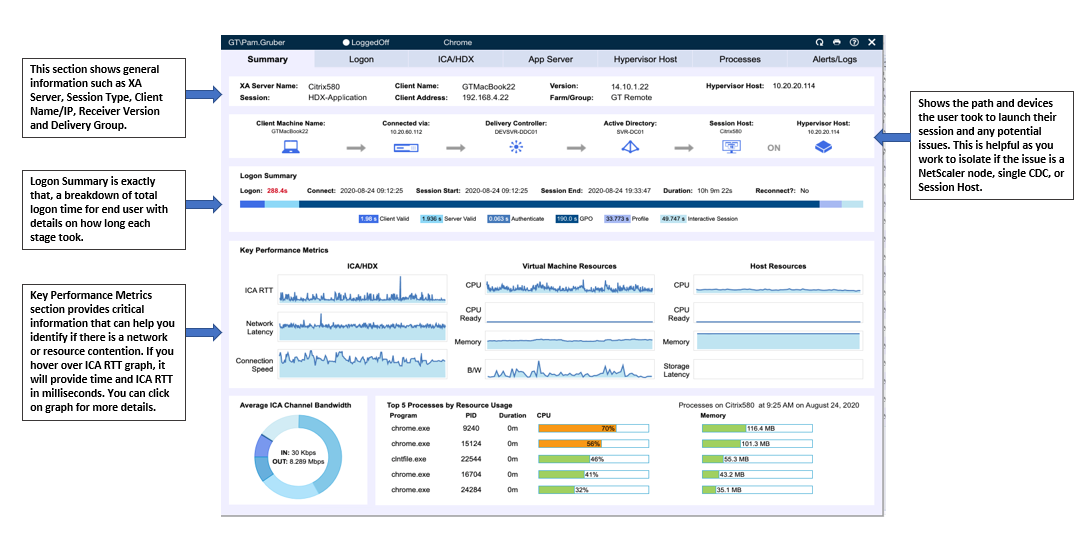
Of all the data that Goliath can present to me as an engineer, this is really one of those dashboards (see Figure 4) that I simply can’t live without when it comes to gauging the end users overall experience.  There is a wealth of information that is presented in an easy to navigate user interface and summarized across a series of tabs. It is a single location where I can see any potential IT element that could impact end user experience from the user’s behavior, to the endpoint, and then all the way through any condition in the data center.

Anyone who has ever supported a Citrix environment knows just how painful it can be trying to troubleshoot logon issues and reduce the overall logon time.  Over the years, I have spent countless hours simulating end user logons and tracking the time it took for each, all in what sometimes can feel like a “fruitless effort” attempting to shave only seconds.  It can be extremely tedious and will most likely require digging into several scattered logs to figure out exactly where that additional time is truly coming from.  With Goliath, I have an easy to read breakdown showing not just the overall logon time, but also each step in that process.

The Session Dialog, however, shows so much more than just the Logon Summary.  While Citrix has done a fabulous job of tweaking the HDX protocol and making it a best in class solution for remote workers, it’s just a painful truth that the quality of that network means everything to the end users experience.  ICA Latency, Round Trip Time, and Connection Speed are all measurements that help me to further understand if the user may be experiencing session freezing and mouse/keyboard lag.

Figure 4: Goliath’s Session Summary screen provides in a single view critical metrics from the endpoint, end-user behavior, connection, delivery infrastructure, all the way to the backend data center.

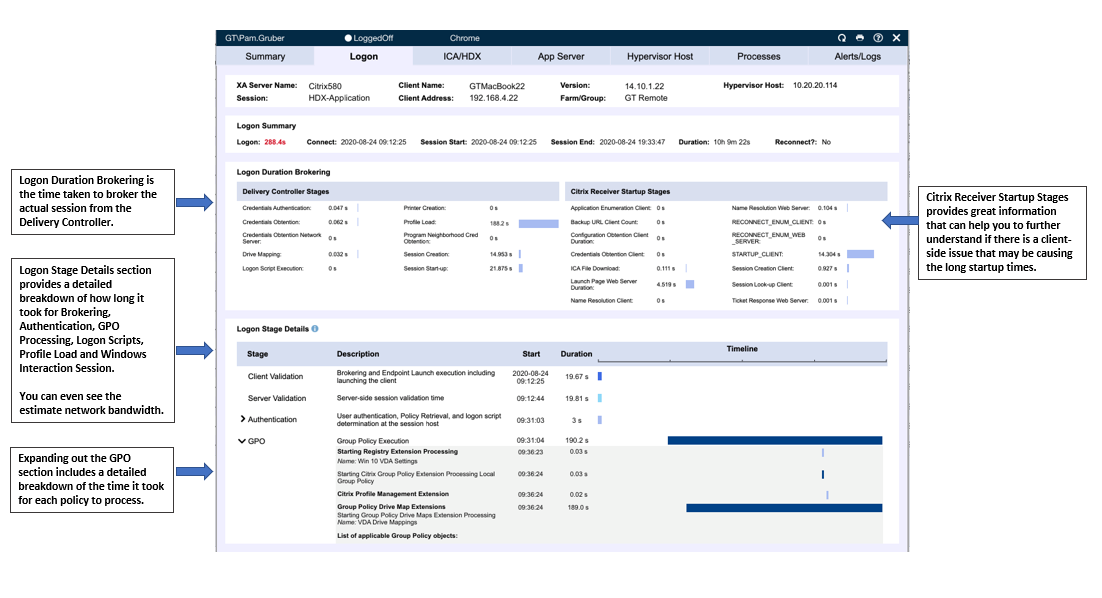
Talking about troubleshooting the end user logon process, I wanted to take a moment to focus on the Logon Tab (see Figure 5).  Let’s say I noticed that Group Policy Processing was taking longer than expected, I can go to the Logon tab and see just how long each individual policy took to load.  If the issue doesn’t seem to be policy related, I can see other important items related to the Logon process such as Client Validation, Authentication, Profile Load, and the Windows Interactive Session.

In addition to the Logon Stage Details, I can also see a breakdown of the Brokering Time and Receiver Startup Stages.  Collectively this information helps to give me a holistic view of the time spent for the end user to launch their session and insight into a logon/launch issue.

As I walk through each of the additional tabs (ICA/HDX, App Server, Hypervisor Host, Processes, Alerts/Logs) I am given detailed information about each area of focus.

Goliath's Summary screen can drill down into deep stages into logon process

Figure 5: Goliath’s Logon tab allows you to drill further down into 33+ logon stages to quickly find root cause, such as GPO.

Conclusion

When I opened this article, I talked about the stress that gets placed on engineers when working through an escalation and articulated a scenario that I myself have been involved in countless times.  If there is one thing that I can guarantee you, it’s that those situations will arise, they are unavoidable in IT.  However, you can take the preventative steps to bullet proof yourself as best you can and be prepared.

As silly as it may sound, here your shield is “DATA”.  The more visibility you have and the faster you can access that data about the environment you support, the sooner you can get back to your daily life.  Everything that I walked through in this article is accessible in a matter of seconds. Not only that, but the user interface is setup in a way that allows you to quickly bounce between different servers and user sessions very easily.

I’m a huge Seinfeld fan and one line has always stuck out to me from my experiences working in IT, “Serenity Now, Insanity Later”.

Don’t wait for the insanity, it will find you 😊.  If you feel like you aren’t prepared for those moments, take a few minutes to lay out a game plan.  Once you have that plan, if you find the solution monitoring your Citrix environment is lacking, consider a trial with Goliath.

Revolutionary CEO 2020

Revolutionary CEO 2020

Revolutionary CEO 2020

Thomas Charlton Addressing End User Performance Challenges

The COVID-19 pandemic has severely disrupted the economy all around the world. Most industries are paralyzed and several businesses had to close down due to the crumbling financial market. From sustenance to safety, everything is compromised and people are struggling to keep roofs over their heads. The biggest factor that contributed to such detrimental effects is the lack of preparation and business continuity plans. Keeping aside the sectors such as travel, food, retail, supply chain, and logistics, etc. that had to take a direct hit due to lockdown situation, many threw up their hands simply because they had no idea how to tackle it or were crippled by the lack of resources at hand. Others started looking for long-term solutions in terms of remote working, safety, and risk management in the end-to-end value chain.


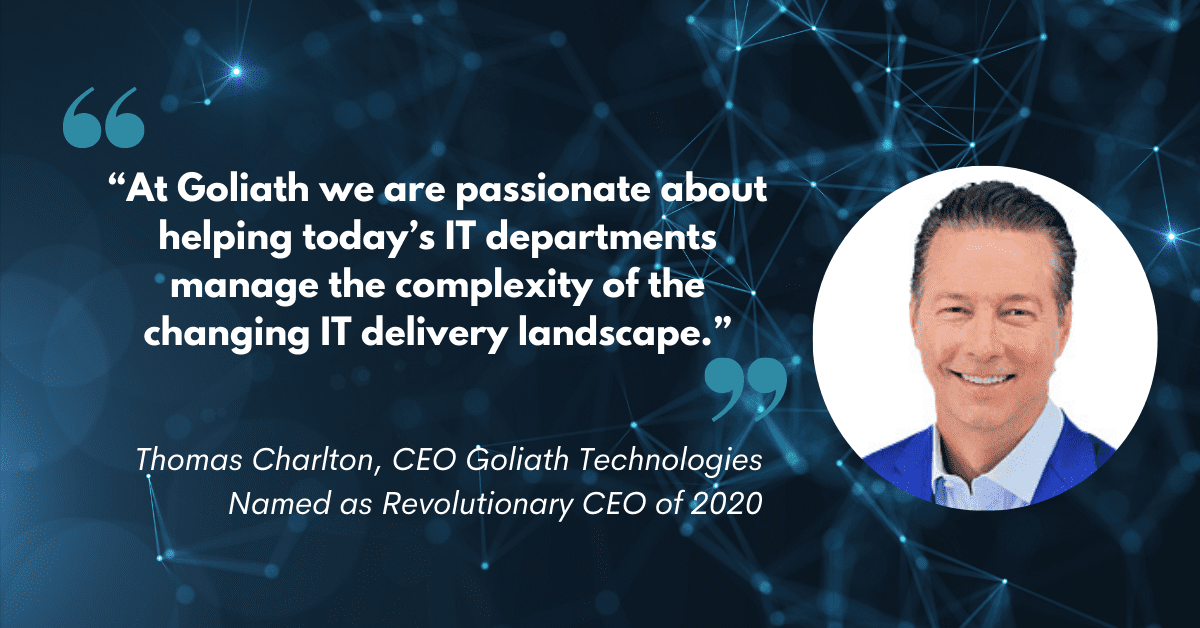
In this feature, we place our focus on the industry which is playing a key role in this battle: the IT sector. Let’s hear it from a leading expert in the field, Thomas Charlton, the CEO of Goliath Technologies, that specializes in end-user experience monitoring and troubleshooting software, with embedded intelligence and automation, that enables IT pros to anticipate, troubleshoot, and document performance issues regardless of where workloads, applications, or users are located.

Thomas talked about how his company supports businesses by empowering proactive IT especially in this time of crisis, describing their approach to creating offerings around client and market needs. He also discussed how building a winning work culture helps translate into business success.

Read the full article on Aspioneer.com here.

    Do you think Goliath can add value to your organization? Reach out.
    Email us at  techinfo@goliathtechnologies.com or schedule a demo, consultation or free trial.