Risks for Health IT Running Outdated Citrix Receiver/Workspace

Risks for Health IT Running Outdated Citrix Receiver/Workspace

Citrix CTP Blog

Risks for Health IT Running Outdated Citrix Receiver / Workspace App

Written By George Spiers
blog banner

Over the past couple of years, I’ve carried out several audits on healthcare customers’ Citrix Virtual Apps and Desktops or DaaS deployments, and one of the checks that consistently stands out is the use of older Citrix Receiver and Workspace app versions connecting to the environment.

Usually, the organization won’t have just one consistent version being used to connect to their Site. Instead, there is a mixture from the latest current release right down to old versions such as Citrix Receiver 4.2, 4.9, Citrix Workspace app 1809 and 1812. The reason for the mixture is often because healthcare organizations allow uncontrolled devices to connect to their environment remotely. This has become especially common since the Covid-19 pandemic set upon the world, where many staff members would suddenly find themselves working from home on their own devices. Those devices are owned by the end-user, not the organization, thus software deployment mechanisms to enforce versioning control is non-existent. Another example is where health organizations have 3rd party contractors, vendors, or other health institution personnel connecting to their Citrix environment, and these endpoint devices are managed by another IT department. I experienced this first hand supporting isolated Citrix infrastructure that allowed staff from other hospitals in the country to connect in, and 3rd party vendors who supported clinical systems to be used within the hospital.

These aren’t the only scenarios, however; some environments have little in the way of different versions connecting, but the endpoints that do connect are managed by the organization and simply run outdated versions.

Should we let this continue to happen, but place more focus on keeping the core Citrix Virtual Apps and Desktops components e.g., StoreFront, Delivery Controller, Licensing, up to date? Why do we need to update our clients to the latest versions of Workspace app? For several reasons it is important to keep on top of Workspace app updates. An organization should have a tried and tested automated approach to deploying new versions of Workspace app to their managed endpoints at least 1-2 times per year. For unmanaged devices, it is advised to either discuss with other Health IT teams or hand out guidance to the end-users themselves on how they should and can keep their own siloed Workspace app deployments up to date.

I’ll discuss a couple of the reasons as to why it is important to not be that health environment that continues to run any Citrix Receiver versions, let alone old versions of Workspace app. For clarity, Citrix Receiver was rebranded to Workspace app some time ago, so if you still have ‘Citrix Receiver’ installed on your endpoint, you really are running old versions!

Potential Impact on End User Clinician Experience and Organizational Security

Lack of Feature Support

Want to make use of Teams optimization or Browser Content Redirection? One health client I supported rolled out Microsoft Teams to replace Zoom not long after Teams was starting to gain popularity, and Teams on Citrix requires a minimum Workspace app version to run effectively. As Citrix releases new functionality and enhancements to Virtual Apps and Desktops, there may be a requirement to introduce supporting code in Citrix Workspace app. Citrix won’t cover all versions of Citrix Receiver and Workspace app that have ever been released, especially when most of these versions are no longer officially supported. Therefore, there will be a minimum version of Workspace app that you need to have installed on your machine before you can make use of said functionality. When your users continue to run older versions of Citrix Receiver or Workspace app, they may miss out on these functionality and performance improvements.

The following list includes some functionality that has been released over the past couple of years that requires a minimum version of Workspace app.

Feature Minimum Supported Workspace app (Windows Only)
Browser Content Redirection 1809
Optimization for Microsoft Teams 1907
Adaptive transport 2105
Service Continuity 2109
App Protection 2002
Drag and Drop 2002
HDX Direct 2303

Security Vulnerabilities

Yes, security vulnerabilities affect Citrix Receiver and Workspace app too. If you are running those older and unsupported versions, then it’s likely that you have a piece of software on hundreds or thousands of corporate endpoints that has a known vulnerability exploitable by attackers. Healthcare organizations are not exempt from attacks, in fact some of the most sophisticated attacks have been carried out on healthcare organizations resulting in devastating impact to patient care.

Upgrading to the latest versions of Workspace app will include patches for such security vulnerabilities. Here are some of the recent vulnerabilities affecting certain Citrix Receiver and Workspace app versions so that you have an idea where you are impacted.

CVE ID Version of Workspace app impacted (Windows only)
CVE-2020-14884 Before Long Term Service Release 1912
CVE-2020-13885 Before Long Term Service Release 1912
CVE-2021-22907

Before Current Release 2105

Before Long Term Service Release 1912 CU4

CVE-2023-24484

Before Current Release 2212

Before Long Term Service Release 2203 CU2

Before Long Term Service Release 1912 CU7 Hotfix 2

CVE-2023-24485

Before Current Release 2212

Before Long Term Service Release 2203 CU2

Before Long Term Service Release 1912 CU7 Hotfix 2

Supportability

Citrix Receiver is long out of support, and many Citrix Workspace app versions are no longer supported as well. When a product is not supported, you will no longer be able to avail of bug fixes, enhancements, or security patches unless you perform an upgrade. If you have any issues within your environment that is deemed to be related to Citrix Receiver or Workspace app, then you may not be able to get technical support from Citrix and likely will be asked to upgrade the product to a supported version.

Check out the Lifecycle Milestones for Citrix Workspace app and Citrix Receiver: https://www.citrix.com/support/product-lifecycle/workspace-app.html

There are two product lifecycles known as Current Release (CR) and Long Term Service Release (LTSR). CR versions are often released every three months and will typically reach End of Maintenance (EOM) once the next version of Workspace app is released, and End of Life (EOL) 18 months after the release date.

LTSR versions each have a three-year lifecycle, and new LTSR versions are typically released every 18-24 months.

As of the time of writing, here are some lifecycle dates for Citrix Workspace app.

Citrix Workspace app version (Windows only) EOM EOL
2307.1 Current Release Upon next release February 12th, 2025
2204.1 Current Release May 16th, 2022 November 7th, 2023
2203.1 Long Term Service Release Upon next release March 23rd, 2025

Compatibility Issues

Citrix frequently release new functionality via DaaS and new versions of Virtual Apps and Desktops. Only supported versions of Workspace app are officially compatible with DaaS and supported versions of Virtual Apps and Desktops, thus there is an increased risk that you could run into compatibility issues if you do not upgrade to the latest versions of Workspace app. Such compatibility issues could range from connection failures to application crashes or other issues.

Often in healthcare environments the Citrix session hosts will have a number of components and drivers installed to interact with peripherals on the users’ endpoint such as dictation devices, foot pedals, and microphones, thus it is important to align with vendor best practice recommendations and be on a supported Citrix Workspace app version in case any issues arise.

Also, do you remember when Citrix stopped accepting TLS 1.0 and 1.1 connections to Citrix Cloud? Customers had to ensure that they upgraded their endpoints to run minimum versions of Citrix Receiver / Workspace app that supported TLS 1.2, or else deploy StoreFront in their resource locations. If you keep on top of your Workspace app upgrades, then you are being proactive rather than reactive to such situations that are likely to again present themselves in the future.

Denial of Environment Access

Health organizations are exploring all types of ways to better secure their environment. This includes securing the front door access, in other words, posture checking devices before they are allowed to connect to the environment. Citrix Device Posture service is one of the newer cloud-based solutions that allows an organization to easily enforce governance on endpoints, ensuring that they must meet certain requirements before being allowed access to resources such as Virtual Apps or SaaS apps.

Organizations may impose restrictions on endpoints that run older versions of Citrix Receiver or Workspace app. If a version of Workspace app has vulnerabilities, and is not supported by Citrix, or does not support certain enhancements and features such as Microsoft Teams Optimization, then to protect the environment, access could be entirely or partially restricted to resources unless the entity or individual that manages that endpoint upgrades Workspace app to a later version. This can certainly be useful in healthcare where a multitude of devices connect into the Citrix environment, but one must be careful not to unintentionally prevent productivity and patient care being provided.

It’s a balancing act and good ongoing communication to all users of the system is important so that users know what versions they should be running now and in the future.

Integration Challenges

Often third-party software vendors will mandate that you have a particular minimum version of Workspace app installed on your endpoints to be compatible with their software. In the past with my experience working in the Healthcare industry, I’ve come across many different agents and drivers that need to exist on the Citrix Virtual Delivery Agent (Session Host) and talk back to the endpoint, via a custom virtual channel for example. These integrations are often critical in providing clinicians with the functionality that they need to provide great patient care, so it is imperative that you align with such requirements to avoid potential compatibility issues such as features or functionality not working correctly, or sporadic issues arising that are difficult to audit and find root cause for.

Performance Problems

As I mentioned previously, some enhancements to the Citrix suite of products require that you run a minimum version of Workspace app to avail of them. By simply having a recent version of Workspace app deployed to your managed endpoints, your users can take advantage of some recent performance improvements to the HDX stack, such as:

  • HDX Adaptive Transport. Requires a minimum of Workspace app for Windows 1907. Designed to combat challenging WAN conditions and improve overall session performance for all types of connections, this feature uses Enlightened Data Transport, a Citrix-proprietary transport protocol that is built on top of UDP to transport ICA data for all virtual channels between the Citrix Virtual Delivery Agent and endpoint.
  • HDX Adaptive Throughput. Requires a minimum of Workspace app for Windows 1811 or later. This feature intelligently fine-tunes the peak throughput of the ICA session by adjusting output buffers. The number of output buffers is initially set at a high value, which allows ICA data to be transmitted to the client endpoint more quickly and efficiently, which in turn allows for improvements in file transfer performance, video playback, and general interactivity with an ICA session. This can be useful for consultants who work from home and analyze high-resolution X-Ray images, for example.
  • EDT Congestion Control. Whilst currently still in Tech Preview, this enhancement aims to provide end-users with better in-session responsiveness, visual quality, and frame rate. Overall, the end-user would receive a better end-user experience particularly if they are connecting to their Virtual App or Desktop over a connection that is suffering from high latency and/or packet loss. Required a minimum of Workspace app for Windows 2303, but that may be subject to change once the enhancement is made generally available.

Steps to Consider

Addressing modern HIT challenges may require a third-party solution purpose-built for HIT. Goliath Technologies is a powerful tool that will empower HIT teams to anticipate clinician experience issues before they happen by leveraging intelligence and automation, isolate root cause and troubleshoot quickly when issues do arise with correlated data across the entire delivery infrastructure, and provide documented objective proof so permanent fixes can be put in place and IT can objectively report on the quality of the clinician experience they are delivering.

Some ways Goliath can help HIT address client issues:

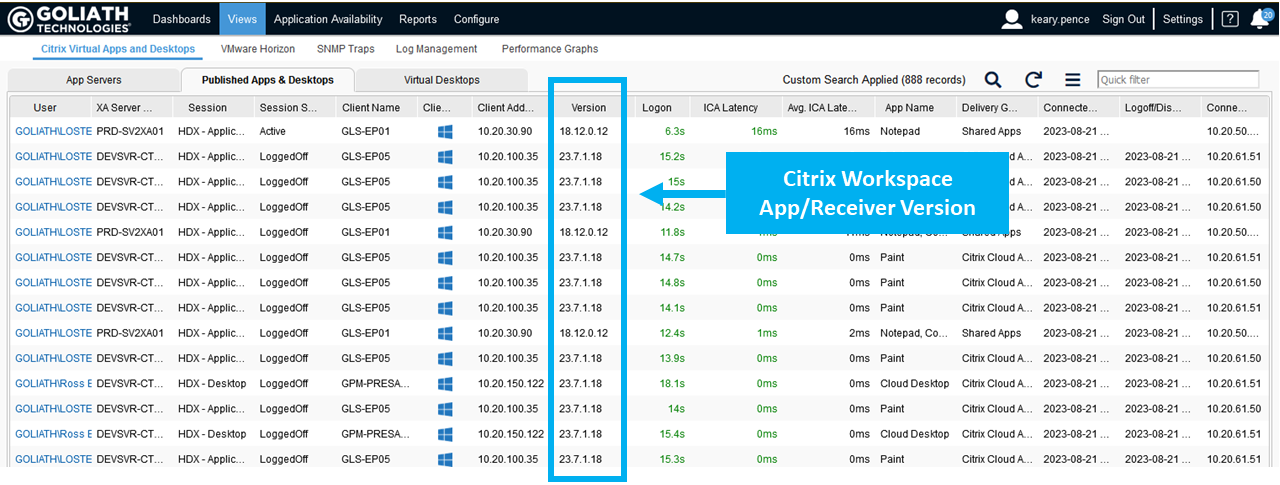
  • View client version across your inventory: with Goliath Performance Monitor you can quickly check the Citrix Receiver and Workspace App versions used by your end users and plan remediation actions for outdated client software.
Citrix Receiver Version Views


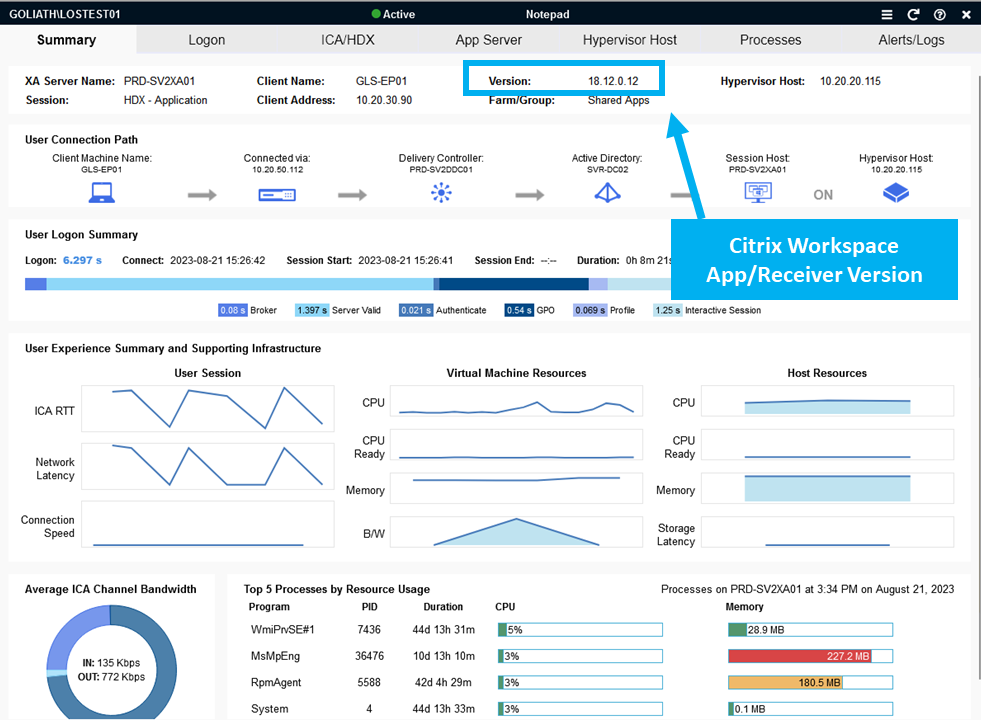
  • Deep end user experience telemetry correlated across the entire delivery infrastructure: Goliath Performance Monitor enables the correlation of client software versions and reduced performance by presenting this information in a single (summary) pane.
Citrix Receiver Version Summary


Summary

This article has explained various important reasons as to why you should strive to keep Workspace app updated across all of your health organization’s managed endpoints. Of course, one of the benefits of a Citrix environment is the work from anywhere and from any device possibility, meaning that for those unmanaged endpoints, which the majority of health organizations do have connecting to their Citrix Virtual Apps and Desktops / DaaS environments, then some solid guidance either via ‘Remote User Guides’ or ‘Acceptable Use Policies’ can help reduce or eliminate the use of outdated Workspace app versions. The same applies when an organization has third-party vendors or contractors connecting to the environment, which is again very common in healthcare to support the wide array of application systems in use.

With the running of the latest Workspace app, end-users can avail of the latest security enhancements, product features, bug fixes, performance and stability improvements, all whilst being within vendor support boundaries.

For more information about Goliath Technologies, you can visit their website www.goliathtechnologies.com or reach out to techinfo@goliathtechnologies.com.

Chris Hughes

George Spiers

Citrix CTP, Citrix Certified Expert in Virtualization (CCE-V), Citrix Certified Expert in Networking (CCE-N), and  Microsoft Certified Solutions Expert. 

Try Goliath For Free

Experience true end user experience monitoring and troubleshooting free for 30 days.
Monitoring of the End-User Experiencey in Healthcare Environments

Monitoring of the End-User Experiencey in Healthcare Environments

Citrix CTP Blog

Intelligent Monitoring of the End-User Experience is Necessary in Healthcare Environments More than Ever

Citrix CTP Blog Banner

Originally post by Theresa Miller at 24×7 IT Connection

Healthcare workers are continuing to find themselves overwhelmed, and the Health IT Professionals that support these workers with technologies that must be online and high performing are equally stressed. There is no time for EHR (Epic, Cerner, Allscripts, MEDITECH) or other system failures. All technology vendors must work in concert to deliver a successful end-user experience. If you work in healthcare and you are an IT professional and you are not proactively monitoring, troubleshooting, and documenting performance issues across ALL applications and IT infrastructure elements (Citrix, VMware, Microsoft, etc.) then you will continue to struggle.  Speed to technology resolution is critical, and lives are impacted if the technology is down, making monitoring and troubleshooting the end-user experience more important than ever.  Let’s look.

Healthcare workers need to focus on the patients, not worry about broken systems

IT Professionals in healthcare; more than ever, need to make sure systems are always online.  A purpose built-monitoring solution is critical to making sure this is possible.  Systems are complex, and there is no time to manually troubleshoot anything. In my experiences within the healthcare space monitoring was always important, but solutions implemented were not efficient and typically time-consuming. A solution that can be implemented quickly to support the surge of remote workers is no longer optional and is needed so healthcare workers can focus on the patient and not tech issues.  Keeping your EHR solution and other applications online, and available from home, should be front and center and ensuring quality outcomes by reducing or eliminating system downtime are more important than ever.

Telehealth – the new normal

If your appointments for routine and general medical follow-up haven’t been rescheduled your medical provider may be scheduling your next appointment to be via Telehealth call instead of in person.  Leading into the COVID-19 outbreak, depending on the healthcare system and provider this may be an appointment approach that you have already tried.  Just this week I received a note from one of my medical providers indicating that all appointments will now be done this way until the COVID-19 concerns are alleviated.  So, soon I will get to experience this firsthand and I suspect this will be true for many going forward.  Consider now how Telehealth will need its infrastructure systems to be online and working 99.9999% of uptime with support for reliable access at home.  There is no room for system downtime, all telehealth services must be up and working; monitoring and troubleshooting the infrastructure both while on-site at a health system and from a healthcare worker’s home office is now critical.

Peace of mind for healthcare workers and IT Professionals

Healthcare workers have one focus that is even more elevated and critical during the COVID-19 pandemic, and that is ensuring the health and well-being of the patient they are treating. A computer system failure can interfere with patient care in so many ways and can be life-threatening.  To reiterate from above – there is no time for EHR (Epic, Cerner, Allscripts, MEDITECH) or other system failures. When an IT Professional deploys the right monitoring tool it enables them to proactively address performance issues before clinicians or patients are impacted. And with the right troubleshooting tools, you can quickly isolate root cause when performance problems do occur – as we know they will. Finally, purpose-built tools will offer historical reports to not only prove when permanent fix solutions have been put in place are working but also to foster collaboration across internal IT teams, management, other vendors and end-users. As more healthcare workers work from home, IT will need analytics to determine if root cause of poor session performance is due to the application, IT infrastructure, or home office environment. Investing in the right monitoring and troubleshoot tools, ensure healthcare providers have the technology they need to do their jobs successfully.

Theresa Miller

Theresa Miller

IT professional working as a technical expert in IT for over 20 years. Theresa is a Citrix CTP, VMware vExpert, Microsoft MVP (Office Servers and Services), Nvidia Advisory Council, and MBA. Her areas of expertise are in the areas of Exchange, Office 365, Active Directory, VMware, Citrix XenApp, and XenDesktop. She is the Founder of 24×7 IT Connection, LLC, a Windows IT Pro Contributing Editor, Pluralsight author, and is an author for TechTarget. You can find her on twitter @24x7itconnect.

Try Goliath For Free

Experience true end user experience monitoring and troubleshooting free for 30 days.
Citrix Expertise: Trouble Finding It? The Answer is Technology

Citrix Expertise: Trouble Finding It? The Answer is Technology

Citrix CTP Blog

Trouble Finding Citrix Expertise?

The Answer is Technology.

citrix expertise

Why is it so difficult to find the Citrix expertise you need to successfully manage the end-user experience?

It is all in the numbers. And the numbers are not changing anytime soon. Citrix sites support over 400,000 customers. On average, an organization has 2-3 total FTEs managing and monitoring their Citrix environment. If you take those numbers, then roughly there is a demand for at least 1.2 million experts who need to be able to interact with Citrix in a knowledgeable way. Now on the supply side. We know there are 62 named Citrix Technology Professionals (CTPs) every year who are highly certified. There are then roughly 50-150 Citrix Technology Advocates (CTAs). Harder to quantify is how many additional Citrix experts at varying certifications exist. What I can say is the total supply is far below the demand of 1.2 million. And regionally, it can be even more challenging. Here in Northern Ireland the talent pool supply is much lower than London or major cities in the United States. This means that more often than not organizations using Citrix software are under resourced and struggling to find or keep professionals with deep technical expertise. (Click here to view Citrix Infographic highlighting these numbers.)

And if you are a lucky organization with the right expertise level, my guess is your deep technical experts spend anywhere from 25-30% of their time troubleshooting basic end-user tickets. This is critical time taken away from optimizing, managing, upgrading, and supporting your Citrix environment.

This paradigm isn’t going to change anytime soon. The only way to change the paradigm is to change the factors. This is where technology, with AI and automation, can augment your Citrix expertise. The right technology solution knows what to monitor, what thresholds to set, and the right alerts to implement in order to proactively anticipate, troubleshoot, and prevent performance issues – all without manual intervention.

Citrix Expertise Out-Of-The-Box

All too often Citrix experts are hired to deploy, manage, and optimize their Citrix Virtual Application and Desktop environments. But where do they spend their time? They spend it troubleshooting end-user performance issues and responding to countless support tickets that come across their desk. The free tools don’t help always help. They often give only a single view into the Citrix stack, not the broader view to the entire delivery infrastructure, which includes elements like Active Directory, Licensing Servers, SQL databases, hypervisors, operating systems, network connectivity, and more. Now, instead of strategically helping transform the way people work, the few experts you do have spend their days defending the technology and its capabilities without the right tools to support them.

This can all be changed by leveraging purpose-built technology that embeds intelligence and automation to proactively anticipate, troubleshoot, and prevent end-user performance issues regardless of where workloads or users are located. Instead of spending time on a full-time employee (FTE), at a fraction of the cost you can use technology that will not only pre-emptively alert you about potential performance issues before users are impacted but can also isolate root cause automatically when issues arise. And now, new AI chatbots can make troubleshooting even easier.

With IT teams across all industry verticals facing similar resource challenges, AI changes the game. By helping IT teams effectively add additional Citrix expertise to their teams, they can make up for limited headcount and/or budget. It also empowers all levels of the IT Support team to troubleshoot Citrix ultimately reducing escalations and cutting down on remediation times.

Augmenting Existing Expertise

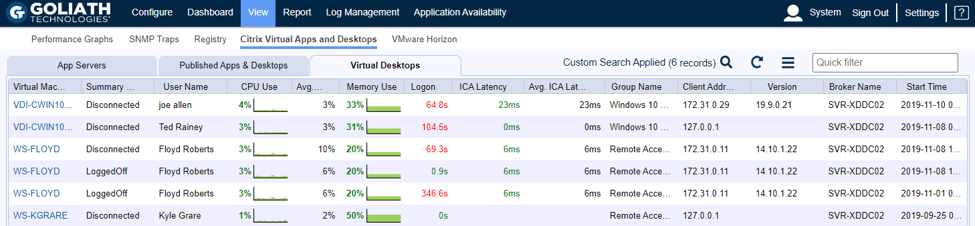
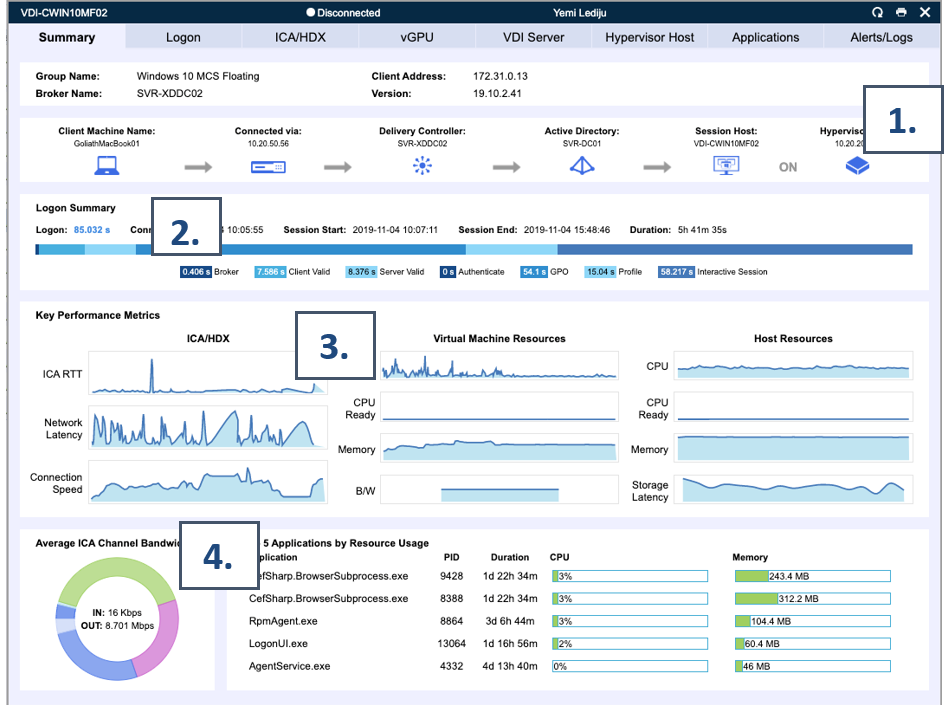
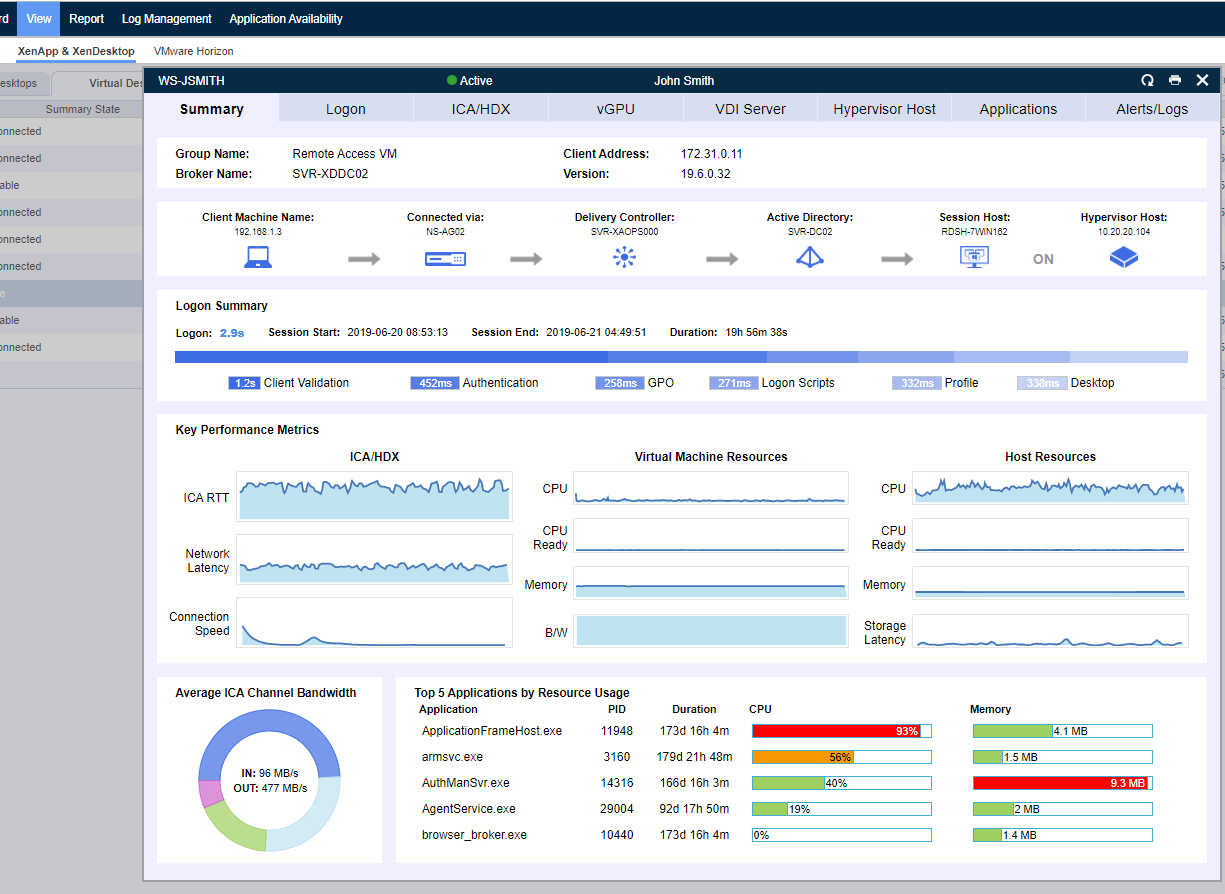
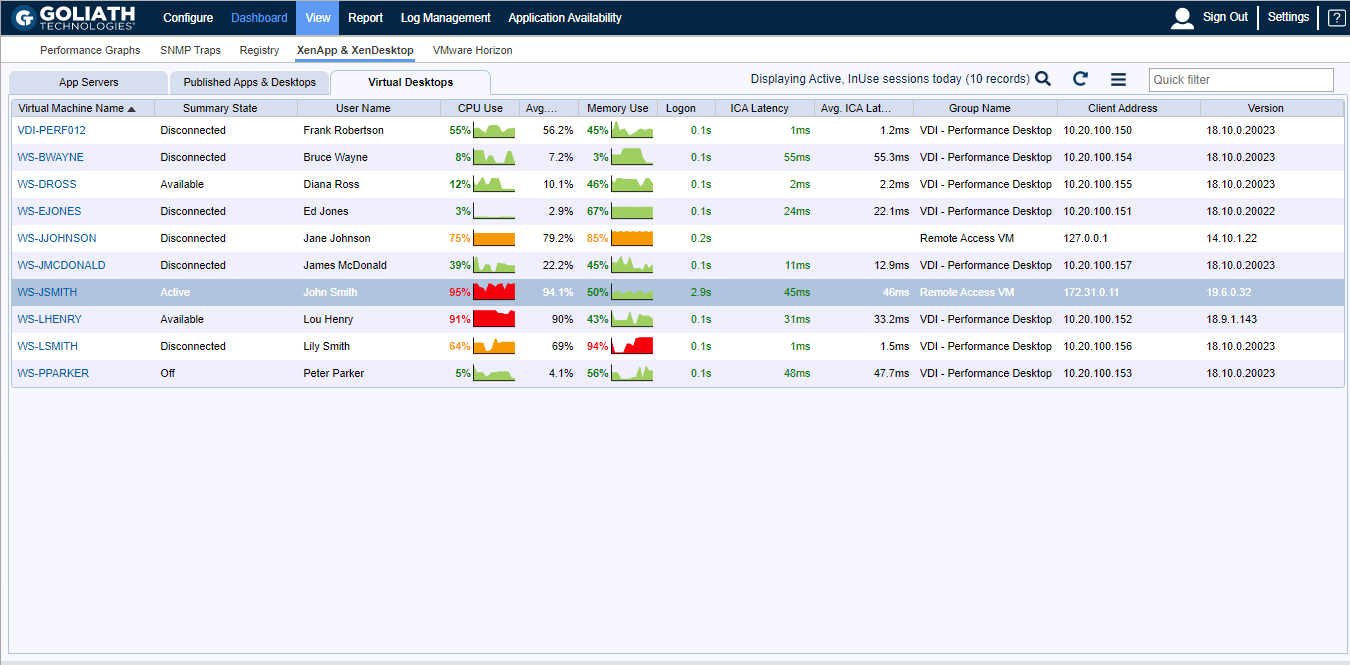
In addition to serving as a full-time expert, purpose-built technology can uplevel your current staff. Organizations often hire junior level Citrix talent and invest in growing their skills over time. We can expedite that timeline by offering visual representations of performance data correlating key metrics to isolate root cause of issues. This can alleviate clicking around for hours trying to understand why end users are experiencing poor performance, instead empowering employees to quickly isolate the user session (Figure 1) experiencing an issue and quickly identifying what might be causing the performance lag (Figure 2).

Without a tool that automatically correlates and ties specific end-user experience data to the complex delivery infrastructure, admins could waste hours sifting through different systems and reports trying to recreate specific details of a user session. This even assumes that the data (event logs, performance data, etc.) exists for the right time period and user session in question. Even with hours of hunting, administrators could still come up empty -handed on why an end user is experiencing poor performance. 


citrix expertise

Figure 1: This is an example where Goliath Technologies, a purpose-built monitoring and troubleshooting tool, can offer a view of all virtual desktop sessions (current and historical) which an administrator can quickly bring up and sort and search for a user session to confirm that the slowness they are complaining is real and then drill into the next step to identify why slowness is occurring.

citrix expertise

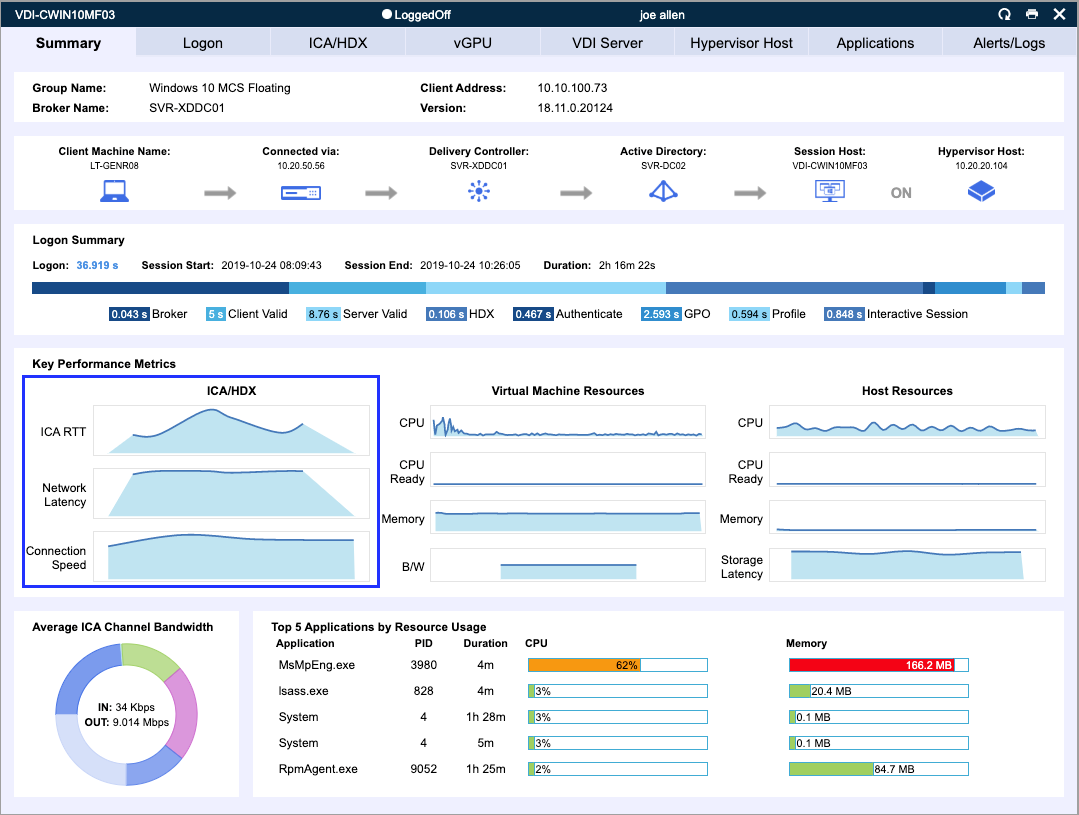
Figure 2: The image above shows a visual summary, powered by Goliath Technologies, that summarizes a single user session. At a glance, administrators can quickly get an overview of a single session’s performance correlating key metrics they may not easily find in Citrix alone.

  1. Dependency map offers a quick overview of all components involved in establishing and hosting the selected Citrix end-user session.
  2. Quick visual breakdown of all stages of the logon process.
  3. Key performance metrics enable an administrator to quickly view answers about the performance of a Citrix/VMware session and determine if slowness is caused by the network or other resources.
  4. A detailed breakdown of the application usage reveals root cause of a performance issue within an end-user’s virtual machine.

Retaining Talent

Talent retention is a top of mind topic for most managers. Good Citrix admins do not want to spend their days reacting to end-user complaints and fires. They want to invest in the future and be proactive in the services they deliver. Investment in purpose-built tools empowers administrators to proactively look for issues before end-users complain, avoiding support tickets all together from being filed.

Also, key performance reports empower administrators to foster data driven conversations with other IT team members, upper management, vendors, and end-users themselves. This avoids hours of wasting time blaming others for an issue and instead drives factual conversations and faster resolution times.

Selecting the Right Technology

Now if you are you looking to augment, uplevel, and support your teams you need to select the right technology. Not all technology is the same and not all will support the goal of delivering a “Citrix Expert Out-of-the-Box”. In order to get the complete uplift you are looking for, you need a solution that offers:

  • AI and automation to proactively prevent end-user issues from ever arising and offer troubleshooting assistance in real time with AI chatbot functionality
  • Broad and deep metrics across entire IT delivery infrastructure (Citrix, VMware Horizon, Microsoft, IGEL, etc.) and end-user behavior.
    • If in healthcare includes visibility across all major EHR applications.
  • Historical reports and analytics to foster data driven conversations with internal IT teams, other vendors, and end users.

These key elements are in fact all part of Goliath Technologies offerings. Goliath Technologies offers software with embedded intelligence and automation for monitoring and troubleshooting end-user performance issues for environments built on Citrix Virtual Apps and Desktops or VMware Horizon platforms, whether on-premises or in the cloud (e.g. AWS, Azure). With Goliath’s unified view of end-user experience data across any hybrid landscape, IT is positioned to proactively ensure a great end-user experience regardless of where end users or workloads are located. Goliath now features the industry’s first AI Citrix Troubleshooting Assistant. 

Summary

When investing in a purpose-built monitoring and troubleshooting solution, like Goliath Technologies, it is like adding a full-time Citrix troubleshooting expert available 24/7/365.  And it is an expert that is a trusted resource helping others on your team from the help desk to other administrators and upper management.

Chris Hughes

George Spiers

Citrix CTP, Citrix Certified Expert in Virtualization (CCE-V), Citrix Certified Expert in Networking (CCE-N), and  Microsoft Certified Solutions Expert. 

Try Goliath For Free

Experience true end user experience monitoring and troubleshooting free for 30 days.

Why Troubleshooting Tools are Important to Any Citrix Upgrade

Why Troubleshooting Tools are Important to Any Citrix Upgrade

Citrix CTP Blog

Why Troubleshooting Tools are Important to Any Citrix Upgrade

George Spiers blog banner

The Extended Support end-date for XenApp 6.5 is just under two months away, so the remaining customers, which I expect to be a fair few, should be on their migration journey to the Flexcast Management Architecture versions of Citrix Virtual Apps and Desktops 7.

We should take a moment to firstly identify the different types of customers and where they are on their Citrix Virtual Apps and Desktops journey. I like to group them in to three categories:

The XenApp 6.5 Customers:

The XenApp 6.5 customers that remain on that version for reasons such as:

1. It just works, and the customer has been reluctant to move to Virtual Apps and Desktops 7 in case it did not perform as well.

2. Missing features available in XenApp 6.5 but not available in Virtual Apps and Desktops 7. Thankfully Citrix has filled the gap in this regard, not to mention the many more features now in Virtual Apps and Desktops 7.

3. Having to retrain staff on the Flexcast Management Architecture is a challenge and has delayed the transition to Virtual Apps and Desktops 7. The components that make up a Virtual Apps and Desktops 7 site do behave different, but many components have not changed a great deal from 6.5.

4. Budget constraints, as to support a new upgrade version, there is normally a requirement to invest in new virtualisation hardware, storage, and software licenses such as for new Operating Systems.

5. Concerns around how IT support can affectively troubleshoot in a Virtual Apps and Desktops 7 environment, as there has been change in the architecture and components.

The 7.x Long Term Service Release (LTSR) Customers:

The 7.x Long Term Service Release customers that remain on such a version for reasons such as:

1. The customer does not have the staff numbers or time to keep upgrading to the latest versions of Virtual Apps and Desktops.

2. The customer does not want to risk the disruptions that an upgrade has the potential to bring, such as new types of faults leaking into the environment, slower performing logons, or a worsened in-session user experience.

3. The customer wants to remain on a stable version and not risk introducing new code to the environment that could be unstable.

4. The customer has no interest in new features at this time, and the current LTSR version offers all that they need.

The 7.x Current Release (CR) Customers:

The Virtual Apps and Desktops 7 Current Release customers remain on such a version for reasons such as:

1. The customer needs the latest features released by Citrix, as it allows the customer to be more competitive in their market.

2. The customer has a well-defined upgrade strategy that minimises user disruption and can be executed easily.

3. The customer has the staff skilled to perform frequent upgrades and they are well equipped with tools such as monitoring products to capture analytics and troubleshoot the environment effectively.


Either way, if a customer is still on XenApp 6.5, LTSR or the Current Release of Virtual Apps and Desktops, at some time sooner or later the environment will need to be upgraded.

Stepping aside from Citrix upgrades and looking outside of the Citrix stack allows us to remember that every other component used to support your application or desktop virtualisation deployment will need to be maintained and not left stagnant. That is, from your bare metal hypervisor hosts, to the network and storage fabrics, Operating Systems, SQL server versions, and the applications that users’ interface with every day.

The problem the IT team and organisation face is that with upgrades to any infrastructure hardware or software component, it can result in a degraded end-user experience, or it could introduce new types of faults into your environment. This is where monitoring software can aid your deployments and help ease those deployment pains.

Investment in purpose-built troubleshooting and monitoring tools helps with deployment pains:

A monitoring solution is just what you need to aid your upgrades from XenApp 6.5 to 7, or from Virtual Apps and Desktops 7 versions to later releases. Here are three key benefits you can gain from having a monitoring solution in place:

Baseline the environment before and after upgrades.

Baselining allows you to compare the performance of your infrastructure when it is working as it should, and then after you complete an upgrade to a newer version of Virtual Apps and Desktops. You can also extend the baselining to hardware refreshes, Operating System upgrades, 3rd party software upgrades and more. This allows you to determine if any change to the environment has had an impact on performance.

Baselines should be focused to include logon times, application launch times, virtual machine resource consumption, and resource consumption against your hypervisors, storage and network.

Monitor both old and future environments from a single pane of glass.

During a Virtual Apps and Desktops upgrade, there is going to be a time where you will have users launching resources from both old and new environments. More typically in an enterprise environment will you stage the upgrade. This allows you to carefully plan and execute your upgrades, without putting too much pressure on your team and causing mass-disruption to end-users.

With a monitoring product that is able to monitor both environments at the same time, you will have the advantage of being able to effectively monitor and troubleshoot both environments from a single console, as let’s face it, the priority of the old environment should not decrease until the last user has been migrated off it.

Troubleshoot any issues that do crop up after the migration quickly, to avoid end-user disappointment.

Your end users are the key to a successful deployment. If your end-users frequently experience issues during or just after the deployment of a new version of Citrix Virtual Apps and Desktops, management may delay

Leverage historical reports to continually monitor and trend use and performance over time.

To anticipate and prevent future issues, it is critical to trend and watch performance over time so that you can foster data driven conversations on how and where you can make future performance improvements and ensure performance degradation does not slowly happen over time.

Goliath Performance Monitor (GPM):

The three key benefits I spoke about can be delivered by a monitoring and troubleshooting solution such as Goliath Performance Monitor, and the Application Availability Monitor products.

Application Availability Monitor (GAAM) is a synthetic application availability tool that can simulate the launching of applications or desktops in your Virtual Apps and Desktops environments, mimicking a real user session launch. Simulations are automatically performed at set times chosen by you, and simulations launch a resource just like an end-user would. This synthetic logon process tests StoreFront logins, authentication, application enumeration, session launch, and more, including capturing the time it takes for each step to complete.

These steps play a direct part in the success of a Virtual Apps and Desktops upgrade. If they are much slower after an upgrade than they previously were, delays to the upgrade may be inevitable as user feedback would be poor and adoption is likely to be low.

Having a tool like GAAM running in your current environment allows you to capture a baseline for many of the workflows an end user goes through every day, and you can compare that baseline with an upgraded version of Citrix Virtual Apps and Desktops. This is further achieved by the historical reporting capabilities of the product.

The results of GAAM are fed into the Goliath Performance Monitor system and can be used for historical reporting as mentioned. This system monitors your Citrix components such as the Delivery Controllers, VDAs, and StoreFront servers. It can also monitor multiple versions, solving the key benefit of monitoring your XenApp 6.5 environment and Virtual Apps and Desktops 7 environment at the same time.

However, it also goes beyond just Citrix. GPM can monitor your hypervisor hosts, the virtual machines that run within them, your storage platform, the networking stack, and end-user specific experiences such as real user logon times, in-session performance and more. This allows you to even benchmark hypervisor performance before and after a hardware refresh, or virtual machine resource consumption after an Operating System upgrade.

Above is a screenshot of the summary information composing the user experience dashboard that provides information and metrics about the user’s specific published app/desktop or virtual desktop session making it easier to troubleshoot when issues arise.

Going beyond benchmarking for upgrades, the capturing and archiving of all this data can assist with your capacity planning for future upgrades without the need to guess.

Whilst on a normal day the solution keeps check on your infrastructure, the early warning system provided by Goliath Performance Monitor makes sure that you are alerted to problems before an end-user experiences them, or the problems become more widespread within the business affecting multiple users. This delivers the third key benefit of solving issues before an end-user notices and tickets are opened with the helpdesk. There is also the capability of self-healing, allowing problems to automatically be remediated without manual intervention from the IT administrators.

Summary

Software vendors such as Citrix are innovating at a rapid pace, bringing new versions of their products out every quarter. This speed of release means that customers will find themselves upgrading more frequently than they ever did before, which is often warranted to make use of new functionality and stay current, however it does bring a risk to the end-user using the platform you are upgrading that they may not get the same user experience they have become used to expecting. That experience can be calculated by performance or by hard or soft errors encountered.

With a monitoring tool like GPM, you get a wrath of information about a user’s session experience when they are connected to a virtual application or desktop. That information is saved and available for historical reporting.

GPM also provides information about your virtual machine’s performance, the network performance, and hypervisor performance. You can see things like how much CPU is being consumed on a hypervisor host or what process in a virtual desktop is taking up too much memory.

If an IT administrator takes a call from an affected user, direct from the GPM console you can see the client’s IP address, logon time, Citrix Receiver version, what time they connected, their session latency and so much more. Having information like this readily available and at your fingertips empowers the IT service desk and results in support incidents being resolved faster.

All of these capabilities will undoubtably help you during those upgrades that will happen sooner rather than later. They will also continue to help once the upgrade is successful, ensuring that you not only deliver a performing solution from the beginning, but during the full life of the environment.

Whether you’re still in the planning stages or in the middle of a phased roll-out, here is a free migration guide, written for IT professionals by IT professionals that will give you all the technical details you need to ensure a seamless migration and a positive end-user experience.

Chris Hughes

George Spiers

Citrix CTP, Citrix Certified Expert in Virtualization (CCE-V), Citrix Certified Expert in Networking (CCE-N), and Microsoft Certified Solution Expert.

Identify Cause of Issues in Your Citrix/VMware Horizon Deployment

Identify Cause of Issues in Your Citrix/VMware Horizon Deployment

Citrix CTP Blog

Top 3 Ways to Identify Root Cause of Poor Performance Issues in Your Citrix or VMware Horizon Deployment

Enterprise troubleshooting is not an easy task with many enterprises.  Administrators are typically left maintaining many different solutions, attempting to evaluate root cause manually, or are left with solutions that do not give broad visibility into all aspects of the deployed Citrix or VMware Horizon deployment.  This can leave systems down for longer than necessary and can leave administrators in a tough spot.  We covered some of these pain points previously and can be found here.  As we unravel this topic further, let’s look at my top 3 virtualization troubleshooting scenarios that could have simply been resolved with the right purpose-built tools.  Then let’s look at how 3 of the new features in Goliath Performance Monitor 11.8 could have ensured quick identification of the problem and helped resolve the technology issue by finding root cause easily.

If only there were a way

Using the wrong tools or a very manual approach can leave users stranded without the ability to do their jobs while support teams spend hours or days troubleshooting and working toward resolving issues.  The more complex the deployment the more challenging this can be to fix the issue.  It seems that most enterprises will spend large amounts of money on a deployment, but often try to cover monitoring by using native toolsets, scripted options, or even manual approaches.  Making it challenging to quickly resolve issues and work quickly to identify root cause.  Let’s take a closer look 3 of my top troubleshooting challenges from my experiences.

Troubleshooting Challenge 1: New EHR Deployment or Upgrade Goes Live and within an Hour Performance Significantly Degrades

In a healthcare environment a new EHR deployments goes live, and within an hour of the new system being online the environment quickly went from performing to only a subset of users being able to function while the rest of the environment degraded quickly.  It started with multiple user calls to the service desk.  This deployment didn’t have a single, comprehensive monitoring solution in place.  After leveraging the tools available, and some manual diagnosis multiple support calls were opened.

Root cause:

  • Memory leak in the EHR application
  • Bug that a patch was created for within the virtualization platform software that was creating a limitation in the number of users that could connect to the backend host

Despite all the load testing and prep that went into this environment in advance, there were still issues uncovered that could not be seen without real load and without the right monitoring tool to oversee the entire environment.  So how could a purpose-built monitoring tool have helped in this scenario?

See Figure 1 below:


End-User Experience Overview


Figure 1 – Demonstrates visual insights; with Goliath 11.8, into the user experience with detail that allows for quick identification of compute issues that could have more led to expedited identification of the issues.


Troubleshooting Challenge 2: Remote Workers Struggling to Logon

In a financial environment external access to the virtualization environment was primarily used for the rare cases that users needed to work remote.  For example, a snow day.  Users that accessed the system earlier in the morning could access the system fine, but those coming in later in the morning are being denied by the access gateway.  The support desk starts getting calls, and upon further analysis root cause was identified:

  • Not enough user connection licenses

To resolve, an expedited license purchase was procured.  Let’s take a look at how with the right tool this could have been identified and resolved quickly.  See Figure 2 and Figure 3 below:


Goliath's System Health Overview


Figure 2 – Demonstrates visual insights into the overall performance of the users previously connected in Goliath 11.8 which clearly shows us the system is functioning well and the server health is not creating a bottle-neck.


License Count Visual Information


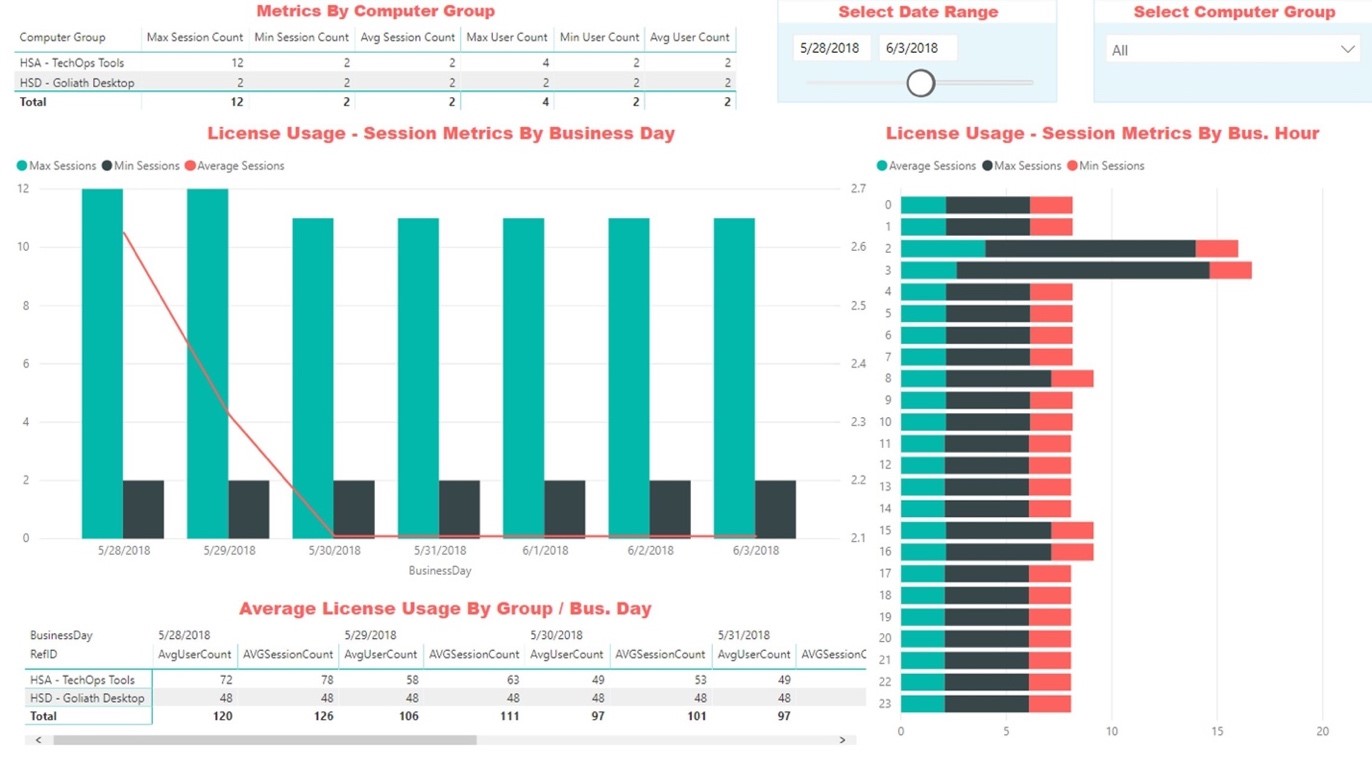
Figure 3 – Demonstrates visual information into the available license count.


Troubleshooting Challenge 3: User is Having Application Issues and Opens a Ticket Saying Citrix is Slow.

In a technology company a user calls in and states that Citrix is slow.  It is up to the support desk to dive in more closely, because the support person knows that Citrix as an application isn’t the problem at all.  After doing some shadowing of the user it was identified that their remote desktop is performing slowly.  From here, the call needs to be escalated, because administrative permissions to dive deeper are needed.  In this environment all troubleshooting is manual and tools are being researched, but when all is said and done the root cause is:

  • The server the desktop is running on is low on resources, so it must be removed from production so that user can reconnect their desktop session on a new server.

With the process being manual, this took the better part of an hour to resolve when it could have been minutes.  The same process would apply if it was a VMware Horizon instance. Let’s take a closer look at Figure 4 below.

in session performance quickly evaluated


Figure 4 – Demonstrates how in session performance can be quickly evaluated with Goliath 11.8 to determine which server the user is connected to and identify the root cause of the server slowness issue.


Concluding Thoughts

Troubleshooting your Citrix or VMware Horizon environment shouldn’t be difficult or time consuming.  With the right purpose-built tools leveraging analytics of your environment will not only help you quickly identify tough issues quickly it can lead to more proactive technical work that can eliminate issues before the user calls. With the right metrics and increased visibility not only will you be better equipped to anticipate, troubleshoot and prevent end-user issues from occurring, but you will be able to foster data-driven conversations across your entire IT debarment, with other vendors as well as internal stakeholders.

Click here to learn more about all the features included in Goliath’s latest product release.

Theresa Miller

Theresa Miller

IT professional working as a technical expert in IT for over 20 years. Theresa is a Citrix CTP, VMware vExpert, Microsoft MVP (Office Servers and Services), Nvidia Advisory Council, and MBA. Her areas of expertise are in the areas of Exchange, Office 365, Active Directory, VMware, Citrix XenApp, and XenDesktop. She is the Founder of 24×7 IT Connection, LLC, a Windows IT Pro Contributing Editor, Pluralsight author, and is an author for TechTarget. You can find her on twitter @24x7itconnect.

Advanced Logon Duration Troubleshooting with Goliath Performance Monitor

Advanced Logon Duration Troubleshooting with Goliath Performance Monitor

Advanced Logon Duration Troubleshooting with Goliath Performance Monitor

Authored by Citrix CTP George Spiers


When we virtualize desktops and applications in a Citrix environment, one of the most important success factors is providing end-users with quick logons to those resources. This is often a difficult challenge that usually results in hours of tweaking, fine-tuning, and lengthy testing. In this article, we take a look at Goliath Technologies’ monitoring software, and how this product accurately provides uniquely detailed in-depth logon measurements to allow you to effectively monitor and troubleshoot logon times in a quicker, more effortless way.

The logon process

If we take a quick but important look at the logon process, it becomes evident that over 30 steps are required to complete a successful logon. With so many steps and communication between various infrastructure components, it can be a challenge to optimally have each step performing in a way that will keep end-users happy, and productive, by offering fast access to desktops and applications. Some of the main steps in the logon process include:

  1. Citrix Workspace app launch, connection and authentication to StoreFront.
    • Alternatively, access to StoreFront via a web browser.
  2. Application and desktop enumeration via StoreFront and Delivery Controller communication.
  3. Delivery Controller brokering and provision of an ICA file to the client.
  4. Launching and establishing an HDX connection to an available VDA, as per the contents of the ICA file.
  5. User session creation and Citrix policy processing.
  6. User authentication between Active Directory and the VDA.
  7. User profile load, Group Policy, and logon script processing.
  8. Shell initialization and load

What has the potential to impact logons?

Some of the reasons a logon can slow include but are not limited to:

  1. Large profile size, when for example using Roaming Profiles or Citrix Profile Management.
  2. Logon scripts.
  3. The amount of configured Group Policy settings.
  4. Lack of hypervisor resource/resource constraint.
  5. Lack of VDA resource, lack of available VDAs, resource constraint.
  6. Incorrect Active Directory configuration.
  7. Overloaded Domain Controllers, StoreFront servers, or Delivery Controllers.
  8. Slow network connections between client endpoint and StoreFront, or client endpoint and VDA.

How will you know?

One of the many challenges a Citrix administrator faces is knowing what is causing a slowdown in logons, or why a logon was slow, even if it was just a handful of logons. This is where monitoring solutions add value to your existing environment and take much of the guesswork out of the troubleshooting and identification process.

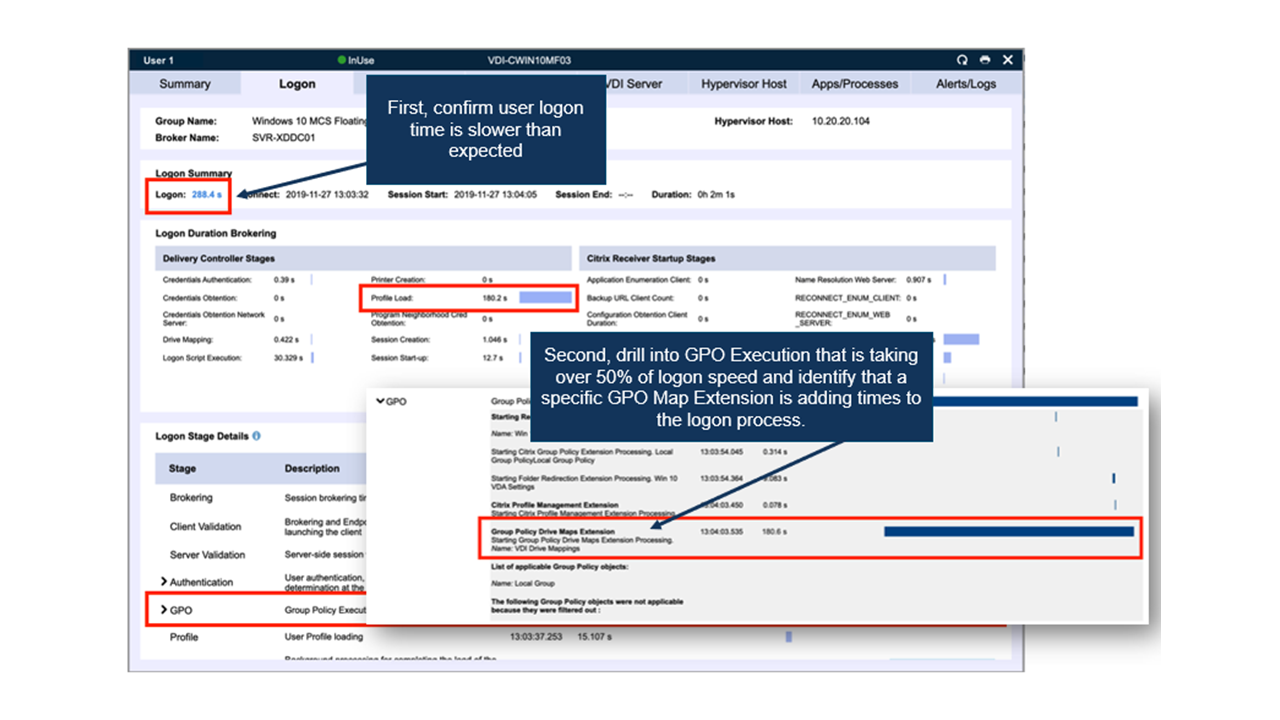
It is known that various products exist that can record logon time duration. Take Citrix Director for example. The problem you may face with many of these products is simply the lack of detail that is captured and presented to you when it comes to logons, which results in potentially extra hours getting to the root cause. For example, you might look at a slow logon report and find that GPO processing was slow, which is great, but what exact GPO is causing the slowness in this instance? It could take a serious amount of time evaluating GPOs, testing them in a non-production environment and applying them one by one until you find the culprit.

As another example, if the monitoring product doesn’t investigate application enumeration times, how long will it take before you investigate this as being the cause of your user’s logon slowness? I can tell you that this is something you will likely overlook nine times out of ten, but it is a point in the logon process that absolutely can have an impact.

Therefore, getting to the root cause before more business productivity is lost is the end-goal here. Not only is this great for the end-users, but it is also advantageous to the Citrix administrator, who can get on with other parts of his/her job.

Goliath Technologies set themselves apart with a product that provides extensive amounts of information around logon durations, providing just the information that is needed to get to the problem point faster than ever. Goliath Performance Monitor does this by providing metrics for over 33 steps in the logon process. Three examples of logon times, with two being slow-logon scenarios caused by different issues are shown below:

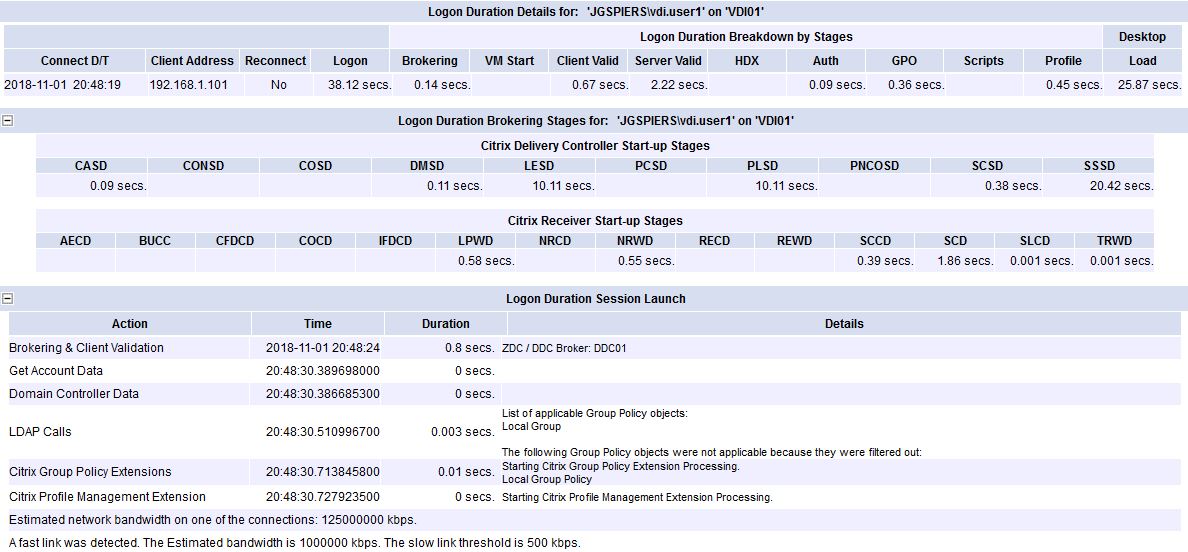
The normal logon:

  • Time to logon: 38 seconds.

A 38 second logon is acceptable by all means. This is a fresh Windows 10 VDA install I am connected to, so it would definitely be possible to reduce the logon times after some optimisations.

Via the XenApp & XenDesktop page, Goliath Performance Monitor reports a logon duration of 38.1 seconds.

Logon duration metrics of interest:

  • PLSD: In this logon example, I used Citrix Profile Management, and the profile load time reports in at 10.11 seconds.
  • GPO: Nothing wrong with GPO processing times, coming in at 0.36 seconds.
  • Brokering: This element in the logon process is also great, at 0.14 seconds taken for the Delivery Controller to broker my connection on to an available VDA.

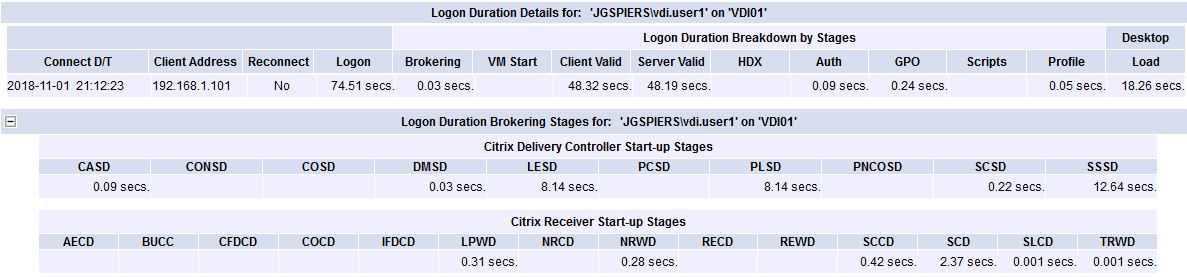
The slow logon:

  • Time to logon: 74 seconds.
  • Reason: Desktop load.

74.5 seconds is cause for concern, and Goliath Performance Monitor rightly highlights the time in red for our attention.

Via the XenApp & XenDesktop page, Goliath Performance Monitor reports a logon duration of 74.5seconds.

Drilling into the logon time:

Logon duration metrics of interest:

  • Client Valid: The time spent validating the client side session. Normally this metric references any delays that happen on the client-side. For example, launching Citrix Receiver, DNS resolution, establishing connections etc.
  • Server Valid: The time spent validating the server side session. Normally this metric references any delays that happen on the server-side. For example, making sure the VDA is ready to host a session.

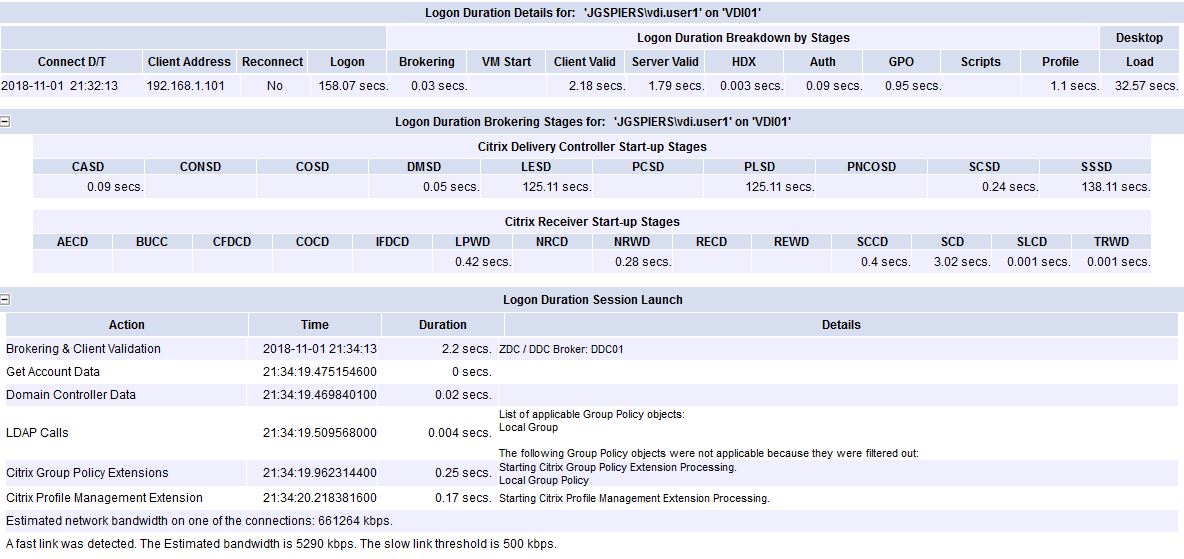
The extra slow logon:

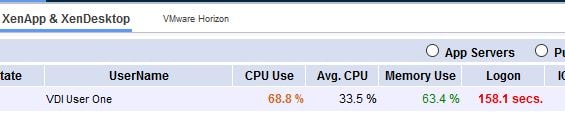
  • Time to logon: 158 seconds.
  • Reason: Large profile.

158 seconds, let’s hope that never happens in our production environment!

Via the XenApp & XenDesktop page, Goliath Performance Monitor reports a logon duration of 158.1 seconds.

Drilling into the logon time:

Logon duration metrics of interest:

  • PLSD: This metric is profile load time. At 125 seconds, it is clear that either the profile configuration was wrong, or the profile itself was overly large. In my example, the latter applied.

Summary


With so much data passed to you, you can rule out many steps in the logon process quickly, allowing you to draw a conclusion and reach the root cause of logon slowness much faster, keeping your users happy.

As shown in the above screenshots, you can see the many different steps that are recorded when a user logs on to their desktop or application. Not only does Goliath Performance Monitor record the GPO processing time, profile load time, script processing time and so on, but it goes well beyond this, capturing application enumeration time, brokering time, HDX session establishment time, how long it takes to obtain applicable Group Policies, how long authentication takes and much more.

If you are intrigued by all the different metrics that Goliath Performance Monitor reports on but I have not mentioned, I recommend the comprehensive Complete Guide to Understanding The Citrix Logon Process guide. A small example of the metrics and their meanings are listed below:

  • DMSD – The time is takes to map client drives, devices and ports from the client device.
  • SSSD – The complete high-level time it takes to perform the entire start-up operation.
  • NRWD – The time it takes the Delivery Controller’s XML service to resolve the name of a published application or desktop to a VDA address.
  • SCCD – This metric starts as close as possible to the time of the request (mouse-click) and ends when the ICA connection between client and VDA has been established.
  • SCD – The time it takes from wfica32.exe launching on your client machine to a connection being established with a VDA.

With Goliath Performance Monitor, you can quickly see the value that such in-depth logon reporting provides. Also note that historical data reporting is possible with the product and you don’t lose any data by way of database trimming, or purging of old data. Without a doubt, there is no comparison between the level of detail found in Goliath Performance Monitor and other tools like Director, etc.

If you’d like to see how Goliath Performance Monitor can proactively solve logon duration and other ‘Citrix is slow’ issues in your environment, you can download a fully functional, fully-supported 30 day free trial here.

Browse EHR Monitoring & Troubleshooting Webinars