Citrix End-User Productivity Reporting

Citrix End-User Productivity Reporting

Citrix End-User Productivity Reporting

A major government agency enacted a new policy allowing employees to work from home using Citrix during times of inclement weather. This policy introduced a new visibility challenge for the organization. Read on to discover how they fixed the visibility gaps with the Citrix End-User Productivity Report from Goliath.


Organization: US Government Department

Infrastructure: Citrix XenApp 6.5, Citrix XenDesktop 7.6 & VMware

Products: Goliath Performance Monitor


The Business Challenge: Measuring Citrix XenApp & XenDesktop Usage for Remote Users

When employees worked in the office, it was relatively easy for management to measure Citrix usage, but it became much more difficult when they worked from home. In an attempt to resolve this issue, the Citrix support team was tasked with finding a solution for obtaining the Citrix XenApp & XenDesktop end-user activity or usage of the application.

The Citrix team knew that simply auditing end-user session time was going to be insufficient. They needed a solution to validate that employees were actually productive during the hours that they were connected to the environment, and active within their sessions.

Employers needed insights to better understand their employees:

When it comes to understanding how employees work, employees are seeking Citrix Performance Monitoring reports. They need reports that not only track end-user productivity but the overall end-user experience while working within Citrix virtual applications and desktops. They are looking to answer questions around:
 

  • What are common active hours spent working, while employees work from home?
  • When are employees, or departments, most active during the workday?
  • What applications are most used (for XenApp customers)?
  • What is the average logon time?
  • Do my end-users ever experience session slowness or latency?

The Solution:

Track User Sessions within Citrix Published Apps, Shared Hosted Desktops, or Virtual Desktop Sessions

The government agency had been utilizing Goliath Performance Monitor (GPM) for monitoring and troubleshooting the Citrix environment for a few years. Knowing that GPM had rich out-of-the-box reporting capabilities, the support team looked to Goliath first for a solution.

Goliath has over dozens of out-of-the-box reports pre-configured within the products and the information required for user auditing of Citrix XenApp and XenDesktop was already in place and available in these reports.  The End-User Productivity Report tracks users’ time interacting with sessions within Citrix published applications, shared hosted desktops, or virtual desktop sessions.

Goliath Productivity Report Capabilities

  • Track the number of user sessions for a particular user
  • Tracks if the user is actually interacting with the session (i.e. typing or moving the mouse).
  • Provides data points that reflect when a user is being productive within their active session.
  • Shows total duration of a session and actual percentage of interaction time within that session
  • Calculates the percentage of the time the employee was actually working.
XenApp Enduser productivity report

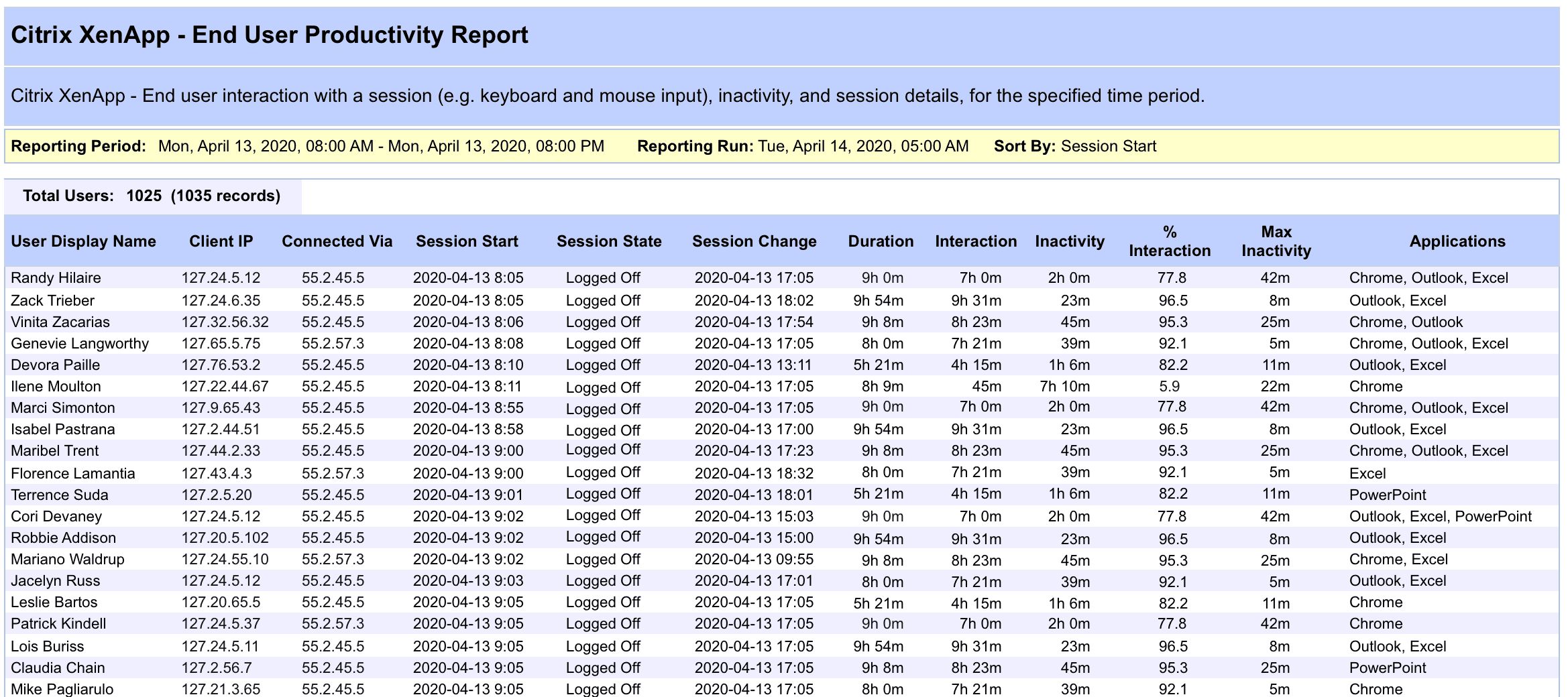
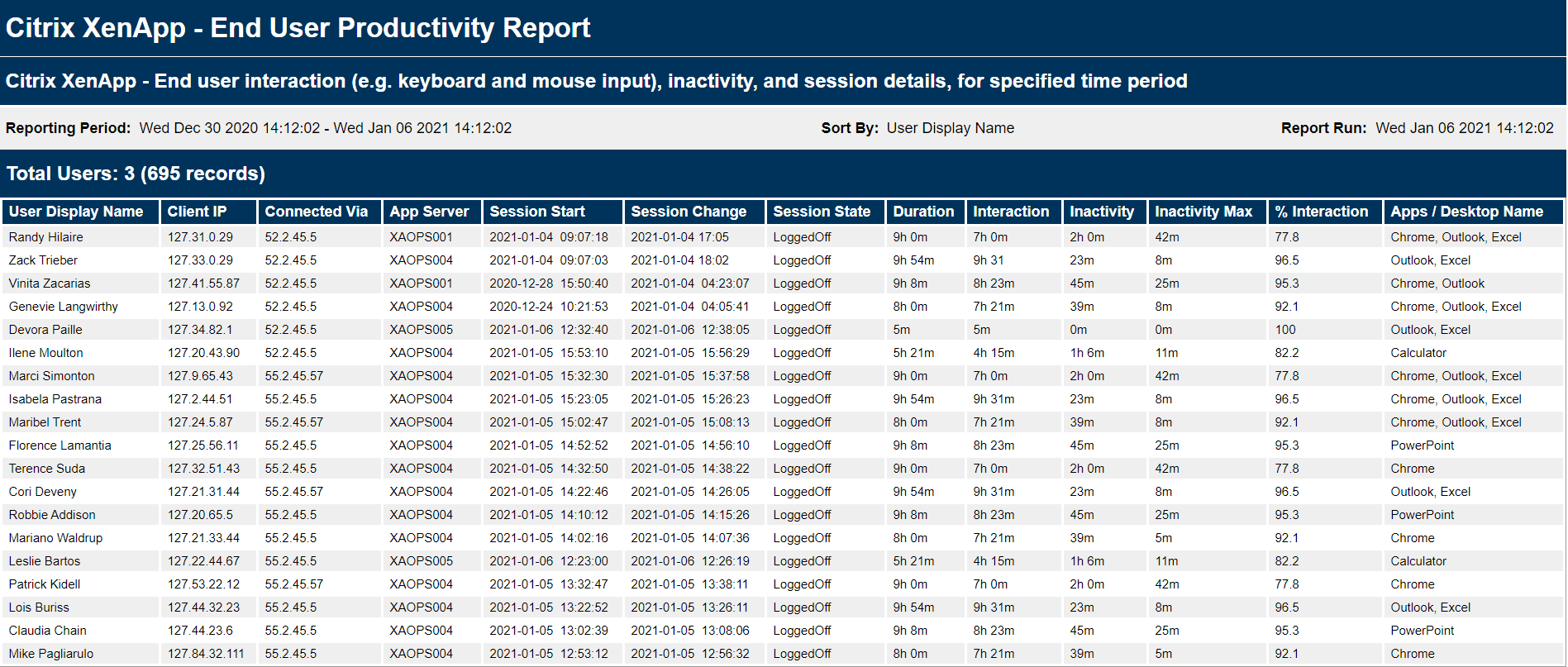
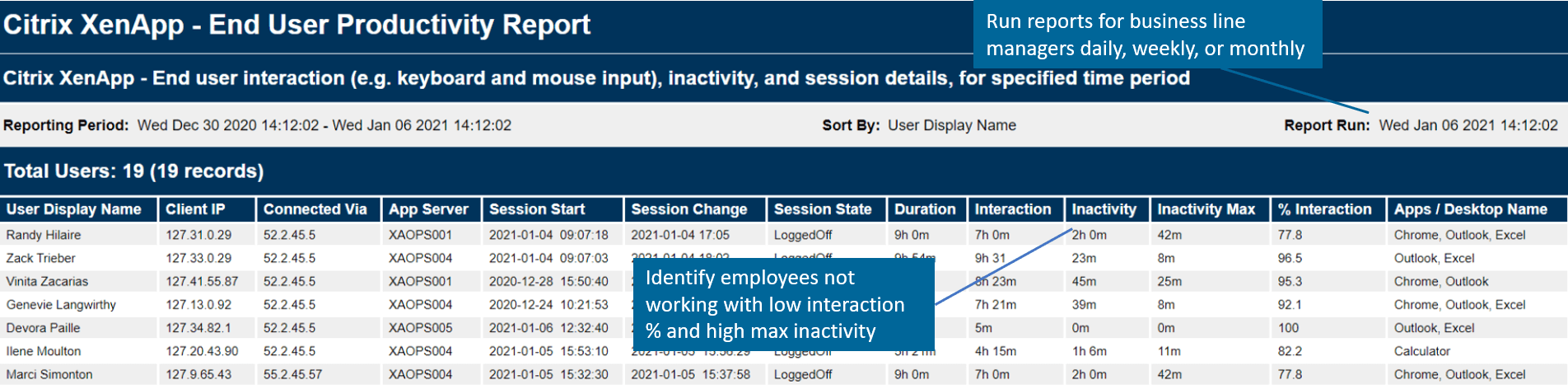
Figure 1: The end-user productivity report can be filtered based on user and time period to show such statistics as total time a user was interacting with the system (interaction), total time a user was inactive and NOT interacting with the system (inactivity), and percentage of the duration time that the user was interacting within the system (% interaction).

The Results: Closed Visibility Gaps Using Citrix End-User Productivity Reporting

This customer now runs the End-User Productivity Report at management’s request to gain insight into the user session activity. The Citrix performance monitoring report from Goliath allows them to see Citrix usage and use the information to truly understand how productive their remote workforce truly is.

The End-User Productivity Report can be scheduled to run on an hourly/weekly/monthly basis, or on-demand. The End-User Productivity Report is exportable to many formats including PDF, CSV, and other integrated data analysis tools which allows for easy access by management.

Continue Your Research on How to Troubleshoot Citrix Performance Issues

How to Report On Remote Worker Activity and Key Performance Indicators

How to Report On Remote Worker Activity and Key Performance Indicators

How to Report On Remote Worker Activity and Key Performance Indicators

Employee Productivity Tracking & KPIs for Remote Worker Activity


COVID-19 and the New IT Reporting Challenge

The unplanned and unbudgeted surge in remote workers is creating new requirements and challenges for IT management. Understanding how these changes impact the IT infrastructure and worker’s effectiveness is vital to business continuity.

Goliath offers the following out-of-the box reports that can help to better document key performance indicators and activity for the remote workforce:

  • End-User Productivity Tracking
  • End-User Performance in Real-Time and Historical
  • License Usage

To assist IT Management, Goliath is offering special short-term subscription and support options to help deal with the current crisis. To learn more, continue reading below or reach out to techinfo@goliathtechnologies.com.

    End-User Productivity Report

    Goliath offers an End-User Productivity Report that provides employee productivity tracking. This report tracks exactly how many hours an end-user was interacting within their Citrix session and how much time they were inactive (i.e. not working). The report can be scheduled to run or executed on-demand and can be emailed, exported (PDF, CSV), or viewed directly within the Goliath interface. Figure 1, below, displays the End-User Productivity Report that shows managers actual user interaction and inactivity.

    Goliath’s End-User Productivity Reporting for Citrix

    Figure 1: The end-user productivity report can be filtered based on user and time period to show such statistics as total time a user was interacting with the system (interaction), total time a user was inactive and NOT interacting with the system (inactivity), and percentage of the duration time that the user was interacting within the system (% interaction).

    Real-Time End-User Performance Monitoring

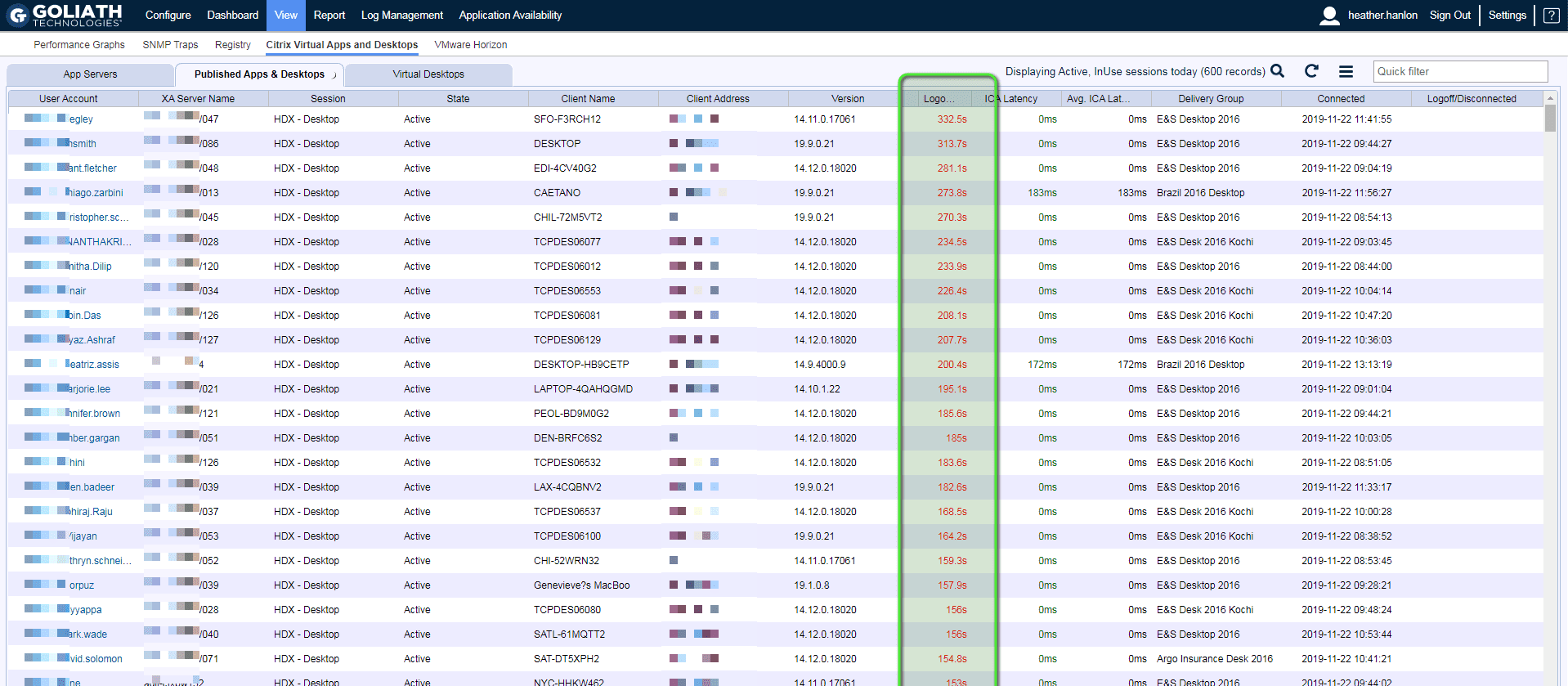
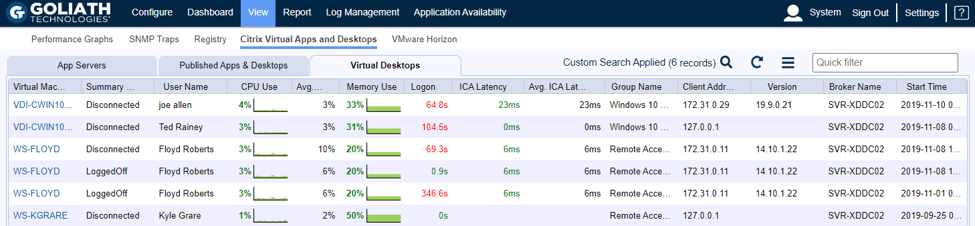
    Goliath provides real-time analytics around each individual user session (Figure 2). At any point in time, IT can use this view to sort by logon times or ICA latency to quickly determine if there are any abnormalities or larger performance issues.

    To hear how Penn National Insurance uses this chart daily to track real-time performance for their remote workers, watch this short customer video.

    End user performance monitoring display

    Figure 2: The Virtual Apps and Desktop display provides analytics for the actual user sessions where admins can not only drill into users with issues, but also sort and spot check those end users who may be experiencing poor performance. 

    Historical Performance Reports

    Goliath offers historical reports and analytics that measure the end user experience and documents the actual performance around logon times, ICA or BLAST latency, session performance, availability, and more. These reports not only show data going back 60, 90 or 120 days, but can be leveraged to collaborate cross-functionally and drive meaningful conversations with other IT teams (server, network, applications), management, vendors, and end users.

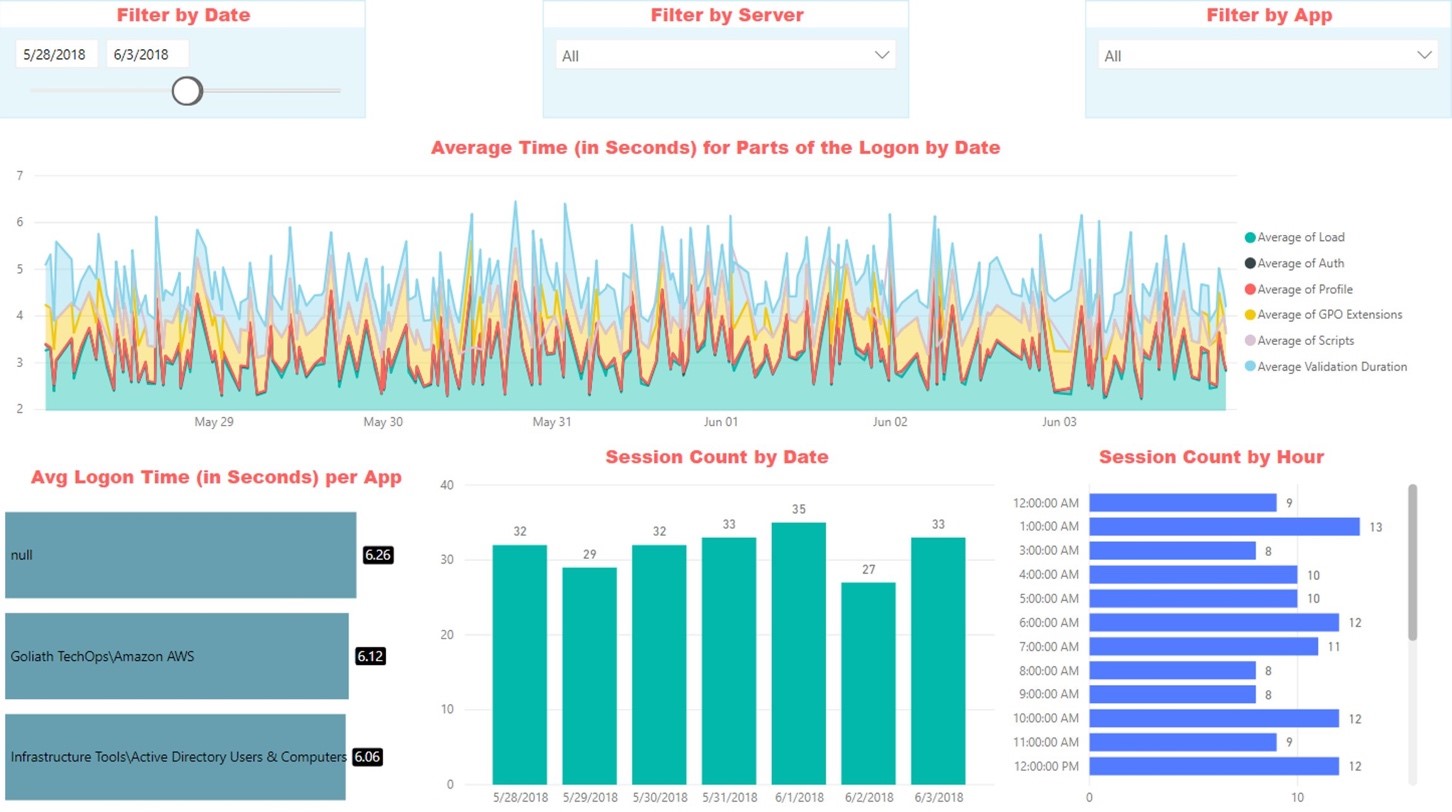
    Figure 3, below, is an example of the logon duration report where the different sections of the logon process are broken down across the environment, highlighting any bottlenecks. This report can be run over a specific time period, by server, or by application.

    Goliath’s End-User Productivity Reporting for Citrix

    Figure 3: The graphical logon duration report shows trends over time to management, other IT teams, and end-users, identifying where bottlenecks exist and, once fixed, that resolution has been achieved.

    License Usage Reports

    The license usage report identifies the unique number of users that logged into the environment over a defined stretch of time along with the total number of licenses utilized. This enables administrators to quickly determine how close they are to running out of licenses during peak usage times. This is growing in importance as the increase in remote working has increased license usage for many organizations.

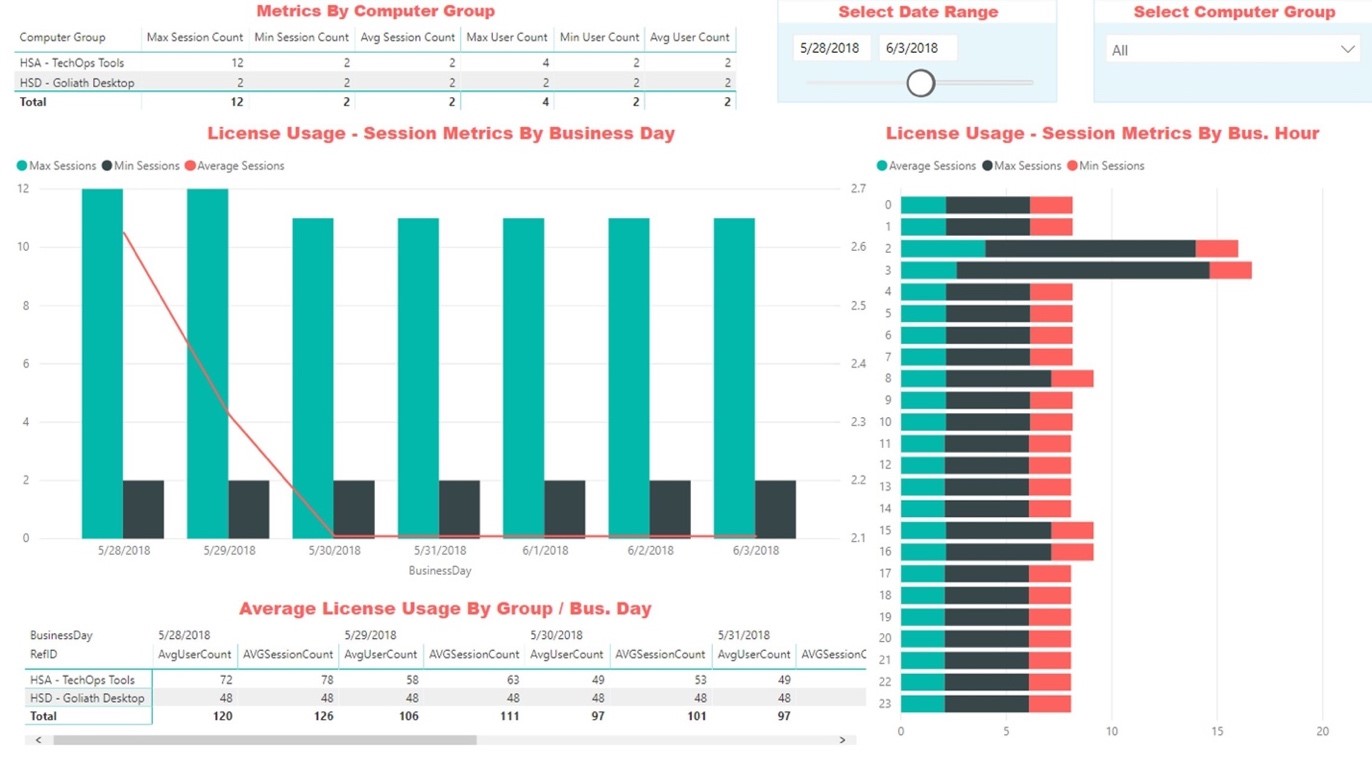
    Goliath also offers reports on Citrix or VMware Horizon licenses looking at groups of users as well as time (Figure 4). Now before increasing Citrix or VMware Horizon licenses due to increased remote staffing levels, actual usage data can be used to confirm the requirement. If licenses are added, they can be tracked to ensure they are being utilized as expected

    Goliath’s End-User Productivity Reporting for Citrix

    Figure 4: The License Usage report breaks down actual usage of licenses and can be filtered over a specific date range or group of users.

    Citrix Expertise: Trouble Finding It? The Answer is Technology

    Citrix Expertise: Trouble Finding It? The Answer is Technology

    Citrix CTP Blog

    Trouble Finding Citrix Expertise?

    The Answer is Technology.

    citrix expertise

    Why is it so difficult to find the Citrix expertise you need to successfully manage the end-user experience?

    It is all in the numbers. And the numbers are not changing anytime soon. Citrix sites support over 400,000 customers. On average, an organization has 2-3 total FTEs managing and monitoring their Citrix environment. If you take those numbers, then roughly there is a demand for at least 1.2 million experts who need to be able to interact with Citrix in a knowledgeable way. Now on the supply side. We know there are 62 named Citrix Technology Professionals (CTPs) every year who are highly certified. There are then roughly 50-150 Citrix Technology Advocates (CTAs). Harder to quantify is how many additional Citrix experts at varying certifications exist. What I can say is the total supply is far below the demand of 1.2 million. And regionally, it can be even more challenging. Here in Northern Ireland the talent pool supply is much lower than London or major cities in the United States. This means that more often than not organizations using Citrix software are under resourced and struggling to find or keep professionals with deep technical expertise. (Click here to view Citrix Infographic highlighting these numbers.)

    And if you are a lucky organization with the right expertise level, my guess is your deep technical experts spend anywhere from 25-30% of their time troubleshooting basic end-user tickets. This is critical time taken away from optimizing, managing, upgrading, and supporting your Citrix environment.

    This paradigm isn’t going to change anytime soon. The only way to change the paradigm is to change the factors. This is where technology, with AI and automation, can augment your Citrix expertise. The right technology solution knows what to monitor, what thresholds to set, and the right alerts to implement in order to proactively anticipate, troubleshoot, and prevent performance issues – all without manual intervention.

    Citrix Expertise Out-Of-The-Box

    All too often Citrix experts are hired to deploy, manage, and optimize their Citrix Virtual Application and Desktop environments. But where do they spend their time? They spend it troubleshooting end-user performance issues and responding to countless support tickets that come across their desk. The free tools don’t help always help. They often give only a single view into the Citrix stack, not the broader view to the entire delivery infrastructure, which includes elements like Active Directory, Licensing Servers, SQL databases, hypervisors, operating systems, network connectivity, and more. Now, instead of strategically helping transform the way people work, the few experts you do have spend their days defending the technology and its capabilities without the right tools to support them.

    This can all be changed by leveraging purpose-built technology that embeds intelligence and automation to proactively anticipate, troubleshoot, and prevent end-user performance issues regardless of where workloads or users are located. Instead of spending time on a full-time employee (FTE), at a fraction of the cost you can use technology that will not only pre-emptively alert you about potential performance issues before users are impacted but can also isolate root cause automatically when issues arise. And now, new AI chatbots can make troubleshooting even easier.

    With IT teams across all industry verticals facing similar resource challenges, AI changes the game. By helping IT teams effectively add additional Citrix expertise to their teams, they can make up for limited headcount and/or budget. It also empowers all levels of the IT Support team to troubleshoot Citrix ultimately reducing escalations and cutting down on remediation times.

    Augmenting Existing Expertise

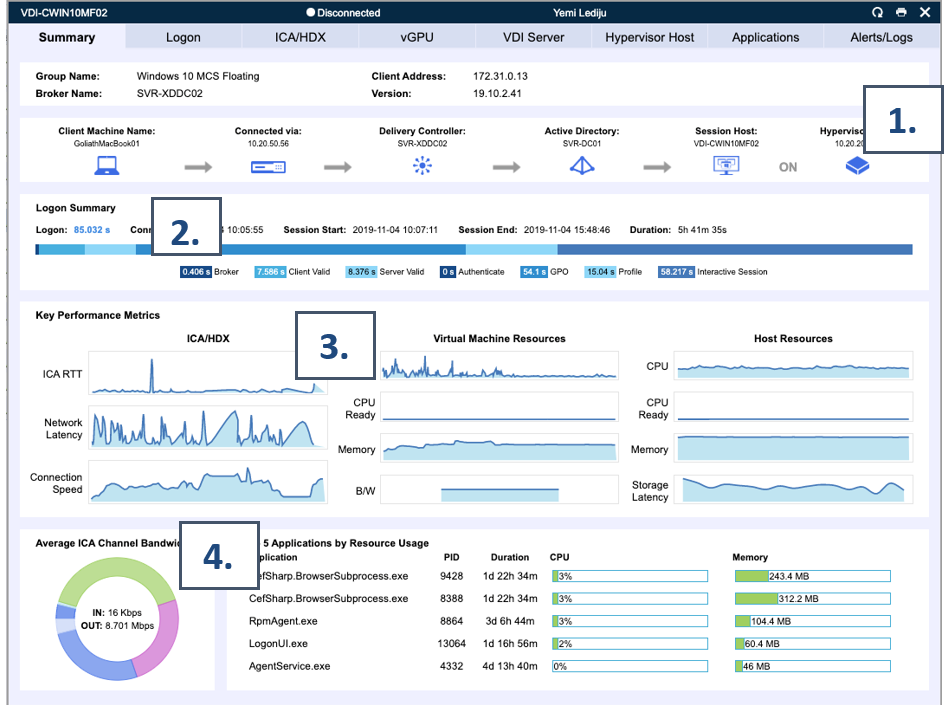
    In addition to serving as a full-time expert, purpose-built technology can uplevel your current staff. Organizations often hire junior level Citrix talent and invest in growing their skills over time. We can expedite that timeline by offering visual representations of performance data correlating key metrics to isolate root cause of issues. This can alleviate clicking around for hours trying to understand why end users are experiencing poor performance, instead empowering employees to quickly isolate the user session (Figure 1) experiencing an issue and quickly identifying what might be causing the performance lag (Figure 2).

    Without a tool that automatically correlates and ties specific end-user experience data to the complex delivery infrastructure, admins could waste hours sifting through different systems and reports trying to recreate specific details of a user session. This even assumes that the data (event logs, performance data, etc.) exists for the right time period and user session in question. Even with hours of hunting, administrators could still come up empty -handed on why an end user is experiencing poor performance. 


    citrix expertise

    Figure 1: This is an example where Goliath Technologies, a purpose-built monitoring and troubleshooting tool, can offer a view of all virtual desktop sessions (current and historical) which an administrator can quickly bring up and sort and search for a user session to confirm that the slowness they are complaining is real and then drill into the next step to identify why slowness is occurring.

    citrix expertise

    Figure 2: The image above shows a visual summary, powered by Goliath Technologies, that summarizes a single user session. At a glance, administrators can quickly get an overview of a single session’s performance correlating key metrics they may not easily find in Citrix alone.

    1. Dependency map offers a quick overview of all components involved in establishing and hosting the selected Citrix end-user session.
    2. Quick visual breakdown of all stages of the logon process.
    3. Key performance metrics enable an administrator to quickly view answers about the performance of a Citrix/VMware session and determine if slowness is caused by the network or other resources.
    4. A detailed breakdown of the application usage reveals root cause of a performance issue within an end-user’s virtual machine.

    Retaining Talent

    Talent retention is a top of mind topic for most managers. Good Citrix admins do not want to spend their days reacting to end-user complaints and fires. They want to invest in the future and be proactive in the services they deliver. Investment in purpose-built tools empowers administrators to proactively look for issues before end-users complain, avoiding support tickets all together from being filed.

    Also, key performance reports empower administrators to foster data driven conversations with other IT team members, upper management, vendors, and end-users themselves. This avoids hours of wasting time blaming others for an issue and instead drives factual conversations and faster resolution times.

    Selecting the Right Technology

    Now if you are you looking to augment, uplevel, and support your teams you need to select the right technology. Not all technology is the same and not all will support the goal of delivering a “Citrix Expert Out-of-the-Box”. In order to get the complete uplift you are looking for, you need a solution that offers:

    • AI and automation to proactively prevent end-user issues from ever arising and offer troubleshooting assistance in real time with AI chatbot functionality
    • Broad and deep metrics across entire IT delivery infrastructure (Citrix, VMware Horizon, Microsoft, IGEL, etc.) and end-user behavior.
      • If in healthcare includes visibility across all major EHR applications.
    • Historical reports and analytics to foster data driven conversations with internal IT teams, other vendors, and end users.

    These key elements are in fact all part of Goliath Technologies offerings. Goliath Technologies offers software with embedded intelligence and automation for monitoring and troubleshooting end-user performance issues for environments built on Citrix Virtual Apps and Desktops or VMware Horizon platforms, whether on-premises or in the cloud (e.g. AWS, Azure). With Goliath’s unified view of end-user experience data across any hybrid landscape, IT is positioned to proactively ensure a great end-user experience regardless of where end users or workloads are located. Goliath now features the industry’s first AI Citrix Troubleshooting Assistant. 

    Summary

    When investing in a purpose-built monitoring and troubleshooting solution, like Goliath Technologies, it is like adding a full-time Citrix troubleshooting expert available 24/7/365.  And it is an expert that is a trusted resource helping others on your team from the help desk to other administrators and upper management.

    Chris Hughes

    George Spiers

    Citrix CTP, Citrix Certified Expert in Virtualization (CCE-V), Citrix Certified Expert in Networking (CCE-N), and  Microsoft Certified Solutions Expert. 

    Try Goliath For Free

    Experience true end user experience monitoring and troubleshooting free for 30 days.

    MSP Uses Hybrid Cloud Monitroring Services to Deliver Exceptional Customer Service

    MSP Uses Hybrid Cloud Monitroring Services to Deliver Exceptional Customer Service

    Cloud Geeni

    MSP Monitors Hybrid Cloud Services to Deliver Exceptional Customer Service

    hybrid cloud monitoring

     “Goliath is a superior admin tool that gives us peace of mind that we are constantly delivering a reliable, high-performing hybrid cloud managed service to our customers. Without Goliath we would only be reactive, responding to customer issues versus proactively identifying performance bottlenecks and addressing them before a customer is ever impacted.” – Andy Smith, Network Support Administrator of Cloud Geeni

    Infrastructure

    Proprietary cloud platform utilizing Microsoft Hyper-V, Azure, and Remote Desktop Services.

    Challenge

    Cloud Geeni is a fully managed cloud service provider guaranteeing their customers of all sizes 99.9% up-time and high-performing virtualized desktops and applications on their proprietary cloud platform. Their customer service commitment is high, promising their customers that they will not be burdened with the day-to-day maintenance of their IT delivery infrastructure, enabling their users to work freely with high-performing applications and desktops anywhere and at any time.

    In order to deliver on this commitment, Cloud Geeni must be notified anytime something could negatively impact their customers’ overall performance. They need to know if a new application was added and isn’t maximizing current CPU levels, which could negatively impact end user performance. It is critical, as a service provider, that they are proactive and know the current state of their infrastructure 24/7 and how that infrastructure has changed over time. For example, they need to be able to monitor trends and warn their clients when additional resources (i.e. memory, CPU) need to be added to support their growing applications and workforce. Without the ability to be proactive, their whole business is at risk as customer retention becomes near impossible. Finally, if issues do arise, they need the visibility and metrics to troubleshoot quickly, isolate root cause, and implement a permanent fix solution.

    Solution

    Monitoring Hybrid IT Environments

    Cloud Geeni has a proprietary hybrid platform compromised of Azure, physical devices, and Microsoft Hyper-V. This infrastructure supports Microsoft Remote Desktop Services for many of their customers. The complexity of the architecture makes it impossible to monitor and troubleshoot from a single console – unless they invest in a third-party tool which can look across all elements within the IT delivery infrastructure.

    This is why Cloud Geeni turned to Goliath Technologies nearly 5 years ago, looking for a purpose-built tool that could anticipate, troubleshoot, and prevent end user performance issues regardless of where IT workloads or users were located.

    Goliath runs on every single one of Cloud Geeni’s servers and desktops, monitoring and alerting when issues arise around:

    • CPU usage
    • Memory utilization
    • Disk errors

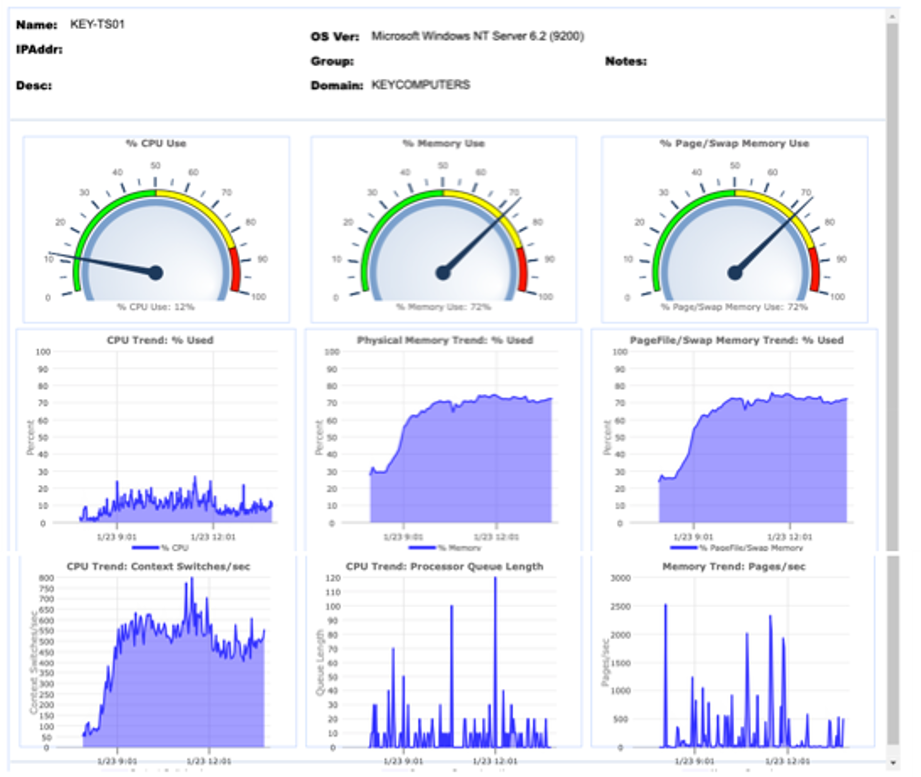
    By enabling these alerts, Cloud Geeni can address issues before they negatively impact the performance of their customers’ virtualized desktops. For example, one day they got an alert showing a spike in memory usage which would slow performance down. They were able to identify that this customer recently introduced a new CRM system which was consuming significantly more memory. Based on data-backed evidence, they were able to advise their customer that in order to prevent performance issues they needed to invest in more memory given that the new CRM tool was starting to spike Memory Use (see Figure 1). This is just one example on how Cloud Geeni is better managing their business by proactively addressing performance issues before their customers are impacted.

    Figure 1: Charts like the one above quickly enables Cloud Geeni to show their customers when they are at risk of maximizing their Memory allocation. In the graph above you can see Memory Use is ok but it is at risk of getting into the red, indicating lack of memory, which can impact performance. Now Cloud Geeni is enabled to have a data-driven proactive conversation communicating that if more load is added they will need to increase memory to maintain their level of performance.

    Results

    Increased Efficiencies and Data-Driven Conversations

    Beyond helping Cloud Geeni become more proactive with their customers, by leveraging Goliath they are also able to be more efficient and foster data-driven conversations with their customers.

    If Goliath wasn’t used, Cloud Geeni would require more support staff manually checking multiple systems and screens daily to ensure everything was working as expected. Not only does this manual effort increase risk of error, it also has a significantly higher cost due to additional headcount. Goliath leverages embedded intelligence and automation to guide the team on what metrics to monitor and how to monitor and alert on them for over 250 key conditions, events, and failure points. Andy Smith, Network Support Administrator of Cloud Geeni, said that, “By leveraging Goliath, it’s as if we hired multiple full-time troubleshooting experts who not only solve issues but also proactively identify and alert on them before end users are impacted. This not only saves us dollars, but at the end of the day provides an even higher level of customer care for Cloud Geeni.”

    Finally, another advantage for Cloud Geeni is they can have data-driven conversations with their customers about the ongoing needs and growth of their environment. Cloud Geeni shares reports with their customers showing trends about usage and performance. For example, they can now go to their customer and show with factual evidence that over a period of time memory use has increased, indicating that in order to keep performance high, an investment in more hardware is needed. Prior to Goliath, these conversations were more difficult to share as they didn’t have the reports to cross correlate performance with metrics. These conversations typically result in customers investing more with Cloud Geeni, and they have hard evidence on why that investment is needed. This not only drives revenue for Cloud Geeni, but it also makes those customer conversations much simpler.

    When Andy Smith was asked to describe Goliath in three words he said, “superior admin tool.” He also commented that “Without Goliath’s monitoring, our support would be more labor intensive. We need to know of any performance issues before our customers are impacted or we aren’t delivering on our customer commitments.”

    Chris Hughes

    ABOUT CLOUD GEENI

    Cloud Geeni is a U.K.-based Managed Service Provider supporting over 200 customers across various industries.

    Headquarters location: Greater Manchester, UK 
    Founded: 1984
    Employees: 100+
    Industry: IT Services

    Are Your Remote Workers Working?

    Are Your Remote Workers Working?

    Are Your Remote Workers Working?

    Measure Citrix or VMware Horizon Usage

    As someone who has worked remotely for the past 10 years, I know more often than not my days start sooner than most in the office and end later as I have no commute to worry about. And while I suspect 80-90% of remote workers operate this way, there is always that 10% who are taking advantage of their newly found freedom. And this is why, as employers open up the option to work from home, it raises this concern: are my employees really working?

    End-User Productivity Reports

    With the right tools to measure end-user activity, determining if employees are working or not is not a hard question to answer. Here at Goliath, we offer a standard out-of-the box report, End-User Productivity Report, that tracks how many hours an end-user was interacting within their Citrix session and how much time they were inactive (see Figure 1). One metric we highlight is Max Inactivity as it identifies longest period of time the user was inactive in the system, indicating the highest period of time they were not working during their session. This report is intended to give business line managers empirical evidence about their employee’s work habits while working from home.

    Figure 1: The end-user productivity report tracks how many hours an end-user was interacting within their Citrix session and how much time they were inactive (i.e. not working).  The % Interaction metric is the percentage of the duration time that the user was interacting within the system.


    Webinar Replay:

    How to Report on Home Worker Productivity and Experience

    XenApp Enduser productivity report

    All Goliath reports offer historical views into trends over time. This means that should someone’s performance start dropping over time, a manager could look into their activity history and see if there is any correlation around performance and time spent actively working.

    Few want to be big brother, but for any organization their most valued asset is their people. And in order to support macrotrends promoting a more flexible workstyle or the Coronavirus Pandemic enforcing work from home, there is increased need to have tools that can help identify when the amount of time dedicated to working is impacting overall performance.

    To learn more about Goliath’s end-user activity reports, contact techinfo@goliathtechnologies.com.