
Top American Airline Ensures Access to Citrix Virtual Apps with Application Availability Monitoring
[fusion_builder_container hundred_percent=”no” hundred_percent_height=”no” hundred_percent_height_scroll=”no” hundred_percent_height_center_content=”yes” equal_height_columns=”no” menu_anchor=”” hide_on_mobile=”small-visibility,medium-visibility,large-visibility” status=”published” publish_date=”” class=”” id=”” background_color=”” background_image=”” background_position=”center center” background_repeat=”no-repeat” fade=”no” background_parallax=”none” enable_mobile=”no” parallax_speed=”0.3″ video_mp4=”” video_webm=”” video_ogv=”” video_url=”” video_aspect_ratio=”16:9″ video_loop=”yes” video_mute=”yes” video_preview_image=”” border_size=”” border_color=”” border_style=”solid” margin_top=”” margin_bottom=”” padding_top=”” padding_right=”” padding_bottom=”” padding_left=””][fusion_builder_row][fusion_builder_column type=”2_3″ layout=”1_1″ spacing=”” center_content=”no” link=”” target=”_self” min_height=”” hide_on_mobile=”small-visibility,medium-visibility,large-visibility” class=”” id=”” background_color=”” background_image=”” background_image_id=”” background_position=”left top” background_repeat=”no-repeat” hover_type=”none” border_size=”0″ border_color=”” border_style=”solid” border_position=”all” padding_top=”” padding_right=”” padding_bottom=”” padding_left=”” margin_top=”” margin_bottom=”” animation_type=”” animation_direction=”left” animation_speed=”0.3″ animation_offset=”” last=”no”][fusion_text columns=”” column_min_width=”” column_spacing=”” rule_style=”default” rule_size=”” rule_color=”” hide_on_mobile=”small-visibility,medium-visibility,large-visibility” class=”” id=””]
[fusion_imageframe image_id=”” max_width=”” style_type=”” blur=”” stylecolor=”” hover_type=”none” bordersize=”” bordercolor=”” borderradius=”” align=”right” lightbox=”no” gallery_id=”” lightbox_image=”” lightbox_image_id=”” alt=”” link=”/citrix-director-comparison/?utm_source=blog&utm_inline=banner&utm_campaign=website-CTAs&utm_content=gaat-airlines” linktarget=”_blank” hide_on_mobile=”small-visibility,medium-visibility,large-visibility” class=”” id=”” animation_type=”” animation_direction=”left” animation_speed=”0.3″ animation_offset=””] [/fusion_imageframe]In this post, we share a story about how one of the top 10 airlines utilized a new technology to solve an old problem: Proactively confirm that the Sabre Reservation System, accessed using Citrix, would be available when reservation specialists attempted to logon and schedule flights for customers. They selected the Goliath Application Availability Testing Service for Citrix.
Recently, Goliath received an inquiry from the Citrix Engineering Team at one of the top ten airlines in the world. The Citrix team was in dire need of a tool which would allow them to continually check remote connectivity and availability of their Citrix VDI infrastructure and the Sabre Reservation System and alert them before they were called by the business units who would usually contact them when reservation specialists were having logon issues can catch them flat-footed. So, they wanted to be able to avoid these calls and if they did happen, have the ability to say, “we know of the issue and were on it”.
The catch: No technology could be deployed on-premises.
Employing a large remote workforce of registration agents in multiple time zones was effective from a business standpoint allowing for greater flexibility in hiring and market coverage. However, it did not come without technical challenges, as these remote team members were experiencing issues when the Citrix desktops were intermittently not launching successfully.
The catch: No technology could be deployed on-premises.
Employing a large remote workforce of registration agents in multiple time zones was effective from a business standpoint allowing for greater flexibility in hiring and market coverage. However, it did not come without technical challenges, as these remote team members were experiencing issues when the Citrix desktops were intermittently not launching successfully.
IT needs to ensure an ‘Always On’ Citrix environment for 1,000+ remote end users
At approximately 1,000+ users who take reservations and VIP support calls, the airline’s remote work force is rather large. This team depends on Citrix for delivery of key applications in order to perform their duties on a daily basis, and availability of those resources needs to be available 24/7/365.
We introduced the Citrix Engineers to our application availability testing service, which doesn’t require any software on premise. The onboarding process was easy. A configuration link was sent to them where they entered the following information:
- URL to connect to the Citrix environment
- The Citrix account credentials
- Application or desktop name to be tested
- Email address for receiving real-time alerts from the Application Availability Service
Upon saving the information, the service was fully configured and ready to start the testing process.
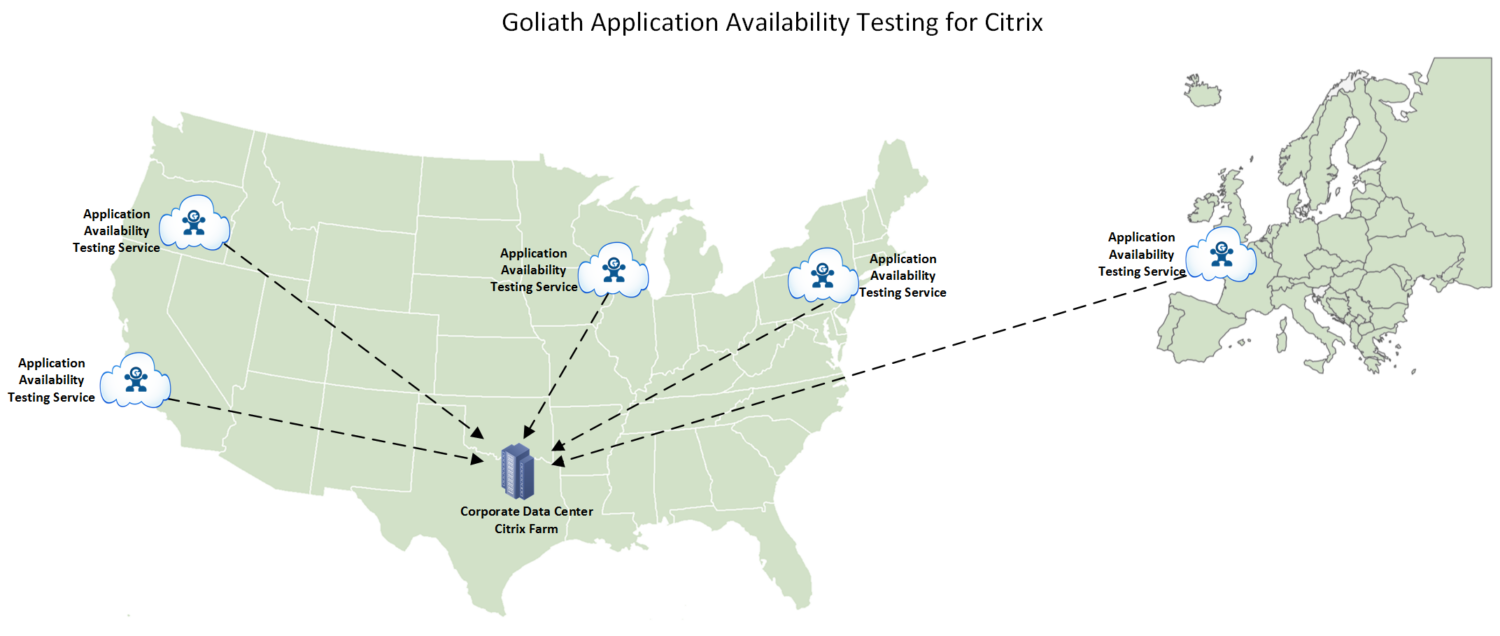
As you can see below, the service was configured to test application availability from four different egress points in the United States, and one in Europe. Each was selected based on time zone and the largest clusters of remote employees.
[/fusion_text][fusion_imageframe image_id=”41714|800″ max_width=”” style_type=”” blur=”” stylecolor=”” hover_type=”none” bordersize=”” bordercolor=”” borderradius=”” align=”center” lightbox=”yes” gallery_id=”” lightbox_image=”” lightbox_image_id=”” alt=”” link=”” linktarget=”_self” hide_on_mobile=”small-visibility,medium-visibility,large-visibility” class=”” id=”” animation_type=”” animation_direction=”left” animation_speed=”0.3″ animation_offset=””]https://goliathtechnologies.com/wp-content/uploads/2019/02/GAAT-Airlines-800×339.png[/fusion_imageframe][fusion_separator style_type=”none” hide_on_mobile=”small-visibility,medium-visibility,large-visibility” class=”” id=”” sep_color=”” top_margin=”25″ bottom_margin=”” border_size=”” icon=”” icon_circle=”” icon_circle_color=”” width=”” alignment=”center” /][fusion_text columns=”” column_min_width=”” column_spacing=”” rule_style=”default” rule_size=”” rule_color=”” hide_on_mobile=”small-visibility,medium-visibility,large-visibility” class=”” id=””]
Test & Confirm Applications Will Launch in Real Time
Almost immediately, the Citrix team started seeing successful application and desktop launches in real time. They also started seeing that failures were occurring. In fact, after initiating the first test, the Citrix team began receiving email notifications of logon failures.
Here is an example of the real-time screen they were seeing:
[/fusion_text][fusion_imageframe image_id=”41715|full” max_width=”” style_type=”” blur=”” stylecolor=”” hover_type=”none” bordersize=”” bordercolor=”” borderradius=”” align=”center” lightbox=”no” gallery_id=”” lightbox_image=”” lightbox_image_id=”” alt=”” link=”” linktarget=”_self” hide_on_mobile=”small-visibility,medium-visibility,large-visibility” class=”” id=”” animation_type=”” animation_direction=”left” animation_speed=”0.3″ animation_offset=””]https://goliathtechnologies.com/wp-content/uploads/2019/02/Confirm-Logon-Slowness-e1550089903569.png[/fusion_imageframe][fusion_separator style_type=”none” hide_on_mobile=”small-visibility,medium-visibility,large-visibility” class=”” id=”” sep_color=”” top_margin=”25″ bottom_margin=”” border_size=”” icon=”” icon_circle=”” icon_circle_color=”” width=”” alignment=”center” /][fusion_text columns=”” column_min_width=”” column_spacing=”” rule_style=”default” rule_size=”” rule_color=”” hide_on_mobile=”small-visibility,medium-visibility,large-visibility” class=”” id=””]
Upon receiving these alerts they were able to do what?
This data and information is also available in a historical report IT staff can analyze to make decisions and provide management with historical information.
The two images below are an example of logon failures displayed in this report. In the example here, the airline’s Citrix engineer used the data to confirm that a StoreFront server went down.
The report drilled down into the actual steps taken to get to the failure point. In a production environment, the appropriate support teams would have been alerted immediately when these failures occurred, giving them time to investigate the issue before receiving calls from their end users.
Finally, and as importantly, the reports gave them objective evidence that would validate whether or not they were meeting their Citrix Availability SLAs.
[/fusion_text][fusion_imageframe image_id=”41716|800″ max_width=”” style_type=”” blur=”” stylecolor=”” hover_type=”none” bordersize=”” bordercolor=”” borderradius=”” align=”center” lightbox=”yes” gallery_id=”” lightbox_image=”” lightbox_image_id=”” alt=”” link=”” linktarget=”_self” hide_on_mobile=”small-visibility,medium-visibility,large-visibility” class=”” id=”” animation_type=”” animation_direction=”left” animation_speed=”0.3″ animation_offset=””]https://goliathtechnologies.com/wp-content/uploads/2019/02/Historical-Simulation-Drilldown-800×422.png[/fusion_imageframe][fusion_separator style_type=”none” hide_on_mobile=”small-visibility,medium-visibility,large-visibility” class=”” id=”” sep_color=”” top_margin=”25″ bottom_margin=”” border_size=”” icon=”” icon_circle=”” icon_circle_color=”” width=”” alignment=”center” /][fusion_imageframe image_id=”41717|800″ max_width=”” style_type=”” blur=”” stylecolor=”” hover_type=”none” bordersize=”” bordercolor=”” borderradius=”” align=”center” lightbox=”yes” gallery_id=”” lightbox_image=”” lightbox_image_id=”” alt=”” link=”” linktarget=”_self” hide_on_mobile=”small-visibility,medium-visibility,large-visibility” class=”” id=”” animation_type=”” animation_direction=”left” animation_speed=”0.3″ animation_offset=””]https://goliathtechnologies.com/wp-content/uploads/2019/02/Track-Simulation-Results-800×359.png[/fusion_imageframe][fusion_separator style_type=”none” hide_on_mobile=”small-visibility,medium-visibility,large-visibility” class=”” id=”” sep_color=”” top_margin=”25″ bottom_margin=”” border_size=”” icon=”” icon_circle=”” icon_circle_color=”” width=”” alignment=”center” /][fusion_text columns=”” column_min_width=”” column_spacing=”” rule_style=”default” rule_size=”” rule_color=”” hide_on_mobile=”small-visibility,medium-visibility,large-visibility” class=”” id=””]
The Logon Success/Failure Analysis Report may be configured to run on a scheduled basis (daily, weekly, etc.) or as an on-demand report– just in time for those impromptu meetings management sometimes calls.
This Logon Report provides:
- A direct output of any scheduled logon successes or failures for the time period specified when the report is generated
- Full visibility to drill down into each of the logon availability tests to identify where a failure may have occurred
Logon Success/Failure Analysis Report will indicate if the:
- Connection flowed through the NetScaler properly
- StoreFront server isn’t responsive
- Specific application or desktop was unable to launch
When this customer interaction ended, everyone was very satisfied. Together, and in less than two hours, we had solved a difficult challenge. The Goliath Application Availability Testing Service for Citrix provided them with peace of mind that they would “know first” if a reservation specialist was going to have issues.
[/fusion_text][/fusion_builder_column][fusion_builder_column type=”1_3″ layout=”1_3″ spacing=”” center_content=”no” link=”” target=”_self” min_height=”” hide_on_mobile=”small-visibility,medium-visibility,large-visibility” class=”” id=”” background_color=”” background_image=”” background_image_id=”” background_position=”left top” background_repeat=”no-repeat” hover_type=”none” border_size=”0″ border_color=”” border_style=”solid” border_position=”all” border_radius=”” box_shadow=”no” dimension_box_shadow=”” box_shadow_blur=”0″ box_shadow_spread=”0″ box_shadow_color=”” box_shadow_style=”” padding_top=”” padding_right=”” padding_bottom=”” padding_left=”” margin_top=”” margin_bottom=”” animation_type=”” animation_direction=”left” animation_speed=”0.3″ animation_offset=”” last=”no”][fusion_content_boxes layout=”icon-with-title” columns=”1″ title_size=”” heading_size=”2″ title_color=”” body_color=”” backgroundcolor=”” icon=”” iconflip=”” iconrotate=”” iconspin=”no” iconcolor=”” icon_circle=”” icon_circle_radius=”” circlecolor=”” circlebordersize=”” circlebordercolor=”” outercirclebordersize=”” outercirclebordercolor=”” icon_size=”” icon_hover_type=”” hover_accent_color=”” image=”” image_id=”” image_max_width=”” link_type=”” button_span=”” link_area=”” link_target=”” icon_align=”left” animation_type=”” animation_delay=”” animation_offset=”” animation_direction=”left” animation_speed=”0.3″ margin_top=”” margin_bottom=”” hide_on_mobile=”small-visibility,medium-visibility,large-visibility” class=”” id=””][fusion_content_box title=”” backgroundcolor=”” icon=”” iconflip=”” iconrotate=”” iconspin=”no” iconcolor=”” circlecolor=”” circlebordersize=”” circlebordercolor=”” outercirclebordersize=”” outercirclebordercolor=”” image=”” image_id=”” image_max_width=”” link=”” linktext=”Read More” link_target=”” animation_type=”” animation_direction=”left” animation_speed=”0.3″ animation_offset=””]
[gravityform id=”106″ title=”false”]
[/fusion_content_box][/fusion_content_boxes][/fusion_builder_column][/fusion_builder_row][/fusion_builder_container][fusion_builder_container hundred_percent=”no” hundred_percent_height=”no” hundred_percent_height_scroll=”no” hundred_percent_height_center_content=”yes” equal_height_columns=”no” menu_anchor=”” hide_on_mobile=”small-visibility,medium-visibility,large-visibility” status=”published” publish_date=”” class=”” id=”” background_color=”” background_image=”” background_position=”center center” background_repeat=”no-repeat” fade=”no” background_parallax=”none” enable_mobile=”no” parallax_speed=”0.3″ video_mp4=”” video_webm=”” video_ogv=”” video_url=”” video_aspect_ratio=”16:9″ video_loop=”yes” video_mute=”yes” video_preview_image=”” border_size=”” border_color=”” border_style=”solid” margin_top=”” margin_bottom=”” padding_top=”” padding_right=”” padding_bottom=”” padding_left=””][fusion_builder_row][fusion_builder_column type=”1_1″ layout=”1_1″ spacing=”” center_content=”no” link=”” target=”_self” min_height=”” hide_on_mobile=”small-visibility,medium-visibility,large-visibility” class=”” id=”” background_color=”” background_image=”” background_image_id=”” background_position=”left top” background_repeat=”no-repeat” hover_type=”none” border_size=”0″ border_color=”” border_style=”solid” border_position=”all” padding_top=”” padding_right=”” padding_bottom=”” padding_left=”” margin_top=”” margin_bottom=”” animation_type=”” animation_direction=”left” animation_speed=”0.3″ animation_offset=”” last=”no”][fusion_imageframe image_id=”41465|1200″ max_width=”” style_type=”” blur=”” stylecolor=”” hover_type=”none” bordersize=”” bordercolor=”” borderradius=”” align=”center” lightbox=”no” gallery_id=”” lightbox_image=”” lightbox_image_id=”” alt=”” link=”/free-trial/goliath-application-availability-monitor-30-day-free-trial/?utm_source=blog&utm_medium=banner&utm_campaign=website-CTAs&utm_content=gaat-airlines” linktarget=”_blank” hide_on_mobile=”small-visibility,medium-visibility,large-visibility” class=”” id=”” animation_type=”” animation_direction=”left” animation_speed=”0.3″ animation_offset=””]https://goliathtechnologies.com/wp-content/uploads/2019/02/Free-Trial-CTA-v2.1-GAAM-1500×486-1200×389.png[/fusion_imageframe][/fusion_builder_column][/fusion_builder_row][/fusion_builder_container]



Recent Comments