50% of Health Systems: Clinicians Report EHR Speed & Reliability Issues

50% of Health Systems: Clinicians Report EHR Speed & Reliability Issues

50% of Health Systems: Clinicians Report EHR Speed & Reliability Issues

50% of Health Systems: Clinicians Report EHR Speed & Reliability Issues


By Ryan Oliver, former Research Director at KLAS

I spent almost 10 years at KLAS, and during that time, I extensively researched IT infrastructure and how speed and reliability impact clinicians’ overall experience with the EHR. When these systems lag or fail, clinician’s experience severely reduced productivity, frustration, and negative perception of IT. Of course, this dissatisfaction extends to the EHR application they see on their screen, whether it is Epic, Oracle Health EHR, or another vendor.

Despite massive investments in optimizing, enhancing, or even replacing EHRs, over 50% of health systems still struggle with speed and reliability issues. That’s a staggering statistic, considering the direct impact on provider efficiency and patient care.

Using Data to Tell the Story

Jenna Anderson, VP of Collaborative Insights at KLAS, shared eye-opening data:

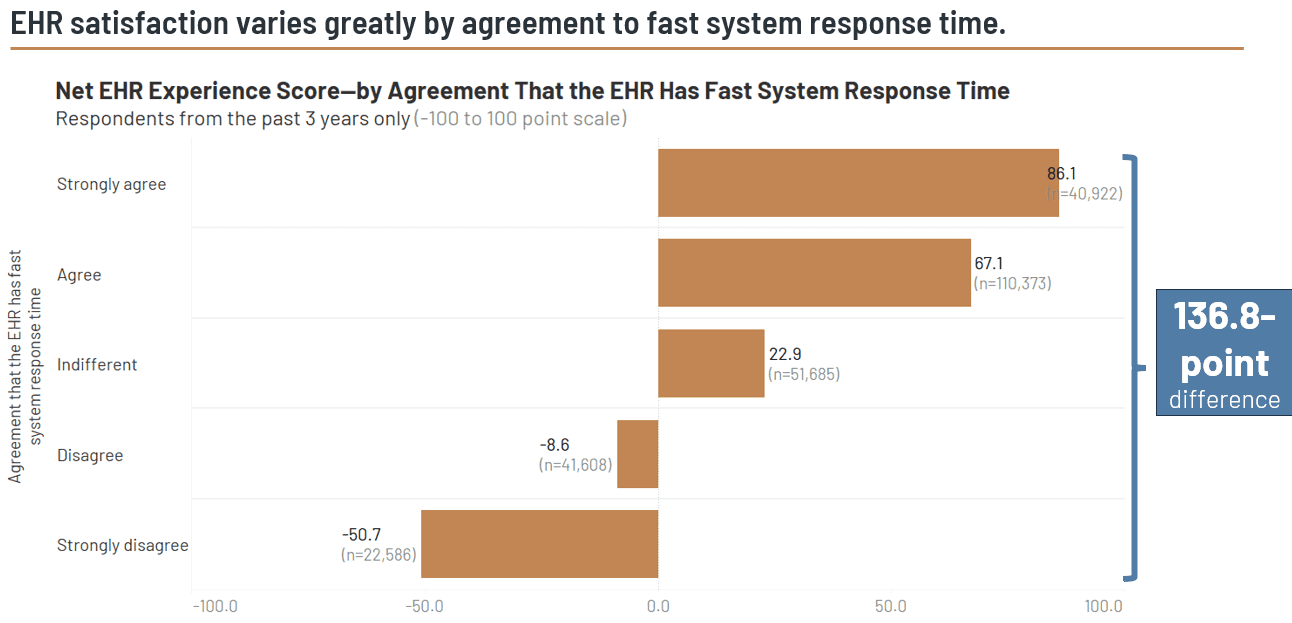
  • When physicians strongly agree that response times are adequate, their net experience score is a highly positive 86.1.
  • Out of 267,000 physicians surveyed, fewer than 41,000 strongly agree with this statement.
  • When physicians strongly disagree, the average score plummets 136.8 points to negative 50.7.

In simple terms: doctors are much happier when response times are good, but very unhappy when they aren’t. The problem is, only a small percentage (~15%) think response times are good. This leaves massive room for improvement with the right technology.
 

Troubleshoot Citrix remote workers


The message is clear: speed and reliability are the foundation of a positive EHR experience. These issues can always be fixed—the real challenge is finding the root cause before they disrupt workflows. 

How Goliath Helps Health Systems Fix EHR Performance Issues

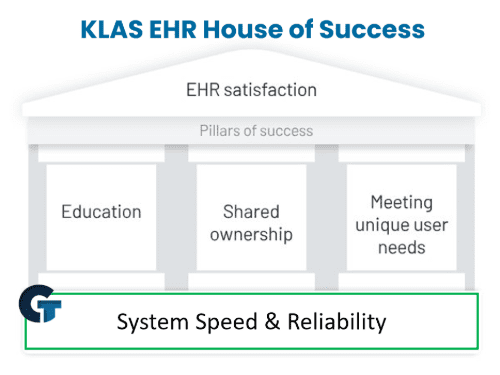
The KLAS House of Success for EHR Satisfaction shows system speed & reliability as the foundational element to improving EHR satisfaction, and Goliath Technologies is the only fully KLAS-rated solution that addresses system speed and reliability (KLAS report here).
 

EHR Speed and Reliability

Real-World Impact: A Top 5 Non-Profit Health System’s Success Story

One of the largest non-profit health systems leveraged Goliath to diagnose and resolve their biggest speed and reliability challenge – logon issues.

Here’s how they did it:

  • Using Goliath’s AI-enhanced contextual data, the IT team pinpointed the root cause of slow logins. The solution was deployed in less than two hours.
  • They quickly discovered that local profiles on Epic Citrix servers were causing delays, forcing users to wait for Windows to time out before logging in.
  • An emergency Active Directory change was implemented to resolve the issue.

Further: They thought the issue was isolated to only a handful of users based on the number of support tickets submitted. Goliath quickly pointed out that the issue was widespread, impacting 37K users despite being largely unreported.

Profile Load


The Result:

Logon times dropped by over 50%, allowing physicians to see more patients—or even get home for dinner on time. Read the full story here.


Fix the Foundation Before Investing in New Solutions

Over the past year, nearly every health system I’ve spoken with has either purchased or is considering ambient speech products to improve clinician efficiency. But here’s the reality: if your EHR infrastructure is slow and unreliable, physicians will still be dissatisfied—no matter what new technology you add.

You can contact the author directly at ryan.oliver@goliathtechnologies.com

Licking Memorial Health System Proactively Identifies and Resolves Citrix Slowness Issues Before Epic Hyperdrive Speed & Reliability Impacts Users

Licking Memorial Health System Proactively Identifies and Resolves Citrix Slowness Issues Before Epic Hyperdrive Speed & Reliability Impacts Users

How We Did IT

Licking Memorial Health System Proactively Identifies and Resolves Citrix Slowness Issues Before Epic Hyperdrive Speed & Reliability Impacts Users


How Intermountain Health Increased Clinician Satisfaction with Citrix & Cerner Millennium

Infrastructure

Epic Hyperdrive, Citrix, Horizon


Challenge

The IT team at Licking Memorial Health System was receiving frequent “Citrix is slow” and “Epic is slow” complaints. They needed a solution to proactively identify and resolve issues affecting the availability, speed, and reliability of Epic, as well as other clinical and business applications. Existing Citrix and third-party tools did not provide sufficient visibility beyond the Citrix environment, into the Epic EHR user experience, or into user behavior that could impact overall performance. That’s when they turned to Goliath.


Solution – Proactive Troubleshooting

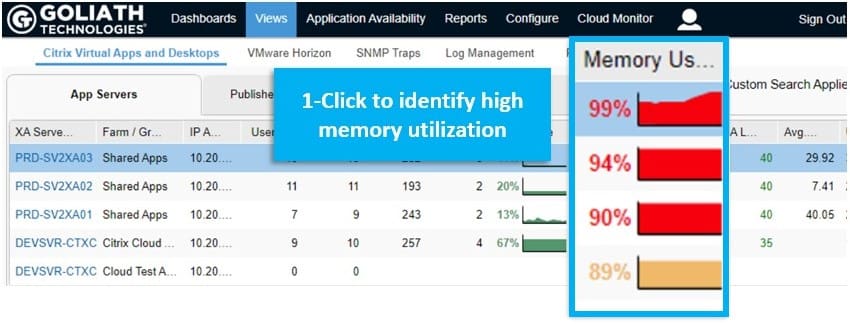
A Server Administrator was alerted by Goliath to spikes in memory usage on XenApp servers. Using Goliath, he quickly identified the issue impacting users and resolved it before any support tickets were submitted.

By opening the Views > App Servers tab in Goliath, he immediately saw that most XenApp machines were consuming high amounts of memory.


High memory utilization can cause session slowness and poor server performance, often linked to end-user behavior.

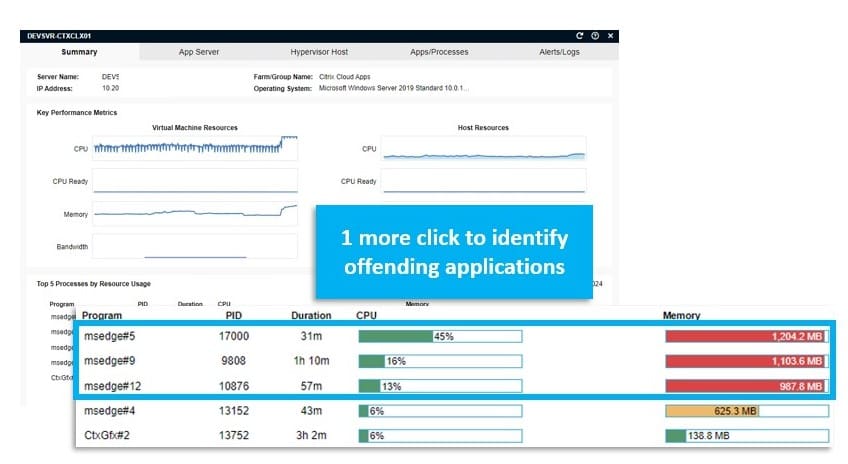
With one click, he determined that Microsoft Edge was the application consuming excessive memory. While browser activity commonly leads to performance issues, the widespread nature of this problem required further investigation.

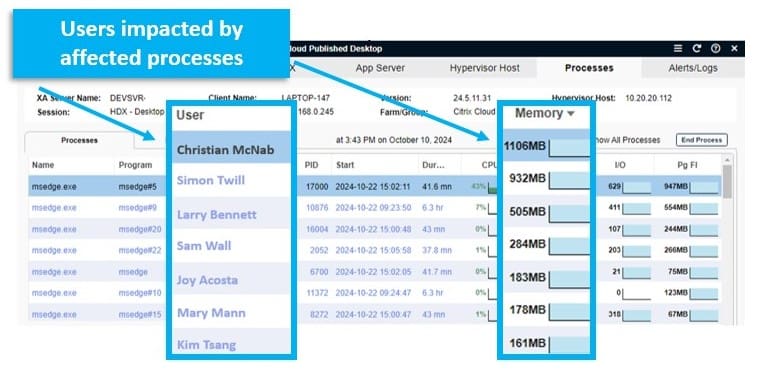
Navigating to the session display, he identified which users were running Microsoft Edge processes, narrowing down the source of the activity.


Results

Using Goliath to pinpoint the root cause, the team at Licking investigated the high memory usage with Edge and discovered a recent Microsoft 365 patch announcement detailing a memory leak issue.

Knowing that Outlook is widely used, the administrator confirmed that users were experiencing poor performance. He then proactively:

  • Advised affected users of the issue
  • Provided remediation steps
  • Notified users as soon as the issue was resolved

This proactive approach minimized further impact and prevented the issue from spreading.

If you are having end user experience issues with your clinical or business applications reach out and let’s discuss. We find and fix very specific issues and in a discovery conversation we will let you know if we can assist. If the issues you are experiencing are outside our purview, we will share that as well.

Learn more about our EHR Speed & Reliability Improvement Program.


Intermountain Health

ABOUT ORGANIZATION

Licking Memorial Health Systems (LMHS) is a not-for-profit healthcare organization based in Newark, Ohio, dedicated to improving community health. Established in 1898, LMHS comprises Licking Memorial Hospital, a multi-specialty physician group known as Licking Memorial Health Professionals, and the Licking Memorial Health Foundation. The organization offers a comprehensive range of services, including emergency medicine, home healthcare, and specialized medical services in areas such as cancer, heart, maternity, and mental health.

Headquarters location: Newark, Ohio
Founded: 1898
Employees: > 2400
Industry: Healthcare

Try Goliath For Free

Give us a little information, download our software solution, and start using the same day.

Citrix AI Troubleshooting: Expert In-House

Citrix CTP Blog

Citrix AI Troubleshooting: Expert In-House

Written By: Chris Twiest
KIP AI Citrix Troubleshooting Assistant

AI has been the talk of the day ever since the breakthrough of ChatGPT with a large generative language model. More and more companies are also adding AI capabilities into their products, but this is often just a marketing trick to tag on AI to show a new feature that isn’t really AI. Goliath Technologies is handling AI very differently. They are introducing KIP, a virtual AI troubleshooting assistant for Citrix end user experience monitoring. This is an excellent use of AI and is game-changing in the end user experience monitoring space. Let me go ahead and introduce you to KIP.

KIP – Your AI Citrix Troubleshooting Assistant

Goliath Technologies’ end user experience monitoring platform now comes with KIP, your AI troubleshooting assistant. Goliath has always been great at showing where the root cause of an issue is that’s impacting your Citrix end users. But identifying the root cause of issues is, of course, only half the work. You need to fix those issues, and these days, Citrix experts are scarce. Well, this is where KIP shines. When you use Goliath to identify an issue that you now need to troubleshoot, you can simply ask KIP what troubleshooting steps can help you fix the issue. In real-time within Goliath, you can then validate that your remediation actions solved your performance problems. All of this is occurring without needing to switch between monitoring tools or search through knowledgebase articles, and without disrupting your troubleshooting workflow. With KIP, you get an extra Citrix expert in-house, always ready to help and assist you.  

KIP in Action

Part of what is great about KIP is that anyone in IT support can use it to troubleshoot Citrix issues, even if they are not the resident Citrix expert. Let’s look at a few examples:

Example 1

You are troubleshooting a vague issue where the user is complaining about a slow experience when logging into Citrix. The user did not provide any additional information that may be useful in narrowing down the issue. Not to worry though, you can get to that information quickly in just a few clicks.

You quickly narrow down the user’s sessions and isolate the sessions with poor performance:


Citrix AI Troubleshooting


You click on the user’s session to get a correlated view of everything that could be impacting their session and clearly see the issue is with the logon process:


AD OU Latency by Location Sorting


In one more click you drill down further into the logon process to identify exactly where in the logon process the slowness is occurring:


Real Time Remediation Actions


You easily see that the issue is happening during the server validation stage. This is a great place to lean on KIP to help you with next steps now that you have identified where the issue is located:


End User Experience Scorecards


While effectively adding an extra Citrix Expert to your team is awesome, KIP can do even more. It can also help you get to know and navigate the product. So instead of your staff needing to spend time getting to understand the product, reading the admin guide, searching the support site, etc., they can now just talk to KIP and ask things like:

Where can I find the network latency for a user?


End User Experience Scorecards


How can I see which process is taking up the most CPU?


Citrix AI Troubleshooting


This drastically cuts down the onboarding time for anyone using Goliath performance monitoring.

Personally, I think this is an excellent use of AI in a technology product. It helps you with onboarding, troubleshooting, and saving time, which is also a win for your end users. They will have a better-performing Citrix system and will experience less downtime since they can be helped quicker when there are issues. I’m excited to see what Goliath is going to do with KIP in the future because there are, of course, plenty more use cases to think of where a performance monitoring AI can help.

Citrix CTP Chris Twiest

Chris Twiest

Citrix CTP & VMware vExpert, Chris has more than 10 years of experience in managing, creating, and automating workspace environments with a strong focus on virtualization products. Chris works as Technology Officer at RawWorks and runs his own blog at Workspace Guru.

Try Goliath For Free

Experience true end user experience monitoring and troubleshooting free for 30 days.

The Latest Product Highlights in Goliath 12.1

The Latest Product Highlights in Goliath 12.1

Expert Product Review

The Latest Product Highlights in Goliath Performance Monitor 12.1

Reviewed By: Theresa Miller

Monitoring your enterprise end-user computing infrastructure is critical to ensuring systems are online and for proactive troubleshooting. Having the unique ability to engage in on-demand remediation of identified problems from within your monitoring solution, gain insights into the user experience through a scorecard, intelligent sorting by active directory OU, and monitoring of both Citrix and VMware EUC solutions are just some of the ways an enterprise can monitor and proactively understand the end-user experience.  Today, let’s take a closer look at how Goliath 12.1 enhances the monitoring experience to ensure your team can respond and remediate, ensuring that your users are able to do their jobs effectively. 

Enterprise Challenges

With the adoption of system deployments now largely distributed between on-premises, cloud, and as-a–service, enterprise workloads are now more siloed than ever. This can make monitoring and remediation a challenge because, with systems distributed in many different locations, narrowing down the root cause can take much longer without the proper tools. Then, add the complexity of your end-user computing deployment workloads such as Citrix, VMware Horizon, and interdependencies such as Active Directory, distributed endpoints, and more.  In my experience, if you attempt to monitor and remediate manually it can take a long time to track down the problem and resolve it.  End-to-end troubleshooting and remediation can take anywhere from hours to weeks.  There must be a better way. 


12.1 Benefits to Expedite Root Cause Identification and Remediation

In the latest software version that Goliath offers, there are some great enhancements that help with monitoring and remediation. While the product has many new features, I am going to focus on on-demand remediation, scorecards, intelligent sorting, reporting, and VMware Horizon enhanced monitoring capabilities.

On-demand remediation 

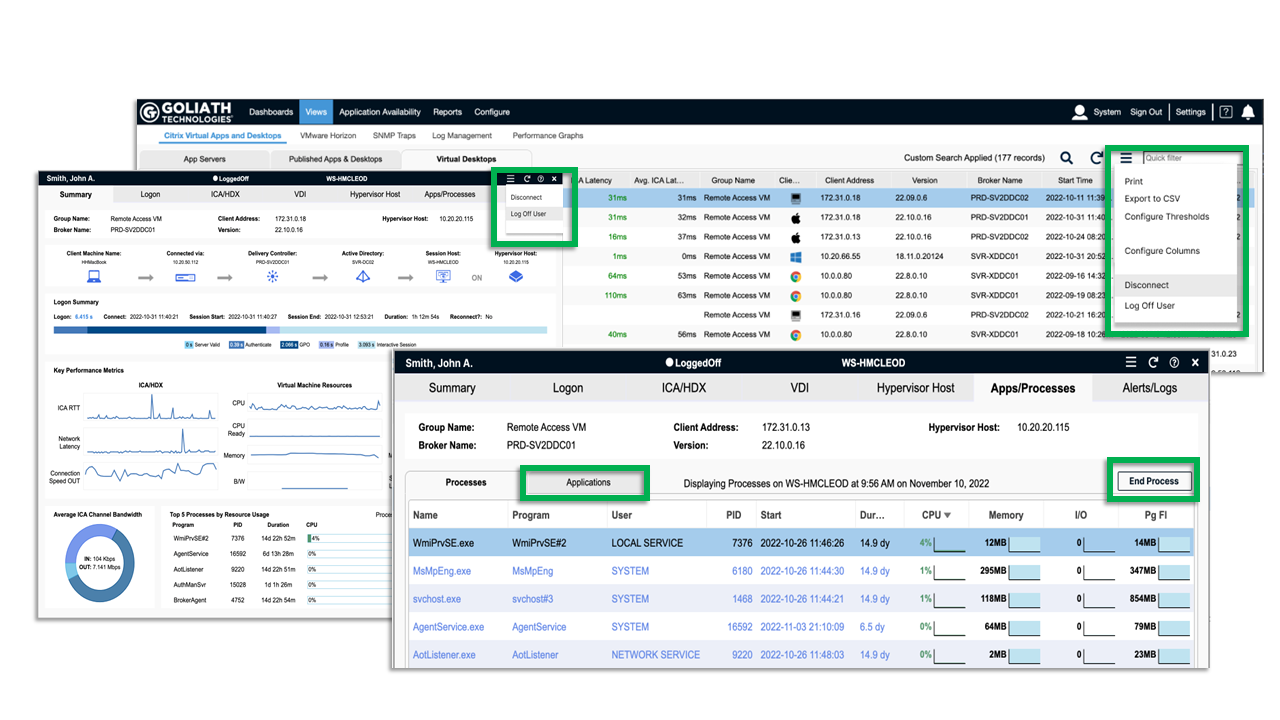
Empowering front-line support to resolve end-user issues has been a common challenge across enterprises. Typically, this is due to the level of permissions needed to be able to allow front-line support to remediate issues. Often, it would have been beneficial and help resolve issues faster if common remediation tasks such as server reboots and process restarts could be done at the front-line. With Goliath 12.1, built-in remediation offers the ability to resolve issues in real-time during live sessions without switching tools and quickly getting users working again. Some examples of remediated tasks that can be triggered on-demand are logging off a user session, disconnecting a session, ending a running process, and ending an application. See figure 1 below. 


Real Time Remediation Actions

Scorecards

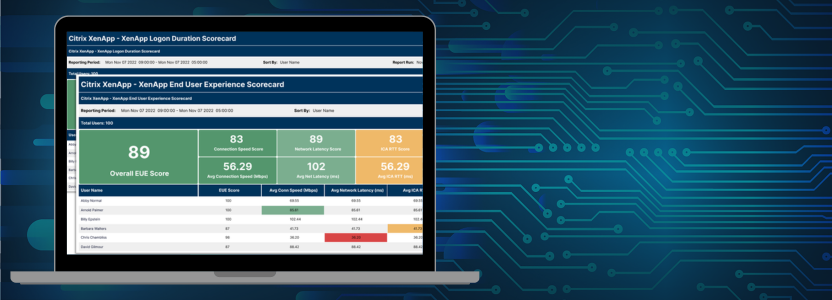
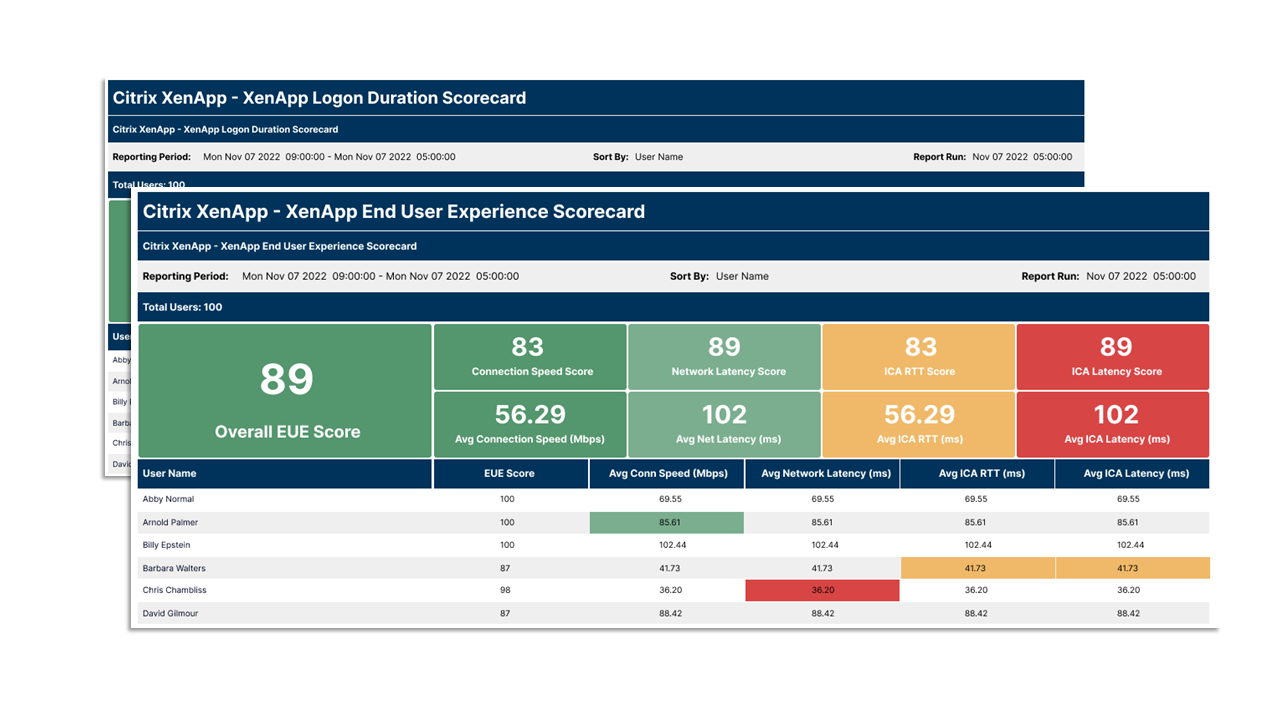
In my experience, capturing a summative overview of user experience monitoring can be a challenge. Even when IT delivery is successful, presenting this information to others typically comes in the form of several hard to read screens without a visual point of view and/or subjective feedback. With the updated scorecard capabilities in Goliath 12.1, it’s much easier to view the end user experience and easily communicate with your team on the objective facts around user performance successes and opportunities for improvement.  See figure 2 below. 


End User Experience Scorecards

Location specific user insights and reporting 

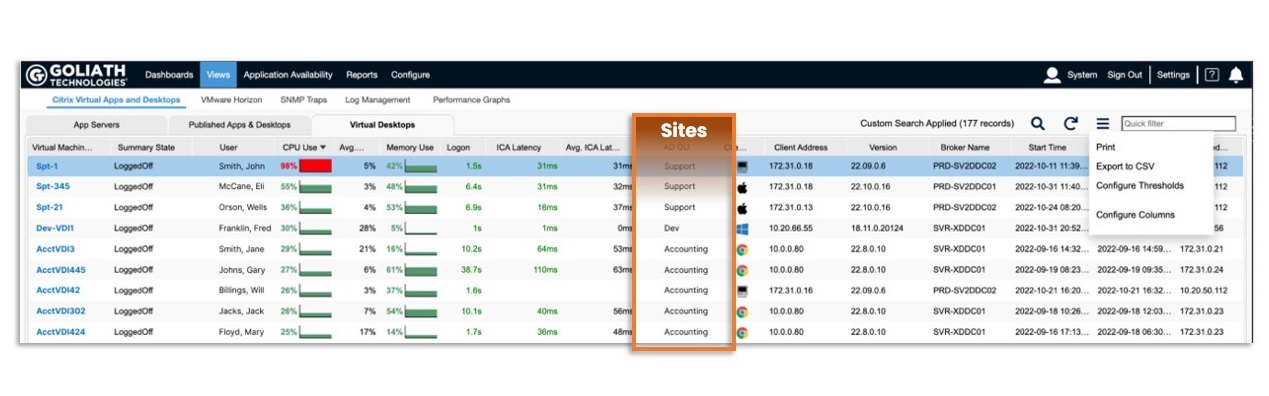
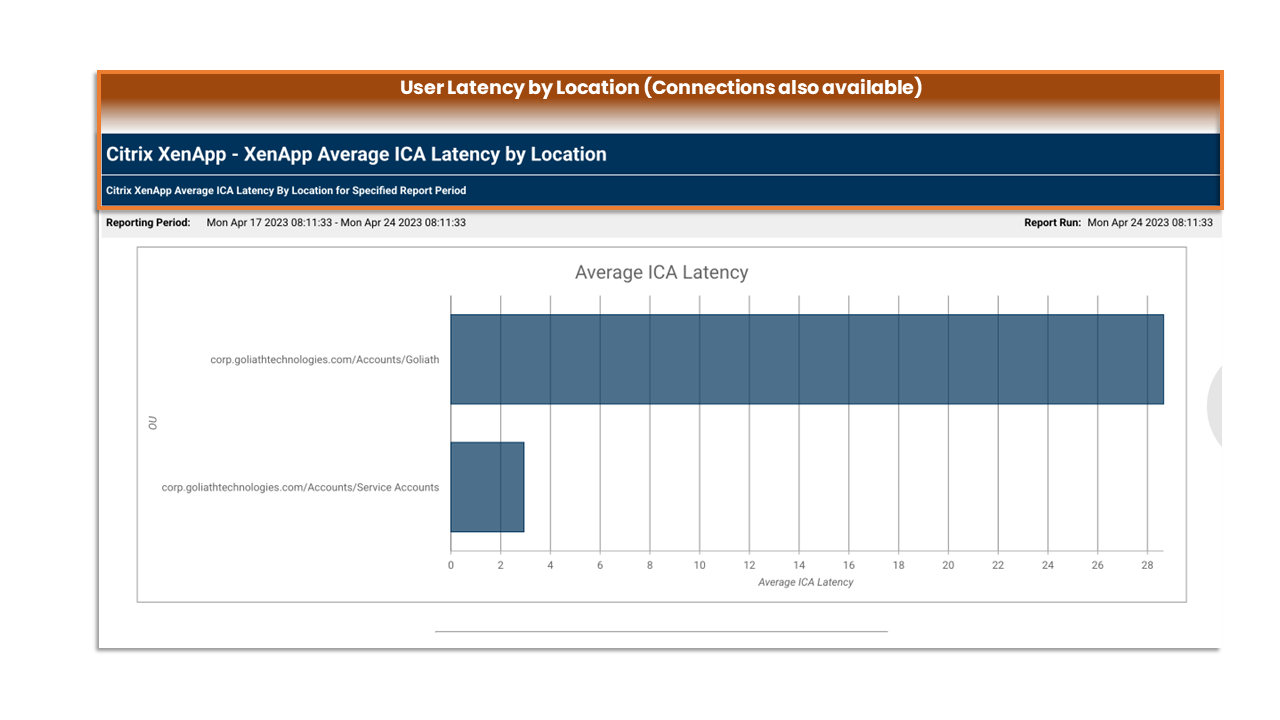
As a practitioner, there have been many times when it would have been helpful to review user performance metrics and insights based upon a user(s) or group of user’s location or department.  This would be extremely helpful when troubleshooting a problem that may be impacting several users at any given time. The ability to sort and report by Active Directory OU would allow for deeper insight into end user experience across the organization. With Goliath 12.1, they now offer intelligent sorting by Active Directory OU to provide better visibility into user needs/issues by location to ensure troubleshooting efforts are quickly tasked to the correct area of need.  See figure 3 below. 

Location Sorting
AD OU Latency by Location Sorting

Enhancements for VMware Horizon 

Organizational deployments of end-user computing solutions are continuing to expand to other solutions, and monitoring capabilities should also be able to appropriately support enterprises functions in any of these areas.  One commonly deployed toolset is VMware Horizon, and in Goliath 12.1 there are expanded monitoring capabilities to ensure visibility into workloads.

Application Availability Monitor

Concluding Thoughts

Efficient and successful monitoring for your end-user computing workloads is important to ensure you are getting to the root cause quickly and remediating effectively.  Workloads are more distributed than ever with on-premises, cloud-hosted, and SaaS.  Evaluate which tools you are using and be sure to choose a solution that empowers your team to be able to quickly resolve user problems and ensure they can do their jobs successfully. 

Chris Hughes

Theresa Miller

IT professional working as a technical expert in IT for over 20 years. Theresa is a Citrix CTP, VMware vExpert, Microsoft MVP (Office Servers and Services), Nvidia Advisory Council, and MBA. Her areas of expertise are in the areas of Exchange, Office 365, Active Directory, VMware, Citrix XenApp, and XenDesktop. She is the Founder of 24×7 IT Connection, LLC, a Windows IT Pro Contributing Editor, Pluralsight author, and is an author for TechTarget. You can find her on twitter @24x7itconnect.

Try Goliath For Free

Experience true end user experience monitoring and troubleshooting free for 30 days.

Citrix Receiver Blog Monica Griesemer

Citrix Receiver Blog Monica Griesemer

Citrix Blog

Prevent Critical Issues Resulting from Using EOL Citrix Receiver Versions

When I speak with IT professionals about end user experience and Citrix session performance, unsurprisingly, the subject of Citrix Workspace app versioning pops up. What is surprising, however, is their various degrees of attention toward maintaining up-to-date versioning of the Citrix Workspace app. Citrix Receiver was the previous iteration of Citrix Workspace app, but many organizations are still leveraging dated or unsupported Citrix Receiver versions.

If you want to get the best features from Citrix, you’ll need the latest Citrix Workspace app version. For many, there are plenty of regulatory or compliance issues that drive the update cycle. For others, it is the potential for security vulnerabilities that drives change. Keeping your Citrix and Goliath technologies up to date is the best way to ensure your environment stays secure and operates seamlessly. What doesn’t seem to weigh as heavily, however, is the impact software updates have on the end user experience. For some, that is because the other drivers precede user experience and so it never really becomes an issue. For organizations that are not motivated by security or compliance concerns, they are likely leveraging older Citrix Workspace app and Citrix Receiver versions. There is a strong possibility that degraded end user experience is the price being paid.

I imagine that troubleshooting serves as more of a drain on your resources than a value-added activity. Striking a balance between maintaining a fully up-to-date environment while reducing disruption to end users can be a real challenge. Maintaining supported versions of Citrix Workspace app is a simple way to avoid some of these common end user experience issues:

Slow Response Times

The number one complaint IT hears from Citrix users is, “Citrix is slow”. Most of the time, the cause of the issue has nothing to do with Citrix itself, but rather, another IT element that is part of the delivery infrastructure or even user behavior. In fact, Citrix takes the heat for just about every end user experience issue. Some of those “slowness” complaints could be mitigated simply by maintaining a current and supported version of the Citrix Workspace app.

Reduced Application Performance

Newer versions of the Citrix Workspace app are optimized for modern operating systems and hardware, and using an older version could lead to reduced performance and slower response times. Applications are heavier and their need for resource consumption is growing. Making sure your environment is optimized (including your Citrix Workspace app version) is imperative to maintaining a great end user experience.

Restricted Application Use

Some Citrix environments may require users to have a minimum version of Citrix Receiver, or Citrix Workspace app, to access specific applications. If the user has an outdated version, they might be restricted from using certain critical applications.

Impacted Integrations

Integrations with other software and tools can be impacted when those tools are updated but Citrix Workspace app is not. When using older versions, compatibility issues with these integrated tools could arise, leading to potential errors or malfunctions.

Deformed or Distorted Images

Newer versions of Citrix Workspace app often introduce enhancements and features that improve user experience, performance, and productivity. Users with older versions may miss out on these improvements. As Citrix infrastructure and protocols evolve, older versions of Citrix Receiver may not be compatible with the latest Citrix servers and applications. This can result in connection failures, application crashes, or other usability issues

When business-critical operations are on the line, or in the case of healthcare organizations – clinical applications and patient care, it’s important to ensure your people have the best performance possible That is best realized when you are running a current version of Citrix Workspace app.

There is a better approach… a PROACTIVE approach!

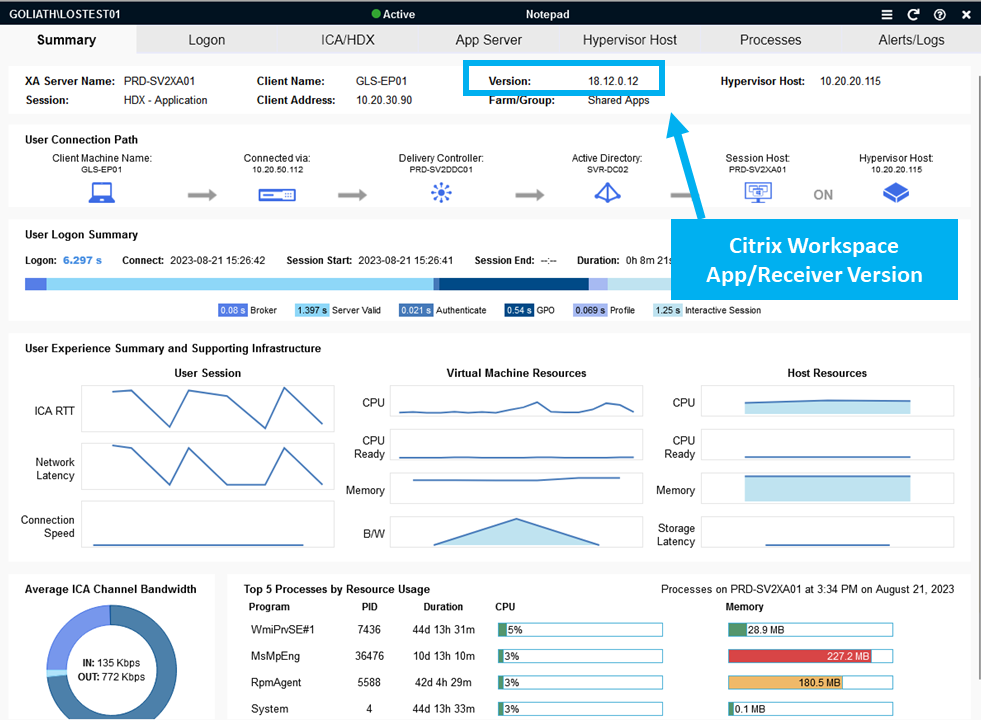
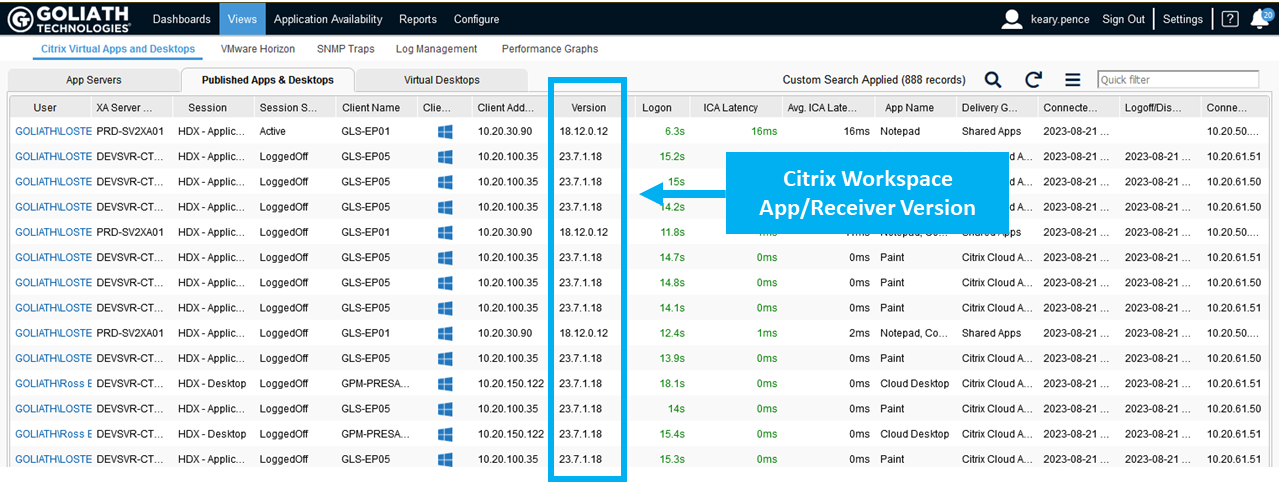
Having a tool that will let you see what version of the Citrix Workspace app is running on each endpoint will allow you to quickly see which end users are at risk of experiencing poor performance. In other words, which users will be submitting “Citrix is slow” tickets in the near future.

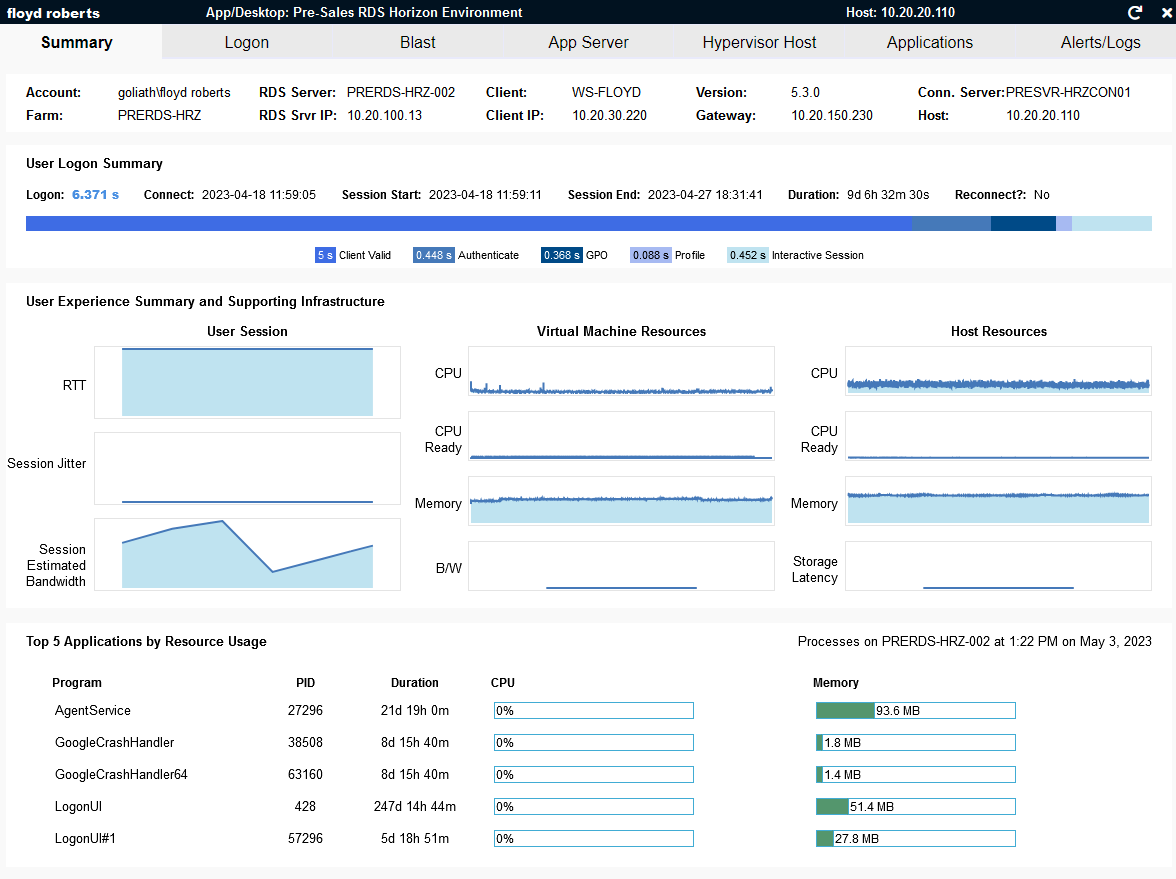
Citrix Receiver Version Summary
Citrix Receiver Version Views

Goliath offers unmatched reporting capabilities that make it easy for IT teams to get a full picture of their IT delivery infrastructure. Understanding which users across the organization are using older versions will help IT get ahead of issues before they arise, or perhaps identify users who may be suffering poor performance in silence.

Citrix Receiver Version Reports

As part of any proactive approach to IT maintaining a great experience for end users, striking a balance between stability and forward-looking functionality is a challenge. The IT delivery infrastructure is already complex and has plenty of potential points of failure. Proactively taking things off the table, like version control, helps to mitigate unnecessary impact to end users.

Chris Hughes

Monica Griesemer

Monica is the Senior Product Marketing Manager at Citrix. 

Chris Hughes

Keary Pence

Product Marketing Director, Goliath Technologies.

Try Goliath For Free

Experience true end user experience monitoring and troubleshooting free for 30 days.

GPM ChromeOS Blog Andre Carpenter

GPM ChromeOS Blog Andre Carpenter

Expert Blog

Google and Goliath – An Ideal Match

Written by: Andre Carpenter

The rise of Google ChromeOS in enterprise

The rise of ChromeOS has been a significant development in the world of technology, particularly in the enterprise world. As an IT professional, I have witnessed firsthand how businesses have shifted their approach towards technology to boost productivity and efficiency. ChromeOS has emerged as a cloud-based operating system that is gaining popularity due to its simplicity, affordability, and security features.

When ChromeOS was first introduced in 2011, I was skeptical about its potential, given its reliance on cloud computing and web-based applications. However, over the last 12 years, it has become one of the most popular operating systems on the market, thanks to its unique selling points that appeal to organizations. One of its most significant benefits is its reliance on cloud computing, making it easy for employees to access work-related content from anywhere and at any time, using any device with an internet connection. This feature is especially useful for companies with a remote or hybrid workforce.

ChromeOS is also designed with security in mind. Its architecture relies on a sandboxing approach, ensuring that each application runs in a secure environment, thus offering a layer of protection against malware and other security threats. Moreover, since the operating system is based on the Linux kernel, it is inherently more secure than other popular operating systems like Windows or MacOS.

However, while ChromeOS may be simple to use, affordable, and secure, it is not without its challenges. Enterprises need to ensure that their IT environment is optimized for ChromeOS and that they have the right tools to monitor and troubleshoot issues effectively and quickly. That’s where Goliath Technologies comes in.


available ICA channels bandwidth can be detected Citrix session

Establishing a benchmark is key!

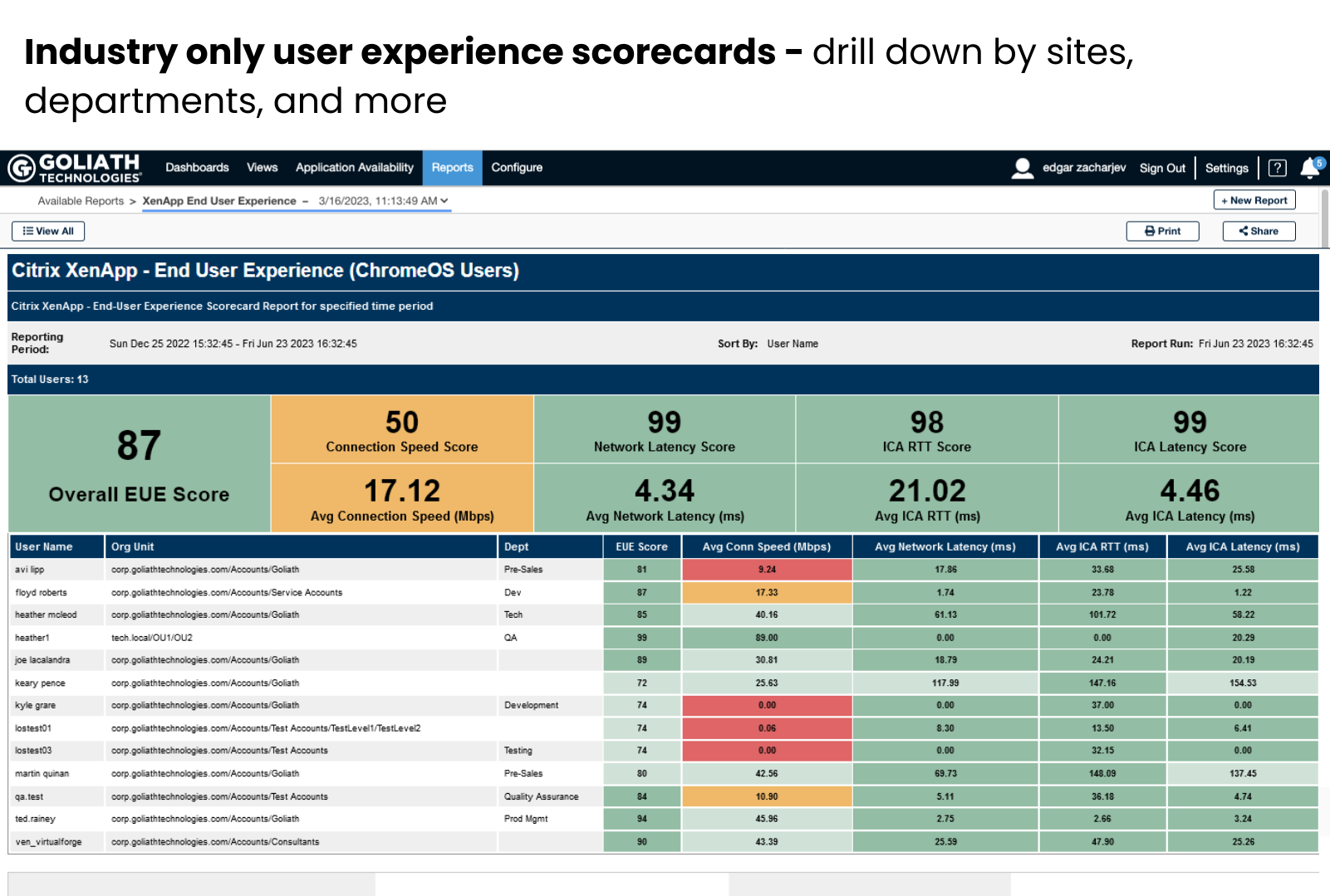
A notable feature of Goliath is the End User Experience scorecard, which is unique across the industry. Goliath scorecards are a great tool to establish a baseline of what an organization’s end user experience is and then use that to measure and track end user experience throughout the deployment of ChromeOS devices. This removes subjectivity and emotion from the equation and measures only object data that ties to the true end user experience. Goliath captures all key telemetry related to end user experience and then benchmarks them against industry best practices. A score is then generated showing how the organization and users are doing against industry standards.


Purpose-built, how to troubleshoot smartly

When users face performance issues, the perception is often that the first IT element they interact with is causing the issue – but it can be one of the many different components and touchpoints that make up the whole overall user experience – from the network connection to the underlying hypervisor, the end user device to the actual end user behavior itself. Figuring out what culprit is causing the degradation can almost be impossible for the operations team.

Add in the surging trend of employees working from home, and you are now faced with having to factor in the employee’s home environment to try to find the root cause.

Goliath Performance Monitor can intelligently provide a single view across the entire IT delivery infrastructure enabling the IT team to predict and proactively identify issues before users are impacted regardless of where the user is!

available ICA channels bandwidth can be detected Citrix session

Proactive fire spotting saves headaches

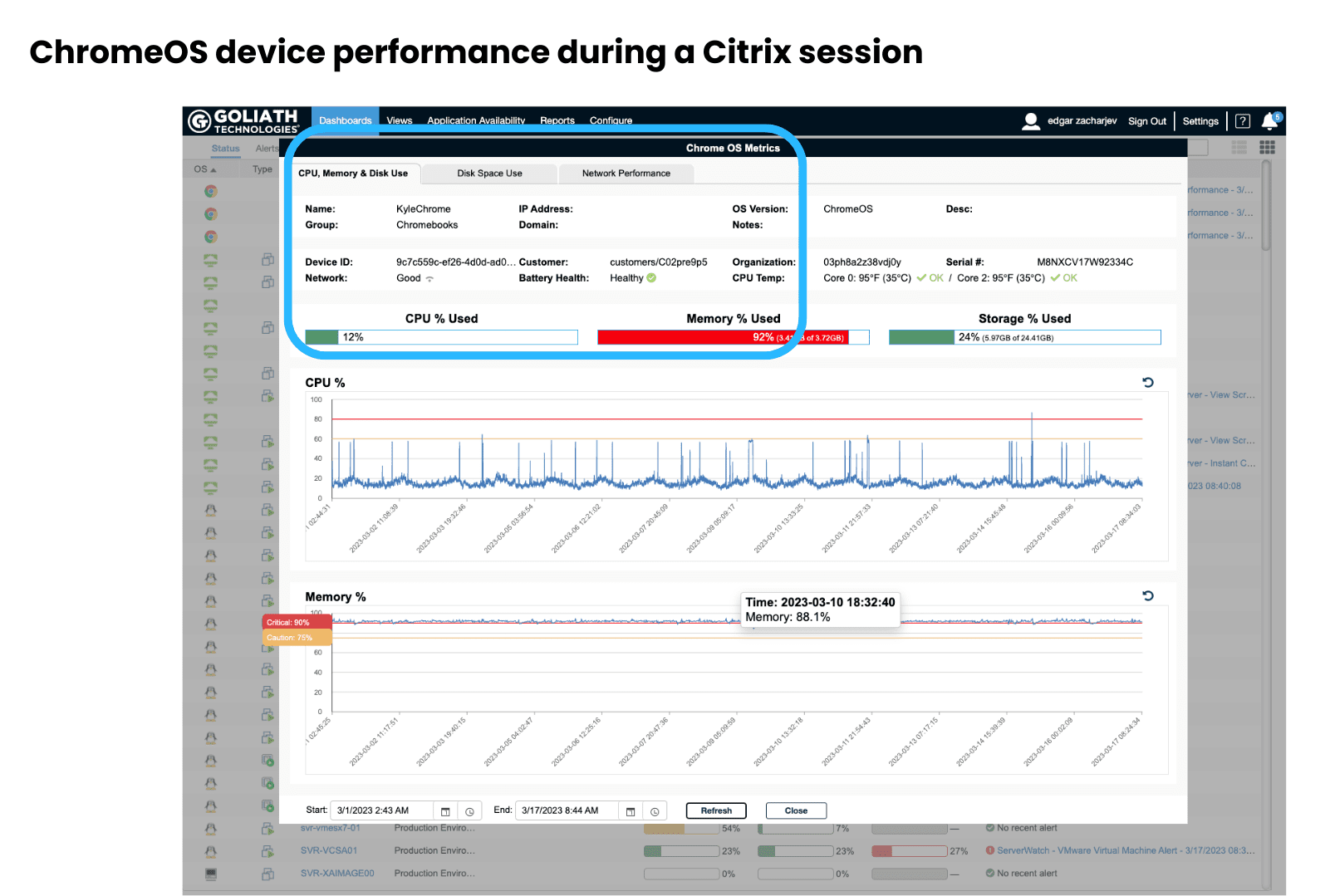
One of the most impressive features of Goliath Technologies’ ChromeOS monitoring capabilities is its ability to identify potential issues before they become major problems. With proactive alerts and automated remediation, enterprises can rest assured that their systems are always performing at their best. And if any issues do arise, the software provides detailed diagnostic data to help organizations quickly identify and resolve the problem.

Goliath automatically discovers and maps your IT components and will deploy to new assets as they are introduced. Then it is automatically monitoring for 250+ events, conditions, and failure points that could cause end user experience issues and alerting in real-time when a threshold is breached. This means that you can run Goliath as a pilot as you roll out limited ChromeOS devices and then when you are ready to fully deploy, all the new devices are automatically pulled in.

In the world of IT troubleshooting, being proactive is always better than being reactive.

When you take a proactive approach, you can identify and resolve issues before they become major problems, which can save you time, money, and headaches eventually.

Ease of Use – Useability makes the day feel shorter!

From an ease of user perspective, Goliath Performance Monitor is an incredibly easy-to-use tool for monitoring the performance of your end user’s experience and the underlying IT delivery infrastructure. Whether you’re a seasoned IT professional or a novice, Goliath makes it easy to quickly identify and troubleshoot issues before they become bigger problems. With a user-friendly interface and intuitive dashboard, Goliath provides real-time insights into the health of your servers, applications, network devices, and end user devices. Its powerful analytics engine allows organizations to quickly identify the root cause of performance issues and take proactive steps to address them – often within just a few clicks. This takes issues that may have taken hours or days to identify and resolve down to just minutes.

Application Availability Monitor

Visibility and Reporting are key – keeping an eye on their user sessions

Supercharging the IT team to gain enhanced visibility and insights into the end user’s activities, even when operating behind their home firewall, opens new doors to pinpoint system bottlenecks and misconfigurations and ensure the user experience is maximized.

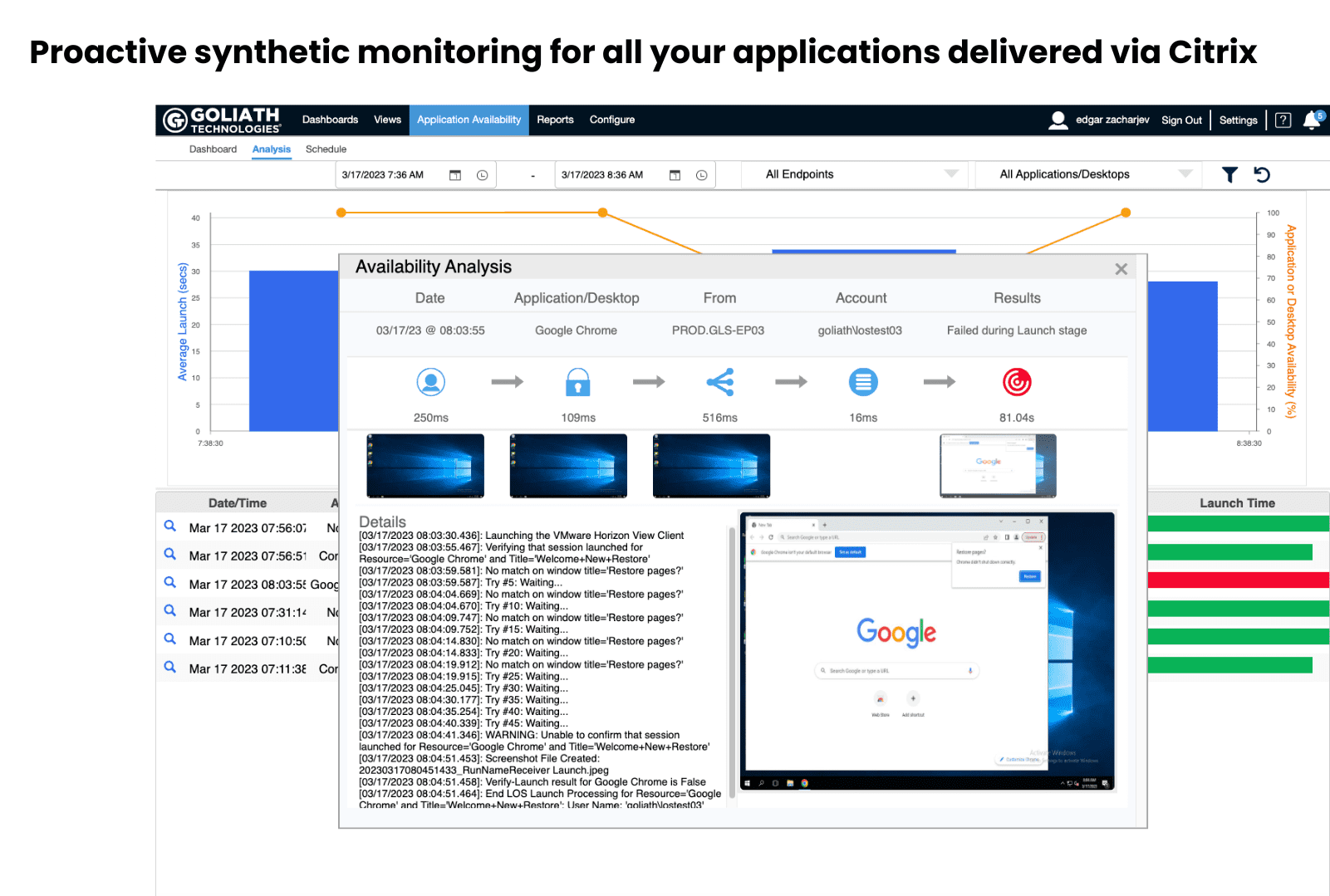
Reports are just as important for proactive troubleshooting and analysis as they are for postmortem. Goliath has out-of-the-box reports ready to go with hundreds of customizable options. Between reports, scorecards, and screenshot evidence for application failures, Goliath provides an abundance of objective data that IT teams can leverage to break down barriers to communication that often exist in siloed IT organizations.

What do the others think?

It has an impressive score of 4.9/5 (at the time of this post) on Capterra with a score of 4.7/5.

This is just another validation of what an awesome time-saver for the modern-day enterprise IT team is seeming.

https://www.capterra.com/p/265895/Goliath-Performance-Monitor/

Closing Remarks

In closing, the past 12 years have seen a notable increase in the prominence of ChromeOS in enterprise settings. This is due to its strong emphasis on security, accessibility, and user-friendliness.

As ChromeOS continues to be adopted as the standard operating environment in many organizations, there is a growing need to maintain high levels of security and provide quick resolutions to any issues that arise, while ensuring a seamless user experience. Goliath Technologies offers an ideal proactive solution to address these challenges, making it a valuable companion to ChromeOS.

Chris Hughes

Andre Carpenter

Andre is an IT technologist from New Zealand living in Melbourne, Australia. You can find his blog over at cloud-land.com.

Try Goliath For Free

Experience true end user experience monitoring and troubleshooting free for 30 days.