How UHS monitors availability and performance of Cerner

How UHS monitors availability and performance of Cerner

How UHS uses availability and performance monitors to ensure Cerner is optimal for its physicians

Universal Health Services runs more than 15,000 tests per day to ensure that patient-critical applications and records are available for physicians and clinicians.


Universal Health Services is one of the 10 largest for-profit health systems in the United States, and it relies heavily on Cerner to deliver EHR application services to healthcare professionals all across the country.

THE PROBLEM
UHS was faced with several challenges related to application failures and slowness, which impacted clinician and healthcare worker end user experience. More important, there was no solution in place for troubleshooting and/or providing advance warning when issues surfaced.

“Like any other IT department supporting a health system, we want to achieve consistent access to patient-critical information from our Cerner EHR system,” said Justin Monnig, general manager of Crossings Healthcare Solutions, a subsidiary of Universal Health Services. “This is challenging due to the distributed nature of our facilities and users.”

The challenge was to change the typical IT support paradigm, which is reactive and engages only after a problem impacts users, he said.

“We needed a solution that proactively identifies problems before our users and patients are impacted, and one that provides the key details we need to quickly pinpoint the root cause and troubleshoot the problem in a complex environment that relies on multiple systems and vendors,” he explained.

PROPOSAL
UHS selected the Goliath Application Availability Monitor because, Monnig said, it acts as an early warning system and proactively exercises and tests the entire complex delivery infrastructure required to successfully deliver Cerner and other critical applications.

“This system installs at our facilities and ensures all systems are working together smoothly — or pinpoints the specific failure point and alerts our IT team with the details and screenshots required to troubleshoot the issue,” he explained.

The availability application integrates with the Goliath Performance Monitor, which provides detailed troubleshooting of end-user experience issues, from UHS end-user locations through its data center and even into the Cerner Remote Hosting Option data center.

“This provides true end-to-end visibility of any issue or system degradation before our physicians or patients are impacted, improving patient care and reducing physician burnout,” Monnig stated.

MARKETPLACE
There are many vendors on the market today that offer availability and performance monitoring tools. Some of these vendors include AppDynamics, Dynatrace, EG Innovations, IT-Conductor, Quest Software, and VictorOps.

MEETING THE CHALLENGE
To start with, UHS deployed the availability monitor to 10 remote locations. It installed it on a variety of devices depending on the site — spare laptops in some cases, virtual machines in others. Once those devices were deployed, all future management of test parameters and schedules were handled centrally from the data center. This meant that the IT team had complete control of the different tests running from each facility.

“The tests themselves proved to be quite robust,” Monnig said. “We were able to cover all possible options by testing infrastructure and virtual applications and desktops. We also ran tests for different user groups to ensure their access permissions were configured properly.”

Since the tests were automated, it helped free up resources for other tasks. If an issue was identified, the team received an alert through the ticketing system immediately. It was like having a full-time system administrator at each location running tests and documenting the results, Monnig said.

“The tests included a timing element so we could identify areas with slow logons then use the integration with the Goliath Performance Monitor to troubleshoot and resolve those issues,” he added.

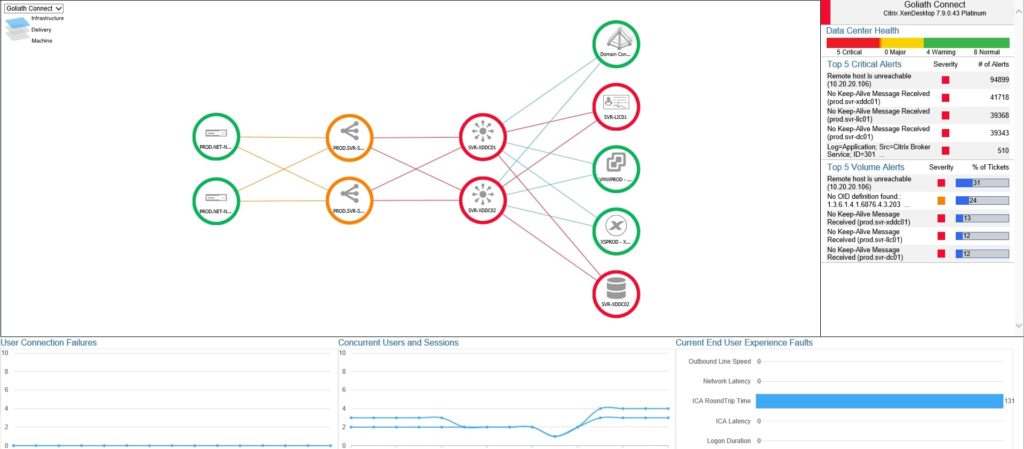
    Image above shows Goliath’s early warning system in production at Universal Health Services. 

    RESULTS
    UHS quickly expanded the project to include more than 50 sites worldwide and now runs more than 15,000 tests per day to ensure that patient-critical applications and records are available for physicians and clinicians.

    “The screenshots and details of key performance metrics provided by Goliath are very helpful when working with vendors, partners or even other internal IT teams,” Monnig said. “We now have clear evidence that pinpoints the problem, and we know exactly when to collaborate with other vendors and IT groups to resolve the issue.”

    Previously, staff would open tickets with vendors without being sure the vendor was even at fault or involved. Now, when staff contacts another group, it’s with the evidence they need to respond quickly, Monnig said. This has improved the working relationship with Cerner and other vendors significantly, he added.

    “The result is the most accurate representation of what an actual end user will experience when they access the Cerner application,” he explained. “All of the metrics generated during the simulated session are reported back to the central end-user experience support team at UHS in real-time. These metrics allow the UHS team to take immediate action whenever trouble arises.”

    ADVICE FOR OTHERS
    “Healthcare IT leaders take great care in choosing the right electronic health record system for their health system; however, they deliver these systems with virtualization technologies like Citrix,” Monnig observed. “It’s important to invest in tools that ensure these technologies are working together properly and delivering a quality end-user experience. This benefits your physicians and clinicians by making their jobs easier, and ultimately benefits your patients.”

    When looking for these tools, Monnig has three suggestions. First, look for tools that understand the specific challenges facing healthcare organizations. Second, healthcare organizations work closely with EHR vendors; choose a monitoring and troubleshooting vendor with the relationships and expertise to work for both.

    And third, while there are many free tools that might solve one problem or cover one system, to be successful, look for a solution that will scale with the organization – that can cover an entire environment and work for one’s IT organization — not add to one’s workload.

    Twitter: @SiwickiHealthIT
    Email the writer: bill.siwicki@himssmedia.com

    Healthcare IT News is a publication of HIMSS Media.

    Do you think Goliath can add value to your organization? Reach out.
    Email us at  techinfo@goliathtechnologies.com or schedule a demo, consultation or free trial.

    VDI Stack Monitoring with Goliath Performance Monitor

    VDI Stack Monitoring with Goliath Performance Monitor

    VDI Stack Monitoring with Goliath Performance Monitor

    Quite often I run projects at existing VMware customers that are building a new Digital Workspace. And quite often, that Digital Workspace contains a VDI. Especially when a customer is already using VMware technology in their data center, vRealize Operations (vROps) is used to monitor the environment. Although vROps is a great solution, it’s not really sufficient to monitor the desktop side of things. Sure, you are able to monitor system resources and the underlying platform, but monitoring User Experience (UX) is something completely different. UX Monitoring focuses on everything directly related to the end user. And I believe that vROps falls a bit short when talking UX. In this post, I would like to explain why solutions like Goliath Performance Monitor and Goliath Application Monitor make a great alternative to vROps and can even compliment VMware’s solution.

    The thing that Goliath does really well and where they were (to me) most known about, is their UX monitoring part of their solutions. UX, like I also explained in the VDI Design Guide, is one of the three types of monitoring for a VDI or DaaS related service. The others are service monitoring and capacity management (which combined are used to predict/avoid outages and rapidly respond in case an outage does happen). And since I already covered their UX monitoring quite comprehensive, I want to focus somewhat more on the less common known part: their data center integration. UX metrics (such as remote protocol metrics, logon metrics, CPU/RAM metrics) are essential to measuring what the user is experiencing but are generally impacted by either the network or the infrastructure on which the virtual desktops are running. Let’s dig into how Goliath approaches the infrastructure bit.

    The main part of the portal is the Dashboard View:

    Citrix Virtual Apps & Desktops page sorted by the Logon column

    In the Dashboard View, it’s possible to get a high-level overview of the health of the entire VDI stack (VMs, Desktops, ESXi hosts, and Data stores). In case you are experiencing issues, the constraining resource or failing component can easily be viewed here. It shows all of the machines that are running on the VMware infrastructure but is also able to monitor physical machines that have a role in the infrastructure.

    In case you need to drill down on a single VM or other objects, it is fairly simple to do so. Just by clicking on the object, the solution takes you to a deeper level of details.

    Session dialog – Logon Duration tab

    The cause of the possible issue is displayed in a simple overview. In the same window, you can even see the most important metrics that belong to the same object.

    Session dialog – Logon Duration tab drill down

    With these options to drill down to the infrastructure layer, you are able to get some more insights on how the complete stack is performing. But, in my opinion, this is still part of UX monitoring. Where it gets more exciting, is that with little adjustments, you can use Goliath Performance Monitor for service monitoring as well. I simply just added a couple of the services that runs on the Horizon Connection Server:

    ”Dashboard

    25 seconds after the Horizon Connection Server was killed, I received an SNMP trap and an email just a couple of seconds after that telling me that the service was unavailable.

    Snapshot Metrics

    You can also automatically try to re-mediate the issue, but for this demo, I choose not to. It’s also possible to add all kinds of other custom metrics you would like to monitor on, which makes it perfectly suitable to add the services of your entire stack to a single solution. Some of the most common services (like SQL, SMTP or HTTP) are already part of the alerts your are able to set up, but the custom ones can be created with things like syslog, SNMP traps or custom Windows/Unix/Linux scripts.

    Conclusion

    I hope I gave you an idea of the possibilities of Goliath’s solutions. Where they fit, depends on your situation. In case you already have vROps in place, you might be able to use Performance Monitor and Application Monitor for your UX metrics that are close to the end user. But, as vROps is included in the VMware Horizon Enterprise license only, there are tons of customers who are in need of an alternative. The complete suite of Goliath’s solutions can be a fine alternative. You can drill down to the physical resource level of hosts, storage and networking in case of performance issues and they offer SNMP, syslog or native service integration in case you would like to include service monitoring as well. If you are already a Citrix customer that is migrating to Horizon, keeping your Goliath stack might make sense since you are already familiar with how to monitor that. Both Citrix and Horizon monitoring can be combined in the same dashboard, which might make monitoring a lot easier during a migration. The solutions are fairly simple to set up and also adds integration to certain 3rd party application stacks, but more about that later 🙂.

    Haven’t read the VDI Design Guide yet?
    Get your FREE version today.

    For more information on how Goliath Performance Monitor can help you and your team be proactive and anticipate, troubleshoot and prevent end user experience issues:

    Send us an email: techinfo@goliathtechnologies.com

    Give us a call: 855-465-4284

    Goliath Technologies Delivers Unmatched Troubleshooting Capabilities in New Release

    Goliath Technologies Delivers Unmatched Troubleshooting Capabilities in New Release

    Citrix CTP Blog

    Goliath Technologies Delivers Unmatched Troubleshooting Capabilities in New Release

    * This article was originally published by George Spiers

    Whilst Citrix Synergy 2019 was in full-flow in Atlanta, GA, Goliath Technologies were also keeping busy with the 11.7.8 release of Goliath Performance Monitor, which adds several features that  were in demand by many customers.

    I’ve had the chance to review this latest release, and wanted to touch on some of the features that are new to version 11.7.8, as well as cover ground on some of the features and capabilities already existing in the product today.

    Troubleshooting Workflows

    When an IT administrator receives alerts or calls from users reporting that their session is slow, their logon times are slow, or they cannot complete a specific workflow, often these calls are challenging to resolve because there are many components and factors at play that could be contributing to the issue.

    Goliath Performance Monitor (GPM) makes such reported faults easier to resolve by presenting to the administrator essentially the components of a Citrix environment and related infrastructure that are healthy, versus those that are under stress or in a failed state. The administrator can know when issues arise in an environment before users are impacted either by the various dashboards made available by GPM, or via proactive alerts via email or common ticketing systems.

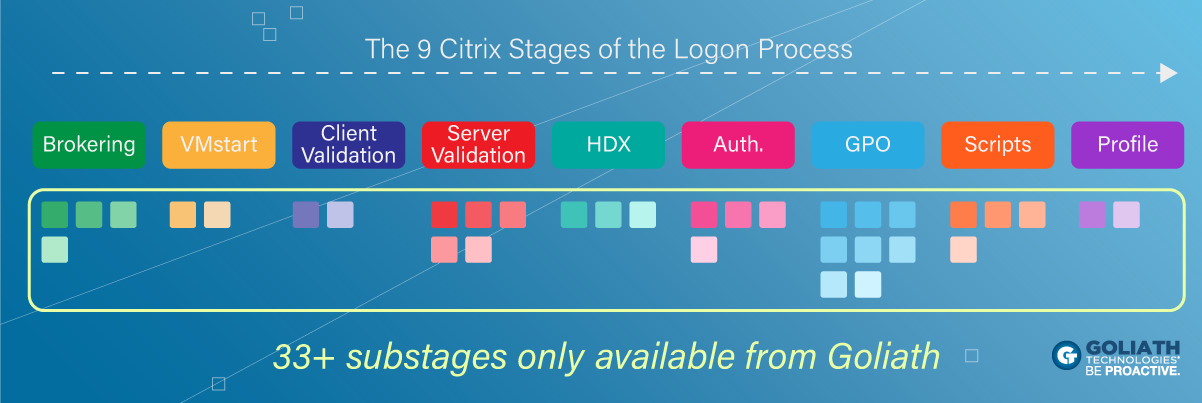
    With the information provided by GPM, take for example a logon duration report, the wealth of information is powerful to an administrator, but may require additional documentation to one who is not familiar with troubleshooting at such a detailed level. Since Goliath Performance Monitor captures over 33 stages of the logon process, there will be times when one or two metrics report back with high times, and the administrator may not exactly know how best to interpret what is being called out, or how best to troubleshoot the issue.

    The new Troubleshooting Workflows are designed to help administrators with all levels of troubleshooting experience use the data Goliath Performance Monitor is collecting and presenting, to their advantage. You will be able to step through common troubleshooting issues backed up by real world use cases, and how to combat them effectively. This means IT professionals will be more effective and faster when it comes to resolving end user experience issues.

    Network Operations Center (NOC) View

    The Goliath Topology View shows you a high level view of your Citrix infrastructure, also known as the NOC view, with colour coding that represents the health of each component. This allows a Citrix administrator to very easily identify if a component is not operating as it should. You do not need to manually build out the dashboard. The system is intelligent enough to automatically map out all of your Citrix infrastructure components such as Delivery Controllers, Delivery Groups, and Machine Catalogs, and create physical and logical connections with other components in the environment.


    This view is now enhanced by customised performance dashboards which provide a more detailed view of key metrics to support the overall health shown by the Topology View.

    Those dashboard could be multiple datacentres, Citrix sites, or the different layers that GPM reports on. Dashboards auto-refresh at intervals configured by you, which is an existing capability of the product. With 11.7.8 these dashboards auto-refresh and auto-cycle, so you can now have multiple dashboards configured and displayed at defined intervals. With the NOC view, auto-refresh and auto-cycle functions, you can display powerful, flexible dashboards to mounted monitors or splash screens in your operations rooms or service desk centres.

    Electronic Health Record Specific Modules

    Goliath Performance Monitor 11.7.8 delivers unique, purpose-built modules for major EHR applications such as Epic, Cerner and MEDITECH to monitor and troubleshoot those mission critical systems. These modules, customer experience, and EHR vendor relationships establish Goliath Technologies as the Health IT Standard for monitoring and troubleshooting.


    If you work in healthcare IT, you will know that a failure or simple performance degradation of an EHR system could have massive impact on patient care. Whilst we focus on our Citrix environment, it is equally as critical to monitor and troubleshoot the applications too, and the backend components that make them tick. With that in mind, you will want to support your EHR environment with products that go beyond simply UP and DOWN monitoring.

    Features such as the Early Warning System from Goliath accesses these mission critical applications just like a real user would, and reports back details on logon times including screenshots if any errors exist in the logon and launch process. Resource load for virtual machines and the Citrix delivery infrastructure is constantly monitored, ICA latency is captured and so on. The information you need to ensure successful uptime and delivery of critical EHR applications on Citrix is taken care of with Goliath, and when things begin to go wrong, you can be proactive in troubleshooting before end-users are impacted.

    Given that systems such as Epic are often accessible via Citrix Virtual Apps deployments, Goliath Performance Monitor can be the single platform for customers to monitor both their Citrix and EHR environments.

    Intelligence and Automation

    The intelligence and automation built into the product allows an organization to prevent end user experience issues by focusing on the logon initiation process, logon process, and in-session performance. These are the three most common causes of a call to the helpdesk.

    With over 250 key failure points being monitored out of the box, you don’t need to be a VDI expert to configure Goliath Performance Monitor, as it self-configures for you, which allows you to get to troubleshooting the environment quicker. The product also discovers and maps out your Citrix infrastructure to a Topology View, and has the ability to auto-deploy agents out to your virtual machines.

    If specific faults, events or conditions are triggered in your environment, Goliath can automatically take care of the situation by restarting services, rebooting servers, or even running PowerShell scripts without the need for human intervention. This dramatically increases the time for resolution, and reduces the chances of an issue impacting end-users, as the issues are resolved right away as soon as they are initially detected. Both the Citrix workers and related infrastructure benefits from automated remediation actions. Some examples of automated remediation actions include:

    • Clearing print queues.
    • Ending disconnected user sessions.
    • Rebooting infrastructure servers, or services.
    • Rebooting VDAs, or services.
    • Terminating application processes.

    As IT teams are always struggling to do more with less, it’s easy to see how these capabilities handle the monitoring and alerting tasks and speed troubleshooting and resolution – freeing team members to focus on other critical projects.

    Advanced Reporting Capabilities

    With every Citrix or End User Computing deployment, the user experience plays a large part in the success of the deployment. A lack of reporting capabilities prevents trends or larger issues from being discovered over time as a deployment matures, or as changes are made to the environment. It also prevents you from providing management with reports that would help justify the need for hardware upgrades, software upgrades, or new technology purchases. It also prevents you from sharing the success of a deployment or future upgrade with the business.

    More than 66 reports exist out-of-the-box in Goliath Performance Monitor, allowing you to produce all sorts of thinkable reports from Citrix session activity, Virtual Apps ICA latency, user logon times, VMware ESX storage usage and much more.

    The advanced reporting capabilities does not stop there. Goliath allows customers to leverage third-party reporting platforms such as Microsoft Power BI, Microsoft Excel, and Tableau to generate reports. This allows you to take advantage of the features and capabilities of these platforms to generate your reports. Goliath provides templates and view to jumpstart the use of these reporting platforms.

    Summary

    The Troubleshooting Workflows, which gives customers real world troubleshooting scenarios including how to solve them, and the ability to auto-cycle NOC view dashboards are my top picks out of this new release. These two features alone help Citrix administrators with various levels of experience troubleshoot issues more effectively, and more proactively monitor their environment(s).

    That said, these features continue to enhance an already powerful feature set. Having over 66 reports available out-of-the-box is a great help for an IT administrator, as most likely there will be a report that suits the needs of the business without having to create a custom one. If in the event a custom report is needed, there is helper documentation online and linked to the product itself that can assist with creating your own reports.

    The intelligence and automated remediation capabilities are also powerful functions of the product, and allow specific issues to be automatically resolved without a Citrix administrator taking time out of their other important tasks to get involved with troubleshooting.

    About the Author: Goliath Tech Team

    The team members collaborated to bring together this blog post by calling on their past Customer Experiences and Expert Knowledge of Citrix Troubleshooting. Beyond writing technical documents this team supports Goliath Customers and provides product feature and function guidance to development.

    Chris Hughes

    George Spiers

    Citrix CTP, Citrix Certified Expert in Virtualization (CCE-V), Citrix Certified Expert in Networking (CCE-N), and Microsoft Certified Solution Expert.

    Resolving Remote Worker ICA Latency with Channel Metrics

    Resolving Remote Worker ICA Latency with Channel Metrics

    Expert Blog

    Independent Review: Using Exclusive Channel Metrics to Solve ICA Latency Issues for Remote Workers

    remote worker ica latency

    Editor’s note:

    This post about proactively identifying and resolving ICA latency issues is written by Ed Duncan. Ed’s post is written to be a resource, so please share this content with your peers and colleagues.


    A few weeks ago I wrote an independent review of the Goliath Application Availability Monitor (GAAM) for Citrix to share my analysis about how it can be used to help troubleshoot slow or failed logins in a XenApp or XenDesktop session.


    In this post I will cover how Goliath Performance Monitor (GPM) can be used to help identify ICA latency issues with XenApp and XenDesktop. This is critical when dealing with remote workers.

    Easier Way to Identify & Fix ICA Latency Issues

    ICA latency is the time it takes for a package running from the Citrix worker server or virtual desktop to reach the Citrix client running on the endpoint device. For best performance for the end user, ICA latency should be as low as possible. When it becomes high, Citrix administrators can expect to start receiving those vague support calls that “Citrix is slow” and can spend several cycles trying to determine the root cause.

    There are several factors that can cause high latency like a bad router or switch, insufficient bandwidth available on the network, or a highly utilized XenApp worker server to name a few. Being able to identify ICA latency as the cause for slow performance is not easy and is not often the first thing that an administrator will check. Sometimes the cause for high ICA latency is beyond the control of the Citrix administrator, but having a tool that is able to identify it is important.

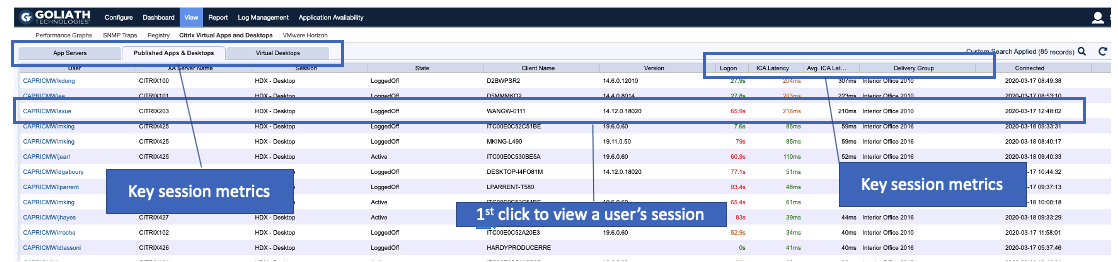
    The software displays ICA latency information on the Real-Time XenApp and XenDesktop Session Display console along with other important session information (Figure 1). This makes identifying the problem easier and speeds up the troubleshooting process. The difficulty is being able to understand what is going on in the ICA connection to begin with. It is not enough to know that latency is high, but more importantly what is causing it to be high.


    Figure 1: The Published Apps and Desktops tab displays user sessions with published apps and published shared desktops.  It gives a high-level overview of the user’s server, application, and the session performance details. Here you can sort by ICA Latency and determine which users are potentially experiencing slowness. 

    Drilldown Into ICA Channel Metrics to Resolve the Root Cause of Performance Issues

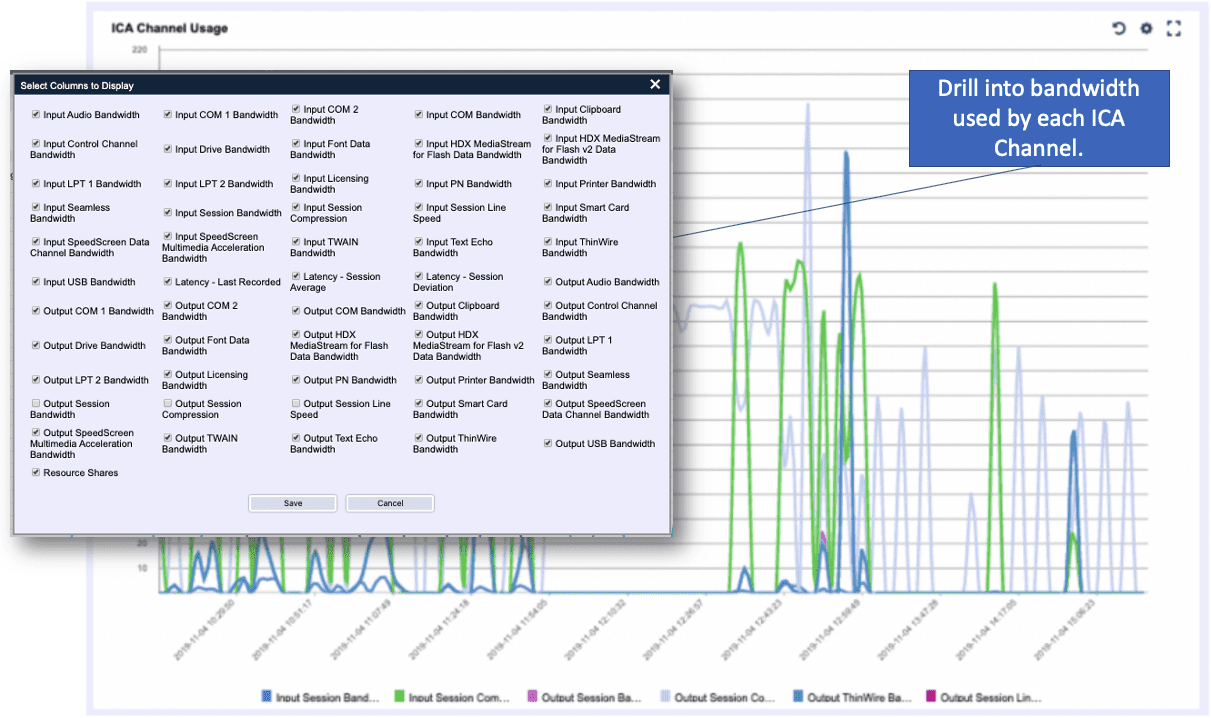
    GPM can drill down further into the XenApp session to get information about the ICA channel metrics. ICA bandwidth consumption can vary by the types of applications being used. Digging further into the details will show what is passing through the ICA channels responsible for handling specific traffic types like printing, graphics, audio, and video (Figure 2).

    This analysis can provide valuable information into what applications or processes users are running at the time high ICA latency was observed. If high ICA latency is due to an application or process, the Citrix administrator can take the corrective steps necessary to resolve the issue as quickly as possible.


    Figure 2: ICA Channel Usage is an overview of metrics collected from the ICA channel and can show how much bandwidth each channel is consuming.

    For example, an HR department releases a new training video and sends out an email company-wide requiring all employees to watch for compliance. The Citrix administrator then begins receiving calls that the Citrix environment is running terribly slow. The administrator uses GPM in real time, and sees that the audio and video ICA virtual channels began spiking shortly after HR sent out the email.

    Further analysis showed that the training video was launched and being viewed by several employees around the same time. The Citrix administrator restricts access to the training video until a better plan is worked out for providing access to all employees without impacting the performance of other applications running on the network.

    This is a simple example, but a common one that many administrators can face when troubleshooting Citrix XenApp and XenDesktop performance issues. In this case, detailed insight was provided into what was occurring in the ICA virtual channels. In summary GPM:

    • Helped the Citrix administrator quickly identify that ICA latency was unusually high
    • Allowed the administrator to analyze what was occurring within the ICA virtual channels
    • Identified the virtual channels with high bandwidth usage and the applications causing them
    • Assisted the Citrix administrator to quickly remedy the situation once the problem was identified

    To try GPM, you can get a fully supported free 30-day trial.

    To learn more about GPM’s broad and deep ICA Latency metrics click the link below to download our Citrix Expert written ICA Troubleshooting Technical Guide

    a technical guide for understanding and troubleshooting citrix ICA HDX


    Chris Hughes

    Ed Duncan

    Former Citrite and a leading expert in Citrix end user logon optimization within the IT industry.

    Advanced Logon Duration Troubleshooting with Goliath Performance Monitor

    Advanced Logon Duration Troubleshooting with Goliath Performance Monitor

    Advanced Logon Duration Troubleshooting with Goliath Performance Monitor

    Read the latest blog from George Spiers (CTP) where he reviews the Logon Duration feature of the Goliath Performance Monitor. Even proclaiming, “Without a doubt, there is no comparison between the level of detail found in Goliath Performance Monitor and other tools like Director, etc.”


    When we virtualise desktops and applications in a Citrix environment, one of the most important success factors is providing end-users with quick logons to those resources. This is often a difficult challenge that usually result in hours of tweaking, fine-tuning, and lengthy testing. In this article, we take a look at Goliath Technologies’ monitoring software, and how this product accurately provides uniquely detailed in-depth logon measurements to allow you to effectively monitor and troubleshoot logon times in a quicker, more effortless way.

    A complete guide to understanding the citrix logon process
    Automatically Map, Visualize and Troubleshoot Your Citrix Infrastructure with Topology View

    Automatically Map, Visualize and Troubleshoot Your Citrix Infrastructure with Topology View

    Automatically Map, Visualize and Troubleshoot Your Citrix Infrastructure with Topology View

    One of the single biggest issues that Citrix administrators are forced to deal with is the sheer complexity of their Citrix systems. Not only is there complexity associated with the Citrix software itself, but the Citrix software also has a dependency upon a number of supporting infrastructure components. All of this complexity can make troubleshooting extraordinarily difficult whenever problems arise. An inexperienced administrator may not even know where to start.

    Even if an organization’s Citrix deployment has always performed flawlessly, the administrative staff will still have to cope with the underlying complexity as a part of its capacity planning efforts. If additional users are going to be added to the system for example, then administrators will need to know whether any of its resources are already being strained, and whether or not the system can realistically be expected to handle the increased workload.

    If performed manually, troubleshooting or evaluating the capacity of a Citrix system can be a monumental and time-consuming task that requires an administrator to have a very deep understanding of the underlying network and systems architectures. As an alternative however, Goliath Technologies provides a Topology View feature that can help administrators to pinpoint issues in just a few clicks.


    “Goliath’s Topology View is a graphical tool that automatically detects and maps an organization’s entire Citrix deployment, including all of its subcomponents… This allows you to capture the overall status and health of your entire Citrix infrastructure at a single glance.”


    Understanding Topology View

    Goliath’s Topology View is a graphical tool that automatically detects and maps an organization’s entire Citrix deployment, including all of its subcomponents. This includes things like Citrix storefronts, hypervisors, delivery controllers, databases, and more. Furthermore, each of these individual components is color-coded, as an indication of its general health. A component that is displayed within a green circle, for instance, is known to be healthy, while a component that is displayed within a red circle is performing sub-optimally.  This allows you to capture the overall status and health of your entire Citrix infrastructure at a single glance.

    If an organization is experiencing problems with its Citrix infrastructure, Goliath Technologies’ Topology View is going to display that one individual component in red, while everything else on the chart is shown in green. The reason for this is that there is a complex structure of interdependencies between the components. Therefore, if one infrastructure component is experiencing problems, there is likely to be a chain reaction effect in which a series of other components with direct or indirect dependencies on that component are also affected. Topology View illustrates the relationships between the various components and shows how an issue with one component impacts other components within the hierarchy.

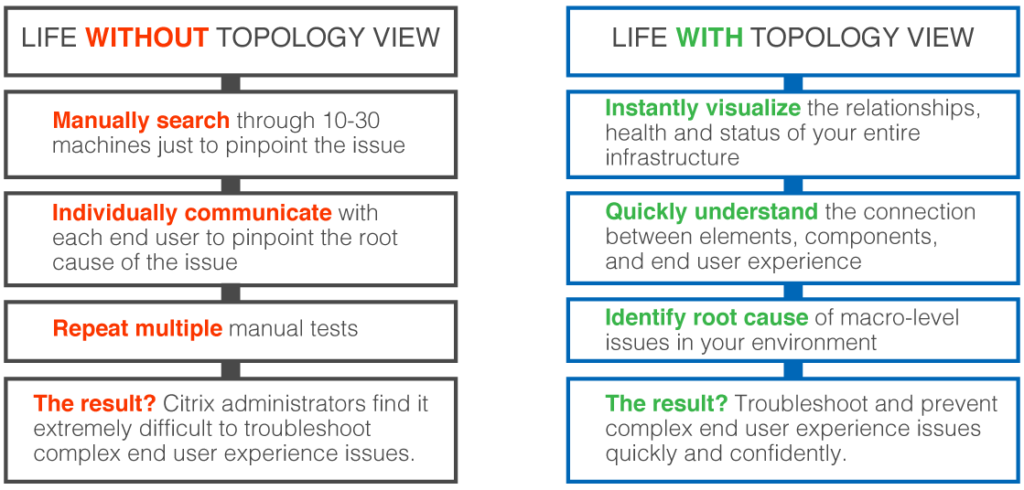
    Having the ability to see the infrastructure as a whole and the relationships between the various components is hugely important from a troubleshooting standpoint because it can save admins from chasing dead ends while attempting to resolve a problem. Imagine for example, that an organization is having problems with their Citrix infrastructure, and that the symptoms point to an issue with a Citrix delivery controller. In spite of the symptoms, the delivery controller may or may not be the true cause of the problem. It could very well be that the delivery controller is actually fine and that the real source of the problem is a backend infrastructure component such as a database. So with that in mind, just imagine how much time an administrator might waste manually trying to figure out what is wrong with a delivery controller that is actually healthy.

    Life with Topology ViewNow consider how Topology View is part of the Goliath Performance Monitor technology which can monitor the entire infrastructure and alert on any lower level components that are in an unhealthy state. An administrator would be alerted to issues relating to back-end components and problems that are lower in the stack.”

    The administrator could then use the information provided by Topology View to track the issue to its source.  By drilling down a little further, the administrator would receive actionable information that they could use to resolve the problem.

    An organization’s Citrix infrastructure is by far one of its most critical IT resources. As such, IT pros are under tremendous pressure to keep the Citrix environment healthy and to immediately resolve any issues that may occur. Topology View from Goliath Technologies can greatly simplify such troubleshooting efforts, while also saving administrators from spending hours trying to manually trace issues across complex, interconnected infrastructure components.

    Learn More:

    Watch the Topology View Video:

    Sign up for a product demo to see how your IT team can benefit from Topology View