Media Company Permanently Resolves Remote Worker Citrix Disconnects & Performance Issues

Media Company Permanently Resolves Remote Worker Citrix Disconnects & Performance Issues

How We Did IT

Media Company Permanently Resolves Remote Worker Citrix Disconnects & Performance Issues


Troubleshooting Citrix Disconnects

“Thanks to Goliath Performance Monitor, and its EventLog Management, we were able to isolate the root cause of an issue that was random but persistent, causing downtime for our developers in India. It was painful to get calls almost daily. Without Goliath’s deep Citrix analytics, we may have never permanently resolved the issue and been able to prevent it from happening again.” – Citrix Administrator

Infrastructure

VMware, Citrix XenDesktop, Citrix XenApp

Challenge

Remote Developers in India Reporting Slowness

Several developers from India were reporting Citrix XenDesktop session slowness and disconnects. The pain was especially felt by this user group because they were users that had recently been on-boarded to the Citrix environment. The reports of slowness and disconnects were seemingly random but persistent. The main difficulty for the Citrix Administrators was that, from the network and infrastructure perspective, the environment looked healthy with no visible issues.

Troubleshooting the issue became additionally challenging due to the fact that the users were not passing through NetScaler. The free Citrix utility, Director, which uses data from Insight for troubleshooting, was rendered useless because they require NetScaler to work.

Solution

As the administrators dug more deeply into the issue, they realized that even if the Citrix NetScaler were being utilized Director might be able to show that there was something wrong, but it wasn’t a purpose-built enterprise monitoring product built for troubleshooting. This, unfortunately, meant it could not assist the administrators in identifying the root cause. The Citrix administrators decided to turn to Goliath to troubleshoot and resolve this end user experience issue.


Troubleshooting Process: Real-Time Data & EventLog Management

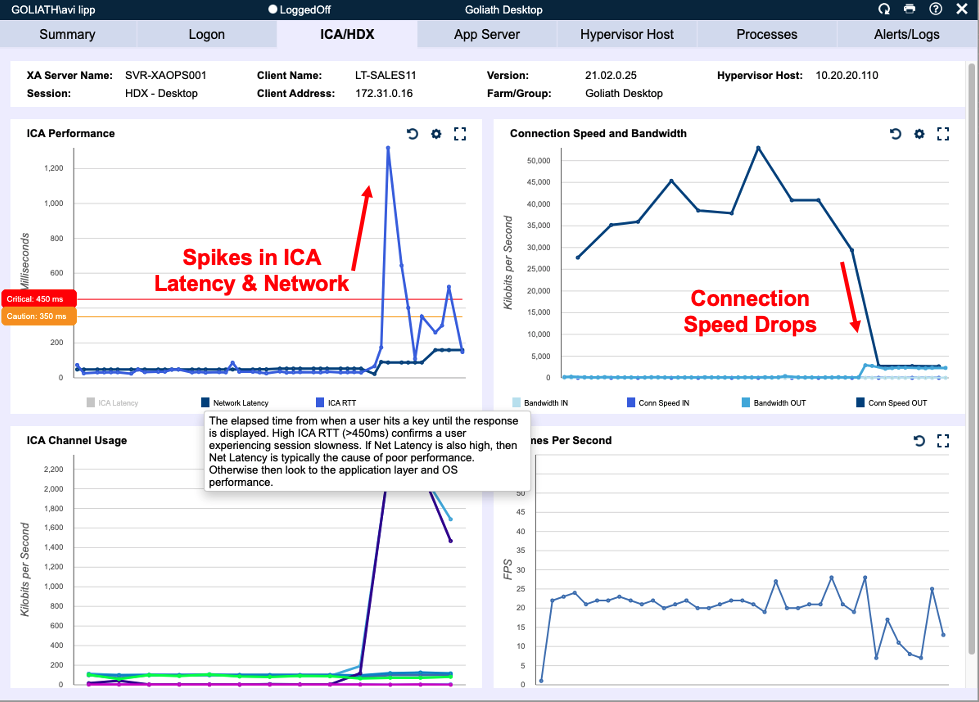
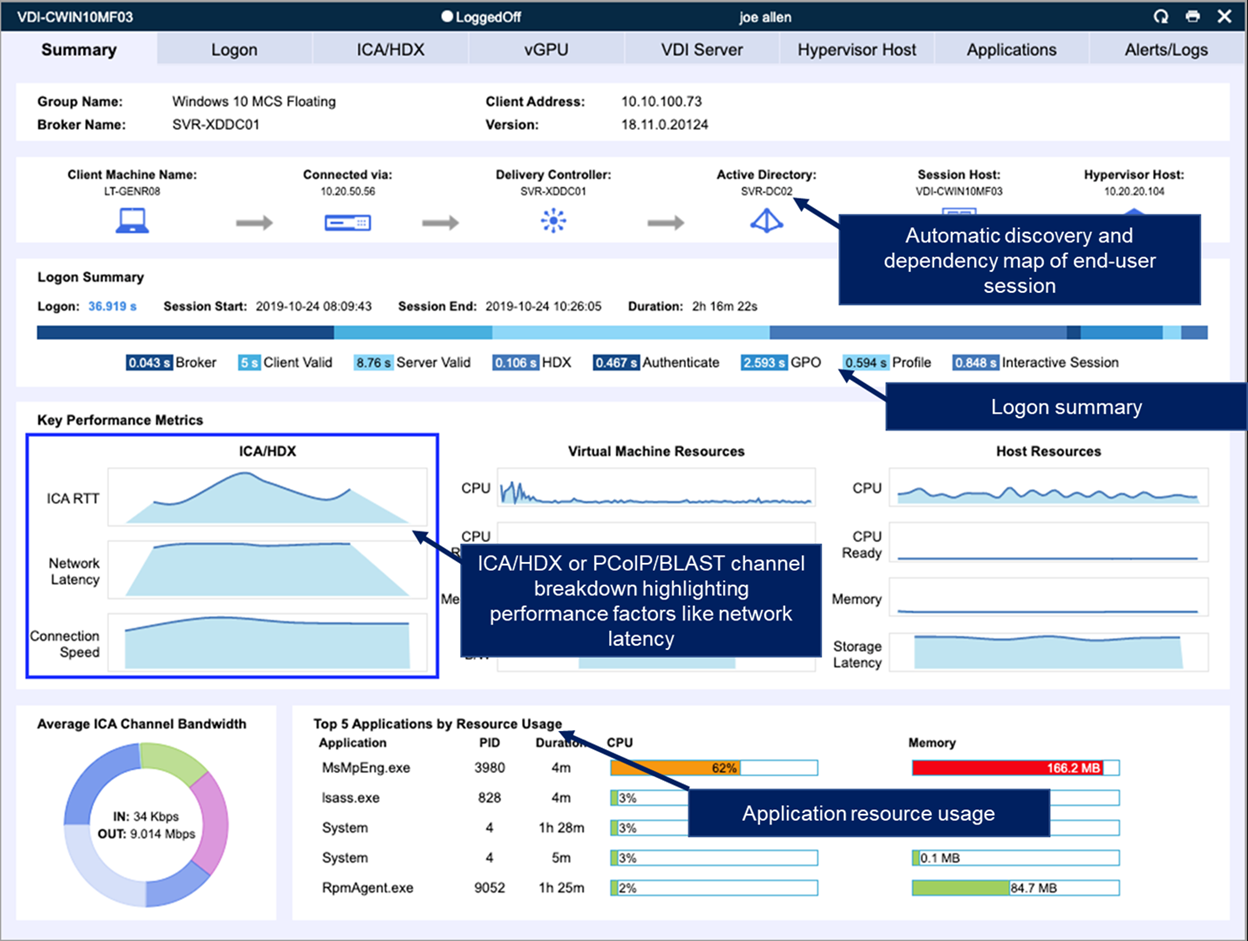
The team used the Session Display of Goliath Performance Monitor to pinpoint the exact users that were reporting the slowness issue. Within the Performance Monitor, you can drill into each user’s session to see Citrix ICA/HDX latency, RTT, Network latency, connection speed and channel breakdown (i.e. what type of data is passing through the ICA/HDX channel).  As depicted in the image below, the administrator simply selected the ICA/HDX tab located within each session and identified that connection speeds for some sessions would drop. They also could see that Network and ICA latency was spiking at times, but it did not appear to be consistent issue.


The image above highlights a single user session correlating how high network and ICA latency can be a result of slow connection speed.


Using the data points gathered from the Connection Performance screen, the Citrix admins correlated the session times to specific events from the EventLog Management viewer in Goliath Performance Monitor, as depicted below. The event log functionality will collect, filter, analyze, alert, report and archive from all Citrix session hosts. Their analysis proved that the disconnected sessions located in the event logs correlated directly to the slow connection speeds reported in the sessions. It also proved that ICA/HDX latency, server resources, and network latency were not the root cause of the disconnects.


Root Cause Found & Problem Resolved

Using the information from the Session Display and the EventLog Management in the Goliath Performance Monitor, the technical team narrowed the root cause down to connection speed. They did this specifically by looking at the event logs to see when the disconnects took place and then going to the user sessions and realized that every time there was a disconnect, the connection speed dropped. Using this information, the focus shifted to the user/endpoint and the network. They found that the users were on the Wi-Fi network at the times they reported the performance issues. With this information, the network team discovered performance issues with the Wi-Fi access points, and the users were promptly switched over to reliable wired connections, and the issue was resolved.


Results

Goliath Performance Monitor successfully provided one of the world’s leading entertainment companies with the tools, visibility and data they required to troubleshoot and resolve the root cause of a critical user experience challenge. This was a challenge that was resulting in downtime and lost productivity for developers in India as well as a persistent and painful headache for our administrators in Chicago. Without the combination of detailed, real-time Citrix metrics the individual user Citrix session drill down and the powerful Goliath EventLog Management & Troubleshooting engine the isolation of this root cause and its resolution would not have been possible.

Try Goliath For Free

Experience true end user experience monitoring and troubleshooting free for 30 days.

Drake University Troubleshoots Citrix, Windows, & Mac OS Experience Issues

Drake University Troubleshoots Citrix, Windows, & Mac OS Experience Issues

How We Did IT

Drake University Troubleshoots Citrix, Windows, & Mac OS Experience Issues


mac os virtual machine windows

“The initial reasons for selecting Goliath Performance Monitor were the rare combination of purpose-built functionality for monitoring Citrix XenApp and the supporting VMware vSphere virtual infrastructure. We have extended the utilization of Goliath to monitor XenDesktop 7.6 farm and added functionality like Goliath Application Availability Monitor for Citrix daily health check reports to proactively ensure end-to-end connectivity so users have seamless access to Citrix delivered applications.”

– Chris Mielke, Infrastructure & Security Services Lead at Drake University

Infrastructure

Citrix XenApp 7.6, Citrix XenDesktop 7.6, & Citrix XenServer 6.5

Challenge

End Users Experience Issues with Virtualized Windows on Mac OS

The Drake Infrastructure Team was having an issue with the performance of virtualized Microsoft Windows instances on Mac OS. More specifically, the College of Business users or students were having performance issues when attempting to use Excel.

Solution

The Drake Team worked with their integrator, Choice Solutions, to leverage Goliath for Monitoring Citrix XenApp and monitoring vSphere virtual infrastructure to troubleshoot and isolate server resources as the root cause of the performance issues. Once the failure point was identified, they were able to resolve the issue quickly by adding server capacity.

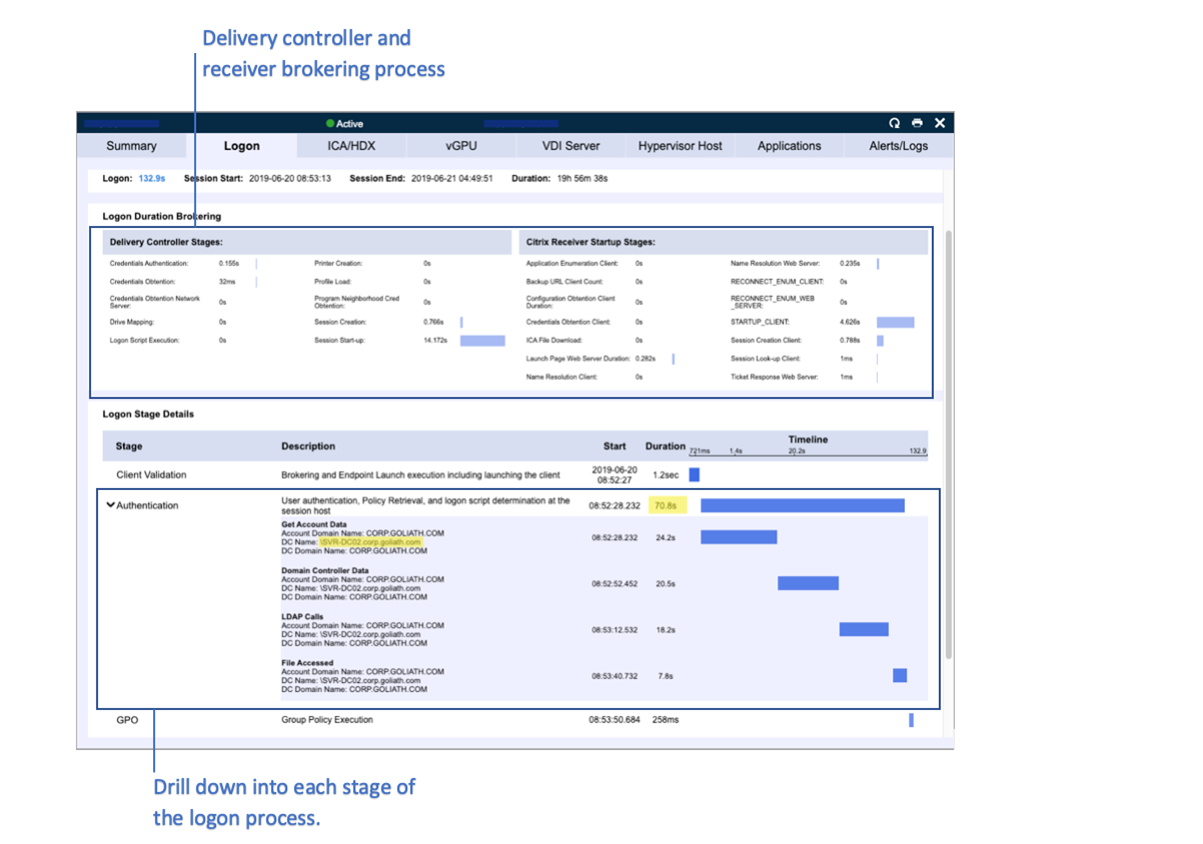
The figure below shows how the logon stages are broken down within a single user session and the screen an administrator sees to diagnosis root cause.

Logon stages


Beyond the performance issue related to Windows, the team has also been able to resolve storage latency issues and in general maintain a proactive IT posture by monitoring Citrix, Monitoring vSphere, and Citrix end user experience.


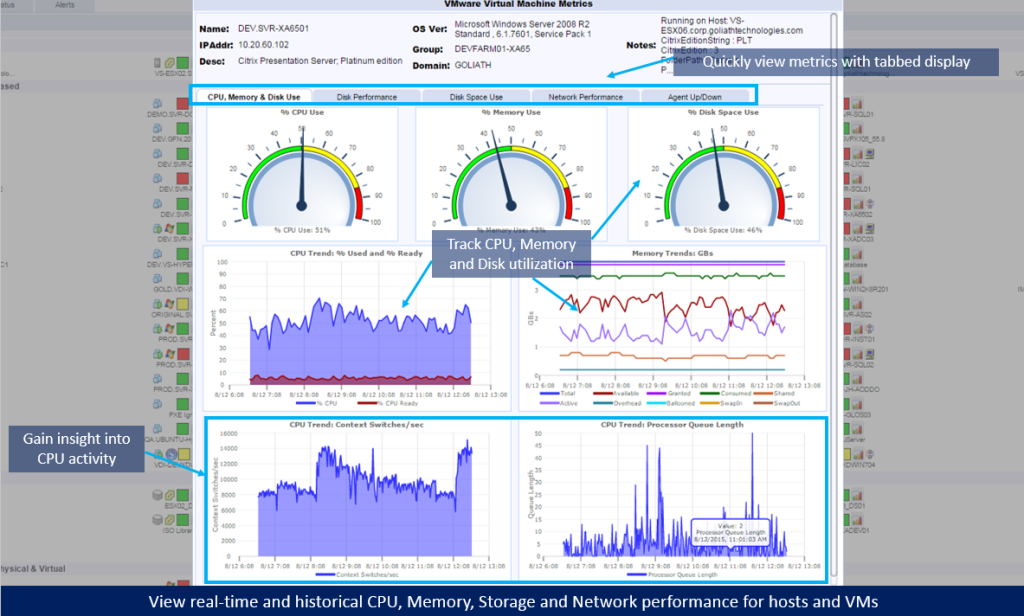
Real Time CPU Memory Utilization Report


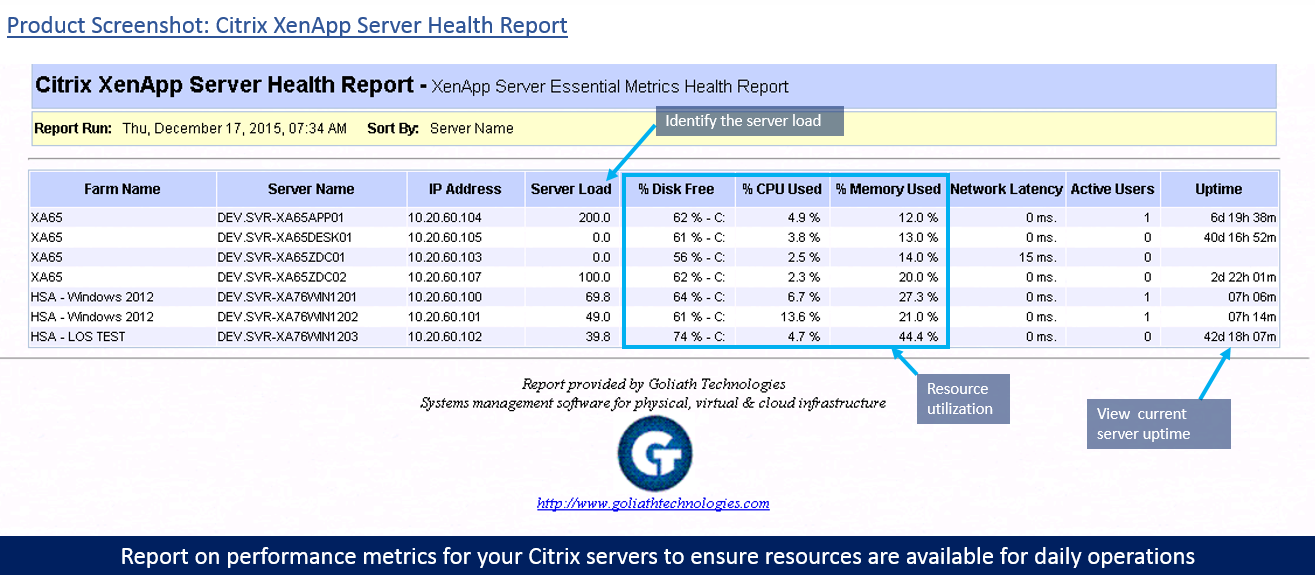
In addition to Goliath Performance Monitor’s Citrix reporting functionality, Chris now also uses the Goliath Application Availability Monitor to proactively get ahead of any potential logon issues in Drake’s Citrix XenApp/XenDesktop 7.6 environment.

This ensures a positive end user experience from session logon and duration to session performance. Chris stated that, “the logon data captured is very good, because of the deep visibility gained as a result of testing the entire Citrix delivery infrastructure, including the NetScaler.”


XenApp Server Health Report

Results

To resolve the Windows and Mac OS performance issue, Chris needed objective evidence that isolated the root cause of the issue. This can only be had using a comprehensive Citrix monitoring tool that also deeply monitors Vmware vSphere. From there, Chris and his team could ultimately prevent the issue from occurring again.

With his selection of Goliath Technologies for his Citrix and VMware vSphere monitoring needs, Chris is now proactively providing Drake’s students with a positive Citrix end user experience.

Drake University

ABOUT UNIVERSITY

Drake University is recognized as one of the finest universities for experiential learning. As a midsize, private university, Drake offers students the benefits and resources of a larger institution with the advantages of intimate class sizes and close personal relationships.

Headquarters location: Des Moines, Iowa
Founded: 1881
Employees: >2000
Students: >5300
Industry: Education and Academic

St. Dominic’s Resolves Citrix Issues Before Remote Students Complain with Proactive XenDesktop Troubleshooting

St. Dominic’s Resolves Citrix Issues Before Remote Students Complain with Proactive XenDesktop Troubleshooting

How We Did IT

St. Dominic’s Resolves Citrix Issues Before Remote Students Complain with Proactive XenDesktop Troubleshooting

xendesktop troubleshooting

To ensure a positive end user experience, St. Dominic’s Priory College utilized proactive Citrix XenDesktop and XenServer performance monitoring to aid in rolling out XenDesktop 7.16 and NVIDIA GRID vGPU Cards.

“We evaluated a number of products and we decided on the entire suite of Goliath’s products because their operating knowledge of Citrix was evident during the course of the evaluation and that came through in their products, features, and functionality.”   

-James Trevaskis, IT Manager for St. Dominic’s Priory College

Infrastructure

Citrix XenDesktop 7.16, VMware vSphere, XenServer & NVIDIA GRID vGPU


Challenge

Maintaining a positive user experience for students using Citrix XenDesktop

James Trevaskis, the IT Manager for St. Dominic’s Priory College, decided to use Citrix XenServer and XenDesktop 7.16 to deliver applications to 600 end user faculty and students, including AutoDesk products with NVIDIA GRID vGPU. As all users are reliant on the Citrix environment, James required a proactive approach to monitoring the new infrastructure to keep ahead of any reliability or performance issues.

Here’s a list of St. Dominic’s performance monitoring selection criteria & goals:

  • The users access the network both locally and remotely using Citrix to access all applications, including AutoDesk products using NVIDIA GRID vGPU cards
  • The students must have 24/7 access, and, if there is an issue, it could be resolved quickly (the parents purchase their child’s computer and expect them to have uninterrupted access)
  • James needs to have 100% uptime to avoid logon and performance complaints from students
  • The students have their own devices and logon from a variety of locations with varying network quality – this complexity makes performance reporting critical
  • IT needs proactive performance alerts to get ahead of end user issues to avoid angry calls/emails from students and parents

As end users don’t often alert at the time the problem is occurring, it can be difficult to identify the root cause at a later date without the right metrics. In addition, James had no way of knowing if the problem occurred within the datacenter or on the client side.

Solution

After looking at a few other solutions, it became apparent that the products from Goliath Technologies used embedded intelligence and automation to easily, and without special configuration, provide the metrics and pre-emptive alerting he needed to anticipate, troubleshoot, and prevent issues in his environment.


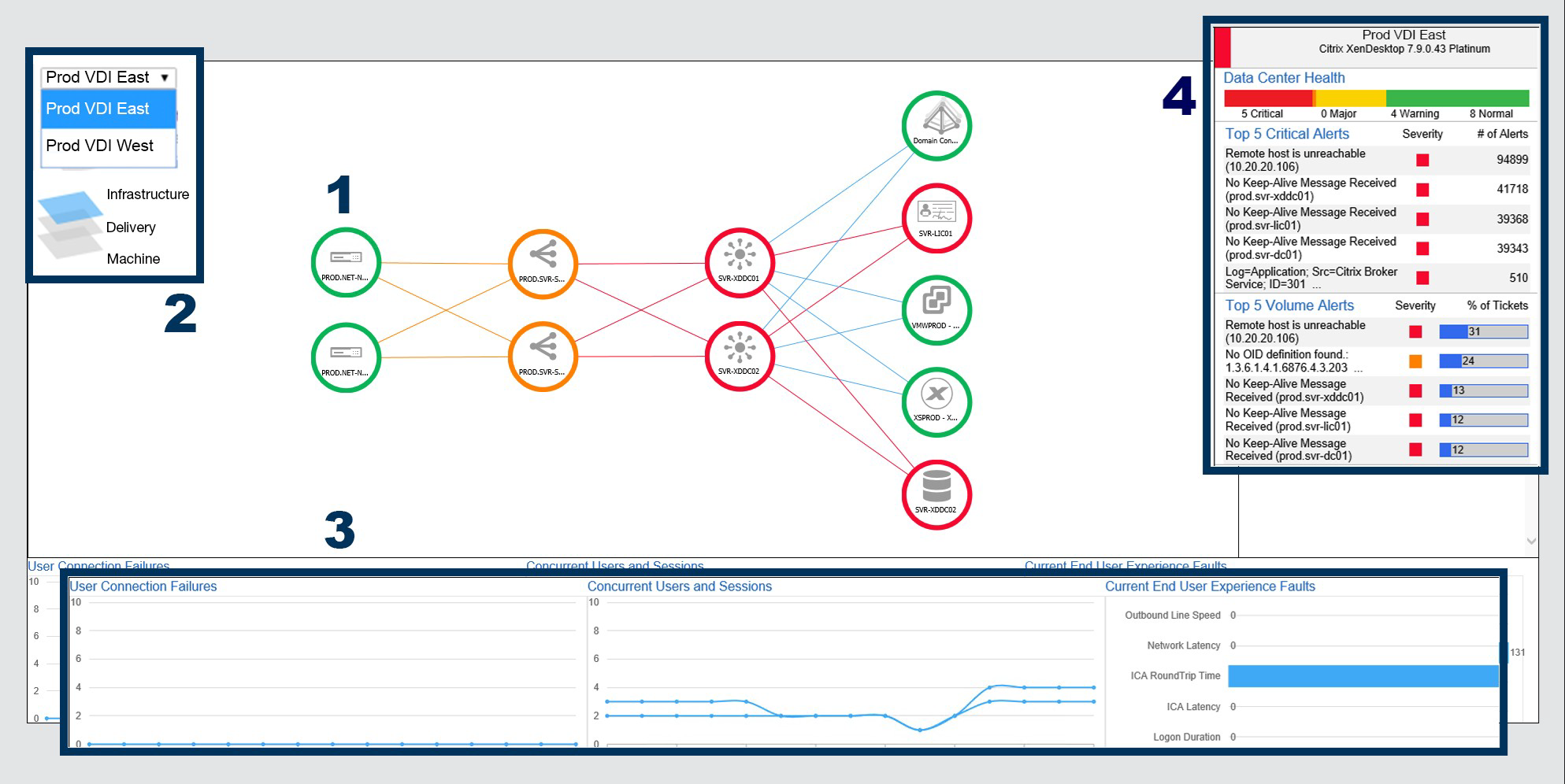
Prod VDI East Graphic


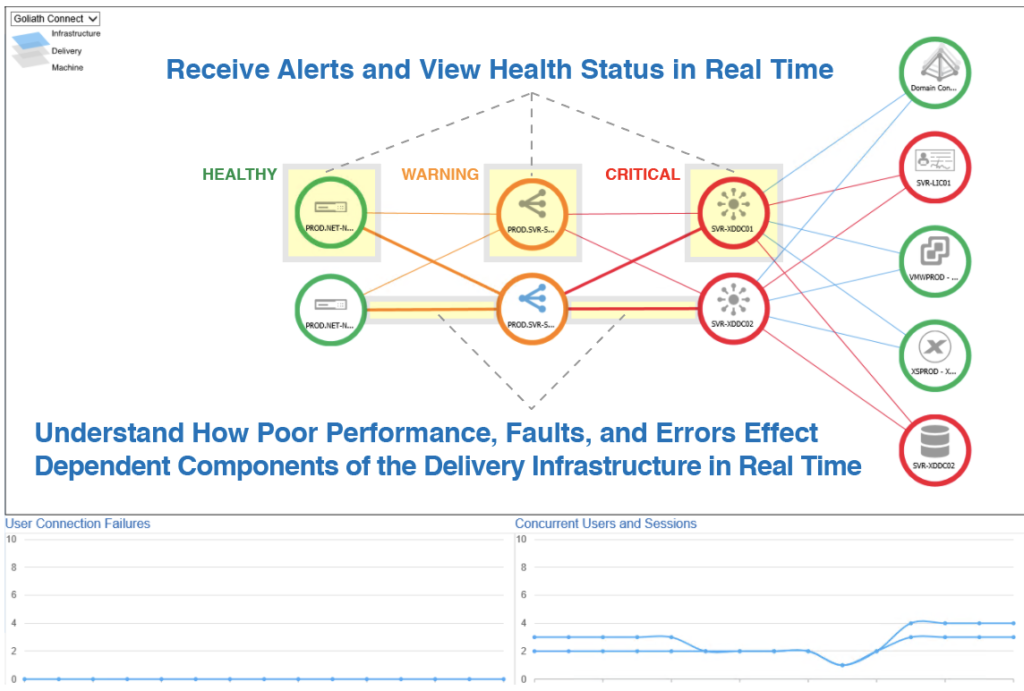
James uses the above as his NOC view to alert him to issues so he can see quickly what is wrong and where. The Goliath Automated Citrix Discovery and Dependency Map will identify the entire Citrix delivery infrastructure and draw a map of the environment.


At a glance, he could see issues as they occurred in real time and was able to troubleshoot them quickly. James explained, “There are many Citrix monitoring solutions on the market, however, after evaluating a number of products, it’s clear that Goliath offers the most comprehensive solution, hands down.”


Results

Early Warning System to Prevent Remote Logon Issues

Additionally, James incorporated the Goliath Application Availability Monitor to give him advance warning of remote student logon issues.

Goliath’s Application Availability Monitor runs all the time ensuring Citrix delivered applications are accessible. James wanted to automate his job as much as possible, so he began using the Goliath Application Availability Monitor to test and ensure Citrix was always available without manual intervention unless there is an issue he is alerted to.

In the image below you can see he now has screenshot evidence to show that all systems are online or down. If there is an issue, he is alerted to issues in real time so he can troubleshoot prior to end users complaining.


James explains why he uses the Goliath Application Availability Monitor, “Monitoring each individual Citrix component is important, however, with so many components, just knowing each is working independently is not enough. A technology that logs on like a real Citrix user exercises the entire delivery infrastructure, which ensures all these components are talking to each other and any problems are detected before users find them.”

As St. Dominic’s continues to scale their solution, he is now able to roll out Citrix XenDesktop to 1,150 new users in 2019 with the confidence that he has a monitoring and troubleshooting solution that is purpose-built for Citrix that allows him to anticipate, troubleshoot and prevent Citrix end user experience issues from happening. He has now moved from reactive to proactive.


Chris Hughes

ABOUT ORGANIZATION

St. Dominic’s Priory College is a prestigious educational institution. Established by the Dominican Sisters, the college has a rich history of providing quality education to girls from Reception to Year 12. Known for its commitment to academic excellence, holistic development, and a strong emphasis on values, St. Dominic’s Priory College nurtures a supportive learning environment that empowers students to achieve their full potential. The college’s vibrant community and dedication to instilling a sense of service and leadership make it a beacon of education in the region.

Headquarters location: Adelaide, South Australia
Founded: 1884
Employees: >80
Industry: Education

Law Firm Reduces Citrix Support Tickets by 60%

Law Firm Reduces Citrix Support Tickets by 60%

How We Did IT

Law Firm Reduces Citrix Support Tickets by 60%


Law Firm banner

“We reduced Citrix ticket escalations by 60%”

– Pete Chim, Systems Engineer

Infrastructure

Citrix XenApp

Challenge

A national law firm has attorneys and staff attempting to access Citrix delivered applications from all over the world. Because they use various methods to connect to the internet, the connection quality is variable and Citrix monitoring and troubleshooting tools are essential. The firm has users connecting from remote offices, homes, hotels, and even airplanes, which can result in connection and latency issues. This leads to an increase in the number of end users contacting the help desk for advice on improving the quality of service, even when the cause was a low-quality hotel or airline network.

The majority of these Citrix tickets were escalated to their Citrix Architects, who are responsible for deploying Citrix but continually were being pulled to respond to end user tickets as the help desk didn’t have the knowledge or tools to resolve end user complaints related to “Citrix is Slow” complaints. In addition, they did not have the objective evidence in the form of reports or documentation to prove root cause of the problem to those end users.

Solution

The IT team needed a Citrix End User Experience Monitoring & Troubleshooting solution that would allow them to do two things:

  1. Offer them granular visibility root cause of slowness when using Citrix and Citrix delivered applications.
  2. Provide the help desk with an easy to use troubleshooting tool that would empower non-Citrix experts to troubleshoot and potentially resolve end user performance issues. And, if the issue could not be resolved because it was solely related to end user behavior talk to the end user provide documentation to prove root cause was either a result of their actions or their connection into Citrix.

As a Citrix Platinum customer, this law firm did have Citrix Director deployed in their Citrix XenApp environment. As with most free utilities, these are designed to provide some metrics but it didn’t offer the broad and deep visibility necessary to anticipate, troubleshoot and document Citrix end user experience issues. Citrix Director, beyond being inadequate from a Citrix monitoring and troubleshooting perspective, was too confusing to be useful to the help desk staff.

After looking at several Citrix monitoring and troubleshooting vendors, the firm decided to do a proof of concept with Goliath Technologies. They discovered that Goliath gave—in real-time—very deep and complete visibility into the Citrix end user experience. Of particular value was its ability to quickly identify the root cause of a remote user’s issue—whether it is the connection, stage of the logon sequence, or another program competing for network resources, such as YouTube, Netflix, or a gaming site. With Goliath’s Citrix monitoring and troubleshooting solution, they can see, in real time, if a user’s slow connection is due to internet network quality or a competing program as seen below.


Screenshot

Results

Armed with Goliath’s Citrix monitoring and troubleshooting solution, the IT team was poised to integrate it into their internal processes so they could improve the end user experience through faster response times, improved communication, and an empowered help desk. Pete Chim, Systems Engineer, put a checklist in their ServiceNow knowledge base so the help desk staff could use Goliath’s Citrix monitoring and troubleshooting to conduct a series of checks against this knowledge base when a ticket was opened from an end user complaining about Citrix slowness or disconnects. Now, the help desk staff resolves issues more easily on their own, which has reduced the need to escalate to Citrix engineers by an estimated 60%.

Browse Citrix Webinars

ABOUT ORGANIZATION

The firm has a reputation for providing high-quality legal services across a wide range of practice areas, including corporate law, real estate, litigation, and intellectual property.

Headquarters location: Northeast, USA
Founded: over a century ago
Employees: >500
Industry: Legal

Ballard Spahr Migrates from Citrix XA 6.5 to XD 7.6

Ballard Spahr Migrates from Citrix XA 6.5 to XD 7.6

User Story: Ballard Spahr Uses Goliath to Migrate from Citrix XenApp 6.5 to XenDesktop 7.9

The Business Challenge: Migrating from Citrix XenApp 6.5 to XenDesktop 7.9 Platinum

Director vs Goliath TroubleshootingMigrating from one Citrix version to another is complicated enough, but Ballard Spahr also has attorneys and other users who require access to applications from all over the world. They connect from remote offices, homes, hotels, even airplanes. Because they use various methods to connect to the internet, the connection quality is also variable.

The IT team wanted to achieve two things to assist in a smooth transition to Citrix XenDesktop 7.9 Platinum:

  1. Knowing that end user experience issues can cause delays in adoption, they wanted a proactive monitoring and troubleshooting product that would help them anticipate issues and resolve them quickly
  2. They need to be able to track adoption to Citrix XenDesktop 7.9 Platinum

The Solution: As a Citrix Platinum customer, Ballard Spahr has access to the free utilities available to Citrix Platinum customers. In fact, they had Citrix Director and Citrix Insight Center installed, but found that these utilities, while helpful, are not designed for enterprise monitoring, management and troubleshooting the Citrix environment. They didn’t provide the visibility into Citrix, end user experience, and the supporting infrastructure. In addition, there was no capability to manage end user experience or gauge the adoption rates of end users.

The Ballard Spahr IT Team selected Goliath Technologies because of its capability to preemptively alert on, and resolve, issues that might negatively affect end users and slow adoption. This is accomplished through advanced threshold-based alerting (See Image Below), which will notify IT, in real time, if a condition exists that may cause an end user connection issue, logon slowness or session latency. In addition, Goliath had out-of-the-box reports—called “End User Connection” reports—which can be run on a scheduled basis to show the frequency and length of user sessions. This gave the IT team the ability to see how often users were logging on to the Citrix 7.9 environment versus the 6.5 environment, thereby gauging adoption.

The Outcome: The IT team at Ballard Spahr now has a proactive monitoring and management tool for their Citrix XenApp 6.5 environment, and new Citrix XenDesktop 7.9 deployment that is being utilized to reduce end user experience issues that might slow adoption of Citrix XenDesktop 7.9. In addition, they have daily reporting that keeps them abreast of adoption rates of the new Citrix deployment.


MSPs Use Application Availability Monitor for Troubleshooting

MSPs Use Application Availability Monitor for Troubleshooting

MSPs Leverage the Goliath Application Availability Monitor for Advanced Troubleshooting and Increased Revenue

The Goliath Application Availability Monitor (GAAM) received significant interest from many industries and clients when it was launched in October 2017, but Managed Service Providers such as MTM, HCL, CSC, CDK Global, CloudShape, Dizzion, and others embraced this new technology quickly and enthusiastically.  This technology is purpose-built to help ensure SLA’s are achieved by reducing end user experience issues when Citrix XenApp, Citrix XenDesktop or VMware Horizon are part of the service offering. In addition, most service providers use the application availability monitor functionality as the basis for a new recurring revenue offering “daily application availability testing service”; an automatic daily confirmation that applications and infrastructure are ready and available before end users get to work.

John Byrne, MTM Technologies Director of NOC Technologies, shares why:

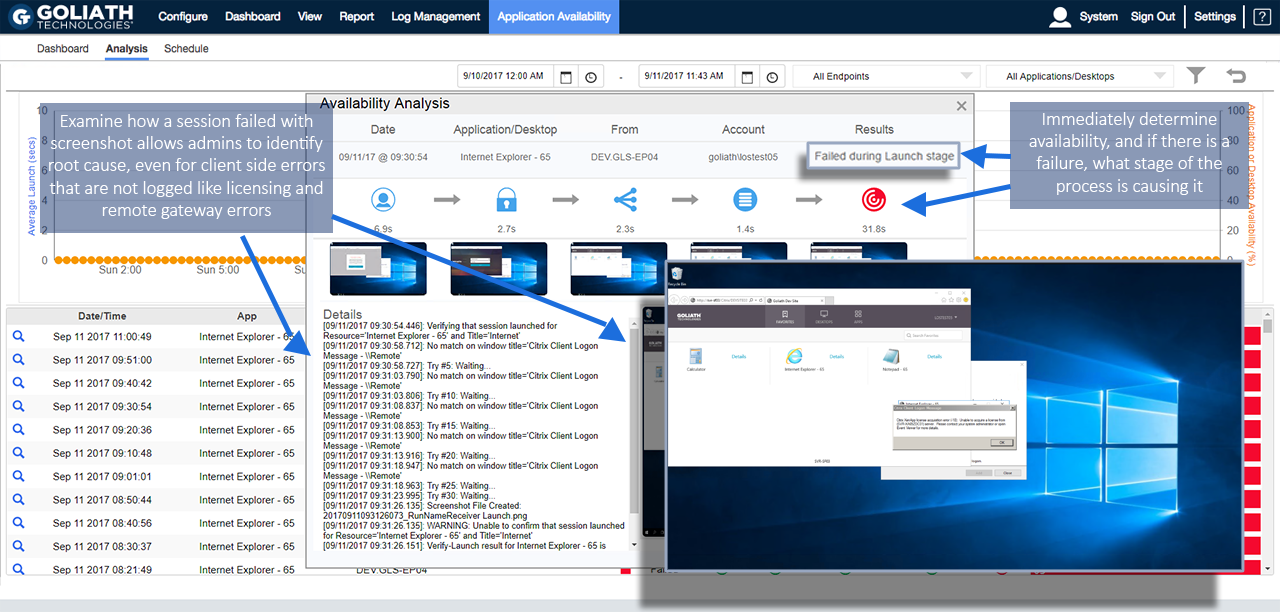
“At MTM, we deploy the Goliath Application Availability Monitor as an advanced troubleshooting tool,” Byrne explained.  “GAAM’s automatic screenshots allow us to see a picture of the exact point at which the application launch failed, then ID and resolve the underlying problem that caused the application or infrastructure to be unavailable quickly, and we can share the images directly with customers, so they can see exactly what issue occurred and where.”

Figure 1: The Goliath Application Availability Monitor automatically logs in from any end point; providing information on where an issue occurred, a screenshot documenting the specific error, and details in the failure point in the logon process.

Managed Service Providers use the Goliath Application Availability Monitor to meet strict SLA’s when delivering Desktop as a Services (DaaS), Platform as a Service (PaaS), Software as a Service (SaaS), Infrastructure as a Service (IaaS), Remote Monitoring and Management (RMM) and other services. Pre- empting issues and solving them before end users are impacted is the “holy grail” for service providers, but if issues do occur, quick resolution is a close second in terms of priority.

The key to this new technology is the Goliath Virtual User which can be installed at any location or endpoint to provide an automated early warning system for any application issues. This monitoring can be scheduled according to the specific needs of either, the MSP or the end customer — such as time or shift based monitoring, maintenance/patched based monitoring, or constant monitoring throughout the working day. The below reference architecture shows how an MSP can deploy the Goliath Virtual User to monitor multiple end points – though specific use cases may use a different model.

msp application availability monitor

The monitoring provides a valuable early warning system, but Goliath’s automatic screenshot feature provides an additional immediate impact for MSPs. The Goliath Application Availability Monitor allows companies to schedule an automated logon from any system endpoint and exactly mirrors the logon sequence users use to access the system, while capturing screenshots to document the success, or failure, and specific error messages at each step of the process. These screenshots capture the specific root cause of a problem, whether it’s a network, infrastructure, or an application issue, and provides administrators with objective evidence detailing the error and failure point.

“We use this technology as part of our client demonstrations and offer the screenshots as an option in our customer portal,” Byrne continued. “The new user interface is tremendous – and well-designed for proactive management and troubleshooting of end user experience issues.”
In addition to troubleshooting, MSPs see another significant benefit – meeting and exceeding their Service Level Agreements (SLAs). Providers automatically schedule the logons to occur at critical times, such as before a major shift change. Then, they either document system availability, or proactively fix issues – before customers are impacted. The screenshots then allow them to clearly and automatically document the resolved problems, even if they are resolved before clients see them directly.

“The screenshot feature is a real value-add for us,” concluded Byrne.

Some MSP’s now offer this “daily test” of application and infrastructure availability to customers as a high margin recurring revenue service. In many cases this serves as easy entry to acquire new customers because the prospective customer doesn’t need the same level of commitment required for other full-service offerings such as DaaS, MaaS, IaaS, etc. This early warning system offers a way to both generate revenue and build an initial relationship with a new customer that can be expanded over time.

MSPs are unique in that they have SLAs to provide availability for external customers, but any IT administrator can use the same tool to automatically document system status or troubleshoot issues for internal clients and stakeholders – all before end users even know the problem exists. The application can be deployed for Citrix XenApp and XenDesktop, VMWare Horizon, AWS, Azure, as well as EMR/EHR applications like Epic, Cerner, Meditech, AllScripts  

To learn more about the Goliath Application Availability Monitor or to request a personalized demonstration of how this technology can help you proactively solve issues before your customers or end users are impacted, please contact us at techinfo@goliathtechnologies.com or start a free 30-day Trial by clicking the link below.