
Marietta Memorial Health Resolves Citrix Print Issues

Marietta Memorial Health Resolves Citrix Print Issues

Marietta Memorial Health Resolves Citrix Print Issues – Tickets down 60%

As part of a Goliath Technologies Citrix troubleshooting services project, I was working with Memorial Health System, a non-profit organization with 2 hospitals, 15 outpatient sites and provider clinics, and more than 5,000 end users.  Their healthcare IT team’s goal was to proactively get ahead of physician and medical staff complaints stemming from Citrix XenApp 7.15 printing problems and failures with better XenApp monitoring. The healthcare IT team already used Goliath’s MEDITECH module to proactively troubleshoot issues across Citrix and MEDITECH from a single pane of glass, now they needed to address printing problems that were adversely impacting end user experience not just for doctors and clinicians, but ultimately their patients as well.

    The healthcare IT team had three specific printer issues to solve for their end users:

    1. Citrix Printer Spooler Failures
    2. Citrix Printer Driver Corruptions
    3. Citrix Printer Mapping Issues

    To help the team achieve their goal, we deployed Goliath Performance Monitor (GPM) and leveraged the Printing Health Report, which is just 1 of 66 IT performance and end user experience reports that come out-of-the-box with GPM. This allowed us to perform in-depth XenApp monitoring, which enabled us to troubleshoot issues with printer mapping and services.

    The Problem – Over 100 Support Tickets Per Day Due to Printer Failures

    This healthcare IT team’s challenge was to troubleshoot and fix the root cause of a multitude of Citrix printing issues.


    Step 1 – Schedule Goliath’s Printing Health Report to Filter Citrix Printing Problems 

    First, we brought in the healthcare system’s Citrix XenApp environment through our ‘First-Time Run Wizard’ using our APIs for Citrix. Once the Citrix infrastructure was listed in inventory, we deployed our Intelligent Agent to the Citrix session hosts and role servers to gain deeper visibility into the Citrix Supporting Infrastructure. This gave us better capabilities to monitor XenApp.

    Yes, that’s right — an Agent. Our Intelligent Agent is not what you think; the Agent uses less than 0.1% CPU, 1.5 MB on disk, about 50 to 80 MB RAM, and no reboot is required. We deployed Goliath’s Agent within minutes and were able to instantly begin collecting Citrix printer troubleshooting data – regardless of the organization’s size and network complexity.

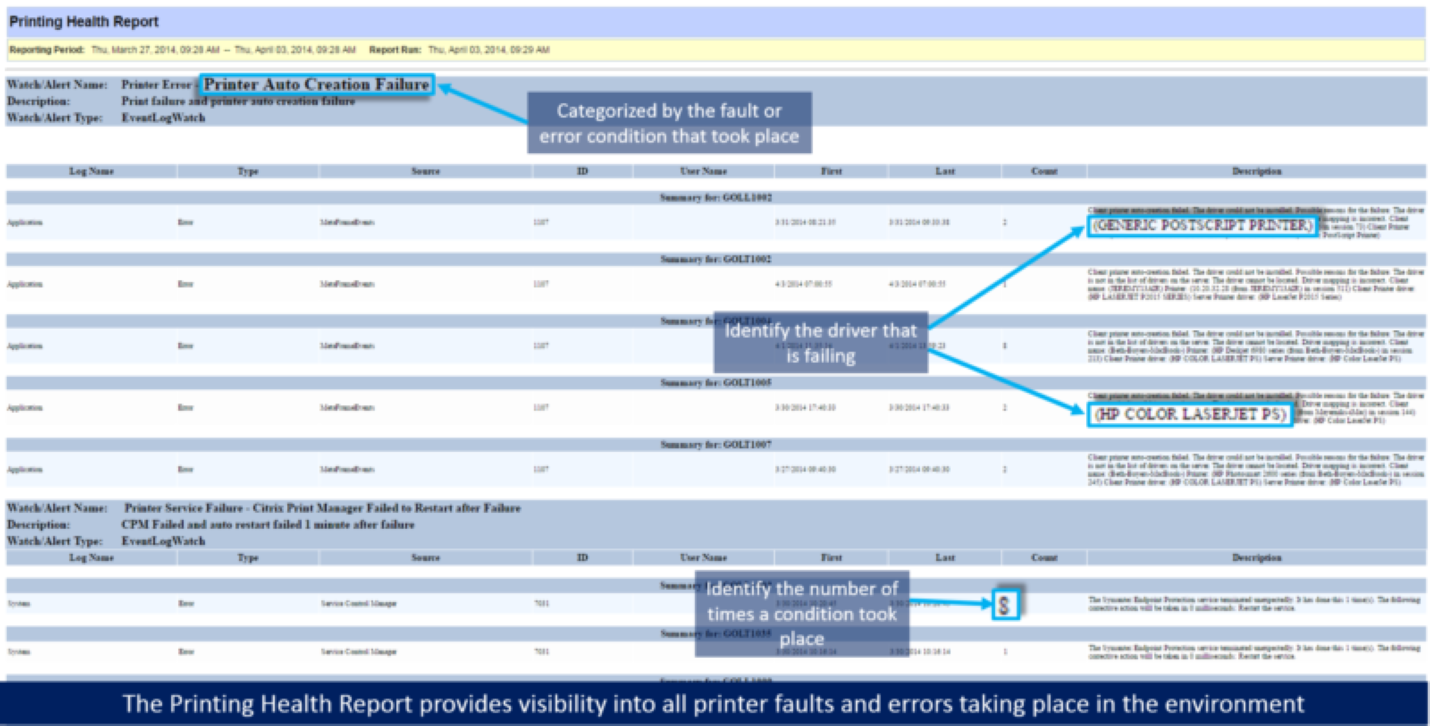
    To help the healthcare system pinpoint the exact issues taking place in their environment, we scheduled the Printing Health Report (below) in our XenApp monitoring software to categorize and summarize the Citrix printing problems that were occurring over a 24-hour period.

    XenApp Enduser productivity report

    This report identifies all printing issues that are occurring in the environment, so that they can be broken down and addressed. As far as Citrix printing best practices go with us, this is a great starting point.

    Step 2 – Use the Printing Health Report to Troubleshoot & Fix Driver Corruption Events & Printer Mapping Issues

    Using the Printing Health Report information (above), the healthcare IT team was able to analyze the faults and errors as well as walk through the environment and systematically resolve the issues that were occurring:

        • Driver corruption events: the report allowed the administrator to identify the driver type and XenApp servers experiencing driver corruption so they could reinstall the right drivers on the right XenApp Gold Images.
        • Printer mapping issues: they were able to find that the mapping issues were coming from printers that were not on the organization’s approved printers list – some users had issues being unable to print from Citrix to a local printer, like their legacy HP LaserJet 4100s. For some users, the health system made exceptions, but the rest had to get new printers.

    Just by making these few changes, the healthcare IT team was able to resolve the majority of their printer mapping issues that were occurring. These were huge issues, as they caused users to be wholly unable to print from Citrix to local and network printers.

    Step 3 – Activate Goliath’s Print Service Error — Print Spooler Service Alert

    Following the changes, we ran the Printing Health Report again to see how the environment was acting. The report results still included some errors in regard to the print spooler, but that was to be expected.

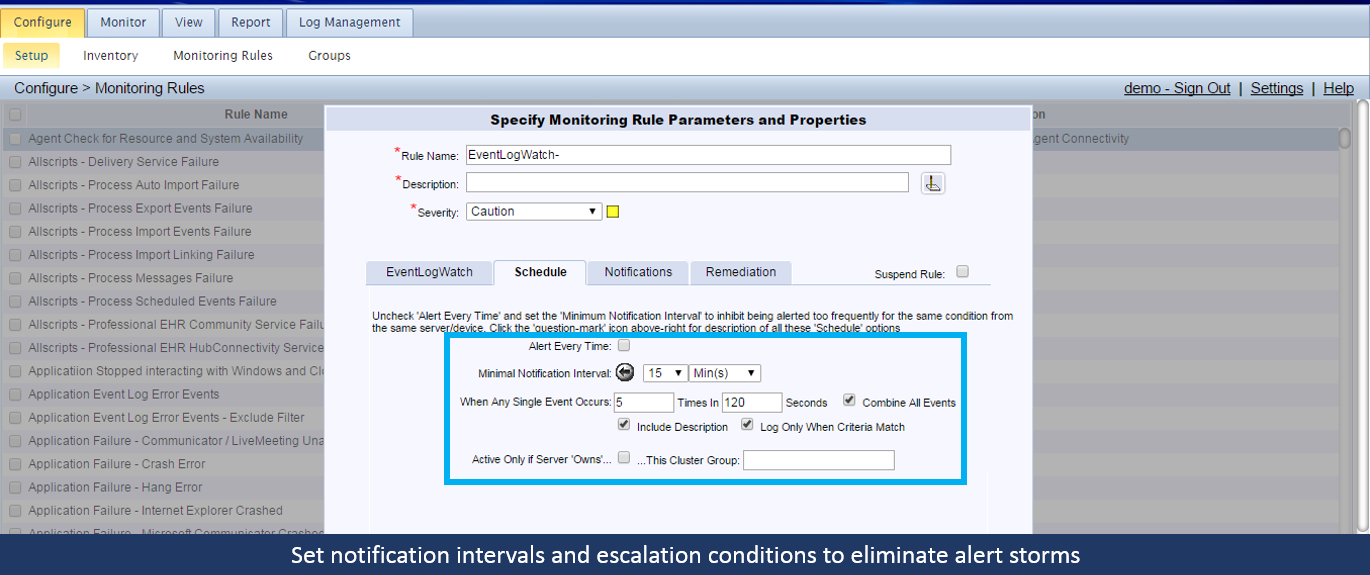
    So to handle the Citrix print spooler issues, we enabled some of our out-of-the-box IT performance alerts for the print spooler and created some remediation actions to resolve these issues automatically when they occurred to keep the end users working.

    One of the alerts we enabled was the Print Service Error – Print Spooler Service alert which alerts the healthcare IT staff if the print spooler service stopped and failed.

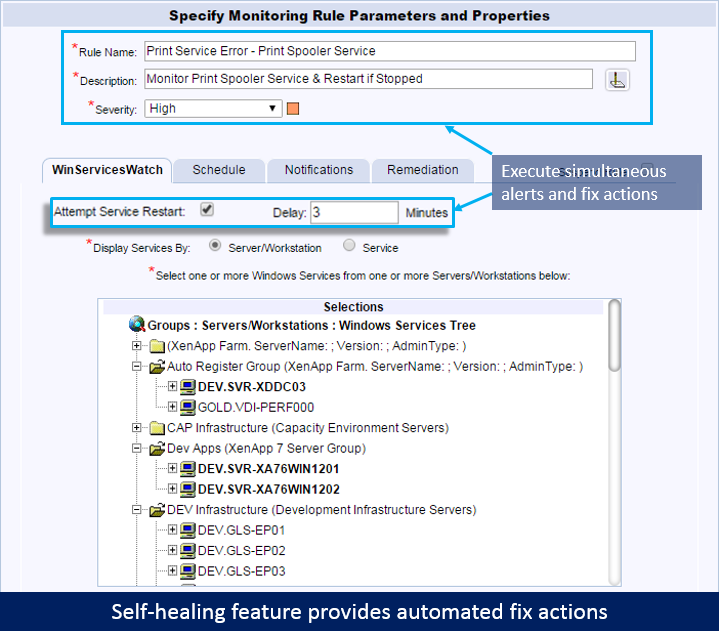
    With this alert, we also enabled the out-of-the-box remediation to restart the print spooler service. If the print spooler service was stopped for at least 3 minutes, Goliath Performance Monitor would automatically attempt to restart the service. By having our technology execute the remediation action automatically it helped save time normally taken by the help desk and IT staff to manually execute the restart.

    Citrix print spooler fail automated fix actions

    Step 4 – Configure Monitoring Rules for ‘cpsvc.exe’ & ‘splwow64.exe’ to Identify High CPU & Memory Usage

    Because of how print spooler failures would occur, we needed to monitor the print spooler processes in case they got hung, so we configured Citrix monitoring rules for ‘cpsvc.exe’  (the Citrix Print Manager) and ‘splwow64.exe’ to identify when they experienced high CPU and memory usage.

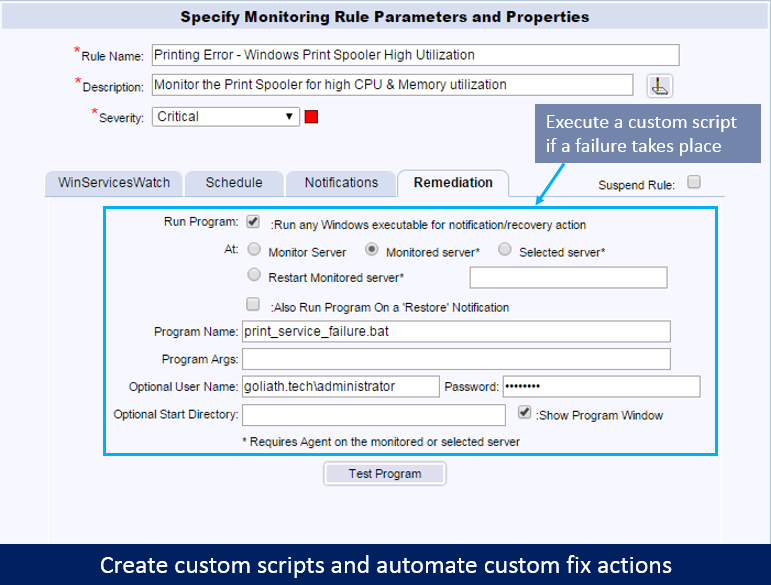
    High resource utilization on these processes can cause the print spooler to crash or hang. In addition to configuring email notification, we also configured remediation actions for this alert to resolve the condition before it resulted in actual Citrix printing problems and server performance degradation.

    Citrix printer fail custom script fix action

    One of the healthcare system’s engineers wrote a script, and put it into our remediation engine so it was documented and could be used by the Citrix help desk. When one of these processes spiked in resources, the script would terminate the process, clear the print queue, and notify the end users to resubmit their print job. This custom script was then applied to the alert so that when a failure took place, the script would execute automatically.

    By using Goliath Performance Monitor’s ability to automate fix actions, the healthcare system was able to be proactive instead of reactive. In doing so, they were able to troubleshoot Citrix printing problems as well as lighten the load of their help desk team. More specifically they were able to see that there had been a change in how the print drivers were mapped through the Citrix policies. They changed one setting and the result was reduced printer failures from hundreds per day to less than ten.

    Want to learn more about how our software can help you troubleshoot end user experience issues just like the health IT team outlined in this post? Click the image below to browse our schedule of upcoming live webinars where you will get the chance to see the product in action!

    Browse EHR Monitoring & Troubleshooting Webinars

    About the Author: 

    The team members collaborated to bring together this blog post by calling on their past Customer Experiences and Expert Knowledge of Citrix Troubleshooting. Beyond writing technical documents this team supports Goliath Customers and provides product feature and function guidance to development.
    St. Louis Metropolitan Police Department Selects Citrix Enterprise Instead of Citrix Platinum

    St. Louis Metropolitan Police Department Selects Citrix Enterprise Instead of Citrix Platinum

    St. Louis Metropolitan Police Department Selects Citrix Enterprise Instead of Citrix Platinum

    “We selected Citrix Enterprise & Goliath instead of Citrix Platinum because Goliath gives us far superior Citrix monitoring and management capabilities than the utilities included with Platinum. Goliath and Citrix Enterprise together were much more affordable than Citrix Platinum, and after we evaluated the Citrix performance monitoring of Goliath, the decision was a no-brainer.”
    – Tom Westbrook, Manager IT Operations & Networking, SLMPD


    The Business Challenge: 

    The Saint Louis Police Department was deciding whether to purchase Citrix Platinum or Enterprise. Citrix XenApp and XenDesktop are used to support remote police officers by delivering applications and desktops. Due to the nature of the environment, having an effective and comprehensive Citrix XenApp monitoring solution for their delivery infrastructure is critical. The need for Citrix XenApp monitoring was the major consideration when trying to decide between purchasing XenDesktop Enterprise or XenDesktop Platinum. They were told that the Platinum edition included additional capabilities for Citrix XenApp monitoring with Director and Insight, “all the enterprise monitoring you will need is free if you purchase Citrix Platinum”.

     
    View the Director Comparison Video
     

    Citrix Platinum Tools are Not Useful for Citrix Monitoring & Troubleshooting  

    The biggest challenge in the decision-making process was the cost vs. the benefit of purchasing Citrix XenApp/XenDesktop Platinum. The features and functionality of the Enterprise edition satisfied all of the technical requirements necessary to delivering applications and desktops to end users, except for providing the Citrix monitoring capabilities needed to ensure a high-quality user experience. While the Platinum edition claims to provide comprehensive Citrix monitoring capabilities with the free utilities included in the Citrix Platinum License, the evaluation proved that the functionality of Director and Insight did not meet the minimum requirements for Citrix monitoring. The Citrix monitoring tools may indicate that something is wrong, but the depth of visibility did not exist to tell them “what was wrong” or root cause. So, why purchase Platinum and then have to also buy additional Citrix monitoring for the supporting infrastructure and end user experience? What was truly needed was a monitoring solution that worked with Citrix Enterprise Edition. See the selection criteria they developed here:

    Feature Goliath Citrix Desktop Director with Insight for Platinum Edition
    Enterprise Architecture Yes No
    VMware Integration Yes No
    vCenter, XenServer, and Hyper-V Integration Yes Limited
    One Product to Monitor VDI, Hypervisors, and Physical Infrastructure Yes No
    3rd Party Tools Integration Yes No
    Alerting Controls and Scheduling Yes No
    Automated Remediation Yes No
    Alert Resolution Feature Yes No
    Physical Server Monitoring Yes No
    ICA/HDX Monitoring Yes Limited
    Citrix XenApp and XenDesktop Performance Dashboard Yes Limited
    Citrix XenApp and XenDesktop Failure Monitoring Yes Limited
    Application Failure Monitoring Yes No
    Citrix App Availability Testing Yes No
    175+ Pre-Configured Failure Point Monitors Yes No
    Logon failure and duration threshold-based alerting Yes Limited
    Session analysis per user session for VDI, Hosted Shared Desktop and Hosted Shared Application Yes Limited
    Logon Duration Analysis Yes Limited
    ICA Channel Drilldown Yes Yes
    ICA Latency and RTT Yes Yes
    Detailed Historical Reporting Yes No
    Client Connection Speed Yes No
    Client Network Latency Through ICA Yes No
    Application Availability testing all components of logon in concert Yes No
    Print Monitoring Yes No
    Profile Monitoring Yes No
    Provisioning Services Monitoring Yes No
    Microsoft SQL Monitoring Yes No
    Active Directory Yes No
    66 Out-of-The-Box Reports Yes No

    The Solution: “Goliath and Citrix Enterprise Were a No Brainer”

    Part of the decision-making process for the Saint Louis Police Department was to evaluate alternative solutions that would give them better functionality as Director and Insight for Platinum Edition. They wanted something that would help them anticipate, troubleshoot, resolve and prevent Citrix end user experience issues. Goliath offered an end-to-end solution, providing deep visibility into Citrix sessions, end user experience and underlying infrastructure–often the root cause of Citrix performance issues.

    The powerful out of the box capabilities above, combined with the competitive price point of Goliath Performance Monitor and Goliath Application Availability Monitor, gave the Citrix support staff the ability to be truly proactive without purchasing Citrix Platinum.  This allowed them to anticipate, troubleshoot, resolve, and prevent issues in a way that Director with Platinum edition simply could not, while also saving money.

    The Summary

    After the evaluation concluded, it was readily apparent that Goliath Technologies and Citrix Enterprise Edition offered a complete and comprehensive solution that was more capable than the tools included with XenApp/XenDesktop Platinum Edition. And, given the upcharge for going to Citrix Platinum, a truly proactive Citrix Desktop environment could be achieved at a far lower price point.
    Click the image below to learn more about how we compare to Citrix Director — then sign up for a Free Trial!

    Citrix Troubleshooting Helps MEDITECH Hospital Solve User Issues

    Citrix Troubleshooting Helps MEDITECH Hospital Solve User Issues

    The Goliath Support Team worked with a customer who uses Goliath’s Citrix Monitoring and Troubleshooting functionality for their MEDITECH applications. This customer was a Health Care System that includes 2 hospitals and a number of other healthcare related facilities.

    The Health Care System had over 150 VMware VMs supporting their MEDITECH EMR/EHR applications via Citrix XenApp for over 1,000 users. Their primary concern was preventing end user complaints resulting from application and server issues. By configuring our product for VMware vSphere monitoring, Citrix monitoring, and MEDITECH monitoring we were able to let them know of impending issues so they had time to react and solve problems before end users were impacted. This blog will speak to how we did that.

    Monitoring Rules & Real-Time Alerts

    So first we set up our Citrix and MEDITECH Monitoring Rules and real-time alerts. Keep in mind these are all out-of-the-box, meaning that the expertise of knowing what conditions to look for or monitor are already pre-loaded into the base product, as are the alerts. This is essential for Citrix Troubleshooting because the rules tell the product what conditions to look for on the hypervisor, virtual machines, OS, applications, and hardware.

    For example, we deployed MEDITECH, VMware monitoring, Citrix monitoring, and many other rules. The rules also contain the alerts that will tell you in real time if a trigger event has taken place, and can also perform proactive remediation actions as well.

    In the case of the Health Care System, once the monitoring rules and real-time alerts were configured they were instantly alerting of faults taking place in their environment. After running the Citrix monitoring, Citrix troubleshooting, and MEDITECH monitoring for a month or so, they started to experience a high CPU utilization alerts on a handful of their MEDITECH XenApp Servers. In receiving the alerts they were able to drill into the issue to determine the root cause of these alerts.

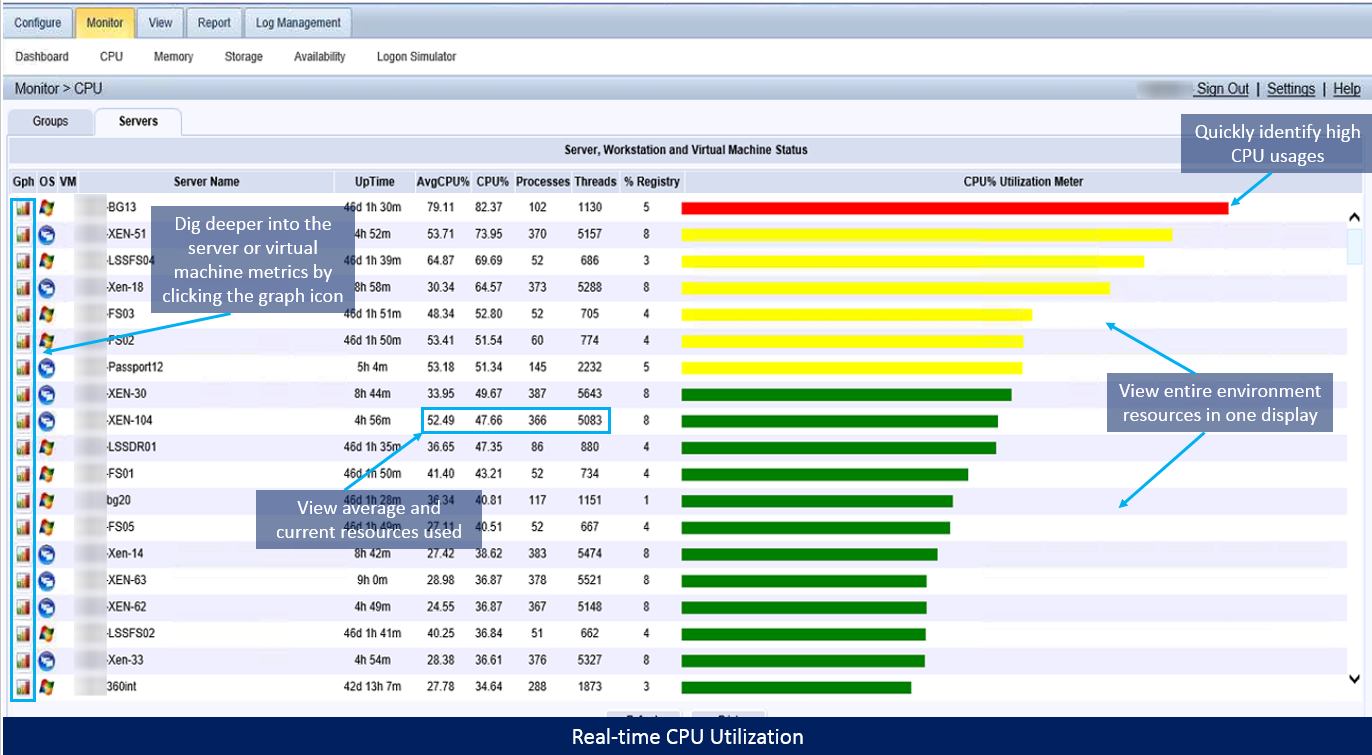
    In the screenshot below, you will see that they would first navigate to the CPU page to get a glance at all of the average and percent CPU for the entire Citrix and MEDITECH environment.

    Citrix Troubleshooting Out-of-the-Box CPU monitoring

    cpu-monitoring-goliath-technologies

    From this page, the customer was then able to compare the alerted machine CPU against others in the environment. They were also able to drill into the VMware virtual machine metrics by clicking the graph icon to view additional key CPU metrics via the hypervisor trending over time.

    In the screenshot below the customer was able to use this display to see that the %CPU had been steadily increasing over an hour time span before it maxed at 100% for one their XenApp servers which were hosting MEDITECH.

    vm-metrics-identify-usage-trends

    Identify Usage Trends

    Finally, the customer was able to note all of these key metrics before moving to the Citrix XenApp/XenDesktop Session Display to see how user activity could be affecting the XenApp server. Once on that display, they were able to search for all of the sessions on that particular machine for a given time frame to troubleshoot Citrix. Once spotting a couple users with high CPU they were able to drill into those sessions.

    To see what the user was doing, they opened the ‘Application Performance’ tab. The Health Care System was able to then determine from the display that the said user was running 6 instances of csmagic.exe that were collectively monopolizing the machine resources. Once the root cause was identified the help desk was able to kill those processes and in turn stabilize the machine.

    View Processes and Identify Users Burning Resources

    These are only a few key screens and metrics, but they were hugely impactful to this customer. Since implementing Goliath Performance Monitor for Citrix Monitoring and Troubleshooting few months ago they have been able to catch multiple CPU and memory leaks in their environment across multiple locations. They have also implemented additional alerting in regards to process utilization to get ahead of situations like this from happening again.

    If you have any questions or would like to speak to a technical specialist, feel free to reach out by Phone at (855)-465-4284 or Email at techinfo@goliathtechnologies.com.


    Want To Learn More?

    Browse our upcoming webinars to see our software in action!

    Browse EHR Monitoring & Troubleshooting Webinars
    How to Proactively Ensure End Users Always Have VDI Access

    How to Proactively Ensure End Users Always Have VDI Access

    It’s amazing to see just how far we’ve come in terms of connectivity and how we leverage digital resources. As standalone analog devices give way to connected digital devices, the latter will generate vast amounts of data that will, in turn, allow us the chance to refine and improve our systems and processes in previously unimagined ways. A recent IDC report pointed out that Big Data and metadata (data about data) will eventually touch nearly every aspect of our lives — with profound consequences. By 2025, an average connected person anywhere in the world will interact with connected devices nearly 4,800 times per day — basically one interaction every 18 seconds.

    In the business world – this couldn’t be truer. So many workers are no longer bound by a ‘desk’ and can be classified as mobile employees working well outside of the traditional ‘9-5’ parameters. This means that end users need to have Citrix or VMware Horizon VDI access no matter where they are working. I know I certainly fall into that category. I also know that I interact with digital devices every single day and I generate vast amounts of data around my interaction with those devices. Through it all, it’s the data that I create around my experience that’s truly most valuable.

    Real-World VDI Access Example

    Let’s drill down this experience into some real-world situations. Here’s a portal I use to access some key desktops and apps:

    I love launching my desktop (from pretty much any device) and having all of my resources readily available. However, in a world where ‘slow is the new down,’ it can get pretty frustrating when something isn’t working. Specifically, VDI connection issues and VDI problems can cause serious hang-ups and experience issues.

    So, what do you do if you have hundreds, or even thousands of users accessing VDI instances? How do you quickly capture VDI connection issues? Sure, Citrix XenDesktop and VMware Horizon have great tools built-in. but what if you need a tool that proactively confirms the availability of any application that is accessed using desktop virtualization, regardless of the location of the applications or users? Remember, you don’t just want to solve a problem quickly, you need to find the root cause to prevent this type of issue from recurring.

    How to Fix VDI Connection Issues

    If there is a VDI connection issue or a problem with a virtual application, it’s critical to have the ability to monitor, report, and alert in detail around the issue root cause areas. Further, IT professionals need an end-to-end look at the entire virtual infrastructure, not just part of it. The Goliath Application Availability Monitor (GAAM) is a great example of this as it acts as an early warning system for IT managers and administrators; the key word here being EARLY warning. GAAM will tell you if there is a logon failure, network problems, or application enumeration issues. Again, the really cool part here is the proactive nature of this alert and monitoring system. For example, it can let you know that your Citrix or VMware Horizon could experience a serious bottleneck before a group of users log on by showing exact screenshots of the environment and the issue.

    This tool accurately confirms the availability of any application that is accessed using desktop virtualization, regardless of the location of the applications themselves or the users. The other important point is that virtualization environments can be very different which is why GAAM doesn’t only focus on one architecture. It integrates to proactively monitor the availability of ANY application or desktop delivered over Citrix XenApp, Citrix XenDesktop, VMware Horizon, or Microsoft RDS.

    With all of this in mind, we need to actually understand what it looks at. Specifically:

    • Connectivity (i.e. network speeds, latency)
    • Application/desktop availability
    • Configuration or availability problems with the delivery infrastructure, including Citrix NetScaler, web interface/storefront, delivery controllers, active directory, licensing servers, SQL databases, and much more
    • Licensing issues
    • Client-side errors (i.e. a message box error presented at the endpoint level, captured by Goliath’s screenshotting technology)

    One of my biggest pet peeves really does revolve around VDI connection issues and slowness. This is why working with connectivity is one of the most important elements to test and validate. Let me point you to the ‘value of the millisecond.’ Research from TABB Group estimates that if a broker’s electronic trading platform is 5 milliseconds behind the competition, it could lose at least 1% of its flow; that’s $4 million in revenues per millisecond. Up to 10 milliseconds of latency could result in a 10% drop in revenues. From there it gets worse. If a broker is 100 milliseconds slower than the fastest broker, it may as well shut down its FIX engine and become a floor broker. In this case, latency is literally worth $4 million per millisecond. But what if you’re working with healthcare VDI? The value of a millisecond could now revolve around someone’s life.

    In our persistently connected society, making sure that we have the best experience possible doesn’t just mean being able to access a simple resource. User experience and performance translates to productivity, happier employees, and IT staff providing value back to the business. Tools like Goliath Application Availability Monitor help diagnose root cause issues and quickly resolve VDI connection issues before they become major problems. The final key point is ease-of-use. You don’t have to be a script expert to deploy this type of tool. GAAM gives you the ability to leverage an easy-to-use, centrally managed tool when configuring synthetic launch sequences regardless of endpoint.

    Your users are constantly on the move. This is why it’s so important to leverage good monitoring and performance tools within your virtualization infrastructure. Remember, these are the types of products that help you proactively troubleshoot an issue and even prevent it in the future. This keeps your end users online and able to access mission-critical applications, no matter where they are working from that day.

    MTM Meets Customer SLAs with Goliath Technologies

    MTM Meets Customer SLAs with Goliath Technologies

    [fusion_builder_container hundred_percent=”no” hundred_percent_height=”no” hundred_percent_height_scroll=”no” hundred_percent_height_center_content=”yes” equal_height_columns=”no” menu_anchor=”” hide_on_mobile=”small-visibility,medium-visibility,large-visibility” class=”” id=”” background_color=”” background_image=”” background_position=”center center” background_repeat=”no-repeat” fade=”no” background_parallax=”none” enable_mobile=”no” parallax_speed=”0.3″ video_mp4=”” video_webm=”” video_ogv=”” video_url=”” video_aspect_ratio=”16:9″ video_loop=”yes” video_mute=”yes” video_preview_image=”” border_size=”” border_color=”” border_style=”solid” margin_top=”” margin_bottom=”” padding_top=”” padding_right=”” padding_bottom=”” padding_left=””][fusion_builder_row][fusion_builder_column type=”1_1″ layout=”1_1″ spacing=”” center_content=”no” link=”” target=”_self” min_height=”” hide_on_mobile=”small-visibility,medium-visibility,large-visibility” class=”” id=”” background_color=”” background_image=”” background_position=”left top” background_repeat=”no-repeat” hover_type=”none” border_size=”0″ border_color=”” border_style=”solid” border_position=”all” padding_top=”” padding_right=”” padding_bottom=”” padding_left=”” dimension_margin=”” animation_type=”” animation_direction=”left” animation_speed=”0.3″ animation_offset=”” last=”no”][fusion_text columns=”” column_min_width=”” column_spacing=”” rule_style=”default” rule_size=”” rule_color=”” class=”” id=””]

    “At MTM, we deploy the Goliath Application Availability Monitor as an advanced troubleshooting tool. GAAM’s automatic screenshots allow us to see a picture of the exact point at which the application launch failed, then ID and resolve the underlying problem that caused the application or infrastructure to be unavailable quickly, and we can share the images directly with customers, so they can see exactly what issue occurred and where.”
    -Joe Byrne, Director of NOC Technologies, MTM Technologies

    MTM Technologies, Inc., is a Citrix Service Provider and leading national provider of next-generation IT solutions and services to Global 2000, enterprise organizations, and mid-size companies. MTM is a National Platinum Citrix Partner and VMware Premier Partner. MTM, who maintains all four Citrix specializations, works with Citrix to assist companies with the demands of today’s mobile workforce. Whether on premise or in the cloud, by combining Citrix’s product suite with MTM’s branded professional and managed services enterprise, commercial and government organizations are provided a robust solution to serve their mobile workers their applications and data in a highly secure manner.

    Click Here to see if Goliath can Power your Recurring revenue services business

    The Customer’s Infrastructure: Citrix XenServer 6.5, Citrix XenApp, XenDesktop & Citrix NetScaler


    The Business Challenge: Current Monitoring Vendor has Performance Visibility Gaps with Citrix XenServer, XenApp, XenDesktop, NetScaler, & End User Experience

    As a Managed Service Provider (MSP), MTM Technologies designs SLAs that are unique to each customer but essentially focus on delivering a positive end user experience. MTM’s monitoring backbone to deliver these services had been Nimsoft for infrastructure and SolarWinds for the Network.

    These are good tools but neither product offers purpose-built functionality for Citrix Monitoring and specifically the ability to proactively determine if there is a problem with Citrix Logon Initiation, Logon Duration or Session Performance.

    Goal of Being Proactive

    There are products that can tell MTM if something failed after the fact, but they needed something to give them advance warning before Citrix end users were impacted. MTM deemed it critical to use proactive Citrix Monitoring technology to ensure that performance-based SLAs were met when offering Remote Infrastructure Monitoring (RIM), Monitoring as a Service (MAAS)  and Desktop as a Service (DaaS).

    Unsure of Root Cause of End User Experience Issues

    MTM wanted absolute visibility and predictability in their Citrix Performance Monitoring for XenApp and especially around the Citrix End User Experience in situations where they were providing RIM, MaaS or delivering DaaS. Essentially, MTM needed advance notice and alerts when logon initiation failures or slowness occurred.

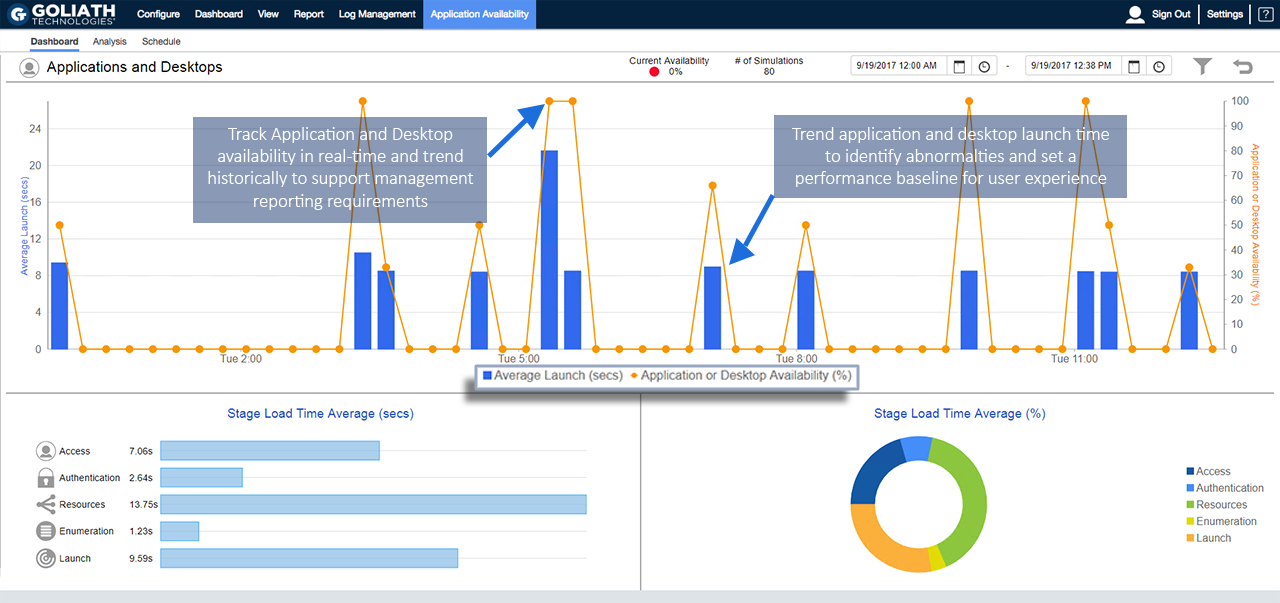
    Then, if there was a failure or degradation of service, MTM needed the correlated data from the end point through the NetScalers and the backend Citrix delivery architecture to determine the root cause so they could deploy remediation actions. This required logon simulation alerting and logon duration analysis as depicted in the below real-time screen shot of the Goliath Application Availability Monitor.

    Real-time Application Availability Dashboard

    GAAM Application and Desktop Dashboard

    Many times the logon initiation process was successful but the logon process was sluggish. In this case, MTM used the logon duration drill down which dissects 33 different, though interrelated, steps in the logon process as depicted below. Armed with this logon duration detail MTM was able to pinpoint the true root cause of logon duration slowness and resolve the issue permanently—before end user performance is impacted.

    Real-time Citrix Logon Duration Drill Down

    GPM Citrix Logon Duration Drill down

    “Citrix is Slow!” Alerts

    With MTM supporting many customers and SLAs, some running over 2500 VDI sessions, they needed alerts for the ambiguous “Citrix is slow” complaint.

    Citrix CSPs, and especially Citrix Administrators, know that Citrix gets the blame when performance issues arise, which is why comprehensive Citrix monitoring is critical. Often, the true culprit of session performance issues are some element in the supporting infrastructure. MTM’s other base requirement was to have the visibility into the entire Citrix delivery infrastructure by having two unique capabilities; one, a drill down into a specific Citrix user’s session and two, a break down of the HDX latency and session performance in real-time.

    Real-time Citrix ICA/HDX Channel Drill Down

    Citrix ICA/HDX Channel Drill Down

    Real-time Citrix Session Performance Drill Down

    Citrix Session Performance Drill Down

    Finally, MTM needed to run historical reports and analysis to determine long-term performance trends because if they couldn’t see what happened, it would be impossible to be proactive. The requirement was to have the necessary reports available out-of-the-box. Armed with this data, MTM can customize Goliath’s Citrix Monitoring software to send threshold-based alerts and simultaneous remediation actions before end users are affected.

    Citrix XenApp & XenDesktop End User Experience Report

    XAXD End User Experience Report

    Citrix XenApp & XenDesktop Logon Duration Report

    XAXD Logon Duration Report

    Citrix XenApp & XenDesktop ICA Latency Report

    XAXD ICA Latency Report

    Goliath has 66 of these types of performance and end user experience reports for Citrix and VMware, all of which come out-of-the-box with Goliath Performance Monitor.

    The Solution: Choose a Proactive End-to-End Solution

    Based on MTM’s criteria to proactively manage end user experience and satisfy their SLAs—ICA Latency, Logon Simulation, Logon Duration, and Session Performance—Goliath was the clear solution.

    MTM chose Goliath Technologies Citrix Monitoring to solve visibility gaps, end user experience issues and meet SLAs, but there was more than just deep metrics that factored into their decision, which include:

    • Service Level Agreements: Goliath’s suite of proactive IT performance monitoring and management technology allows MTM to meet their SLAs.
    • Multi-tenancy: MSPs like MTM can use Goliath to proactively manage environments by criteria such as customer, location, application, infrastructure, etc.
    • Master “Intelligent” Agent: This is an ultra-low resource utilization (0.1% CPU) agent to monitor remote locations without maintaining an external connection. The “Intelligent” Agent gathers numerous metrics like the ICA/HDX Channel and the Hypervisor, and it can execute remediation actions on XenApp Servers, XenDesktop VDI, Citrix Role Servers, & End Points.
    • MSP Management: Centralized management of the end user experience for MSPs.
    • Share Data with other Tools: Can send data to Nimsoft, SolarWinds, etc.
    • Custom Reporting: Real-time dashboards and historical reports that are branded with MTM’s logo.

    As you can see from the above screenshots, MTM is able to use Goliath Performance Monitor and the Goliath Application Availability Monitor for Citrix to gain complete visibility into the end users’ sessions, XenServer and XenDesktop performance data, and end user experience metrics in a single view.

    With Goliath, MTM can trend utilization over time and see exactly what is happening with remote users to troubleshoot the root cause of performance issues and proactively deploy remediation actions to ensure a positive end user experience.

    Further Reading

    Goliath Performance Monitor for Citrix XenServer

    Goliath Performance Monitor for Citrix XenApp & XenDesktop

    Goliath Application Availability Monitor for Citrix

    Independent Reviews of all Goliath Technologies’ Proactive IT Operations Software

    [/fusion_text][/fusion_builder_column][/fusion_builder_row][/fusion_builder_container]