How to Accurately Troubleshoot Citrix ICA Network and Connectivity Related Issues

How to Accurately Troubleshoot Citrix ICA Network and Connectivity Related Issues

How to Accurately Troubleshoot Citrix ICA Network and Connectivity Related Issues

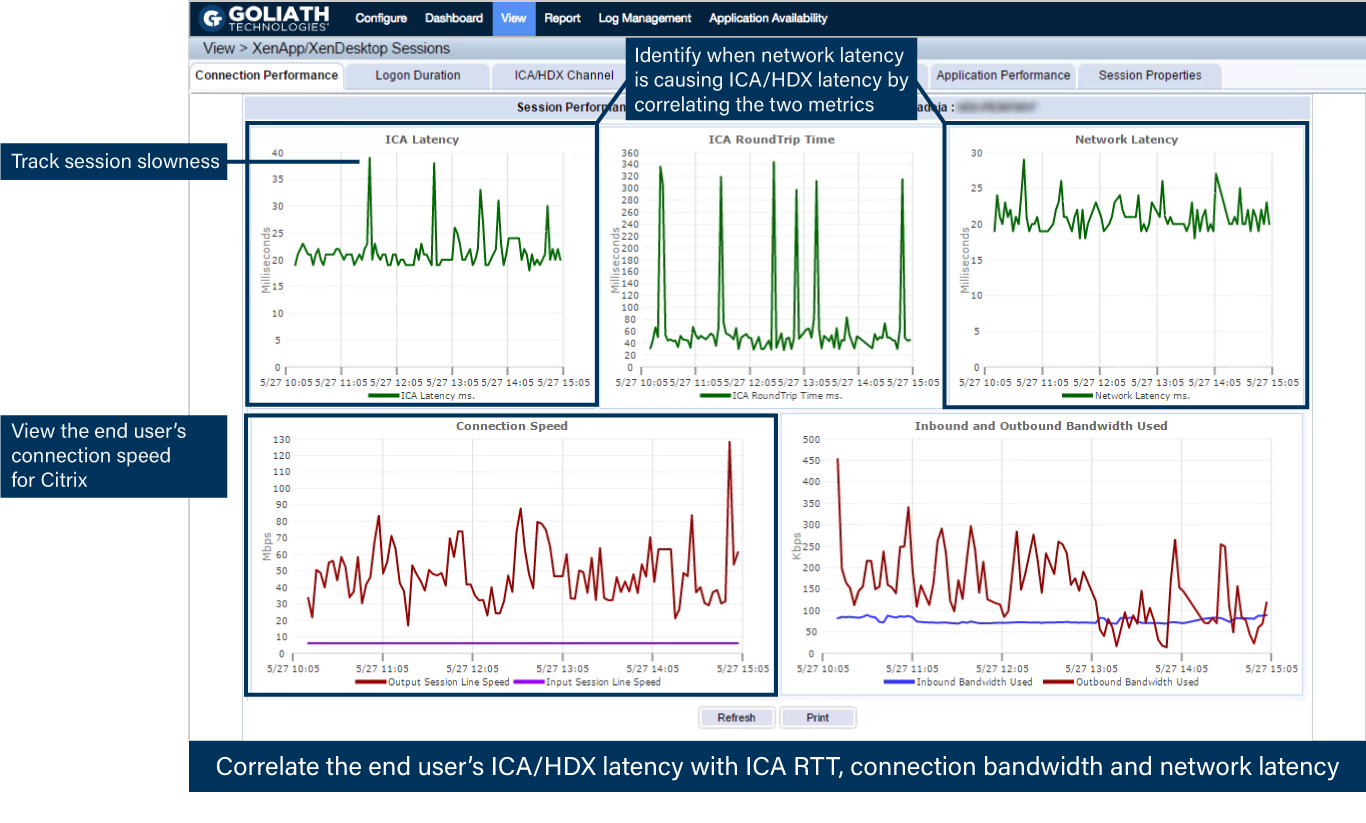
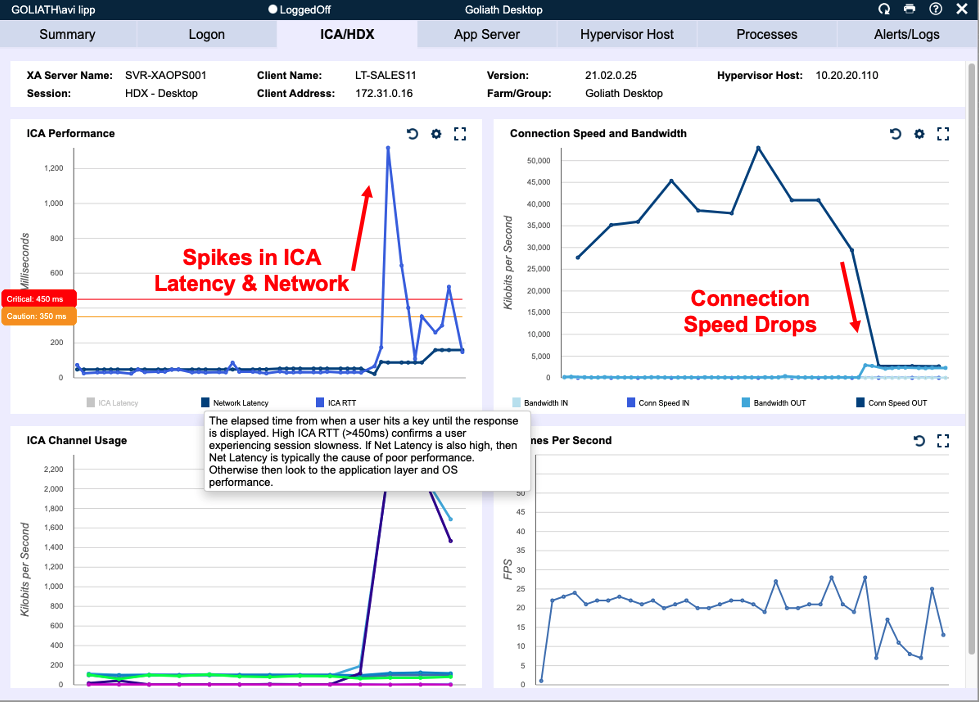
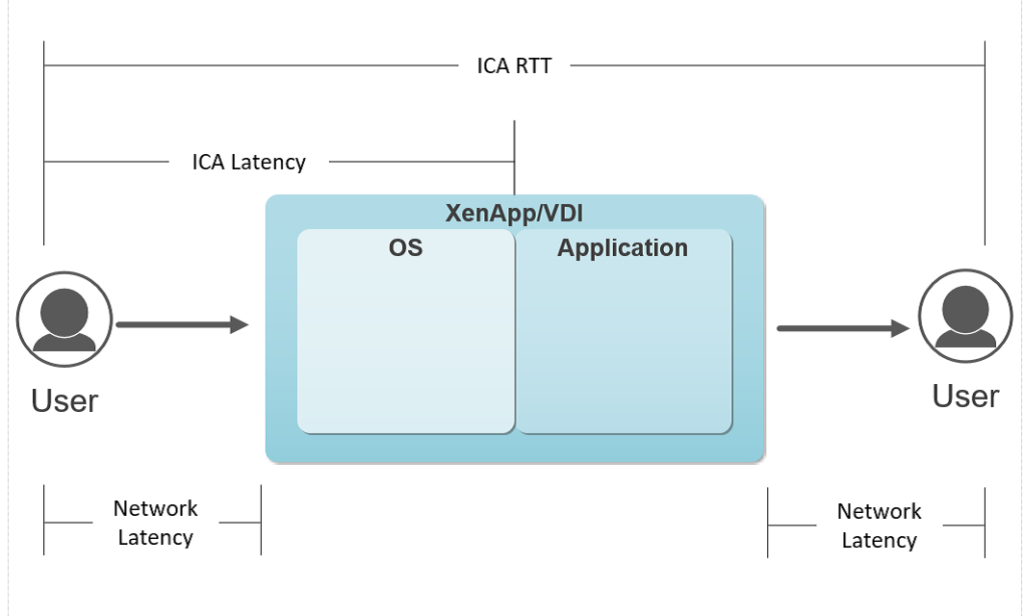
When troubleshooting Citrix end user experience issues, problems are often rooted in the bandwidth users have available for Citrix connectivity or Citrix connection latency. However, these conditions are not visible from a pure network monitoring perspective, as network monitoring tools can only leverage Netflow, AppFlow Analysis, SNMP, SYSLOG or ICMP monitoring. The key data necessary to gain visibility to a user’s session is found in the Citrix ICA Protocol and requires protocol integration from the VDA to access the necessary metrics on a user basis – not a network device, route, or trunk. This user-based approach to tracing their network performance enables Goliath to isolate the conditions affecting one or many users with sessions traversing the same network where some are experiencing a problem and others are not. These issues can be accurately identified, and connectivity constraints more accurately determined, by looking at the following metrics: User Connection Speed, Network Latency (from the Citrix ICA Channel), ICA RTT, and ICA Latency.

Xenapp / VDI Graphic

Figure 1: ICA Latency, ICA RTT and ICA Network Latency

 These metrics are valuable because they take the entire stack – user connectivity, network performance, VDA performance, hosting environment and user behavior into consideration for more accurate troubleshooting.

When you use the product for troubleshooting consider the following:

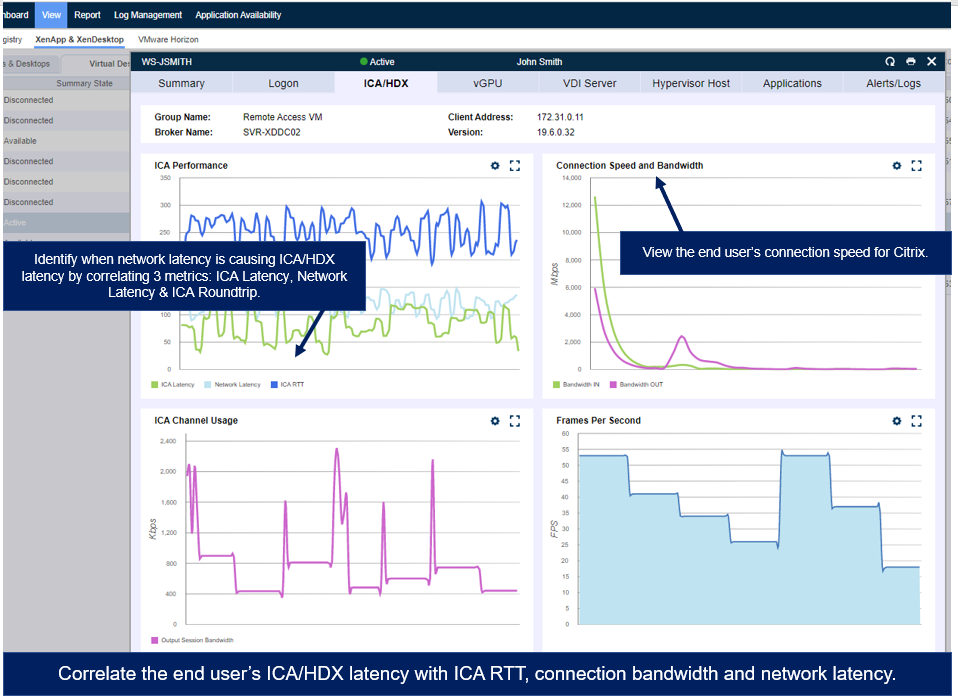
  • When troubleshooting slowness, the primary question you need to answer is whether the slowness is due to a network/connectivity issue or a resource issue. The quickest way to make that determination is by reviewing the user’s Network Latency, Citrix ICA RTT, and Connection Speed.
  • The network latency we show here is not your common ICMP/Ping based network latency, but rather a measurement through a unique integration into Citrix ICA protocol that no one else can show you. Because of that we can measure the true network latency in real-time, which is the foundation for ICA performance. If network latency is persistently high, your users are not going to have a better Citrix ICA RTT or ICA Latency than network latency allows, resulting in poor end-user experience.
  • Additionally, the connection speed is a measurement of how much bandwidth your end user has on their endpoint for Citrix. Here’s why that’s important: If your user is on a laptop, Citrix must share bandwidth with Windows, other applications, windows updates, etc. and does not get a complete share to the full bandwidth available to the endpoint. If your users are on a thin client or mobile device, this can be even more problematic, and we have even seen where some thin clients end up on WiFi during upgrades and rollouts instead of the wired connection as expected.
  • So, by looking at the Network Latency and Connection speed we can determine if the user’s connectivity is the source of problems. High Network Latency points to route and connection performance issues, and low connection speed indicates network connectivity/wan issues which are going to impact the user’s experience.
  • If Network Latency and Connection Speed are fine then the Network can be eliminated from the equation, and we can focus on resource availability

If a user’s Citrix ICA RTT is high that allows us to quickly identify if there are enough resources for the application and user activity, or the session host is able to deliver the responsiveness for the user to have a good experience. If the user is experiencing slowness and it does not manifest in Citrix ICA RTT, the problem is most likely lower in the stack in the host or storage architecture.
Goliath ICA Latency Monitoring

When troubleshooting network and connectivity related issues the information necessary is all contained under the View > XenApp & XenDesktop Session Display.

Goliath Performance Monitor is the only product that can open up the ICA protocol in this way to give you the visibility and the accurate metrics to determine slowness, and the combination of all of the above metrics are required to achieve that determination.


Click here to learn more about our Citrix ICA capabilities or download the guide below.
a technical guide for understanding and troubleshooting citrix ICA HDX
MTM Hits End User Uptime SLAs with Goliath Technologies

MTM Hits End User Uptime SLAs with Goliath Technologies

MTM Meets Customer SLAs with Goliath

 
MTM Technologies Logo

“Goliath Technologies is the only truly proactive end-to-end monitoring and management solution for Citrix. Goliath provides deep metrics and analysis necessary for organizations to get ahead of issues in the three key areas that often cause pain for end users: logon initiation, logon duration and session performance.” 
– John Byrne, MTM Technologies Director of NOC Technologies

MTM Technologies, Inc., is a Citrix Service Provider and leading national provider of next-generation IT solutions and services to Global 2000, enterprise organizations, and mid-size companies. MTM is a National Platinum Citrix Partner and VMware Premier Partner. MTM, who maintains all four Citrix specializations, works with Citrix to assist companies with the demands of today’s mobile workforce. Whether on-premises or in the cloud, by combining Citrix’s product suite with MTM’s branded professional and managed services enterprise, commercial and government organizations are provided a robust solution to serve their mobile workers their applications and data in a highly secure manner.

The Customer’s Infrastructure: Citrix XenServer 6.5, Citrix XenApp, XenDesktop & Citrix NetScaler

The Business Challenge: Current Monitoring Vendor has Performance Visibility Gaps with Citrix XenServer, XenApp, XenDesktop, NetScaler, & End User Experience

As a Managed Service Provider (MSP), MTM Technologies designs SLAs that are unique to each customer but essentially focus on delivering a positive end user experience. MTM’s monitoring backbone to deliver these services had been Nimsoft for infrastructure and SolarWinds for the Network.

These are good tools but neither product offers purpose-built functionality for Citrix Monitoring and specifically the ability to proactively determine if there is a problem with Citrix Logon Initiation, Logon Duration or Session Performance.

Goal of Being Proactive

There are products that can tell MTM if something failed after the fact, but they needed something to give them advance warning before Citrix end users were impacted. MTM deemed it critical to use proactive Citrix Monitoring technology to ensure that performance based SLAs were met when offering Remote Infrastructure Monitoring (RIM), Monitoring as a Service (MAAS)  and Desktop as a Service (DaaS).  

Unsure of Root Cause of End User Experience Issues

MTM wanted absolute visibility and predictability in their Citrix Performance Monitoring for XenApp and especially around the Citrix End User Experience in situations where they were providing RIM, MaaS or delivering DaaS. Essentially, MTM needed advance notice and alerts when logon initiation failures or slowness occurred.

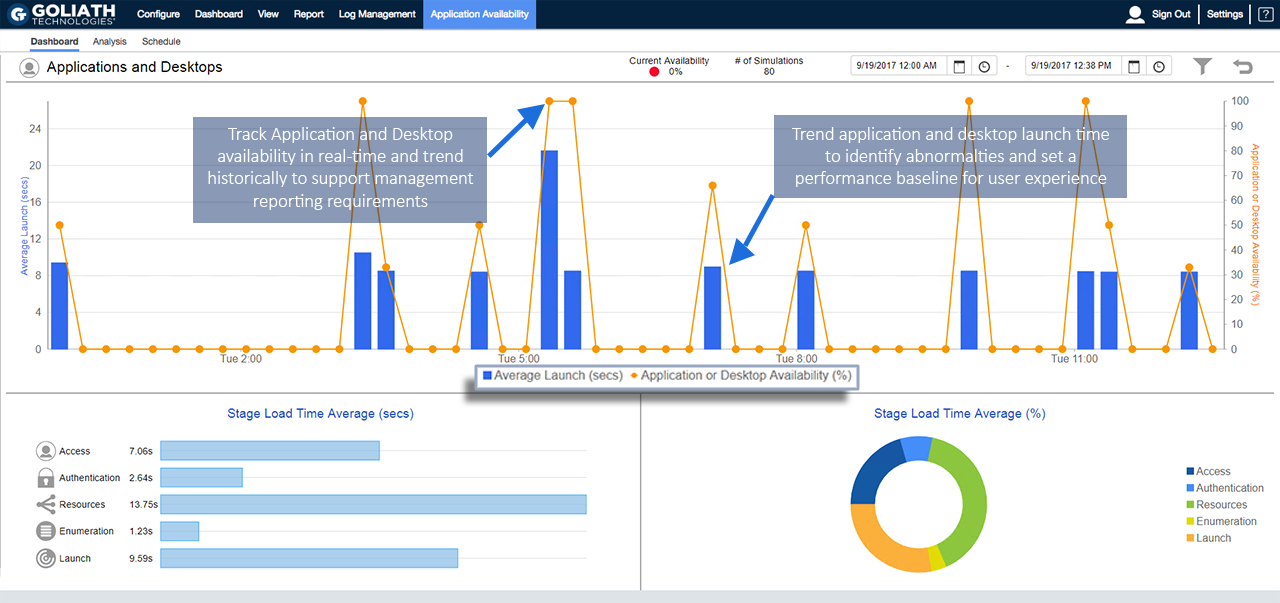
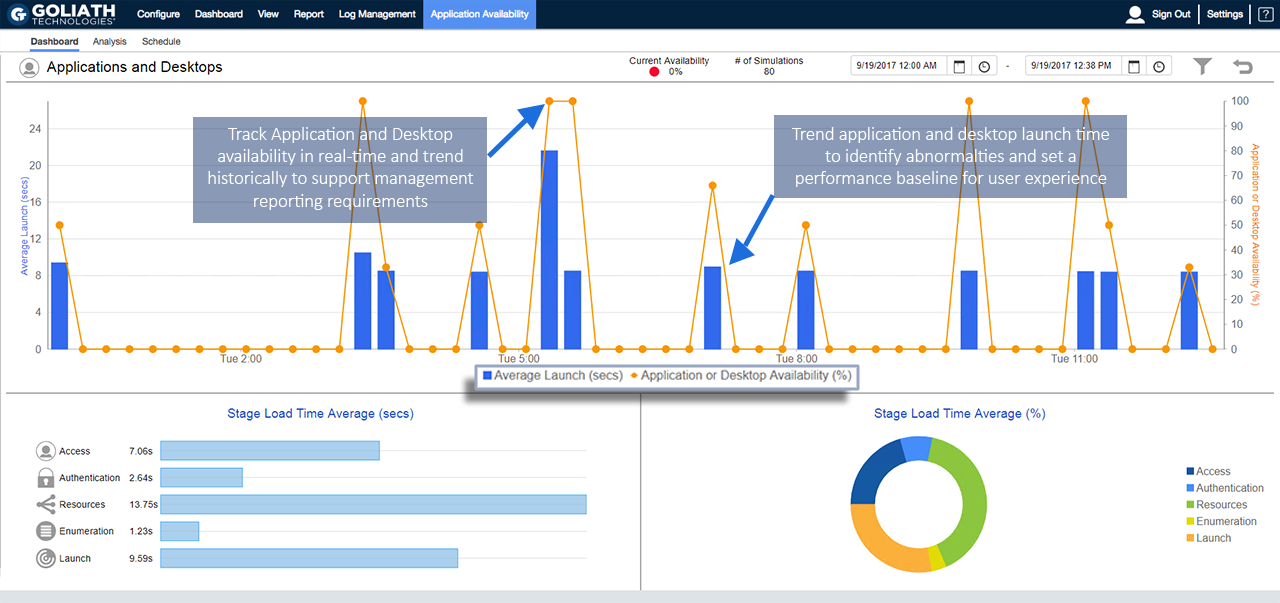
Then, if there was a failure or degradation of service, MTM needed the correlated data from the end point through the NetScalers and the backend Citrix delivery architecture to determine the root cause so they could deploy remediation actions. This required logon simulation alerting and logon duration analysis as depicted in the below real-time screen shot of the Goliath Application Availability Monitor. 

Real-time Application Availability Dashboard

GAAM Dashboard

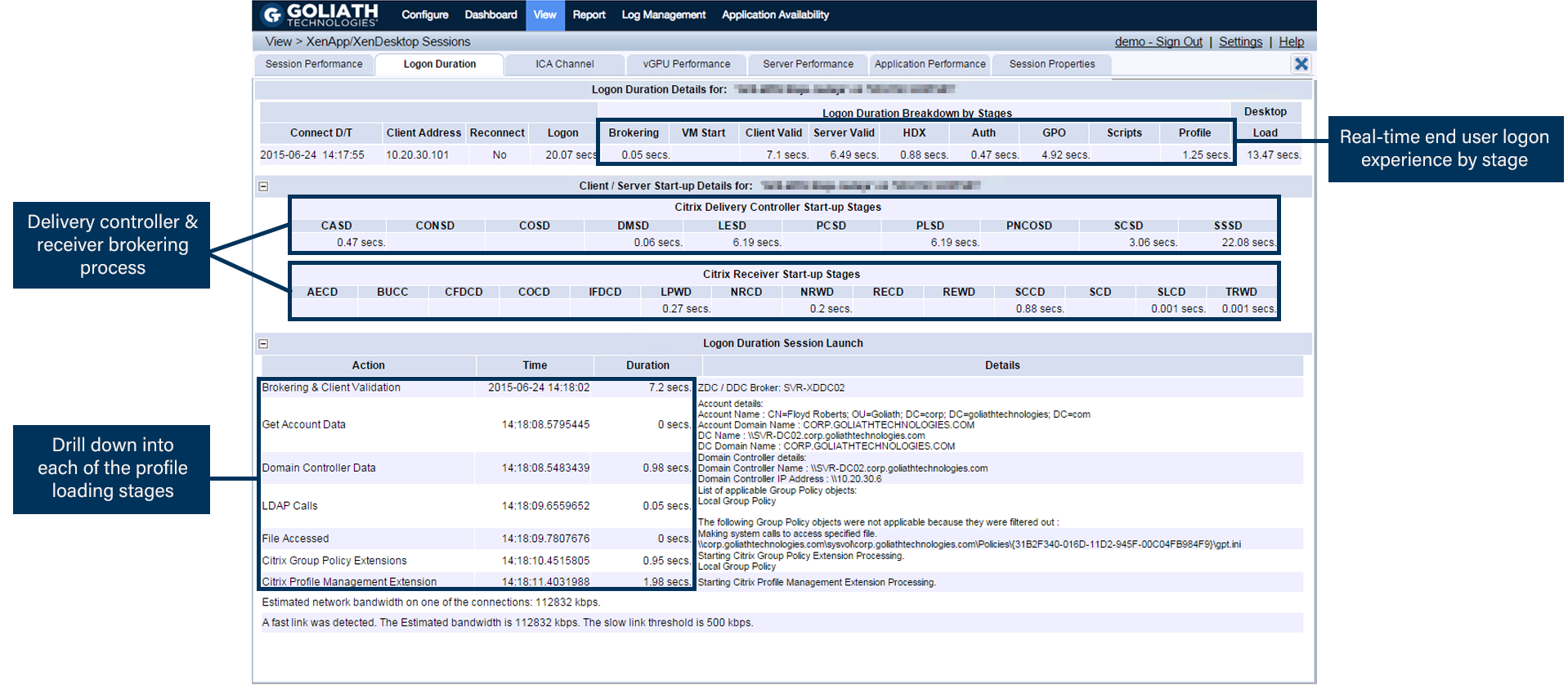
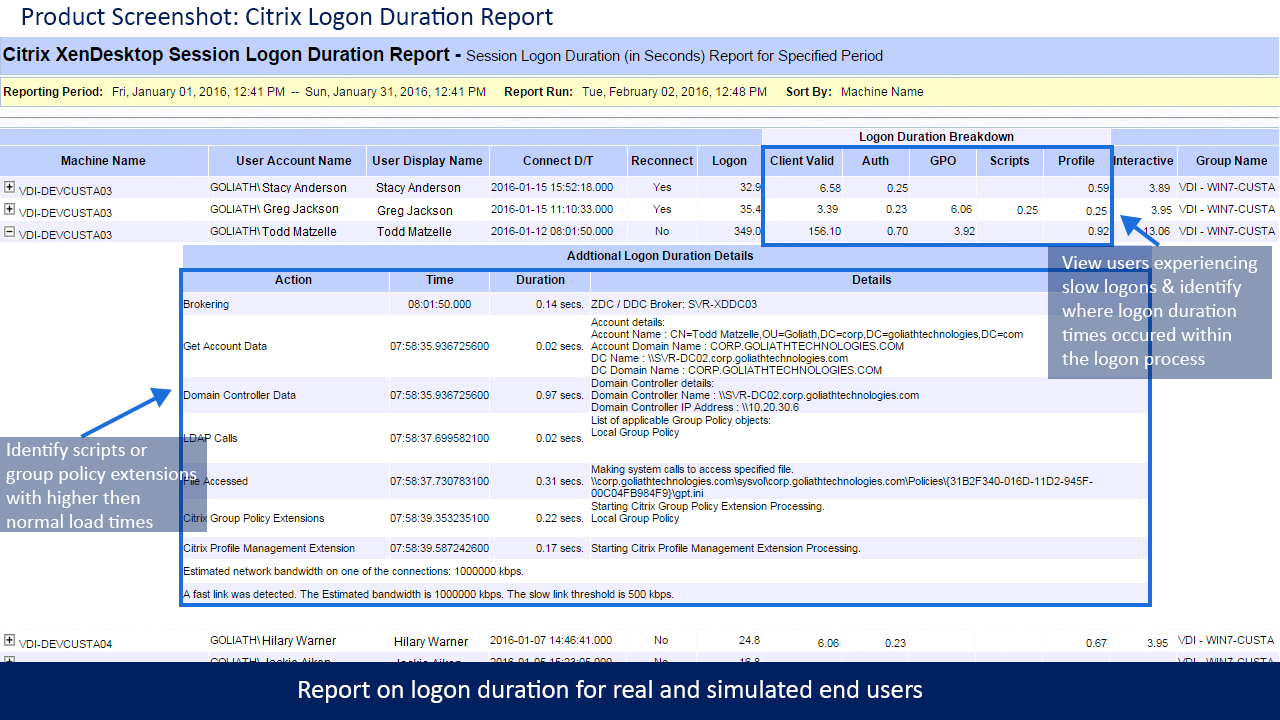
Many times the logon initiation process was successful but the logon process was sluggish. In this case, MTM used the logon duration drill down which dissects 33 different, though interrelated, steps in the logon process as depicted below. Armed with this logon duration detail MTM was able to pinpoint the true root cause of logon duration slowness and resolve the issue permanently—before end user performance is impacted. 

Real-time Citrix Logon Duration Drill Down

GPM Citrix Logon Duration Drill Down

“Citrix is Slow!” Alerts

With MTM supporting many customers and SLAs, some running over 2500 VDI sessions, they needed alerts for the ambiguous “Citrix is slow” complaint.

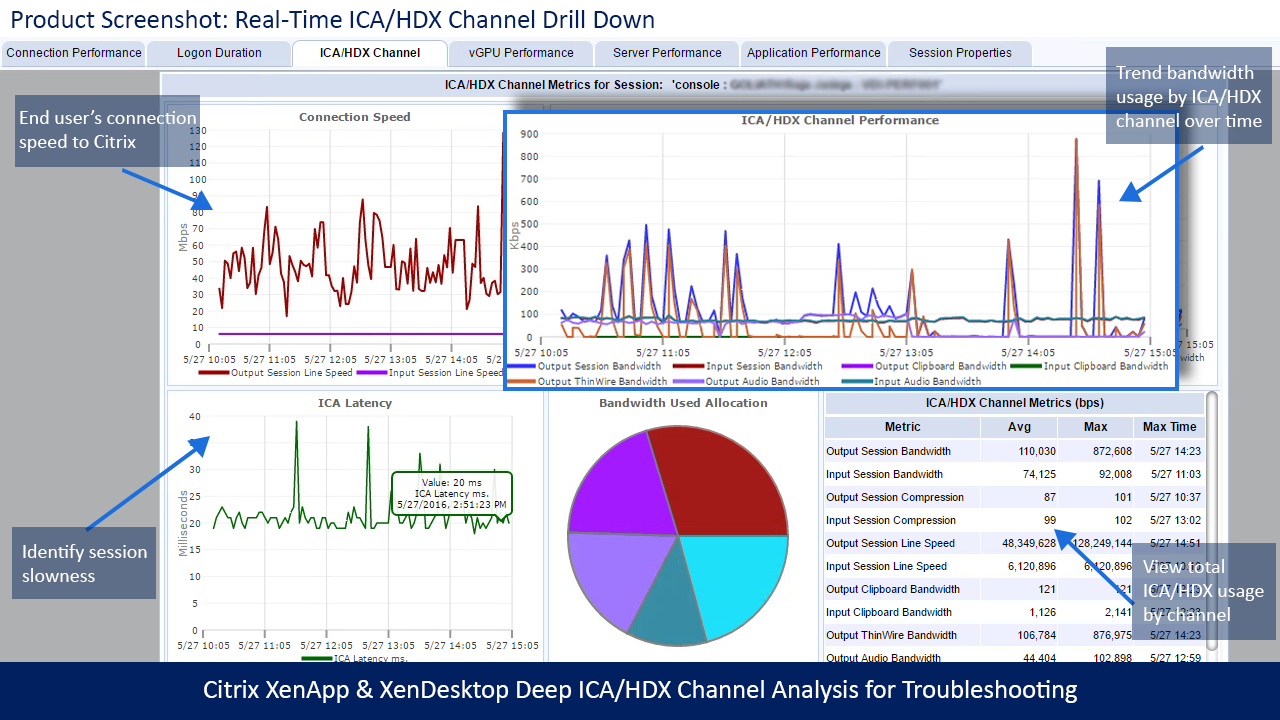
Citrix CSPs, and especially Citrix Administrators, know that Citrix gets the blame when performance issues arise, which is why comprehensive Citrix monitoring is critical. Often, the true culprit of session performance issues are some element in the supporting infrastructure. MTM’s other base requirement was to have the visibility into the entire Citrix delivery infrastructure by having two unique capabilities; one, a drill down into a specific Citrix user’s session and two, a break down of the HDX latency and session performance in real-time.

Real-time Citrix ICA/HDX Channel Drill Down

Citrix ICA/HDX Channel Drill Down

Real-time Citrix Session Performance Drill Down

Citrix Session Performance Drill Down

Finally, MTM needed to run historical reports and analysis to determine long-term performance trends because if they couldn’t see what happened, it would be impossible to be proactive. The requirement was to have the necessary reports available out-of-the-box. Armed with this data, MTM can customize Goliath’s Citrix Monitoring software to send threshold-based alerts and simultaneous remediation actions before end users are affected. 

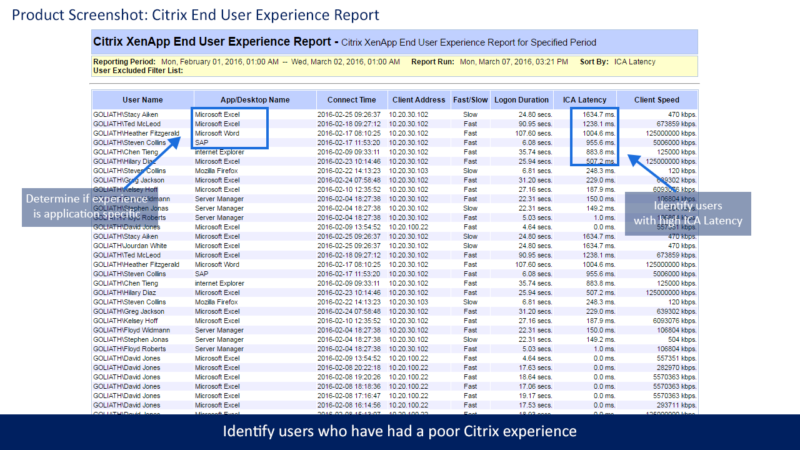
Citrix XenApp & XenDesktop End User Experience Report

XAXD End User Experience Report

Citrix XenApp & XenDesktop Logon Duration Report

XAXD Logon Duration Report

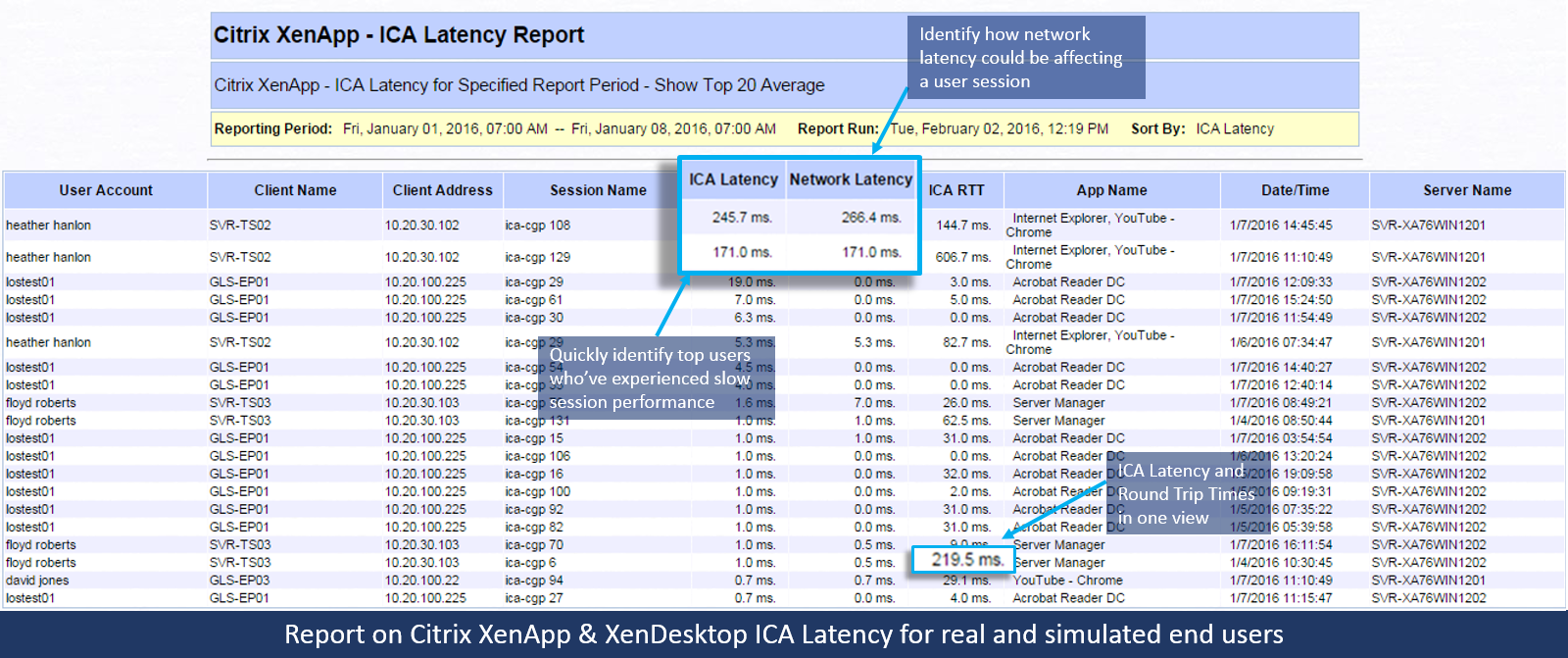
Citrix XenApp & XenDesktop ICA Latency Report

Goliath has 66 of these types of performance and end user experience reports for Citrix and VMware, all of which come out-of-the-box with Goliath Performance Monitor.

The Solution: Choose a Proactive End-to-End Solution  

Based on MTM’s criteria to proactively manage end user experience and satisfy their SLAs—ICA Latency, Logon Simulation, Logon Duration, and Session Performance—Goliath was the clear solution.  

MTM chose Goliath Technologies Citrix Monitoring to solve visibility gaps, end user experience issues and meet SLAs, but there was more than just deep metrics that factored into their decision, which include:

  • Service Level Agreements: Goliath’s suite of proactive IT performance monitoring and management technology allows MTM to meet their SLAs.
  • Multi-tenancy: MSPs like MTM can use Goliath to proactively manage environments by criteria such as customer, location, application, infrastructure, etc.
  • Master “Intelligent” Agent: This is an ultra-low resource utilization (0.1% CPU) agent to monitor remote locations without maintaining an external connection. The “Intelligent” Agent gathers numerous metrics like the ICA/HDX Channel and the Hypervisor, and it can execute remediation actions on XenApp Servers, XenDesktop VDI, Citrix Role Servers, & End Points.
  • MSP Management: Centralized management of the end user experience for MSPs.
  • Share Data with other Tools: Can send data to Nimsoft, SolarWinds, etc.
  • Custom Reporting: Real-time dashboards and historical reports that are branded with MTM’s logo.

As you can see from the above screenshots, MTM is able to use Goliath Performance Monitor and the Goliath Application Availability Monitor for Citrix to gain complete visibility into the end users’ sessions, XenServer and XenDesktop performance data, and end user experience metrics in a single view.

With Goliath, MTM can trend utilization over time and see exactly what is happening with remote users to troubleshoot the root cause of performance issues and proactively deploy remediation actions to ensure a positive end user experience.

product discussions for MSPs promotion

Drake University Troubleshoots Citrix, Windows, & Mac OS Experience Issues

Drake University Troubleshoots Citrix, Windows, & Mac OS Experience Issues

How We Did IT

Drake University Troubleshoots Citrix, Windows, & Mac OS Experience Issues


mac os virtual machine windows

“The initial reasons for selecting Goliath Performance Monitor were the rare combination of purpose-built functionality for monitoring Citrix XenApp and the supporting VMware vSphere virtual infrastructure. We have extended the utilization of Goliath to monitor XenDesktop 7.6 farm and added functionality like Goliath Application Availability Monitor for Citrix daily health check reports to proactively ensure end-to-end connectivity so users have seamless access to Citrix delivered applications.”

– Chris Mielke, Infrastructure & Security Services Lead at Drake University

Infrastructure

Citrix XenApp 7.6, Citrix XenDesktop 7.6, & Citrix XenServer 6.5

Challenge

End Users Experience Issues with Virtualized Windows on Mac OS

The Drake Infrastructure Team was having an issue with the performance of virtualized Microsoft Windows instances on Mac OS. More specifically, the College of Business users or students were having performance issues when attempting to use Excel.

Solution

The Drake Team worked with their integrator, Choice Solutions, to leverage Goliath for Monitoring Citrix XenApp and monitoring vSphere virtual infrastructure to troubleshoot and isolate server resources as the root cause of the performance issues. Once the failure point was identified, they were able to resolve the issue quickly by adding server capacity.

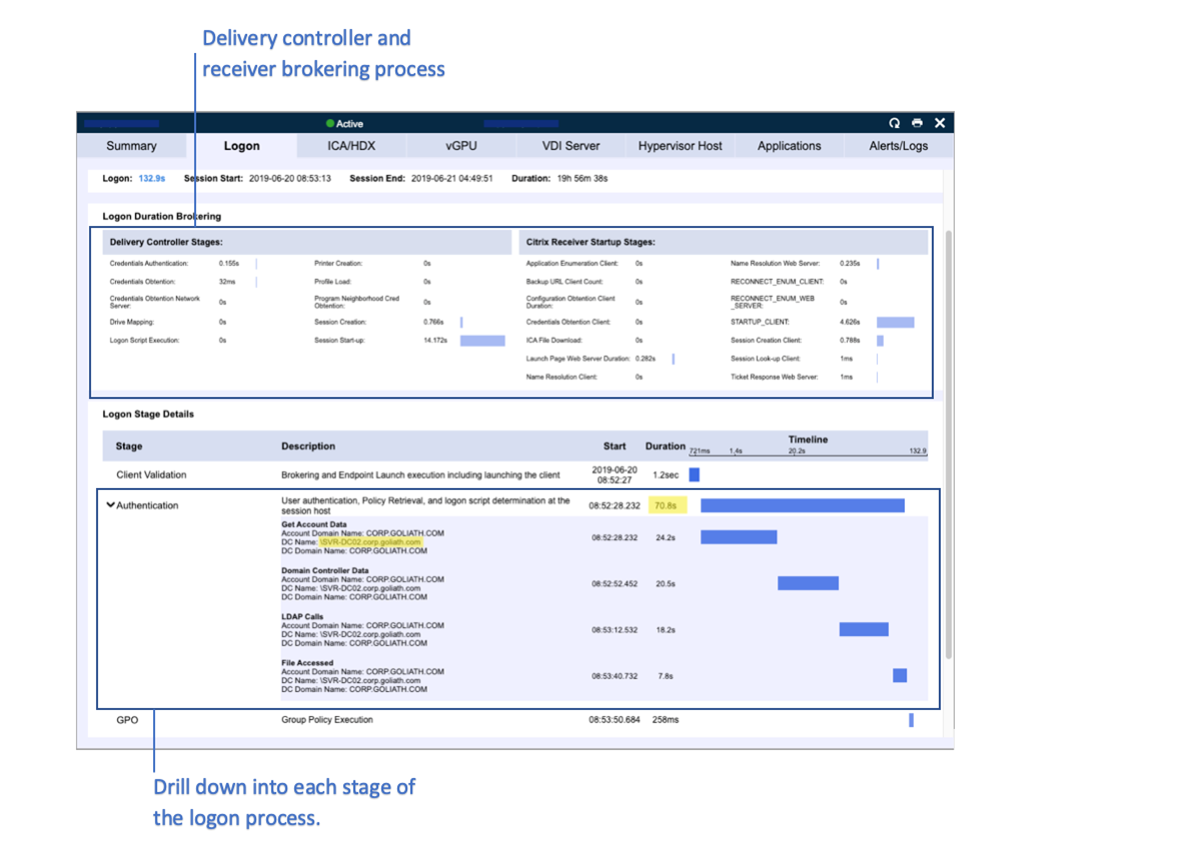
The figure below shows how the logon stages are broken down within a single user session and the screen an administrator sees to diagnosis root cause.

Logon stages


Beyond the performance issue related to Windows, the team has also been able to resolve storage latency issues and in general maintain a proactive IT posture by monitoring Citrix, Monitoring vSphere, and Citrix end user experience.


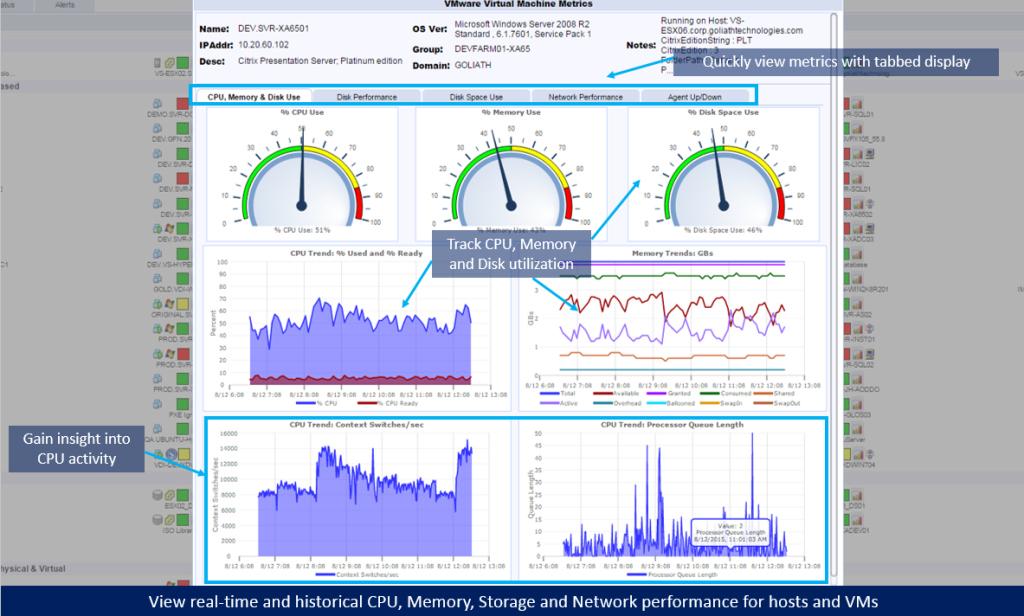
Real Time CPU Memory Utilization Report


In addition to Goliath Performance Monitor’s Citrix reporting functionality, Chris now also uses the Goliath Application Availability Monitor to proactively get ahead of any potential logon issues in Drake’s Citrix XenApp/XenDesktop 7.6 environment.

This ensures a positive end user experience from session logon and duration to session performance. Chris stated that, “the logon data captured is very good, because of the deep visibility gained as a result of testing the entire Citrix delivery infrastructure, including the NetScaler.”


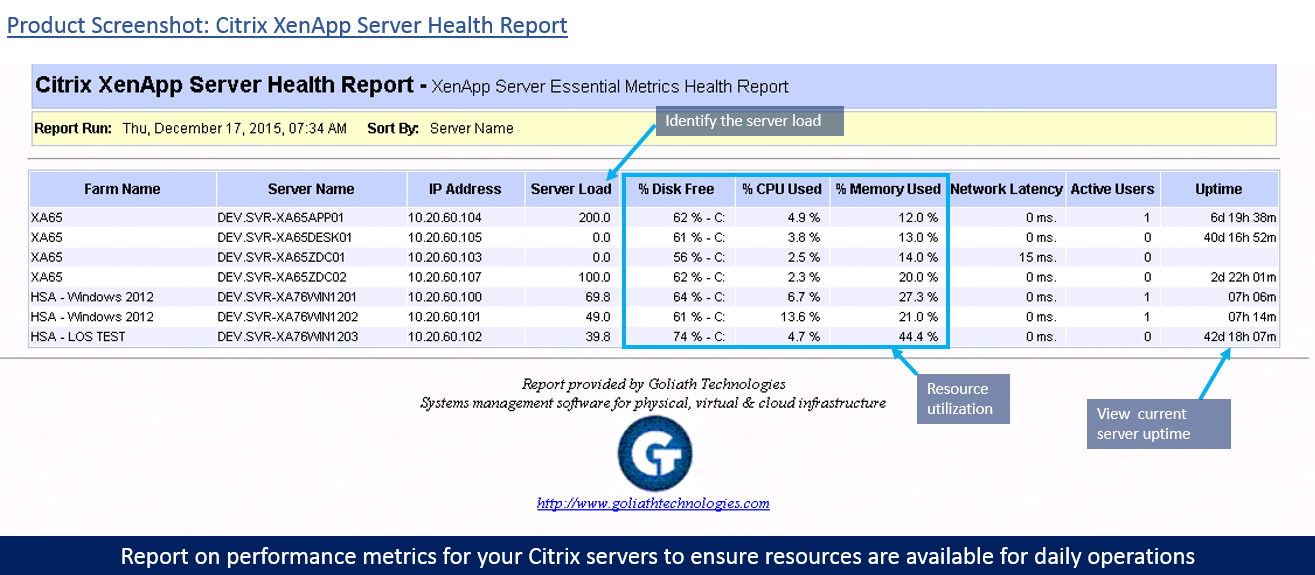
XenApp Server Health Report

Results

To resolve the Windows and Mac OS performance issue, Chris needed objective evidence that isolated the root cause of the issue. This can only be had using a comprehensive Citrix monitoring tool that also deeply monitors Vmware vSphere. From there, Chris and his team could ultimately prevent the issue from occurring again.

With his selection of Goliath Technologies for his Citrix and VMware vSphere monitoring needs, Chris is now proactively providing Drake’s students with a positive Citrix end user experience.

Drake University

ABOUT UNIVERSITY

Drake University is recognized as one of the finest universities for experiential learning. As a midsize, private university, Drake offers students the benefits and resources of a larger institution with the advantages of intimate class sizes and close personal relationships.

Headquarters location: Des Moines, Iowa
Founded: 1881
Employees: >2000
Students: >5300
Industry: Education and Academic

Law Firm Reduces Citrix Support Tickets by 60%

Law Firm Reduces Citrix Support Tickets by 60%

How We Did IT

Law Firm Reduces Citrix Support Tickets by 60%


Law Firm banner

“We reduced Citrix ticket escalations by 60%”

– Pete Chim, Systems Engineer

Infrastructure

Citrix XenApp

Challenge

A national law firm has attorneys and staff attempting to access Citrix delivered applications from all over the world. Because they use various methods to connect to the internet, the connection quality is variable and Citrix monitoring and troubleshooting tools are essential. The firm has users connecting from remote offices, homes, hotels, and even airplanes, which can result in connection and latency issues. This leads to an increase in the number of end users contacting the help desk for advice on improving the quality of service, even when the cause was a low-quality hotel or airline network.

The majority of these Citrix tickets were escalated to their Citrix Architects, who are responsible for deploying Citrix but continually were being pulled to respond to end user tickets as the help desk didn’t have the knowledge or tools to resolve end user complaints related to “Citrix is Slow” complaints. In addition, they did not have the objective evidence in the form of reports or documentation to prove root cause of the problem to those end users.

Solution

The IT team needed a Citrix End User Experience Monitoring & Troubleshooting solution that would allow them to do two things:

  1. Offer them granular visibility root cause of slowness when using Citrix and Citrix delivered applications.
  2. Provide the help desk with an easy to use troubleshooting tool that would empower non-Citrix experts to troubleshoot and potentially resolve end user performance issues. And, if the issue could not be resolved because it was solely related to end user behavior talk to the end user provide documentation to prove root cause was either a result of their actions or their connection into Citrix.

As a Citrix Platinum customer, this law firm did have Citrix Director deployed in their Citrix XenApp environment. As with most free utilities, these are designed to provide some metrics but it didn’t offer the broad and deep visibility necessary to anticipate, troubleshoot and document Citrix end user experience issues. Citrix Director, beyond being inadequate from a Citrix monitoring and troubleshooting perspective, was too confusing to be useful to the help desk staff.

After looking at several Citrix monitoring and troubleshooting vendors, the firm decided to do a proof of concept with Goliath Technologies. They discovered that Goliath gave—in real-time—very deep and complete visibility into the Citrix end user experience. Of particular value was its ability to quickly identify the root cause of a remote user’s issue—whether it is the connection, stage of the logon sequence, or another program competing for network resources, such as YouTube, Netflix, or a gaming site. With Goliath’s Citrix monitoring and troubleshooting solution, they can see, in real time, if a user’s slow connection is due to internet network quality or a competing program as seen below.


Screenshot

Results

Armed with Goliath’s Citrix monitoring and troubleshooting solution, the IT team was poised to integrate it into their internal processes so they could improve the end user experience through faster response times, improved communication, and an empowered help desk. Pete Chim, Systems Engineer, put a checklist in their ServiceNow knowledge base so the help desk staff could use Goliath’s Citrix monitoring and troubleshooting to conduct a series of checks against this knowledge base when a ticket was opened from an end user complaining about Citrix slowness or disconnects. Now, the help desk staff resolves issues more easily on their own, which has reduced the need to escalate to Citrix engineers by an estimated 60%.

Browse Citrix Webinars

ABOUT ORGANIZATION

The firm has a reputation for providing high-quality legal services across a wide range of practice areas, including corporate law, real estate, litigation, and intellectual property.

Headquarters location: Northeast, USA
Founded: over a century ago
Employees: >500
Industry: Legal

Ballard Spahr Migrates from Citrix XA 6.5 to XD 7.6

Ballard Spahr Migrates from Citrix XA 6.5 to XD 7.6

User Story: Ballard Spahr Uses Goliath to Migrate from Citrix XenApp 6.5 to XenDesktop 7.9

The Business Challenge: Migrating from Citrix XenApp 6.5 to XenDesktop 7.9 Platinum

Director vs Goliath TroubleshootingMigrating from one Citrix version to another is complicated enough, but Ballard Spahr also has attorneys and other users who require access to applications from all over the world. They connect from remote offices, homes, hotels, even airplanes. Because they use various methods to connect to the internet, the connection quality is also variable.

The IT team wanted to achieve two things to assist in a smooth transition to Citrix XenDesktop 7.9 Platinum:

  1. Knowing that end user experience issues can cause delays in adoption, they wanted a proactive monitoring and troubleshooting product that would help them anticipate issues and resolve them quickly
  2. They need to be able to track adoption to Citrix XenDesktop 7.9 Platinum

The Solution: As a Citrix Platinum customer, Ballard Spahr has access to the free utilities available to Citrix Platinum customers. In fact, they had Citrix Director and Citrix Insight Center installed, but found that these utilities, while helpful, are not designed for enterprise monitoring, management and troubleshooting the Citrix environment. They didn’t provide the visibility into Citrix, end user experience, and the supporting infrastructure. In addition, there was no capability to manage end user experience or gauge the adoption rates of end users.

The Ballard Spahr IT Team selected Goliath Technologies because of its capability to preemptively alert on, and resolve, issues that might negatively affect end users and slow adoption. This is accomplished through advanced threshold-based alerting (See Image Below), which will notify IT, in real time, if a condition exists that may cause an end user connection issue, logon slowness or session latency. In addition, Goliath had out-of-the-box reports—called “End User Connection” reports—which can be run on a scheduled basis to show the frequency and length of user sessions. This gave the IT team the ability to see how often users were logging on to the Citrix 7.9 environment versus the 6.5 environment, thereby gauging adoption.

The Outcome: The IT team at Ballard Spahr now has a proactive monitoring and management tool for their Citrix XenApp 6.5 environment, and new Citrix XenDesktop 7.9 deployment that is being utilized to reduce end user experience issues that might slow adoption of Citrix XenDesktop 7.9. In addition, they have daily reporting that keeps them abreast of adoption rates of the new Citrix deployment.