How To Guarantee A Quality Experience To Remote Citrix Users

How To Guarantee A Quality Experience To Remote Citrix Users

How To Guarantee A Quality Experience To Remote Citrix Users

Recently, I worked with a customer who was having inconsistent issues with user experience. To date they have been utilizing Goliath Performance Monitor to troubleshoot and alert on faults and errors taking place in their XenApp 7.6 environment.

They were using their Citrix NetScaler ADC’s as a NetScaler Gateway to reverse proxy ICA remote sessions within their Citrix environment, and they were especially interested in seeing how Goliath could provide deeper analytics into the experience of their end users who were logging into the environment from home and constantly complaining about poor session performance, specifically slowness.

Gaining the appropriate visibility into the NetScaler Gateway VIP to identify and resolve the end user’s complaints was extremely important because in the end users’ eyes, the problem was always Citrix, when in reality the root cause was unknown.

AppFlow Data: What It Is & How It’s Used for Analysis

Before diving into how the customer leveraged Goliath for NetScaler to solve their challenge, it’s important to understand a little bit about how the technology operates and delivers results. This technology provides a unique vantage point from a monitoring perspective. Very simply, Goliath for NetScaler collects AppFlow data from the Citrix NetScaler Application Delivery Controller and the NetScaler Gateway.

AppFlow consists of messages that are sent from the Citrix NetScaler ADC & Gateway which include data points around the connections that are established to it. This data contains valuable information related to what is occurring during a session, and delivers full session visibility from source to destination.

Once Goliath for NetScaler receives the AppFlow messages, it begins to automatically generate real-time dashboards, live reports, and historical analysis on critical data related to Citrix XenApp & XenDesktop ICA/HDX sessions, application utilization and access, NetScaler Gateway execution, and web application VIP  performance.  The newly gained visibility gained with NetScaler Platinum licensing combined with the power of Goliath technology made Goliath for NetScaler the obvious choice for solving this customer’s user experience challenges.

Up & Running Faster than it Takes to Get a Pizza Delivered

Getting Goliath for NetScaler set up and running for this customer was fast and simple. Enabling AppFlow on the Citrix NetScaler ADC’s and configuring the message to be sent to Goliath only took less than thirty minutes. Once AppFlow configuration was complete, the customer immediately started receiving actionable data from Goliath for NetScaler.

To start their analysis and troubleshooting, the customer went to the ‘sessions’ screen (see image below) of the product and was able to gain total visibility into the end users sessions on the NetScaler Gateway, as all of the current sessions are listed on the bottom half of the real-time display.

Round Trip Time – Jitter – Retransmits

The information gathered for the sessions includes the username, user’s IP address, the version of Citrix receiver they were using to establish the connection, and the date/time the session was established. In addition to the previous data points, the key end user experience metrics of Round Trip Time (RTT), Network Jitter, and Packet Retransmits were also detailed.

These metrics are clear indicators as to whether or not a user was experiencing poor Citrix session performance.  To further understand why these metrics are important, and what they mean, please see the below definitions:

  • RTT – Round Trip Time measures the packet time from the source, to the intended destination, and then back again. This is the primary measurement which would indicate performance problems. On a Citrix ICA/HDX connection, data is captured from the time of the initial mouse click, to the handoff to the server which is handling the session, its processing time to compute the action, and then presents it back down to the endpoint.
  • Jitter – Jitter is technically defined as the delay variation or deviation in the connection. This effectively measures the quality of the connection, and if there is any “noise on the line.” This would cause delays in the presentation of a user’s Citrix session.
  • Retransmits – This is a measure of the volume of packets that had to be re-sent due to packet loss. This would be indicative of a poor connection, and would result in choppiness in the presentation of an end user’s Citrix session.

In the screenshot below, you can see how these data points are color-coded on the basis of connection quality red (severe), yellow (lackluster), and green (satisfactory).

XenApp/XenDesktop Analyze ICA RTT Jitter

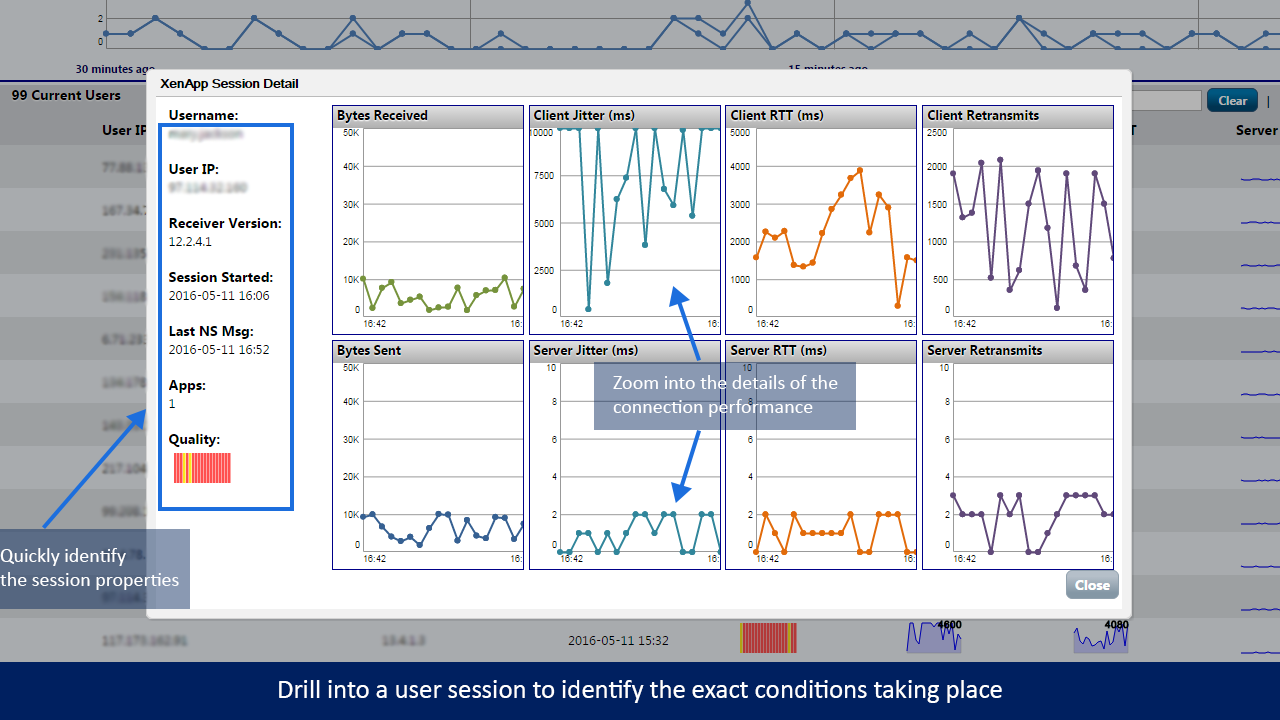
Using this quick and easy graphical representation of the user sessions, the Citrix administrators were able to quickly target problematic users, and immediately drill down into the sessions to see exactly how the performance metrics aligned for each user. By clicking on the user’s session, the Citrix administrators now had the ability to segment the end user experience quality metrics down to Client Jitter Round Trip Times (RTT) and Server Jitter Round Trip Times (RTT). The ability to have visibility into both the client and the server sessions is critical.

The client-side metrics show the performance of the connection from the user’s end point to the Citrix NetScaler Gateway and back, whereas the server metrics pertain to the connection between the Citrix NetScaler Gateway, and the internal architecture.

This is exactly why having visibility into the ICA/HDX sessions through the NetScaler Gateway is so important. Having the aforementioned visibility provides incontrovertible evidence as to whether the issue is from the data center side, where admins have control over the performance, or if it’s external to the network, and therefore the responsibility of the end user.

The Citrix administrators at the manufacturer were amazed how Goliath for NetScaler was able to break down the users ICA/HDX session performance, and how actionable the data would be for their help desk. They were able to “live share” this data off to their help desk to aid in dealing with end user complaints when users called in about their Citrix sessions being slow.

Product Note: The “Live Share” feature, creates a link that can be taken and then handed off to an end user or administrator by email or over your corporate chat software. When the recipient of the live share clicks on the link, they are provided with direct access to the report which allows them to establish the objective evidence they need to see. The report can then be refreshed to show current, live data when performing ongoing troubleshooting.

How the Help Desk Used Goliath for NetScaler

Here’s how the help desk used Goliath for NetScaler – The help desk started by quickly searching for the user’s session from the sessions tab:

NetScaler User Sessions Analytics

The help desk then clicked on the user’s session to see where the session performance had degraded. The Citrix administrators could now provide a visual timeline of end users session performance, empowering them to correlate what the user said they were doing at a specific time, to the performance over the duration of that time period.

For example, they had an end user who called in one day to complain about their Citrix connection. The help desk user followed the above process and could see that between 10 am and 10:05 am the client RTT and retransmits extremely increased. When stating this information to the end user, they recollected the timeline and stated that at 9:45 am they boarded and commuter train and around 10 am they would’ve been entering a tunnel, which was about the time they started having connection problems.

The ability to correlate the connection data to a real-world event is unique to Goliath for NetScaler. As detailed below, data points were provided as an average and then rolled up, obfuscating the performance:

Netscaler User Sessions Identify Conditions

When support engineers wanted to share the details of what happened within a user’s session with management, and/or Citrix administrators, they were easily able to access a reporting screen. From there, they could print a report, or “live share” as seen below. As described earlier, live share makes it very easy for the organizations departments to collaborate on troubleshooting this issue, and to quickly provide the data to the people that needed to see in real time.

Netscaler Real Time Key Metric Report

After review of the above user’s experience, it was obvious that specific RTT values correlated to a poor end user experience. As a result, the administrators refined the alerting thresholds in order to be proactive. Rather than waiting for the user to call and report a problem, the administrators would already know the user may be experiencing a problem within their Citrix sessions, and required attention and/or support.

Alert thresholds were set at 400ms, the threshold at which users started to experience slowness and other Citrix session performance degradation. To ensure that support staff and admins were aware of degradation as it happened, alert notifications were configured to be automatically sent to the help desk and the Citrix admins, empowering them to effectively support the end user in the event future performance issues arose.

Finally Able to Gain Full Visibility into the End User Experience

Prior to deploying Goliath for NetScaler, the Citrix admins had no way to analyze and troubleshoot their end user sessions. Gaining visibility into an end users experience was extremely important because in the end users’ eyes, the problem was always Citrix, when that was not always the case.

The deep visibility that the technology provided allowed the Citrix Admins to very quickly understand not only that a user working remote was having a poor end user experience, but also determine that the root cause of the performance degradation was the end user’s connection. The Administrators had tangible proof that the problem was not the delivery infrastructure, and were able to provide the objective evidence to management to support each scenario.

This allowed the administrators to target the specific root cause of the performance issue and enables them to be proactive in addressing user experience challenges going forward. Furthermore, the export feature of each of the reports allowed the Citrix administrators to share the deep insight provided by Goliath for NetScaler to their managers in just two clicks. Overall, by deploying Goliath for NetScaler in addition to Goliath Performance Monitor, we were able to provide the Citrix administration teams the objective evidence needed to effectively monitor their Citrix environment from end to end.

Get a 30-day Free Trial or Demo of Goliath for NetScaler

To try the technology, with full support from Goliath, click here to get a 30-day free trial or personal demo.

Forthright Hits 99.9% Citrix Uptime SLAs with Goliath

Forthright Hits 99.9% Citrix Uptime SLAs with Goliath

Forthright

Forthright Hits 99.9% Citrix Uptime SLAs with Goliath

citrix uptime

“Goliath enables us to proactively prevent about 70 Citrix support tickets per day. Their Citrix XenApp Monitoring & Troubleshooting provides us with a centralized view of Citrix, our virtual infrastructure and correlates this with real time end user experience metrics. Coupled with the fact that they have proactive logon simulation functionality, is why we selected Goliath as a critical component in our managed services offerings.”  – Ricardo Ceballos, Director of Enterprise Managed Services, Forthright

As an enterprise managed service provider (MSP), Forthright offers SLAs that are unique to each customer. All of which are focused on maintaining uptime and performance at 99.9% while delivering a positive end user experience. They were facing a challenge as their current XenApp Monitoring Vendor, N-Able, couldn’t provide a way to proactively predict Citrix logon experience and troubleshoot logon failures or slowness. With an infrastructure consisting of VMware, Citrix XenApp, XenDesktop 7.6 they knew they needed a purpose-built tool that would enable them to hit the 99.9% uptime mark on all customer SLAs.


Infrastructure

VMware, Citrix XenApp, XenDesktop 7.6


Challenge

Over the past few years, Forthright has experienced significant demand for their managed services. Many of these clients depend on Citrix to access their mission-critical applications, so tools purpose-built for Citrix XenApp monitoring and troubleshooting were required. These customers wanted commitments or SLAs from Forthright relative to uptime and good end user experience. So the technical team decided they needed specific functionality that would allow them to determine if there is a problem with Citrix Logon Initiation and Logon Duration–before end users were impacted.

In looking for a solution, Forthright’s technical team evaluated a myriad of XenApp monitoring products. To ensure success, there were two crucial elements the XenApp monitoring solution needed to address:

  1. Proactive and/or Preemptive LogonFailure or Slowness Alerting: There are a few products that can tell if something failed after the fact, but they needed something to give them advance warning before end users were impacted. Real-time XenApp monitoring, alerting on thresholds, events, and failures relative to Citrix logons was something that they deemed critical to ensure that performance-based SLAs are met when offering Remote Infrastructure Monitoring (RIM) and Desktop as a Service (DaaS).
  2. Root Cause Analysis and Citrix XenApp Troubleshooting: This is largely a byproduct of the above limitation. Most XenApp monitoring and troubleshooting offerings don’t provide real-time alerting on logon issues because their products simply don’t see or monitor the failure points. They don’t go deep or broad enough into the Citrix XenApp and virtualization layers. As RicardoCeballos, Director of Enterprise Managed Services puts it, “If a XenApp monitoring product can’t see an IT element, then it can’t monitor, alert, or isolate that IT element as the root cause. Simply alerting me that something went wrong – after the fact – and without the detail to isolate and document root cause – is just not helpful.”

Solution

Goliath Application Availability Monitor (GAAM) for Citrix and Logon Duration Troubleshooting was implemented to help Forthright achieve 99.9% uptime on their SLAs.

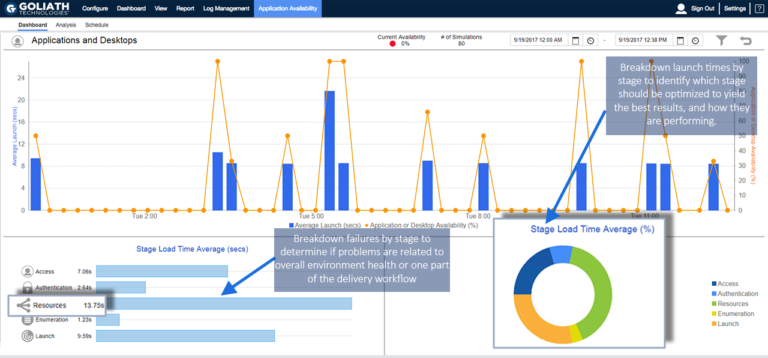
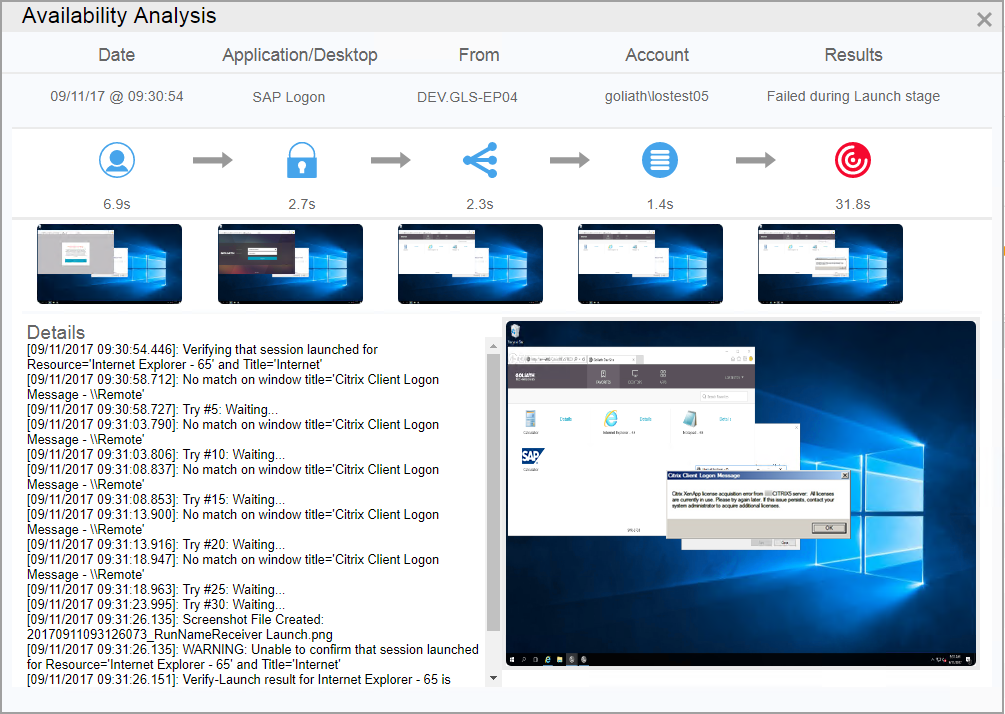
GAAM for Citrix XenApp and XenDesktop was deployed to customer locations and was used both on-premises and remotely to ensure that Citrix applications and desktops would launch. In the image above, you can see the real-time dashboard that displays each logon attempt and whether it was a success or failure.

It is the only technology they could find that conducts simulations such that it confirms the entire Citrix Delivery Infrastructure would work. It tests the NetScaler, Storefront, Delivery Controller, VDI and XenApp Server. This technology will send alerts in real time if there is a failure and is offered both as an on-premises software or a hosted service.

This technology provided great value to Forthright beyond simply its preemptive alerting capabilities. GAAM for Citrix eliminated the need to manually confirm Citrix Applications would launch, saving up to 3 hours per environment per day. Utilizing Goliath, this process is automated and has been reduced to 30 minutes.

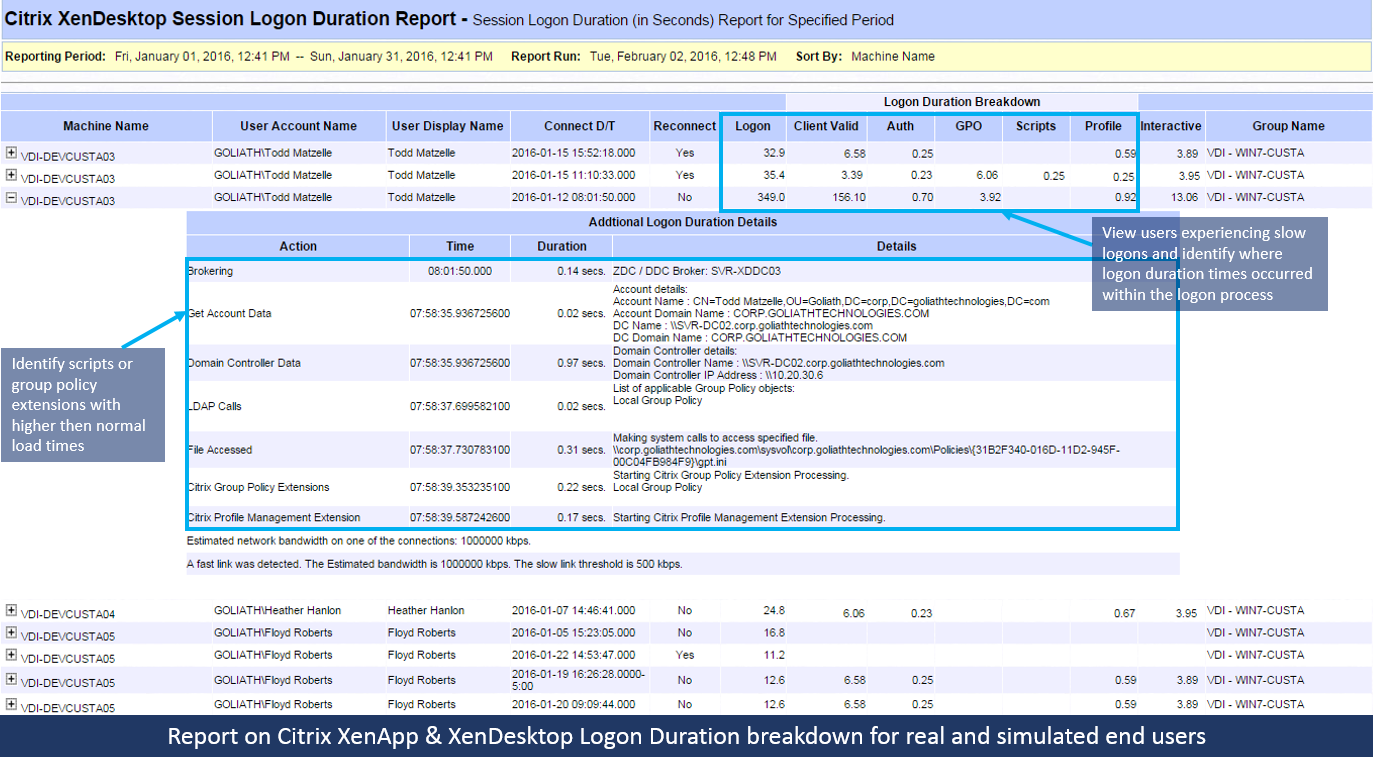
They also use the reporting capability of the product to run historical reports for analysis of the overall success or failure of the Citrix Logons or to drill down by user. The report below is an example.


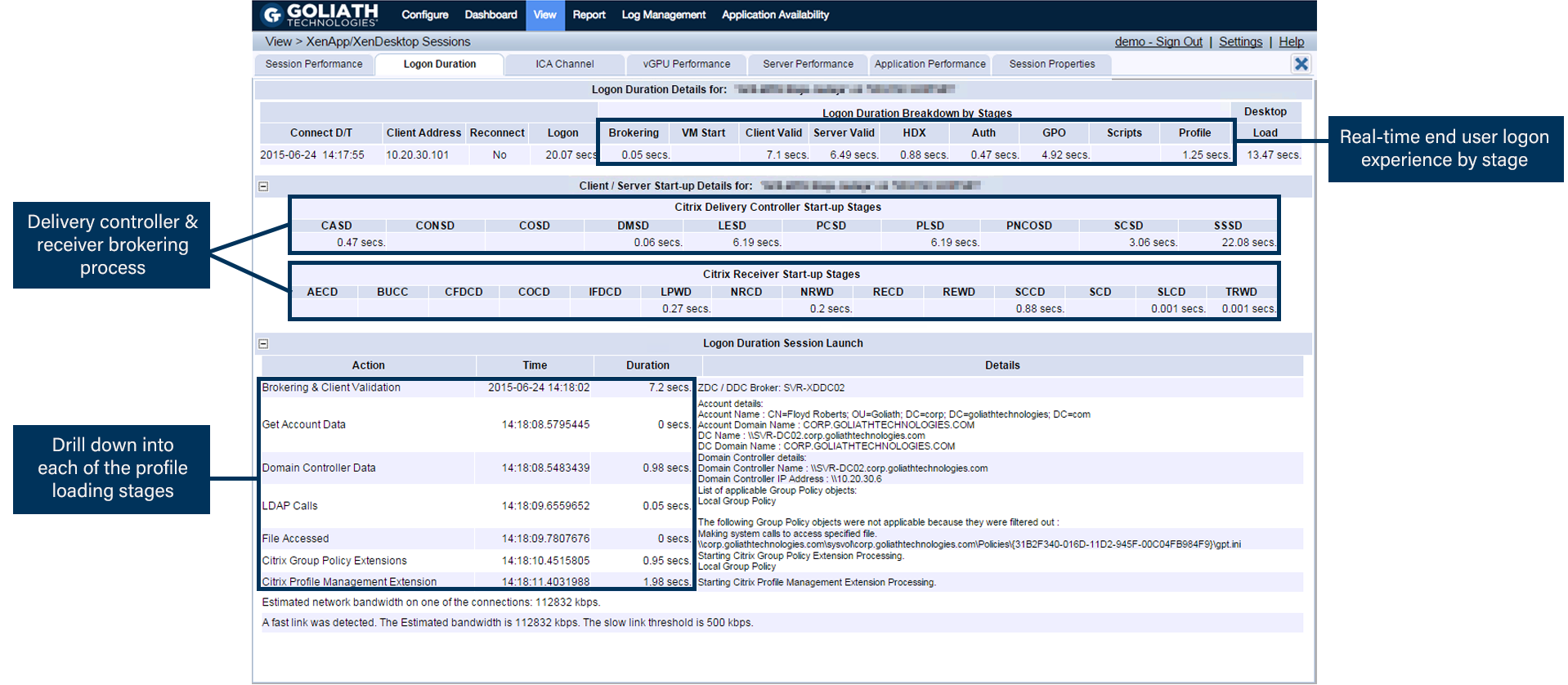
Many times the logon initiation process was successful, but the logon process was sluggish. In this case, Forthright used the logon duration drill down which dissects 33 different, though interrelated, steps in the logon process as depicted below. Armed with this logon duration detail they were able to pinpoint the true root cause of logon duration slowness and resolve the issue permanently—before end user performance is impacted.

Real-time Citrix Logon Duration Drill Down

Logo Duration Product Screenshot


Citrix XenApp & XenDesktop Logon Duration Report

Forthright needed to run historical reports and analysis to determine long-term performance trends enabling them to be proactive in managing customers’ environments. The requirement was to have the necessary reports available out-of-the-box. Armed with this data, they could tune Goliath’s XenApp monitoring software to send threshold-based alerts and simultaneous remediation actions before end users were affected.

xenapp-xendesktop-logon-duration-breakdown-goliath-forthright

Results

The Forthright team was also pleased to find out that Goliath has 66 of these types of performance and end user experience reports for Citrix and VMware, all of which come out-of-the-box with Goliath’s XenApp Performance Monitoring product.

Based on Forthright’s selection criteria to proactively manage end user experience and meet their SLAs with a purpose-built solution for Citrix XenApp monitoring, Goliath was the clear solution.

In addition to the two core requirements listed above, Goliath Technologies offered additional features that were specifically designed for Service Providers that were helpful in making a decision and having the product become a success:

  • Multi-tenancy: MSPs can use Goliath to proactively manage environments by criteria such as customer, location, application, infrastructure, etc.
  • Master “Intelligent” Agent: This is an ultra-low resource utilization (0.1% CPU) agent to monitor remote locations without maintaining an external connection. The “Intelligent” Agent gathers numerous metrics like the ICA/HDX channel and the hypervisor, and it can execute remediation actions on XenApp Servers, XenDesktop VDI, Citrix role servers, and end points.
  • MSP Management: Centralized management of the end user experience for MSPs.
  • Share Data with other Tools: Can send Citrix XenApp monitoring and troubleshooting data to Nimsoft, SolarWinds, etc.
  • Custom Reporting: Real-time dashboards and historical reports that are branded with Forthright’s logo.

As you can see from the above screenshots, Forthright is able to use Goliath Performance Monitor for XenApp Monitoring and the GAAM for Citrix to gain complete visibility into the end users’ logon experience in a single view.


Instantly Download this New Complete Guide to Understanding the Citrix Logon Process for XenApp/XenDesktop

In this free how-to troubleshooting guide to solving Citrix logon issues, a Citrix Engineer breaks down each step of the complex Citrix logon process. The guide explains all 33 stages of the Citrix logon sequence and the role each stage plays in delivering a successful logon. You will also learn the challenges inherent in isolating the specific stage/stages causing slow or failed Citrix logons so you can improve end user experience.

forthright-goliath-technologies

ABOUT FORTHRIGHT

Forthright Technology Partners stands out as a prominent provider of user-centric IT solutions and services.

Headquarters location: Weston, Florida
Founded: 1992
Employees: >30
Industry: Information technology

Guest Post: Citrix Could Use Goliath To Sell Platinum License

Guest Post: Citrix Could Use Goliath To Sell Platinum License

Editor’s note: this post is from Kyle Davies, a Citrix Certified Expert, Citrix Certified Professional, Solutions Architect and accomplished VDI expert. You can connect with Kyle on LinkedIn, Twitter and through his blog, Tech Thoughts.

Recently, Citrix announced an investment they made in acquiring the Comtrade Microsoft SCOM management pack IP, which can be found here. Although I agree with the concept of buying pre-built and working solutions to provide customers with a monitoring pack that works, what I don’t understand is: why Microsoft SCOM?

Is Offering SCOM with Platinum Licenses really a Great Value?

In the UK, I don’t see many organizations running Microsoft SCOM, so these packs won’t be a major selling point for Platinum licensing at the moment. I would have preferred that Citrix acquired technology that could be integrated natively into the stack, with an SDK/API for other monitoring tools to plug into, or comes as a pre-built virtual appliance with plug and play capabilities.

Maybe this acquisition is part of a larger strategy that’s coming with the beast known as Microsoft? Especially since the new CEO of Citrix is ex-Microsoft! Or is this predominantly based on the SCOM presence in the US? (If you’re from the US feel free to comment outlining your thoughts on SCOM and its use across the pond.)

An Opportunity for Citrix sitting on a ‘Platinum’ Platter?

Throwing something out there; a few weeks ago, I wrote an article on the benefits of being able to monitor a Citrix environment from a NetScaler perspective.

If Citrix really wants to drive Platinum licensing sales across the board (XenApp/XenDesktop & NetScaler), why would Citrix not look to partner up with someone like Goliath Technologies for their Goliath for NetScaler? For their NetScaler, partnering up with Goliath is same concept as offering the SCOM packs.

#CitrixPartnerLove

To me, partnering with Goliath is less offensive to the Citrix partner ecosystem as there isn’t another solution that I have seen like Goliath for NetScaler. From an outsider looking in, the SCOM pack acquisition could look and sound like there is no other comparable alternative to monitoring your Citrix environment, leaving other partners like Lakeside, Goliath, and ControlUp in the lurch.

Goliath for Netscaler enhances the functionality of existing NetScaler Enterprise and Platinum Edition environments by adding functionality like performance analysis, trending, and data exports via API or CSV, and more.

Goliath offers something above and beyond what is currently capable within Citrix Insight Center. The other element for me is, if Citrix procured the rights to integrate this into their Platinum licensing model(s) it could be deployed from a virtual appliance rather than having to utilize/implement a completely separate architecture.

For me, if Platinum licensing offered these services and more in depth monitoring capabilities, it would be an easier upsell as the uptake of the Insight Center has been slow, from what I have seen. Most discussions I have had with customers has shown this to be due to the very limited historical data Citrix supports. With Goliath for NetScaler you can keep unlimited history, so long as you have the resources to support it.

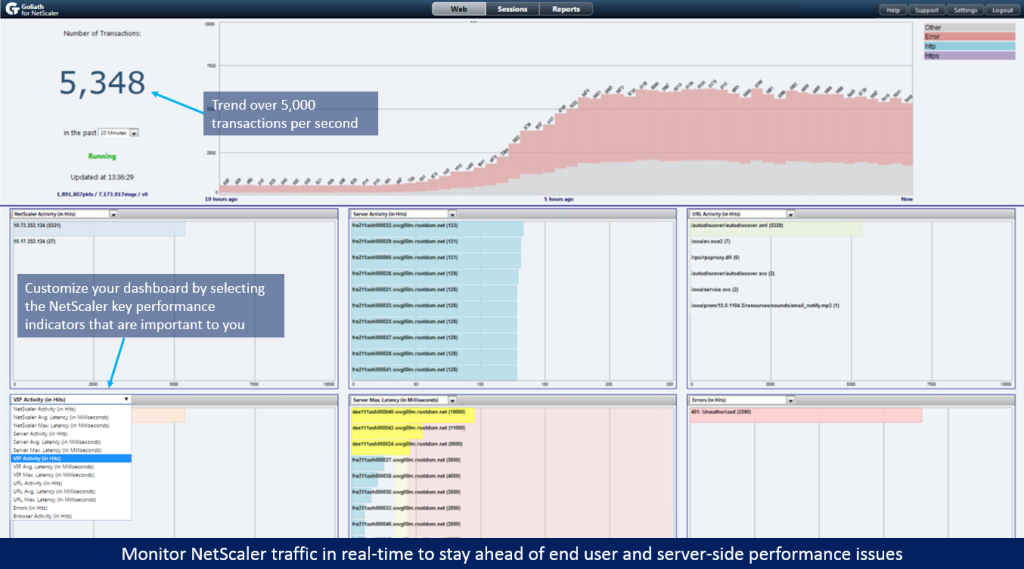
There’s a great use case about a large global retail organization using Goliath is to provide analytics for their Citrix Platinum SDX NetScalers. The use case outlines how Goliath’s solution is monitoring and looking for trends on 10,000 transactions per second, and confirming that web transactions are complete. If there is a failed or slow content search and or transaction you will receive an alert!

In summary and in my opinion, Citrix should do the same with Goliath for NetScaler that they are doing with Comtrade by offering Goliath’s technology to Platinum license holders.

What do you think?


About the Author: 

The team members collaborated to bring together this blog post by calling on their past Customer Experiences and Expert Knowledge of Citrix Troubleshooting. Beyond writing technical documents this team supports Goliath Customers and provides product feature and function guidance to development.

User Story: Retailer Monitors 10k NetScaler Transactions/Second

User Story: Retailer Monitors 10k NetScaler Transactions/Second


User Story: Retailer Monitors 10k NetScaler Transactions

Per Second

Editor’s note: The retailer featured in this post has given us permission to tell their story to help their fellow IT Operations teams solve similar challenges. Their brand name has been redacted for competitive and privacy reasons.   

The Retailer’s Business Challenge: Lack of visibility into the performance of their complex environment

A top 5 global retailer uses Citrix Platinum Edition SDX NetScaler Application Delivery Controllers to reverse proxy their main retail website. The problem, however, was that management faced a lack of visibility into the responsiveness of the site to information requests and transaction performance.

Full View into the End User’s Entire Transaction Journey 

Specifically, the retailer needed an enterprise NetScaler ADC monitoring product that could scale to support packet throughput above 10,000 NetScaler transactions per second. And, a product their enterprise IT team could use to monitor the entire end user transaction journey — from website request initiation through transaction execution — and remediate transaction slowness or failures should they occur. 

It’s about Business Too 

To help people like product category managers, the retailer’s IT operations team uses the reports in Goliath for NetScaler to see how many requests are being made to each of the retailer’s product category VIPs (Virtual IP addresses), which show high latency or are generating error codes, which servers are generating errors such as timeouts, and how the traffic is distributed to the backend servers. 

The retailer’s IT Operations team attempted to use NetScaler Insight Center to get the visibility and data they needed to effectively manage their NetScaler ADCs which typically can process over 10,000 eCommerce website transactions per second through the Citrix NetScaler Application Delivery Controller. Unfortunately, Insight Center was unable to scale to meet their enterprise IT needs, so they turned to Goliath for help. 

In addition to being able to monitor the end user’s entire transaction journey (and not lose business to their competitor Amazon), the retailer needed a NetScaler performance and IT analytics solution that provided answers by giving them real-time dashboards, threshold based alerts, historical reports with unrestricted time frame reports, the ability to export performance data, and collaborate in real time.

The Retailer’s Environment Challenge: Managing NetScalers ADC & up to 10,000 NetScaler transactions per second 

In the retailer’s environment there are 10 SDX NetScalers (see above), each load balancing multiple VIPs (Virtual IP addresses). Each VIP represents a product category in their retail operation (groceries, pharmacy, electronics, housewares, clothing, etc.).

Behind each VIP is one or more application servers. There are over 400 servers in total. Each cluster of app servers is connected to a database. All of this infrastructure controls information for over 10 million individual product items.

goliath-it-analytics-netscaler-transactions

During normal operations, about 3,000 to 4,000 NetScaler requests are handled each second. During peak shopping hours that rate climbs to 10,000 NetScaler VIP transactions per second. Requests for product information come in from a variety of sources: the retailer’s eCommerce website, mobile apps, inventory management systems, etc.

The Retailer’s Solution

When this retail giant needed to get insight into their environment, they turned to Goliath for NetScaler to collect AppFlow messages broadcasted by their SDX NetScalers. 

The retailer uses Goliath for NetScaler to understand the transaction behavior including performance, traffic routing from user to content loaded from the back end server, and reporting.

Each NetScaler request generates AppFlow messages containing the following data:

  • The VIP
  • The actual server selected
  • The requested URL
  • The returned status code
  • The response in milliseconds

Goliath for NetScaler in turn, collects all of this information, stores it in a database, and provides a real-time dashboard showing the flow of traffic and details about latency, VIP activity, error codes, etc. At a glance, IT staff can see which servers are taking the longest to respond.

Management Gets Access to Critical Historical Performance Reporting 

By using the historical reports feature in Goliath for NetScaler, the retailer’s management can get full visibility into their environment’s performance. Specifically, their management can now see:

  • Requests being made on each VIP (this data is critical to the managers of the different product categories, like pharmacy, home products, etc.)
  • Traffic distribution to the back-end web servers
  • VIPs showing the highest latency

If requests coming to a VIP are taking too long, this indicates that additional app servers are needed on the VIP. If latency is low, the number of servers can be reduced:

  • VIPs generating errors

An HTTP 404 error code would indicate that one of the upstream systems is requesting information for a product that doesn’t exist:

  • Server errors

Errors such as Timeout on a server indicates server trouble or misconfiguration:

  • Traffic pattern trending over time. By generating reports over long timelines, management can get a crystal clear picture of how many requests are being processed. This gives them insight into future expansion needs

The retailer is able to use Goliath for NetScaler to get this data without changing a single application server component, deploying agents, or causing negative impact on the actual server performance.

Why Goliath for NetScaler Solved the Retailer’s Problems

Because Goliath for NetScaler scales to support packet throughput above 10,000 NetScaler transactions per second while providing visibility into each step of the end user’s journey from website request initiation through transaction execution, the retailer’s IT operations team knew the technology would solve their problems. 

There are several key points to derive from this success story:

  1. Goliath is the only product in the market, that can handle 10,000+ NetScaler transactions per second
  1. It has real-time threshold based alerts that are triggered by slow transaction performance
  1. Collecting all of the data is possible without changing a single application server component
  1. All of the performance data and metrics are available via AppFlow from the existing NetScalers
  1. Gathering the data has zero impact on the actual server performance
  1. No agents are needed to collect the data

By deploying Goliath’s technology, the retailer’s enterprise IT team can monitor the performance of their 10 SDX NetScalers, gain full visibility into the entire transaction journey in a single pane of glass, from the end user request through to the backend application server, and get alerted to interruptions or latency that would cause an end user to abandon their transaction.


For more information on how Goliath Performance Monitor can help you and your team be proactive and anticipate, troubleshoot and prevent end user experience issues:

Send us an email: techinfo@goliathtechnologies.com

Give us a call: 855-465-4284


RCH Holdings Drops Citrix Slow Logon Times 5 Min to 30 Sec

RHC Holdings

RCH Holdings Drops Citrix Slow Logon Times 5 Min to 30 Sec

citrix slow logon

Kaleb Propst“We were hosting our IT Infrastructure and moved it in house to improve overall SLA’s, end user experience, and specifically Citrix logon times. When we moved IT back on premise, we knew we needed a technology that was purpose built for Citrix XenDesktop 7.6 that enabled us to look at the logon process from the end user’s perspective. Goliath has the most detail we have seen in any technology and we used it effectively to significantly reduce our Citrix logon times.”
 

-Kaleb Propst, IT Technician at RHC Holdings 

Infrastructure

Citrix XenDesktop 7.6 & XenServer

Challenge

Stop the “Logon Bombs” & Proactively Troubleshoot & Remediate Slow Citrix Logon Issues

Kaleb Propst and his team were not satisfied with the public cloud provider they were using. Being unable to consistently meet SLA’s, the decision was made by the executive team to build their own data center.

In the hosted environment, there were any number of issues but certainly the one that caused the most pain was Citrix XenDesktop 7.6 logon times that were averaging between 2-5 minutes. It was not a tenable situation and one they decided to address when they moved IT on-premise.

In an attempt to troubleshoot the Citrix logon issues, Kaleb and his team used the standard methods. They made sure they were up to date on any hot fixes from Citrix, scoured forums, and opened tickets with Citrix. All of these efforts failed to yield a result that helped them identify the root cause of the logon issues, and the long Citrix XenDesktop 7.6 logon times persisted.

Solution

The IT Team selected Goliath Technologies because of the broad and deep visibility into all aspects of the Citrix delivery infrastructure. Virtually any IT element that can impact the end user experience is proactively monitored right out of the box.

Goliath shows the logon process in real time and for each end user. For advanced troubleshooting and analysis the logon process is broken down by each of the 9 stages including brokering, virtual machine start, client and server side validation, HDX connection, authentication, group policy, logon scripts, and profile load.

In addition, for each stage the IT administrator can drill down in each stage to get information such as:

  • Domain Authentication
  • Policy Loading
  • Policy Execution
    • Scripts
    • Printer Mapping
    • Fileshare
    • Registry Extensions
    • Powershell
  • Folder Redirection

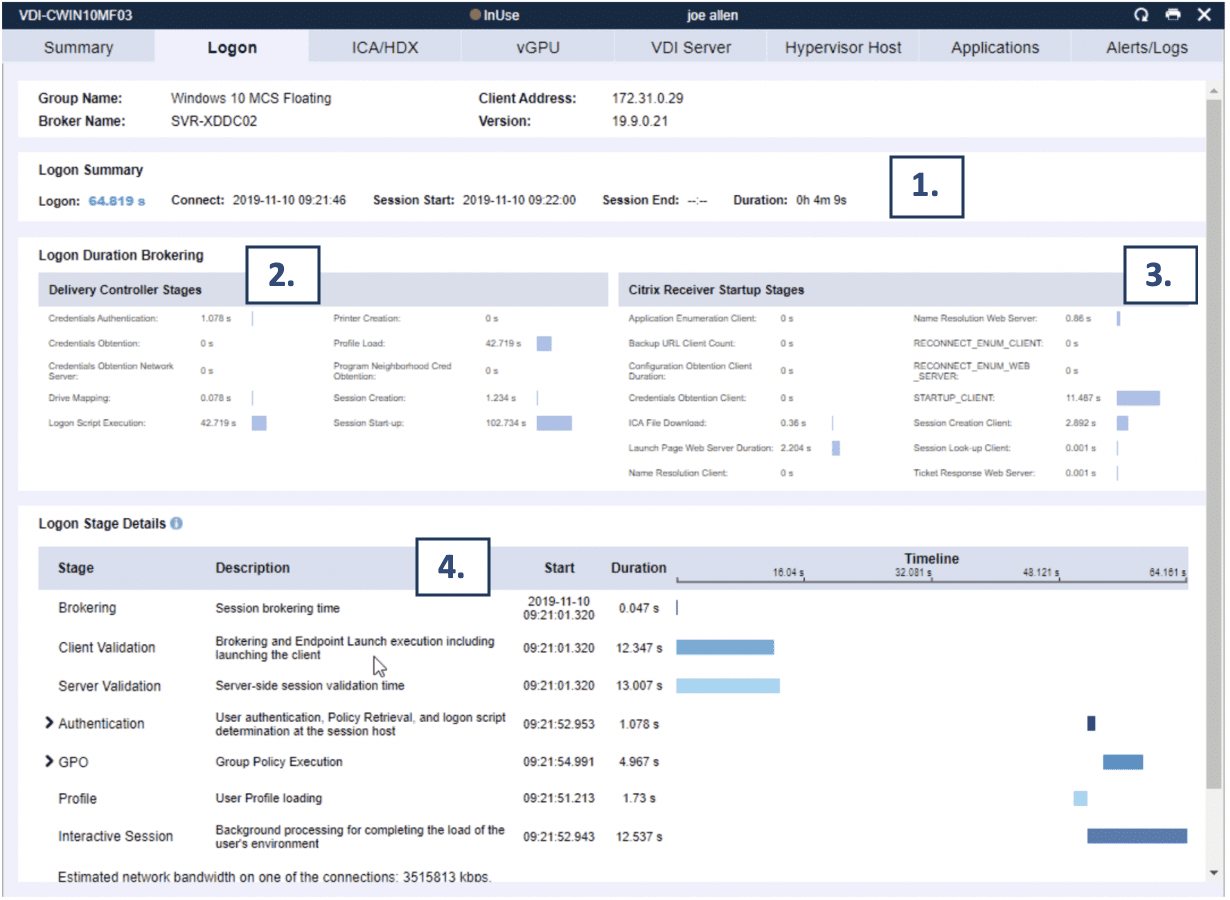
Here is an example of the real time logon duration breakdown screen that Kaleb and his team uses to proactively troubleshoot and remediate slow Citrix logon issues:


(1) The Logon Summary identifies in real-time the actual logon duration time as well as session start, duration, and end time if applicable.

(2) The Delivery Controller Stages identifies where in the delivery controller performance problems maybe manifesting themselves. 

(3) The Citrix Receiver Startup Stages will help identify if there are issues with Receiver that could be impacting performance. 

(4) The Logon Stage Details section of the Logon tab is unique to Goliath Performance Monitor and presents a granular breakdown of the login process by combining all of the logon metrics above in the screen with other information included in the Goliath logs. 

Armed with this real time data, Kaleb and his team were able to isolate the exact stage of the Citrix logon process that was causing the delay. As a result of this drill down they were able to isolate anti-virus software as the root cause. They changed some of the anti-virus settings and logon times improved almost immediately.

With that critical issue solved, they are now able to be more proactive and run cause and effect tests to see how their IT infrastructure changes and how adjustments impact the duration of the different stages of the logon process.

Results

Logon Times Dropped to 20-40 Seconds 

RHC Holdings was able to reduce Citrix XenDesktop 7.6 logon times from 2-5 minutes to 20-40 seconds by using the powerful, purpose built Citrix Logon Duration Breakdown analysis within Goliath Performance Monitor. This functionality, combined with the other key features allow them to proactively manage and monitor end user experience in their Citrix XenApp 7.6 environment.