

Prevents Cerner & Citrix Performance Issues from Impacting Clinicians

Prevents Cerner & Citrix Performance Issues from Impacting Clinicians

How We Did IT

Prevents Cerner & Citrix Performance Issues from Impacting Clinicians


Prevents Cerner & Citrix Performance Issues from Impacting Clinicians

Chris Timbers“Goliath Technologies’ End User Experience Monitoring gives us complete visibility into the end-user experience from the time they logon to Cerner through their use of the application, in real-time, so we stay ahead of performance issues that can impact our users.” – Chris Timbers, CIO at NorthBay Healthcare 
Infrastructure

Cerner Millennium, Citrix

Challenge

This story speaks to unique challenges that NorthBay faced and how they used purpose-built technology with embedded intelligence and automation to be alerted, in real-time, to Cerner Millennium or Citrix logon issues before physicians or clinicians were impacted.

IT Challenges with Cerner Millennium & Citrix that Impact Patient Care

NorthBay IT was faced with the following daily challenges:

Slow logons for Cerner and Citrix: Physicians log on from different locations throughout the hospital and see patients every 20 minutes, so a two-minute delay when trying to access Cerner is too long to wait. Speed of access to these applications is critical to ensuring that time is spent providing healthcare service and not waiting for application sessions to launch.

Delayed identification of Cerner or Citrix performance degradation: Degraded session performance severely impacts the timely delivery of patient care. As a result, it is critical that performance “slowdowns” are identified early, before the ability to deliver services is impacted [Learn more about Goliath Performance Monitor for Hospitals Using Cerner].

Complexity of the Cerner and Citrix Logon Process: The Cerner and Citrix logon process is the primary step to accessing mission-critical applications. It is complex and relies on many components to successfully complete the logon process, making it difficult to troubleshoot without purpose-built technology.

Lack of Visibility: NorthBay healthcare providers primarily utilize the Cerner application via Citrix. This application is hosted by Cerner. NorthBay had visibility into their own infrastructure while Cerner actively monitored application performance in the data center. However, there was no effective end-to-end performance monitoring from the data center to the desktop.

Solution

What Goliath Technologies Provided

After an exhaustive search to identify a solution for NorthBay’s unique visibility challenges, their team elected to deploy Goliath Performance Monitor and Goliath Application Availability Monitor with out-of-the-box functionality to support Citrix and Cerner.

Implementing Goliath Performance Monitor in just the NorthBay environment was not going to be sufficient in providing the end-to-end visibility that they required. However, because Goliath is the only monitoring technology allowed in the Cerner hosted facility, we were able to provide an industry-only fully integrated solution that encompasses their entire application delivery architecture. Goliath Performance Monitor offered the following capabilities to the administrators and support staff at NorthBay:

  • End-to-end visibility that enables them to have performance and availability metrics from the end-users’ perspective at the hospital location. This data can be trended in real-time and historically.
  • Visibility into both on-premise and Cerner-hosted applications and servers.
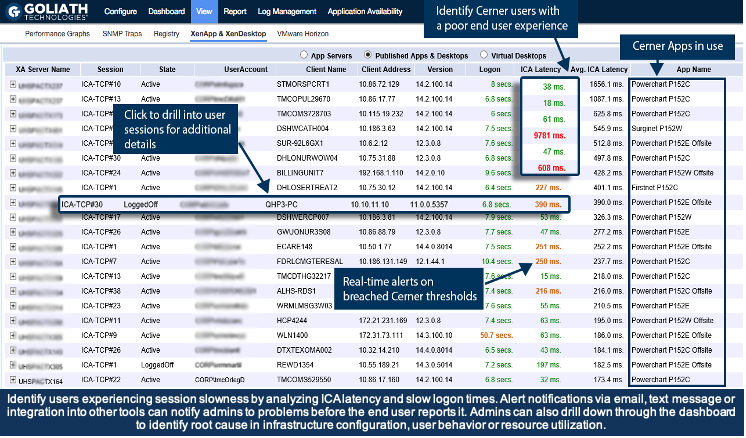
Cerner session display

Results

Once the product was deployed, NorthBay system administrators had true end-to-end visibility with comprehensive monitoring of both Cerner Millennium and Citrix. They received an in-depth view into the entire user workflow, regardless of location. Goliath’s Cerner and Citrix monitoring capabilities, combined with Cerner’s remote hosting technologies and services, provide NorthBay with advanced warning of potential end-user experience issues and evidence of root cause to resolve and prevent future issues.

To increase visibility across the network, NorthBay also wanted to guarantee that clinical applications would launch when physicians and healthcare workers attempted to log on. Healthcare workers see patients about every 20 minutes, so the applications needed to launch immediately to avoid scheduling delays. Goliath Application Availability Monitor was deployed to proactively log on to applications and alert IT administrators of logon failures or slowness before end users were impacted.


Cerner GAAM Screen

The advantage of having the Goliath solution deployed on-premises, where clinical applications are hosted, is that NorthBay now has complete end-to-end visibility that previously could not have been accomplished. In addition, NorthBay can complement the quality monitoring and management that CernerWorks provides in the hosted facility with their own on-site end-user experience monitoring and management.

NorthBay Health logo

ABOUT ORGANIZATION

NorthBay Health is a non-profit healthcare system in Northern California. NorthBay Health is dedicated to providing quality healthcare services to the local communities it serves, with a focus on community health and wellness. They are committed to delivering the highest level of care possible and rely upon Cerner and Citrix to support this objective throughout their health system.

Headquarters location: Fairfield, California
Founded: 1960
Employees: >2500
Industry: Healthcare

Technical Review: Examining Goliath’s Early Warning System for Citrix, VMware, & RDS

Technical Review: Examining Goliath’s Early Warning System for Citrix, VMware, & RDS

Technical Review: Examining Goliath’s Early Warning System for Citrix, VMware, & RDS

The Goliath Application Availability Monitor is an industry-first software that provides organizations of all sizes with an early warning system, alerting IT administrators of access and performance issues with business-critical applications before their end users ever attempt to logon.

IT professionals everywhere can now receive customizable alert notifications and warnings to exact failure points in the workflow for desktop virtualization platforms like Citrix, VMware or RDS. To proactively monitor the availability of Citrix XenApp & Xen Desktop, VMware Horizon View, and Microsoft RDS effectively, the Application Availability Monitor must confirm that the applications will be available and that the entire delivery infrastructure and workflow are executing properly. This is all made possible by the Goliath Virtual User – a small-footprint technology that automates the process of logging on to Citrix/VMware Horizon/RDS to confirm application availability, and that the workflow is operating properly. The Goliath Virtual User is deployed on-premises or remotely (wherever end users are located), automatically logs on like a real user to confirm applications will launch and is configured exactly like a real user with the same permissions within Active Directory.

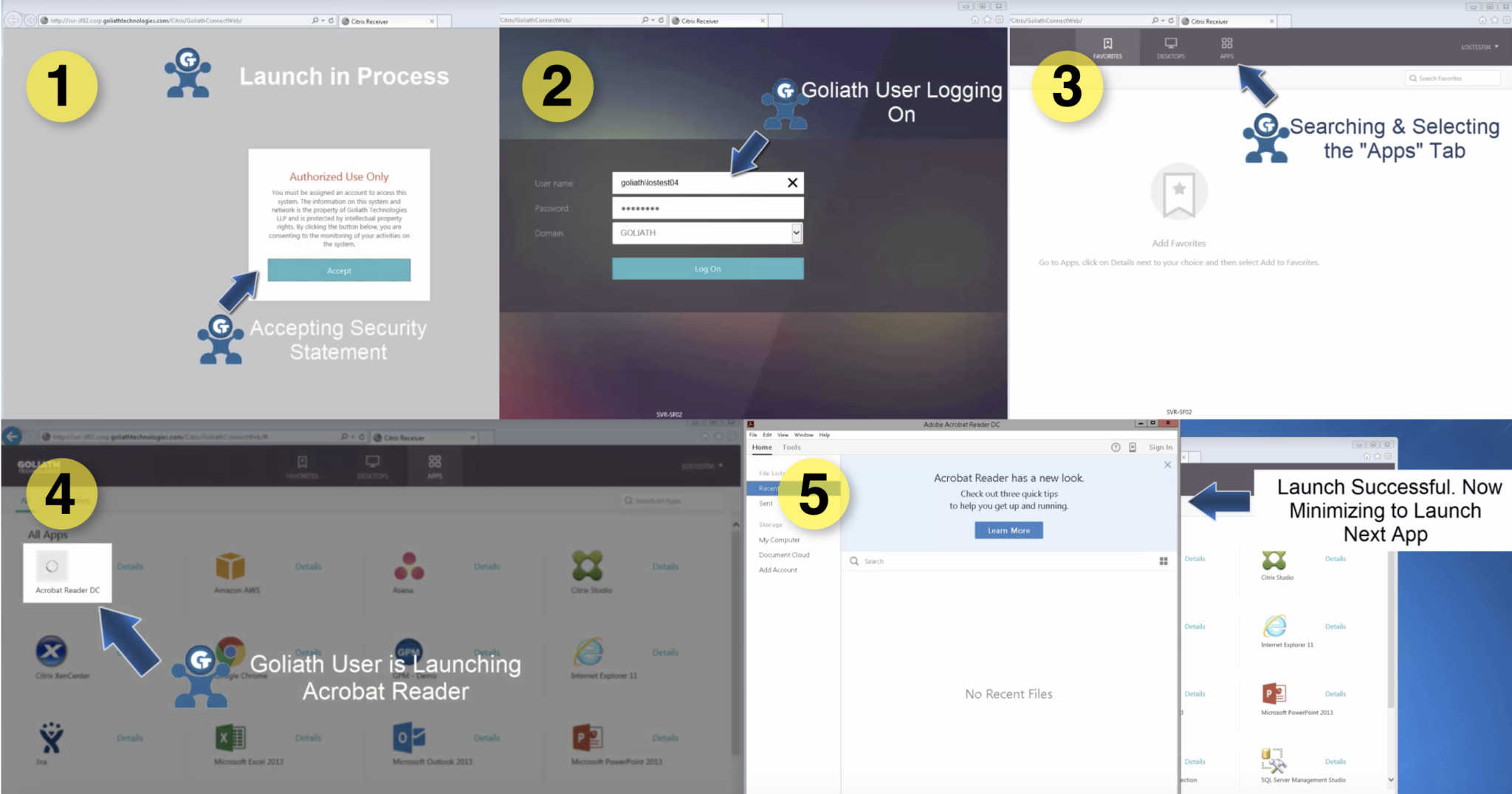
Below is a depiction of the Goliath Virtual User in action – automatically initiating a connection to the application and in doing so confirming that the entire application delivery infrastructure and workflow are working properly to launch applications:

confirm the application delivery infrastructure

Screenshot Analysis

When each phase of the logon process for Citrix XenApp/XenDesktop, VMware Horizon View or Microsoft RDS is executed by the Application Availability Monitor, a screenshot is taken to provide visual evidence and objective proof of logon success or logon failure. This allows IT administrators to see the potential impact that typically elusive items like disclaimers, error messages, secondary authentication, and multiple launch sequences may have on the outcomes of the logon process. This provides objective evidence of the root cause of the logon issue that can be shared with management, vendors, and counterparts to end finger pointing and put permanent fix actions in place.

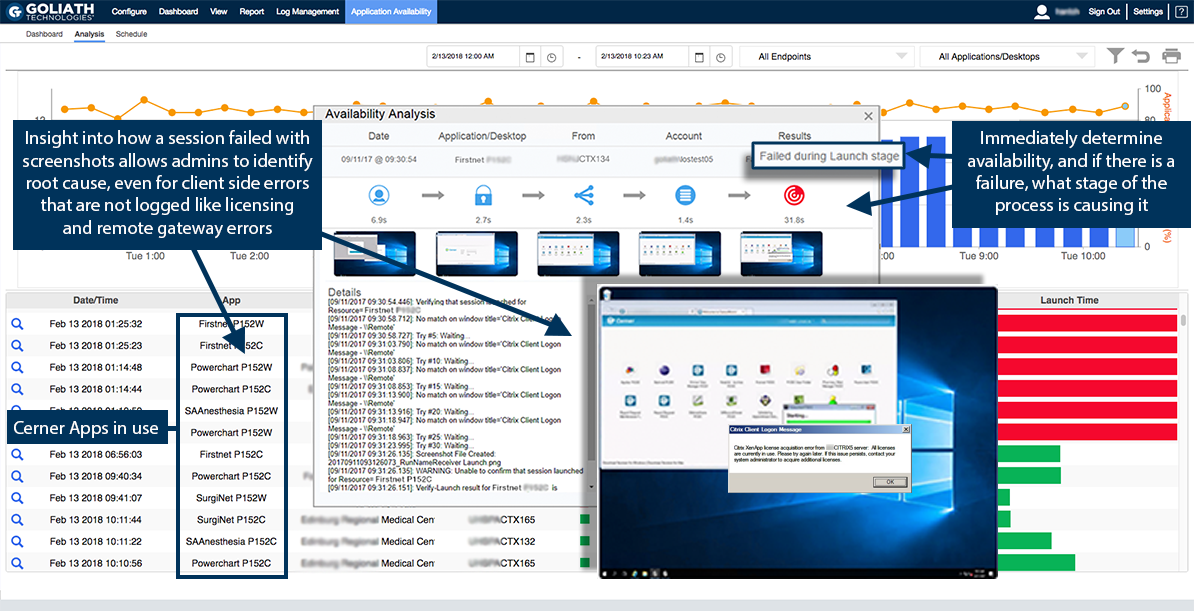
As illustrated below, you can quickly drill down to investigate failures right from the application availability dashboard by clicking on the magnifying glass. In just three steps, you can then see where the logon issues occurred during the logon process and what the issue was:

screenshot analytics

  1. In this case, failure occurred at the launch stage (marked by the ‘1’)
  2. The screenshot (2) proves that the application failed to launch and shows the root cause of the Citrix workflow and application launch failure as being the result of a licensing problem
  3. By navigating to the “Details” or “Analytics” section (3), we can see that the launch failed at the point of verifying that Internet Explorer launched

Scheduling and Automation

Unlike other technologies, the Goliath Application Availability Monitor has built-in logon scheduling functionality. This provides an easy to use, templated approach to constructing launch sequences. This gets you scheduled in minutes – not hours – without the need for custom scripting or recording sequences. The Application Availability Monitor can be scheduled to run automatically and continuously across multiple applications, determining logon performance across different locations and/or different types of users as needed. For example, it can run throughout the day so your IT staff will know immediately if/where there is a problem and at which stage of the process the problem is occurring. Launches can be scheduled to execute, for example, before Doctors or Nurses start their shift so that healthcare IT can be alerted to issues before these end users feel the impact of an application/desktop performance issue.

Below is an example of the scheduling display showing the ease of setup and the frequency of launches throughout the day:

scheduling

scheduling #2

Alerting

Alert notifications can be sent immediately if a validation of the workflow fails by email, SNMP, SYSLOG, or to the customer’s ticketing or enterprise monitoring solution. This allows critical uptime and availability information to be delivered prior to end users knowing there is a problem.

Below is an example of the alert notification feature within the scheduling display:

early warning system altering

Deployment

The Application Availability Monitor can be deployed however you desire. You can deploy it on-premises or in the cloud to identify individual, site or geographic application availability issues. Because the logon attempts can be scheduled and remotely deployed, it can be strategically positioned at the location users sign in from to provide visual proof regarding logon success, logon failure or logon slowness from the user’s unique access location. This way, IT admins can diagnose whether issues are location specific or global in nature, providing the help desk with relevant data regarding availability and performance.

This is an illustration of how a deployment is configured for ten remote locations that logon daily to centralized applications hosted in the internal cloud.

proactive deployment architecture for application availability monitor

Remediation

There is also an integrated remediation engine within the Goliath Application Availability Monitor. The remediation engine is customizable; however, it comes with a large number of prebuilt rules geared toward quick, automated resolution and prevention of further issues or complications. For example, a XenApp server could be set into maintenance mode to prevent future failed logon attempts, or key dependencies on role servers could be checked to automate the investigation process.

Below is a screenshot of the remediation feature within the scheduling display:

remediation

Integration with Goliath Performance Monitoring

The Goliath Application Availability Monitor is also fully integrated into the Goliath Performance Monitor. As a result, IT professionals not only can identify application availability issues but also the root cause. Other technologies called “logon simulators” may be able to simply ‘identify’ a logon failure, but without full integration into an enterprise monitoring product, there is no way of identifying why a performance issue occurred. If applications are being monitored individually, they are being gauged separately and may look fine. It is only when executing the fully integrated launch process by multiple users – including remote access, application/desktop availability and the delivery infrastructure – that you not only trigger issues but see contextual, objective evidence of where the root cause of these issues is actually sourced.

Summary

Goliath’s Application Availability Monitor is the only solution available today that proactively gauges logon performance by exercising the entire delivery infrastructure in concert exactly as an end user does. The Goliath Virtual User can do this over the same network using the same profile permissions/setup as the actual end user. The result is an advanced warning system that accurately reports issues, empowering administrators to identify and resolve end user experience issues related to logon initiation and logon duration before productivity is hindered.

The technology can deliver these capabilities through proactive, real-time threshold-based alerts, the live dashboard, detailed drill-downs/screenshots for logon process analysis and rich historical reporting.

Those features, combined with a fast and simple process for deployment, configuration and operation allow organizations to preemptively identify issues before users are impacted. It also enables them to identify where the issue is occurring, pinpoint the root cause and collaborate toward resolution faster than ever before.

Want to see a personalized demo or access a 30-day free trial of
the Goliath Application Availability Monitor? Contact us today!

techinfo@goliathtechnologies.com  |  (855) 465-4284
Separate Troubleshooting Products from Monitoring Utilities

Separate Troubleshooting Products from Monitoring Utilities

Selecting a Citrix Monitoring Vendor? After doing that often over the last 15 years I Developed These “Litmus Test” Questions To Help

If you have a Citrix environment there will come a time when you have to troubleshoot an issue or two– an obvious understatement. As an IT Administrator and Consultant, I often found my monitoring solution would give me performance metrics but wouldn’t help me troubleshoot the root cause of a performance issue because they just didn’t get enough detail and couldn’t deliver it in a way that allowed me to avoid an issue or objectively prove root cause. Frustrated, I thought of all the missing data, blind spots and failure points and developed a series of 26 questions that would determine, before I purchased a solution, if the vendor could get the specific details and render them in such a way that I would be able to isolate root cause and resolve the issues I had experienced. In other words, IF the vendor WOULD be able to troubleshoot an issue when the time came.

Every monitoring vendor says that they can monitor everything—HDX, Logon Process, End User Experience—but the devil is in the details, and there are a lot of details. So, I tell the vendor to put aside the marketing feature presentation and just tell me if they can do the following 26 things. It is in a Yes/No answer form because I want problems avoided or fixed. No credit for “partial” SLA’s in IT.    

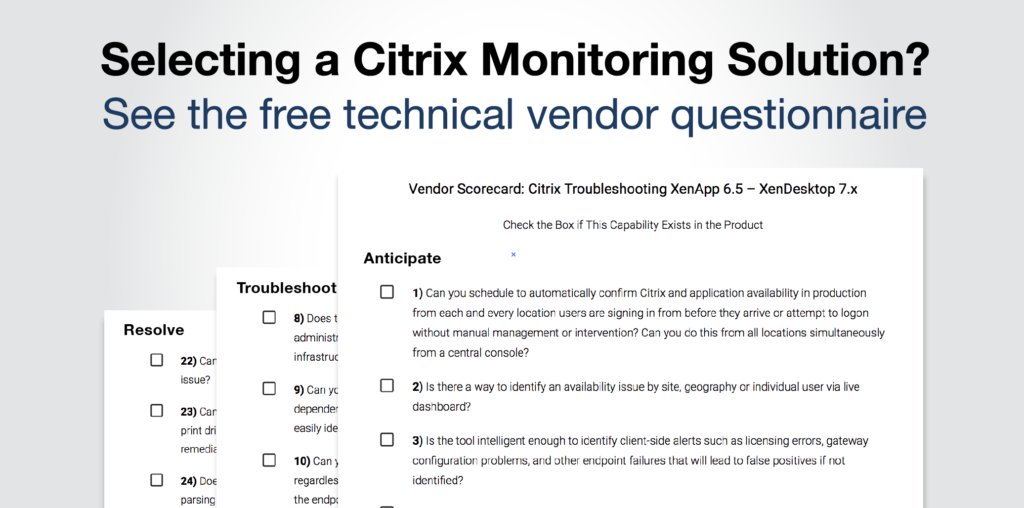
Vendor Scorecard: Citrix Troubleshooting XenApp 6.5 – XenDesktop 7.x

Check the Box if This Capability Exists in the Product
Download the Questions Here

Anticipate

  • 1) Can you schedule to automatically confirm Citrix and application availability in production from each and every location users are signing in from before they arrive or attempt to logon without manual management or intervention? Can you do this from all locations simultaneously from a central console?

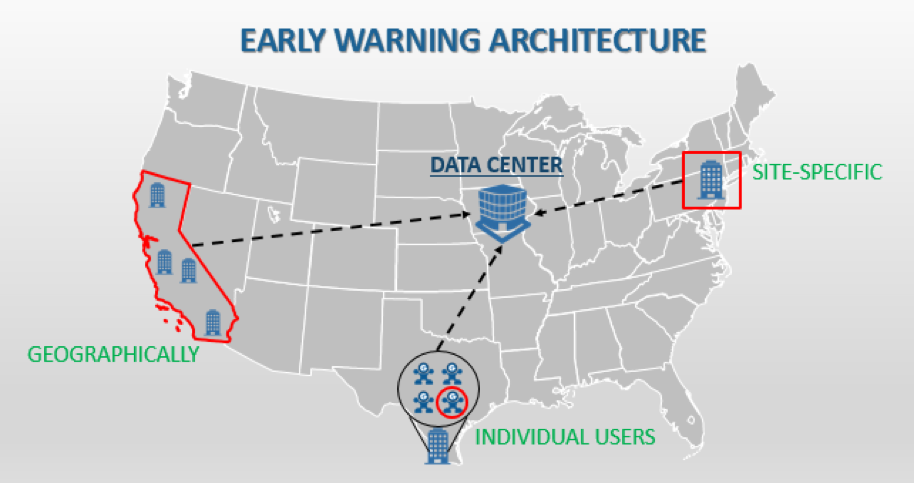
  • 2) Is there a way to identify an availability issue by site, geography or individual user via live dashboard?

  • 3) Is the tool intelligent enough to identify client-side alerts such as licensing errors, gateway configuration problems, and other endpoint failures that will lead to false positives if not identified?

  • 4) Can you trigger alerts based on thresholds, events, and failures, and then execute automated remediation actions to resolve those problems?

  • 5) Does the solution allow for dynamic grouping and policy assignment to ensure that proactive rules are assigned accordingly upon migration (i.e. hybrid cloud)?

  • 6) Can the solution allow me to know when a system level issue will have an upstream impact on user experience from a single dynamic screen?

  • 7) Can the technology monitor and alert on file level changes, including file/folder growth, cut/copy/paste actions and specific file edits?

Troubleshoot

  • 8) Does the technology have the ability to gather data and analytics from the entire stack so an administrator can determine an end user’s experience and trace that back to the underlying infrastructure element impacting it?

  • 9) Can you see your entire Citrix environment in one graphical view that shows the dependencies and relationship between Citrix & supporting IT elements, so at a glance you can easily identify the location or IT element that is experiencing a performance issue?

  • 10) Can you isolate as the root cause of a logon duration issue and identify root cause regardless of where it manifests from? Some example of this include, Citrix Receiver startup on the endpoint, waiting for session host readiness, policy execution of the specific policy, DNS resolution during the ICA/HDX connection creation, or any of the other 33+ stages?

  • 11) Can you drill into session logon to know how long the domain controller takes to obtain GPOs and determine if they are applicable?

  • 12) Can you troubleshoot the root cause of random consistent slowness and isolate it as an unreliable Wi-Fi connection or available connection speed to the endpoint for Citrix?

  • 13) When troubleshooting can the technology correlate slow ICA Round Trip Time directly to storage performance on a specific datastore, or hypervisor host CPU Ready issues that the session host resides on?

  • 14) Can you analyze and compare logon, connection, and session performance for both on premise and/or cloud workloads to identify and troubleshoot end user experience issues?

  • 15) Does the solution support rapid deployment for environments where cloud bursting is leveraged for temporarily increasing available compute resources?

  • 16) Can the technology provide visibility into ICA Round Trip Time, ICA Latency, Network Latency and session bandwidth available? Can it help to identify the root cause of session slowness as either the network connection, the underlying systems infrastructure performance, or application performance?

  • 17) Does the technology provide me with visibility into user activity via ICA channels and application usage statistics? For example, does it allow me to correlate high Thinwire bandwidth utilization directly to the user watching YouTube from Chrome in session?

  • 18) Can performance counter data from monitored resources be graphically presented, historically trended and analyzed for root cause analyses of performance related issues?

  • 19) Can your solution generate a report of all user’s sessions from the last 6 months? Can it identify if the sessions were active vs idle?

  • 20) Does the technology allow for the visibility to troubelshoot down to the endpoint? This includes performance monitoring, alerting and event log analysis.

  • 21) Can you furnish me with at least two references that will speak to how they used your product to isolate root cause and troubleshoot issues or avoid them completely?

Resolve

  • 22) Can you generate reports to prove that an issue is an infrastructure, resource, or Citrix issue?

  • 23) Can you generate root cause reports that show faults or errors causing application failures, print driver problems, user GPO faults, and configuration problems such that strategic, targeted remediation activities can be initiated?

  • 24) Does the solution provide a comprehensive log (syslog and event log) correlation engine for parsing and analyzing log data to find root-cause?

  • 25) Can you put alert resolution instructions or knowledge base in the product so that level 1 support, when an alert is triggered, can resolve issues usually solved by level 3?

  • 26) Can you implement self-healing, auto remediation actions without customization? Such as restarting a service, killing a process, running a script or application?

Total Score         /26         Vendor Name:

Using these questions and this overall “paper evaluation” process allowed me to make the best recommendations for my clients during my time as a Citrix consultant. The reason for this is that the key is to ensure that vendors are questioned deeply about the way the product will assist in troubleshooting and resolving Citrix end user experience and/or performance issues. This is especially true today as there are a multitude of products on the market with the ability to address XenApp and XenDesktop monitoring requirements.

I know the reference question is old school but I would really suggest you speak with customers who used a vendor’s technology to troubleshoot an issue. As a matter of fact the more references the better, and three is generally the magic number. When you talk to the reference, find out what their specific issue was and how they used the product to determine root cause. Also ask about the support they received with deploying and using the product. Quality of support is as important as functionality in the grand scheme of things. The technical people you work with should be experts in the product and the platforms that you are using the product to monitor.

User Story: Citrix Troubleshooting Assessment Reduces Support Tickets by 25% in 30 days

User Story: Citrix Troubleshooting Assessment Reduces Support Tickets by 25% in 30 days

Citrix Printing Issues Troubleshooting Assessment Reduces Support Tickets by 25%

The Business Challenge: A customer was experiencing persistent Citrix XenApp and XenDesktop performance issues related to printing and the logon process. After trying to troubleshoot the issues on their own, the root cause could not be determined without the assistance of Goliath Technologies.

The Solution: To start, the client requested a Citrix troubleshooting engagement to investigate the root cause of persistent performance issues. Before seeing the observations and reports that Goliath was able to provide, it’s important to understand the customer’s infrastructure elements at the initial stage of the Citrix Troubleshooting Assessment. Goliath’s Citrix Monitoring solution was deployed to the following infrastructure elements:

After the implementation, out-of-the-box rules and dashboards were automatically applied to the inventory. A follow-on configuration effort was then initiated to deploy agents and build custom rules and reports to identify printing and profile issues; it was essential to deploy agents to the delivery infrastructure in order to achieve end-to-end visibility and determine the root cause. After collecting data for two weeks, the Goliath Support team came back with observations related to:

  • Printing Issues
  • Profile Problems
  • Other Citrix Troubleshooting findings

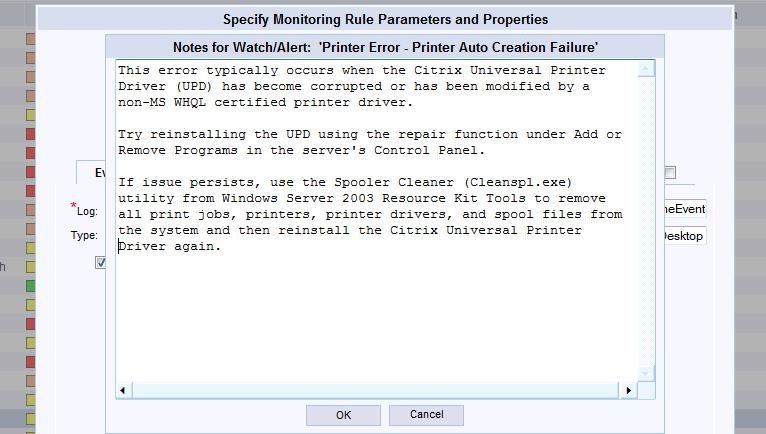
Using Out-of-the-Box Monitoring Rules, like the one pictured below, were useful to identifying and preventing these Printing Issues from occurring in the future. Having the ability to enter Notes into the specific rule allowed the Help Desk and other IT Administrators to collaborate on issues and troubleshoot issues more effectively and efficiently.

After identifying the specific Printing issues, Profile problems appeared to stem from underlying registry and security issues, outlined below:

Finally, as the Goliath Support team worked through the issues and problems related to Printing and Profiles, other Citrix Troubleshooting findings were documented.

The Summary: By completing the Citrix troubleshooting assessment and implementing the recommended fix actions provided by Goliath Performance Monitor and Goliath Application Availability Monitor, Citrix support tickets decreased by 25% within 30 days.

Goliath vs. Citrix Comparison

About the Author: 

The team members collaborated to bring together this blog post by calling on their past Customer Experiences and Expert Knowledge of Citrix Troubleshooting. Beyond writing technical documents this team supports Goliath Customers and provides product feature and function guidance to development.

Questions When Evaluating Monitoring & Troubleshooting Software

Questions When Evaluating Monitoring & Troubleshooting Software

Questions When Evaluating Production-Ready Monitoring & Troubleshooting Software Solutions

There are many IT Operations products in the market that focus on monitoring and management. The key difference between Goliath Technologies and other products is our focus on end user experience with Citrix and healthcare. Though there are good products that have some functionality for Citrix, there isn’t another solution that offers the end-to-end capability to anticipate, troubleshoot, resolve, and prevent end user experience issues with Citrix. Pertaining to healthcare, there isn’t another company that has purpose-built modules to support major EMR/EHR applications and correlate the application and system performance data.

The single most important criteria that determines the “best product” is the customers’ specific requirements. We cannot say that the major differentiators above are important for all customers. For those who have a desire to test the “production-readiness” of a product, the Goliath Technical Support Team have put together a summary of questions, asked by our customers, to troubleshoot issues and proactively manage their Citrix and EMR/EHR environments.

What is important to note is that through our customers’ unique experiences, our support team has acknowledged that the questions posed typically stem from three key areas (Pictured below). All attribute to one common goal: a positive End User Experience.

Here are some of the questions that can empower Citrix administrators to determine if a vendor’s ability to anticipate, troubleshoot, resolve, and prevent Citrix and EMR/EHR issues satisfy their unique demands.

Logon Initiation

Anticipate

  1. Can logon and applications be tested with simulations using real ICA sessions?
  2. Can logon, session and application or desktop availability issues be identified and resolved before end users are aware?

Troubleshoot

  1. Can you identify if logon issues are geographically-based, site-specific, or user-based, in advance?
  2. Can you drill down into failed logons and identify exactly what part of the logon process failed and when it failed?

Resolve

  1. Are detailed reports available on the success and failure rate of simulated logons?
  2. Is it possible to take remediation when issues are identified with simulated and actual real user logons?

Logon Process

Anticipate

  1. Can preemptive rules and alerts be configured based on logon duration thresholds?
  2. Can logon simulations be used to identify slow logons before users are impacted?

Troubleshoot

  1. Can you identify if a slow logon was a result of a delay related to the starting up of a virtual desktop?
  2. Can the technology identify if the ICA file download is slow?
  3. Will you know when the session launch page is loading slowly?
  4. Are you able to identify when logon is slow because of an overloaded XML broker?
  5. Can you identify that client side validation and session brokering is slow?
  6. Is it possible to drill into session logon to know how long Active Directory takes to obtain GPOs and determine if they are applicable?
  7. Can the technology identify how long it takes to process Citrix policies vs Windows Policies?
  8. Is there the capability to identify if a corrupt print driver is causing a delay in the logon process?
  9. Can the technology natively break down the following GPO types and the length of time it takes to process each?
    1. Registry extensions
    2. Folder redirection extensions
    3. Scripting extensions
    4. Folder extensions
    5. Folder Options extensions
    6. Group Policy environment extensions
    7. Local user group extensions
    8. Drive map extensions
    9. Scheduled task extensions
    10. Files extensions
    11. Ini files extensions
    12. Search extensions
    13. Shortcut extensions
    14. IE zone mapping extensions
    15. IE settings extensions
    16. Citrix Profile Management Extensions
  1. Is there a fully detailed breakdown of the Logon Duration States, Citrix Receiver Startup Stages, Brokering Stages, and Session Launch Stages in a single screen?
  2. Can the technology provide data to correlate each state properly and understand the true duration of logon?
  3. Are there detailed historical reports on every session, its logon duration, and how long each of the specific components took to complete?
  4. Can logon stages be correlated with event logs to identify root cause?

Resolve

  1. Is it possible to configure remediation actions to automate the resolution of logon duration issues?
  2. Can ICA session simulations be conducted to test and validate configuration improvements made to the logon process?
  3. Are reports available to baseline and trend detailed logon duration metrics over time?

Session Performance

Anticipate

  1. Are preemptive threshold based alerts available on the following session performance issues
    1. ICA Latency
    2. ICA RTT
    3. Network Latency
    4. Active Sessions
    5. Available VDI
    6. XenApp Session Host Server Load
    7. Active XenApp Session Count
    8. Active XenApp User Count

Troubleshoot

  1. Is correlation possible with ICA Round Trip Time to ICA latency and Network Latency?
  2. Can you identify that network jitter is causing a client side issue with remote users?
  3. The technology correlate ICA latency to network jitter?
  4. Can the technology provide visibility into all the ICA channel, and application usage to identify issues such as a user session is slow because they are watching video in session consuming all available bandwidth?
  5. Is it possible identify that a print job outside of the ICA session is cause poor session performance within the session?
  6. Does the technology provide reporting to see that ICA Latency increases every day at the same time over a period of one year?
  7. Is there a detailed analysis of each of the 50 ICA channels and how they impact session performance?
  8. Can you provide detailed historical reports on ICA Round Trip Time and how it correlates to problems with the underlying infrastructure?
  9. Can you drill down to correlate ICA round trip time with high storage latency to pinpoint user session performance issues?
  10. Is there robust event log management available that allows you to archive all event logs from all monitored virtual/physical Windows machines including PVS or MCS provisioned session hosts?
  11. Can all event logs be viewed and analyzed including Application and Services Logs?

Resolve

  1. Can remediation actions be taken to automate resolution of issues such as print service failures?
  2. Are reports available to trend session performance overtime to validate performance and issue resolution actions?
  3. Does the technology provide an inbuilt knowledge base for IT staff to share specific resolution details directly in the alerts?

There is no disputing the importance of Logon Initiation, the Logon Process, and Session Performance, but monitoring and troubleshooting software solutions must also take into account other factors. As our Support Team has learned, there is more to a positive end user experience then the three pillars mentioned above. Which is why questions related to the Citrix NetScaler and Healthcare in general must be taken into consideration when evaluating different products in the marketplace.

NetScaler

Anticipate

  1. Can alerts be generated preemptively for poor ICA session performance metrics such as RTT and network jitter?
  2. Are alerts available to notify you of an HA failover?

Troubleshoot

  1. Can you to correlate ICA roundtrip time with Network Jitter?
  2. Is it possible to identify if proxied ICA session performance issues are client side or server side?
  3. Can the technology provide you with a single console for managing the entire NetScaler deployment?
  4. Is there visibility into the following NetScaler metrics?
    1. Activity by application/VIP
    2. Transaction response time
    3. User IP
    4. Transactions per NetScaler
    5. Transaction Load Time
    6. Page Latency
    7. Pages Viewed
    8. Faults by Error Codes
  5. Is there unrestricted historical reporting on NetScaler usage and trends?

Resolve

  1. Is the capability to share analytical data live via URL with collaborators to resolve issues?
  2. Is there integration with other monitoring technologies via Syslog or CSV?

Healthcare

Anticipate

  1. Are there purpose built modules for EMR/EHR applications available in the technology?
  2. Does the technology have specific performance graphs, rules and alerts available for MEDITECH

3.Is a module available for monitoring and preemptive based alerting for Allscripts?

4. Can simulations be conducted to ensure that EMR/EHR applications are available before health care workers           access the environment?

Troubleshoot

  1. Is the technology able to be deployed to monitor XenApp servers in the Cerner Datacenter?
  2. Can you have complete visibility from the user’s endpoint into a hosted EMR/EHR application to identify if root cause is resulting from the provider or from your infrastructure?
  3. Can all event logs be archived, analyzed and alerting on from the EMR/EHR platform for root cause analysis?
  4. Is there visibility to troubleshoot EMR/EHR platform specific faults and performance issues?

Resolve

  1. Does the technology have detailed reporting for collaboration with EMR/EHR vendors?
  2. Can remediation actions be taken to automate the resolution of issues?

Summary

What has become clear is IT Operations products in the market focus on monitoring and management. When evaluating solutions that offer end-to-end capabilities, it’s important to ask the right questions. As our Goliath Support Team has noticed, each customer has distinct IT requirements and unique challenges that must be addressed. A positive End User Experience is the heart of all IT Operations products. The first question that should be asked is which product can anticipate, troubleshoot, resolve and prevent end user experience issues with Citrix and healthcare? Goliath Technologies has solutions that are purpose-built and product-ready to not only answer questions, but satisfy those requirements and challenges and ensure a positive end user experience for all.