Prevent EHR End User Experience Issues Before They Increase Costs

Prevent EHR End User Experience Issues Before They Increase Costs

Prevent EHR End User Experience Issues Before They Increase Costs – and Stress

Without a doubt, the digitization of patient health records and the rapid growth of software applications and systems supporting patient care and administration have changed the way medical care is delivered. As physicians, hospitals, and health systems struggle to see more patients, deliver better care – and comply with an ever-increasing number of other demands of their time – it’s critical that the applications and systems they rely on are available and perform as expected. When electronic health record (EHR) end user experience issues arise with these various technologies, downtime occurs, meaningful use objectives become more difficult to achieve and end users become susceptible to burnout.

Common systems-related issues that negatively impact end user experience include initiating logon to EHR systems and modules, issues with the logon process itself and sluggish session performance that slows down important end user activities.

It’s not hard to understand that proactively anticipating, troubleshooting and preventing end user experience can go a long way toward ensuring the productivity of healthcare professionals. In today’s fast-paced healthcare care environment, any difficulty and delay accessing or using mission critical applications creates stress and decreases the productivity of healthcare professionals.

A Common Challenge for Today’s Medical Worker: You’re Ready to Work but Your Technology Isn’t

Let’s take a look at how a poor end user experience impacts the typical day in the life of a physician – Dr. Smart – a high-cost medical professional responsible for providing care to patients while simultaneously being bombarded by administrative demands.

7:00 a.m. – Hospital Rounds. Dr. Smart arrives at Local Community Hospital and attempts to log into their patient registration module to print a list of patients she needs to see. Unfortunately, Dr. Smart encounters a problem logging on to the facility’s patient registration module. What typically takes less than a minute involves quite a bit more time.  Fifteen minutes later, Dr. Smart begins her rounds and sees her first patient. The doctor just lost an average of three minutes per patient – and she hasn’t even seen the first one!

While examining her second patient, Dr. Smart discovers she’s unable to access the hospital’s electronic health record imaging order entry module. All she receives from the system is some cryptic system error message that reminds her of some of the incomprehensible prescriptions handwritten by a few of her fellow physicians prior to the advent of electronic RX applications. How great would it be if somehow that error message was automatically captured and shared with someone who could decipher it and act on it?

After spending 10 minutes on the phone with the hospital’s help desk, they congratulate Dr. Smart for discovering a new issue with the hospital’s imaging order entry module. Pleased to be of help but frustrated nonetheless, she writes the imaging order by hand and continues her rounds, jotting down information she knows she’ll have to rekey later in the day.

It’s 9:00 a.m. and Dr. Smart Has Already Lost an Hour of Her Time – Three Hours into Her Day

9:00 a.m. – She’s 30 minutes late meeting with her patients at her outpatient clinic; the waiting room seems more crowded than usual. For the next four hours, Dr. Smart sees eight patients, bouncing between six different applications she needs to provide care to her patients. These applications include:

  1. Her clinic’s EHR system (Allscripts Professional EHR™ hosted by a 3rd party)
  2. Her clinic’s on-premises practice management system
  3. The Local Community Hospital’s EHR to access radiology reports (Epic’s Community Connect™ EHR)
  4. Two different Laboratory Information Management Systems (LIMS)
  5. A new telemedicine application hosted by a 3rd party
  6. The EHR at nearby Level II Trauma facility (Cerner CommunityWorks™ EHR)

Application Access & Performance Issues Compound Throughout the Day

In the four-hours since her day started, Dr. Smart logs on, off and switches between these six different systems so many times she’s lost count. But she definitely remembers the types of issues she encountered along the way:

  1. Unable to access Local Community Hospital’s EHR to check on some radiology reports (Logon Initiation)
  2. A 10-minute interruption while her clinic’s power user contacted the Local Community Hospital’s regarding her inability to access certain patient records (Logon Process)
  3. About a dozen 1-2 minute delays she believes is related to her clinic’s Allscripts EHR. (Session Performance)

Software Issues in the Second Half of Dr. Smart’s Day – It’s Déjà vu All Over Again

Let’s see how the remainder of Dr. Smart’s day proceeds:

12:00 p.m. (Lunch) – Dr. Smart grabs a protein bar and a carton of milk from a vending machine in the cafeteria. She’s going to skip lunch today to help make up for time lost earlier. She’s a strong person and loves her role in helping to care for her patients.

12:15 – 5:00 p.m. – Pretty much a longer version of the first five hours of the day.

While the access issues encountered in the morning didn’t reoccur at the Dr. Smart’s clinic in the afternoon, Dr. Smart noticed several periods of extreme slowness when using the practice management system (hosted by a 3rd party). An inquiry by the clinic’s administrator to the vendor hosting the PMS resulted in nothing more than a claim that “everything’s running fine on our end.”

Hospitals & Health Systems Need Clear, Actionable Information on System Performance Issues

Dr. Smart wondered: ‘are the slowness and disconnects I experience random or is there a pattern of performance issues with our PMS? Seemingly on the same days and times week after week?’ If only the IT staff responsible for supporting these systems could pinpoint the exact root cause of these issues? Or, even better, proactively identify and resolve issues before doctors and other users are impacted? How would patient care improve and how much money could be saved?

5:00 p.m. – 9:00 p.m. – An Evening at Home Catching Up Using Remote Access

Remember the end user experience issues Dr. Smart had to deal with while doing her rounds at Local Community Hospital? As well as those imaging orders that she was unable to enter at her clinic?  How about all the time she lost due to poor application response times? Well, those tasks had to be completed somewhere by someone, and that would be by Dr. Smart at her home office in the evening. Hopefully, the applications she has to access remotely are available and operating faster than earlier in the day.

5 Minutes Here, 10 Minutes There – Pretty Soon Patient Care is Delayed & Costs Increase

In her ten-hour day providing patient care at her clinic and the Local Community Hospital, Dr. Smart calculates that she lost over two hours of her valuable time just trying to access key software resources and perform the day-to-day duties of her job. And these delays associated with logging in, the logon process and session performance were not unique to her this day only but often occur in similar form nearly every day of the week.

All of these preventable interruptions were related to common technology issues that might easily be addressed by low-cost end user experience monitoring and management products currently available.

Identifying EHR End User Experience Issues Protects Hospital Software Investments

The good news for Dr. Smart and other healthcare professionals is that some hospitals, health systems and the information technology (IT) staff supporting them are starting to take a proactive approach toward identifying end user experience issues before they occur.

Some healthcare organizations are developing software utilities in-house but that approach is limited, must be maintained as end-user systems and applications change, and consumes critical IT resources. Other hospitals and health systems are using applications and features tightly bundled with their server, application and desktop virtualization and networking software – like Citrix and/or VMware. But these solutions are limited to their specific product sets and are not specifically designed for the healthcare applications that end-users like Dr. Smart use throughout their day.

Flexible, Cost-Effective Commercial Performance Monitoring Software

The Goliath performance monitoring and troubleshooting suite of tools provide everything hospitals and health systems need to ensure that the mission critical applications and systems needed by healthcare professionals like Dr. Smart to perform their life-saving work are available on a consistent basis.

  1. Automatically confirm that EHR applications and IT infrastructure are available, and if they are not, use embedded intelligence and automation to alert IT so they can fix the issue before physicians and health care workers are impacted.
  2. Anticipate, troubleshoot, and prevent end user experience issues where most users experience issues: logon initiation, logon processing, and system performance.
  3. Enable IT pros to quickly remediate problems and isolate root cause to reduce professional pain.
  4. Have broad and deep visibility to issues across multiple platforms, regardless of which IT infrastructure and applications are being used and where end users are located.
  5. Provide objective evidence through historical reports and trending analysis to allow permanent fix actions to be implemented to prevent issues in the future.
  6. Are purpose-built for major EMR/EHR applications including Cerner, Allscripts, MEDITECH, and Epic.

Moreover, the Goliath performance monitoring and troubleshooting suite frees hospital IT staff from having to build and maintain custom software utilities while expanding features and functionality beyond the limited focus of specific Desktop Virtualization vendors like Citrix and VMWare. Most importantly, a positive end user experience for people like Dr. Smart is preserved and the large investment hospitals and health systems have made in their mission-critical systems is enhanced.

 
Browse EHR Monitoring & Troubleshooting Webinars
How to Accurately Troubleshoot Citrix ICA Network and Connectivity Related Issues

How to Accurately Troubleshoot Citrix ICA Network and Connectivity Related Issues

How to Accurately Troubleshoot Citrix ICA Network and Connectivity Related Issues

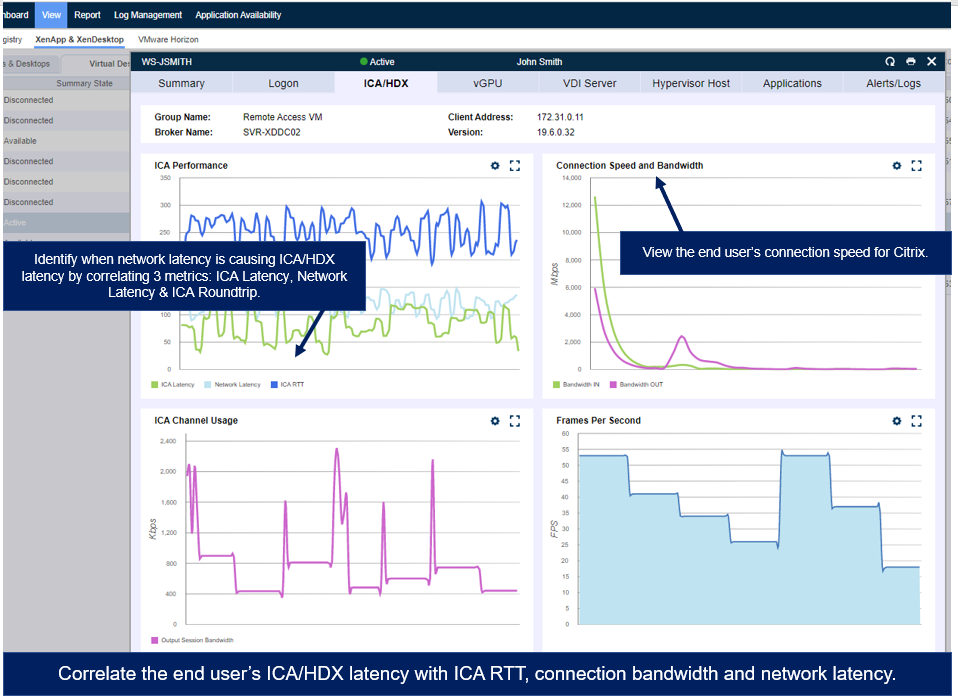
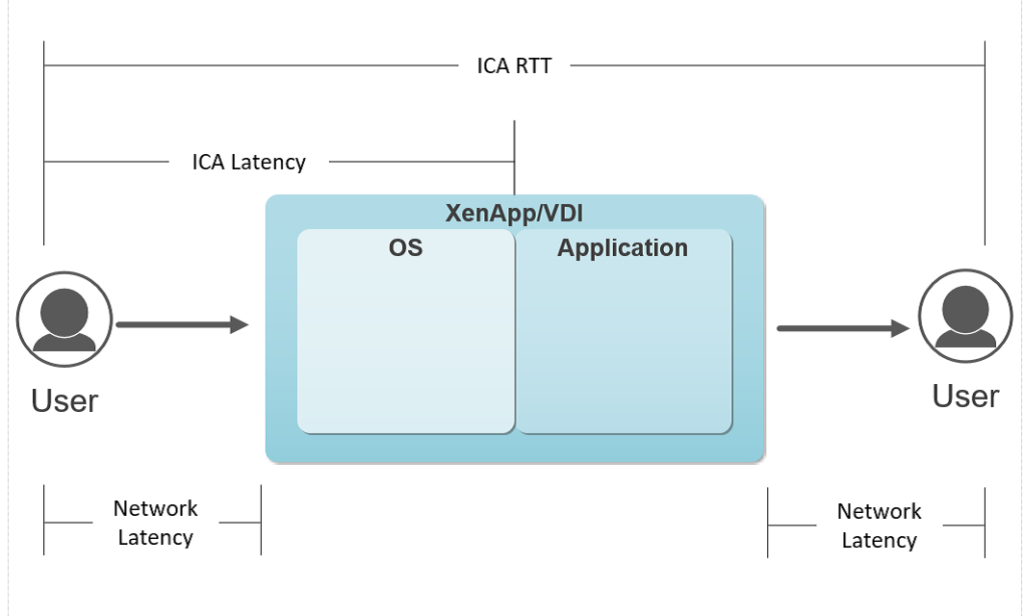
When troubleshooting Citrix end user experience issues, problems are often rooted in the bandwidth users have available for Citrix connectivity or Citrix connection latency. However, these conditions are not visible from a pure network monitoring perspective, as network monitoring tools can only leverage Netflow, AppFlow Analysis, SNMP, SYSLOG or ICMP monitoring. The key data necessary to gain visibility to a user’s session is found in the Citrix ICA Protocol and requires protocol integration from the VDA to access the necessary metrics on a user basis – not a network device, route, or trunk. This user-based approach to tracing their network performance enables Goliath to isolate the conditions affecting one or many users with sessions traversing the same network where some are experiencing a problem and others are not. These issues can be accurately identified, and connectivity constraints more accurately determined, by looking at the following metrics: User Connection Speed, Network Latency (from the Citrix ICA Channel), ICA RTT, and ICA Latency.

Xenapp / VDI Graphic

Figure 1: ICA Latency, ICA RTT and ICA Network Latency

 These metrics are valuable because they take the entire stack – user connectivity, network performance, VDA performance, hosting environment and user behavior into consideration for more accurate troubleshooting.

When you use the product for troubleshooting consider the following:

  • When troubleshooting slowness, the primary question you need to answer is whether the slowness is due to a network/connectivity issue or a resource issue. The quickest way to make that determination is by reviewing the user’s Network Latency, Citrix ICA RTT, and Connection Speed.
  • The network latency we show here is not your common ICMP/Ping based network latency, but rather a measurement through a unique integration into Citrix ICA protocol that no one else can show you. Because of that we can measure the true network latency in real-time, which is the foundation for ICA performance. If network latency is persistently high, your users are not going to have a better Citrix ICA RTT or ICA Latency than network latency allows, resulting in poor end-user experience.
  • Additionally, the connection speed is a measurement of how much bandwidth your end user has on their endpoint for Citrix. Here’s why that’s important: If your user is on a laptop, Citrix must share bandwidth with Windows, other applications, windows updates, etc. and does not get a complete share to the full bandwidth available to the endpoint. If your users are on a thin client or mobile device, this can be even more problematic, and we have even seen where some thin clients end up on WiFi during upgrades and rollouts instead of the wired connection as expected.
  • So, by looking at the Network Latency and Connection speed we can determine if the user’s connectivity is the source of problems. High Network Latency points to route and connection performance issues, and low connection speed indicates network connectivity/wan issues which are going to impact the user’s experience.
  • If Network Latency and Connection Speed are fine then the Network can be eliminated from the equation, and we can focus on resource availability

If a user’s Citrix ICA RTT is high that allows us to quickly identify if there are enough resources for the application and user activity, or the session host is able to deliver the responsiveness for the user to have a good experience. If the user is experiencing slowness and it does not manifest in Citrix ICA RTT, the problem is most likely lower in the stack in the host or storage architecture.

Goliath ICA Latency Monitoring

When troubleshooting network and connectivity related issues the information necessary is all contained under the View > XenApp & XenDesktop Session Display.

Goliath Performance Monitor is the only product that can open up the ICA protocol in this way to give you the visibility and the accurate metrics to determine slowness, and the combination of all of the above metrics are required to achieve that determination.


Click here to learn more about our Citrix ICA capabilities or download the guide below.

a technical guide for understanding and troubleshooting citrix ICA HDX
Simplify Troubleshooting your IT Healthcare Virtual Architecture with Goliath Technologies

Simplify Troubleshooting your IT Healthcare Virtual Architecture with Goliath Technologies

Simplify Troubleshooting your IT Healthcare Virtual Architecture with Goliath Technologies

Virtual architecture is complex to standup and deploy, and when it comes to the ability of your support team to fix an issue it needs to be done fast and when possible – proactively.  This is extremely important from the business user perspective in all organizations, but even more importantly in healthcare where there is another person’s health and possibly even their life on the line.   With this level of criticality, It becomes imperative to simplify troubleshooting your IT Healthcare virtual architecture, and the Electronic Medical Record (EMR) applications such as Epic and Cerner to name a couple.  Let’s dive deeper into this topic by first discussing a real-world problem scenario, then do some discovery around how users will work around the system if they do not get what they need, and then we will do some discovery around how purpose-built monitoring can ensure the uptime of your EMR deployment.

Getting the right care – let’s start with the Emergency Room

The last thing your Information Technology team wants to hear is that the healthcare provider cannot do their patient charting, medicine administration, or place an order for a chest x-ray for a critical patient in the emergency room due to slow performance when they are trying to login to the system.  In all cases, the emergency room will come with the need for treating their patients quickly.  Waiting is not an option.

I have personally experienced this first hand when I brought one of my children to the emergency room of a medical facility that used an EMR application.  My son ended up with a cut that required stitches, and while it’s been many years now, this scenario showcases how a slow EMR application can impact the healthcare providers ability to do their job efficiently.  The emergency room care provider was very professional, but the login to the system was moving very slowly.  So much that they were standing there with the pain medication in hand for my child, but couldn’t move forward until the system let them in. Thankfully in this case it worked out ok, but what would happen in a more critical situation?

According to a survey of 50 healthcare institutions by the International Journal of Medical Informatics (Sittig DF, et al. Int J Med Inform. 2014;83:797-804, http://bit.ly/2xSHOAy), 96% of responders reported at least one unplanned downtime in the three years prior to the survey. More alarming, 70% had at least one unplanned downtime that lasted more than eight hours.  This survey highlights that my ER experience was not an isolated incident, and that we need both awareness and action to ensure that the technology IT departments provide is stable and meeting the needs of the enterprise.

It is the IT departments responsibility to know what is going on even before the user (healthcare provider) reports a problem.  Ensuring that all patients are cared for in an expedited manner when needed.  Having a monitoring solution that can report logon initiation, logon duration, and session performance is significant. It’s also important that the data is accurate, meaningful, and actionable.  This ensures that the EMR application can maintain and/or resume the performance it needs to successfully treat patients.

Working around the System

To the IT professional or business leader there is nothing more disheartening than to learn that their healthcare professionals have stopped reporting problems because they just gave up on the issues, and/or that they found a way around the issue. The risk with both examples is high, because hospitals need to deploy systems that ensure security and HIPAA compliance.  IT Professionals also strive to ensure their systems run well, and if they don’t know something is wrong they cannot fix it.  That’s where a great monitoring tool can come in.  Even if your users aren’t reporting the problems, a monitoring tool can proactively let the IT support team know they have issues to resolve.  The downstream impact of this is that the patients seen by the hospital will get the healthcare they deserve.

Thoughts for consideration

Healthcare organizations spend hundreds of millions of dollars ensuring that they have selected and then implemented the right EMR solution for their patient care.  The teams that deploy and support these systems must ensure that once the system is in use that they can keep their healthcare providers up and running proactively.  When this is not possible, then it can be critical to get the healthcare provider up and running as quickly as can be.  In healthcare an EMR application is critical, but don’t forget that purpose-built monitoring tools can help ensure that every patient cared for gets the care they need and deserve, because the healthcare providers have the systems online and available to do their jobs successfully.

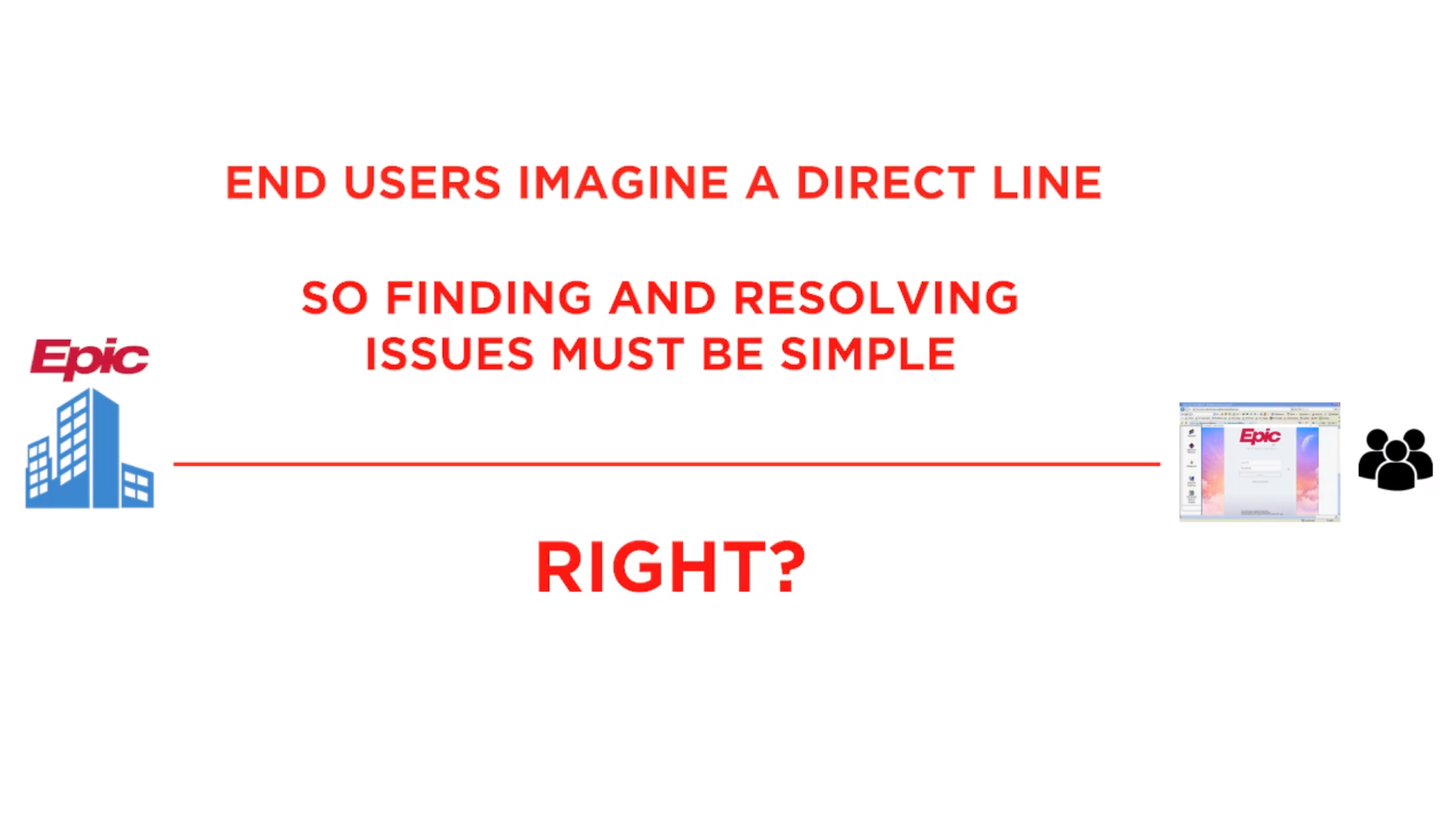
Last, but not least it is worth some time to watch this video that highlights the point that there is so much more that needs to be evaluated when troubleshooting a problem. When one of your users calls in and states “EPIC is not working”, or “Cerner is slow” finding and answer quickly is critical, so they can get back to serving patients as soon as they can.

Now think about this more, can you relate to what it means to ensure that your healthcare providers can put the patient first no matter what?  Having the right tools that keeps both the patient at heart, and allows for quick resolution of problems is necessary.

Sponsored by Goliath Technologies

Goliath Technologies provides IT operations software with embedded intelligence & automation that enables users of Desktop Virtualization to anticipate, troubleshoot & prevent end-user experience issues regardless of where IT workloads or users are located. In Healthcare IT this translates into better patient care.

Click here to read this blog post on 24×7 IT CONNECTION


HIStalk Interviews Thomas Charlton, CEO, Goliath Technologies

HIStalk Interviews Thomas Charlton, CEO, Goliath Technologies

HIStalk Interviews Thomas Charlton, CEO, Goliath Technologies

Click here to read interview on HIStalk.

Tell me about yourself and the company.

I started my career talking to surgeons about the benefits of minimally invasive surgery and the impact on patient care. Way back then, 25 years ago, health IT was an afterthought. Now I’m back talking to health systems and the IT departments about the impact on patient care from an IT perspective. It’s interesting how things have come full circle and healthcare has changed so much.

Goliath Technologies focuses on creating software to ensure that when clinicians or healthcare workers attempt to access electronic patient records, they can do so without struggling with application access. We want them focused on patient care, not fumbling around with applications.

We sell tourniquets at Goliath Technologies, not vitamins. If you are an IT pro — and those are our customers — and you’re having problems with end user experience issues, especially as it relates to clinical and business applications in a healthcare setting, we may have software that can help stop the bleeding.

What kinds of performance issues do you see with EHRs and hospital infrastructure such as Citrix?

I would say about 90 percent of the performance issues occur at one of three stages of the user experience. One is logon initiation — they’re having trouble accessing the application. Two, the logon is slow — they’re trying to log on to the application, they’re getting through a few screens, but the overall process is slowing them down from accessing the application. Then, it’s in-session performance as we call it, whether it’s Citrix or VMware Horizon, which we’re seeing more of. Regardless of what the clinical application or the EHR application is, whether it’s hosted or on-premise, they have problems in the same three key areas.

About five years ago, we started bringing out technologies that focus very considerably on helping folks anticipate, troubleshoot, and then prevent issues in those three areas. We dig very, very deep and get tremendous amounts of metrics and data to try to be able to help them solve the performance issues in those three key areas — initiation, logon duration, and session performance.

I would assume those system vendors are happy that you can either fix the problem or at least prove that their application isn’t the cause of it. How do your customers work with those vendors as they try to get to the bottom of the issue?

It has really taken off. We have two very forward-looking vendors, Cerner and Epic. Cerner now resells Goliath Technologies products, so they can sell our technology into Cerner hospitals. We have a lot of very large Cerner hospitals. UHS, which I believe is a top 10 for-profit health system, is a big Cerner customer. I believe they’re the top 15 in Cerner, but they’ve been a customer of ours for years.

Epic has started the Epic Orchard program that gives performance vendors like ourselves access to Epic application data and information to correlate that with end user experience and IT delivery infrastructure data.

These forward-looking vendors realize that performance issues — standard, everyday IT performance issues, whether you’re on-premise with Epic or hosted with Cerner — impact the end user experience. A lot of the finger-pointing goes to Cerner.

I can give you one very good example with UHS. They were having downtime at a particular hospital. They opened a support ticket with Cerner. There was quite a bit of frustration. They had our technology on-premise, and there’s a real key component here — they had a problem with WiFi. It had nothing to do with Cerner. Of course, everybody sees Cerner on the console, so that’s who they blame. We found out that it was an on-premise WiFi issue that was causing the downtime.

We have situation after situation where that occurs. Our technology looks at things outside of the application that can cause problems with accessing the application or using the application.

You’ve introduced a cloud monitoring product for AWS and Azure. What healthcare demand are you seeing for it?

That remains to be seen. If I could make a statement about movement to the public cloud, we’re seeing a lot of adoption of cloud-based services, but your formal IT organizations are doing a lot of moving to internal cloud, centralizing applications for efficiency and things of that nature. We’re just starting to see hybrid clouds in the enterprise, where Viacom is a big customer of ours and BBVA. They are moving small amounts of their infrastructure to the cloud.

At Viacom, for example, they’ve been using technology in the cloud to build websites for movies for years and years. They’ve used AWS, but traditional IT is moving slowly. It’s even more so the case in healthcare IT. They’re worried about other things. Not only do you lose a bit of control when you move to the cloud and there’s a cost associated with it, but then there are all the concerns around privacy and security. We’re not seeing the move to the cloud in healthcare that we’re even starting to see in the enterprise. I think it’s probably going to move a little bit more slowly.

What’s it like selling technology to hospitals versus other industries?

What’s very interesting about healthcare IT is that they are much more traditional in terms of their approach, and very pragmatic. Things tie back, oftentimes, to patient care. So when you think about the challenges in healthcare IT, there are three critical things that we see across the board in relation to their enterprise counterparts.

Budgets and headcount. Almost always, they’re about a half to a third of what their enterprise counterparts would be. If you’re a health system and you’re supporting 5,000 users, your IT budget and your staff is probably about half of what a similarly-sized enterprise would be.

Desktop virtualization. A huge challenge. Healthcare uses desktop virtualization in a considerable fashion to access the clinical and business applications that they use because it provides them with secure access. But that also adds complexity, on top of the fact that they have smaller IT staffs.

Patient care is at the root and gives a little bit different focus. You may have a marketing person, a salesperson, or a developer who can’t access their application in an enterprise, and that’s one thing. But when you have a surgeon, physician, or clinician who can’t access patient records when they’re trying to have an interaction with the patient — or, God forbid, the patient is on the table, so to speak, in a clinical setting — that adds a considerable amount of focus.

When we deal with healthcare versus enterprises, there seems to be a little bit more focus and a little bit more sense of urgency to solve these particular issues. The underlying current is that everyone is concerned about patients. It’s a little bit more critical on the healthcare side than it seems to be on the enterprise side.

You were described in a 2002 profile as being an aggressive leader who pushes employees hard, puts performance monitoring in place, and then gets results from companies that were previously struggling. Have you changed your approach? What problems do you most often see in companies?

That was an interesting article. You have to take an article like that and put it up against the common sense and logic test. That was Silicon Valley, and Silicon Valley certainly went through the dot-com boom or bust for awhile. But things have not changed a whole lot in Silicon Valley. If someone doesn’t like where they’re working or they believe they’re being pushed too hard, they can always go work somewhere else.

I’ve done five other companies since then, Goliath Technologies being the latest. All of those five companies were successful turnarounds. Some led to exits, built a lot of shareholder value, and launched a lot of careers for people.

What was missing in that article, and what I’ve seen consistently — and I’m talking about taking over companies in New York, Israel, Canada and different parts of the United States — is that regardless of generation, there are people who are extremely driven and want to prioritize advancing their careers, for whatever reason, over doing other things. It’s talked about in terms of being aggressive and hard-driving, but really I was very lucky to be engaged with teams where there were lots and lots of hard-driving people.

I honestly don’t philosophically think that you can drive anybody. You want to find driven people and then create the type of an environment where those types of driven people want to come and have a long-term career.

Do think it’s your personality or the rigor with which you approach the business with an end goal in mind that makes you successful?

I say to people all the time when we’re interviewing them that we are in the people business at Goliath Technologies. When I was taking over venture capital-backed businesses, I used to get pushback from the boards many times for the amount of money that I would spend on training, ongoing education, and my focus on promoting people from within. My father brought this up to me one time. He said, you’re in the software business. There’s no plant. There’s no equipment. There’s no collateral. There’s people. You’re in the people business. You just happen to build software.

People come up with the ideas. Other people take those ideas and turn them into workable products. Other people then market, sell them, and then support those customers on an ongoing basis. We are in the people business. We just happen to sell software.

Do you have any final thoughts?

As an organization, we will be very successful if we focus very intently on two things — the careers of our employees and solving problems for our customers. The marketplace is moving in our direction. There’s an increasing reliance on desktop virtualization. The major EMR/EHR vendors are coming to the realization that outside of their application, there’s a tremendous amount of IT infrastructure that can impact the end user experience with their application, and therefore, their brand and reputation. Organizations like Cerner and Epic are working with us now in a formal partnership.

We will focus on employees and customers and ultimately be proud of what we’re doing to positively impact patient care.

 
Browse EHR Monitoring & Troubleshooting Webinars

Disclaimer: All brands, logos or product information mentioned here are the registered trademarks of their respective owners.

Designed and Hosted by Telemitra Inc | ©2021 Goliath Technologies. All Rights

Designed and Hosted by Telemitra Inc | ©2021 Goliath Technologies. All Rights

Empowering Help Desk Professionals to Proactively Solve End User Problems

Empowering Help Desk Professionals to Proactively Solve End User Problems

Empowering Help Desk Professionals to Proactively Solve End User Problems

Originially posted by Danny van Dam

Help desk technicians form the front line of support in identifying, troubleshooting, and preventing end user performance issues (and costly downtime) for key applications and services. They need to quickly identify the scope of the issue and route the critical details required to fix the issue – fast. Goliath Technologies increases the troubleshooting and remediation abilities of help desk technicians by placing a vast array of tools at their fingertips. This support is available in three key areas:

  • Troubleshooting the specific root-cause of the issues impacting logon duration or session performance based on detailed metrics from both current and historical user sessions.
  • Identifying the scope of the issue: is a reported issue limited to a specific user, or a larger issue impacting multiple users, or even entire user groups or geographies?
  • Preventing calls before they happen by automatically testing system and application availability to identify and resolve issues before end users are impacted.

Once issues are identified, Goliath helps resolve issues quickly with advanced remediation capabilities that alert service professionals to errors and respond with automated ‘self-healing’ actions or identifies the specific root cause for faster repair. This results in reduced calls and support tickets, smoothly running systems, and happier users.

Troubleshoot Individual End User Calls with Goliath Performance Manager

For individual end user calls, Goliath offers a variety of tools with which to troubleshoot issues. From being able to view historical data of past logons, to what network the user is logging in from, to being able to

pinpoint at what step in the logon process the user experienced an issue – the Goliath XenApp/XenDesktop sessions views provide all of this data and more. Some of the available troubleshooting metrics include:

  • Citrix receiver version – Provides more information to troubleshoot in case the client version isn’t up-to-date.
  • Client address and network location – Helps diagnose connection speed issues and confirm client location.
  • Session properties – Delivers all Active Directory details for an end user for troubleshooting – all user and workstation specific.
  • Logon Duration – Pinpoints the specific step in logon where the user experienced an issue, as well as why the issue occurred, so that the ticket can be routed with full informational details.
  • Historical logon data – Provides historical context. If users report an issue has occurred multiple times, historical data is available in the XenApp/XenDesktop Session with a searchable interface to find specific users or time period.  Goliath is the only company to offer a detailed historical view of all of these individual metrics.

Additionally, Goliath offers detailed data down to the granular level on applications running on a user’s workstation, bandwidth use, and task usage to help find the information required to assist your end users as completely and quickly as possible. In many companies, support technicians needed to be dispatched to the end user’s physical location to capture this data from the machine directly.  This is time-consuming, expensive, and the system may no longer be in the error state it was when the issue was reported.  Goliath Performance Monitor captures all this information and delivers it to a central location for rapid analysis.  The results can be easily shared with other teams through enterprise support systems like ServiceNow or Remedy.  This means support technicians can identify issues, and either resolve them or route them confidently to the correct team with all the details required to speed resolution.

Identify the Scope with Goliath Topology View

The Goliath Topology view provides a visual guide to the logical relationships and connections of your entire Citrix infrastructure and shows the health of each individual component at a glance. It provides detailed information on the status of your delivery groups, machine catalogs, images, clusters and hosts that allows you to quickly identify and troubleshoot macro-level events affecting locations, regions, and other large groups of users.  This is critical to Help Desk Technicians because it allows them to quickly understand the scope of the problem.  Events impacting larger groups of users can be immediately identified and the proper support teams can quickly access the necessary details on what groups are impacted and which parts of the delivery infrastructure is involved.  This results in faster resolution and return to normal operations.

Preventing Calls Before They Happen with Goliath Application Availability Monitor

Help Desk and Support teams are always working to reduce end user issues and support tickets.  The best way to do that is by proactively resolving issues before end users are impacted.  The Goliath Application Availability Monitor automatically tests the entire delivery architecture and confirms applications will launch when end users attempt to access

them.  By simulating actual logon and application launches from actual user locations, in the exact same way that a real end user does, the technology allows for advance discovery of issues by validating that the delivery workflow will execute. The key benefit is that when an issue is discovered by a simulated ‘virtual user’, it can be addressed before end users are ever impacted.

The Next Step:
Resolving Issues with Advanced Remediation Capabilities

Once the problem has been specifically identified, Goliath goes beyond monitoring and troubleshooting metrics with unique Advanced Remediation Capabilities that alert services teams to potential errors and speed resolution with automated actions or specific, expert knowledge from other team members.

  • Threshold-Based Alerting allows help desk professionals to receive proactive communications based on faults, error and similar conditions so that issues can be addressed before end users even report the issue.
  • Automated Remediation and Self-Healing delivers automatic remediation fixes when certain alerts are triggered based on faults, events or conditions. Whether it be restarting a service, or running a PowerShell script, Goliath supports “self- healing” workflows to allow IT organizations to dramatically increase Help Desk response times and implement truly proactive IT processes. Available remediation actions include:
    • Citrix:
      • Restart print, application, & Citrix services
      • Start/restart VDA agent
      • Disable logons to XenApp servers
      • Kill stuck print processes
      • Clear temp directories
      • Kill apps with memory/CPU leaks
    • Infrastructure:
      • Restart SQL service
      • Restart backup job
      • Execute Windows job scheduler tasks
      • Reboot servers
  • Alert Resolution Instructions allow team members to share information for cases when automated remediation is not an option. Goliath allows administrators to automatically pass on troubleshooting details to team members when certain alerts are triggered.  This allows your best experts to share their knowledge and allows the correct support team to resolve these events more quickly and consistently.

To See How Goliath Empowers Help Desk Professionals to Proactively Solve End User Problems:


How to Accurately Troubleshoot Citrix ICA Network and Connectivity Related Issues

Guest Post: ICA Latency Isn’t Enough

Guest Post: ICA Latency Isn’t Enough

This post is republished on our blog with permission from Alexander Ervik Johnsen, Blogger, Senior Solution Architect, Technology Evangelist, Author and Speaker, based in Oslo – Norway. The original post appears here on Alexander’s blog. Check out Alexander’s latest blog around the topic of Citrix ICA.

Troubleshooting End User Experience with Advanced Citrix ICA/HDX Metrics and Analysis

By: Alexander Ervik Johnsen

“Citrix is slow” is one of the most common end user complains that frustrates both the end users themselves and the support teams and administrators tasked with resolving the issue.  The challenge is finding the key metrics that identify the true root-cause of the problem so that Citrix XenApp and XenDesktop administrators can proactively monitor, troubleshoot and prevent end user experience issues quickly and confidently.

The ICA/HDX remoting protocol delivers critical applications and resources to users across geographic distances and various connection mediums on different devices.  This means the network layer is enormously responsible for delivering a good end user experience.  For this reason, many people and monitoring solutions use ICA Latency as their end-all measure for understanding end user experience issues over Citrix ICA/HDX.  It’s a convenient and broadly available, but to truly understand what specific factors are contributing to the problem, you need a tool that breaks down ICA Latency into its detailed components. 

ICA Latency is the time from when a user executes a keystroke or mouse click to when it is processed on the session host.  It includes both network latency and any delay on the session host to process this request.  To best understand the cause of end user issues, administrators require an application that can break out and track these sub-components separately to identify and address the true root-cause.

ICA Round Trip Time (RTT) is the elapsed time from when the user hits a key until the response is displayed back at the end point, as calculated by the session experience monitoring service. The difference between the ICA Latency and RTT is the application processing time on the session host.  

ICA Network Latency is the amount of time it takes data to reach the server.  ICA Network Latency may be higher than ICA Latency, as underlying Citrix protocols are designed to will smooth out ICA Latency spikes to improve experience for the end user.  The delta between ICA Network Latency and ICA Latency can be attributed to server performance.

By breaking ICA Latency into ICA RTT and ICA Network Latency, IT Administrators can take the general complaint ‘Citrix is slow’ and quickly identify specific reasons driving that issue – be that bandwidth, server performance, or application performance issues.  Using this information and more detailed metrics available from Goliath Performance Monitor, administrators can confidently take specific action to remediate problems with the network, or with resource issues at the server.

For more information on how to confidently troubleshoot end user experience issues using Citrix ICA/HDX please download our whitepaper: