

St. Dominic’s Resolves Citrix Issues Before Remote Students Complain with Proactive XenDesktop Troubleshooting

St. Dominic’s Resolves Citrix Issues Before Remote Students Complain with Proactive XenDesktop Troubleshooting

How We Did IT

St. Dominic’s Resolves Citrix Issues Before Remote Students Complain with Proactive XenDesktop Troubleshooting

xendesktop troubleshooting

To ensure a positive end user experience, St. Dominic’s Priory College utilized proactive Citrix XenDesktop and XenServer performance monitoring to aid in rolling out XenDesktop 7.16 and NVIDIA GRID vGPU Cards.

“We evaluated a number of products and we decided on the entire suite of Goliath’s products because their operating knowledge of Citrix was evident during the course of the evaluation and that came through in their products, features, and functionality.”   

-James Trevaskis, IT Manager for St. Dominic’s Priory College

Infrastructure

Citrix XenDesktop 7.16, VMware vSphere, XenServer & NVIDIA GRID vGPU


Challenge

Maintaining a positive user experience for students using Citrix XenDesktop

James Trevaskis, the IT Manager for St. Dominic’s Priory College, decided to use Citrix XenServer and XenDesktop 7.16 to deliver applications to 600 end user faculty and students, including AutoDesk products with NVIDIA GRID vGPU. As all users are reliant on the Citrix environment, James required a proactive approach to monitoring the new infrastructure to keep ahead of any reliability or performance issues.

Here’s a list of St. Dominic’s performance monitoring selection criteria & goals:

  • The users access the network both locally and remotely using Citrix to access all applications, including AutoDesk products using NVIDIA GRID vGPU cards
  • The students must have 24/7 access, and, if there is an issue, it could be resolved quickly (the parents purchase their child’s computer and expect them to have uninterrupted access)
  • James needs to have 100% uptime to avoid logon and performance complaints from students
  • The students have their own devices and logon from a variety of locations with varying network quality – this complexity makes performance reporting critical
  • IT needs proactive performance alerts to get ahead of end user issues to avoid angry calls/emails from students and parents

As end users don’t often alert at the time the problem is occurring, it can be difficult to identify the root cause at a later date without the right metrics. In addition, James had no way of knowing if the problem occurred within the datacenter or on the client side.

Solution

After looking at a few other solutions, it became apparent that the products from Goliath Technologies used embedded intelligence and automation to easily, and without special configuration, provide the metrics and pre-emptive alerting he needed to anticipate, troubleshoot, and prevent issues in his environment.


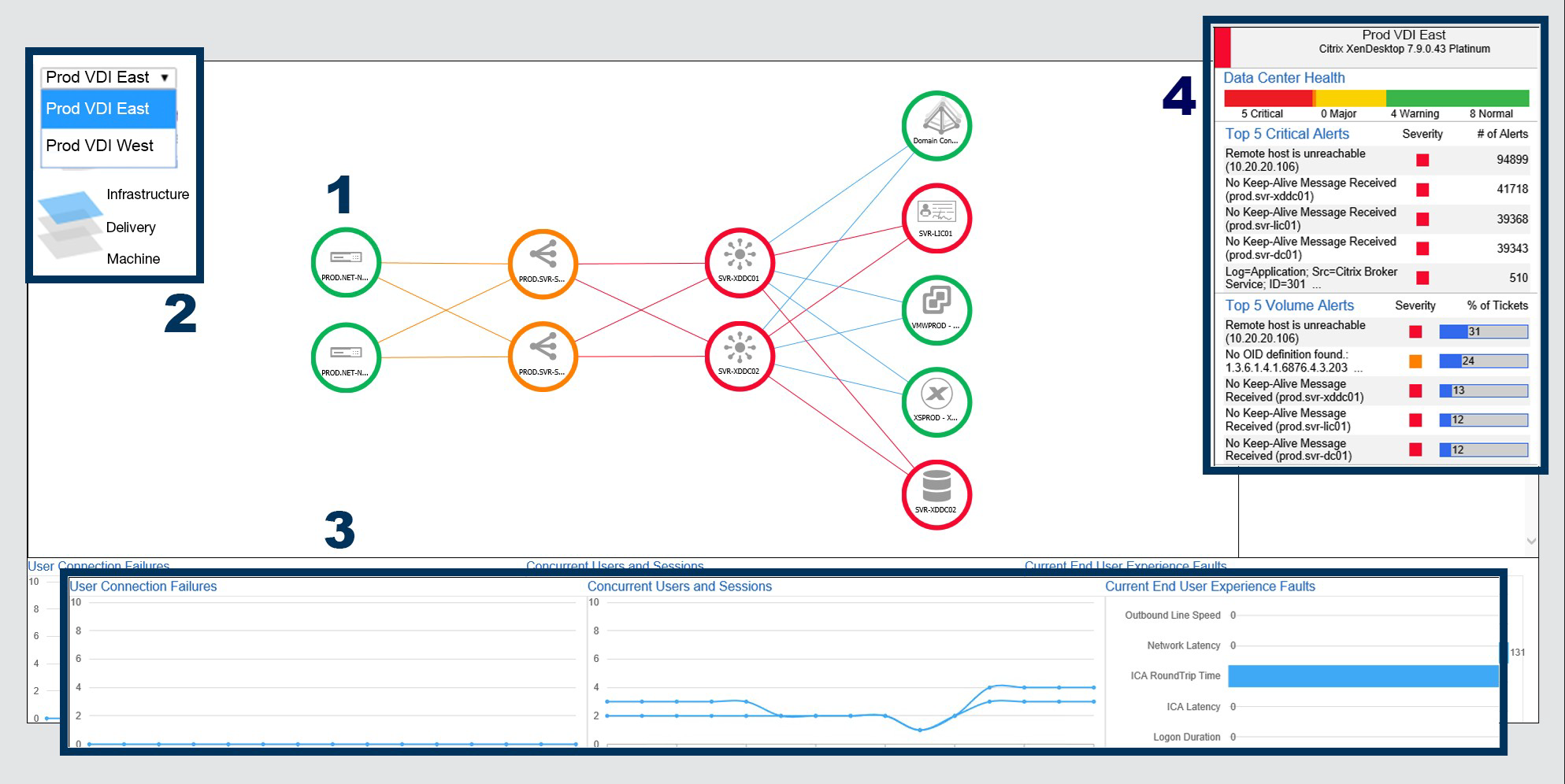
Prod VDI East Graphic


James uses the above as his NOC view to alert him to issues so he can see quickly what is wrong and where. The Goliath Automated Citrix Discovery and Dependency Map will identify the entire Citrix delivery infrastructure and draw a map of the environment.


At a glance, he could see issues as they occurred in real time and was able to troubleshoot them quickly. James explained, “There are many Citrix monitoring solutions on the market, however, after evaluating a number of products, it’s clear that Goliath offers the most comprehensive solution, hands down.”


Results

Early Warning System to Prevent Remote Logon Issues

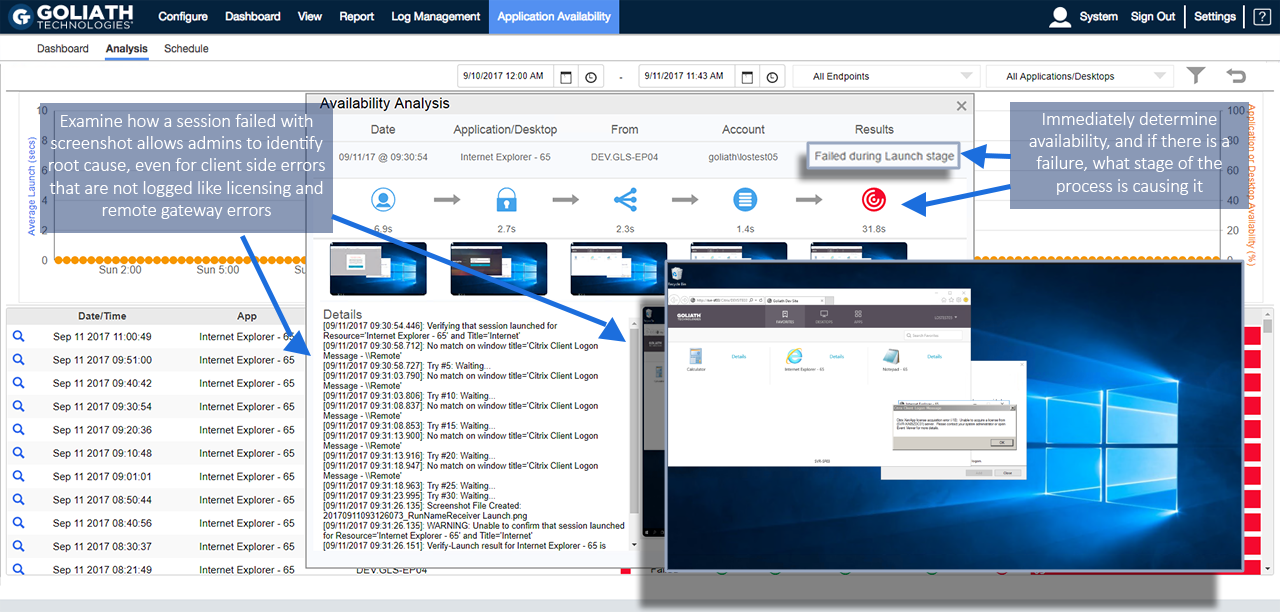
Additionally, James incorporated the Goliath Application Availability Monitor to give him advance warning of remote student logon issues.

Goliath’s Application Availability Monitor runs all the time ensuring Citrix delivered applications are accessible. James wanted to automate his job as much as possible, so he began using the Goliath Application Availability Monitor to test and ensure Citrix was always available without manual intervention unless there is an issue he is alerted to.

In the image below you can see he now has screenshot evidence to show that all systems are online or down. If there is an issue, he is alerted to issues in real time so he can troubleshoot prior to end users complaining.


James explains why he uses the Goliath Application Availability Monitor, “Monitoring each individual Citrix component is important, however, with so many components, just knowing each is working independently is not enough. A technology that logs on like a real Citrix user exercises the entire delivery infrastructure, which ensures all these components are talking to each other and any problems are detected before users find them.”

As St. Dominic’s continues to scale their solution, he is now able to roll out Citrix XenDesktop to 1,150 new users in 2019 with the confidence that he has a monitoring and troubleshooting solution that is purpose-built for Citrix that allows him to anticipate, troubleshoot and prevent Citrix end user experience issues from happening. He has now moved from reactive to proactive.


Chris Hughes

ABOUT ORGANIZATION

St. Dominic’s Priory College is a prestigious educational institution. Established by the Dominican Sisters, the college has a rich history of providing quality education to girls from Reception to Year 12. Known for its commitment to academic excellence, holistic development, and a strong emphasis on values, St. Dominic’s Priory College nurtures a supportive learning environment that empowers students to achieve their full potential. The college’s vibrant community and dedication to instilling a sense of service and leadership make it a beacon of education in the region.

Headquarters location: Adelaide, South Australia
Founded: 1884
Employees: >80
Industry: Education

How To Get Alerted To Citrix Issues Before End Users Complain

How To Get Alerted To Citrix Issues Before End Users Complain

Get Alerted To Citrix Issues Before End Users Complain

Until now, Citrix system administrators with responsibility for XenApp and XenDesktop had no way to anticipate the end user experience, therefore, were only able to be reactive to complaints from users. Being proactive is now achievable as Goliath gives you the ability to create the same analysis for both real and simulated users, which allows administrators to proactively initiate user sessions with simulated users and analyze performance prior to real end users attempt to access their applications. Imagine that you can truly know what a user’s experience is going to be before they do!

With the Goliath Performance Monitor you will know what the end users will experience during logon initiation, the logon process and while in their Citrix session.  This isn’t possible without key features that I will explain in this blog post, and to my knowledge, this capability is not available in any other single solution. Many of the Citrix Administrators, Citrix CTP’s and consultants we talked to while designing the product told us that they have attempted to accomplish the goal of being truly proactive but they had to leverage multiple different products and scripts, but still couldn’t get it done. Now, this very difficult objective can be achieved by utilizing a single product with the following key features:

Logon Simulation

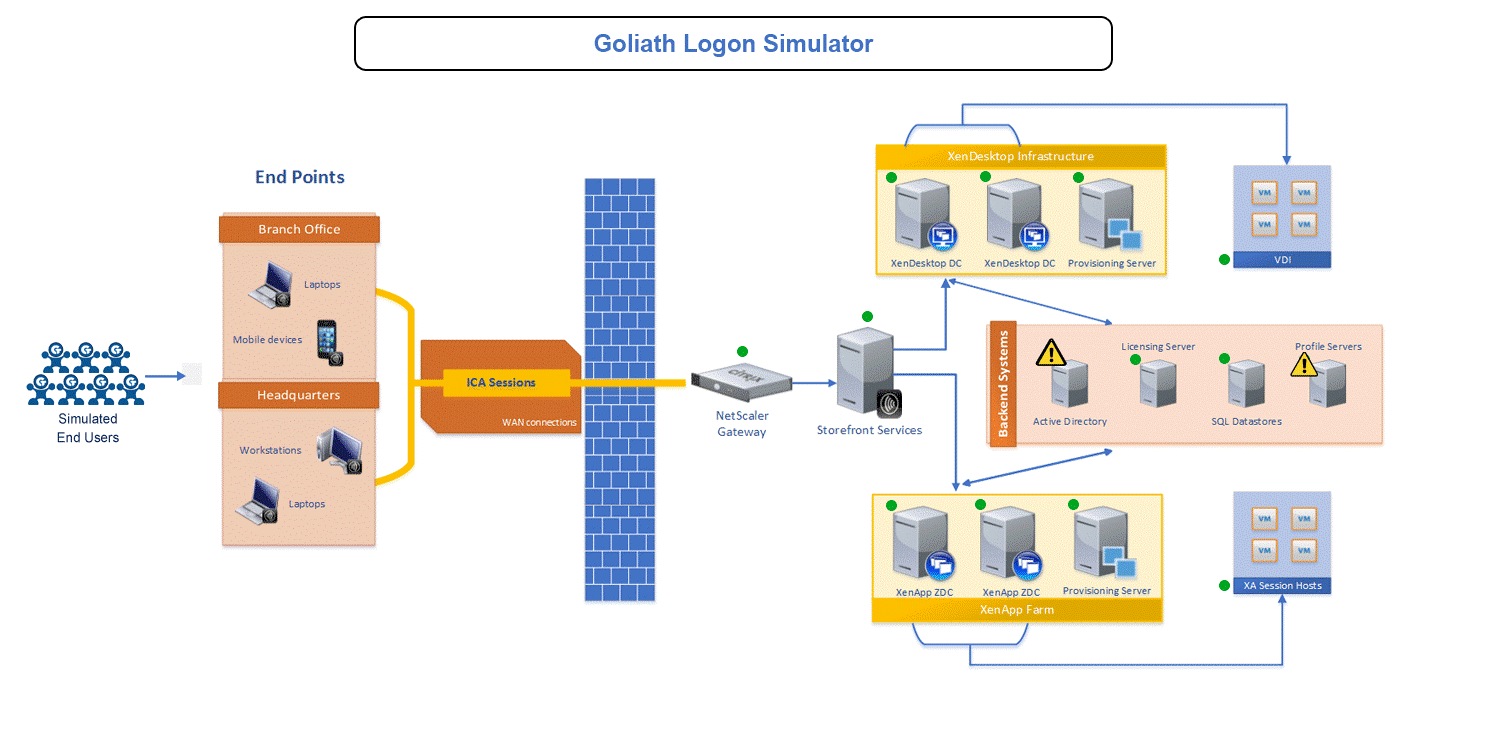
With the Goliath Application Availability Monitor (GAAM), Citrix Administrators can finally become proactive when it comes to Citrix logon issues. GAAM is the only software available that tests the entire Citrix delivery infrastructure, both locally and remotely, by simulating the exact same steps a user would take during the Citrix logon process. This allows you to identify the root cause of logon issues, whether they fail or are simply slow, and resolve them before end users complain.

In this diagram, from left to right, the logon simulator initiates the logon process with simulated users which follow the same exact steps a user would, thereby exercising the entire Citrix Infrastructure including passing through the NetScaler, Storefront and other elements in the delivery infrastructure. In this example, a profile didn’t load but the root cause was active directory.

Logon Simulator Diagram

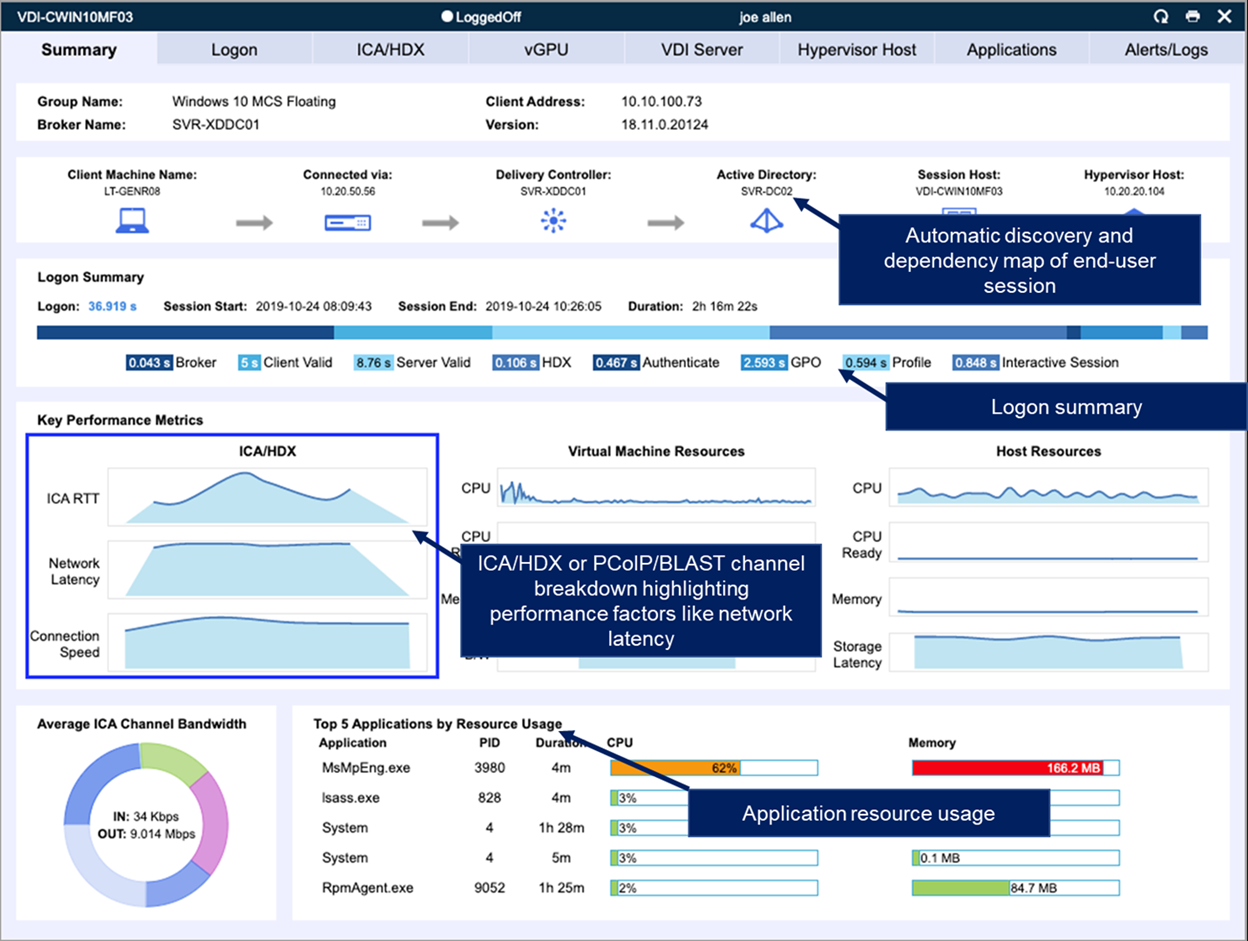
ICA Channel Dashboard

ICA Latency is the key indicator of Citrix session slowness as it takes into consideration server slowness and network performance in a single value to indicate user experience. By drilling down into the Citrix ICA Channel, you can track the bandwidth usage by channel – Audio, Video, Clipboard, Printer, KB & Mouse response, and Connection Speed – to identify the root cause of session slowness or performance degradation. Sample image below:

ICA-Session-Drilldown

Logon Duration Breakdown

The Logon Duration Analysis real time dashboard lets you troubleshoot and resolve logon slowness issues by breaking down each stage of the logon process so you can determine exactly where the slowness is occurring by total logon time, authentication, profile load, group policy processing, script execution and interactive display load.

Logon Duration Breakdown

Logon Duration Report

The Logon Duration Report gives you a historical view of the entire logon process for all users during the time period you specify. This allows you to determine the root cause of user logon slowness by drilling down into each stage in the logon process including, total logon time, authentication, profile load, group policy processing, script execution and interactive display load.  With this report, you can easily troubleshoot and resolve logon issues reported by users during a specified period of time.

User Application Task Visibility

With our End User Application Task Visibility, you can see what users are doing within an application and the resource utilization. For example, if a user was streaming audio and video, not only would you see how many resources an application was using, but also the specific content  the user was streaming.

End-User-Application-Task-Visibility

 End User Experience Report

Run a report of all users or any specific user over a period of time to identify and troubleshoot slow Citrix sessions. The End User Experience Report allows you to first determine if a user’s session was slow and then correlate that to the connection speed and where the user launched the session from to narrow potential root cause.

End to End Connection Report

With the End-to-End Connection Report, you can run a report for a specified period of time for all users to see trends and troubleshoot user slowness caused by connection routes. The report correlates end user experience metrics to the exact combination of the Web Interface, Broker, and server for each user’s session.

This is a very exciting new release for our customers because these features allow them to truly be proactive in the three areas that most commonly cause ticket related issues – logon initiation, logon process and session performance.

If you want a fully supported 30-day free trial or personal demonstration of this software, please go here. If you just have a question or comment feel free to email us at techinfo@goliathtechnologies.com
Separate Troubleshooting Products from Monitoring Utilities

Separate Troubleshooting Products from Monitoring Utilities

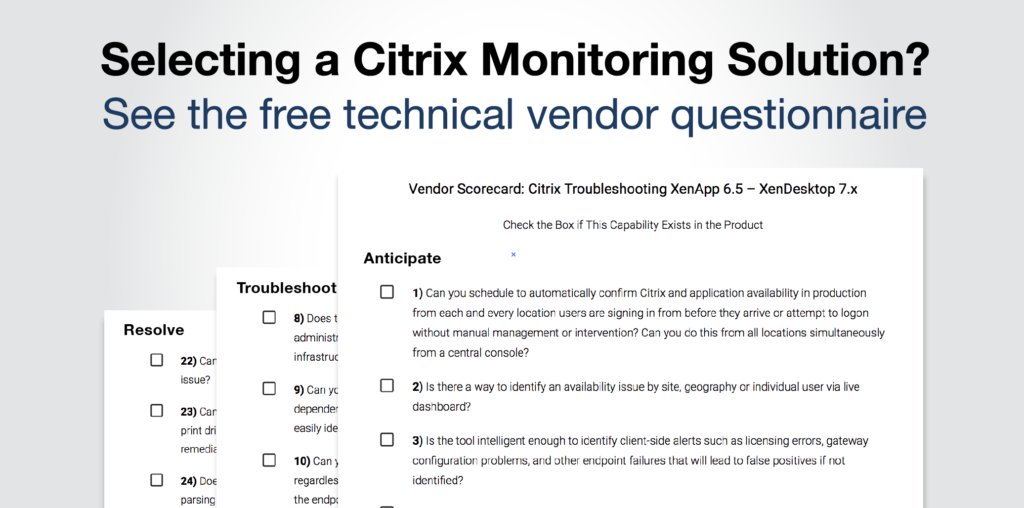
Selecting a Citrix Monitoring Vendor? After doing that often over the last 15 years I Developed These “Litmus Test” Questions To Help

If you have a Citrix environment there will come a time when you have to troubleshoot an issue or two– an obvious understatement. As an IT Administrator and Consultant, I often found my monitoring solution would give me performance metrics but wouldn’t help me troubleshoot the root cause of a performance issue because they just didn’t get enough detail and couldn’t deliver it in a way that allowed me to avoid an issue or objectively prove root cause. Frustrated, I thought of all the missing data, blind spots and failure points and developed a series of 26 questions that would determine, before I purchased a solution, if the vendor could get the specific details and render them in such a way that I would be able to isolate root cause and resolve the issues I had experienced. In other words, IF the vendor WOULD be able to troubleshoot an issue when the time came.

Every monitoring vendor says that they can monitor everything—HDX, Logon Process, End User Experience—but the devil is in the details, and there are a lot of details. So, I tell the vendor to put aside the marketing feature presentation and just tell me if they can do the following 26 things. It is in a Yes/No answer form because I want problems avoided or fixed. No credit for “partial” SLA’s in IT.    

Vendor Scorecard: Citrix Troubleshooting XenApp 6.5 – XenDesktop 7.x

Check the Box if This Capability Exists in the Product
Download the Questions Here

Anticipate

  • 1) Can you schedule to automatically confirm Citrix and application availability in production from each and every location users are signing in from before they arrive or attempt to logon without manual management or intervention? Can you do this from all locations simultaneously from a central console?

  • 2) Is there a way to identify an availability issue by site, geography or individual user via live dashboard?

  • 3) Is the tool intelligent enough to identify client-side alerts such as licensing errors, gateway configuration problems, and other endpoint failures that will lead to false positives if not identified?

  • 4) Can you trigger alerts based on thresholds, events, and failures, and then execute automated remediation actions to resolve those problems?

  • 5) Does the solution allow for dynamic grouping and policy assignment to ensure that proactive rules are assigned accordingly upon migration (i.e. hybrid cloud)?

  • 6) Can the solution allow me to know when a system level issue will have an upstream impact on user experience from a single dynamic screen?

  • 7) Can the technology monitor and alert on file level changes, including file/folder growth, cut/copy/paste actions and specific file edits?

Troubleshoot

  • 8) Does the technology have the ability to gather data and analytics from the entire stack so an administrator can determine an end user’s experience and trace that back to the underlying infrastructure element impacting it?

  • 9) Can you see your entire Citrix environment in one graphical view that shows the dependencies and relationship between Citrix & supporting IT elements, so at a glance you can easily identify the location or IT element that is experiencing a performance issue?

  • 10) Can you isolate as the root cause of a logon duration issue and identify root cause regardless of where it manifests from? Some example of this include, Citrix Receiver startup on the endpoint, waiting for session host readiness, policy execution of the specific policy, DNS resolution during the ICA/HDX connection creation, or any of the other 33+ stages?

  • 11) Can you drill into session logon to know how long the domain controller takes to obtain GPOs and determine if they are applicable?

  • 12) Can you troubleshoot the root cause of random consistent slowness and isolate it as an unreliable Wi-Fi connection or available connection speed to the endpoint for Citrix?

  • 13) When troubleshooting can the technology correlate slow ICA Round Trip Time directly to storage performance on a specific datastore, or hypervisor host CPU Ready issues that the session host resides on?

  • 14) Can you analyze and compare logon, connection, and session performance for both on premise and/or cloud workloads to identify and troubleshoot end user experience issues?

  • 15) Does the solution support rapid deployment for environments where cloud bursting is leveraged for temporarily increasing available compute resources?

  • 16) Can the technology provide visibility into ICA Round Trip Time, ICA Latency, Network Latency and session bandwidth available? Can it help to identify the root cause of session slowness as either the network connection, the underlying systems infrastructure performance, or application performance?

  • 17) Does the technology provide me with visibility into user activity via ICA channels and application usage statistics? For example, does it allow me to correlate high Thinwire bandwidth utilization directly to the user watching YouTube from Chrome in session?

  • 18) Can performance counter data from monitored resources be graphically presented, historically trended and analyzed for root cause analyses of performance related issues?

  • 19) Can your solution generate a report of all user’s sessions from the last 6 months? Can it identify if the sessions were active vs idle?

  • 20) Does the technology allow for the visibility to troubelshoot down to the endpoint? This includes performance monitoring, alerting and event log analysis.

  • 21) Can you furnish me with at least two references that will speak to how they used your product to isolate root cause and troubleshoot issues or avoid them completely?

Resolve

  • 22) Can you generate reports to prove that an issue is an infrastructure, resource, or Citrix issue?

  • 23) Can you generate root cause reports that show faults or errors causing application failures, print driver problems, user GPO faults, and configuration problems such that strategic, targeted remediation activities can be initiated?

  • 24) Does the solution provide a comprehensive log (syslog and event log) correlation engine for parsing and analyzing log data to find root-cause?

  • 25) Can you put alert resolution instructions or knowledge base in the product so that level 1 support, when an alert is triggered, can resolve issues usually solved by level 3?

  • 26) Can you implement self-healing, auto remediation actions without customization? Such as restarting a service, killing a process, running a script or application?

Total Score         /26         Vendor Name:

Using these questions and this overall “paper evaluation” process allowed me to make the best recommendations for my clients during my time as a Citrix consultant. The reason for this is that the key is to ensure that vendors are questioned deeply about the way the product will assist in troubleshooting and resolving Citrix end user experience and/or performance issues. This is especially true today as there are a multitude of products on the market with the ability to address XenApp and XenDesktop monitoring requirements.

I know the reference question is old school but I would really suggest you speak with customers who used a vendor’s technology to troubleshoot an issue. As a matter of fact the more references the better, and three is generally the magic number. When you talk to the reference, find out what their specific issue was and how they used the product to determine root cause. Also ask about the support they received with deploying and using the product. Quality of support is as important as functionality in the grand scheme of things. The technical people you work with should be experts in the product and the platforms that you are using the product to monitor.

How To Guarantee A Quality Experience To Remote Citrix Users

How To Guarantee A Quality Experience To Remote Citrix Users

How To Guarantee A Quality Experience To Remote Citrix Users

Recently, I worked with a customer who was having inconsistent issues with user experience. To date they have been utilizing Goliath Performance Monitor to troubleshoot and alert on faults and errors taking place in their XenApp 7.6 environment.

They were using their Citrix NetScaler ADC’s as a NetScaler Gateway to reverse proxy ICA remote sessions within their Citrix environment, and they were especially interested in seeing how Goliath could provide deeper analytics into the experience of their end users who were logging into the environment from home and constantly complaining about poor session performance, specifically slowness.

Gaining the appropriate visibility into the NetScaler Gateway VIP to identify and resolve the end user’s complaints was extremely important because in the end users’ eyes, the problem was always Citrix, when in reality the root cause was unknown.

AppFlow Data: What It Is & How It’s Used for Analysis

Before diving into how the customer leveraged Goliath for NetScaler to solve their challenge, it’s important to understand a little bit about how the technology operates and delivers results. This technology provides a unique vantage point from a monitoring perspective. Very simply, Goliath for NetScaler collects AppFlow data from the Citrix NetScaler Application Delivery Controller and the NetScaler Gateway.

AppFlow consists of messages that are sent from the Citrix NetScaler ADC & Gateway which include data points around the connections that are established to it. This data contains valuable information related to what is occurring during a session, and delivers full session visibility from source to destination.

Once Goliath for NetScaler receives the AppFlow messages, it begins to automatically generate real-time dashboards, live reports, and historical analysis on critical data related to Citrix XenApp & XenDesktop ICA/HDX sessions, application utilization and access, NetScaler Gateway execution, and web application VIP  performance.  The newly gained visibility gained with NetScaler Platinum licensing combined with the power of Goliath technology made Goliath for NetScaler the obvious choice for solving this customer’s user experience challenges.

Up & Running Faster than it Takes to Get a Pizza Delivered

Getting Goliath for NetScaler set up and running for this customer was fast and simple. Enabling AppFlow on the Citrix NetScaler ADC’s and configuring the message to be sent to Goliath only took less than thirty minutes. Once AppFlow configuration was complete, the customer immediately started receiving actionable data from Goliath for NetScaler.

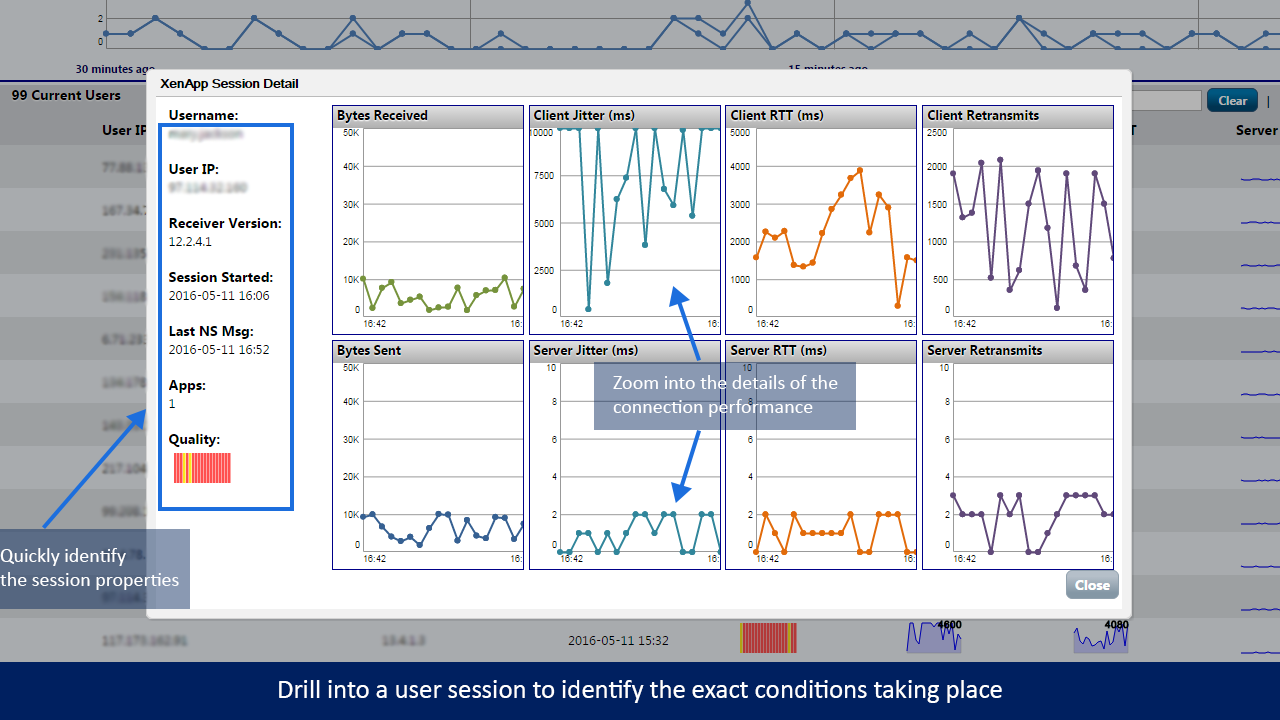
To start their analysis and troubleshooting, the customer went to the ‘sessions’ screen (see image below) of the product and was able to gain total visibility into the end users sessions on the NetScaler Gateway, as all of the current sessions are listed on the bottom half of the real-time display.

Round Trip Time – Jitter – Retransmits

The information gathered for the sessions includes the username, user’s IP address, the version of Citrix receiver they were using to establish the connection, and the date/time the session was established. In addition to the previous data points, the key end user experience metrics of Round Trip Time (RTT), Network Jitter, and Packet Retransmits were also detailed.

These metrics are clear indicators as to whether or not a user was experiencing poor Citrix session performance.  To further understand why these metrics are important, and what they mean, please see the below definitions:

  • RTT – Round Trip Time measures the packet time from the source, to the intended destination, and then back again. This is the primary measurement which would indicate performance problems. On a Citrix ICA/HDX connection, data is captured from the time of the initial mouse click, to the handoff to the server which is handling the session, its processing time to compute the action, and then presents it back down to the endpoint.
  • Jitter – Jitter is technically defined as the delay variation or deviation in the connection. This effectively measures the quality of the connection, and if there is any “noise on the line.” This would cause delays in the presentation of a user’s Citrix session.
  • Retransmits – This is a measure of the volume of packets that had to be re-sent due to packet loss. This would be indicative of a poor connection, and would result in choppiness in the presentation of an end user’s Citrix session.

In the screenshot below, you can see how these data points are color-coded on the basis of connection quality red (severe), yellow (lackluster), and green (satisfactory).

XenApp/XenDesktop Analyze ICA RTT Jitter

Using this quick and easy graphical representation of the user sessions, the Citrix administrators were able to quickly target problematic users, and immediately drill down into the sessions to see exactly how the performance metrics aligned for each user. By clicking on the user’s session, the Citrix administrators now had the ability to segment the end user experience quality metrics down to Client Jitter Round Trip Times (RTT) and Server Jitter Round Trip Times (RTT). The ability to have visibility into both the client and the server sessions is critical.

The client-side metrics show the performance of the connection from the user’s end point to the Citrix NetScaler Gateway and back, whereas the server metrics pertain to the connection between the Citrix NetScaler Gateway, and the internal architecture.

This is exactly why having visibility into the ICA/HDX sessions through the NetScaler Gateway is so important. Having the aforementioned visibility provides incontrovertible evidence as to whether the issue is from the data center side, where admins have control over the performance, or if it’s external to the network, and therefore the responsibility of the end user.

The Citrix administrators at the manufacturer were amazed how Goliath for NetScaler was able to break down the users ICA/HDX session performance, and how actionable the data would be for their help desk. They were able to “live share” this data off to their help desk to aid in dealing with end user complaints when users called in about their Citrix sessions being slow.

Product Note: The “Live Share” feature, creates a link that can be taken and then handed off to an end user or administrator by email or over your corporate chat software. When the recipient of the live share clicks on the link, they are provided with direct access to the report which allows them to establish the objective evidence they need to see. The report can then be refreshed to show current, live data when performing ongoing troubleshooting.

How the Help Desk Used Goliath for NetScaler

Here’s how the help desk used Goliath for NetScaler – The help desk started by quickly searching for the user’s session from the sessions tab:

NetScaler User Sessions Analytics

The help desk then clicked on the user’s session to see where the session performance had degraded. The Citrix administrators could now provide a visual timeline of end users session performance, empowering them to correlate what the user said they were doing at a specific time, to the performance over the duration of that time period.

For example, they had an end user who called in one day to complain about their Citrix connection. The help desk user followed the above process and could see that between 10 am and 10:05 am the client RTT and retransmits extremely increased. When stating this information to the end user, they recollected the timeline and stated that at 9:45 am they boarded and commuter train and around 10 am they would’ve been entering a tunnel, which was about the time they started having connection problems.

The ability to correlate the connection data to a real-world event is unique to Goliath for NetScaler. As detailed below, data points were provided as an average and then rolled up, obfuscating the performance:

Netscaler User Sessions Identify Conditions

When support engineers wanted to share the details of what happened within a user’s session with management, and/or Citrix administrators, they were easily able to access a reporting screen. From there, they could print a report, or “live share” as seen below. As described earlier, live share makes it very easy for the organizations departments to collaborate on troubleshooting this issue, and to quickly provide the data to the people that needed to see in real time.

Netscaler Real Time Key Metric Report

After review of the above user’s experience, it was obvious that specific RTT values correlated to a poor end user experience. As a result, the administrators refined the alerting thresholds in order to be proactive. Rather than waiting for the user to call and report a problem, the administrators would already know the user may be experiencing a problem within their Citrix sessions, and required attention and/or support.

Alert thresholds were set at 400ms, the threshold at which users started to experience slowness and other Citrix session performance degradation. To ensure that support staff and admins were aware of degradation as it happened, alert notifications were configured to be automatically sent to the help desk and the Citrix admins, empowering them to effectively support the end user in the event future performance issues arose.

Finally Able to Gain Full Visibility into the End User Experience

Prior to deploying Goliath for NetScaler, the Citrix admins had no way to analyze and troubleshoot their end user sessions. Gaining visibility into an end users experience was extremely important because in the end users’ eyes, the problem was always Citrix, when that was not always the case.

The deep visibility that the technology provided allowed the Citrix Admins to very quickly understand not only that a user working remote was having a poor end user experience, but also determine that the root cause of the performance degradation was the end user’s connection. The Administrators had tangible proof that the problem was not the delivery infrastructure, and were able to provide the objective evidence to management to support each scenario.

This allowed the administrators to target the specific root cause of the performance issue and enables them to be proactive in addressing user experience challenges going forward. Furthermore, the export feature of each of the reports allowed the Citrix administrators to share the deep insight provided by Goliath for NetScaler to their managers in just two clicks. Overall, by deploying Goliath for NetScaler in addition to Goliath Performance Monitor, we were able to provide the Citrix administration teams the objective evidence needed to effectively monitor their Citrix environment from end to end.

Get a 30-day Free Trial or Demo of Goliath for NetScaler

To try the technology, with full support from Goliath, click here to get a 30-day free trial or personal demo.

How To Enhance NetScaler ADC with Monitoring and Reporting

How To Enhance NetScaler ADC with Monitoring and Reporting

How To Enhance NetScaler ADC with Monitoring and Reporting

In May of this year, Citrix announced the Citrix Workspace Cloud initiative. Goliath Technologies is excited to be one of the first Citrix Premiere Partners to support this ongoing Citrix Program. On October 1, 2015 the Citrix Lifecycle Management Tool was introduced to the public and the Goliath for NetScaler Blueprint is now available in the Citrix Lifecycle Management Library.

Accelerate & Simplify

The Goliath for NetScaler Blueprint is designed to enable IT Organizations to accelerate and simplify the design, deployment, and on-going management of Citrix workloads across virtual, private, or public cloud environments.

With Goliath for NetScaler, we are able to translate the native AppFlow data into critical data related to Citrix XenApp & XenDesktop, application (VIP) utilization and access, NetScaler ADC, functions and server performance. This data drives real-time performance dashboards, threshold based alerts, and historical reports with no time restriction, and so management and application owners can troubleshoot and resolve infrastructure performance issues that impact end user experience.

Features of Our Goliath for NetScaler Blueprint Solution

  • Using the Citrix Blueprint facilitates and automates the download and deployment of the Goliath for Netscaler (GFN) virtual appliance
  • It automatically configures GFN to meet prerequisites and best practices for CPU and Memory configuration
  • It connects to VCenter and deploys ovf to the correct VMware datastore and host

Merits of Using the Blueprint Over the Traditional Way of Installing the Software Solution

  • The use of the Citrix Blueprint reduces the time of deploying the technology because instead of the deployment process being manual to download, access VMware environment, configure the appliance deployment, and deploy it to the host and storage.
  • Often the Netscaler ADC admin and the VMware admin are on two different teams. Having a blueprint could facilitate the handoff process required to request and deploy our appliance that normally takes place alongside change requests. The result would be a reduction in the overall time for deploying our technology.

Immediately Isolate Server or Client Side Performance Issues

real-time-xenapp-xendesktop-sessions-goliath-technologies

Isolate & Analyze Individual User Session Performance

xenapp-xendesktop-session-performance-goliath-technologies

Analyze User-specific Detail

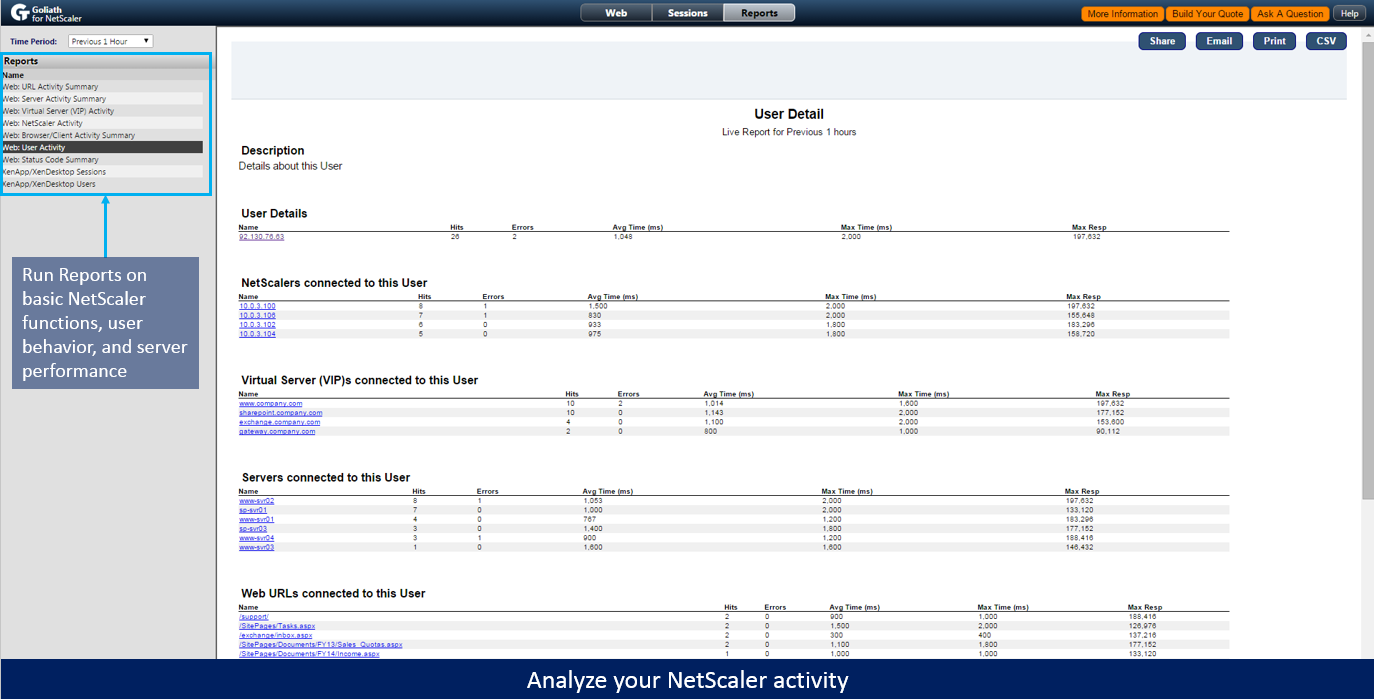
analyze-netscaler-goliath-it-analytics-for-netscaler

Enhance your Enterprise or Platinum Edition of NetScaler

Goliath for NetScaler is the only tool in the marketplace that enhances the functionality of your Enterprise and Platinum Edition of NetScaler ADC and NetScaler Gateway by adding functionality like performance analysis, trending, and data exports via API or CSV.  This functionality makes it easier and faster for companies of all sizes to optimize their IT environments and helps to ensure a seamless delivery of applications and a positive end user experience. 

How To Proactively Manage Citrix-Delivered Clinical Apps

This post about how Citrix and Goliath Technologies are working together to help Healthcare IT teams proactively solve end user experience issues is republished with permission from Citrix. The original post is written by Nitin Sharma and appears on the Citrix blog.

“I just want it to work, I don’t have time to call support and resolve an issue when I have a life on the line,” was a direct quote from a clinician I had a chance to sit down with a few months ago when asking him about how technology plays a role in his day to day life.

For me and colleagues that happen to see and interact with some of the latest technologies on a daily basis, occasionally we forget that for some people, technology is simply an afterthought. For them, it’s just a means to an end. For clinical staff, that “job” is to ensure they’re able to provide the best care for whoever it is sitting across from them.

Healthcare, when compared to many other industries, doesn’t follow the prototypical 8am-5pm workday. Clinicians require seamless access to clinical apps and data 24/7, because critical care simply cannot and will not wait.

In an industry where seconds can–literally–mean life or death, there needs to be solutions in place that give doctors and other healthcare workers the immediate access they need to provide quality care. Clinicians, as mentioned earlier, don’t have the luxury of time to worry about why an application is slow or isn’t launching, they just need it to work. Period.

Citrix has had a long track record of success in addressing the above challenges and allowing caregivers to seamlessly access apps and data to provide the best quality care for their patients, and we know it’s important to provide IT staff (who are typically resource constrained in general) the tools they need to ensure 100% uptime of their environments. Tools that provide IT with a proactive–as opposed to a reactive–approach, and provide IT admins the power they need to ensure my clinical friend above doesn’t “have to call support.”

One of our Citrix Ready Partners in healthcare, Goliath Technologies, has come up with a unique solution by creating a series of fully integrated technologies specifically built and developed for the challenges of Healthcare IT and designed to give administrators the ability to anticipate, troubleshoot and resolve performance issues. Their product goes beyond the limitations of passive monitoring, provides a proactive approach, offers actionable data and will even take actions to resolve issues.

For our healthcare customers, Goliath’s software is focused on providing end-to-end visibility in environments that are using Citrix to deliver EMR/EHR applications. This includes logon initiation and process through to session performance and all the IT elements that can impact performance.

End user experience is of critical importance in an “always on,” 24/7 environment, and Goliath’s solution provides unique functionality to help administrators know, in advance, if there will be an issue when they try to access their applications. Their Logon Simulator for Citrix will actually log on to the application, taking the same steps a real end user would–even through NetScaler–to ensure that the logon is successful. If there is a failure or slowness it will send an alert.

So, in one customer example an administrator scheduled the Goliath Logon Simulator to logon from remote locations two hours before staff came to the hospital to ensure applications were available and if not it alerts him with enough time to fix the issue. That is truly proactive. Talk about preventive medicine!

They also have taken the approach of adding deep metrics about Citrix XenApp and XenDesktop and the supporting infrastructure that directly impact end user experience relating to logon duration and session performance. Again, this functionality is ready out of the box because they have done the necessary API integration and development to populate dashboards and screens with real time logon times broken down by stage and ICA Channel drill-down.

To give you a detailed example of how detailed and actionable the information is, a physician was having trouble with image resolution when accessing a clinical application from home. The administrator was able to drill down into the ICA latency channel using the real time dashboard on session performance and noticed that the physician was also streaming audio, which was taking up the available bandwidth. He was asked to turn off the streaming audio and problem was solved.

Completing the end-to-end picture, they are the only performance-monitoring company that has purpose-built application modules for the various EMR/EHR applications. Right now, they have application modules for MEDITECH, Siemens, Allscripts, T-System, and McKesson with Epic and Cerner in development. These purpose-built modules allow them to tie the end user experience, Citrix infrastructure and application performance together in one view. Alerts are generated if there is a breach of any threshold metric that might signal an impending performance issue which can then be traced to the root cause being with logon initiation, logon duration or session performance with one of the EMR/EHR application sessions.

 
Browse EHR Monitoring & Troubleshooting Webinars