Ensuring Quality Outcomes by Reducing EHR System Downtime

Ensuring Quality Outcomes by Reducing EHR System Downtime

Ensuring Quality Outcomes by Reducing EHR System Downtime

EHR implementations are typically a huge undertaking for healthcare organizations.  In some cases, deployments can take more than a year, and the cost implication is millions of dollars.  No small task of any kind, but when it comes down to monitoring sometimes only standard monitoring tools are deployed to reduce cost.  Today we will discover how healthcare organizations with a mindset of ensuring quality outcomes, will prevail and reduce EHR system downtime for the long-term.  More specifically we will be diving into a real-world story where the correct advanced monitoring and troubleshooting tool was not deployed right away, and the challenges that were faced as a result.

Design, Architect, and Deploy

A lot of preparation and testing goes into an EHR deployment.  In this real-world scenario a virtualized environment will need to be architected and deployed.  The preference in this case was to use a Citrix XenApp environment deployed on a VMware vSphere Hypervisor.

The task list was not small, here is a high-level overview:

  • Understand the business requirements and turn this into an equipment design
  • Architect, then order equipment, once received, then install
  • Network architecture and implementation
  • Hypervisor design and implementation
  • Citrix application design and install
  • Install applications, configure and test peripherals
  • Load testing
  • Adjust and realign and the scope gets modified
  • More load testing

Once all the preparation was completed it was time for the healthcare organization to start using the new system.

It’s Go-Live!

Even the best designs and architectures can experience the unforeseen.  As noted above, countless rounds of application testing, load testing and adjustment had occurred with this environment.  However, come go-live several things came to light.  At go-live, the system would function fine for several hours and then crash.  User sessions becoming hung, and the server the user was connected to would become completely useless.  Even with redundancy in place this wasn’t a viable workaround, because all systems would eventually crash and burn.   Keep in mind that this deployment the was deployed with native monitoring tools.

All hands-on Deck!

Every person involved in the architecture deployment now needed to assess their parts of the deployment with their independent monitoring tools, because there wasn’t one centralized one that could monitor everything.  It is challenging for these tools to see the true end user experience, which relies on multiple systems working together in concert.  Also, multiple support vendors were pulled into the conversation, because all teams were coming up empty handed with answers.  Troubleshooting this issue was a challenge, because of the dispersed collection of independent monitoring tools.

Troubleshooting went on for about 18 hours before it was discovered that there were some software bugs.  Two software patches had to be created to resolve the issue this environment was experiencing.  Woah, right!

Cost of a Downtime

Next consider the healthcare organization.  Fortunately, the old systems were still in place, so practitioners could use their old workflows until this was resolved.   If this had not been the case though the cost of downtime would have been very real.

Consider these statistics:

  • According to this article and the AC Group paper mentioned “Ten hours of electronic healthcare record (EHR) system downtime in a year could cost the average 20-physician practice nearly $100,000, yet 87% of medical practices ignore vendor service level agreements and uptime requirements when purchasing EHR system software.”
  •  According to Gartner, the average cost of IT downtime is $5,600 per minute. Because there are so many differences in how businesses operate, downtime, at the low end, can be as much as $140,000 per hour, $300,000 per hour on average, and as much as $540,000 per hour at the higher end.

Understanding the cost of a downtime for your enterprise is important to the success of your business.  Also, when proactive management and monitoring are in place a reduction in the risk of an actual major outage can be significantly reduced.

Goliath Technologies: The Health IT Standard

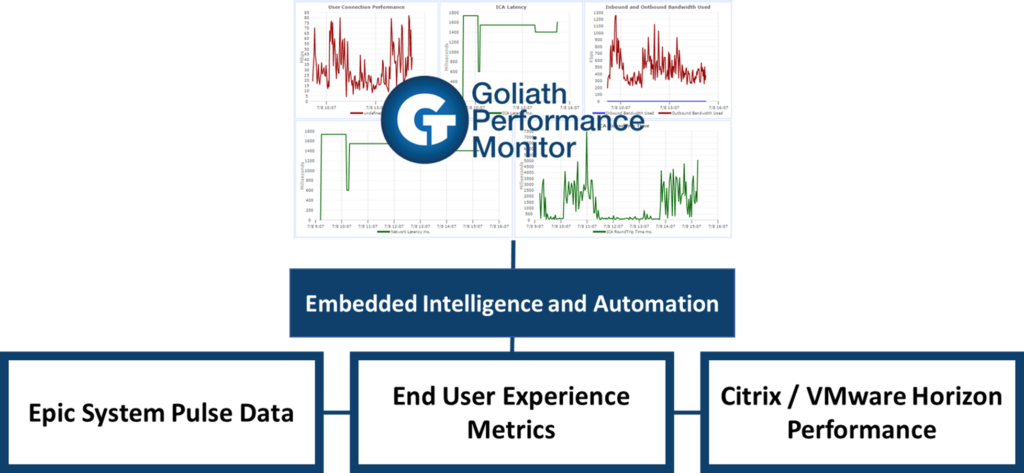
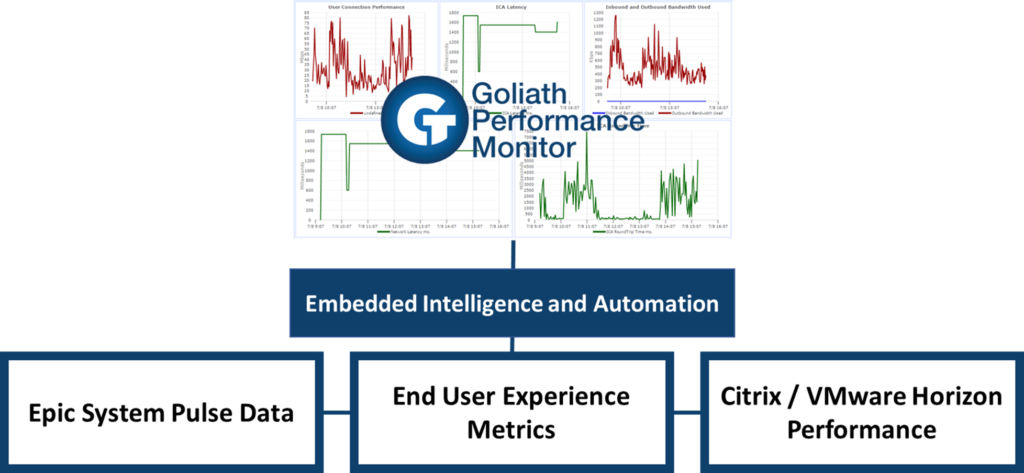
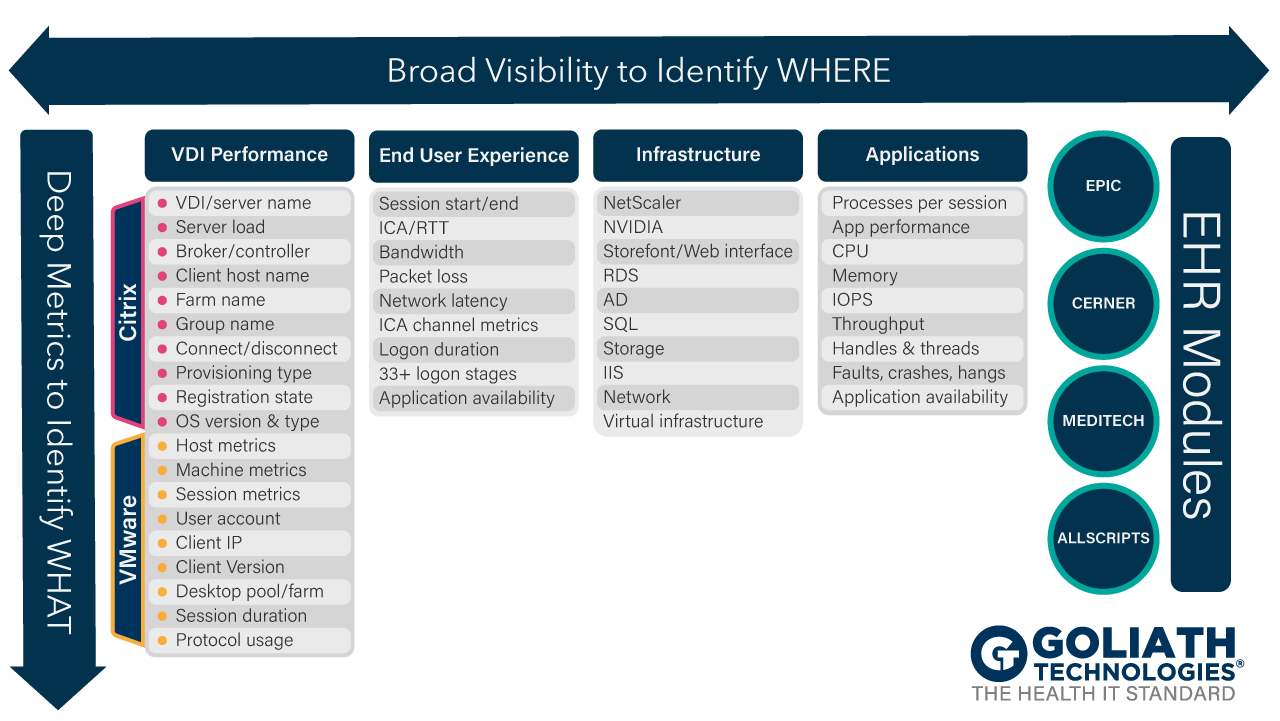
Now let’s look at how Goliath Technologies flips the paradigm by starting with the end user and understanding how the entire delivery infrastructure works together.  Goliath’s purpose-built EHR modules provide broad visibility to understand where a problem is coming from, and deep, detailed metrics to identify the true root cause of an issue.


As demonstrated here, the right toolset can broaden visibility across EHR performance, Citrix/VMware performance and EUE experience metrics that makes this work.   A CIO recently commented that the challenge of Healthcare IT is to deliver the systems an information required seamlessly, at the time care is provided … not 10 minutes later due to system issues.  Goliath reduces EHR system downtime which ensures quality patient outcomes.


Browse EHR Monitoring & Troubleshooting Webinars

Why MSPs Need Application Availability Monitoring

Why MSPs Need Application Availability Monitoring

Why MSPs Need Application Availability Monitoring

I’ve lived in the virtualization and cloud world for a really long time. During that time, I’ve also seen the impacts on users when you don’t have a good performance monitoring and troubleshooting system in place. That said, what if you have managed services? Do you understand what challenges managed services providers (MSPs) face when working without a monitoring and troubleshooting tool? How are you effectively resolving common VDI performance as well as connectivity issues?

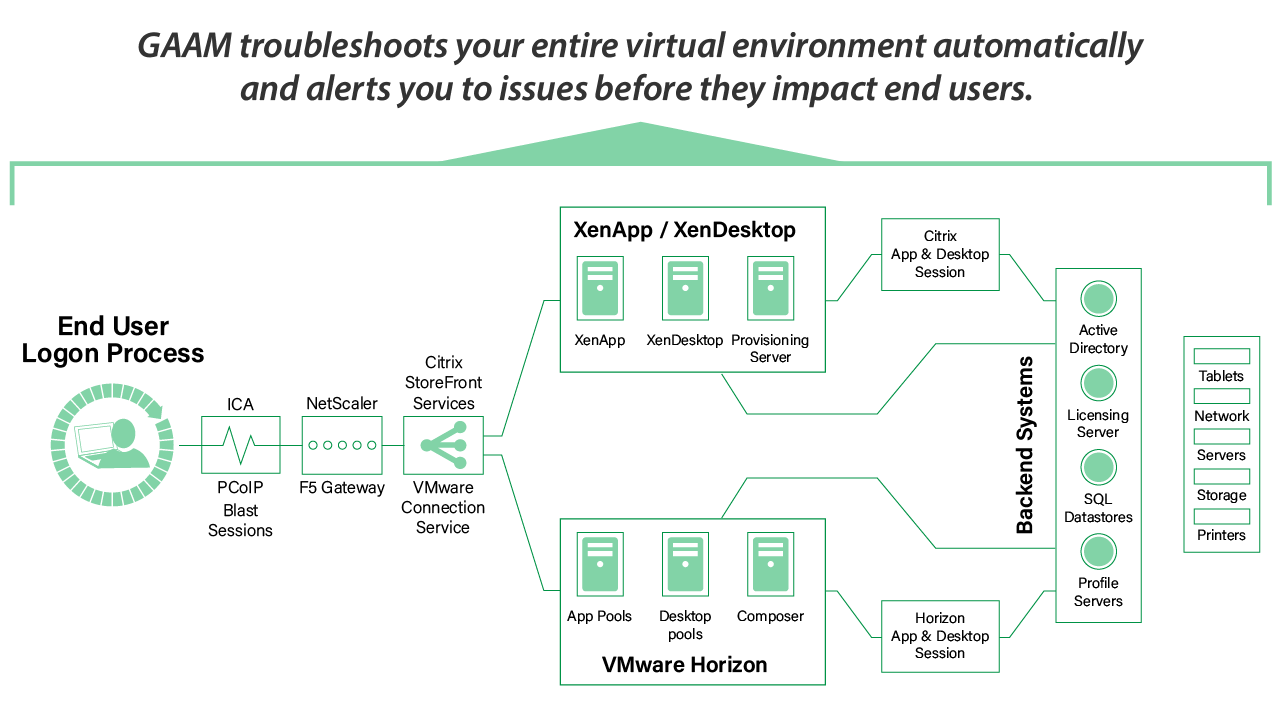
The Goliath Application Availability Monitor (GAAM) is a powerful solution to help you alleviate some of the most frustrating issues when working with VDI, virtualization, or application delivery in general. Once you use it, you won’t know how you lived without it.

When I first sat down in front of the Goliath management console, I saw how GAAM was used to automatically test the entire infrastructure as well as run tests from all critical endpoints, constantly. Even today, when working with Citrix ecosystems, the Goliath Application Availability monitor is the only tool I’ve found that proactively tells me when, where and why problems are occurring in my environment. From an MSP’s perspective, this not only prevents a lot of headaches but also saves so many hours of troubleshooting by pinpointing the problem for me. Plus, you’ll reduce the number of tickets you have by allowing GAAM to fix problems before end users are impacted.

Before we go too much further, let’s start with the user. Today’s users are much more agile and way more dependent on their desktops and applications running at all times. This is a major reason why VDI performance issues can cause serious issues in a world where ‘slow is the new down.’ From an MSP’s perspective, you really want to try to minimize these issues, but if they occur, be able to resolve and troubleshoot VDI issues as well as overall application delivery. Remember, you’re not only trying to make user experience better, but also make it easier for managed services engineers to troubleshoot faster.

biggest challenges for managed service providers

To that extent, I’ve worked with organizations that take a more legacy approach to managing their application and desktop delivery architecture. Without tools like GAAM, life could get a bit complicated. Let me paint a picture:

  • How do you know if your networks and backend systems are available? How do you know if you find out too late? Your SQL infrastructure is down. And you basically found out because a massive group of users emailed or called you at once. If you’re a managed service provider, this isn’t a fun day. However, this is your life without GAAM. And, it’s not just SQL. There are a myriad of network and backend systems that might fail and bring you to a halt. Is Active Directory functioning? What about your licensing servers? Maybe something went wrong with a NetScaler network connection. The point is that without GAAM, you’re playing a reactive game. Troubleshooting things like VDI connection issues under ‘fire drill’ circumstances isn’t fun. GAAM will absolutely automatically alert you of issues related to Citrix login failure or slowness before the end user ever notices an issue.
  • Parts of your environment are broken, but you’re not sure what they are. Is your vCenter Server operating? Maybe your profile servers are running out of space. Much like the previous point, you won’t know what’s going on until after it starts happening. In this case, you’re causing slowness for both your users and your business. The entire point of GAAM is to find the root cause of end user experience issues before your end users. This also means deeply understanding all of the infrastructure and virtualization components that support both your users and your business. Without GAAM, it’s so much more of a guessing game. Wouldn’t you love to have a system that simply tells you what’s wrong, where to find it, and even how to troubleshoot it? This level of integrated troubleshooting can become a reality when leveraging GAAM.
  • Your apps may not be launching… and you’ll have no idea why without lots of troubleshooting. This isn’t fun. Everything seems to be working, but apps aren’t launching. Is something wrong with Storefront? Are ICA connections dropping like crazy? Even within your VDI sessions, are applications enumerating? Without GAAM, you’re stuck not seeing the big picture and working really hard to focus in on single issues or environmental elements. You basically lose out on both real-time and historic views, to get a complete view of the entire environment, not just a single component.
  • Your applications and desktops are launching slowly, and you’re not really sure why that’s happening. Honestly, this could be even more frustrating than VDI or applications not launching at all. Again, without GAAM, you’ll find yourself going through the same paces to try and figure out why things aren’t working. Maybe your load balancers are misconfigured. Or, maybe something is wrong with licensing. The point is that you’ll have to lift each rock on its own to try and figure all of this out. And, you’ll likely have to log into multiple consoles just to figure it all out. As it stands, GAAM is the only IT ops tool that includes purpose-built technology to integrate key data sources to help IT professionals proactively anticipate, troubleshoot, and prevent end user experience issues. Without it, the process to find out what’s wrong is painstakingly slower.

In my own experience, one of the biggest challenges for managed service providers is the ability to be proactive. So, removing a legacy way of managing users, applications, and their resources will make your virtualization ecosystem much healthier. Sitting down in front of the Goliath management console, I quickly saw that GAAM gave me a much broader perspective into so many key variables within a virtualization architecture. So, you’re now aware what life is like without GAAM.

What happens when you introduce this kind of tool into your own environment? At it’s core, the Goliath Application Availability Monitor (GAAM) acts as an automatic early warning system for pretty much everything we’ve discussed so far. For example, the Goliath Virtual User (which can be deployed at any location) proactively accesses Citrix XenApp/XenDesktop and other mission-critical applications just like a real user. This provides hard data on what will happen when an actual user, doctor or nurse tries to access important patient records. IT professionals are alerted immediately if an issue occurs, and the system provides specific data on where the failure happened. This allows IT to identify root cause and troubleshoot quickly before actual users are impacted. Plus, the system will give you screenshot evidence so you can actually see where there might be VDI performance issues or if there are challenges with connectivity.

Managed services aren’t just about delivering content and resources. It’s about being proactive and supporting an agile business. In my own experience, GAAM will tell you where and why issues are occurring, unlike other application performance monitoring software. From there, you can integrate both troubleshooting as well as control. Administrators can see what tests will be run, from each location, and manage testing by shift, or by event, and even block out maintenance windows to avoid unnecessary alerts. All of this is handled from a central, simple interface with no need for scripting or intervention at the end points themselves.

Do you want to make your life easier, better support your users, and have a happier business? Use GAAM as a real solution to help you alleviate some of the most frustrating issues when working with VDI, virtualization, or application delivery in general. Once you use it, you won’t know how you lived without it.

Click the link below to access a Free Trial of the software mentioned in this blog!
 
 
What’s Required for Citrix XenApp/XenDesktop Troubleshooting?

What’s Required for Citrix XenApp/XenDesktop Troubleshooting?

What’s Required for Real Citrix XenApp/XenDesktop Troubleshooting?

It is not exactly a secret that Citrix deployments can be complex, and like any complex system, things mayoccasionally go wrong. When that happens, it is important to restore the system to a functional status as quickly as possible and avoid a prolonged outage. That being the case, IT pros who are tasked with maintaining their company’s Citrix deployments should consider their plan for addressing an unanticipated problem.

Director vs Goliath Troubleshooting

Most IT professionals have a collection of tools that they have amassed over the years and turn to these tools when things go wrong. It is especially common for IT pros to use free or open source troubleshooting tools. Such tools may provide diagnostic capabilities that go beyond what can be natively found in the Citrix software, and are freely available for download. So, what’s not to like?

I’m not one to bash the use of free tools. I use them myself on occasion. But, there are times when relying on free troubleshooting tools might not be in your best interest. Free tools may not be the best tool for the job.

As someone who has worked in IT for well over 20 years, there are a number of things that I have noticed about free tools over the years. Let me share with you some of my observations.

One of the hardest lessons that I have learned about the use of free tools is that sometimes you get exactly what you pay for. When you use a free tool, that tool may or may not be trustworthy. The troubleshooting tools that Citrix provides presumably work as advertised, but on at least a couple of occasions I have downloaded free support tools that ended up giving me inaccurate information. In both situations, I wasted many hours of troubleshooting because I believed what the tool was telling me.

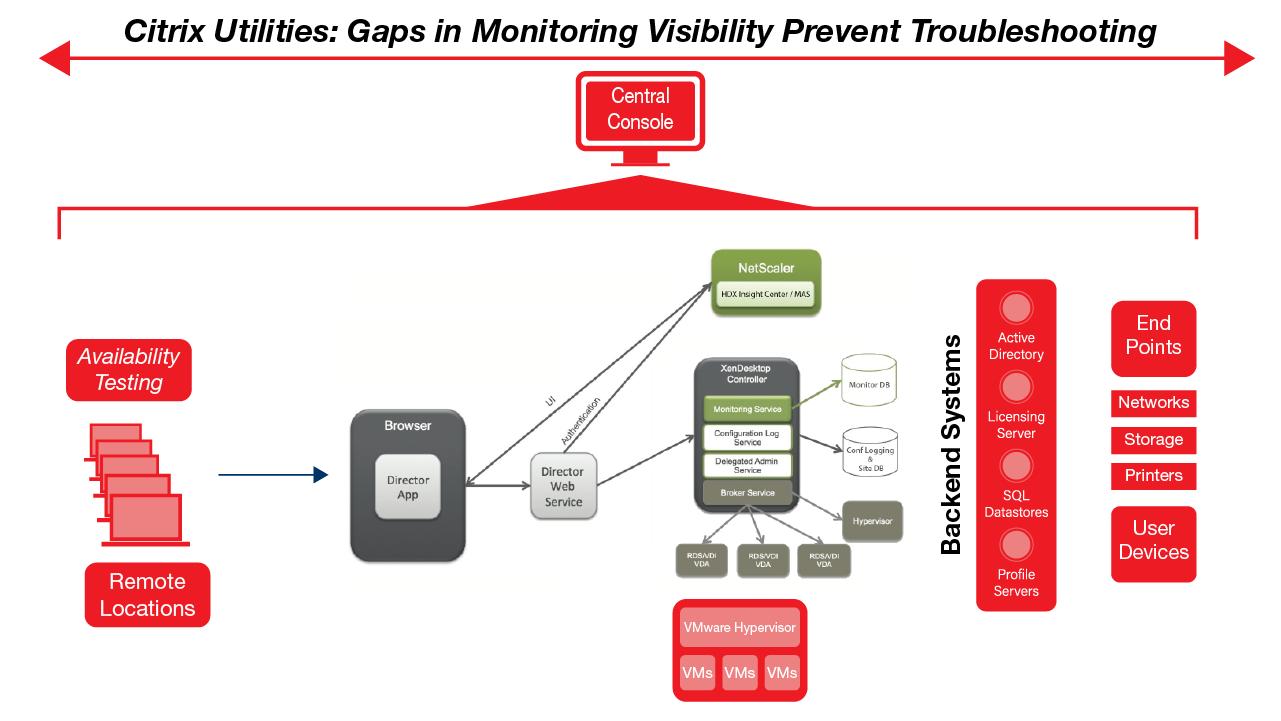
Citrix Utilities Leave Blind Spots

Another observation that I have made over the years is that most of the free tools that I have used are either broad or deep, but not both. A broad tool might give you a general overview of the health of your IT infrastructure but lack the ability to drill down into complex problems. Conversely, a tool that includes some technical depth may fail to see the big picture, which is important in Citrix environments.

As a techie, I have historically gravitated toward tools that provide some technical depth. After all, it’s tough to fix a problem if you can’t really dig in and find out what is going on. However, tools that provide a high degree of technical depth can sometimes be problematic in a completely different way.

One issue that I have occasionally run into with some of the free tools is that they present you with raw information, leaving the interpretation of that information up to you. A performance monitoring tool might show you for example, that a particular server’s storage I/O is way too high, but it is up to you to figure out why this is happening. Normally this means needing to know which additional performance counters you need to cross reference, what the normal range should be for those counters, and what it might mean if counters reflect ooff-nominal values.

A second issue that I have sometimes seen with the free tools is that they can lead you on a wild goose chase. There is an old saying that when all you have is a hammer, everything looks like a nail. If you have performance tools that are designed to diagnose very specific types of problems, your troubleshooting efforts will naturally begin to align with the tool’s capabilities. The problem is that you can become dependent on your tools to the point that it becomes difficult to diagnose problems that fall outside of what the various tools are designed to look for.

When it comes to diagnosing problems in an environment that is as complex as some Citrix deployments, you really need a tool that can see the big picture, but that can also drill down into the root cause of the problem once the general problem area has been identified. Goliath Technologies’ Goliath Performance Monitor is an excellent example of such a tool. It provides a broad overview of your entire Citrix deployment, while also providing the technical depth necessary for meaningful root cause analysis. Perhaps more importantly, the software is designed to be easy to use, and skilled resources are not required for implementation. That’s because Goliath Technologies includes Embedded Intelligence and Automation that is preconfigured to:

  • Discover and map your entire Citrix environment, and the dependencies within it – automatically.
  • Monitor and alert you to events, conditions, and failures that may degrade performance
  • Provide automatic remediation of issues based on specific conditions. This includes restarting servers, applications, and processes – or launching script/executable files to resolve issues before they become more serious.
 
Goliath vs. Citrix Comparison

Troubleshooting Insights for Success Within your Epic Deployment

Troubleshooting Insights for Success Within your Epic Deployment

Citrix CTP Blog

Troubleshooting Insights for Success Within your Epic Deployment

Citrix Expert Blog banner

Read the latest blog from Theresa Miller (CTP, vExpert, MVP) where she explains how healthcare organizations using Epic can benefit from the broad and deep visibility provided by the Goliath Performance Monitor.

Healthcare organizations that deploy Epic to support the patients that they see every day have a responsibility to ensure that Epic is always online and performing well. Take for example, a hospital that uses Epic for all its patient services to keep the patients healthy and to ensure their safety Epic needs to be online 24×7. Monitoring and troubleshooting both the underlying infrastructure and Epic are critical to ensuring patients get the care they need. Today let’s talk about how to ensure this happens.


Visibility with native tools

Most Epic deployments are virtualized, as it is one of their recommended architecture options. End-user computing (EUC) products typically come with a nice set of native tools. Typically, I would recommend that organizations should try native tools for monitoring, but keep in mind that at the end of the day this will only take you far. In most hospital environments application architecture is complex, and a native tool will only show you a subset of the functionality. Most applications have layers of functionality that cannot be seen in their entirety with native tools. Because of this a, thousands of support tickets can be pouring in from end users, and, depending on the native tool the underlying root cause still be unknown, or worse, the simpler view of native tools may show all systems working properly. The reason is that native tools don’t always show the big picture, and the interdependencies between various systems are not monitored or visible.

Breaking down the silos

As we assess things further it becomes clearer that EUC virtual environments in general have many layers to be monitored. These environments have storage, network, infrastructure and application software. Not only can you end up with multiple native monitor tools, there can be corresponding team silos to work through in the enterprise. During any critical outage impacting Epic working through team silos can add a challenging dynamic. Teams need to communicate with each other openly to figure out the problem. The more team silos, the longer it can take to resolve a problem. The longer the problem goes unsolved the more patient impact to care that will be seen. Having one monitoring tool that can see into the entire architecture will lead to the ability to having more proactive response teams, and faster time to resolution of issues that cannot proactively be prevented.

Time to get proactive and say goodbye to reactive

Now that we’ve looked at the challenges with troubleshooting infrastructure that supports your Epic environment it’s time to evaluate further. Goliath Technologies has a module for their Performance Monitor solution that can not only monitor and troubleshoot your entire virtual infrastructure; it can also integrate data directly from Epic, providing the ability to correlate between the key metrics that Epic System Pulse can provide.

Epic Demo


Why is this important you ask?

When it comes to Epic performance there are many different aspects of your underlying architecture that can impact access to the application, user logon speed, and system latency. These potential problems can lead to end-user frustration if a wholistic view of the overall environment isn’t at your fingertips.

Healthcare IT benefits from the broad and deep visibility from Goliath in several ways. First, it provides a wholistic view of end user experience issues across the complex environments that is unavailable to native tools. Secondly, many customers use it as a starting point to quickly identify if the root cause of a specific issue is in Epic, or in the underlying delivery architecture, and troubleshoot accordingly. With Goliath’s module for Epic System Pulse Integration, it is easy to diagnose problems both proactively and in an expedited fashion ensuring business functionality, uptime, and proactive problem solving. Having a solution that is purpose-built, your IT support organization can ensure Epic uptime and business success.

Theresa Miller

Theresa Miller

IT professional working as a technical expert in IT for over 20 years. Theresa is a Citrix CTP, VMware vExpert, Microsoft MVP (Office Servers and Services), Nvidia Advisory Council, and MBA. Her areas of expertise are in the areas of Exchange, Office 365, Active Directory, VMware, Citrix XenApp, and XenDesktop. She is the Founder of 24×7 IT Connection, LLC, a Windows IT Pro Contributing Editor, Pluralsight author, and is an author for TechTarget. You can find her on twitter @24x7itconnect.

Try Goliath For Free

Experience true end user experience monitoring and troubleshooting free for 30 days.

Epic and System Pulse are trademarks of Epic Systems Corporation

Proactive Management of End-User Experience – Flipping the Paradigm

Proactive Management of End-User Experience – Flipping the Paradigm

Proactive Management of End-User Experience – Flipping the Paradigm

Goliath Technologies’ CEO Thomas Charlton and CTO Donna Grare were recently interviewed by Healthcare Scene to discuss the topic of proactive end user experience management in healthcare IT, and how our products can help hospitals and healthcare organizations move away from reactive tactics.

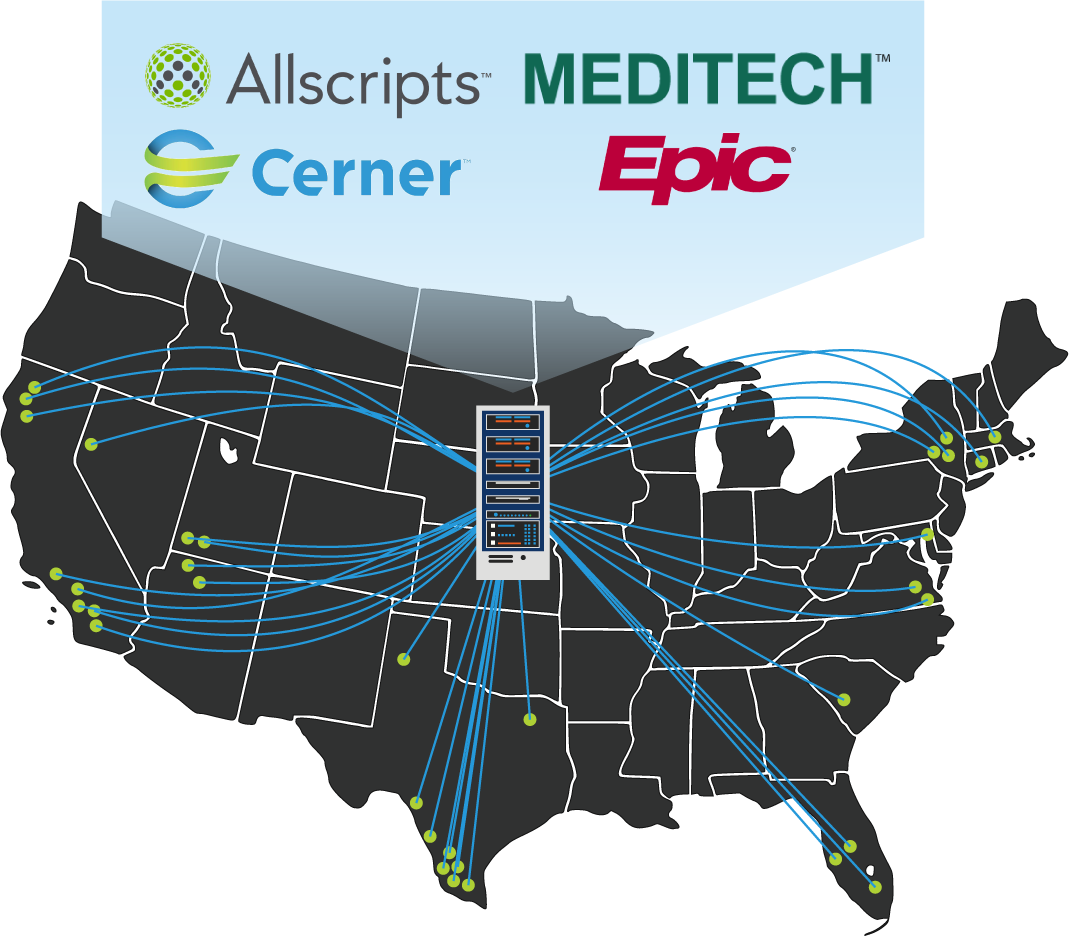
Towards the middle of the interview Colin stated, “I have to admit that before I sat down with Charlton and Grave, I had no idea that platforms like Goliath’s existed. Their platform is the result of years of work with other industries: banking, legal and managed services. Smartly, Goliath realized that they would have to pre-build connections to popular healthcare applications before organizations would adopt their platform. They currently have connections to: Allscripts, MEDITECH, Cerner and EPIC.”

Browse EHR Monitoring & Troubleshooting Webinars
Automatically Map, Visualize and Troubleshoot Your Citrix Infrastructure with Topology View

Automatically Map, Visualize and Troubleshoot Your Citrix Infrastructure with Topology View

Automatically Map, Visualize and Troubleshoot Your Citrix Infrastructure with Topology View

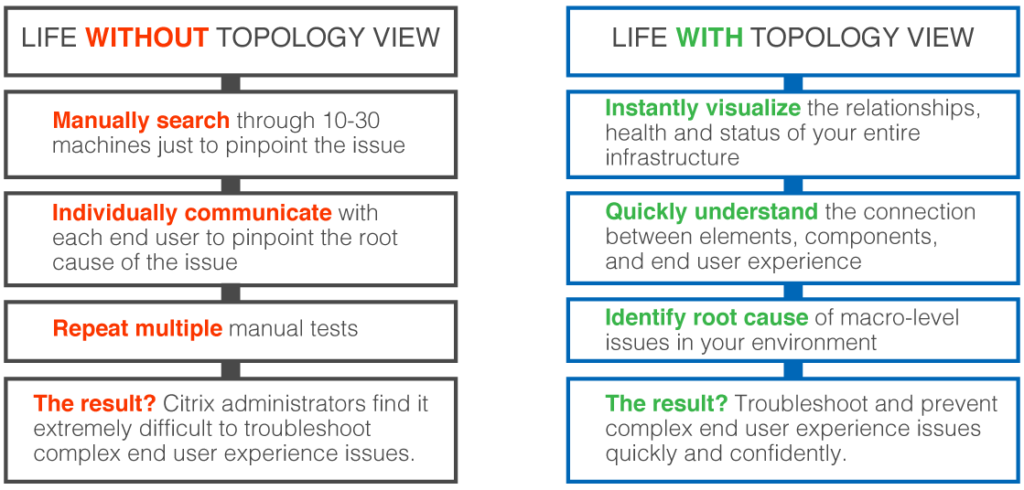
One of the single biggest issues that Citrix administrators are forced to deal with is the sheer complexity of their Citrix systems. Not only is there complexity associated with the Citrix software itself, but the Citrix software also has a dependency upon a number of supporting infrastructure components. All of this complexity can make troubleshooting extraordinarily difficult whenever problems arise. An inexperienced administrator may not even know where to start.

Even if an organization’s Citrix deployment has always performed flawlessly, the administrative staff will still have to cope with the underlying complexity as a part of its capacity planning efforts. If additional users are going to be added to the system for example, then administrators will need to know whether any of its resources are already being strained, and whether or not the system can realistically be expected to handle the increased workload.

If performed manually, troubleshooting or evaluating the capacity of a Citrix system can be a monumental and time-consuming task that requires an administrator to have a very deep understanding of the underlying network and systems architectures. As an alternative however, Goliath Technologies provides a Topology View feature that can help administrators to pinpoint issues in just a few clicks.


“Goliath’s Topology View is a graphical tool that automatically detects and maps an organization’s entire Citrix deployment, including all of its subcomponents… This allows you to capture the overall status and health of your entire Citrix infrastructure at a single glance.”


Understanding Topology View

Goliath’s Topology View is a graphical tool that automatically detects and maps an organization’s entire Citrix deployment, including all of its subcomponents. This includes things like Citrix storefronts, hypervisors, delivery controllers, databases, and more. Furthermore, each of these individual components is color-coded, as an indication of its general health. A component that is displayed within a green circle, for instance, is known to be healthy, while a component that is displayed within a red circle is performing sub-optimally.  This allows you to capture the overall status and health of your entire Citrix infrastructure at a single glance.

If an organization is experiencing problems with its Citrix infrastructure, Goliath Technologies’ Topology View is going to display that one individual component in red, while everything else on the chart is shown in green. The reason for this is that there is a complex structure of interdependencies between the components. Therefore, if one infrastructure component is experiencing problems, there is likely to be a chain reaction effect in which a series of other components with direct or indirect dependencies on that component are also affected. Topology View illustrates the relationships between the various components and shows how an issue with one component impacts other components within the hierarchy.

Having the ability to see the infrastructure as a whole and the relationships between the various components is hugely important from a troubleshooting standpoint because it can save admins from chasing dead ends while attempting to resolve a problem. Imagine for example, that an organization is having problems with their Citrix infrastructure, and that the symptoms point to an issue with a Citrix delivery controller. In spite of the symptoms, the delivery controller may or may not be the true cause of the problem. It could very well be that the delivery controller is actually fine and that the real source of the problem is a backend infrastructure component such as a database. So with that in mind, just imagine how much time an administrator might waste manually trying to figure out what is wrong with a delivery controller that is actually healthy.

Life with Topology ViewNow consider how Topology View is part of the Goliath Performance Monitor technology which can monitor the entire infrastructure and alert on any lower level components that are in an unhealthy state. An administrator would be alerted to issues relating to back-end components and problems that are lower in the stack.”

The administrator could then use the information provided by Topology View to track the issue to its source.  By drilling down a little further, the administrator would receive actionable information that they could use to resolve the problem.

An organization’s Citrix infrastructure is by far one of its most critical IT resources. As such, IT pros are under tremendous pressure to keep the Citrix environment healthy and to immediately resolve any issues that may occur. Topology View from Goliath Technologies can greatly simplify such troubleshooting efforts, while also saving administrators from spending hours trying to manually trace issues across complex, interconnected infrastructure components.

Learn More:

Watch the Topology View Video:

Sign up for a product demo to see how your IT team can benefit from Topology View