
Identify Cause of Issues in Your Citrix/VMware Horizon Deployment

Identify Cause of Issues in Your Citrix/VMware Horizon Deployment

Citrix CTP Blog

Top 3 Ways to Identify Root Cause of Poor Performance Issues in Your Citrix or VMware Horizon Deployment

Enterprise troubleshooting is not an easy task with many enterprises.  Administrators are typically left maintaining many different solutions, attempting to evaluate root cause manually, or are left with solutions that do not give broad visibility into all aspects of the deployed Citrix or VMware Horizon deployment.  This can leave systems down for longer than necessary and can leave administrators in a tough spot.  We covered some of these pain points previously and can be found here.  As we unravel this topic further, let’s look at my top 3 virtualization troubleshooting scenarios that could have simply been resolved with the right purpose-built tools.  Then let’s look at how 3 of the new features in Goliath Performance Monitor 11.8 could have ensured quick identification of the problem and helped resolve the technology issue by finding root cause easily.

If only there were a way

Using the wrong tools or a very manual approach can leave users stranded without the ability to do their jobs while support teams spend hours or days troubleshooting and working toward resolving issues.  The more complex the deployment the more challenging this can be to fix the issue.  It seems that most enterprises will spend large amounts of money on a deployment, but often try to cover monitoring by using native toolsets, scripted options, or even manual approaches.  Making it challenging to quickly resolve issues and work quickly to identify root cause.  Let’s take a closer look 3 of my top troubleshooting challenges from my experiences.

Troubleshooting Challenge 1: New EHR Deployment or Upgrade Goes Live and within an Hour Performance Significantly Degrades

In a healthcare environment a new EHR deployments goes live, and within an hour of the new system being online the environment quickly went from performing to only a subset of users being able to function while the rest of the environment degraded quickly.  It started with multiple user calls to the service desk.  This deployment didn’t have a single, comprehensive monitoring solution in place.  After leveraging the tools available, and some manual diagnosis multiple support calls were opened.

Root cause:

  • Memory leak in the EHR application
  • Bug that a patch was created for within the virtualization platform software that was creating a limitation in the number of users that could connect to the backend host

Despite all the load testing and prep that went into this environment in advance, there were still issues uncovered that could not be seen without real load and without the right monitoring tool to oversee the entire environment.  So how could a purpose-built monitoring tool have helped in this scenario?

See Figure 1 below:


End-User Experience Overview


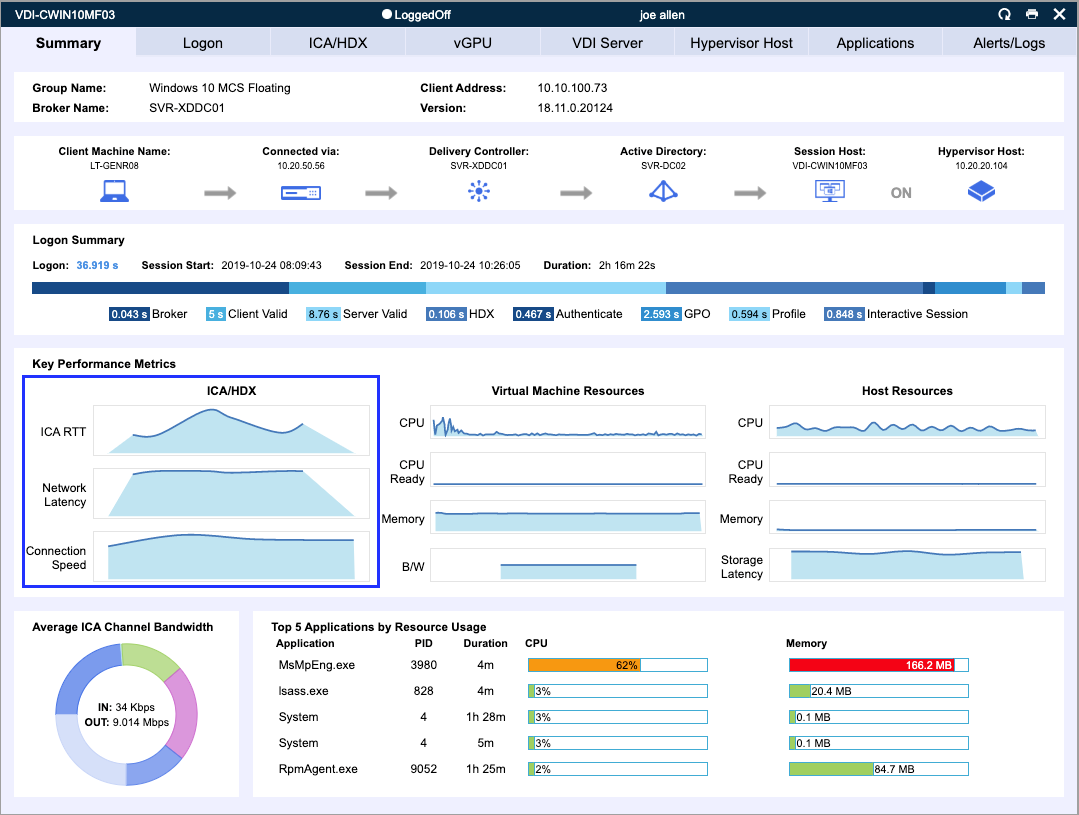
Figure 1 – Demonstrates visual insights; with Goliath 11.8, into the user experience with detail that allows for quick identification of compute issues that could have more led to expedited identification of the issues.


Troubleshooting Challenge 2: Remote Workers Struggling to Logon

In a financial environment external access to the virtualization environment was primarily used for the rare cases that users needed to work remote.  For example, a snow day.  Users that accessed the system earlier in the morning could access the system fine, but those coming in later in the morning are being denied by the access gateway.  The support desk starts getting calls, and upon further analysis root cause was identified:

  • Not enough user connection licenses

To resolve, an expedited license purchase was procured.  Let’s take a look at how with the right tool this could have been identified and resolved quickly.  See Figure 2 and Figure 3 below:


Goliath's System Health Overview


Figure 2 – Demonstrates visual insights into the overall performance of the users previously connected in Goliath 11.8 which clearly shows us the system is functioning well and the server health is not creating a bottle-neck.


License Count Visual Information


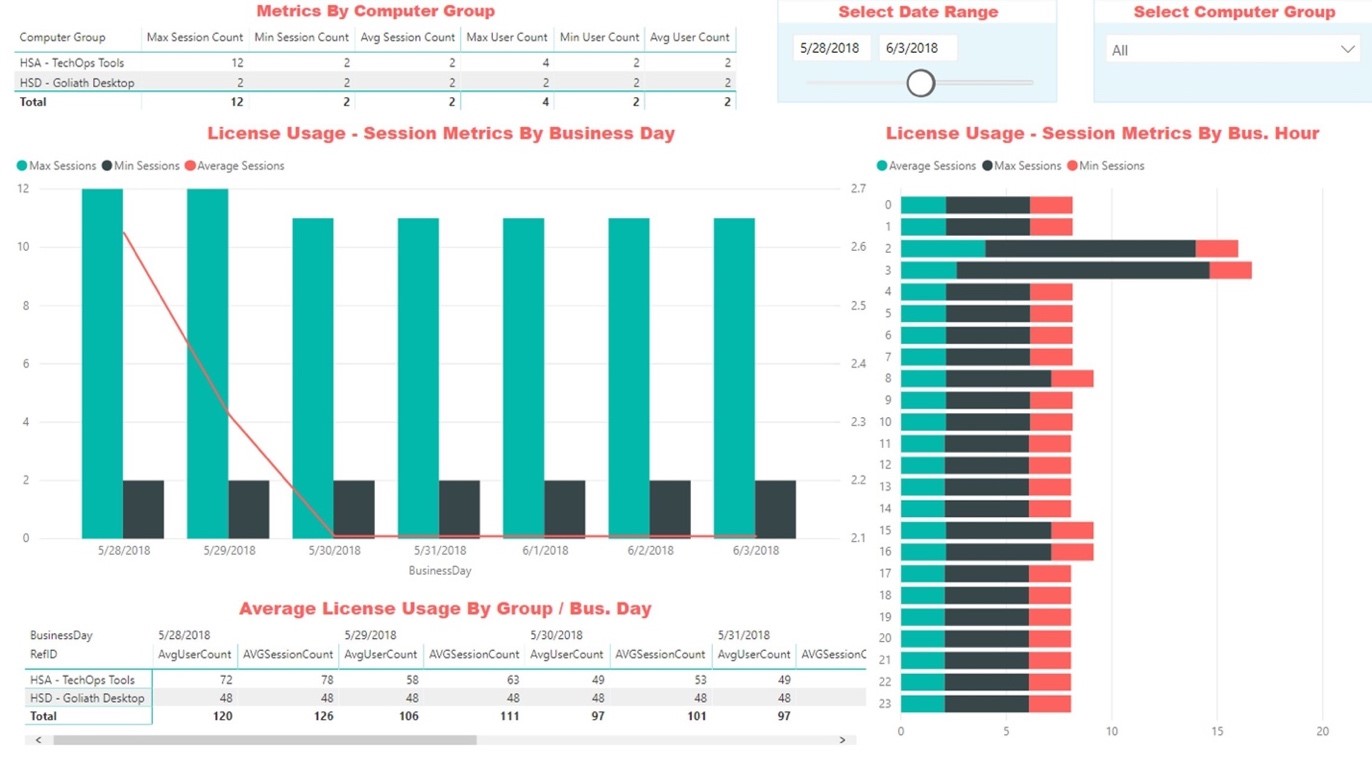
Figure 3 – Demonstrates visual information into the available license count.


Troubleshooting Challenge 3: User is Having Application Issues and Opens a Ticket Saying Citrix is Slow.

In a technology company a user calls in and states that Citrix is slow.  It is up to the support desk to dive in more closely, because the support person knows that Citrix as an application isn’t the problem at all.  After doing some shadowing of the user it was identified that their remote desktop is performing slowly.  From here, the call needs to be escalated, because administrative permissions to dive deeper are needed.  In this environment all troubleshooting is manual and tools are being researched, but when all is said and done the root cause is:

  • The server the desktop is running on is low on resources, so it must be removed from production so that user can reconnect their desktop session on a new server.

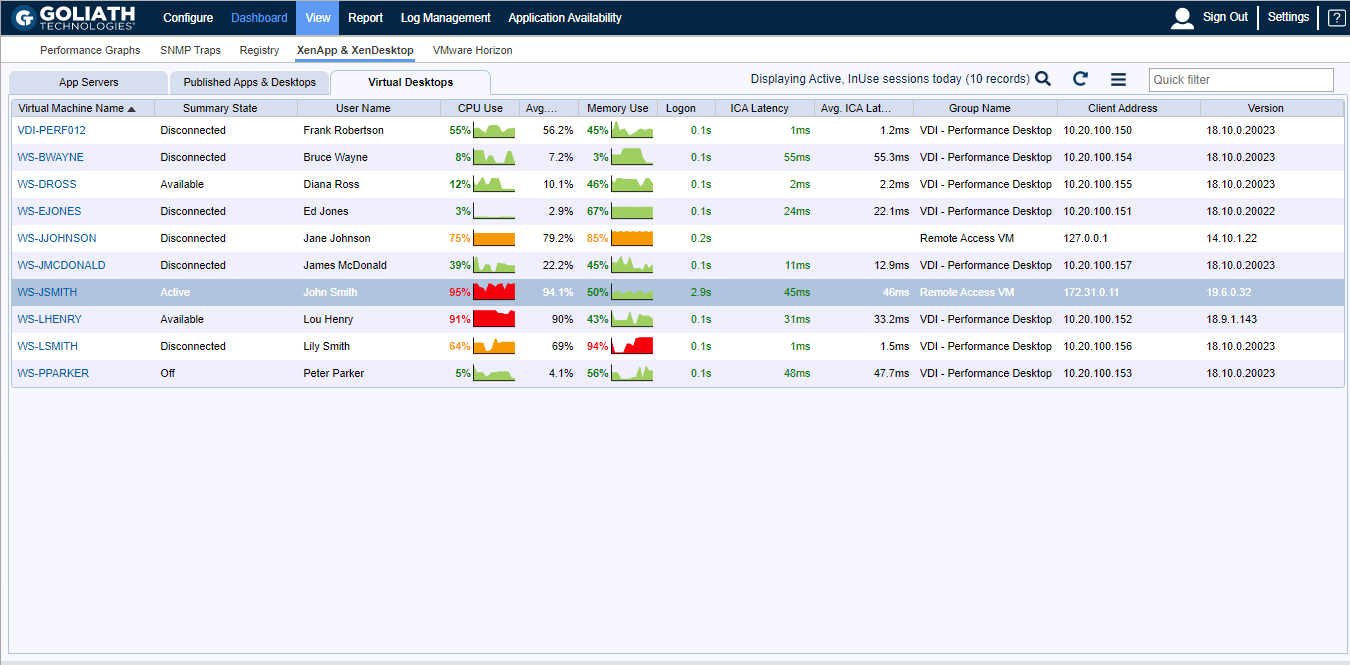
With the process being manual, this took the better part of an hour to resolve when it could have been minutes.  The same process would apply if it was a VMware Horizon instance. Let’s take a closer look at Figure 4 below.

in session performance quickly evaluated


Figure 4 – Demonstrates how in session performance can be quickly evaluated with Goliath 11.8 to determine which server the user is connected to and identify the root cause of the server slowness issue.


Concluding Thoughts

Troubleshooting your Citrix or VMware Horizon environment shouldn’t be difficult or time consuming.  With the right purpose-built tools leveraging analytics of your environment will not only help you quickly identify tough issues quickly it can lead to more proactive technical work that can eliminate issues before the user calls. With the right metrics and increased visibility not only will you be better equipped to anticipate, troubleshoot and prevent end-user issues from occurring, but you will be able to foster data-driven conversations across your entire IT debarment, with other vendors as well as internal stakeholders.

Click here to learn more about all the features included in Goliath’s latest product release.

Theresa Miller

Theresa Miller

IT professional working as a technical expert in IT for over 20 years. Theresa is a Citrix CTP, VMware vExpert, Microsoft MVP (Office Servers and Services), Nvidia Advisory Council, and MBA. Her areas of expertise are in the areas of Exchange, Office 365, Active Directory, VMware, Citrix XenApp, and XenDesktop. She is the Founder of 24×7 IT Connection, LLC, a Windows IT Pro Contributing Editor, Pluralsight author, and is an author for TechTarget. You can find her on twitter @24x7itconnect.

Is Your EHR Running On Citrix Ready For The Workday

Is Your EHR Running On Citrix Ready For The Workday

Is Your EHR Running On Citrix Ready For The Workday

How do you really know if your EHR running on Citrix is ready for the workday?

This post was originally published by Theresa Miller.

Healthcare environments must ensure application availability around the clock to serve the needs of their patients.  In many hospitals, while they serve patients 24×7, there is typically a lighter overnight load, but by the time the sun rises, healthcare teams start staffing in full force. Oftentimes applications in healthcare are deployed via Citrix. The Citrix infrastructure can be complex and adding an EHR application such as EPIC can make early morning health checks take a long time. In this article, let’s look at my experiences completing that early morning health check of Citrix and an EHR application with native toolsets. Then let’s more specifically dive into ways to ensure that your Citrix servers serving up your EHR to the enterprise are ready to support the patients you care for every day.

It’s a new day – health checks!

In the past, when on-call that team member would be responsible for checking the health of the environment which wasn’t a small task.  To ensure everything is functional each day here is the checklist of what needed to be assessed.

  • Check email to identify potentially hung Citrix Servers: Two custom PowerShell scripts were run via scheduled task each day to check the uptime of each Citrix server, and to provide a list of disconnected sessions for review.
  • Citrix Director Review: Opened the Citrix monitoring tool to assess any potential issues.
  • EHR monitoring tools: Beyond Citrix, the EHR provider offered a separate console that could provide some insights into the overall health of the EHR application infrastructure.

Beyond leveraging these many different consoles, additional manual checks were often required depending on what was identified in the console.  Then remediating any issues found to make sure that the systems were all online and functional before the thousands of healthcare staff and patients that would be reliant upon these systems throughout the day.

Phew! Whatever happened to simple?

In the end, we were using a multitude of tools that created more work for the team with the misguided perception that we were saving money by not buying a 3rd party tool. The unfortunate truth was that a lot of money was being spent on the team’s valuable time, and in some cases didn’t always ensure that the environment was online for the day which equaled more dollars lost.  While there was a procedure, this is a prime example of how monitoring Citrix and EHR software, without the right tool for the job, doesn’t guarantee system availability or that the lack thereof would be identifiable.  Native monitoring doesn’t provide a single pane of glass or provide a real way to be truly proactive.  Even though we had time to fix the issues before the workday it was clear there had to be a better way.

Proactive Real-time Monitoring for EHR

Is there really a way to do proactive real-time monitoring of your Citrix environment that hosts your EHR deployment?  Goliath Technologies has a way to do this.  Not only can you be running proactive monitoring round the clock and be alerted when it fails, your teams will now have the ability to get visual feedback on each screen that applies to the user connection clearly leading the infrastructure administrator to what is successful, but more importantly what is failing.  Simplifying what it takes to ensure both your Citrix and EHR deployments are always available 24×7.  Let’s take a look at Figure 1 and Figure 2 below to get a better understanding of how this works.

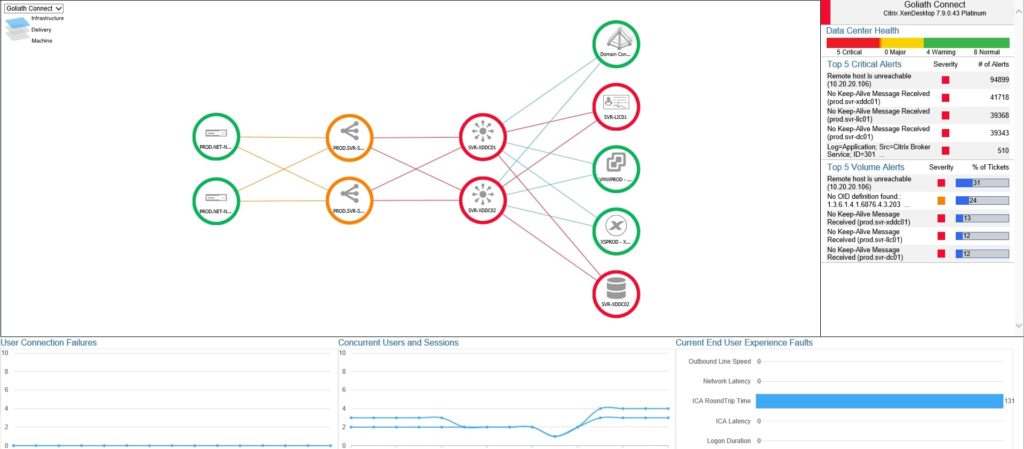
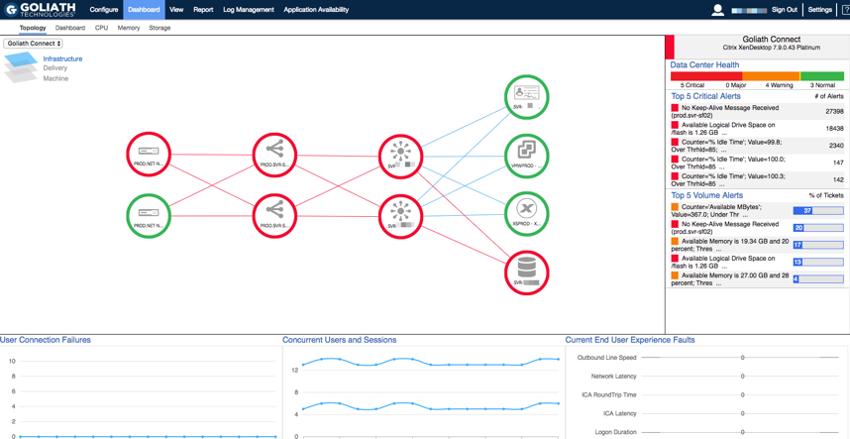
Figure 1 below shows how simple it is to understand at a glance where there may be issues in your Citrix VDI deployment, and how simple it is to click into the map to know where troubleshoot issues in your environment.

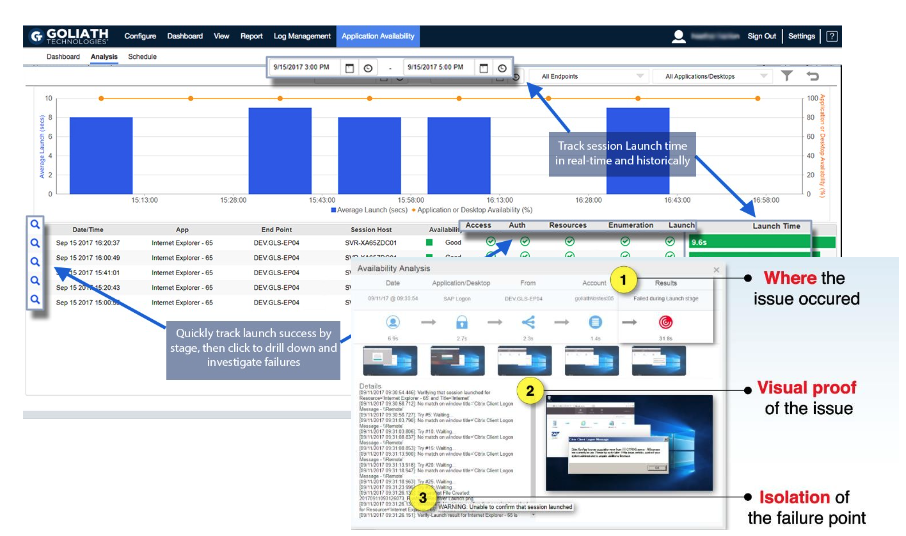
Figure 2 below shows availability analysis and how you can gain visual insights and screenshot evidence of the user experience, so that it’s clearer what needs to be resolved.  Gaining insights into the user errors removing the dependency for a user to be available before troubleshooting can occur.

Goliath Technologies offers purpose-built modules for EHR applications such as Epic, Cerner, MEDITECH, and Allscripts that enables health IT teams to see monitoring information from these applications combined with metrics from the IT delivery infrastructure layer (Citrix, VMware Horizon, etc.), as well as with end user behavior details for healthcare application delivery success.

Learn how Universal Health Services leverage Goliath’s availability and performance monitoring every day to ensure patient-critical applications and records are always available.

Goliath Technologies Appoints Stacy Leidwinger as CMO

Goliath Technologies Appoints Stacy Leidwinger as CMO

Goliath Technologies Appoints Stacy Leidwinger as Chief Marketing Officer

Marketing executive has deep experience using product and go-to-market innovation as drivers of rapid growth

October 16, 2019 – Philadelphia, Pa. – Goliath Technologies, a leader in anticipating, troubleshooting and preventing end user experience issues and the industry-standard in Health IT, today announced the appointment of Stacy Leidwinger as the company’s Chief Marketing Officer (CMO).

Leidwinger is a marketing and product professional with deep software industry experience. She joins Goliath after her most recent role as VP of Product for Nuance Document Imaging, recently acquired by Kofax. Her experience in marketing, product marketing, and product management has given her the insight and knowledge to spur accelerating growth and market leadership for business-to-business software companies.

“Stacy has proven herself time and again as an alchemist for innovation-fueled growth,” said Thomas Charlton, Chairman and CEO of Goliath Technologies. “Her mission with our company is to define clear positioning and messaging, as well as identify and guide our overall go-to-market strategy. I’m enormously proud to have her on board.”

At Goliath Technologies, Leidwinger will report to Charlton, joining the leadership team that is steering the company through its next phase of rapid growth with product and marketing strategies for the healthcare technology industry, as well as enhancing the company’s core focus on technology infrastructure.

“We are already unlocking tremendous value from Electronic Health Records (EHR) technologies such as Cerner, Epic, Allscripts and MEDITECH,” said Leidwinger, CMO of Goliath Technologies. “This opportunity is a great one for me because our software today does what no one else’s can. We give our IT customers a single, unified end-to-end view of the performance experienced by end users by combining powerful monitoring data across user behaviors, the infrastructure stack, and EHR apps. It’s what IT needs to ensure the best possible technology availability and response for its end users.”

Prior to Nuance, Stacy worked for RES Software of Radnor, Pennsylvania, and the Netherlands where, as product leader, she drove the company’s transformation from desktop management to an end user security offering. The company was acquired by Ivanti in 2017. Previously, she led product management for Vivisimo, an innovator in the enterprise search market that was acquired by IBM. Leidwinger went on to a prominent leadership role within IBM as a product leader within its global Big Data portfolio.

About Goliath Technologies

Goliath Technologies, a leader in proactive IT,  transforms IT professionals into IT heroes by helping them proactively resolve issues before end users are impacted. Our monitoring and troubleshooting software for hybrid IT environments use embedded intelligence and automation so any IT professional can anticipate, troubleshoot, and prevent end user experience issues regardless of where IT workloads or users are located. Customers include Universal Health Services, NorthBay Healthcare, Inspira Health Network, American Airlines, Office Depot, Tech Mahindra, Pacific Life, HCL and others. Learn more about how we empower proactive IT at goliathtechnologies.com.

Media Contact Info:
Nicole Connell
nicole.connell@goliathtechnologies.com
855-465-4284

Goliath Technologies Delivers Unmatched Troubleshooting Capabilities in New Release

Goliath Technologies Delivers Unmatched Troubleshooting Capabilities in New Release

Citrix CTP Blog

Goliath Technologies Delivers Unmatched Troubleshooting Capabilities in New Release

* This article was originally published by George Spiers

Whilst Citrix Synergy 2019 was in full-flow in Atlanta, GA, Goliath Technologies were also keeping busy with the 11.7.8 release of Goliath Performance Monitor, which adds several features that  were in demand by many customers.

I’ve had the chance to review this latest release, and wanted to touch on some of the features that are new to version 11.7.8, as well as cover ground on some of the features and capabilities already existing in the product today.

Troubleshooting Workflows

When an IT administrator receives alerts or calls from users reporting that their session is slow, their logon times are slow, or they cannot complete a specific workflow, often these calls are challenging to resolve because there are many components and factors at play that could be contributing to the issue.

Goliath Performance Monitor (GPM) makes such reported faults easier to resolve by presenting to the administrator essentially the components of a Citrix environment and related infrastructure that are healthy, versus those that are under stress or in a failed state. The administrator can know when issues arise in an environment before users are impacted either by the various dashboards made available by GPM, or via proactive alerts via email or common ticketing systems.

With the information provided by GPM, take for example a logon duration report, the wealth of information is powerful to an administrator, but may require additional documentation to one who is not familiar with troubleshooting at such a detailed level. Since Goliath Performance Monitor captures over 33 stages of the logon process, there will be times when one or two metrics report back with high times, and the administrator may not exactly know how best to interpret what is being called out, or how best to troubleshoot the issue.

The new Troubleshooting Workflows are designed to help administrators with all levels of troubleshooting experience use the data Goliath Performance Monitor is collecting and presenting, to their advantage. You will be able to step through common troubleshooting issues backed up by real world use cases, and how to combat them effectively. This means IT professionals will be more effective and faster when it comes to resolving end user experience issues.

Network Operations Center (NOC) View

The Goliath Topology View shows you a high level view of your Citrix infrastructure, also known as the NOC view, with colour coding that represents the health of each component. This allows a Citrix administrator to very easily identify if a component is not operating as it should. You do not need to manually build out the dashboard. The system is intelligent enough to automatically map out all of your Citrix infrastructure components such as Delivery Controllers, Delivery Groups, and Machine Catalogs, and create physical and logical connections with other components in the environment.


This view is now enhanced by customised performance dashboards which provide a more detailed view of key metrics to support the overall health shown by the Topology View.

Those dashboard could be multiple datacentres, Citrix sites, or the different layers that GPM reports on. Dashboards auto-refresh at intervals configured by you, which is an existing capability of the product. With 11.7.8 these dashboards auto-refresh and auto-cycle, so you can now have multiple dashboards configured and displayed at defined intervals. With the NOC view, auto-refresh and auto-cycle functions, you can display powerful, flexible dashboards to mounted monitors or splash screens in your operations rooms or service desk centres.

Electronic Health Record Specific Modules

Goliath Performance Monitor 11.7.8 delivers unique, purpose-built modules for major EHR applications such as Epic, Cerner and MEDITECH to monitor and troubleshoot those mission critical systems. These modules, customer experience, and EHR vendor relationships establish Goliath Technologies as the Health IT Standard for monitoring and troubleshooting.


If you work in healthcare IT, you will know that a failure or simple performance degradation of an EHR system could have massive impact on patient care. Whilst we focus on our Citrix environment, it is equally as critical to monitor and troubleshoot the applications too, and the backend components that make them tick. With that in mind, you will want to support your EHR environment with products that go beyond simply UP and DOWN monitoring.

Features such as the Early Warning System from Goliath accesses these mission critical applications just like a real user would, and reports back details on logon times including screenshots if any errors exist in the logon and launch process. Resource load for virtual machines and the Citrix delivery infrastructure is constantly monitored, ICA latency is captured and so on. The information you need to ensure successful uptime and delivery of critical EHR applications on Citrix is taken care of with Goliath, and when things begin to go wrong, you can be proactive in troubleshooting before end-users are impacted.

Given that systems such as Epic are often accessible via Citrix Virtual Apps deployments, Goliath Performance Monitor can be the single platform for customers to monitor both their Citrix and EHR environments.

Intelligence and Automation

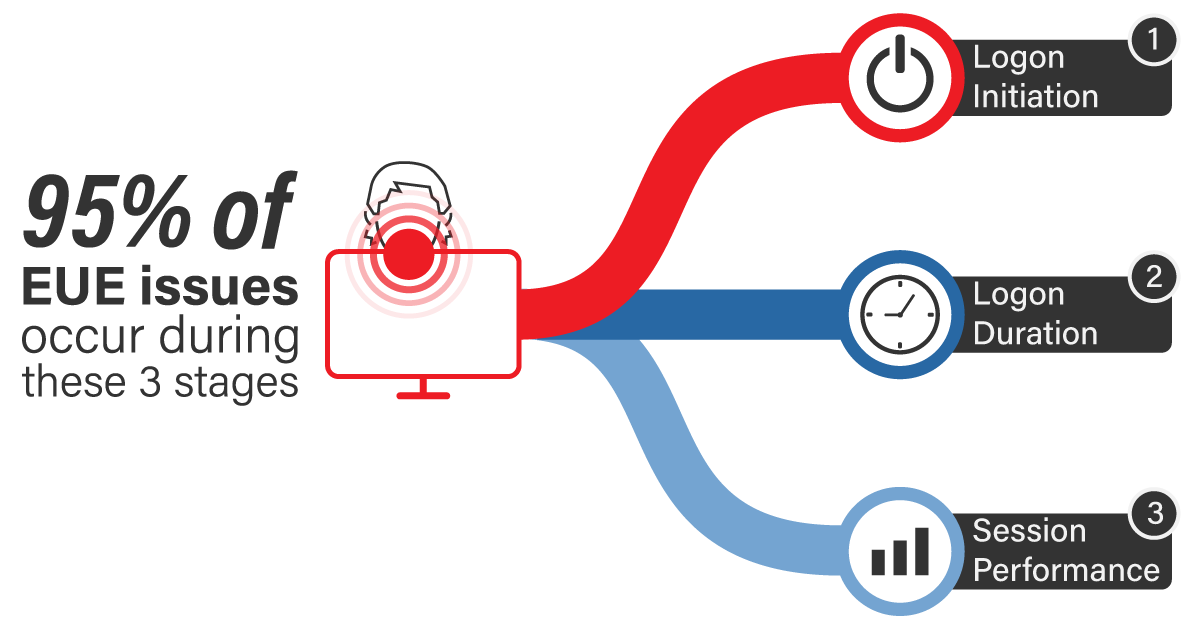
The intelligence and automation built into the product allows an organization to prevent end user experience issues by focusing on the logon initiation process, logon process, and in-session performance. These are the three most common causes of a call to the helpdesk.

With over 250 key failure points being monitored out of the box, you don’t need to be a VDI expert to configure Goliath Performance Monitor, as it self-configures for you, which allows you to get to troubleshooting the environment quicker. The product also discovers and maps out your Citrix infrastructure to a Topology View, and has the ability to auto-deploy agents out to your virtual machines.

If specific faults, events or conditions are triggered in your environment, Goliath can automatically take care of the situation by restarting services, rebooting servers, or even running PowerShell scripts without the need for human intervention. This dramatically increases the time for resolution, and reduces the chances of an issue impacting end-users, as the issues are resolved right away as soon as they are initially detected. Both the Citrix workers and related infrastructure benefits from automated remediation actions. Some examples of automated remediation actions include:

  • Clearing print queues.
  • Ending disconnected user sessions.
  • Rebooting infrastructure servers, or services.
  • Rebooting VDAs, or services.
  • Terminating application processes.

As IT teams are always struggling to do more with less, it’s easy to see how these capabilities handle the monitoring and alerting tasks and speed troubleshooting and resolution – freeing team members to focus on other critical projects.

Advanced Reporting Capabilities

With every Citrix or End User Computing deployment, the user experience plays a large part in the success of the deployment. A lack of reporting capabilities prevents trends or larger issues from being discovered over time as a deployment matures, or as changes are made to the environment. It also prevents you from providing management with reports that would help justify the need for hardware upgrades, software upgrades, or new technology purchases. It also prevents you from sharing the success of a deployment or future upgrade with the business.

More than 66 reports exist out-of-the-box in Goliath Performance Monitor, allowing you to produce all sorts of thinkable reports from Citrix session activity, Virtual Apps ICA latency, user logon times, VMware ESX storage usage and much more.

The advanced reporting capabilities does not stop there. Goliath allows customers to leverage third-party reporting platforms such as Microsoft Power BI, Microsoft Excel, and Tableau to generate reports. This allows you to take advantage of the features and capabilities of these platforms to generate your reports. Goliath provides templates and view to jumpstart the use of these reporting platforms.

Summary

The Troubleshooting Workflows, which gives customers real world troubleshooting scenarios including how to solve them, and the ability to auto-cycle NOC view dashboards are my top picks out of this new release. These two features alone help Citrix administrators with various levels of experience troubleshoot issues more effectively, and more proactively monitor their environment(s).

That said, these features continue to enhance an already powerful feature set. Having over 66 reports available out-of-the-box is a great help for an IT administrator, as most likely there will be a report that suits the needs of the business without having to create a custom one. If in the event a custom report is needed, there is helper documentation online and linked to the product itself that can assist with creating your own reports.

The intelligence and automated remediation capabilities are also powerful functions of the product, and allow specific issues to be automatically resolved without a Citrix administrator taking time out of their other important tasks to get involved with troubleshooting.

About the Author: Goliath Tech Team

The team members collaborated to bring together this blog post by calling on their past Customer Experiences and Expert Knowledge of Citrix Troubleshooting. Beyond writing technical documents this team supports Goliath Customers and provides product feature and function guidance to development.

Chris Hughes

George Spiers

Citrix CTP, Citrix Certified Expert in Virtualization (CCE-V), Citrix Certified Expert in Networking (CCE-N), and Microsoft Certified Solution Expert.

How to Troubleshoot Citrix Logon Issues

How to Troubleshoot Citrix Logon Issues

How to Troubleshoot Citrix Logon Issues

Read the latest blog from Theresa Miller (CTP, vExpert, MVP) where she takes a closer look at Citrix architecture, and the important areas to monitor when troubleshooting Citrix logon issues.

Citrix architectures can be complex with tons of moving parts. When a user sends a Citrix Logon complaint over the troubleshooting process can take a lot of time due to these complexities.

Theresa explains:

“Citrix architecture can be complex and troubleshooting manually can be very time consuming. To ensure that support matters for Citrix login issues can be resolved quickly be sure to implement monitoring and troubleshooting tools that will expedite problem resolution. If Logon Duration is the issue, Goliath Performance Monitor offers a uniquely detailed breakdown of the 33+ stages of the Citrix Logon Process that saves time for your support team and avoids frustration for your users.”

Download the guide below to learn how we break down the 33+ stages of the Citrix Logon Process, and how to troubleshoot them!

Citrix Troubleshooting: How to Resolve ‘Citrix is Slow’

Citrix Troubleshooting: How to Resolve ‘Citrix is Slow’

Expert Blog

Citrix Troubleshooting: How to Resolve ‘Citrix is Slow’

Citrix Troubleshooting

The complexity of finding root cause isn’t within Citrix itself, but rather the supporting IT elements that surround the Citrix farm and the lack of visibility that most IT professionals have into that environment. Free tools, like Citrix Director, do not provide visibility into early stages of the logon, app availability, backend systems (Active Directory, Profile Servers, Licensing Servers), virtual servers, user devices, printers, or storage. And if you are in healthcare, the complexity only increases when you add in your EHR systems (Cerner, Epic, MEDITECH, Allscripts) and do not have the data to identify if the root cause of poor performance is with the EHR system or the infrastructure supporting it.

In order to make troubleshooting “Citrix is Slow” easy, IT professionals need purpose-built tools that leverage embedded intelligence and automation to anticipate, troubleshoot, and prevent end-user experience issues regardless of where IT workloads or users are located.

Troubleshooting Requires Visibility

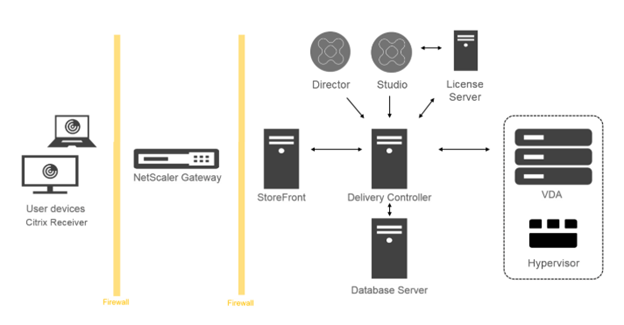
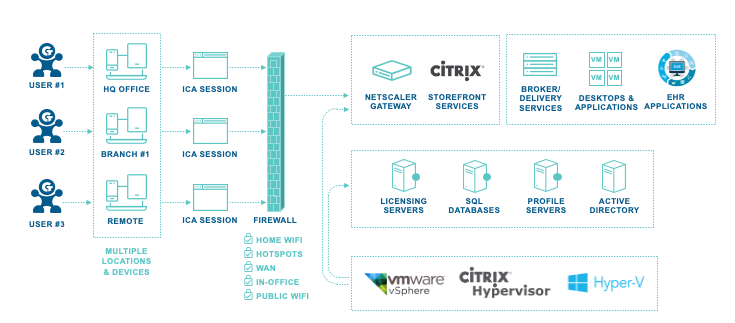
Goliath provides complete end-to-end visibility into the underlying virtualization delivery infrastructure, including specific details on the end user – all from a central console. This enables IT administrators to quickly pinpoint true root cause for troubleshooting and reach resolution from an integrated view of the entire virtualization delivery infrastructure – not just one element of it. As depicted in Figure 1 below, Goliath provides broad metrics across the 15+ systems that work together in concert to deliver the user experience.

Goliath identifies where the problem is across the Citrix stack, end-user experience, core infrastructure, or within the application itself (including all major EHR systems). Additionally, Goliath offers deep metrics to understand exactly what the root cause is whether it is an issue with group policy within the VDI stack, an issue with application availability, or even an action by the end user.

Citrix End-User Experience

Figure 1: To deliver an end-user experience on Citrix, it requires over 15 technologies to work together in concert. In order to troubleshoot root cause of an issue, you need a purpose built tool like Goliath that can give you visibility into each of these touch points. 

Troubleshooting Requires Embedded Intelligence and Automation

A good troubleshooting tool will automatically and intelligently map out your entire infrastructure to deliver end-to-end visibility around the health of your system. In doing so, an IT administrator can quickly identify where an issue could be and even be alerted proactively of the issue before an end user is impacted. Goliath offers an Automatic Citrix Discovery and Dependency Map. In this single, macro view, administrators are given the ability to monitor, manage, and troubleshoot issues with Citrix whether the root cause is the Citrix infrastructure or the supporting IT elements. It shows the overall health of your environment at a glance and provides context-sensitive supporting metrics and details as you select each element. You can drill down and dynamically examine your environment and troubleshoot issues more easily since everything is logically broken down.

Figure 2: Automatic Citrix Discovery & Dependency Map

  1. Automatic mapping your entire Citrix infrastructure to visualize connections, relationships, and health of components.
  2. Ability to easily switch views to different data centers or locations.
  3. Correlation of end-user experience issues to delivery infrastructure components and overall health of the system.
  4. Context-sensitive metrics and alerts for selected components.

Troubleshooting Logon Initiation

Goliath is an early-warning system that specifically solves logon initiation problems. The Goliath virtual user automatically logs on and launches applications before your users get to work. This proactively confirms the virtual application and desktop delivery infrastructure elements are working together properly, and, if not, a real-time alert is sent isolating the failure point so the issue can be resolved before end users are impacted. This goes far beyond a simple simulator–real logons and sessions are created from your key user locations and confirm availability.

Application Availability Monitor

Figure 3: Goliath Application Availability Monitor attempts to logon exactly as your end users would – manually, going click-by-click, to provide the industry’s only solution providing authentically verifiable accounts of logon success or failure.

  1. Highlight of where the issue occurred during logon.
  2. Visual proof that an issue did occur.
  3. Isolation of the failure point.

Troubleshooting Logon Duration

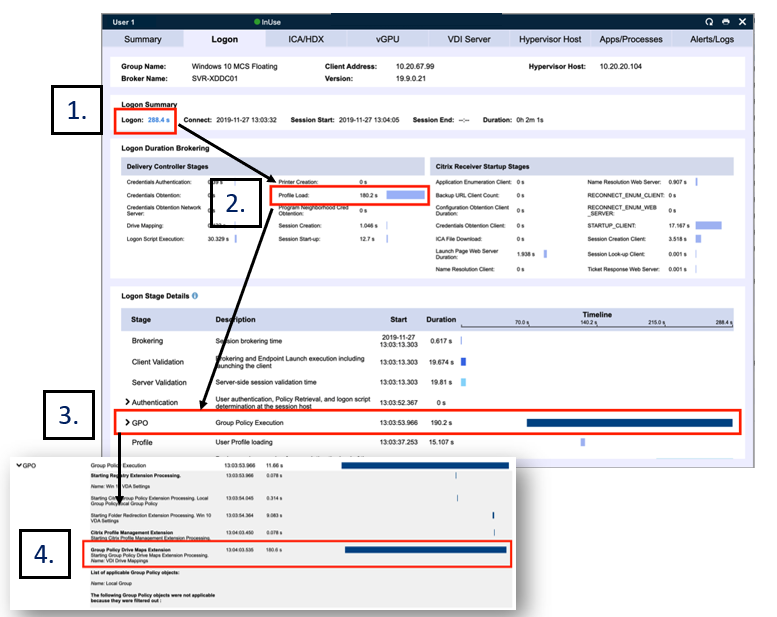
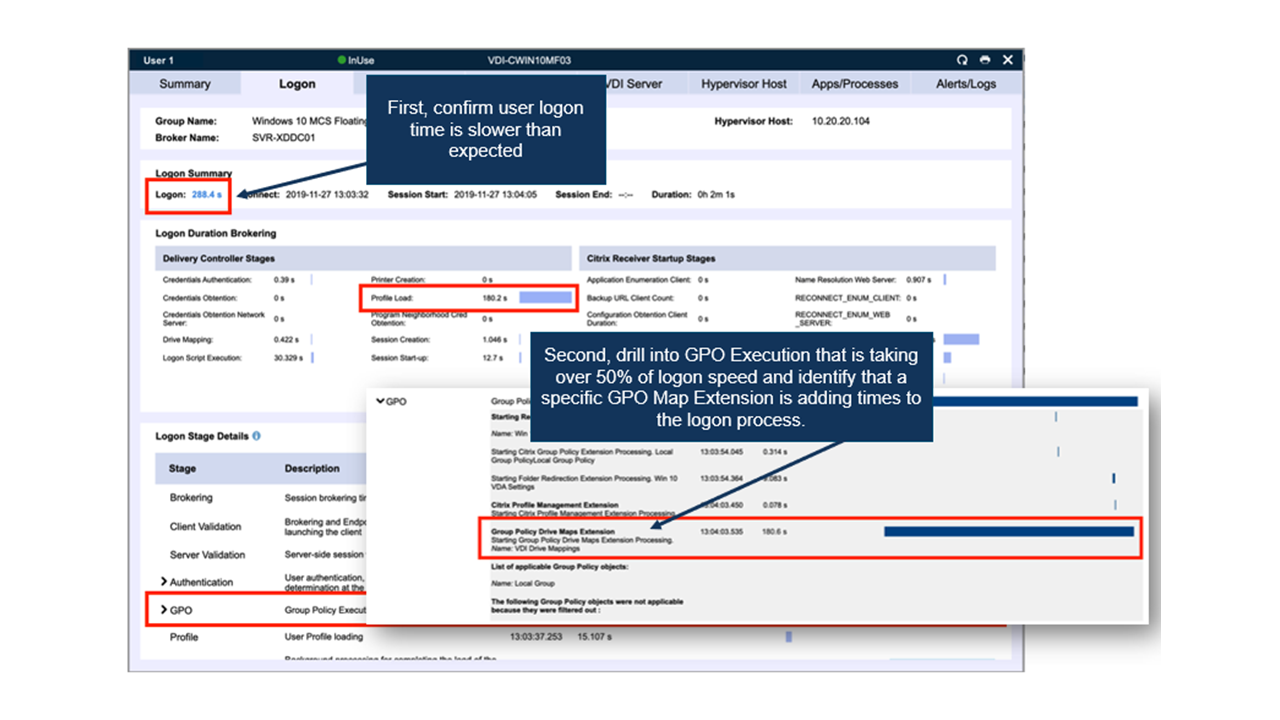
The Goliath Performance Monitor offers unparalleled visibility into the sub-stages of the complex Citrix logon process. It breaks down the 9 main stages provided by Director and other tools into the 33+ detailed stages. By breaking down the main stages into more detailed sub-stages, Goliath pinpoints the true root cause of logon duration issues. For example, other tools can show that the GPO phase is running slowly, but Goliath provides a list of all GPOs accessed in that phase and the specific GPO or combination of GPOs responsible for slowness. This unique detailed view means it is much faster for IT professionals to identify and troubleshoot the problem.

Logon Drill Down

Figure 4: Goliath captures key details unavailable to Citrix Director & MAS and shares deep metrics in a single console to help you anticipate, troubleshoot, and document logon issues. In one screen, Goliath allows you to:

  1. View logon time.
  2. Quickly identify profile load consumes the most time.
  3. Confirm the Group Policy extension in Logon Stage Details consumes the most time.
  4. Open Group Policy detail to find a map extension is incorrectly mapped.

Troubleshooting Session Slowness

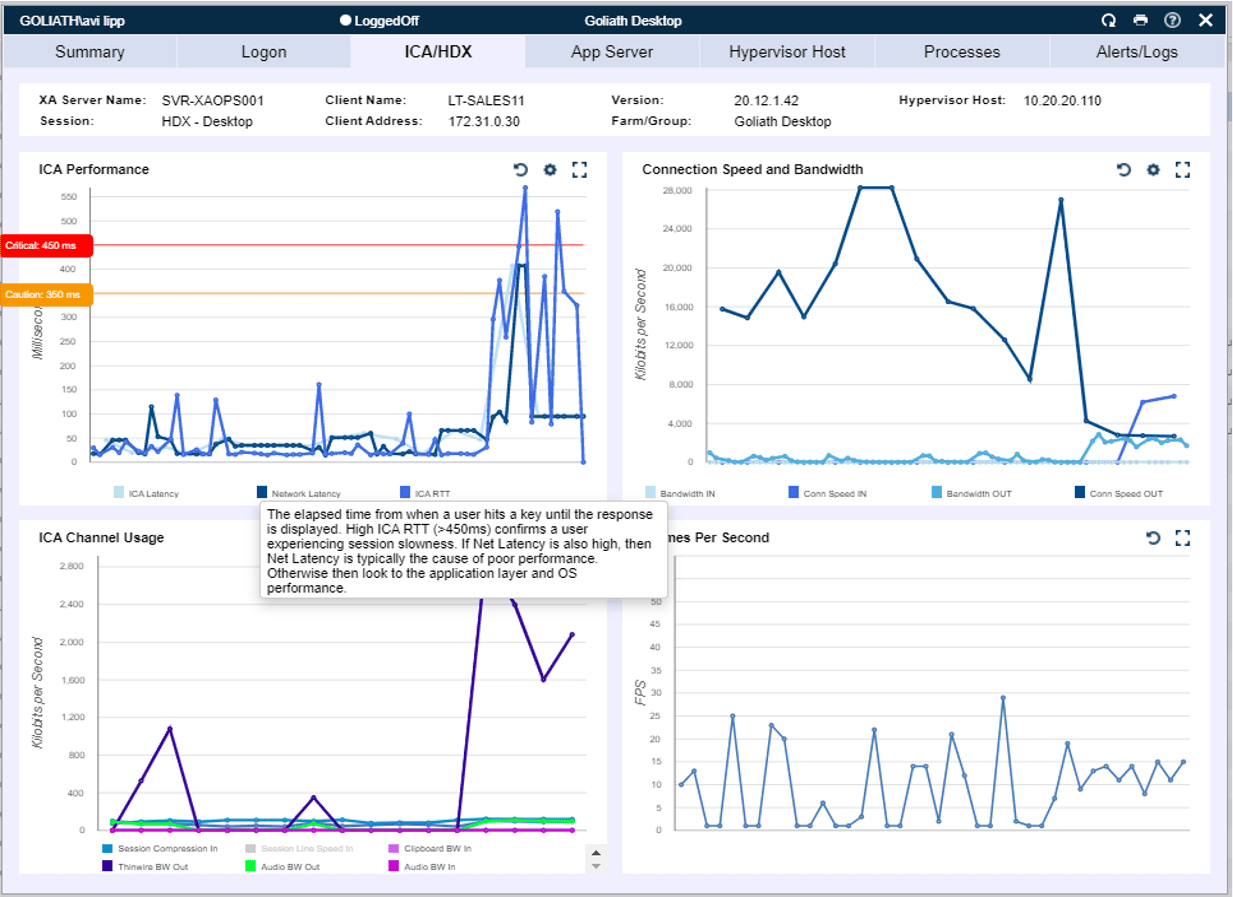
When ‘Citrix is slow’ means in-session performance issues, these issues are caused by network issues, server resource issues, or end-user behavior. The challenge is that, while many tools can provide ICA RTT and confirm that there are session slowness issues, they lack specific detail to identify the true root cause of those performance issues. The Goliath Performance Monitor uses deep Citrix API integration to break down ICA RTT into unique metrics that pinpoint the root cause of session slowness. Goliath measures actual network speed and bandwidth within Citrix to see if slowness is based on network issues, while application and server metrics may indicate that resource issues impact performance. Finally, the application shows specific end-user activity in terms of both specific applications and websites uses, as well as detailed ICA channel performance, to see if the end-user behavior is responsible for session slowness.

In each of these cases, it’s important to note that Goliath maintains this same level of detail for historical sessions. While other tools provide only real-time data or a limited historical view, Goliath allows you to keep your data over time. This is invaluable to troubleshooting efforts because it becomes easy to identify patterns over time that help pinpoint root cause quickly.

Figure 5: Goliath provides industry-leading visibility into Citrix session performance by breaking down the ICA/HDX protocol and returning precise metrics around individual ICA/HDX channel performance.

  1. Identify when network latency is causing ICA/HDX latency by correlating 3 metrics: ICA Latency, Network Latency and ICA Round-Trip Times.
  2. View the end-user’s connection speed for Citrix.

Goliath can take what might otherwise be an extraordinarily difficult troubleshooting task and reduce it to a few mouse clicks, all the while maintaining a focus on improving the end-user experience. Goliath specifically concentrates its troubleshooting efforts around looking for problems tied to login initiation, logon duration, and session performance, since these account for about 95% of the problems encountered in Citrix environments.

Chris Hughes

Brian Posey

Microsoft MVP. As an internationally best-selling technology author and 17-time Microsoft MVP, Brien Posey has written or contributed to dozen books, and created numerous full-length video training courses on a huge variety of IT and space-related topics. In addition, Brien has published over 7000 technical articles and white papers for various Web sites and periodicals. Brien has received Microsoft’s MVP award numerous times for his work in Windows Server, IIS, Exchange Server, File Systems / Storage, Cloud and Datacenter Management, and Windows and Devices for IT.

Try Goliath For Free

Experience true end user experience monitoring and troubleshooting free for 30 days.