Independent Review: New Goliath Performance Monitor for VMware Horizon

Independent Review: New Goliath Performance Monitor for VMware Horizon

Independent Review: New Goliath Performance Monitor for VMware Horizon


Goliath Technologies has been a strong player in the Citrix ecosystem for quite a while now with multiple products such as their Performance Monitor, Application Monitor and Netscaler Monitor. The solutions already had support for VMware vSphere to monitor virtual machines and the physical infrastructure, and since the newest version, the Goliath Performance Monitor also supports VMware Horizon. In this post I would like to highlight some of the features which I think can have a great benefit in VMware-based VDI solutions.

LOGON MONITOR

Let me first tell some more about one of the use cases of the Goliath Performance Monitor; the logon monitor. Everyone who manages Virtual Desktop Infrastructures knows that user experience starts with the logon process. At one of the projects I worked before, end users were used to waiting for at least 5 minutes before they were logged in. After entering credentials, they went for coffee. When they came back, they were able to work. So, when the logon time was reduced to nearly 20 seconds, I had a very happy customer. Monitoring the logon process is important to avoid a bad user experience. That’s where Goliath Technologies steps in with their logon monitor. The logon monitor focusses on the different steps of the logon process and gives a detailed overview of these different steps.

Citrix Virtual Apps & Desktops page sorted by the Logon column

Figure 1: Application Monitor main UI

In the above picture, you can see that different types of logon processes are defined as applications and are ran every 15 minutes. The result is shown as well. In this overview, you are able to check out if certain changes in the infrastructure such as Active Directory Group Policy Objects (GPO’s), applications changes or hardware changes affect the logon process. If, after a change, the logon process is negatively affected, the management console will tell this so you are able to troubleshoot.

When you would like to dig somewhat deeper in the logon process, Goliath Performance Monitor During allows you to, because during the logon process, every step that is taken, is validated with a timestamp and a screenshot. The screenshot will be taken of the individual steps which is accompanied with the timestamp. The next picture shows the details individual steps with the accompanying results.

Session dialog – Logon Duration tab

Figure 2: Logon process details including screenshots

VMWARE HORIZON SUPPORT

Like I explained at the beginning of the post, a new feature in the Goliath Performance Monitor is the ability to view VMware Horizon session information. And this is also a great one for VMware Horizon troubleshooting User Experience related issues. When troubleshooting UX issues, there are a lot of factors which can have a negative impact. What Goliath did, was to include most of the factors which can be related to the virtual infrastructure or connection protocol in one simple overview.

Figure 3: User Experience overview of connected sessions

Session dialog – Logon Duration tab drill down

When in need for more detailed information, this is easily accessible by just selecting a session.

”Dashboard

Figure 4: vSphere Host related metrics

Snapshot Metrics

Figure 5: Connection protocol related metrics

As you can see in the above pictures, most of the information required to troubleshoot the UX is available in the simple UI that the solution offers. No need to create custom dashboards or views.

Another feature that is very useful is the heatmap. In (again) a simple overview, you are able to see what virtual desktops are having an issue.

Figure 6: Heatmap overview containing servers and desktops   

Selecting any of the faulting virtual machines will show you a similar overview of what’s happening in detail. The following figure displays an issue that is happening around Group Policies.

 In an event-viewer style UI, it is fairly simple to track down the source of the issue and start fixing it. Besides the already rich set of services, apps and metrics, it is fairly easy to add another custom metric with the proper thresholds.

LOG MANAGEMENT

Another cool feature that is included, is Log Management. One single overview that contains a variety of log files on which you can filter including Event Viewer and Syslog.

Figure 7: Aggregated Syslog viewer

Figure 8: Aggregated Event Viewer log viewer

Again, an easy way to troubleshoot through log files if this is required. These are just 3 of a lot more features which are part of the Goliath Performance Monitor. I think the solution has a real value in a VMware Horizon VDI environment. Especially if you find vRealize Operations too complex, the Goliath Performance Monitor is a great alternative. It’s easy to set up and deploy, has the ability to create simple overviews of the required metrics needed to troubleshoot and the logon monitor proves to be a great feature to troubleshoot one part of the User Experience that is quite often neglected.

As there are a lot more features and advantages than I wrote about in this post, I will dive deeper into some specific use case in future posts. Keep an eye out for more on Goliath Performance Monitor.

Independent Technical Review: Goliath for Amazon (AWS) & Microsoft Azure Monitoring

Independent Technical Review: Goliath for Amazon (AWS) & Microsoft Azure Monitoring

Independent Technical Review: Goliath for Amazon (AWS) & Microsoft Azure Monitoring

“Goliath provides a single pane of glass for viewing on-premises infrastructure and cloud deployments. This simplifies managing hybrid IT environments and helps facilitate the move to AWS or Azure” – Alan Pichette, CCA-V, CCA-N, CCP-M, Systems Solution Architect at En Pointe Technologies

Walk in the Clouds with Confidence

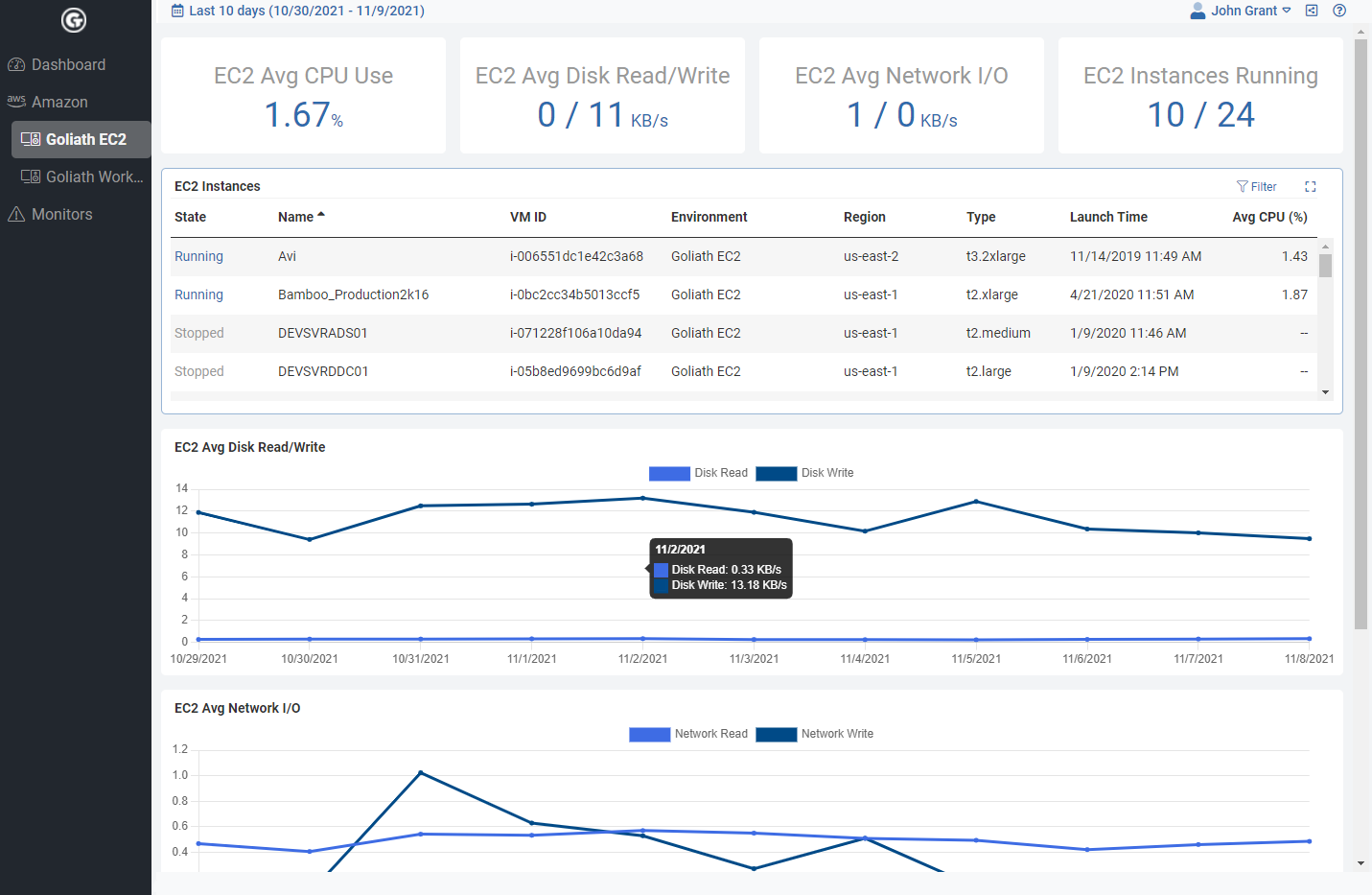
Goliath Technologies is a highly-recommended monitoring and troubleshooting tool in the Citrix, VMware server, and desktop virtualization communities. It also supports monitoring in AWS and Azure environments. Businesses considering moving to the cloud, or have infrastructure in Amazon AWS or Azure can get deeper insight into their cloud solution and virtualization infrastructure all from one single pane of glass.

Citrix Virtual Apps & Desktops page sorted by the Logon column

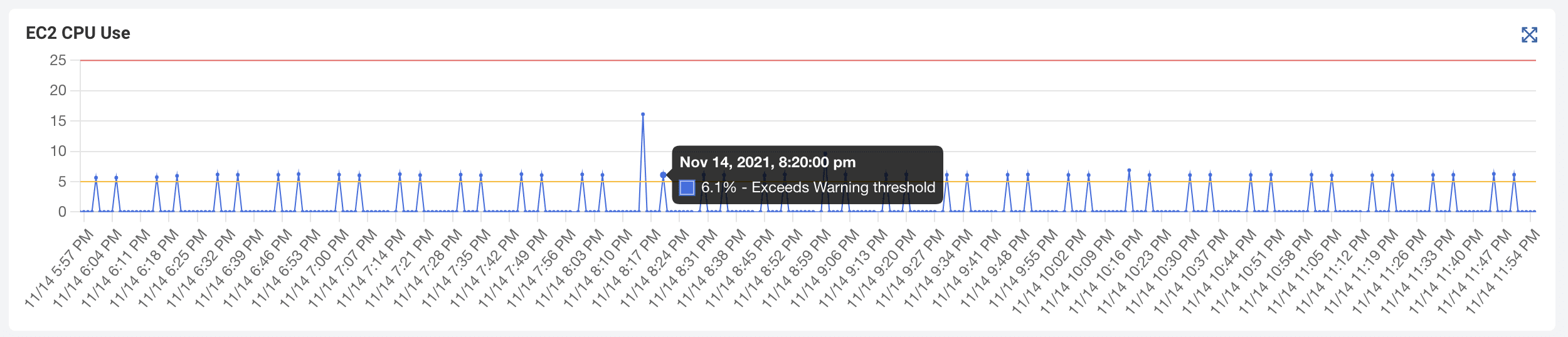
I have migrated many of my clients into AWS and Azure. The first thing on my mind is how can I make the most out of this big investment? How can I get the most horsepower from my servers without breaking the bank? To achieve this you will need smart insight and monitoring into your cloud solution. We all have spikes in our server utilization. Maybe it’s a boot storm at 9 AM on a Monday morning, maybe it’s month end and there’s a high demand for storage and data. Regardless, an IT manager’s nightmare would be having his cloud project go down after a huge investment was made into migrating applications and data to the cloud. Just the opposite can happen as well. When there is room to undersize a new solution you can also feel the burn from oversizing your environment. No CTO will want to see an AWS bill that is way over budget.

Citrix Virtual Apps & Desktops page sorted by the Logon column

Goliath‘s technology monitors AWS and Azure resources in real-time to make certain you are not over or under provisioning resources. In addition, they don’t look at AWS or Azure resources alone. They correlate these metrics with on-premises workloads and end user experience. This just simplifies the job of monitoring and managing hybrid workloads.

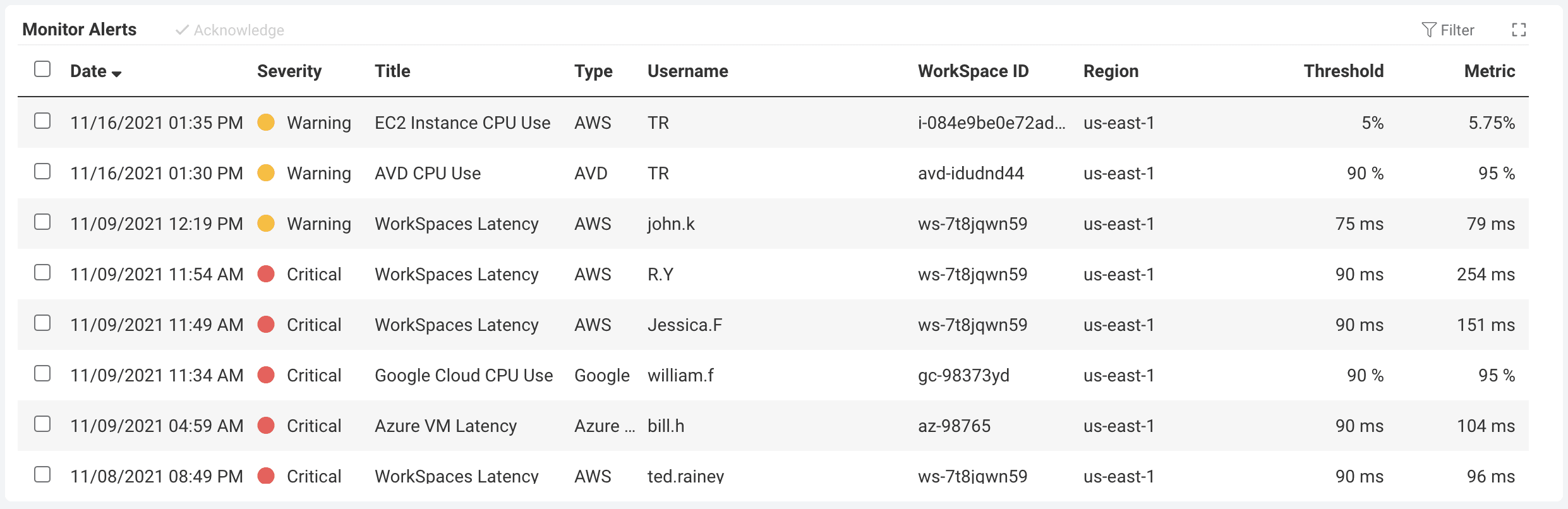
Goliath has an out of the box solution that will give you real-time alerts to your mobile device on all your EC2 instances. Get insight on performance, app crashes and resource consumption so you can react to changes in the cloud environment or performance issues. There is no need to download an app and try to read large graphs on a small screen. You can get text message alerts informing you if anything is going wrong with your environment. Although you can set the thresholds for this tool, Goliath has already preconfigured all the alerts with best practices from the vendors.

Session dialog – Logon Duration tab

To sum it up, I highly recommend taking a look at this comprehensive AWS and Azure monitoring solution. I have done my research on a lot of the monitoring solutions that are on the market today and I have found that Goliath has set a high standard with the features they provide. For more information, email techinfo@goliathtechnologies.com to schedule a free live demo and a free trial of the solution to test in your own cloud environment.

”Dashboard
Independent Review of Goliath Logon Simulator for VMware Horizon by Rob Beekmans, vExpert EUC Champion

Independent Review of Goliath Logon Simulator for VMware Horizon by Rob Beekmans, vExpert EUC Champion

Independent Review of Goliath Logon Simulator for VMware Horizon by Rob Beekmans, vExpert EUC Champion

This independent review of the Goliath Logon Simulator for VMware Horizon is republished on our blog with permission from Rob Beekmans, CCE-V, VCP5.5, VCP5-DT, VCAP-DTD, MCSA2012, vExpert, vExpert EUC Champion Member. The original post appears on Rob’s blog, EUC, UEM, Mobility and Monitoring.


Please Note: The Goliath Logon Simulator has been replaced by the Goliath Application Availability Monitor! This brand new technology provides an early warning system to logon issues and includes detailed screenshotting, flexible scheduling, preemptive alerting, and seamless remediation actions – just to name a few.


Goliath Technologies has offered a logon simulator for Citrix both hosted and on-premises. They renamed the hosted version last year to reflect the real purpose of it. I wrote some articles on Goliath technologies in the past so if you want to understand what they offer read the following articles;

Now they introduced a new simulator, one for VMware Horizon. Now you can pro-actively test your VMware VDI environment with Goliath.

Let me give you a quick introduction in what they offer, the pictures you will see are given to me my Goliath (I asked for them so I could write this blog). So no worries this is no sales article just me showing you what is on the market. I’m planning to write a comparison article on VMware Logon simulators like I did for Citrix – Citrix logon simulator: What are vendors bringing to market? A comparison white paper in a nutshell but time is a bit hard to find right now.

Logon process

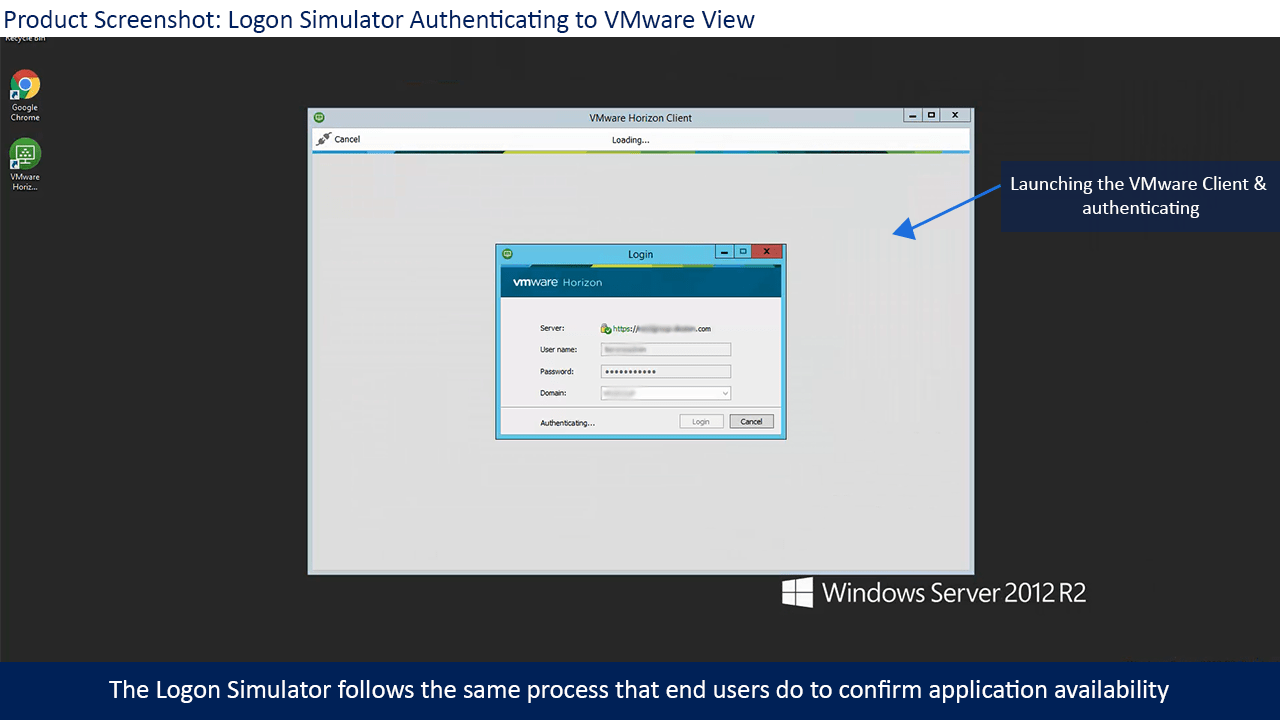
So let’s take a quick look at the logon process and how they setup this simulation. So they will use the Horizon client for this and launch that one. Once it is launched the resource you assigned is launched.

Once it launched the resource you wanted it will wait to make sure it did and then logoff again. In the dashboard, you will see these simulations and the times they took.

The interesting thing about Goliath is that they also think about remediation, so what are you gonna do when something doesn’t work as expected?

So together with their VMware logon simulator but also the Citrix ones comes a remediation tab, here you can configure that e.g. a batch file is started that will reset or start a service.


The logon simulation can be scheduled so that it runs every 20 minutes like in this example. If you want to be alerted every time about the same event happening with a server you can enable that here. If you don’t want to be notified you also manage that here, it just depends on what your management requirements are.

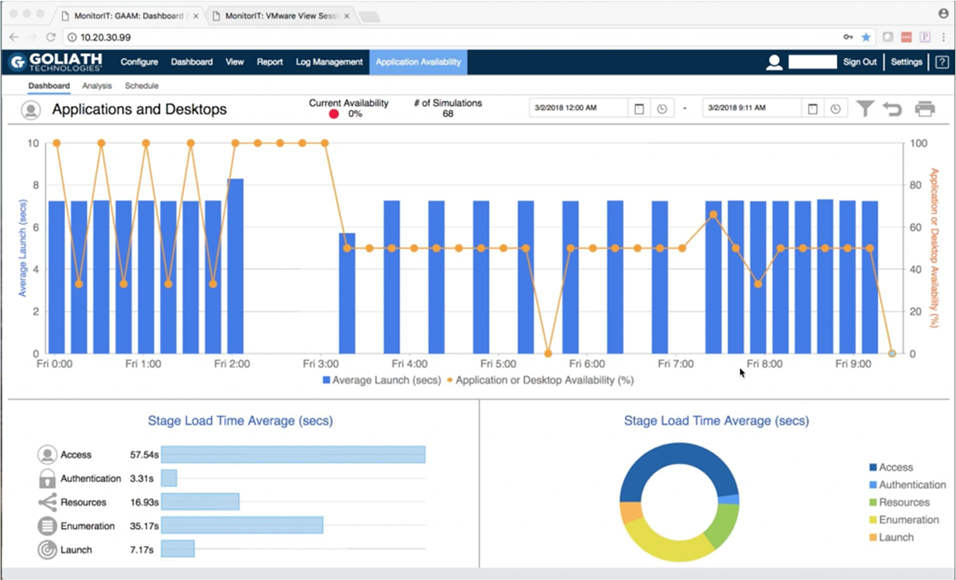
And all this comes together in a dashboard where you will see quickly in an overview what the status is and if the logon simulation succeeded or failed. Whatever the status you can click and zoom in to see the exact steps of the logon process so in case of issues the reason for that issue is found fast.

If you are interested to see more of this, if you have a VMware Horizon environment I can’t think of no better reason, click on the following link and you in a new TAB the Goliath technologies website will open. There is a video about the new feature and more information.

Conclusion

It was just a quick overview to get you on track, you see the market for more functional monitoring is on the move. More and more vendors are releasing products to really test what user are experiencing. I think it is a good thing because besides chain monitoring this is the next logical step. Goliath technologies did a great job with their VMware logon simulator, perhaps in the future a hosted version will be available if demands are there.

About the Author: 

The team members collaborated to bring together this blog post by calling on their past Customer Experiences and Expert Knowledge of Citrix Troubleshooting. Beyond writing technical documents this team supports Goliath Customers and provides product feature and function guidance to development.

Independent Review of Citrix Logon Simulators by Rob Beekmans, Citrix Expert

Independent Review of Citrix Logon Simulators by Rob Beekmans, Citrix Expert

Independent Review of Citrix Logon Simulators by Rob Beekmans, Citrix Expert

This independent review of the Citrix Logon Simulators on the market is republished on our blog with permission from Rob Beekmans, CCE-V, VCP5.5, VCP5-DT, VCAP-DTD, MCSA2012, vExpert, vExpert EUC Champion Member. The original post appears on Rob’s blog, EUC, UEM, Mobility and Monitoring.


I know about a time when logon simulators were rarely seen. Times have changed and several vendors offer a Citrix logon simulation of some sort. With the growth of the offering finding the right one is hard, hence a comparison is needed. This article will shed a bit of light in the functional features of the Citrix logon simulator so that when you are looking for a solution you know the major differences.

What is a logon simulator?

You might ask yourself, what is a logon simulator? I’m sure your idea of it comes close to what it actually is. With a Citrix logon simulator or any logon simulator you mimic the user logon process. When you specific look at Citrix it comes down to mimicking the logon to published desktops or published applications.

The term simulation puts people off as simulation is not for real, this is what is happening with LoginVSI that simulates user loads but with that you can’t say your users will be able to work after that, you just know the load it can handle with a specific user load, no useful for monitoring.

With a logon simulator this is different, it’s not a simulation it’s an actual user logging on. Also it is not and never will be the goal to test sizing with a logon simulator, you test availability. When you look at monitoring you have two methods that should not be seen apart from each other, you have technical monitoring (is my server running as expected and much more) and you have functional testing, is the service I offer work as expected. You can never know if the functional service is operational without testing it… that’s why you need a logon “simulator”.

There are more logon simulators, next to Citrix environments you also have a huge amount of VMware environments, some of the vendors in the article offer next to Citrix also a VMware Horizon View logon simulator. This of course is extensible to others like Microsoft RDS and so on and so on. Citrix and VMware make up the major part of the EUC market and therefor are most interesting to develop for.

A bit deeper

So if we dive in a bit deeper, how is this logon simulator acting? As I already wrote it is mimicking the users behavior on the Citrix environment. This means that;

  • it will execute the client (so it needs a host to execute it from),
  • launch a browser (IE most often running on the host),
  • logon to the Citrix environment (a valid user account is required),
  • start the resource (the published application or desktop by name most often) and logon to that.
  • After it has logged on most of the simulators stay active a bit perhaps start an application in e.g. de desktop and logoff.
  • The tests can be repeated, scheduled and so on. some offer remediation when something goes wrong or alerting.

If the environment is remotely accessible by a Citrix NetScaler this can also be tested depending how the environment is configured of course. Some of the vendors offer out of the box cloud based solutions to do availability testing for you against your environment.

Below is a simple flowchart of a Citrix environment, I “stole” this picture from ControlUP as it shows exactly what the basis is..can’t draw it clearer myself.

Logon Simulator

So what is tested on a functional level?

  • Citrix Netscaler (optional)
  • Citrix StoreFront
  • Citrix Delivery controller
  • Citrix XenApp
  • Citrix XenDesktop
  • Citrix Licensing
  • And all surrounding components offering functionality to Citrix to make it operate.

The premise of a logon simulator

So the premise of any Citrix logon simulator is that it will monitor for you how your Citrix environment is operating on a functional level. It is very important to understand that it is a functional level and not a technical one. For a technical level you need to monitor the components that offer the functionality. On a functional level they offer;

  • Connection times
  • connection timeout
  • Latency
  • Logon time
  • Logoff time
  • insight in the Citrix channel (some do)

… and all this repeatedly so that you have a graph that shows how the performance is doing during the day. If you add monitoring to this you can also do a root cause analysis to pint point what is going wrong when e.g. logon times go up, but that is a whole different story, read my previous article on this right here – link.

The players

So who are the players  in this field (hope I found all of them).

  • ControlUP
  • Goliath Technologies
  • eG Innovations
  • Login PI
  • SquaredUP

So we got five players in this field. If we broaden the scope a bit we also have LoginVSI for load balancing but I’ll leave them out in this comparison as that is in my opinion a different game. Five vendors offering Logon simulation, some integrated with a monitoring solution, some with a hosted offering but all with logon simulation. Let’s look at them one by one on a high level and see the differences. I encourage you to take a deeper look at them as this will be a high level overview, there is more to see and read for each of them.

Comparison

I will compare the vendors/products that offer a Citrix logon simulator based on a couple of aspects, it’s a high level overview as a real white paper comparison document would take up too much time right now. I’m sure that with the handles I give you, you will be able to find your way to the one you need. Mind that most vendors offer a monitoring solution or a management solution as well with the product so define what you are looking for before you start picking a product.


ControlUp

1st up is ControlUP, they recently introduced a Logon simulator in their product. Below is the configuration screen in the product that is used to setup the test. The logon simulator is a clean simulator and nothing fancy but that doesn’t mean it’s not a good one. It is one feature in the monitoring solution of ControlUP. Let take a quick look at the configuration.

ControlUp offers more than just a logon simulator they offer;

  • Monitoring tool
  • Management tool (integrated with the monitoring)
  • Logon simulator

Below is a screenshot of the setup, pretty straightforward. Next you decide if you want to repeat the test and you’re good to go.

Logon simulator

The logon process is ran every 20 seconds in the test above and any issue with the connection will be recorded in the Application event log. The tool is integrated with the monitoring solution, you can set a trigger that you will be notified when several (the number is configurable) logon attempts failed.

logon simulator

If you monitor the complete environment also with ControlUp you then can find the reason in the Application log and go to the server to see what is happening. It’s not integrated as such, they are (still) two components in one console but in time they might be more integrated, the guys at ControlUp keep on amazing us with new functionality.

Comparison


So that is ControlUp a very interesting monitoring product with a community licensed Citrix Logon simulator. The logon simulator of ControlUp is a mall nifty tool to check your environment, it’s not that integrated as some others do but together with the monitoring product behind it it makes a powerful solution. ControlUp is a product, as you might read in my other articles, that offers management as well as monitoring.

My previous articles on ControlUp are found here;

Product website : Logon simulator


Goliath Technologies

Goliath Technologies is a vendor that is offering a Logon simulator for a very long time already. I think that they were one of the firsts to offer this. They also have a monitoring solution next to it.  Of course the logon simulator of Goliath Technologies is also offering the logon process as does ControlUP but with Goliath Technologies they offer a bit more instead.  Next to the logon simulator basics they offer more in-depth insight in the Citrix logon process.

The setup process is a bit more advanced than what we saw with ControlUp, you have a the option to:

  • Schedule a logon simulation or more than one,
  • Remediation if a logon simulation goes wrong
  • Alerting
  • and more

I decided to show the advanced connection step details screen here as I think this is a huge asset for Goliath Technologies. Read my previous articles if you want to learn more. Read my other articles on them to see what advanced features they have, the remediation and logon options for any logon scenario is interesting.

Goliath

As you see in the screenshot above the logon process is shown detailed, every step along the way is recorded. If the connection to the StoreFront or NetScaler is slow and the user is waiting it will show that. This for me is very important as now I can see why it is taking so long for the user to connect.

logon simulator

If you also monitor the Citrix environment you are testing against you have detailed graphs to look inside the Citrix channels. This article is not about the monitoring solution of course but I need to mention it as it makes a difference in what you get for information out of the Citrix sessions with it.

Hosted

Something that Goliath Technologies is offering a hosted solution. The hosted solution is making it possible to test the availability of your Citrix environment from a remote data center. The hosted solution is called “Citrix App Availability testing”. The classic use case is the airliner where personnel is traveling around the world and connect to a central Citrix app. As personnel is in different time zones your support isn’t always easy, testing the connection from different data centers across the world gives you control and insight.

There are some other differences compared to ControlUp, Goliath Technologies can schedule a availability test as well as run them manually or periodically. Depending on your needs it might be interesting to have different options. Client side errors are recorded as well so that IT can determine what the user is experiencing. These are errors that are not captured in event logs normally and cause a lot of frustration. One of the last things to mention is the ability to start a remediation process if something reports an error, so like a batch file to disable logons at a certain server.

Together with the on-premises solution this offers a complete solution for organizations.

Demo

Is there a better way to understand how something works than with a demo.. I included the demo video of Goliath Technologies. It’s their official video so with the talking.

Comparison

So this is Goliath Technologies, a monitoring solution like ControlUp with a Citrix logon simulator that offers more than basic logon simulation. The in-depth insight in the channels is very interesting from Goliath Technologies. Goliath Technologies is working to up-date the console so make it more snappy, I’ve seen a bit of it already and can’t wait for them to release it.

My previous articles on Goliath Technologies are found right here;

Product website: Logon simulator


eG innovations

eG innovation is one of the last additions to the Logon simulator game, they recently added the functionality. eGInnovations integrated the Logon simulator with their monitoring solution and it is now one of the components in the console.

Depending on the license you have you get only the logon simulator or you get the root cause analysis as well and if you have the monitoring solution as well you can see a lot of information inside the Citrix session that will help you troubleshoot and fix the issues users are having. With the logon simulator only you will get a good view already like you see below.

logon simulator

Above is a default graph from the logon simulator offering from eG innovation showing the simulation is detail and the times it took to get to the next step. From the main monitoring screen this is where you get this screen, a magnifying glass shows that the details are available.

logon simulator

eG Innovations comes with a monitoring solution so when you see an issue and you have the monitoring solution also in place you can deep dive to see the root cause. If you integrate with the monitoring you can click to the component that is giving the issues. If you add the monitoring solution you can zoom in on the user and get a dashboard like the first one for that user with detailed information. If you need more complex logon simulation and testing they offer a synthetic scripting solution where a mouse click recording takes place.

Demo

Is there a better way yo understand how something works than with a demo.. There is an awesome webinar about the logon simulator and the scripting option available, just fill in your name and you are able to watch it.  If you just want to see the demo, scroll to 13:50 where they start to demo it…

Comparison

So this is eG Innovations a end to end monitoring solution with two options a logon simulator and a synthetic scripting solution. eG Innovations by default doesn’t offer a hosted solution itself, the company I work for does, we offer a Monitoring as a Service solution to also offers a logon simulator and more. So enough commercial for that, I’m not a sales guy. The product itself does not offer this and neither does eG Innovations.

Read my previous articles on eG Innovations.

Product website: Logon simulator


Login PI

Login PI is the brother or sister of Login VSI. Login VSI is what everyone uses to test their environment with pre-defined use cases and a pre-defined load. Of logon simulatorcourse load testing is great but it doesn’t guarantee anything in production. For that you need to do repetitive testing and that is what LoginPi is offering. They also just came with a new version so time to show what they got.

Login PI is offering a logon simulator for Citrix, VMware Horizon View PCoIP, Microsoft and any other protocol as long as you have client to connect to it.

logon simulator

The dashboard as you see above is new and fresh compared to the first one I saw and tested. It looks fresh to me and very informative. A new feature in this version is that they show in a dashboard the latency per launcher and per host. more features are CPU load, bandwidth and so on.

logon simulator

Demo

Is there a better way yo understand how something works than with a demo.. I included the demo video of Login PI. It’s there official video so with the talking.

Comparison

And there we have Login PI nifty tool to logon, easy to setup and execute a workload. Of course if you script an action to execute that will take a lot more time for sure. the scripting is done by mouse locations, so whatever you click is recorded and replayed. Login PI is not integrated with a monitoring solution and therefor if you find an issue, if your logon process fails, you need a third party monitoring tool to help you out. I think that is showstopper often and a reason some organizations will look for a solution that has both in one.

Read my previous articles on Login PI;

Product website: Logon simulator


SquaredUp

The last one in the list is SquaredUp, they are the strange vendor in this list as I’m sure many of you never heard of them before last year. SquaredUp is a logon simulatormanagement solution to make Microsoft SCOM workable. Microsoft SCOM delivers a load of data and all that data is not processed by the administrators as it is just too much. The guys from SquaredUp created a solution that visualizes Microsoft SCOM data so that administrators actually can make use of it.

Since Citrix bought the Comtrade management packs for Microsoft SCOM they came up with a community version of a Citrix Logon simulator. It’s available on github and it is free. There are a few caveats with it, you need a certain StoreFront version, a certain SCOM version and so on, but hey if you have that this might just be what you’re looking for.

logon simulator

There is a detailed description how to set up the scripting and so on. The diagram above show the working of the logon simulator.  The logon simulator is of course not integrated with a monitoring solution but it depends on a monitoring solution, Microsoft SCOM to be present. so if you have an issue with the logon process you can turn to Microsoft SCOM for answers.

What they offer is a hosted solution to do Citrix availability checks of your environment, by creating a dashboard you can see from which location you are testing and if that test is successful. They are visualization experts so dashboards is there thing.

logon simulator

Demo

Is there a better way yo understand how something works than with a demo.. I included the demo video of ControlUp. It’s there official video so with the talking.

Comparison

Read my previous articles on SquaredUp;

Product website: Logon simulator

Conclusion

We looked at a number of products and all of them will test the availability of your Citrix environment. Of course they have different options and functionalities, this was the reason to write this article. I hope it gives an insight in what is available on the market. I hope that I got all the settings right, if I don’t let me know and I edit them.

If I have to put a number on them I would say that Goliath offers the most advanced logon simulator, eG offers the best integration with the monitoring tool and that ControlUp offers the most complete solution as they also offer management possibilities. Goliath also offers a hosted solution, logon simulation as a SaaS solution. eG innovations and LoginPi offer a scripted solution to script a user action and do a recurring test on this. Too many offering and too many possibilities. I leave it in your hands to find the best one.

Independent Review: Goliath for Citrix NetScaler v4

Independent Review: Goliath for Citrix NetScaler v4

Independent Review: Goliath for Citrix NetScaler v4

This independent review of NetScaler v4 is republished on our blog with permission from Marius Sandbu, Certified Administrator NetScaler & Sr. Systems Engineer. The original post appears on Marius’s blog.

Today, Goliath Technologies is releasing version 4.0 of their Goliath for NetScaler product, which is packed with new features. Up until now Goliath has focused presenting AppFlow data and the critical metrics to measure end-user experience of both ICA traffic and Web insight to the IT-administrators responsible for. AppFlow can be used to essentially measure two types of metrics, either HDX data which is typical ICA-proxy traffic, where it measures ICA latency, bandwidth usage and so on. There is also the other metric which is Web insight. With Web insight we get a constant flow of information about which clients are connecting, where they are connecting from, what resource did they request and so on.

This information is crucial to measure for instance if:

  • Are users suffering from bad user-experience or timeouts?
  • Are users getting 404 error messages from the web service?
  • Is our web service good enough for mobile devices?

But! Appflow is just a small part of the puzzle. AppFlow measures the traffic going from the client to the backend resource, it does not however measure the state of the NetScaler as traffic goes through, so if we have some users complain about web sessions timing out, or ICA sessions freezing we will not get a good explanation why from AppFlow, because this might be because the NetScaler has too much traffic to handle, or the CPU usage has gotten to a point where it cannot process packets.

This is where the second piece of GFN 4 comes in, having AppFlow data combined with real-time NetScaler performance metrics which are being pulled from the appliances using NITRO API, which allows us to show how the NetScaler is performing while seeing how ICA traffic and Web sessions are behaving at the same time.

Within the 4.0 we now have the option add NetScaler Appliances

clip_image002

This should be just using a read-only user on the NetScaler, to allow pulling of data using the NITRO API. Once you have added an appliance, it will start to pull data.

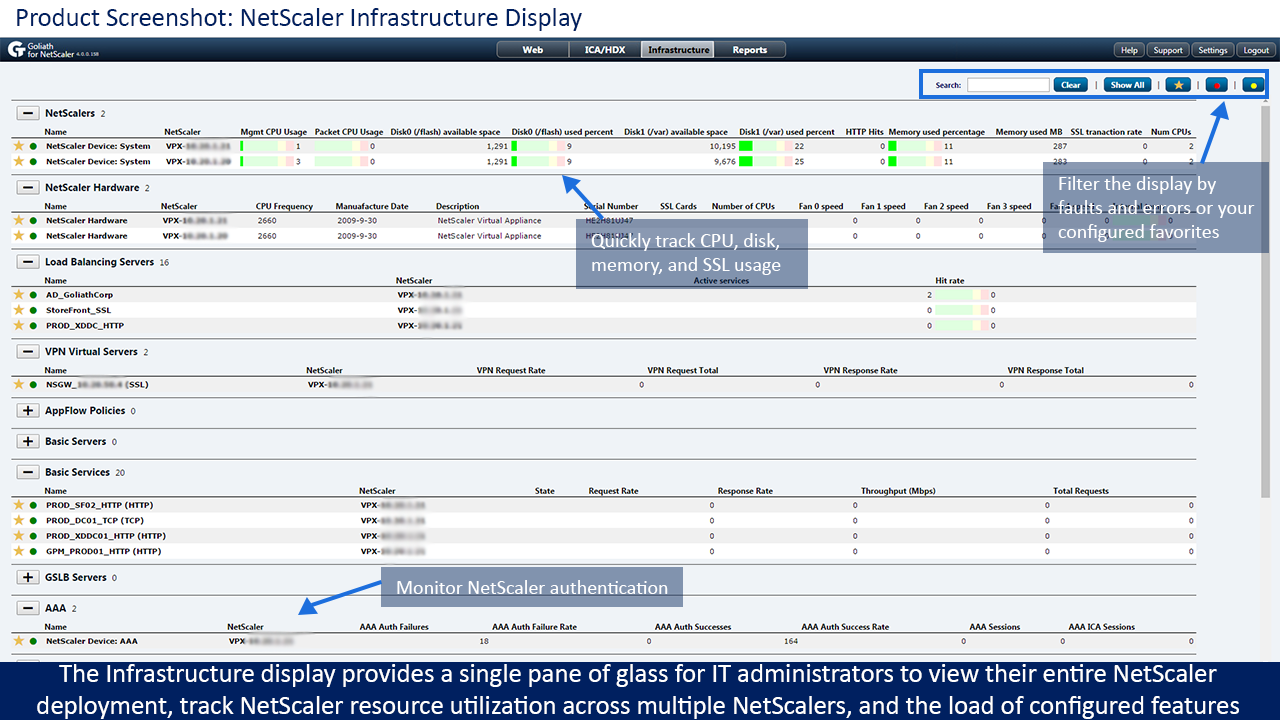
Now within the main dashboard we now have a new pane called infrastructure. The infrastructure view is an also new capability that provides a single screen view of the entire NetScaler deployment from hardware to policies. Having this aggregated overview is a great benefit because all data points that are important are available in a glance, as opposed to having to move between management screens or having to drill into multiple layers within the console.

GFN Infrastructure

So we can go into detail and take a closer look at for instance load balanced virtual servers, hit rate and attached virtual services

clip_image005

We can also get a list of policies and see if we have had any hits on those specific policies today. I’m not going to go through them all in detail, but the infrastructure view provides an easy view of the NetScaler infrastructure in terms of “How are my NetScaler’s today?”

We also have custom reports available, which are built upon the data it collects from the NITRO API so for instance we can see if we have a spike in the packet CPU on the NetScaler, or perhaps the MGMT CPU got a spike we can get this information easily from the built-in reports.

clip_image007

Now Goliath has also included some updates to the AppFlow monitoring as well, which makes it easier to see which ICA-channel for a particular user is taking much bandwidth

clip_image009

Which of course makes it easier to detect if there is a printer hogging all the available bandwidth in a session and so on. Another issue that happens with an ICA session is Jitter, which is actually the variation of data between the end-user and the session. So with this release they have also included Client RTT/Jitter metric which also can be correlated with server RTT/Jitter

clip_image011clip_image013

Which allows us to much easier tell if for instance a user is suffering from packet loss / retransmission or other factors which affects the variation on the session, and we can now correlate it with the Server RTT and Jitter if an issue is connected or not.

So these are just some of the new features added in GFN 4.0. NetScaler is a Swiss army tool of features and therefore it is important to keep a close eye on how it is behaving since it is often a crucial part of many company’s infrastructure, and with GFN 4.0 I believe Goliath are on the right path in terms of how to fully manage and monitor our NetScaler infrastructure.

Independent Review: Citrix Application Availability Testing

Independent Review: Citrix Application Availability Testing

Independent Review: Citrix Application Availability Testing


This independent review of the App Availability Testing for Citrix is republished on our blog with permission from Rob Beekmans, CCE-V, VCP5.5, VCP5-DT, VCAP-DTD, MCSA2012, vExpert, vExpert EUC Champion Member. The original post appears on Rob’s blog, EUC, UEM, Mobility and Monitoring.

Earlier this year I wrote a couple of articles about the Goliath Citrix logon simulator as a service, it enables the ability to test the availability of your Citrix infrastructure through simulating the logon with a user. Simulation sounds like the logon process is not really happening and that’s not true as with simulation a real user account is used to process the logon action. They had two offerings, one on-premises and on hosted. The hosted one is now being renamed. So they renamed it to Application availability testing. Application availability testing is understandable to everyone. It will test the availability of your Citrix environment on scheduled times. The on-premises one, Citrix Logon simulator is going to stay as it was, it offers the same as the new application availability offering but on-premises.

If you are wondering what Goliath is offering with their logon simulation please read my previous articles hereavailability

Application availability testing

So what is application availability testing, why woud you want to use it? Let me take you through a scenario that will make it clear.

Assume we have an airliner where employees travel the world and when the arrive at their destination they want to open an application on the corporate Citrix environment. This scenario is easily copied to any enterprise where employees travel the world, oil companies, truck drivers, shipping and so on. How can you be sure that the connection from the location they will connect from is functioning? Normal monitoring takes you to the boundaries of your network, the outskirts so to say where your control stops and where the Internet starts.

Will this do for monitoring are you done after this? ideally I think you should implement end-to-end monitoring on-premises and application availability testing side by side or integrated if possible. The availability testing does a perfect job showing and testing the user can log on but it won’t warn for issues to happen, for that you need monitoring that understands you environment. So make sure you know what you are aiming for, monitoring or availability testing. If you have the budget look at both.

Offering

What Goliath is offering with their application availability testing is a way to test this availability from datacenters around the globe. So the outskirts and beyond so to say. So a quick overview of what they offer (also found in the articles mentioned earlier);Availability

  • No software onsite
  • No internal resource or changes
  • Setup in less than 30 minutes

It’s a cloud service and the monthly service offers;

  • Logons, schedules 24/7
  • Dashboard, real time confirmation of Citrix logon duration, success and failures
  • Alerts
  • Reports

They are interesting to check out if you look for a application availability as a service.

Visit their site to read more and request a demo, their site is found here