

Independent Review of Citrix Logon Simulators by Rob Beekmans, Citrix Expert
This independent review of the Citrix Logon Simulators on the market is republished on our blog with permission from Rob Beekmans, CCE-V, VCP5.5, VCP5-DT, VCAP-DTD, MCSA2012, vExpert, vExpert EUC Champion Member. The original post appears on Rob’s blog, EUC, UEM, Mobility and Monitoring.
I know about a time when logon simulators were rarely seen. Times have changed and several vendors offer a Citrix logon simulation of some sort. With the growth of the offering finding the right one is hard, hence a comparison is needed. This article will shed a bit of light in the functional features of the Citrix logon simulator so that when you are looking for a solution you know the major differences.
What is a logon simulator?
You might ask yourself, what is a logon simulator? I’m sure your idea of it comes close to what it actually is. With a Citrix logon simulator or any logon simulator you mimic the user logon process. When you specific look at Citrix it comes down to mimicking the logon to published desktops or published applications.
The term simulation puts people off as simulation is not for real, this is what is happening with LoginVSI that simulates user loads but with that you can’t say your users will be able to work after that, you just know the load it can handle with a specific user load, no useful for monitoring.
With a logon simulator this is different, it’s not a simulation it’s an actual user logging on. Also it is not and never will be the goal to test sizing with a logon simulator, you test availability. When you look at monitoring you have two methods that should not be seen apart from each other, you have technical monitoring (is my server running as expected and much more) and you have functional testing, is the service I offer work as expected. You can never know if the functional service is operational without testing it… that’s why you need a logon “simulator”.
There are more logon simulators, next to Citrix environments you also have a huge amount of VMware environments, some of the vendors in the article offer next to Citrix also a VMware Horizon View logon simulator. This of course is extensible to others like Microsoft RDS and so on and so on. Citrix and VMware make up the major part of the EUC market and therefor are most interesting to develop for.
A bit deeper
So if we dive in a bit deeper, how is this logon simulator acting? As I already wrote it is mimicking the users behavior on the Citrix environment. This means that;
- it will execute the client (so it needs a host to execute it from),
- launch a browser (IE most often running on the host),
- logon to the Citrix environment (a valid user account is required),
- start the resource (the published application or desktop by name most often) and logon to that.
- After it has logged on most of the simulators stay active a bit perhaps start an application in e.g. de desktop and logoff.
- The tests can be repeated, scheduled and so on. some offer remediation when something goes wrong or alerting.
If the environment is remotely accessible by a Citrix NetScaler this can also be tested depending how the environment is configured of course. Some of the vendors offer out of the box cloud based solutions to do availability testing for you against your environment.
Below is a simple flowchart of a Citrix environment, I “stole” this picture from ControlUP as it shows exactly what the basis is..can’t draw it clearer myself.

So what is tested on a functional level?
- Citrix Netscaler (optional)
- Citrix StoreFront
- Citrix Delivery controller
- Citrix XenApp
- Citrix XenDesktop
- Citrix Licensing
- And all surrounding components offering functionality to Citrix to make it operate.
The premise of a logon simulator
So the premise of any Citrix logon simulator is that it will monitor for you how your Citrix environment is operating on a functional level. It is very important to understand that it is a functional level and not a technical one. For a technical level you need to monitor the components that offer the functionality. On a functional level they offer;
- Connection times
- connection timeout
- Latency
- Logon time
- Logoff time
- insight in the Citrix channel (some do)
… and all this repeatedly so that you have a graph that shows how the performance is doing during the day. If you add monitoring to this you can also do a root cause analysis to pint point what is going wrong when e.g. logon times go up, but that is a whole different story, read my previous article on this right here – link.
The players
So who are the players in this field (hope I found all of them).
- ControlUP
- Goliath Technologies
- eG Innovations
- Login PI
- SquaredUP
So we got five players in this field. If we broaden the scope a bit we also have LoginVSI for load balancing but I’ll leave them out in this comparison as that is in my opinion a different game. Five vendors offering Logon simulation, some integrated with a monitoring solution, some with a hosted offering but all with logon simulation. Let’s look at them one by one on a high level and see the differences. I encourage you to take a deeper look at them as this will be a high level overview, there is more to see and read for each of them.
Comparison
I will compare the vendors/products that offer a Citrix logon simulator based on a couple of aspects, it’s a high level overview as a real white paper comparison document would take up too much time right now. I’m sure that with the handles I give you, you will be able to find your way to the one you need. Mind that most vendors offer a monitoring solution or a management solution as well with the product so define what you are looking for before you start picking a product.
ControlUp
1st up is ControlUP, they recently introduced a Logon simulator in their product. Below is the configuration screen in the product that is used to setup the test. The logon simulator is a clean simulator and nothing fancy but that doesn’t mean it’s not a good one. It is one feature in the monitoring solution of ControlUP. Let take a quick look at the configuration.
ControlUp offers more than just a logon simulator they offer;
- Monitoring tool
- Management tool (integrated with the monitoring)
- Logon simulator
Below is a screenshot of the setup, pretty straightforward. Next you decide if you want to repeat the test and you’re good to go.

The logon process is ran every 20 seconds in the test above and any issue with the connection will be recorded in the Application event log. The tool is integrated with the monitoring solution, you can set a trigger that you will be notified when several (the number is configurable) logon attempts failed.

If you monitor the complete environment also with ControlUp you then can find the reason in the Application log and go to the server to see what is happening. It’s not integrated as such, they are (still) two components in one console but in time they might be more integrated, the guys at ControlUp keep on amazing us with new functionality.
Comparison
So that is ControlUp a very interesting monitoring product with a community licensed Citrix Logon simulator. The logon simulator of ControlUp is a mall nifty tool to check your environment, it’s not that integrated as some others do but together with the monitoring product behind it it makes a powerful solution. ControlUp is a product, as you might read in my other articles, that offers management as well as monitoring.
My previous articles on ControlUp are found here;
Product website : Logon simulator
Goliath Technologies
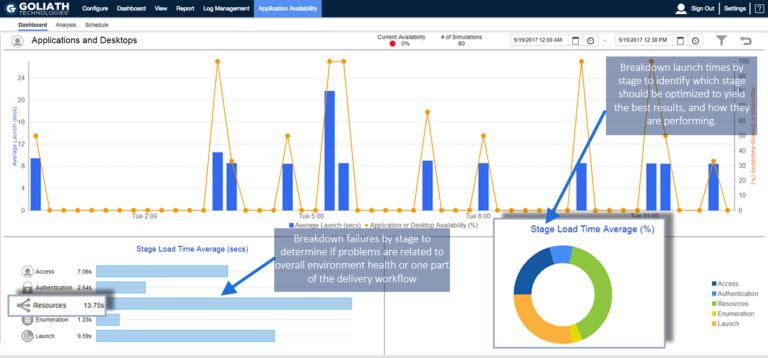
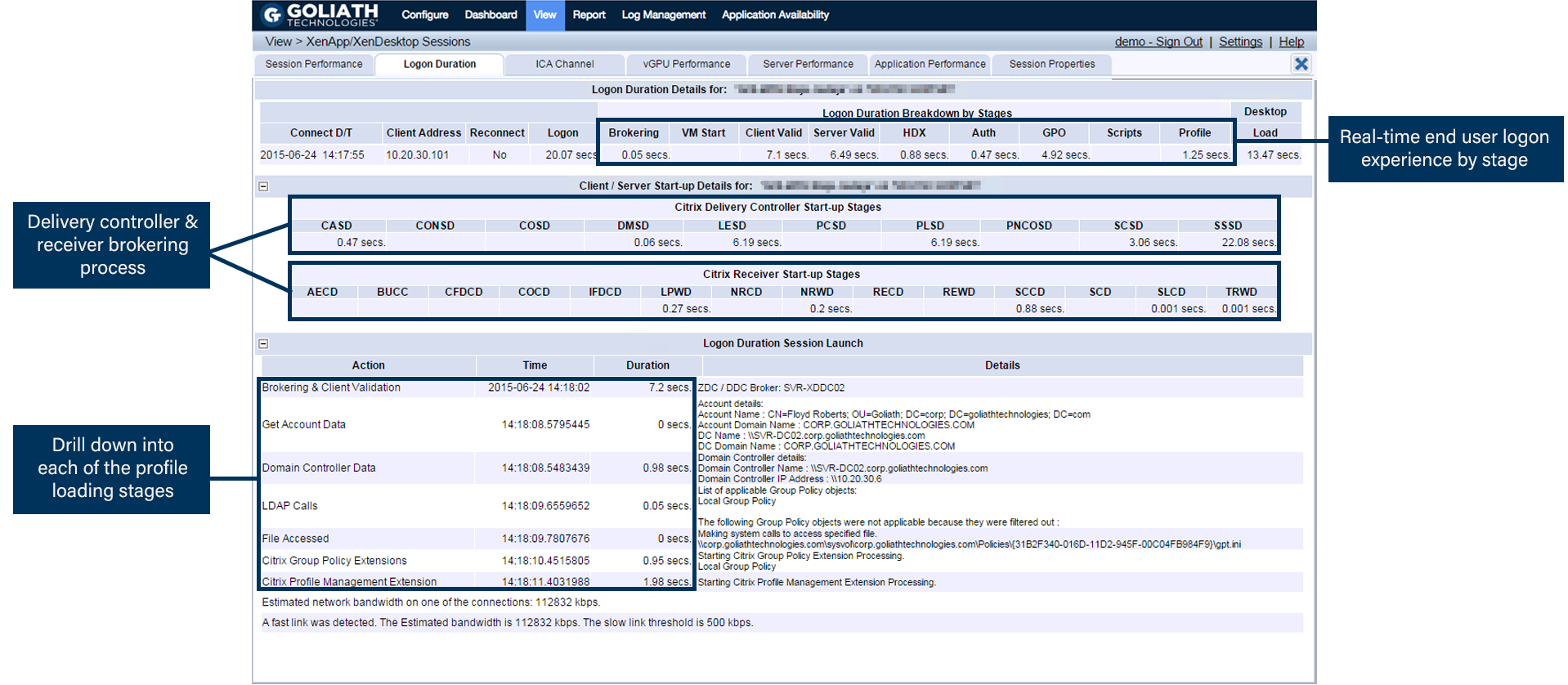
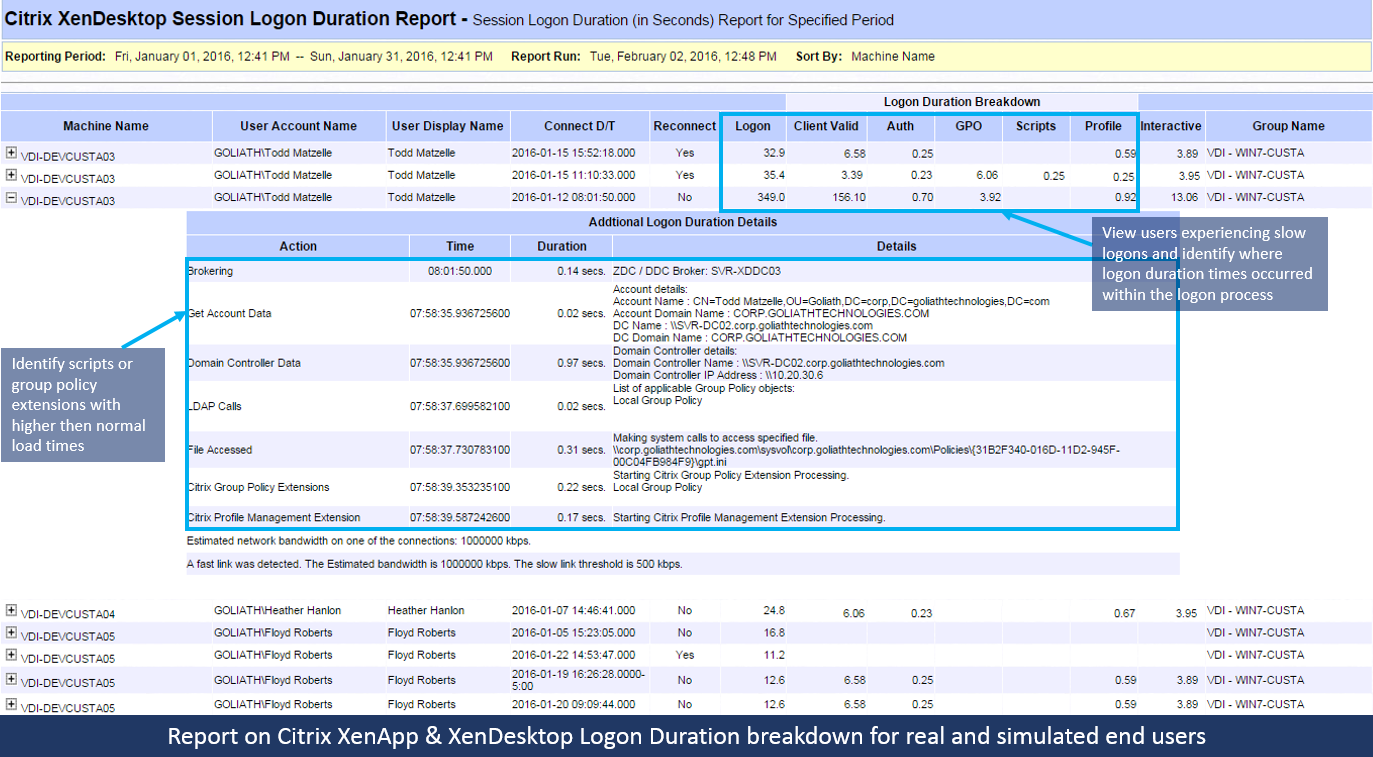
Goliath Technologies is a vendor that is offering a Logon simulator for a very long time already. I think that they were one of the firsts to offer this. They also have a monitoring solution next to it. Of course the logon simulator of Goliath Technologies is also offering the logon process as does ControlUP but with Goliath Technologies they offer a bit more instead. Next to the logon simulator basics they offer more in-depth insight in the Citrix logon process.
The setup process is a bit more advanced than what we saw with ControlUp, you have a the option to:
- Schedule a logon simulation or more than one,
- Remediation if a logon simulation goes wrong
- Alerting
- and more
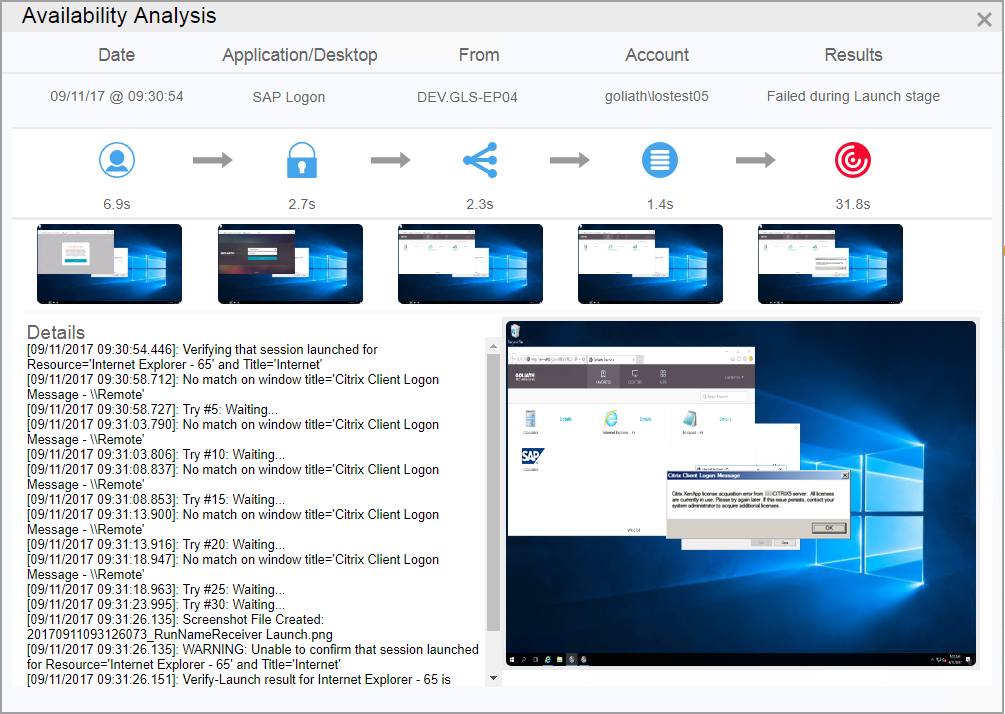
I decided to show the advanced connection step details screen here as I think this is a huge asset for Goliath Technologies. Read my previous articles if you want to learn more. Read my other articles on them to see what advanced features they have, the remediation and logon options for any logon scenario is interesting.
Goliath
As you see in the screenshot above the logon process is shown detailed, every step along the way is recorded. If the connection to the StoreFront or NetScaler is slow and the user is waiting it will show that. This for me is very important as now I can see why it is taking so long for the user to connect.

If you also monitor the Citrix environment you are testing against you have detailed graphs to look inside the Citrix channels. This article is not about the monitoring solution of course but I need to mention it as it makes a difference in what you get for information out of the Citrix sessions with it.
Hosted
Something that Goliath Technologies is offering a hosted solution. The hosted solution is making it possible to test the availability of your Citrix environment from a remote data center. The hosted solution is called “Citrix App Availability testing”. The classic use case is the airliner where personnel is traveling around the world and connect to a central Citrix app. As personnel is in different time zones your support isn’t always easy, testing the connection from different data centers across the world gives you control and insight.
There are some other differences compared to ControlUp, Goliath Technologies can schedule a availability test as well as run them manually or periodically. Depending on your needs it might be interesting to have different options. Client side errors are recorded as well so that IT can determine what the user is experiencing. These are errors that are not captured in event logs normally and cause a lot of frustration. One of the last things to mention is the ability to start a remediation process if something reports an error, so like a batch file to disable logons at a certain server.
Together with the on-premises solution this offers a complete solution for organizations.
Demo
Is there a better way to understand how something works than with a demo.. I included the demo video of Goliath Technologies. It’s their official video so with the talking.
Comparison
So this is Goliath Technologies, a monitoring solution like ControlUp with a Citrix logon simulator that offers more than basic logon simulation. The in-depth insight in the channels is very interesting from Goliath Technologies. Goliath Technologies is working to up-date the console so make it more snappy, I’ve seen a bit of it already and can’t wait for them to release it.
My previous articles on Goliath Technologies are found right here;
- Citrix logon simulator as a service: part1
- Citrix logon simulator as a service; part 2
- Proactive management of end user experience using Goliath Performance Monitor and Goliath Logon Simulator
- Goliath renames their Citrix hosted Logon simulator to App Availability testing for Citrix;
Product website: Logon simulator
eG innovations
eG innovation is one of the last additions to the Logon simulator game, they recently added the functionality. eGInnovations integrated the Logon simulator with their monitoring solution and it is now one of the components in the console.
Depending on the license you have you get only the logon simulator or you get the root cause analysis as well and if you have the monitoring solution as well you can see a lot of information inside the Citrix session that will help you troubleshoot and fix the issues users are having. With the logon simulator only you will get a good view already like you see below.

Above is a default graph from the logon simulator offering from eG innovation showing the simulation is detail and the times it took to get to the next step. From the main monitoring screen this is where you get this screen, a magnifying glass shows that the details are available.

eG Innovations comes with a monitoring solution so when you see an issue and you have the monitoring solution also in place you can deep dive to see the root cause. If you integrate with the monitoring you can click to the component that is giving the issues. If you add the monitoring solution you can zoom in on the user and get a dashboard like the first one for that user with detailed information. If you need more complex logon simulation and testing they offer a synthetic scripting solution where a mouse click recording takes place.
Demo
Is there a better way yo understand how something works than with a demo.. There is an awesome webinar about the logon simulator and the scripting option available, just fill in your name and you are able to watch it. If you just want to see the demo, scroll to 13:50 where they start to demo it…
Comparison
So this is eG Innovations a end to end monitoring solution with two options a logon simulator and a synthetic scripting solution. eG Innovations by default doesn’t offer a hosted solution itself, the company I work for does, we offer a Monitoring as a Service solution to also offers a logon simulator and more. So enough commercial for that, I’m not a sales guy. The product itself does not offer this and neither does eG Innovations.
Read my previous articles on eG Innovations.
- eG Innovations Citrix improvements
- eG Innovations; mobile app management made easy
- eG Innovations; Version 6 coming up
Product website: Logon simulator
Login PI
Login PI is the brother or sister of Login VSI. Login VSI is what everyone uses to test their environment with pre-defined use cases and a pre-defined load. Of  course load testing is great but it doesn’t guarantee anything in production. For that you need to do repetitive testing and that is what LoginPi is offering. They also just came with a new version so time to show what they got.
Login PI is offering a logon simulator for Citrix, VMware Horizon View PCoIP, Microsoft and any other protocol as long as you have client to connect to it.

The dashboard as you see above is new and fresh compared to the first one I saw and tested. It looks fresh to me and very informative. A new feature in this version is that they show in a dashboard the latency per launcher and per host. more features are CPU load, bandwidth and so on.

Demo
Is there a better way yo understand how something works than with a demo.. I included the demo video of Login PI. It’s there official video so with the talking.
Comparison
And there we have Login PI nifty tool to logon, easy to setup and execute a workload. Of course if you script an action to execute that will take a lot more time for sure. the scripting is done by mouse locations, so whatever you click is recorded and replayed. Login PI is not integrated with a monitoring solution and therefor if you find an issue, if your logon process fails, you need a third party monitoring tool to help you out. I think that is showstopper often and a reason some organizations will look for a solution that has both in one.
Read my previous articles on Login PI;
- LoginPi Real world performance insight; part 1
- LoginPi Real world performance insight; part 2: the dashboards
Product website: Logon simulator
SquaredUp
The last one in the list is SquaredUp, they are the strange vendor in this list as I’m sure many of you never heard of them before last year. SquaredUp is a  management solution to make Microsoft SCOM workable. Microsoft SCOM delivers a load of data and all that data is not processed by the administrators as it is just too much. The guys from SquaredUp created a solution that visualizes Microsoft SCOM data so that administrators actually can make use of it.
Since Citrix bought the Comtrade management packs for Microsoft SCOM they came up with a community version of a Citrix Logon simulator. It’s available on github and it is free. There are a few caveats with it, you need a certain StoreFront version, a certain SCOM version and so on, but hey if you have that this might just be what you’re looking for.

There is a detailed description how to set up the scripting and so on. The diagram above show the working of the logon simulator. The logon simulator is of course not integrated with a monitoring solution but it depends on a monitoring solution, Microsoft SCOM to be present. so if you have an issue with the logon process you can turn to Microsoft SCOM for answers.
What they offer is a hosted solution to do Citrix availability checks of your environment, by creating a dashboard you can see from which location you are testing and if that test is successful. They are visualization experts so dashboards is there thing.

Demo
Is there a better way yo understand how something works than with a demo.. I included the demo video of ControlUp. It’s there official video so with the talking.
Comparison
Read my previous articles on SquaredUp;
Product website: Logon simulator
Conclusion
We looked at a number of products and all of them will test the availability of your Citrix environment. Of course they have different options and functionalities, this was the reason to write this article. I hope it gives an insight in what is available on the market. I hope that I got all the settings right, if I don’t let me know and I edit them.
If I have to put a number on them I would say that Goliath offers the most advanced logon simulator, eG offers the best integration with the monitoring tool and that ControlUp offers the most complete solution as they also offer management possibilities. Goliath also offers a hosted solution, logon simulation as a SaaS solution. eG innovations and LoginPi offer a scripted solution to script a user action and do a recurring test on this. Too many offering and too many possibilities. I leave it in your hands to find the best one.




Recent Comments