Citrix & Epic EHR Failure Prevented Before Impacting 25,000 Users at Health System

Citrix & Epic EHR Failure Prevented Before Impacting 25,000 Users at Health System

How We Did IT

Citrix & Epic EHR Failure Prevented Before Impacting 25,000 Users at Health System


epic ehr failure

“Last week we were able to resolve a Citrix XenDesktop issue before end users were impacted. The Goliath Application Availability Monitor for Citrix and VMware Horizon identified that Epic was not available at 4:30 a.m. ET. Our IT team received a real-time alert that the main application failed to enumerate, which would have impacted 25,000 users if not resolved.  Because of Goliath’s advanced warning, we were able to resolve the issue before any users reported the problem to the help desk.”

– Senior Citrix Escalation Engineer


Infrastructure

VMware, Citrix XenApp, Epic Hyperspace, Cerner


Challenge

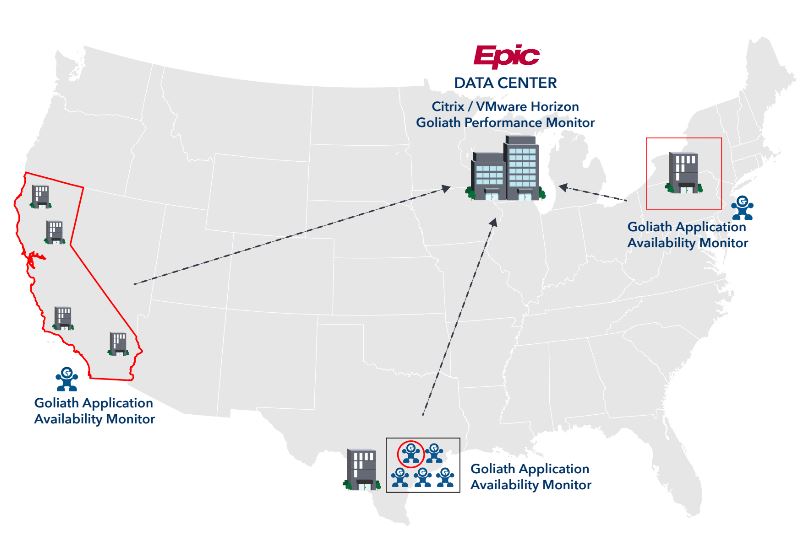
The Citrix XenApp and XenDesktop teams often received complaints related to Citrix XenApp and XenDesktop availability from their end users. Specifically, physicians and nurses who were connecting from remote hospitals and facilities could not launch their Epic Hyperspace application. The Citrix IT Team deployed the Goliath Application Availability Monitor to remote hospitals, which features the “Goliath Virtual User”– a low footprint software that is managed from a central console and logs on to Citrix XenApp and XenDesktop & Epic just like real users. This ensures that the Epic Hyperspace and Citrix applications are available and that the Citrix delivery infrastructure and workflow are functioning as they should. It is like having a real Citrix administrator at the hospital whose sole job is to logon to Citrix XenApp and Epic Hyperspace before users, and then call IT to alert them of any issues so they can resolve before users are impacted. See below the deployment architecture which shows the remotely deployed “Goliath Virtual User.”

Epic Deployment 2

Solution

Averting an Outage for 25,000 Users

The Epic Hyperspace application had recently been upgraded. When the upgrade was complete, the app was tested and made available for consumption by end users. However, during the upgrade, there was a misconfiguration of the application that Citrix admins were not aware of at the time.

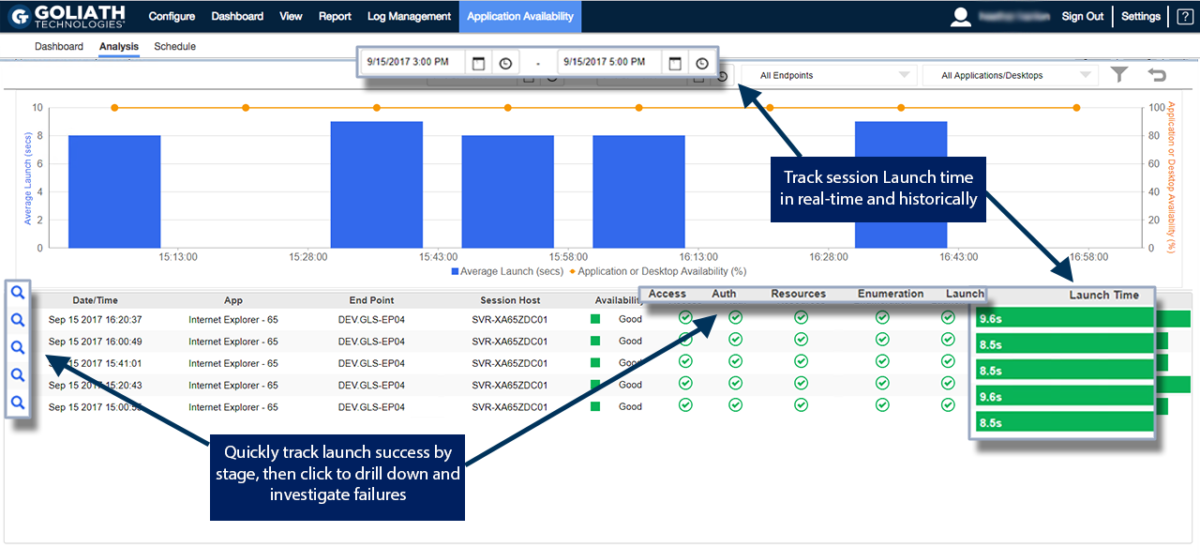
The Citrix team had configured the Goliath Application Availability Monitor for Epic to alert them if there was an issue with a Citrix-delivered application, as part of the early warning system designed to troubleshoot Citrix in advance of end users experiencing performance issues. The Goliath Application Availability Monitor, and “Goliath Virtual User,” was scheduled to run and test all critical applications every 15 minutes daily, including the Epic application that was just upgraded.

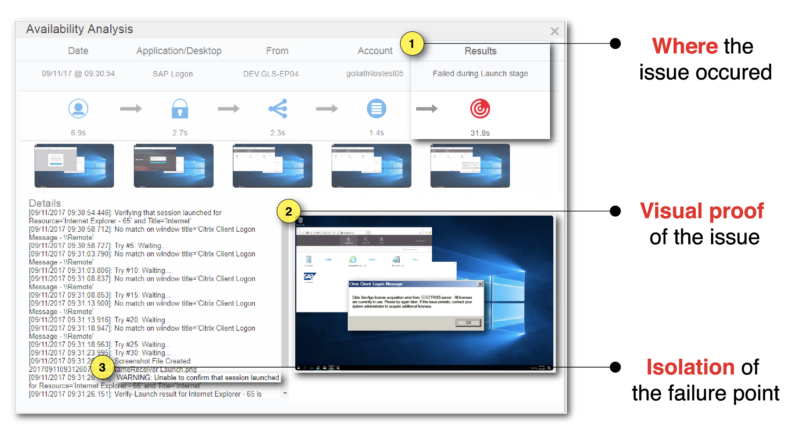
On this day, the Citrix XenApp and Citrix XenDesktop team was sent a real-time alert at 4:30 a.m. ET, that Epic Hyperspace was not available at several hospitals. From the real-time dashboard, it was apparent that failures were occurring from many sites with multiple different Goliath User admin accounts. This allowed IT to know in an instant that there was a global outage of the Epic application that was just updated. From the application availability detail of each failed simulation, the failure point was identified. In every failed instance, an enumeration issue was discovered as the root cause and there was a picture to prove what the issue was in the “screenshot” analysis. As a result, the application icon was not displayed on the web interface page, as seen below in this screenshot from the actual software that identified and alerted to the issue in real-time.


Epic Deployment 2
Epic Deployment 2

Results

Now, the IT team receives an advance warning if Epic Hyperspace and Citrix will not launch, or is slow, before physicians and other healthcare workers log into Citrix XenApp or Citrix XenDesktop for the day. The advance warning, via real-time alerts, gives the IT team peace of mind because they know the early warning system will give them time to troubleshoot Citrix and resolve the performance issue before users are impacted. They now use the new “screenshot” analysis (in the image above) to document, via pictures and metrics, the “true” root cause and put fix actions in place so the issue can be permanently resolved.

Finally, the IT team can communicate more effectively with management, counterparts in other departments and their application vendors because they have objective evidence of application availability, performance, and details relative to the root cause of performance or availability issues. They also can document when, with this advanced warning capability, they saved the day! And, saving downtime that would have impacted 25,000 users is the definition of saving the day.

UHS Resolves Citrix Accessed Oracle Health (Cerner) Millennium Availability Issues Impacting Nurses

UHS Resolves Citrix Accessed Oracle Health (Cerner) Millennium Availability Issues Impacting Nurses

How We Did IT

UHS Resolves Citrix Accessed Oracle Health (Cerner) Millennium Availability Issues Impacting Nurses  


Universal Health Services, Inc. Resolves a Patient Application Issue in Minutes Not Hours

Justin Monnig“We received an urgent request from a Chief Nursing Officer at one of our hospitals. She reported that nursing staff were not receiving important patient information from a staffing application. The application vendor couldn’t pinpoint root cause. We called Goliath and within 30 minutes the UHS internal IT team and Goliath were able to resolve the issue.” — Justin Monnig, General Manager of Crossings Healthcare Solutions, a subsidiary of Universal Health Services, Inc. 

Infrastructure

Oracle Health (Cerner) Millennium, Citrix, VMware 

Availability, speed, and reliability are critical to healthcare organizations as there can be a direct impact to a clinician’s ability to deliver quality patient care. This became a real concern for the team at UHS. User accounts in the nursing staffing application were inexplicably disappearing from groups. This was impacting the ability of the appropriate staff to receive critical communications. The issue was a high priority due to potential patient impact. More concerning was the fact the IT team lacked the telemetry necessary to isolate and resolve the root cause. That was when the IT team at UHS decided to leverage Goliath.  

Challenge

Availability, speed, and reliability are critical to healthcare organizations as there can be a direct impact to a clinician’s ability to deliver quality patient care. This became a real concern for the team at UHS. User accounts in the nursing staffing application were inexplicably disappearing from groups. This was impacting the ability of the appropriate staff to receive critical communications. The issue was a high priority due to potential patient impact. More concerning was the fact the IT team lacked the telemetry necessary to isolate and resolve the root cause. That was when the IT team at UHS decided to leverage Goliath.  

Solution

Isolating Root Cause in Minutes – Not Days 

Since the issue was affecting the delivery of patient care, finding a resolution was time critical. Unfortunately, the vendor support channel for diagnosing and resolving this issue was proving to be ineffective. The ticket was escalated to the application vendor and the UHS team awaited a response. Simultaneously, however, they also escalated the issue to their internal Citrix monitoring, escalation & engineering team to see if they could resolve it more quickly. 

The internal Citrix monitoring and IT team at UHS immediately leveraged Goliath’s advanced troubleshooting capabilities. According to Joe Alexander (Software Architect at UHS),  

“I contacted Goliath since I knew Goliath Performance Monitor captures Citrix XenApp and XenDesktop session information that would show us who is launching the specific application causing issues. I was able to prove this out by writing a quick SQL query to gather application process information but needed Goliath’s help to get a new monitoring rule built. We discussed the potential solutions and within 30 minutes Goliath had an email alert firing and configured an additional report to provide the needed information. These findings were sent to the hospital, and they were able to use the information to prove that this was an end user issue and not a result of the application. So, we were able to troubleshoot, identify the root cause, and resolve the issue in less than 45 minutes. All before we heard from the application provider.” 

Example

KPI Cerner Screenshot

The image above displays metrics from a single user session which helps to quickly identify if the root cause of slow performance is isolated to a single user due to behavior, or if it is a larger systematic issue related to the underlying infrastructure (Citrix) or application.  

Results

By leveraging Goliath’s Citrix CVAD (XenApp & XenDesktop) monitoring, the team at UHS resolved a mission-critical issue that could have impacted patient care. Beyond simply providing the solution, Goliath enabled UHS to begin gathering data points and generating reports within 30 minutes. Because of Goliath’s deep telemetry and unmatched data correlation, the team at UHS had the insight needed to isolate, troubleshoot, and resolve the root cause well before the existing application vendor could complete the research needed to deliver a possible solution. 

Now, UHS has proactive Citrix CVAD (XenDesktop) monitoring and alerting set for this specific condition so that, if it ever happens again at other hospitals, they will be alerted in real-time. 

UHS currently has Goliath’s Citrix Monitoring technology deployed throughout their entire Citrix application delivery infrastructure, which they use to deliver Cerner Millennium™ to their hospitals. The scope of their deployment includes agents deployed within the Cerner-hosted datacenter, and the Goliath Application Availability Monitor at over 33 acute care hospital facilities across the United States. The technology is used by UHS for Citrix monitoring to anticipate speed & reliability issues before they impact clinicians, troubleshoot quickly when issues do arise, and document root cause so permanent remediation can be implemented, and clinicians can deliver uninterrupted patient care.  

UHS logo

ABOUT UHS

Universal Health Services (UHS) is a major healthcare management company in the United States. It operates hospitals, behavioral health facilities, and ambulatory care centers across the country. UHS offers a wide range of medical services, from general healthcare to specialized treatments. Its mission is to provide quality healthcare services to communities, though it is a for-profit entity in the private healthcare sector.

Headquarters location: King of Prussia, Pennsylvania
Founded: 1979
Employees: >94 000
Industry: Healthcare

User Story: Top 25 Law Firm Fixes Citrix with Goliath

User Story: Top 25 Law Firm Fixes Citrix with Goliath

User Story: Top 25 Law Firm Fixes Citrix with Goliath

Last week, I was working with a top 25, US-based law firm who was deploying Goliath Performance Monitor to track end user experience, and ensure their 50 VMware hosts and 400 Citrix XenApp 7.6 servers were healthy and not contributing to performance problems.


To accomplish this, we deployed the technology and configured 3 specific reports that come right out-of-the-box with Goliath Performance Monitor: 

  1. XenApp Server Health Report
  2. Memory Status Report
  3. Logical Drive Status Report

These Citrix and VMware performance reports are used to make sure the administrators had all the data they needed at the tip of their fingers.

Step 1 – Deploy Intelligent Agent to Get Critical Citrix XenApp Session Data

The first thing we did is bring in the law firm’s VMware ESX Hosts using our APIs for VMware, and then we continued through the wizard to add in Citrix XenApp 7.6 environment using our APIs for Citrix. Once the VMware and Citrix infrastructure was listed in the inventory, we deployed our Intelligent Agent to the Citrix session hosts and role servers to gain deeper visibility into the virtual machine OS and Applications running on it.

The Intelligent Agent was the key to get the deep metrics necessary to ensure End User Experience — at less than 0.1% CPU, 1.5 MB on disk, about 50 to 80 MB RAM, the Intelligent Agent was hardly going to impact the server’s performance. The agent was deployed to the environment within minutes and instantly started to collect the key Citrix XenApp session activity.

Step 2 – Schedule the Citrix XenApp Server Health Report to Run at Key Intervals 

To achieve their goal of maintaining a healthy and properly resourced Citrix XenApp environment, the law firm scheduled the Citrix XenApp Server Health Report to ensure they could track key metrics.

Depending on the time of day, different metrics would carry different priorities so we sorted them differently depending on the relevant metric.  Here is how we scheduled the reports and why:

  • 6:00 am: The report was sorted by server uptime and was used to confirm that the servers had restarted the night before. If a server’s uptime was too high they could disable logons or forcibly log off disconnected sessions and restart the servers so it was fresh and available for the day’s usage.
  • 10:00 am: The report was sorted by active users and was used to confirm the users were being load balanced appropriately and identify if there were servers with logons enabled and no users. This would indicate servers may not able to accept incoming sessions.
  • 2:00 pm: The report was sorted by server load and was used to understand if there were any CPU or Memory resource availability concerns before the peak usage time at the end of the day.
  • 6:00 pm: The report was sorted by disk availability to see if there were any disk space issues before the next day started that would need to be addressed.

In addition to the use cases above, this report was also used to proactively identify high CPU conditions on overloaded VMware servers, Citrix user growth, or XenApp servers that never got rebooted to pick up an updated PVS image.


citrix-xenserver-health-report-goliath-technologies


Step 3 – Utilize the Memory Status Report & Logical Drive Status Reports  

If the Citrix and or VMware team saw a problem with regards to memory usage they would then turn to the Memory Status Report to investigate further. The law firm would then run this report on-demand to quickly identify the total allocated memory versus what was available.


memory-status-report-goliath-technologies


Likewise, when the XenApp Server Health Report resulted in low disk free for a given XenApp server, the teams would turn to the Logical Drive Status Report. One of the many conditions that the law firm was able to identify was that by the end of the day the server’s differential (diff) disk would get filled causing errors and faults for the users on that server. By tracking through reporting and alerting, they were able to validate increasing the size of the diff disk to negate future problems.


logical-drive-status-report-goliath-technologies


The Citrix XenApp Server Health Report, Memory Status Report and Logical Drive Status Report featured in this post all come out-of-the box with Goliath Performance Monitor. Aside from scheduling the reports to fit the usage patterns of this customer’s Citrix environment, no additional configuration was needed. All of the reports were configured to be sent straight to the administrators via email, and in some cases, they were also exported to CSV for further reporting activities. 

By scheduling the Citrix XenApp Server Health Report to run multiple times a day with actionable data delivered right into their mailboxes, administrators were able to take proactive measures before it impacted the end user’s experience. Goliath offers 66 Citrix, VMware & NetScaler reports that give you full visibility into your Infrastructure, Performance Issues & End User Experience.

Marietta Memorial Health Resolves Citrix Print Issues

Marietta Memorial Health Resolves Citrix Print Issues

Marietta Memorial Health Resolves Citrix Print Issues – Tickets down 60%

As part of a Goliath Technologies Citrix troubleshooting services project, I was working with Memorial Health System, a non-profit organization with 2 hospitals, 15 outpatient sites and provider clinics, and more than 5,000 end users.  Their healthcare IT team’s goal was to proactively get ahead of physician and medical staff complaints stemming from Citrix XenApp 7.15 printing problems and failures with better XenApp monitoring. The healthcare IT team already used Goliath’s MEDITECH module to proactively troubleshoot issues across Citrix and MEDITECH from a single pane of glass, now they needed to address printing problems that were adversely impacting end user experience not just for doctors and clinicians, but ultimately their patients as well.

    The healthcare IT team had three specific printer issues to solve for their end users:

    1. Citrix Printer Spooler Failures
    2. Citrix Printer Driver Corruptions
    3. Citrix Printer Mapping Issues

    To help the team achieve their goal, we deployed Goliath Performance Monitor (GPM) and leveraged the Printing Health Report, which is just 1 of 66 IT performance and end user experience reports that come out-of-the-box with GPM. This allowed us to perform in-depth XenApp monitoring, which enabled us to troubleshoot issues with printer mapping and services.

    The Problem – Over 100 Support Tickets Per Day Due to Printer Failures

    This healthcare IT team’s challenge was to troubleshoot and fix the root cause of a multitude of Citrix printing issues.


    Step 1 – Schedule Goliath’s Printing Health Report to Filter Citrix Printing Problems 

    First, we brought in the healthcare system’s Citrix XenApp environment through our ‘First-Time Run Wizard’ using our APIs for Citrix. Once the Citrix infrastructure was listed in inventory, we deployed our Intelligent Agent to the Citrix session hosts and role servers to gain deeper visibility into the Citrix Supporting Infrastructure. This gave us better capabilities to monitor XenApp.

    Yes, that’s right — an Agent. Our Intelligent Agent is not what you think; the Agent uses less than 0.1% CPU, 1.5 MB on disk, about 50 to 80 MB RAM, and no reboot is required. We deployed Goliath’s Agent within minutes and were able to instantly begin collecting Citrix printer troubleshooting data – regardless of the organization’s size and network complexity.

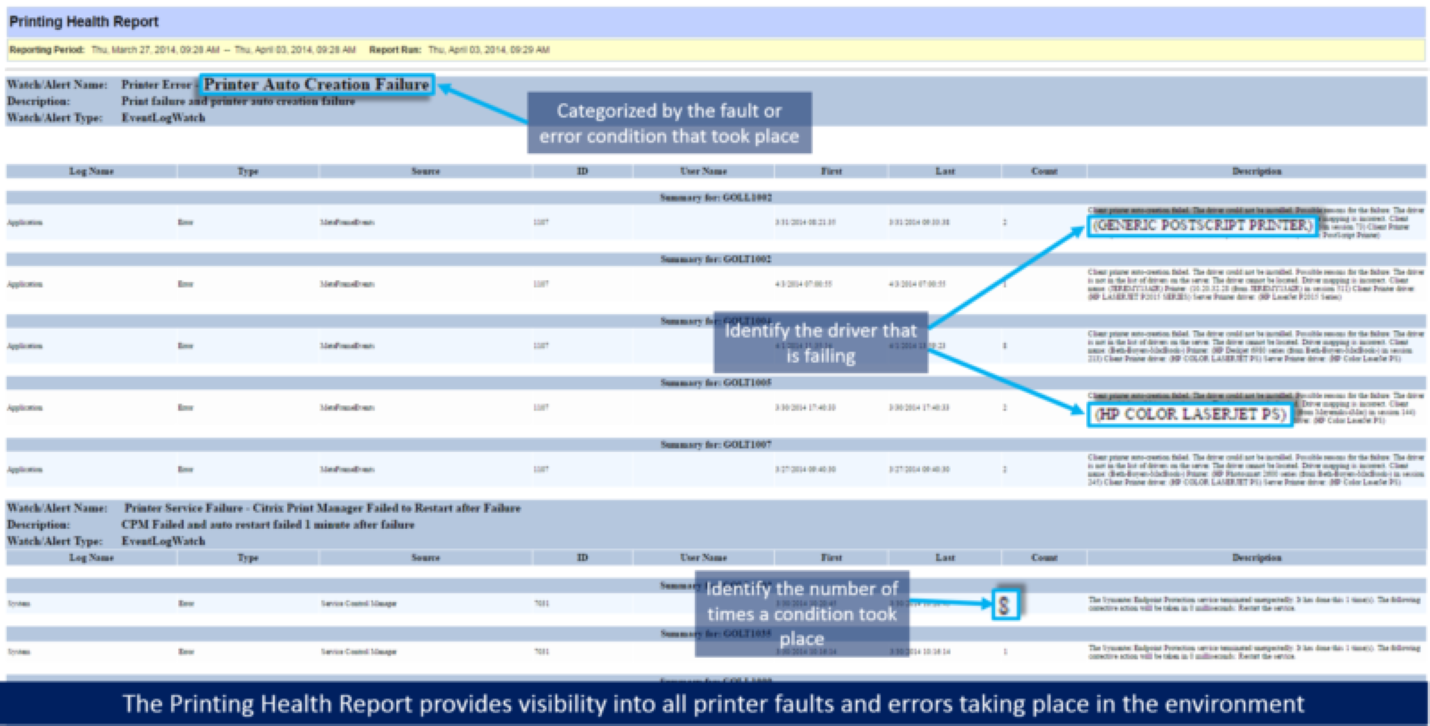
    To help the healthcare system pinpoint the exact issues taking place in their environment, we scheduled the Printing Health Report (below) in our XenApp monitoring software to categorize and summarize the Citrix printing problems that were occurring over a 24-hour period.

    XenApp Enduser productivity report

    This report identifies all printing issues that are occurring in the environment, so that they can be broken down and addressed. As far as Citrix printing best practices go with us, this is a great starting point.

    Step 2 – Use the Printing Health Report to Troubleshoot & Fix Driver Corruption Events & Printer Mapping Issues

    Using the Printing Health Report information (above), the healthcare IT team was able to analyze the faults and errors as well as walk through the environment and systematically resolve the issues that were occurring:

        • Driver corruption events: the report allowed the administrator to identify the driver type and XenApp servers experiencing driver corruption so they could reinstall the right drivers on the right XenApp Gold Images.
        • Printer mapping issues: they were able to find that the mapping issues were coming from printers that were not on the organization’s approved printers list – some users had issues being unable to print from Citrix to a local printer, like their legacy HP LaserJet 4100s. For some users, the health system made exceptions, but the rest had to get new printers.

    Just by making these few changes, the healthcare IT team was able to resolve the majority of their printer mapping issues that were occurring. These were huge issues, as they caused users to be wholly unable to print from Citrix to local and network printers.

    Step 3 – Activate Goliath’s Print Service Error — Print Spooler Service Alert

    Following the changes, we ran the Printing Health Report again to see how the environment was acting. The report results still included some errors in regard to the print spooler, but that was to be expected.

    So to handle the Citrix print spooler issues, we enabled some of our out-of-the-box IT performance alerts for the print spooler and created some remediation actions to resolve these issues automatically when they occurred to keep the end users working.

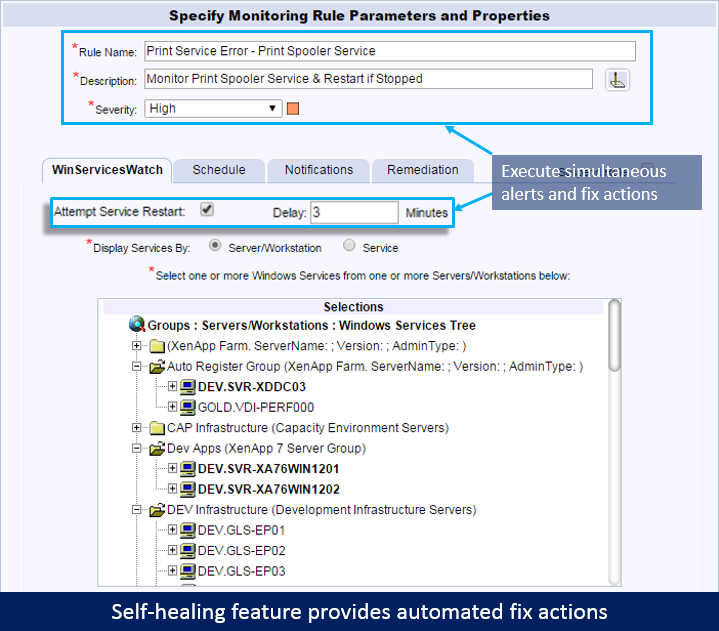
    One of the alerts we enabled was the Print Service Error – Print Spooler Service alert which alerts the healthcare IT staff if the print spooler service stopped and failed.

    With this alert, we also enabled the out-of-the-box remediation to restart the print spooler service. If the print spooler service was stopped for at least 3 minutes, Goliath Performance Monitor would automatically attempt to restart the service. By having our technology execute the remediation action automatically it helped save time normally taken by the help desk and IT staff to manually execute the restart.

    Citrix print spooler fail automated fix actions

    Step 4 – Configure Monitoring Rules for ‘cpsvc.exe’ & ‘splwow64.exe’ to Identify High CPU & Memory Usage

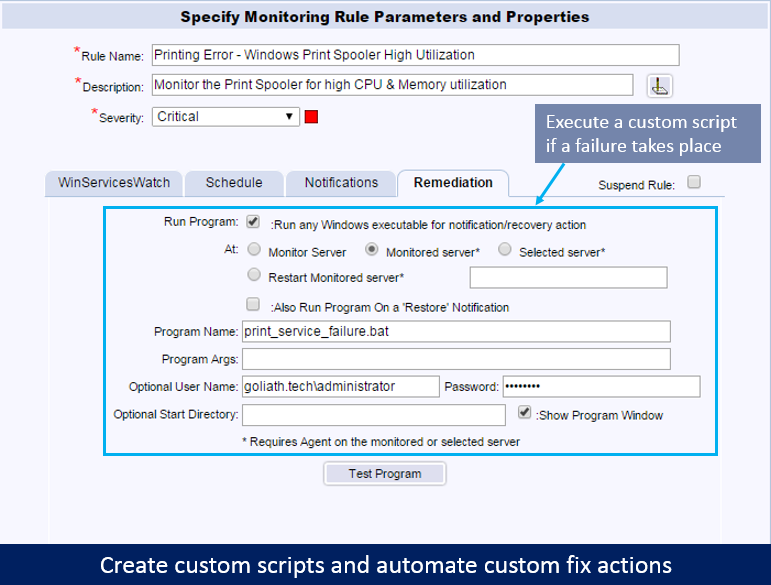
    Because of how print spooler failures would occur, we needed to monitor the print spooler processes in case they got hung, so we configured Citrix monitoring rules for ‘cpsvc.exe’  (the Citrix Print Manager) and ‘splwow64.exe’ to identify when they experienced high CPU and memory usage.

    High resource utilization on these processes can cause the print spooler to crash or hang. In addition to configuring email notification, we also configured remediation actions for this alert to resolve the condition before it resulted in actual Citrix printing problems and server performance degradation.

    Citrix printer fail custom script fix action

    One of the healthcare system’s engineers wrote a script, and put it into our remediation engine so it was documented and could be used by the Citrix help desk. When one of these processes spiked in resources, the script would terminate the process, clear the print queue, and notify the end users to resubmit their print job. This custom script was then applied to the alert so that when a failure took place, the script would execute automatically.

    By using Goliath Performance Monitor’s ability to automate fix actions, the healthcare system was able to be proactive instead of reactive. In doing so, they were able to troubleshoot Citrix printing problems as well as lighten the load of their help desk team. More specifically they were able to see that there had been a change in how the print drivers were mapped through the Citrix policies. They changed one setting and the result was reduced printer failures from hundreds per day to less than ten.

    Want to learn more about how our software can help you troubleshoot end user experience issues just like the health IT team outlined in this post? Click the image below to browse our schedule of upcoming live webinars where you will get the chance to see the product in action!

    Browse EHR Monitoring & Troubleshooting Webinars

    About the Author: 

    The team members collaborated to bring together this blog post by calling on their past Customer Experiences and Expert Knowledge of Citrix Troubleshooting. Beyond writing technical documents this team supports Goliath Customers and provides product feature and function guidance to development.
    Nonprofit Healthcare System Isolates True Root Cause of Citrix & Meditech Issues, Saves Time and Money

    Nonprofit Healthcare System Isolates True Root Cause of Citrix & Meditech Issues, Saves Time and Money

    How We Did IT

    Top 5 Nonprofit Healthcare System Isolates True Root Cause of Citrix & Meditech Issues, Saves Time and Money


    citrix meditech

    Infrastructure

    Citrix XenApp, Citrix XenDesktop, VMware Horizon

    Challenge

    Healthcare IT faces both complexity and urgency when dealing with end user experience issues that impact their EHR environments.  In addition to the usual issues of frustration, delays and inefficiency, patient care is impacted when healthcare workers can’t access critical applications via Citrix XenApp, Citrix XenDesktop, or VMware Horizon.

    Solution

    In this case, a top 5 nonprofit healthcare organization assembled a major incident response team when users reported major performance issues and delays when scanning data into their MEDITECH EHR application.  Initially, the team reviewed the user accounts, scanner data and MEDITECH scanner applications.  Applications teams, Citrix Teams and Network teams reviewed this data and reported no issues in their parts of the system.  At this point, the team began planning to upgrade the drivers on each PC and device involved in scanning – a massive, and time-consuming undertaking.

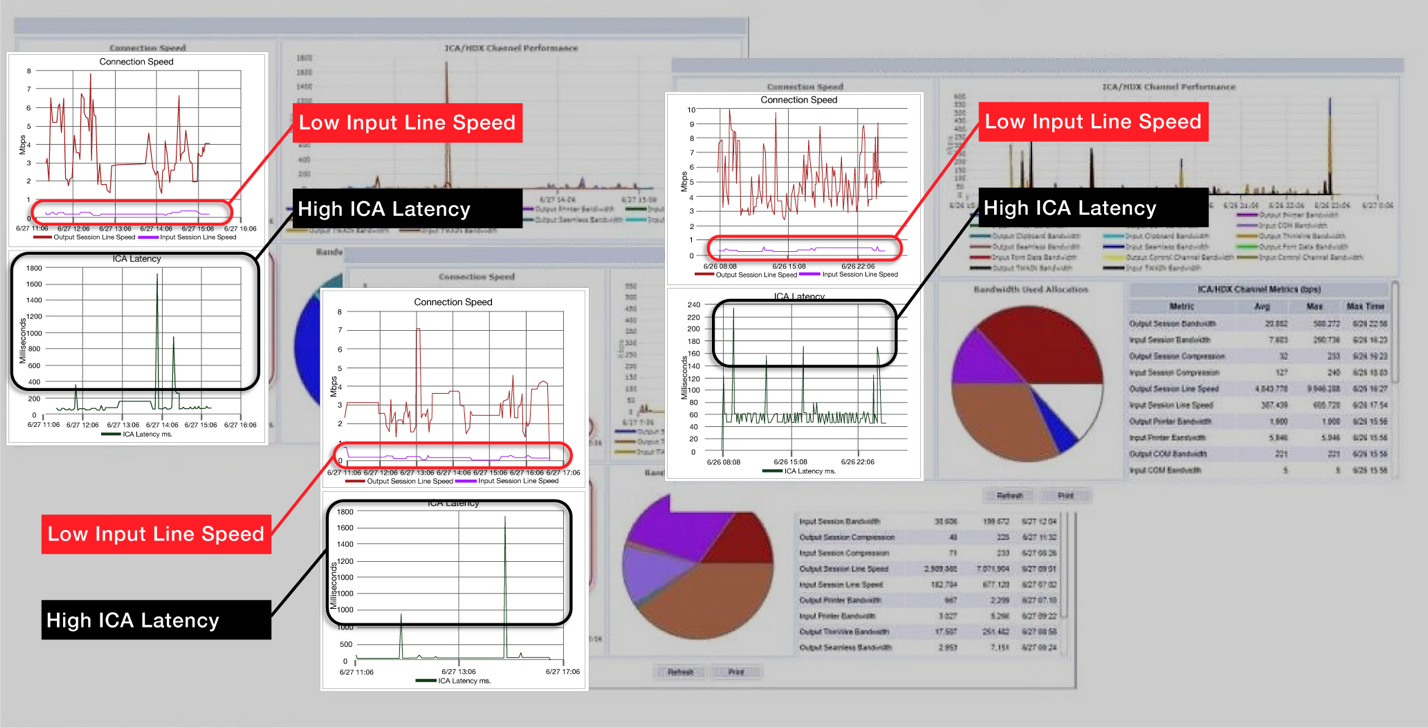
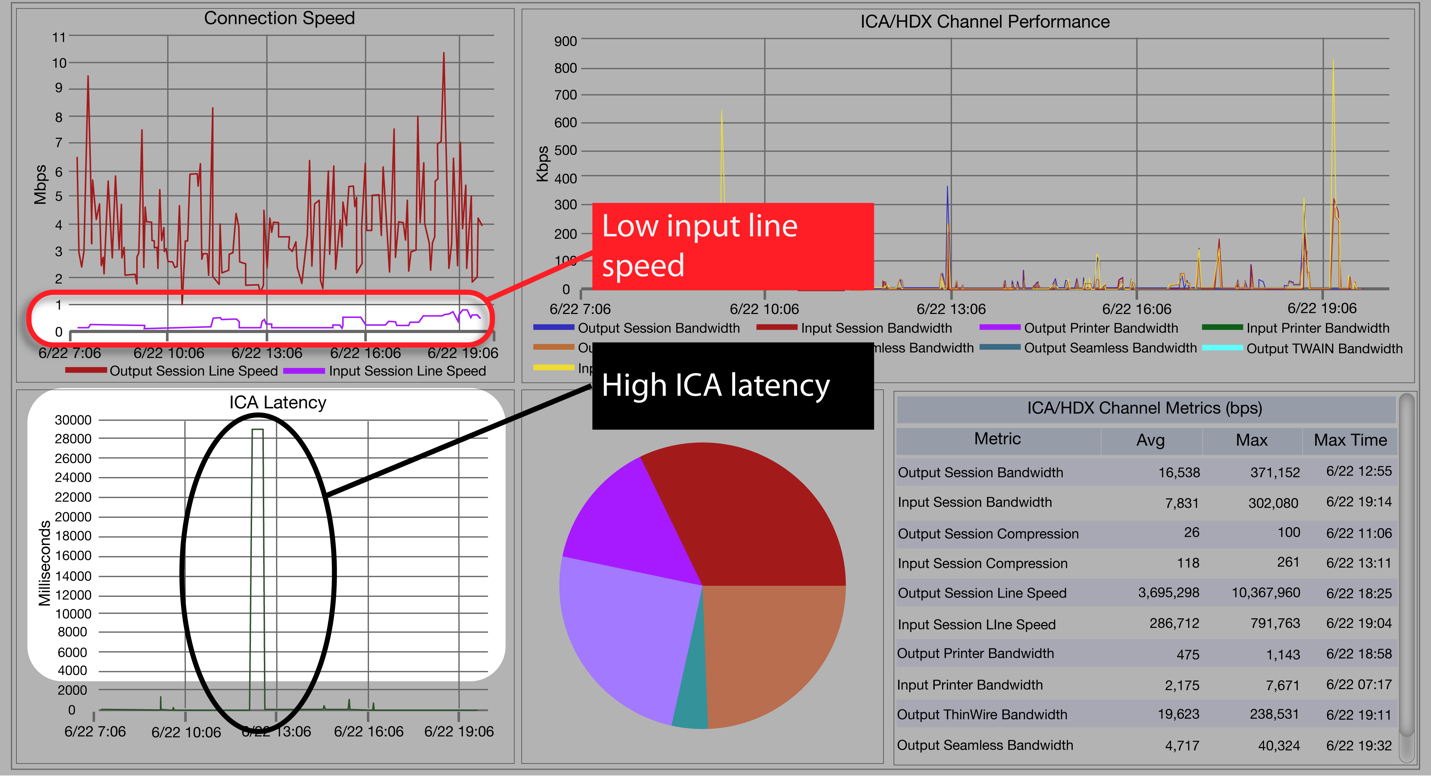
    Parallel to this effort, the End User Computing team used Goliath Performance Monitor and the Goliath MEDITECH Module to troubleshoot the issue in the Citrix XenApp sessions affected.  All of these sessions clearly showed low Input Line Speed and high Citrix ICA latency as depicted in the image below:


    meditechgpm

    Figure 1: Impacted sessions show low Input Line Speed and high Citrix ICA Latency

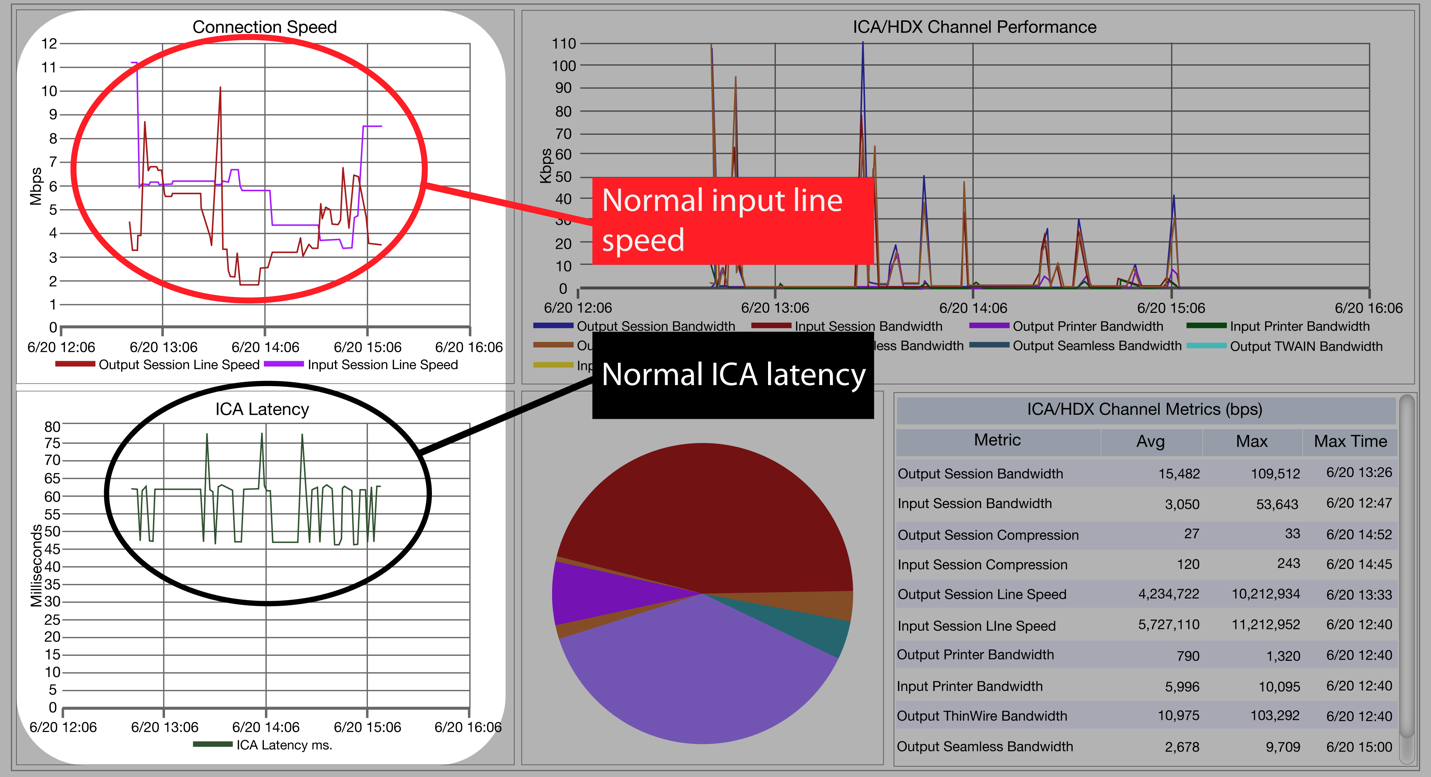
    This raised the key question: When did this start and what caused the change?  Because Goliath Performance Monitor maintains historical session data at the same level of detail as current sessions, it was simple to begin backtracking the issue.  Looking back a week, they were able to see there were no issues reported, and the data showed no problem with Citrix ICA latency or Input Line Speed as seen below:


    normal Input Line Speed and ICA Latency

    Figure 2: Prior sessions show normal Input Line Speed and ICA Latency

    Further investigation pinpointed the start of the problem to a specific date and showed the same issues: high ICA Latency and low Input Line Speed as depicted in the image below:


    meditechgpm

    Figure 3: Pinpointing the first sessions showing the issue

    Results

    Taken altogether, this data showed that multiple users, computers and even entirely separate facilities were having the same problem.  This clearly pointed to a change in the network made just before the issue started.

    The major incident response team reviewed the data and conclusion, and their focus shifted from the plan to update the scanners to the network.  A more detailed network review showed that a specific MLPS circuit was changed just before the issue was reported.  Further tests showed that this circuit was dropping packets and causing retransmits that slowed network traffic across five different facilities.  The networking team disabled the faulty circuit and initiated failover to a backup connection.

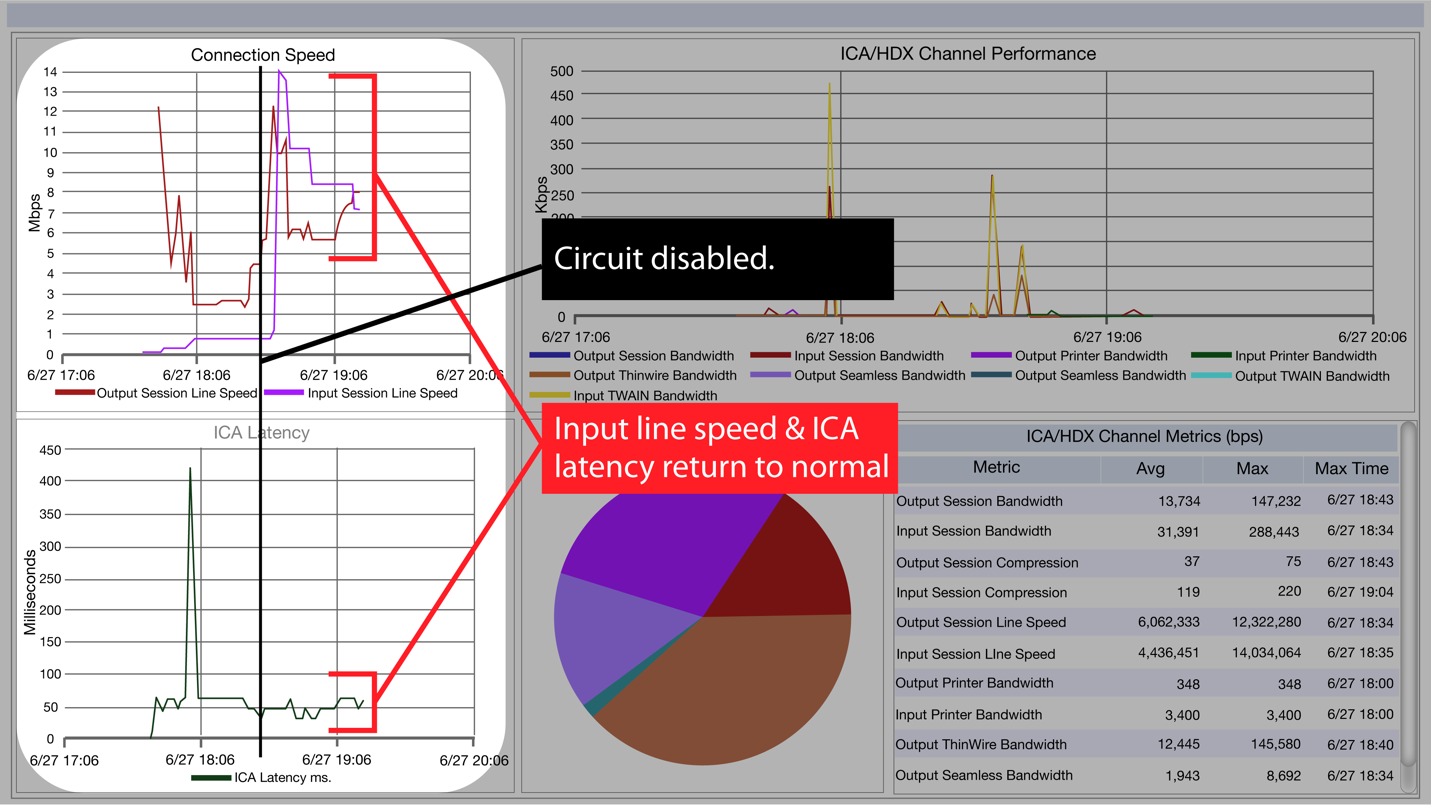
    As soon as the alternate circuit configuration was in place, Goliath Performance Monitor reported an immediate increase in performance for the impacted users’ Citrix XenApp sessions.  Citrix ICA Latency spikes returned to normal during scanning operations and the Input Line Speed increased to standard levels.  End users no longer reported issues with scanners or session performance. Goliath Performance Monitor clearly documented the successful remediation of the issue as depicted in the screenshot below:

    meditechgpm

    Figure 4: Documenting successful remediation by showing improved performance

    This is one example of how this customer used Goliath Technologies embedded intelligence and automation to anticipate, troubleshoot and prevent end user experience issues. The base product, coupled with the Goliath MEDITECH Module, enabled this health system to save countless hours and time.  In addition, it increased the credibility of the IT Team overall.

    Cadaceus Medical Symbol

    ABOUT ORGANIZATION

    Nonprofit healthcare system, operates numerous hospitals and healthcare facilities across the United States. With a focus on providing compassionate care and addressing community health needs, the organization’s mission is to advance the health of individuals and communities.

    Headquarters location: Midwest, United States
    Founded: 2019
    Employees: >150 000
    Industry: Healthcare

    Citrix Service Provider Reduces End User Support Tickets by 20%

    Citrix Service Provider Reduces End User Support Tickets by 20%

    XenWinGo, Citrix Service Provider (CSP) DaaS Reduces End User Support Tickets by 20%

    The Organization: USACI, a Citrix DaaS and SaaS, and Cloud Solutions MSP

    Infrastructure:  VMware, Citrix XenApp, Citrix XenDesktop, Citrix XenServer, Hyper-V

    Goliath Products: Goliath Performance Monitor, Goliath Application Availability Monitor, Goliath Citrix Topology View

    The Business Challenge: Reduce Tickets and Escalations

    USACI is a Managed Service Provider (MSP) that provides Software as a Service (SaaS) and Desktop as a Service (DaaS) solutions over Citrix XenApp and Citrix XenDesktop. They also offer public and private cloud services via their product, XenWinGo. The breadth of services which the organization offers can place a lot of pressure on their Citrix help desk professionals. Customer questions tend to be more technical, and often the issues raised require more expert intervention, such as restarting printers, servers, or specific applications like QuickBooks.  In many Managed Service Providers like USACI, these tasks must be escalated up to more senior (and expensive) resources, who are already engaged in other projects. MSPs like USACI have a higher volume of similar calls or recurring issues across multiple clients, meaning the same issue can be escalated several times in a single day for intervention and resolution. This leads to delays and/or downtime, and MSPs require a more effective solution to reduce these repetitive Citrix help desk tickets.   For Managed Service Providers, these issues are critical because they don’t just lead to inefficiency or customer satisfaction issues, they can impact the Service Level Agreements (SLAs) that are at the heart of their business.

    USACI needed a solution to empower their help desk professionals to proactively anticipate, troubleshoot, and prevent Citrix XenApp and Citrix XenDesktop end user issues in a timely fashion. The tool needed to not only reduce tickets, but reduce expensive escalations as well, thereby freeing up senior team members from repetitive remediation tasks.  Finally, the ideal solution needed features that would support the specific requirements of the MSP business model.

    GPM Citrix Logon Duration Drill Down

    The Solution: Embedded Intelligence and Automation with Goliath Performance Monitor

    USACI leveraged Goliath Technologies’ embedded intelligence and automation to assist help desk personnel to more quickly identify and resolve issues. Goliath delivered this with 250+ built-in rules and alerts, based on events, conditions, and failures points identified from Goliath’s extensive experience with the key failure points in complex VDI environments like Citrix XenApp, Citrix XenDesktop, and VMware Horizon. The system automatically monitors and troubleshoots key failure points based on pre-defined specific thresholds to warn IT professionals about system degradation before end users are impacted.

    Not only does the Goliath Performance Monitor provide the alerts and rules out of the box, but the system can take automated remediation actions based on these conditions.  USACI reported the largest improvements in performance after the implementation of these automatic actions. USACI used these to not only restart servers or applications, but to execute PowerShell scripts immediately as conditions were met.  They also easily customized additional remediation actions for their specific products and environments.

    GPM Citrix Logon Duration Drill Down

    The improvements were extended, however, with the addition of Goliath’s Alert Resolution feature.  Using this, senior technicians and architects were able to provide specific instructions to the IT help desk for recurring issues that empowered them to resolve issues that previously would have been escalated to engineers or architects.

    While the key functionality of the embedded intelligence was a big factor in USACI’s decision to choose Goliath Technologies, they also uncovered another major advantage within the tool – dashboards and built-in reports. Goliath Performance Monitor is purpose-built for MSPs with key features, such as multi-tenancy, vendor billing reconciliation, and remote site IT infrastructure discovery. USACI used Goliath’s built-in reports to track their customers’ activity and automatically bill them accordingly.  This resulted in significant additional savings compared to purchasing or customizing other software.  The combination of embedded intelligence, automated remediation, and built-in reports made the Goliath Performance Monitor the perfect IT help desk solution for USACI.


    The Result: Support Tickets and Escalations Reduced by over 20%

    Since the Goliath Performance Monitor was put in place, total support call volume has decreased by over 20%. The USACI help desk team receives fewer calls relating to printer and QuickBooks issues since the automated remediation feature simultaneously alerts the team and resolves the issues. They are now able to focus on calls which require more special attention.  The reduced calls and alert resolution features combined to substantially reduce the number and cost of escalated Citrix help desk tickets by much more than 20%. This result has increased productivity from the senior technical team on critical projects and, more importantly, an increase in overall customer satisfaction and SLA achievement.

    This is one example of how our customers use Goliath Technologies to anticipate, troubleshoot, and prevent end user experience issues.  To see how Goliath Performance Monitor can give you the visibility required to troubleshoot issues in your Citrix XenApp, Citrix XenDesktop, or VMware Horizon environments, please contact us.