Empire Office Selects Goliath for Remote Work Insights

Empire Office Selects Goliath for Remote Work Insights

Company leverages Goliath’s End User Productivity Report to analyze remote worker activity and overall Citrix performance from their home offices

Goliath Technologies, a leader in end user experience monitoring and troubleshooting software, announced today that it was selected by Empire Office to anticipate, monitor, and document Empire’s end user experience across their Citrix environment. When COVID-19 made its way to the United States and remote work was mandated, Empire Office sought out a monitoring solution that would provide insights into the effectiveness and accessibility of their current toolset for their new remote team to ensure they could maintain their high level of productivity while working from home.

Empire Office, the largest commercial furniture dealer in the world with headquarters in Manhattan, N.Y., is a family-owned business with many employees having decades of tenure. “Looking for a monitoring solution wasn’t about trusting employees, but instead really understanding if anyone was struggling to work in their new office environment under these challenging conditions,” shared Michael Pfaeffle, Senior Vice President and CIO, Empire Office.

Adjusting to a New Work Style

Empire Office needed a monitoring solution that would give accurate metrics to understand if their team was in fact working during their open Citrix sessions and for how long each day. Management wanted to analyze trends in user behavior while working from home – showing whether users were changing their hours of work due to new circumstances, such as supporting the demands of homeschooling. It was important for HR to understand who might be struggling and ensure they had the right support and tools in place to be successful.

After researching several solutions that did not fit Empire Office’s requirements, they discovered Goliath’s End User Productivity Report which highlighted the percentage of time someone was inactive as well as the maximum amount of inactivity time in any given Citrix session. “Most of the time we see this being 45-60 minutes, most likely someone’s lunch break. On occasion, we do see where the same person is inactive for 3-4 hours on a regular basis. Now we know there is a problem and have the data to drive a meaningful conversation with our employee,” said Pfaeffle.

With Goliath, Empire Office now has complete visibility into the productivity of their team while working remotely. “The data has driven great conversations around our culture and work styles. We know we have great people, and now we have the data to understand who might need our help. We have the insights and visibility we never had before,” shared Pfaeffle. In many cases, Empire Office found productivity to be even higher than before, with many employees logging in earlier than before or working into the late hours of the night. “With metrics from Goliath, we learned there is no normal set of work hours when everyone is working from home. Some employees start their day later and work late in the evening. Others start even earlier, wrapping their day sooner. Some just frankly work more hours.”

Troubleshooting the End User Experience at their Home Offices

In addition to reporting on the overall end user experience, Goliath provides Empire Office deep and broad metrics to help troubleshoot performance issues for their remote workers. With a limited team, the Citrix software with real-time data Goliath offers enables Empire Office to quickly isolate root cause of performance issues and determine if an issue is global, related to the Citrix infrastructure, or if it is isolated to a single user.

“Goliath has been helping organizations for years capture better insights into the end user experience of remote workers through advanced reporting and analytics,” said Thomas Charlton, CEO and Chairman of Goliath Technologies. “Empire Office, faced with the challenges of COVID-19 and the sudden surge in remote workers, asked us to enhance our reporting to include productivity analysis of those working from home. Together we solved this problem in a collapsed timeframe.”

Click here to read the full success story and learn how Empire Office is gaining critical insights into their remote worker trends using Goliath’s End User Productivity Report.

About Empire Office

New York-headquartered Empire Office is the largest commercial furniture dealer in the world, with over 74 years of experience and employees across the country. Counting among its clients the world’s premier corporations, including 30 of the top 100 Fortune 500 companies, Empire provides its customers with national coverage and unparalleled service across all 50 states. Empire Office is recognized as a Steelcase Premier Partner and supports a list of more than 400 manufacturers. We partner with best-in-class architects, designers, brokers, craftsmen and manufacturers to deliver proven workspace solutions. With creative and cost-effective results, we address business challenges and activate brands. For additional information, please visit our website at: www.empireoffice.com.

About Goliath Technologies

Goliath Technologies offers end user experience monitoring and troubleshooting software, with embedded intelligence and automation, that enables IT pros to anticipate, troubleshoot, and document performance issues regardless of where workloads, applications, or users are located. By doing so, Goliath helps IT break out of reactive mode, and into proactive mode. Customers include Universal Health Services, NorthBay Healthcare, Enterprise Rent-A-Car, Penn National Insurance, American Airlines, Office Depot, Tech Mahindra, Pacific Life, Xerox, HCL, and others. Learn more about how we empower proactive IT at goliathtechnologies.com.

Empire Office Gain Insight into Who is Using Citrix, When, And Which Applications with Citrix Activity Reporting

Empire Office Gain Insight into Who is Using Citrix, When, And Which Applications with Citrix Activity Reporting

How We Did IT

Empire Office Gains Insight into Who is Using Citrix, When, And Which Applications with Citrix Activity Reporting


User Story banner

“The Goliath report was purpose built to track the amount of time end users were active in their session and how much time they were inactive. This type of report fulfilled the mission management had set to better understand worker behavior. No other end user experience monitoring tools we looked at had just the right metrics to fulfill our needs.” – Michael Pfaeffle, Senior Vice President and CIO, Empire Office

Infrastructure

Citrix XenApp; VMware


The Shift to Hybrid & Remote Work

Empire Office is the United State’s largest commercial furniture dealer, providing creative and cost-effective workspace solutions. Based in Manhattan, NY, they wanted to enable a work from home or office hybrid model. Fortunately, their Senior Vice President and CIO, Michael Pfaeffle, had already enabled the teams to work remotely by investing in Citrix XenApp a few years prior. The team had the tools to work remotely, but the lingering question was if they could work effectively from their home offices.

The Challenge

Prior to the pandemic, the majority of Empire Office’s staff worked from their headquarters in Manhattan. To enable the work from home model using Citrix XenApp, management needed a better way to monitor and measure the productivity of the team. They wanted insights into the effectiveness and accessibility of the current tools the team had to ensure they could maintain their high level of productivity and avoid any roadblocks. Empire Office is a family-owned business and many employees have been at the company for decades. So it wasn’t about trusting employees, but really understanding if anyone was struggling to work in their new office space under these challenging conditions.

Initially, Michael looked into the free Citrix utilities with Citrix ADM, Citrix Analytics, Citrix Director, and other commercial tools like ControlUp, but none were purpose built to give insights into when or how individual workers were working or showed trends to see how work habits might be changing over time.


The Solution

A Citrix Employee Productivity Report

Michael started looking for a Citrix based solution that would give accurate metrics to understand if their team was in fact working during their open Citrix sessions and for how long each day. He also wanted to see trends in user behavior while working from home. It was important for HR to understand who might be struggling and ensure they had the right support and tools in place to be successful.

While researching solutions, Michael found Goliath Technologies Citrix monitoring software. “I had seen references to Goliath on several Citrix forums highlighting its ability to deliver deep and broad metrics around the end user experience within Citrix, and even had feedback from peers that it was the ultimate Citrix reporting tool,” said Michael. “At first I didn’t know if it had the right report I was looking for, but after some collaboration, we scoped the exact report I needed. It tracked the amount of time end users were active in their session and how much time they were inactive. This type of report fulfilled the mission management had set to better understand worker behavior. Goliath came to the rescue and answered all the questions we were asking.” No other end user experience monitoring tools Michael looked at had just the right metrics to fulfill his need.

Productivity Reporting with Goliath

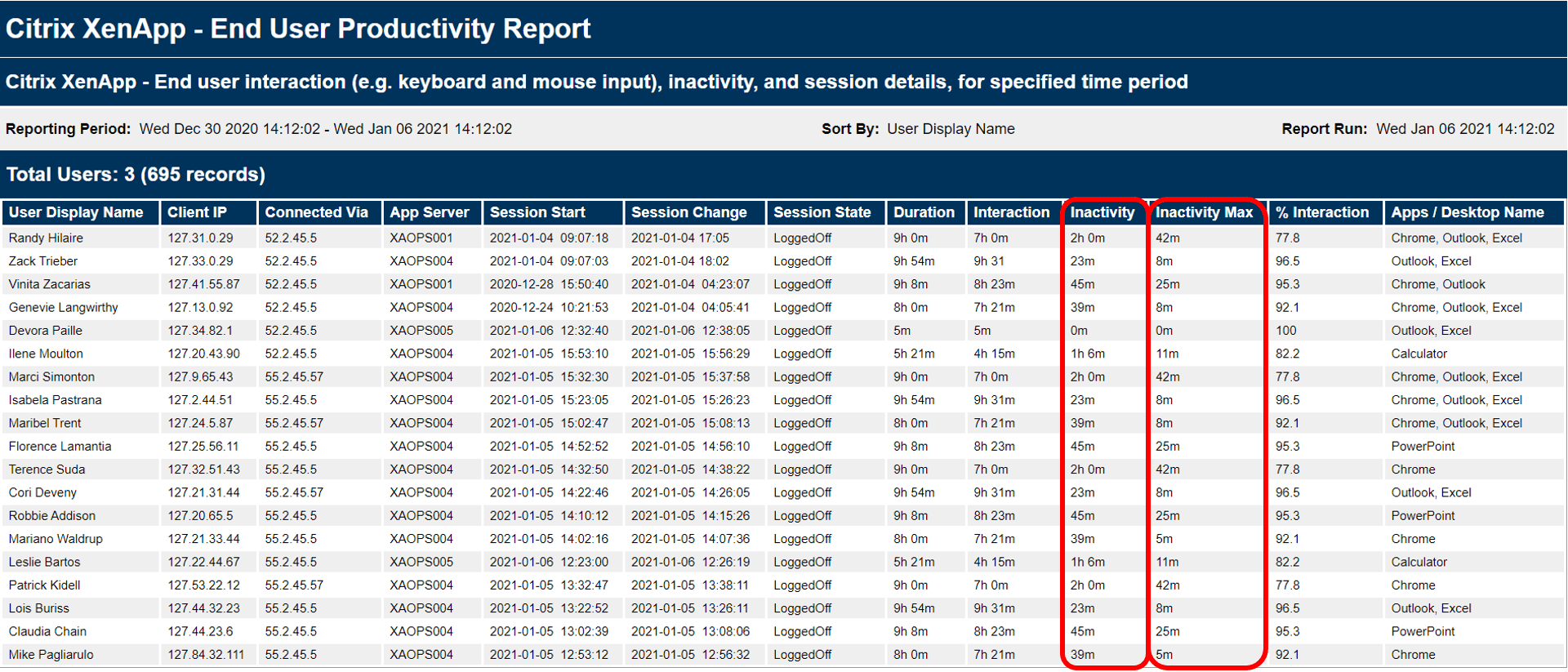
Goliath’s End User Productivity Report provides Empire Office a percentage of time someone was inactive, but most importantly shows the maximum amount of inactivity time in any given session. Most of the time we see this being 45-60 minutes, most likely someone’s lunch break. But then we do see some trends where the same person is inactive for 3-4 hours on a regular basis. Now we know there is a problem going on.

Empire Office gained more insights through:

  • Analyzing common active hours spent working, while employees work from home.
  • Understanding what employees, or departments, were most active during the workday.
  • Identifying what applications are most used (for XenApp customers).
  • Determining on average, how many hours employees, or departments, were working when at home.
Citrix Xenapp end user productivity report

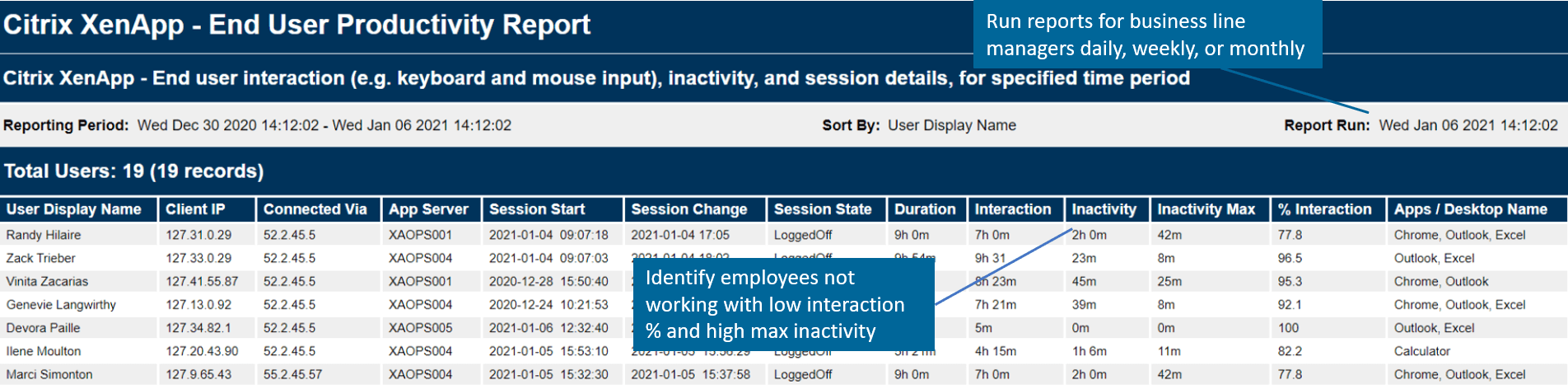
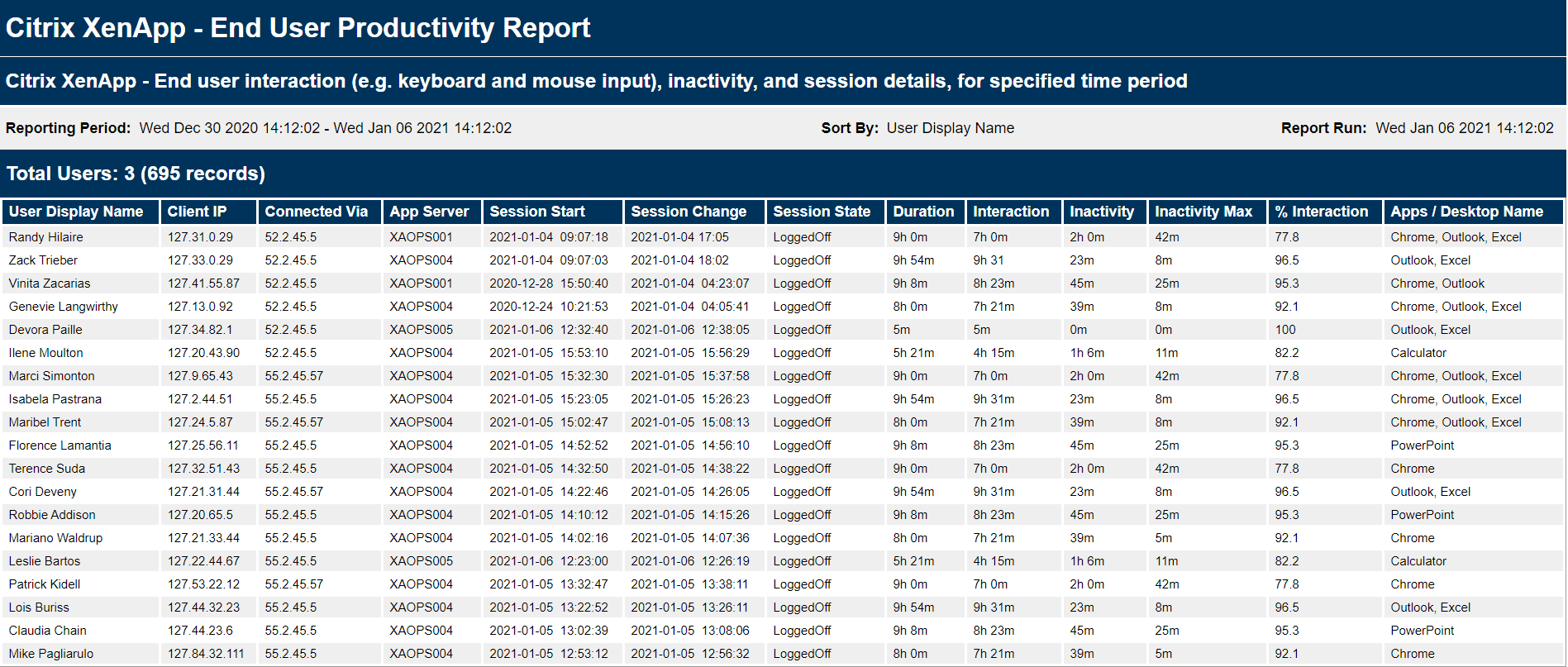
    Figure 1: Goliath’s End User Productivity Reports track exactly how many hours an end user was interacting within their Citrix session and how much time they were inactive (i.e. not working). The report can be scheduled to run or executed on-demand and can be emailed, exported (PDF, CSV), or viewed directly within the Goliath interface.

    Results

    Michael can now accurately report to the CEO and EVP of Administration the overall productivity of the team while working remotely. “The data has driven great conversations around our culture and work styles. We know we have great people, and now we have the data to understand who might need our help. We have the insights and visibility we never had before,” shared Michael. In many cases, Empire Office found productivity to be even higher than before, with many employees logging in earlier than before or working into the late hours of the night. “With metrics from Goliath, we learned there is no normal set of work hours when everyone is working from home. Some employees start their day later and work late in the evening. Others start even earlier, wrapping up their day sooner. Some just frankly work more hours.”

    The other side benefit is while Goliath provides Empire Office the employee productivity report they need to track end user productivity, it is also helping them troubleshoot performance issues for their remote workers. With a limited team, the deep and broad metrics Goliath offers enable Empire Office’s team to quickly isolate root cause and determine if an issue is global, related to the Citrix infrastructure, or if it is isolated to a single user who happens to be using an old MacBook from 2001.

    Future

    Now with data-driven insights, Empire can determine which teams may need to spend more time in the office and which jobs can be effectively done remotely. There are no commitments of what the future may hold, but Empire Office feels empowered with data to understand how their hybrid and remote employees are working and how they might be able to work in the future.

    Empire Office logo

    ABOUT EMPIRE OFFICE

    Empire Office is a leading provider of top-notch office furniture solutions. With a rich history spanning decades, they offer a wide range of stylish and functional furniture, from desks and chairs to storage solutions and accessories. Known for their commitment to sustainability, they provide eco-friendly options and promote responsible industry practices. Empire Office is renowned for its innovative designs and unwavering dedication to customer satisfaction, making them the preferred choice for organizations aiming to create efficient and inspiring workspaces.

    Headquarters location: New York, NY
    Founded: 1946
    Employees: >450
    Industry: Commercial furniture

    Monitoring of the End-User Experiencey in Healthcare Environments

    Monitoring of the End-User Experiencey in Healthcare Environments

    Citrix CTP Blog

    Intelligent Monitoring of the End-User Experience is Necessary in Healthcare Environments More than Ever

    Citrix CTP Blog Banner

    Originally post by Theresa Miller at 24×7 IT Connection

    Healthcare workers are continuing to find themselves overwhelmed, and the Health IT Professionals that support these workers with technologies that must be online and high performing are equally stressed. There is no time for EHR (Epic, Cerner, Allscripts, MEDITECH) or other system failures. All technology vendors must work in concert to deliver a successful end-user experience. If you work in healthcare and you are an IT professional and you are not proactively monitoring, troubleshooting, and documenting performance issues across ALL applications and IT infrastructure elements (Citrix, VMware, Microsoft, etc.) then you will continue to struggle.  Speed to technology resolution is critical, and lives are impacted if the technology is down, making monitoring and troubleshooting the end-user experience more important than ever.  Let’s look.

    Healthcare workers need to focus on the patients, not worry about broken systems

    IT Professionals in healthcare; more than ever, need to make sure systems are always online.  A purpose built-monitoring solution is critical to making sure this is possible.  Systems are complex, and there is no time to manually troubleshoot anything. In my experiences within the healthcare space monitoring was always important, but solutions implemented were not efficient and typically time-consuming. A solution that can be implemented quickly to support the surge of remote workers is no longer optional and is needed so healthcare workers can focus on the patient and not tech issues.  Keeping your EHR solution and other applications online, and available from home, should be front and center and ensuring quality outcomes by reducing or eliminating system downtime are more important than ever.

    Telehealth – the new normal

    If your appointments for routine and general medical follow-up haven’t been rescheduled your medical provider may be scheduling your next appointment to be via Telehealth call instead of in person.  Leading into the COVID-19 outbreak, depending on the healthcare system and provider this may be an appointment approach that you have already tried.  Just this week I received a note from one of my medical providers indicating that all appointments will now be done this way until the COVID-19 concerns are alleviated.  So, soon I will get to experience this firsthand and I suspect this will be true for many going forward.  Consider now how Telehealth will need its infrastructure systems to be online and working 99.9999% of uptime with support for reliable access at home.  There is no room for system downtime, all telehealth services must be up and working; monitoring and troubleshooting the infrastructure both while on-site at a health system and from a healthcare worker’s home office is now critical.

    Peace of mind for healthcare workers and IT Professionals

    Healthcare workers have one focus that is even more elevated and critical during the COVID-19 pandemic, and that is ensuring the health and well-being of the patient they are treating. A computer system failure can interfere with patient care in so many ways and can be life-threatening.  To reiterate from above – there is no time for EHR (Epic, Cerner, Allscripts, MEDITECH) or other system failures. When an IT Professional deploys the right monitoring tool it enables them to proactively address performance issues before clinicians or patients are impacted. And with the right troubleshooting tools, you can quickly isolate root cause when performance problems do occur – as we know they will. Finally, purpose-built tools will offer historical reports to not only prove when permanent fix solutions have been put in place are working but also to foster collaboration across internal IT teams, management, other vendors and end-users. As more healthcare workers work from home, IT will need analytics to determine if root cause of poor session performance is due to the application, IT infrastructure, or home office environment. Investing in the right monitoring and troubleshoot tools, ensure healthcare providers have the technology they need to do their jobs successfully.

    Theresa Miller

    Theresa Miller

    IT professional working as a technical expert in IT for over 20 years. Theresa is a Citrix CTP, VMware vExpert, Microsoft MVP (Office Servers and Services), Nvidia Advisory Council, and MBA. Her areas of expertise are in the areas of Exchange, Office 365, Active Directory, VMware, Citrix XenApp, and XenDesktop. She is the Founder of 24×7 IT Connection, LLC, a Windows IT Pro Contributing Editor, Pluralsight author, and is an author for TechTarget. You can find her on twitter @24x7itconnect.

    Try Goliath For Free

    Experience true end user experience monitoring and troubleshooting free for 30 days.

    Citrix End-User Productivity Reporting

    Citrix End-User Productivity Reporting

    Citrix End-User Productivity Reporting

    A major government agency enacted a new policy allowing employees to work from home using Citrix during times of inclement weather. This policy introduced a new visibility challenge for the organization. Read on to discover how they fixed the visibility gaps with the Citrix End-User Productivity Report from Goliath.


    Organization: US Government Department

    Infrastructure: Citrix XenApp 6.5, Citrix XenDesktop 7.6 & VMware

    Products: Goliath Performance Monitor


    The Business Challenge: Measuring Citrix XenApp & XenDesktop Usage for Remote Users

    When employees worked in the office, it was relatively easy for management to measure Citrix usage, but it became much more difficult when they worked from home. In an attempt to resolve this issue, the Citrix support team was tasked with finding a solution for obtaining the Citrix XenApp & XenDesktop end-user activity or usage of the application.

    The Citrix team knew that simply auditing end-user session time was going to be insufficient. They needed a solution to validate that employees were actually productive during the hours that they were connected to the environment, and active within their sessions.

    Employers needed insights to better understand their employees:

    When it comes to understanding how employees work, employees are seeking Citrix Performance Monitoring reports. They need reports that not only track end-user productivity but the overall end-user experience while working within Citrix virtual applications and desktops. They are looking to answer questions around:


    • What are common active hours spent working, while employees work from home?
    • When are employees, or departments, most active during the workday?
    • What applications are most used (for XenApp customers)?
    • What is the average logon time?
    • Do my end-users ever experience session slowness or latency?

    The Solution:

    Track User Sessions within Citrix Published Apps, Shared Hosted Desktops, or Virtual Desktop Sessions

    The government agency had been utilizing Goliath Performance Monitor (GPM) for monitoring and troubleshooting the Citrix environment for a few years. Knowing that GPM had rich out-of-the-box reporting capabilities, the support team looked to Goliath first for a solution.

    Goliath has over dozens of out-of-the-box reports pre-configured within the products and the information required for user auditing of Citrix XenApp and XenDesktop was already in place and available in these reports.  The End-User Productivity Report tracks users’ time interacting with sessions within Citrix published applications, shared hosted desktops, or virtual desktop sessions.

    Goliath Productivity Report Capabilities

    • Track the number of user sessions for a particular user
    • Tracks if the user is actually interacting with the session (i.e. typing or moving the mouse).
    • Provides data points that reflect when a user is being productive within their active session.
    • Shows total duration of a session and actual percentage of interaction time within that session
    • Calculates the percentage of the time the employee was actually working.
    XenApp Enduser productivity report

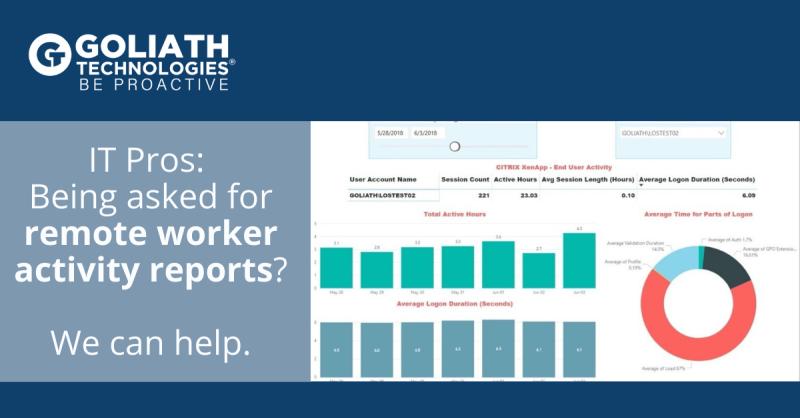
    Figure 1: The end-user productivity report can be filtered based on user and time period to show such statistics as total time a user was interacting with the system (interaction), total time a user was inactive and NOT interacting with the system (inactivity), and percentage of the duration time that the user was interacting within the system (% interaction).

    The Results: Closed Visibility Gaps Using Citrix End-User Productivity Reporting

    This customer now runs the End-User Productivity Report at management’s request to gain insight into the user session activity. The Citrix performance monitoring report from Goliath allows them to see Citrix usage and use the information to truly understand how productive their remote workforce truly is.

    The End-User Productivity Report can be scheduled to run on an hourly/weekly/monthly basis, or on-demand. The End-User Productivity Report is exportable to many formats including PDF, CSV, and other integrated data analysis tools which allows for easy access by management.

    Continue Your Research on How to Troubleshoot Citrix Performance Issues

    Are Your Remote Workers Working?

    Are Your Remote Workers Working?

    Are Your Remote Workers Working?

    Measure Citrix or VMware Horizon Usage

    As someone who has worked remotely for the past 10 years, I know more often than not my days start sooner than most in the office and end later as I have no commute to worry about. And while I suspect 80-90% of remote workers operate this way, there is always that 10% who are taking advantage of their newly found freedom. And this is why, as employers open up the option to work from home, it raises this concern: are my employees really working?

    End-User Productivity Reports

    With the right tools to measure end-user activity, determining if employees are working or not is not a hard question to answer. Here at Goliath, we offer a standard out-of-the box report, End-User Productivity Report, that tracks how many hours an end-user was interacting within their Citrix session and how much time they were inactive (see Figure 1). One metric we highlight is Max Inactivity as it identifies longest period of time the user was inactive in the system, indicating the highest period of time they were not working during their session. This report is intended to give business line managers empirical evidence about their employee’s work habits while working from home.

    Figure 1: The end-user productivity report tracks how many hours an end-user was interacting within their Citrix session and how much time they were inactive (i.e. not working).  The % Interaction metric is the percentage of the duration time that the user was interacting within the system.


    Webinar Replay:

    How to Report on Home Worker Productivity and Experience

    XenApp Enduser productivity report

    All Goliath reports offer historical views into trends over time. This means that should someone’s performance start dropping over time, a manager could look into their activity history and see if there is any correlation around performance and time spent actively working.

    Few want to be big brother, but for any organization their most valued asset is their people. And in order to support macrotrends promoting a more flexible workstyle or the Coronavirus Pandemic enforcing work from home, there is increased need to have tools that can help identify when the amount of time dedicated to working is impacting overall performance.

    To learn more about Goliath’s end-user activity reports, contact techinfo@goliathtechnologies.com.